Network Scanner: Device Finder

Network Scanner: Device Finder

다운로드: App Store다운로드: Google Play
Spark by MWM logo
로고: Network Scanner: Device Finder

네트워크 스캐너: 기기 찾기 — 개인 정보 보호 및 숨겨진 카메라 탐지

안심하고 여행하세요. 숨겨진 기기를 쉽게 스캔하고, 주변 연결을 모니터링하며, 호텔이나 숙박 시설에서 보이지 않는 것을 찾아내기 위한 특수 필터를 사용하세요.

개발사

AI APPS S.R.L.

카테고리

Utilities

다운로드

983K+

사용자 평점

4.6/5

총 평가 수

9K+

지원 언어

1

보이지 않는 것을 발견하세요

이 인터페이스를 사용하는 983K+ 명의 사용자.

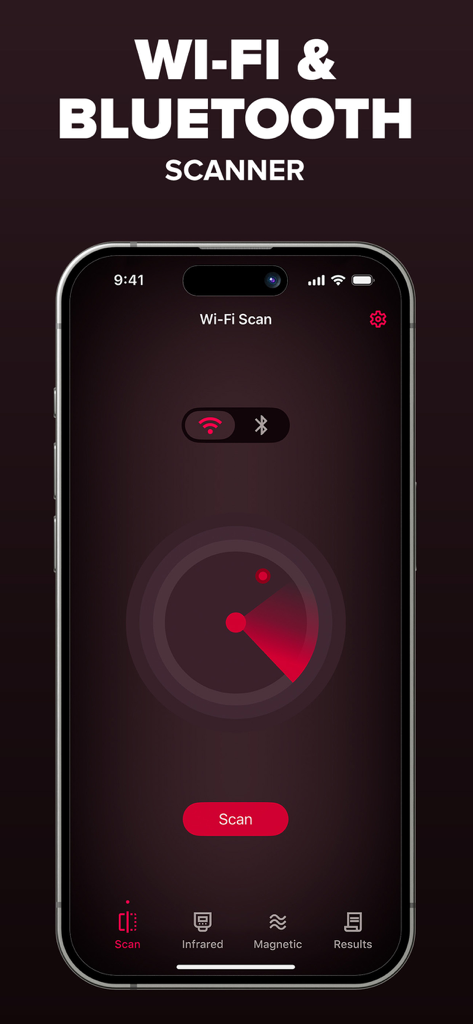
주변 Wi-Fi 및 블루투스 기기를 스캔하는 빨간색 레이더를 보여주는 네트워크 스캐너 앱 인터페이스

주변 Wi-Fi 및 블루투스 기기를 스캔하는 빨간색 레이더를 보여주는 네트워크 스캐너 앱 인터페이스

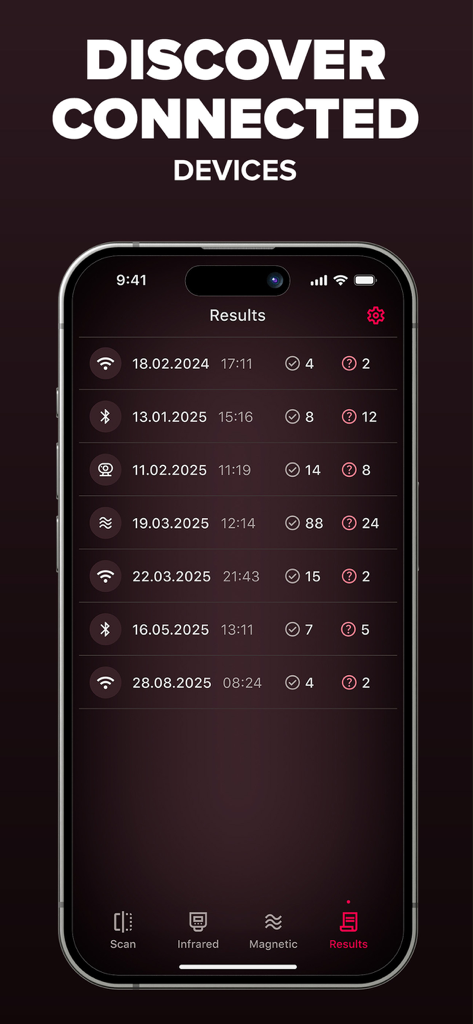
스캔 기록 날짜가 있는 발견된 블루투스 및 Wi-Fi 기기 목록을 보여주는 네트워크 스캐너 앱 결과 화면

스캔 기록 날짜가 있는 발견된 블루투스 및 Wi-Fi 기기 목록을 보여주는 네트워크 스캐너 앱 결과 화면

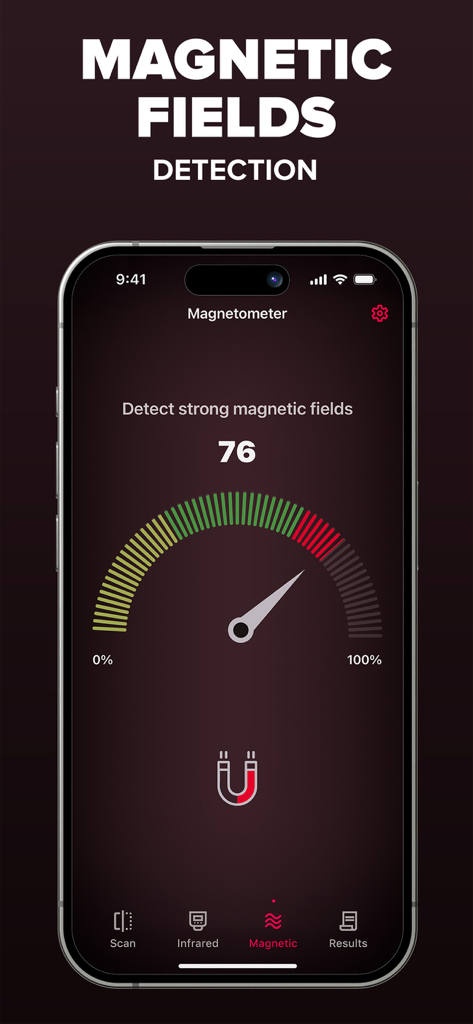
자기장 감지를 위한 자기계이지를 보여주는 스마트폰 앱 인터페이스

자기장 감지를 위한 자기계이지를 보여주는 스마트폰 앱 인터페이스

개인 정보 보호 도구

이 앱을 돋보이게 하는 도구, 983K+ 명의 사용자가 선택.

🔍

네트워크 투명성

Wi-Fi 및 블루투스 신호를 빠르게 스캔하여 주변의 모든 기기를 식별하고 디지털 사각지대를 제거하세요.

👁️

적외선 카메라 차폐

인간의 눈에는 보이지 않는 전자 하드웨어를 드러내는 고급 시각 필터를 사용하여 숨겨진 렌즈를 찾아내세요.

🧲

정밀 하드웨어 로케이터

휴대폰의 내장 센서로 자기장 변화를 추적하여 가구 또는 벽 안에 숨겨진 녹음 장치를 찾으세요.

전 세계 사용자들에게 사랑받는 앱

Trusted by 983K+ 명이 이 앱을 사랑합니다.

"

"혼자 여행하고 에어비앤비를 자주 이용하는 사람으로서 이 앱은 정말 게임 체인저입니다. 적외선 카메라 필터와 네트워크 스캐너 덕분에 체크인하는 순간부터 마음이 놓입니다. 사용하기 매우 쉽고 새로운 환경에서 훨씬 더 안전하다고 느끼게 해줍니다."

Sarah M.
"

"거의 매주 출장으로 여행하는데, 이것이 제 필수 유틸리티가 되었습니다. Wi-Fi 스캐너와 자기 센서를 하나의 간단한 인터페이스로 묶은 점이 마음에 듭니다. 빠르고 안정적이며 호텔과 회의실 주변의 기술 환경을 인지하는 데 도움이 됩니다."

James L.

앱 소개

에 대해 알아야 할 모든 것 Network Scanner: Device Finder.

설명

Network Scanner is a simple utility app that helps you explore your surroundings in fun and informative ways. With a combination of Wi-Fi, Bluetooth, magnetic field, and camera filter tools, you can better understand the environment around you and feel more confident wherever you are. What it does: - Wi-Fi & Bluetooth Device Finder – Scan nearby connections to see what devices are around you. - Magnetometer Sensor – Detect changes in magnetic fields using your phone's built-in sensor. - Infrared Camera Filters – Apply unique filters (green, red, blue, and monochrome) to discover what your camera sees in different visual layers. - Simple & Accessible – Easy-to-use tools, no technical knowledge required. Why Use Network Scanner? - Explore Your Environment – See what's connected, what's nearby, and how signals behave. - Stay Curious – Use filters and sensors to view the world in a new way. - Peace of Mind – Feel more aware of your surroundings when traveling or at home. Try Network Scanner today and take control of your privacy. Upgrade to Premium to enjoy an ad-free experience, Unlimited scanning, Advanced Device Identification Subscription: Payment will be charged to iTunes Account at confirmation of purchase. Subscription with a free trial period will automatically renew to a paid subscription. Subscription automatically renews unless auto-renew is turned off at least 24 hours before the end of the current period. Account will be charged for renewal within 24 hours prior to the end of the current period at the rate of the selected plan. Subscriptions and auto-renewal may be managed by going to Account Settings after purchase. You can cancel your subscription or free trial in the iTunes settings at least 24-hours before the end of the free trial period. The cancellation will take effect the day after the last day of the current subscription period and you will be downgraded to the free service. Subscription options: Week Price: $ 3.99 Lifetime: $ 59.99 Privacy policy: https://aiapps.com.co/privacy-policy/ Terms of use: https://aiapps.com.co/terms/ Contact: support@aiapps.com.co

최신 버전

2.2

크기

45.0 MB

출시일

2024년 3월 8일

개인 정보 보호 및 안심 여행

호텔이나 숙박 시설에서 숨겨진 기기를 탐지하고 개인 공간을 보호하기 위해 네트워크 스캐너를 신뢰하는 983,000명 이상의 사용자들과 함께하세요. 지금 다운로드하고 주변 환경을 제어하세요.

다운로드: App Store다운로드: Google Play
FAQ

자주 묻는 질문

에 대해 알아야 할 모든 것 Network Scanner: Device Finder

Network Scanner: Device Finder는 무엇인가요?

Network Scanner: Device Finder는 Wi-Fi, Bluetooth, 자기장 및 카메라 필터 도구를 사용하여 주변 환경을 탐색하는 유틸리티 앱입니다. 사용자가 주변 환경을 이해하고 근처 연결을 식별하는 데 도움이 됩니다.

Network Scanner: Device Finder는 어떤 기능을 제공하나요?

Network Scanner: Device Finder는 Wi-Fi 및 Bluetooth 장치 찾기, 자기장 센서, 적외선 카메라 필터(녹색, 빨간색, 파란색, 흑백)를 제공하여 시각적 레이어를 탐색합니다. 간단하고 접근하기 쉬운 도구를 제공합니다.

Network Scanner: Device Finder에 Wi-Fi 스캐너가 포함되어 있나요?

네, Network Scanner: Device Finder에는 Wi-Fi 장치 찾기 기능이 포함되어 있습니다. 사용자는 근처 Wi-Fi 연결을 스캔하여 주변 장치를 식별할 수 있습니다.

Network Scanner: Device Finder가 Bluetooth 장치를 감지할 수 있나요?

네, Network Scanner: Device Finder는 Bluetooth 장치를 감지합니다. 이 앱에는 근처 연결을 스캔하고 활성 Bluetooth 장치를 식별하는 Bluetooth 장치 찾기 기능이 있습니다.

Network Scanner: Device Finder는 자기장을 어떻게 사용하나요?

Network Scanner: Device Finder는 자기장 센서를 사용하여 자기장 변화를 감지합니다. 이 기능은 휴대폰의 내장 센서를 활용하여 주변 환경을 탐색합니다.

Network Scanner: Device Finder에는 어떤 종류의 카메라 필터가 있나요?

Network Scanner: Device Finder는 적외선 카메라 필터를 제공합니다. 사용자는 녹색, 빨간색, 파란색, 흑백을 포함한 고유한 필터를 적용하여 카메라를 통해 다른 시각적 레이어를 발견할 수 있습니다.

Network Scanner: Device Finder의 프리미엄 버전이 있나요?

네, Network Scanner: Device Finder는 프리미엄 업그레이드를 제공합니다. 이 업그레이드는 광고 없는 환경, 무제한 스캔 및 고급 장치 식별 기능을 제공합니다.

Network Scanner: Device Finder Premium의 비용은 얼마인가요?

Network Scanner: Device Finder Premium은 주간 구독 시 $3.99 또는 평생 구매 시 $59.99입니다. 결제는 iTunes 계정으로 청구됩니다.

Network Scanner: Device Finder 구독을 어떻게 취소하나요?

무료 평가판 또는 현재 기간이 끝나기 최소 24시간 전에 iTunes 설정에서 Network Scanner: Device Finder 구독을 취소할 수 있습니다. 자동 갱신도 거기서 관리할 수 있습니다.

Network Scanner: Device Finder의 개인 정보 보호 정책이 있나요?

네, Network Scanner: Device Finder에는 개인 정보 보호 정책이 있습니다. https://aiapps.com.co/privacy-policy/에서 확인할 수 있으며 사용자 데이터가 어떻게 처리되는지 설명합니다.

Network Scanner: Device Finder의 스캔 결과를 볼 수 있나요?

네, Network Scanner: Device Finder는 스캔 결과를 표시합니다. 사용자는 "결과" 탭에 액세스하여 Wi-Fi 및 Bluetooth 스캔의 기록 데이터를 볼 수 있습니다.