ParkHouston

ParkHouston

다운로드: App Store
Spark by MWM logo
로고: ParkHouston

ParkHouston: 더 스마트하고 스트레스 없는 주차 및 결제 방법

미터기 사용을 건너뛰고 휴대폰으로 세션을 관리하세요. 시내로 출퇴근하거나 경기에 가든, 미리 공간을 예약하고 티켓을 피하기 위해 원격으로 시간을 연장하세요.

개발사

Parkmobile USA, Inc

카테고리

Navigation

다운로드

585K+

사용자 평점

4.8/5

총 평가 수

7K+

지원 언어

2

한눈에 보는 스마트한 주차

이 인터페이스를 사용하는 585K+ 명의 사용자.

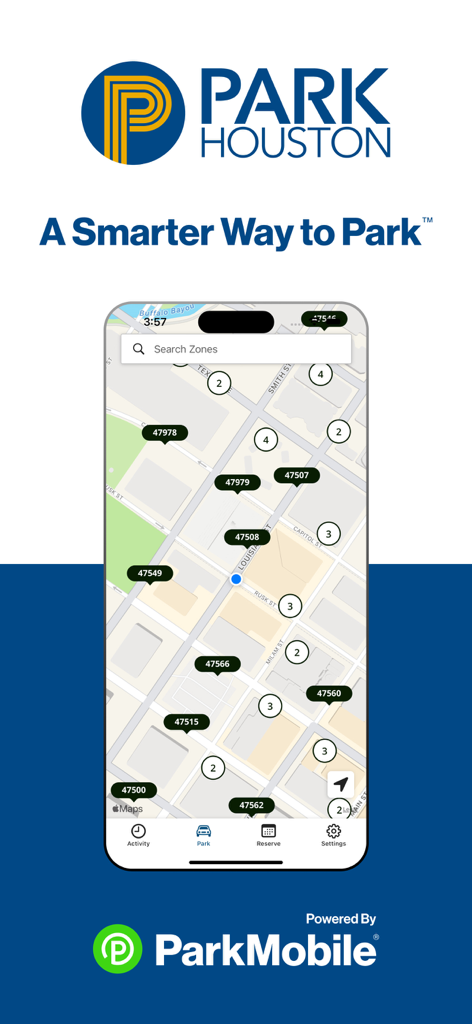
ParkHouston 앱 인터페이스는 도시 주차 구역 지도와 검색 기능을 보여줍니다.

ParkHouston 앱 인터페이스는 도시 주차 구역 지도와 검색 기능을 보여줍니다.

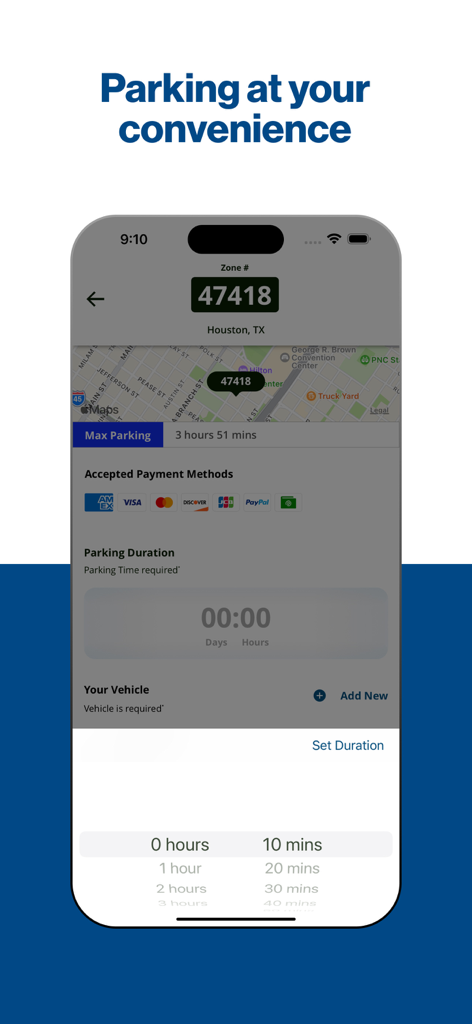
휴스턴 지도가 표시된 ParkHouston 앱의 스마트폰 화면과 주차 시간 선택기.

휴스턴 지도가 표시된 ParkHouston 앱의 스마트폰 화면과 주차 시간 선택기.

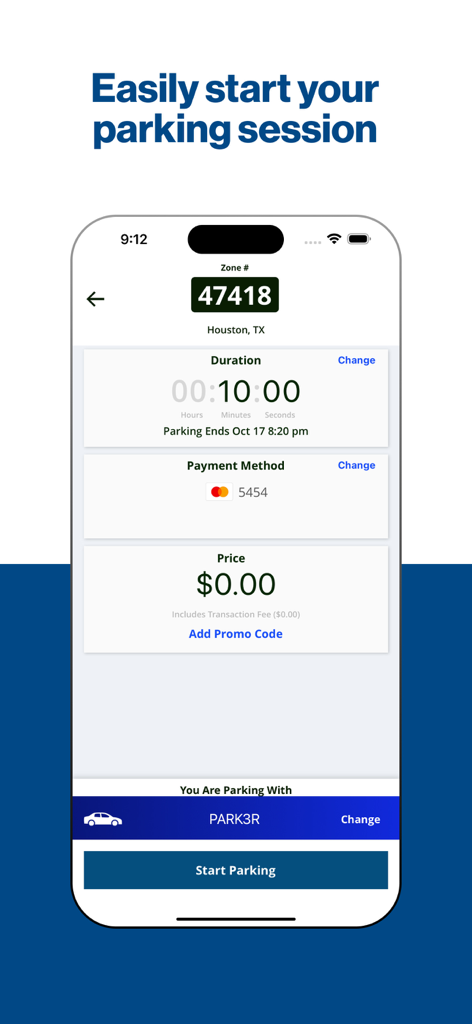
주차 구역 번호, 시간 및 결제 방법을 보여주는 주차 세션 시작을 위한 ParkHouston 앱 인터페이스.

주차 구역 번호, 시간 및 결제 방법을 보여주는 주차 세션 시작을 위한 ParkHouston 앱 인터페이스.

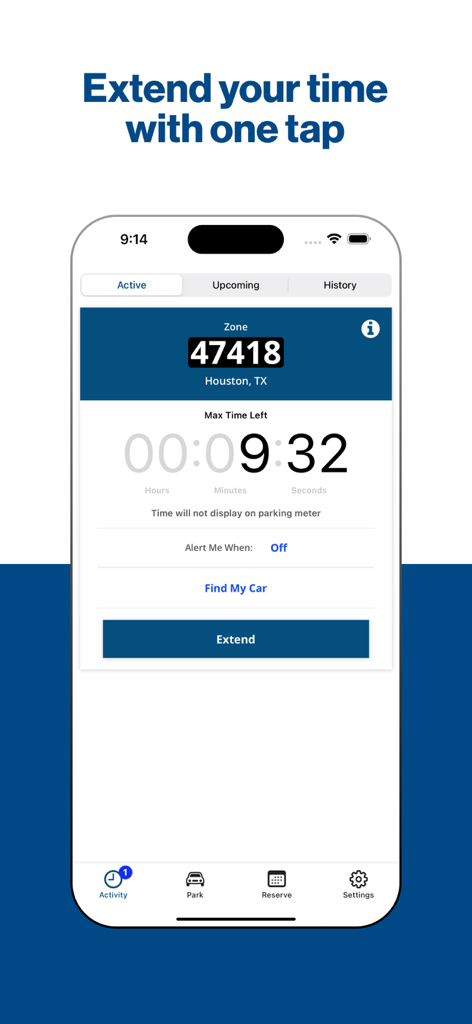
활성 주차 세션의 카운트다운 타이머와 시간을 연장하는 버튼을 보여주는 ParkHouston 앱 화면.

활성 주차 세션의 카운트다운 타이머와 시간을 연장하는 버튼을 보여주는 ParkHouston 앱 화면.

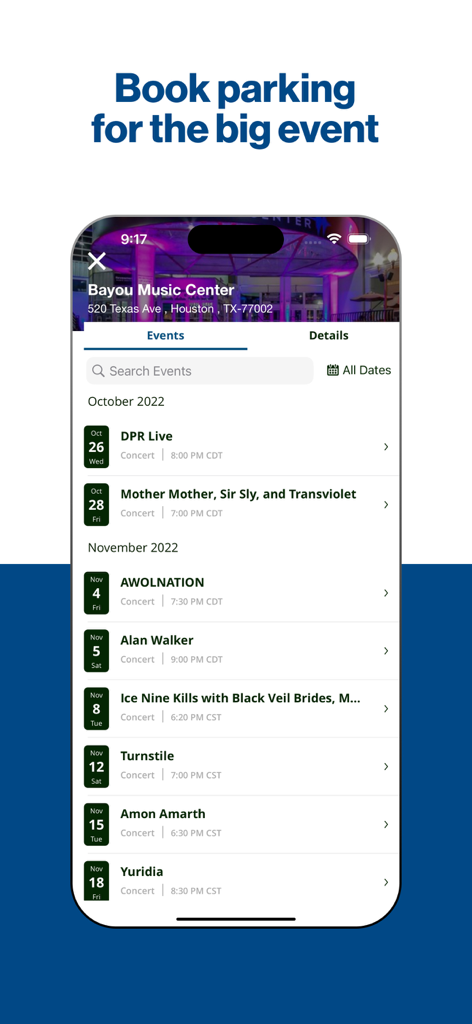
주차 예약을 위한 Bayou Music Center의 예정된 이벤트 목록을 표시하는 ParkHouston 앱 인터페이스.

주차 예약을 위한 Bayou Music Center의 예정된 이벤트 목록을 표시하는 ParkHouston 앱 인터페이스.

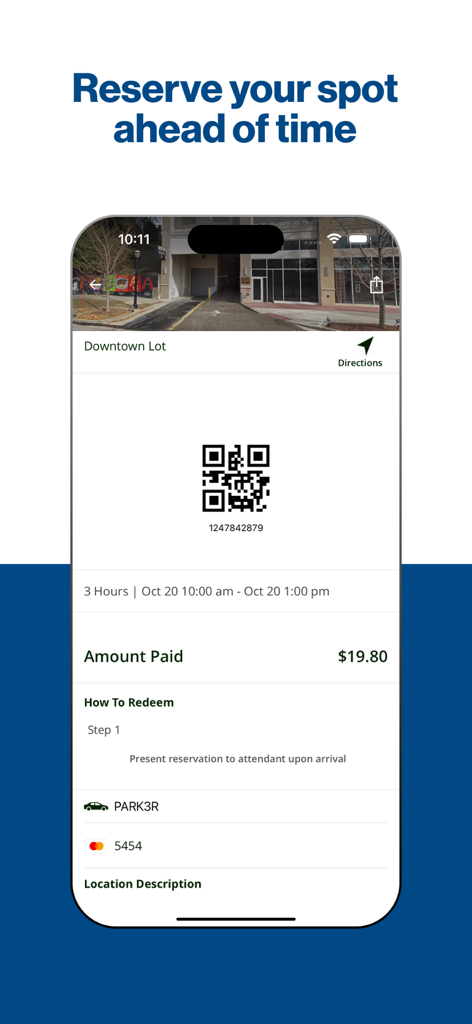
QR 코드 및 시내 주차장 결제 세부 정보가 포함된 주차 예약 확인을 보여주는 ParkHouston 앱 화면.

QR 코드 및 시내 주차장 결제 세부 정보가 포함된 주차 예약 확인을 보여주는 ParkHouston 앱 화면.

휴스턴 및 그 이상에서 프로처럼 주차하세요

이 앱을 돋보이게 하는 도구, 585K+ 명의 사용자가 선택.

📱

미터기 사용을 건너뛰고 제어권을 유지하세요

휴대폰에서 직접 거리 또는 차고 주차 요금을 지불하세요. 만료 알림을 받고 비용이 많이 드는 티켓을 피하기 위해 원격으로 시간을 연장하세요.

🗓️

미리 공간을 예약하세요

행사 당일 스트레스를 해소하세요. 스포츠, 콘서트 또는 공항 여행을 위해 주차 공간을 미리 예약하여 공간을 확보하세요.

🇺🇸

원활한 전국 커버리지

전국 500개 이상의 도시에서 ParkHouston을 사용하세요. 휴스턴 시내에 있든 출장으로 여행하든 주차 걱정은 없습니다.

전 세계 사용자들에게 사랑받는 앱

Trusted by 585K+ 명이 이 앱을 사랑합니다.

"

"ParkHouston은 시내 출퇴근길에 완전히 변화를 가져왔습니다. 더 이상 고객 미팅을 서둘러 끝내거나, 미터기에 돈을 넣기 위해 휴스턴의 더위를 뚫고 나갈 필요가 없습니다. 원격 연장 기능과 만료 알림은 수십 건의 잠재적인 티켓을 면하게 해주었습니다. 제 휴대폰에서 가장 유용한 앱임은 의심할 여지가 없습니다."

Sarah Jenkins, 기업 변호사
"

"Minute Maid Park나 박물관 지구에 갈 때마다 이 앱을 사용합니다. 미리 공간을 예약할 수 있다는 것은 주말 교통 체증의 모든 스트레스를 없애줍니다. 게다가, 가족과 함께 긴 경기를 마치고 주차 공간으로 돌아가려 할 때 '내 차 찾기' 기능은 정말 유용합니다!"

Marcus Thompson, 휴스턴 원주민 및 스포츠 팬

앱 소개

에 대해 알아야 할 모든 것 ParkHouston.

설명

The ParkHouston app, powered by ParkMobile, gives you a smarter way to park in Houston. Easily pay for on-street and off-street parking right from your mobile device. You can also reserve parking ahead of time in lots, garages, venues, airports, and universities across the country. You can use the ParkHouston app in over 500 other cities across the country, including Boston, San Francisco, Washington, D.C., Atlanta, Chicago, Miami, New Orleans, Dallas, St. Louis, Minneapolis, Pittsburgh, Philadelphia, and more. Why Use ParkHouston? • Skip the meter and easily pay for parking from your mobile device • Extend your parking duration remotely from the app • Get alerts so you know when your parking session is going to expire • Reserve parking spots ahead of time to save time and money • Use the app in over 3000 locations coast-to-coast including venues, airports, and universities How to Set Up Your Account • Download the ParkHouston app and create an account with your email address and password • Enter your license plate number and the state where your vehicle is registered • Add your method of payment and start using the ParkHouston app How It Works On-Street and Off-Street Parking: • Enter the zone number on the posted signs around the meter • Select the amount of time you want to park and confirm your information • Touch the “Start Parking” button to begin your parking session • Extend time in the app if you are running late Parking Reservations: • Search for the area where you want to park and select the specific parking location • Choose the date/time and complete your reservation • Follow the instructions in your confirmation to redeem at the parking facility App Features • Customizable notifications delivered via email, text, and/or app • Save your favorite parking locations for next time • Store up to five cars in your account • “Find my car” feature directs you back to the location where you parked • Turn-by-turn directions to the parking garage where you reserved your spot • Multiple payment methods available About ParkMobile ParkMobile, LLC is the leading provider of parking payment solutions in the United States, helping over 40 million people easily find, reserve, and pay for parking from their mobile devices. Looking for Help? At ParkMobile, we’re serious about customer service. We process nearly 500,000 parking transactions every day and we know that every now and then, something might go wrong. If you have an issue, we will do everything we can to make it right. Our customer service is 24/7/365. If you need help, here’s how to get in touch with us: Web: https://ParkMobile.io/ Email: helpdesk@ParkMobile.io Online Help Center: https://ParkMobile.zendesk.com/hc/en-us Video Tutorials: https://www.youtube.com/playlist?list=PLkFsfUAHrnUc5jOm9XtjOmmJQt4YTTCyA Twitter: https://twitter.com/ParkMobile Facebook: https://www.facebook.com/ParkMobile/

최신 버전

25.22.0

크기

77.7 MB

출시일

2017년 5월 5일

휴스턴에서 더 스마트하게 주차할 준비가 되셨나요?

미터기 사용을 건너뛰고, 원격으로 시간을 연장하고, 티켓을 피하는 585,000명 이상의 운전자와 함께하세요. 오늘 ParkHouston을 다운로드하고 도시 전역에서 번거로움 없는 주차를 경험하세요.

다운로드: App Store
FAQ

자주 묻는 질문

에 대해 알아야 할 모든 것 ParkHouston

ParkHouston 앱은 무엇을 위해 사용되나요?

ParkMobile에서 제공하는 ParkHouston 앱을 사용하면 모바일 장치에서 직접 도로변 및 도로외 주차 요금을 쉽게 지불하고 주차 공간을 미리 예약할 수 있습니다.

ParkHouston 앱으로 주차 요금을 어떻게 지불하나요?

ParkHouston 앱으로 주차 요금을 지불하려면 게시된 표지판의 구역 번호를 입력하고 원하는 주차 시간을 선택한 다음 정보를 확인하고 “주차 시작”을 누르세요.

ParkHouston 앱으로 주차 세션을 연장할 수 있나요?

예, ParkHouston 앱에서 원격으로 주차 시간을 연장할 수 있습니다. 또한 주차 세션이 만료되기 전에 알려주는 알림도 제공합니다.

휴스턴 외에 어디에서 ParkHouston 앱을 사용할 수 있나요?

ParkHouston 앱은 보스턴, 샌프란시스코, 워싱턴 D.C., 애틀랜타, 시카고, 마이애미를 포함한 전국 500개 이상의 도시와 전국 3000개 이상의 장소에서 사용할 수 있습니다.

ParkHouston 앱에서 계정을 어떻게 설정하나요?

ParkHouston 앱 계정을 설정하려면 앱을 다운로드하고 이메일과 비밀번호로 계정을 만든 다음 차량 번호와 주를 입력하고 결제 수단을 추가하세요.

ParkHouston 앱은 어떤 결제 수단을 지원하나요?

ParkHouston 앱은 여러 결제 수단을 지원합니다. 지원되는 특정 방법으로는 American Express, Visa, Discover 및 PayPal이 있습니다.

ParkHouston 앱으로 주차 공간을 미리 예약할 수 있나요?

예, ParkHouston 앱을 사용하면 주차 공간을 미리 예약할 수 있습니다. 해당 지역을 검색하고 위치를 선택하고 날짜/시간을 선택한 다음 예약을 완료합니다.

ParkHouston 앱이 예약된 주차 공간으로 가는 길을 안내해 주나요?

예, ParkHouston 앱은 예약한 공간이 있는 주차장까지 상세한 길 안내를 제공합니다.

ParkHouston 앱 계정에 차량을 몇 대까지 저장할 수 있나요?

ParkHouston 앱을 사용하면 편리한 주차 관리를 위해 계정에 최대 5대의 차량을 저장할 수 있습니다.

ParkHouston 앱에 대한 고객 서비스가 필요한 경우 어떻게 해야 하나요?

ParkMobile은 ParkHouston 앱에 대해 연중무휴 24시간 고객 서비스를 제공합니다. 웹, 이메일(helpdesk@ParkMobile.io), 온라인 도움말 센터, 비디오 튜토리얼, Twitter 또는 Facebook을 통해 연락할 수 있습니다.