Planimeter 55. Measure on map.

Planimeter 55. Measure on map.

다운로드: App Store
Spark by MWM logo
로고: Planimeter 55. Measure on map.
Planimeter 55: 전문가를 위한 정밀 지도 측정

정확한 면적, 둘레 및 거리를 계산하는 최고의 도구입니다. 현장 견적을 간소화하고, 지오태그된 사진으로 위치를 기록하며, 전문가급 매핑 도구로 프로젝트를 관리하세요.

개발사

Kalimex-Consulting s.r.o.

카테고리

Navigation

다운로드

175K+

사용자 평점

4.4/5

총 평가 수

400

지원 언어

11

한눈에 보는 정밀함

이 인터페이스를 사용하는 175K+ 명의 사용자.

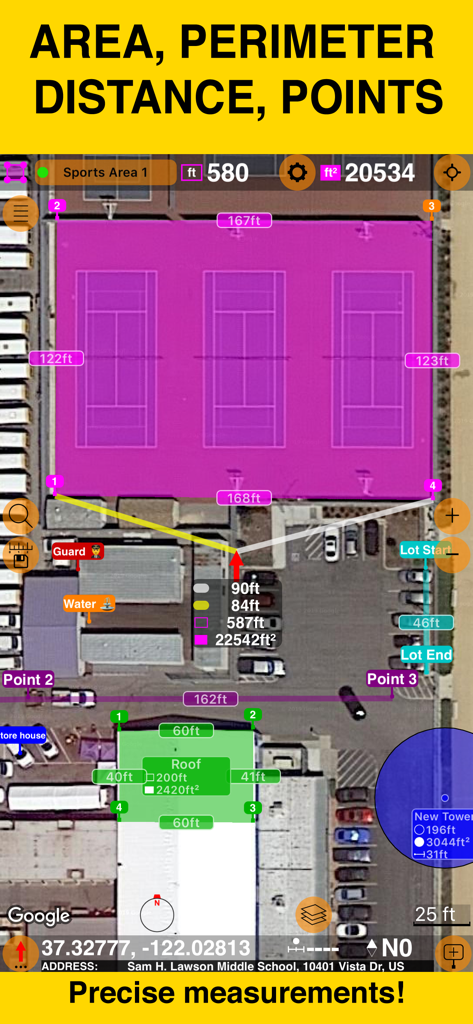
Planimeter 55 앱 스크린샷: 위성 지도에서 정확한 면적 및 둘레 측정값을 보여줍니다.

Planimeter 55 앱 스크린샷: 위성 지도에서 정확한 면적 및 둘레 측정값을 보여줍니다.

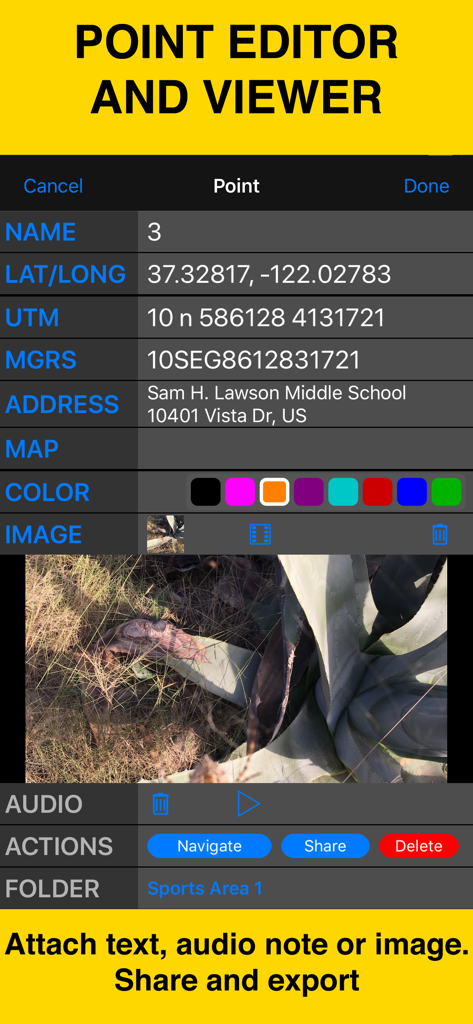
Planimeter 55 인터페이스: 지점 좌표, 주소 및 첨부된 현장 사진을 보여줍니다.

Planimeter 55 인터페이스: 지점 좌표, 주소 및 첨부된 현장 사진을 보여줍니다.

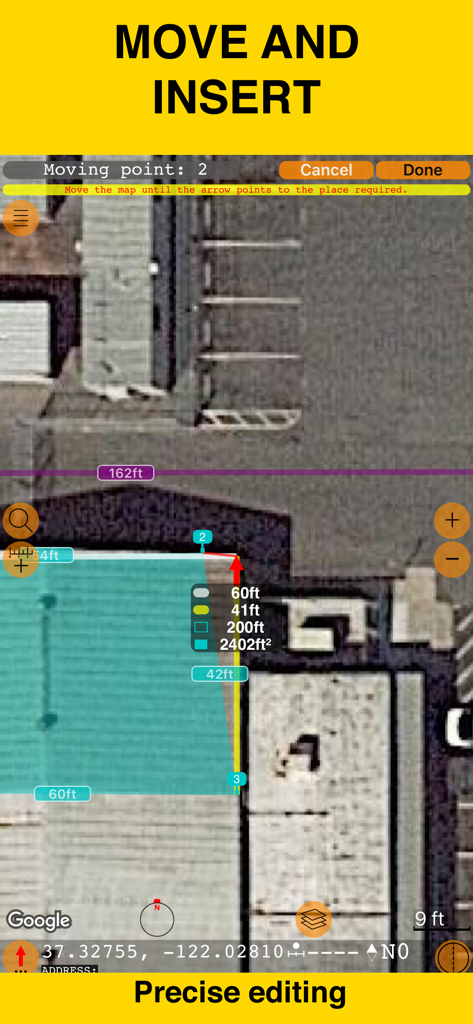
Planimeter 55 앱 인터페이스: 위성 지도에서 정밀 편집 및 면적 측정을 할 수 있습니다.

Planimeter 55 앱 인터페이스: 위성 지도에서 정밀 편집 및 면적 측정을 할 수 있습니다.

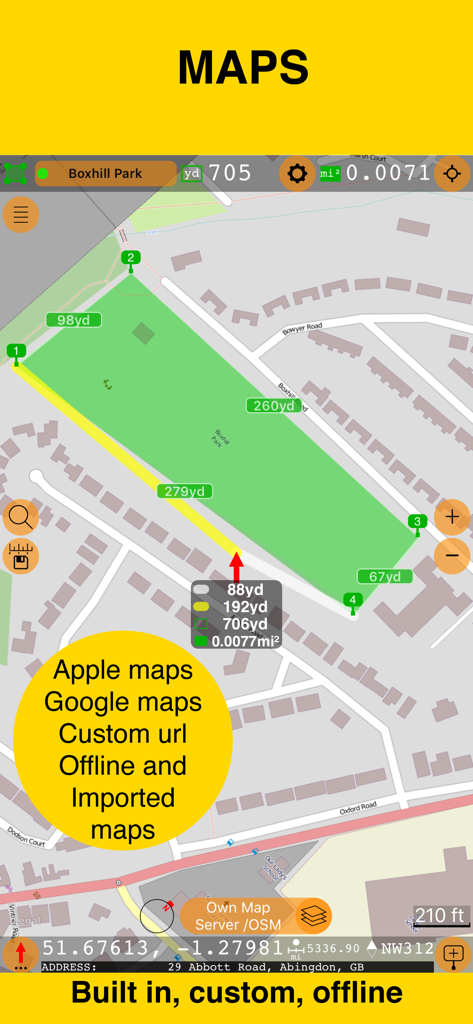
Planimeter 55 인터페이스: Apple, Google 및 오프라인 지도 지원을 강조하는 텍스트와 함께 지도에서 면적 측정을 보여줍니다.

Planimeter 55 인터페이스: Apple, Google 및 오프라인 지도 지원을 강조하는 텍스트와 함께 지도에서 면적 측정을 보여줍니다.

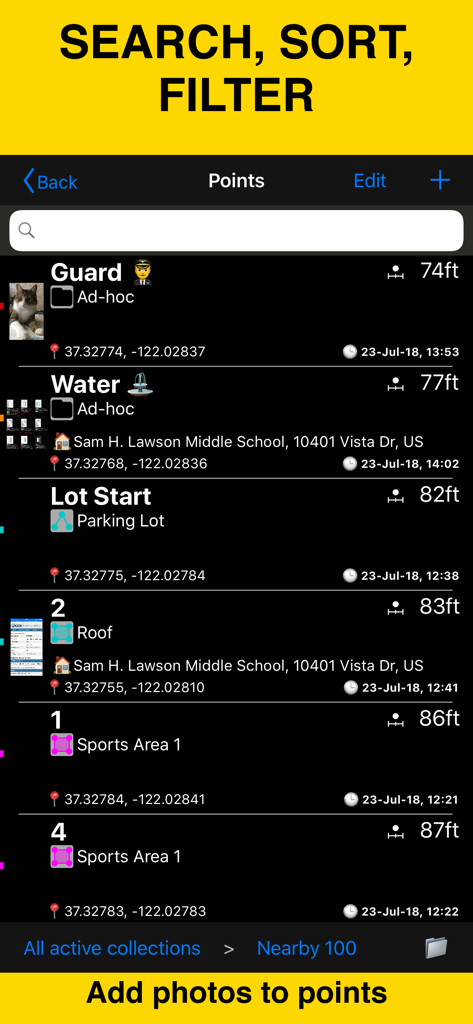
Planimeter 55 앱 화면: 좌표, 거리 및 첨부된 사진과 함께 매핑된 지점 목록을 표시하여 현장 데이터 관리를 지원합니다.

Planimeter 55 앱 화면: 좌표, 거리 및 첨부된 사진과 함께 매핑된 지점 목록을 표시하여 현장 데이터 관리를 지원합니다.

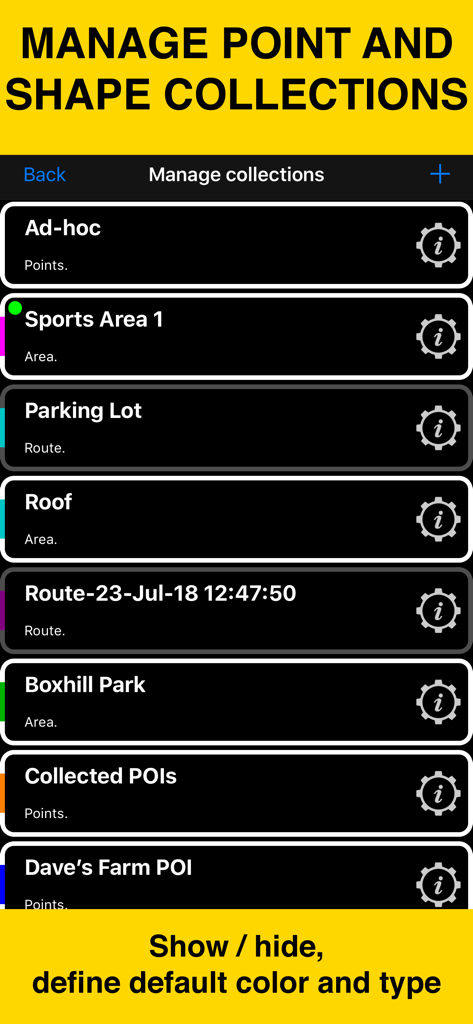
Planimeter 55 모바일 앱 화면: 매핑 프로젝트를 위한 지점 및 도형 컬렉션 관리를 보여줍니다.

Planimeter 55 모바일 앱 화면: 매핑 프로젝트를 위한 지점 및 도형 컬렉션 관리를 보여줍니다.

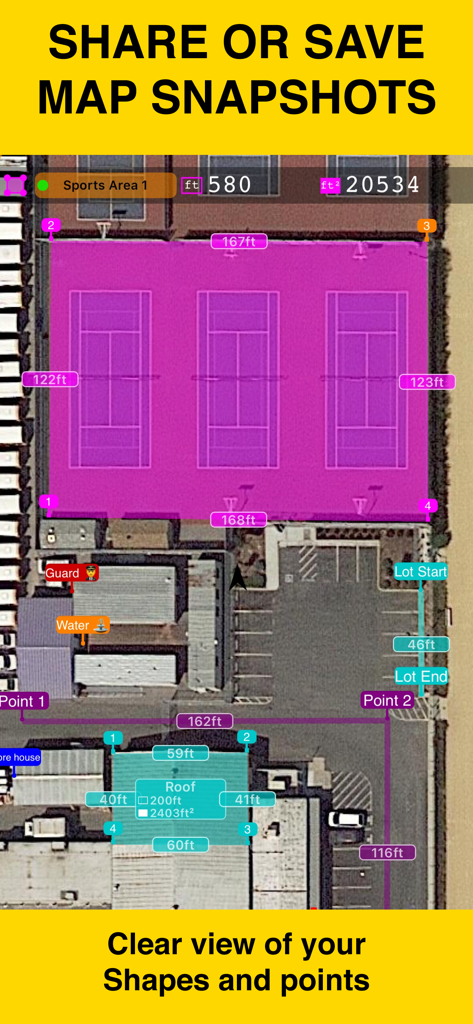
Planimeter 55를 사용하여 스포츠 코트와 건물 지붕의 면적 및 거리 측정값을 보여주는 위성 지도 보기.

Planimeter 55를 사용하여 스포츠 코트와 건물 지붕의 면적 및 거리 측정값을 보여주는 위성 지도 보기.

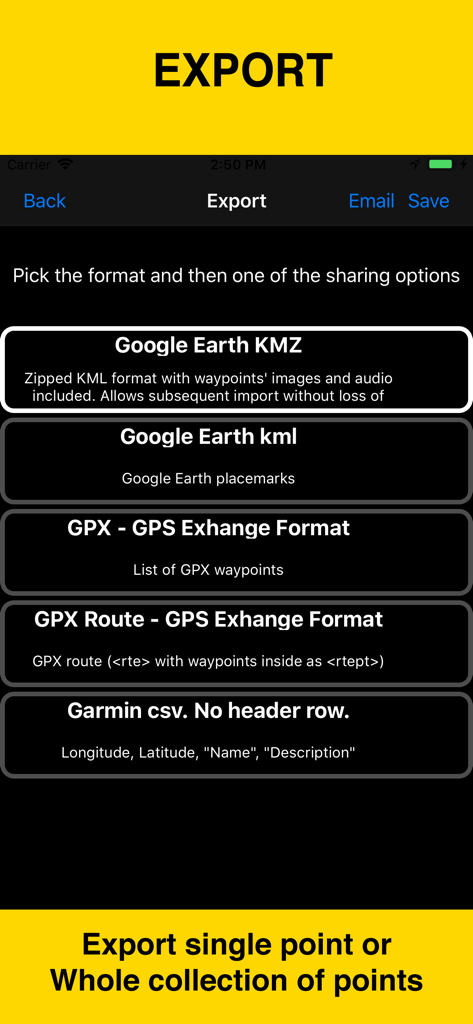
Planimeter 55 앱 내보내기 화면: Google 어스 KMZ, KML, GPX 및 Garmin CSV를 포함한 데이터 형식 옵션을 보여줍니다.

Planimeter 55 앱 내보내기 화면: Google 어스 KMZ, KML, GPX 및 Garmin CSV를 포함한 데이터 형식 옵션을 보여줍니다.

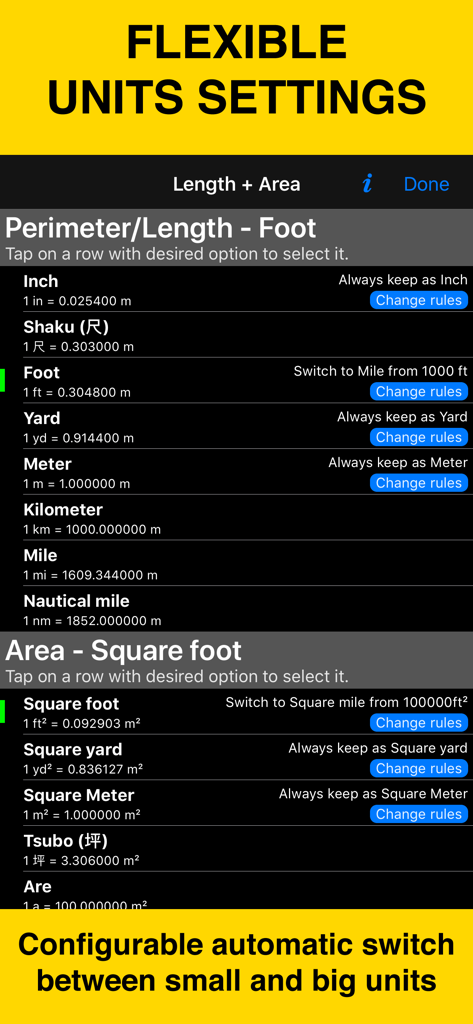
Planimeter 55 설정 화면: 길이 및 면적 측정에 대한 유연한 단위 옵션을 보여줍니다.

Planimeter 55 설정 화면: 길이 및 면적 측정에 대한 유연한 단위 옵션을 보여줍니다.

모든 프로젝트를 위한 전문가급 정밀도

이 앱을 돋보이게 하는 도구, 175K+ 명의 사용자가 선택.

📐

면적 및 거리 즉시 계산

지도를 이동하기만 하면 지붕, 들판 또는 주차장의 실시간 측정값을 얻을 수 있습니다. 측정 바퀴 없이 몇 초 만에 정확한 견적을 생성하는 데 적합합니다.

📸

지오태그된 현장 문서화

특정 GPS 지점에 사진, 음성 메모 및 텍스트를 첨부하세요. 현장 조건의 완전한 디지털 기록을 유지하여 프로젝트 관리를 간소화하고 고객에게 작업 증빙 자료를 제공할 수 있습니다.

🗺️

전문가급 매핑 및 공유

고해상도 Google 지도 위성 확대/축소 기능과 농촌 지역 작업을 위한 오프라인 지도에 액세스하세요. 측량 결과를 KMZ 파일 또는 전문가용 스크린샷으로 내보내 입찰 및 프로젝트 폴더에 포함할 수 있습니다.

전 세계 사용자들에게 사랑받는 앱

Trusted by 175K+ 명이 이 앱을 사랑합니다.

"

"Planimeter 55는 제가 입찰하는 방식을 완전히 바꾸어 놓았습니다. 측정값을 얻기 위해 현장까지 몇 시간씩 운전할 필요 없이, 이제 고해상도 위성 확대/축소 기능을 사용하여 정확한 원격 견적을 제공할 수 있습니다. 지점에 지리 참조 사진을 첨부하여 제 팀의 조직력을 높이고 고객에게 깊은 인상을 남겼습니다. 저의 조경 사업에 필수적인 도구입니다."

Chris M., 조경 계약자
"

"넓은 농촌 부동산을 관리하는 것은 골치 아픈 일이었지만, 이 앱 덕분에 원활하게 처리할 수 있습니다. 현장에서 휴대폰 서비스 없이 일할 때 오프라인 지도 지원은 생명의 은인과 같습니다. 정확하게 면적을 계산하고 메모와 음성으로 경계를 표시한 다음, 모든 것을 KMZ로 내보내 기록할 수 있습니다. 제 장비 중에서 가장 신뢰할 수 있는 도구입니다."

Sarah J., 토지 관리 전문가

앱 소개

에 대해 알아야 할 모든 것 Planimeter 55. Measure on map..

설명

Measure distance, perimeter, and area on a map with ease. Add stand-alone points to mark locations and understand exactly what’s where. Capture photos with location, direction, altitude, and timestamp data. Share and export your projects seamlessly. Planimeter 55 is the ideal tool for measuring construction sites, roofs, lawns, fences, paving, pools, parking lots, fields, and paths. Or simply for placing stand-alone points on a map for better spatial understanding. Why choose Planimeter 55? • Precise control of your planned or measured areas. As you move the map, the app instantly displays the calculated area or distance, including the lengths of adjacent lines—even before you add a new point. • Native Google Maps support for enhanced zoom. Zoom in closer on satellite and hybrid maps for high-detail measurements. • Detailed point management. Assign individual colors to points and attach text notes, audio recordings, or images for comprehensive data collection. • Easy point editing. Move points directly on the main map screen (tap a point and select Move) or in the dedicated point editor. Before confirming, you’ll see the updated area, perimeter, and distance calculations in real time. • Organize your data. Show or hide shapes and point collections to focus on what’s important for your current project. • Flexible measurement units. Customize when distances display in feet or meters versus miles or kilometers. The same flexibility applies to area units. • Custom URL maps, offline maps, and map imports. Planimeter 55 includes Apple Maps and Google Maps by default. You can also add custom URL maps, download offline maps, or import your own maps (mbtiles, sqlitedb) created on your PC or Mac. • KMZ export and import. Transfer shapes and point collections, including images and audio notes, to continue your work across multiple devices. • Built-in camera tool. Attach geo-referenced photos to your points for a complete survey experience. What’s included in the Basic Version: • Create an unlimited number of points and temporary measurement shapes (areas or routes). • To measure a new shape, simply discard the previous one and start again. Unlock the Pro Pack Upgrade for even more: • Full support for Google Maps, custom URL maps, offline maps, and imported maps (with enhanced zoom for satellite and hybrid maps). • Save and manage multiple point collections and shapes. • Import and export individual points or entire shapes and collections. • Save and share map snapshots showing only the objects you’ve created—without UI buttons or tools. Support and Help Access Documentation or Support and Feedback via the MENU (hamburger icon) within the app. For direct support, email stan@blocoware.com. We respond to all emails within a few hours, or up to 9 hours if they arrive during CET/EU night hours. Wishing you happy measuring! The Planimeter 55 Team Terms of Use: https://www.apple.com/legal/internet-services/itunes/dev/stdeula/

최신 버전

4.3

크기

70.9 MB

출시일

2018년 8월 4일

전문적인 정밀도로 측정할 준비가 되셨습니까?

업계에서 가장 신뢰할 수 있는 매핑 도구로 시간과 비용을 절약하는 175,000명 이상의 계약자와 토지 관리자와 함께하세요. 지금 Planimeter 55를 다운로드하세요.

다운로드: App Store