Recipe Collector

Recipe Collector

다운로드: App Store
Spark by MWM logo
로고: Recipe Collector

레시피 컬렉터: 영원히 간직할 나만의 요리책, 디지털로 정리하세요

가족의 비밀 레시피를 보존하고, 실물 카드를 스캔하고, 웹에서 가져온 레시피를 광고 없는 한 공간에 정리하세요. iPhone, iPad, Mac에서 원활하게 동기화되며, 단 한 번의 구매로 구독료는 없습니다.

다운로드: App Store

개발사

Gilbert Hansen

카테고리

Food & Drink

다운로드

6K+

사용자 평점

1.0/5

총 평가 수

0

지원 언어

1

나만의 요리책 미리 보기

이 인터페이스를 사용하는 6K+ 명의 사용자.

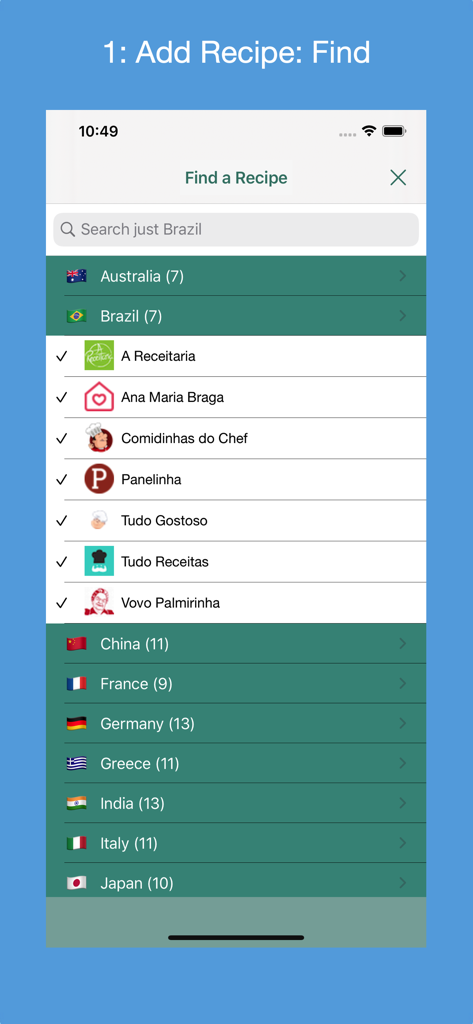
레시피 컬렉터의 레시피 찾기 화면, 다양한 국가의 지원되는 레시피 웹사이트 목록 표시

레시피 컬렉터의 레시피 찾기 화면, 다양한 국가의 지원되는 레시피 웹사이트 목록 표시

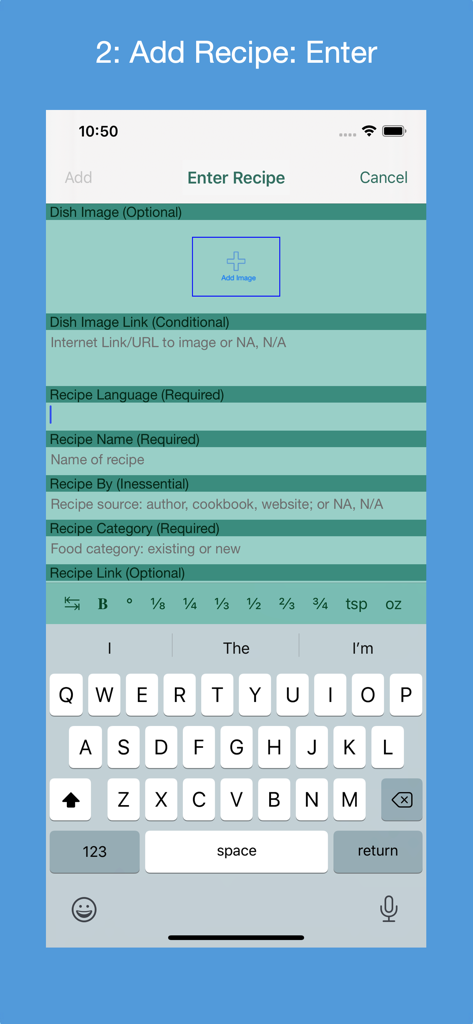
레시피 컬렉터 앱에서 이름과 카테고리 필드로 새 레시피를 추가하기 위한 수동 입력 양식

레시피 컬렉터 앱에서 이름과 카테고리 필드로 새 레시피를 추가하기 위한 수동 입력 양식

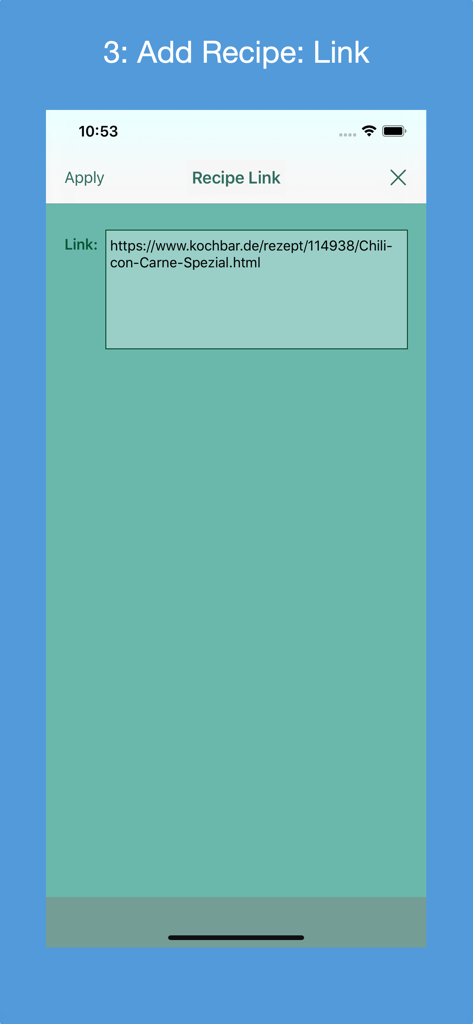
웹 URL을 통해 새 레시피를 추가하기 위한 화면을 보여주는 레시피 컬렉터 앱 인터페이스

웹 URL을 통해 새 레시피를 추가하기 위한 화면을 보여주는 레시피 컬렉터 앱 인터페이스

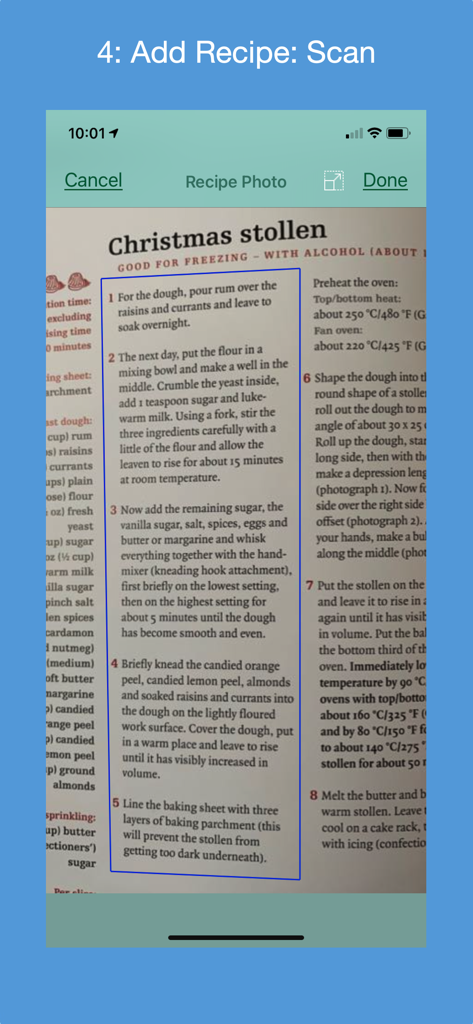
OCR 기술을 사용하여 요리책의 실물 크리스마스 슈톨렌 레시피를 스캔하는 레시피 컬렉터 앱의 iPhone 스크린샷

OCR 기술을 사용하여 요리책의 실물 크리스마스 슈톨렌 레시피를 스캔하는 레시피 컬렉터 앱의 iPhone 스크린샷

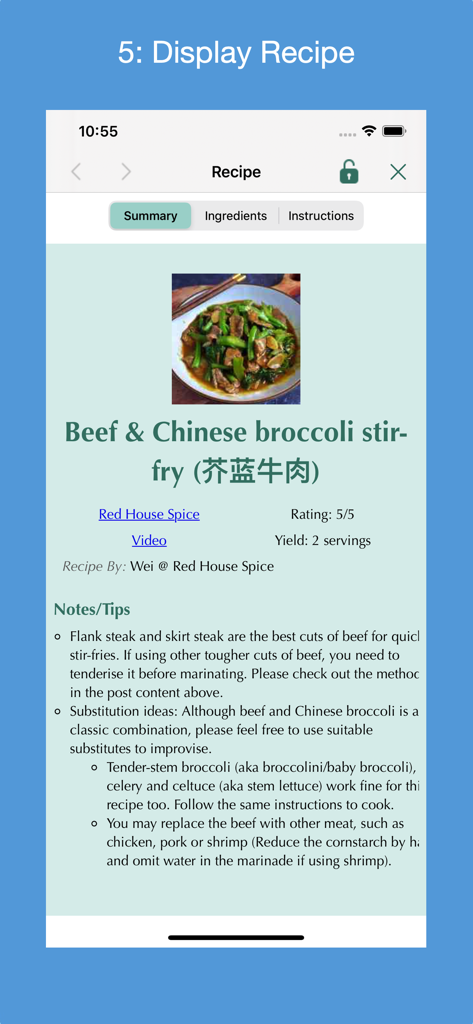
레시피 컬렉터 앱에 소고기와 청경채 볶음 레시피 표시

레시피 컬렉터 앱에 소고기와 청경채 볶음 레시피 표시

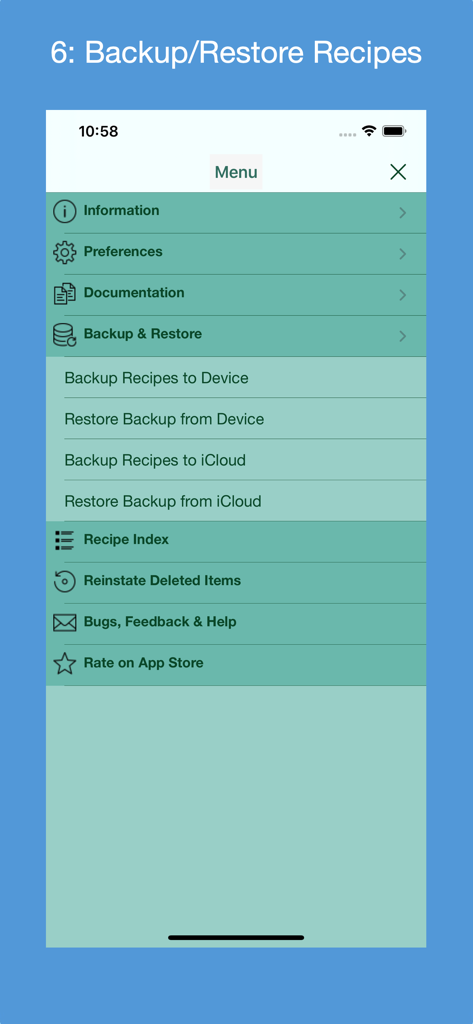
로컬 장치 및 iCloud 저장소에 대한 백업 및 복원 옵션을 보여주는 레시피 컬렉터 앱 메뉴 스크린샷

로컬 장치 및 iCloud 저장소에 대한 백업 및 복원 옵션을 보여주는 레시피 컬렉터 앱 메뉴 스크린샷

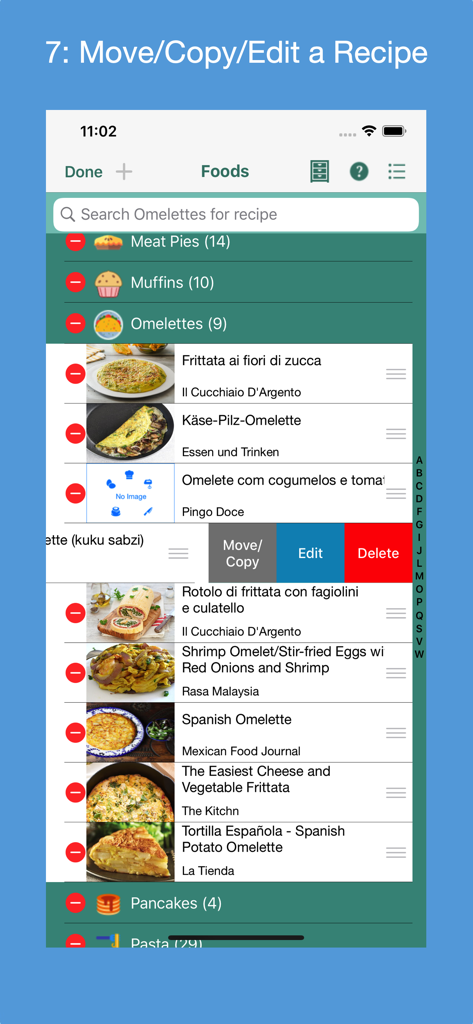
디지털 요리책 내에서 레시피를 이동, 복사, 편집 및 삭제하는 옵션을 보여주는 레시피 컬렉터 앱 인터페이스

디지털 요리책 내에서 레시피를 이동, 복사, 편집 및 삭제하는 옵션을 보여주는 레시피 컬렉터 앱 인터페이스

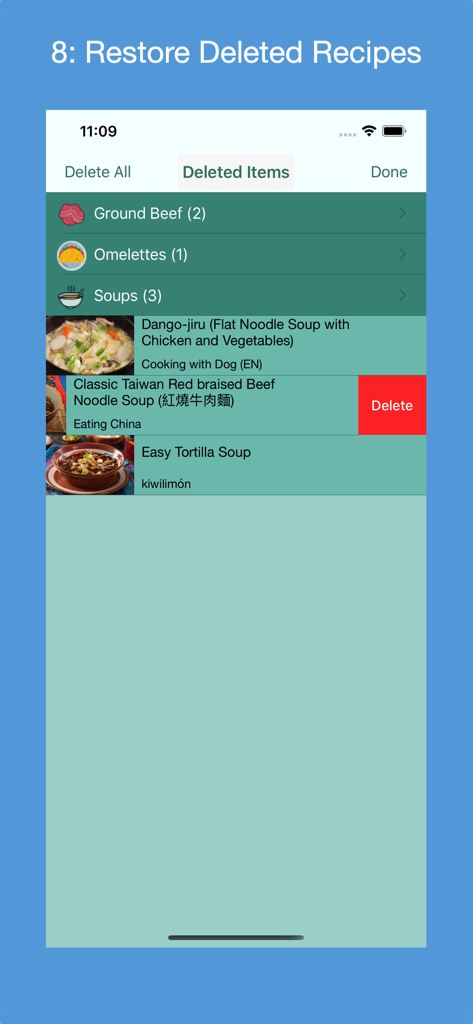
복원 또는 영구 삭제 옵션과 함께 카테고리별 레시피 목록을 보여주는 레시피 컬렉터 앱의 삭제된 항목 화면

복원 또는 영구 삭제 옵션과 함께 카테고리별 레시피 목록을 보여주는 레시피 컬렉터 앱의 삭제된 항목 화면

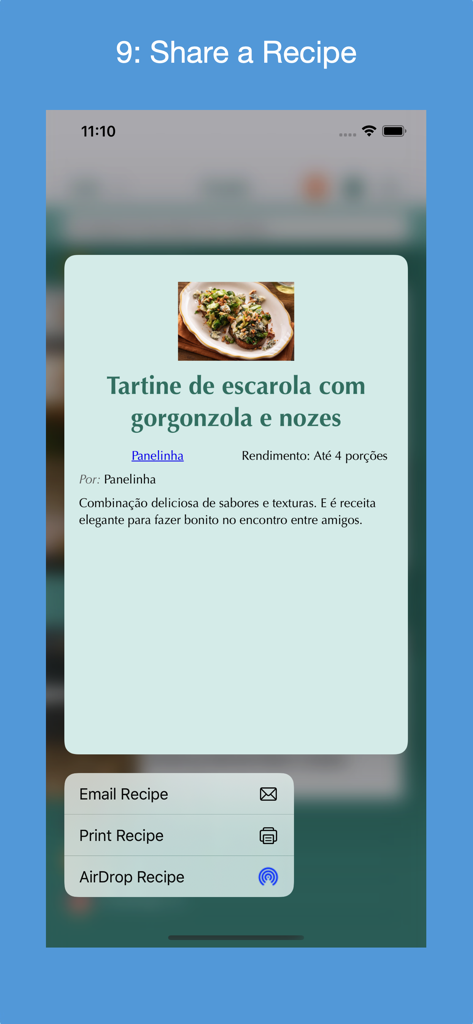
레시피를 이메일, 인쇄 및 AirDrop하는 옵션이 있는 공유 메뉴를 보여주는 레시피 컬렉터 앱 스크린샷

레시피를 이메일, 인쇄 및 AirDrop하는 옵션이 있는 공유 메뉴를 보여주는 레시피 컬렉터 앱 스크린샷

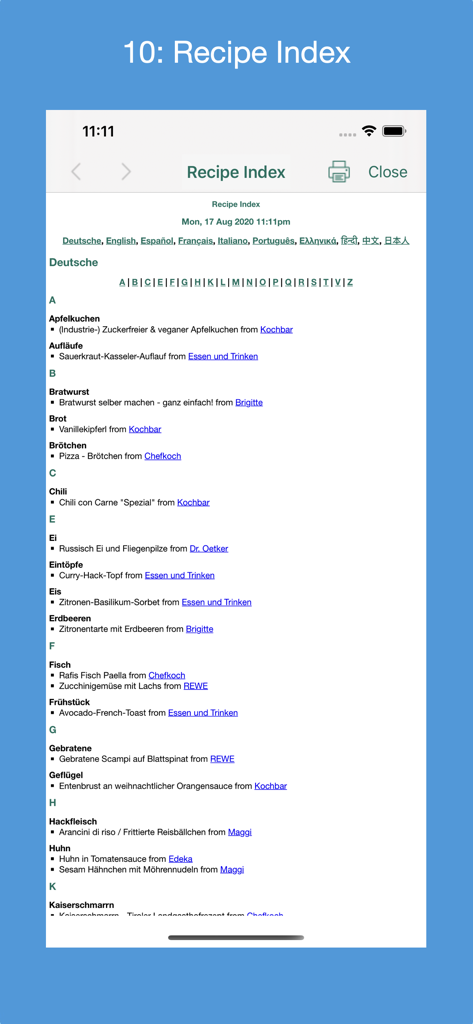
소스 웹사이트 링크가 포함된 언어별로 알파벳순으로 정리된 레시피 컬렉터 앱의 상세 레시피 색인

소스 웹사이트 링크가 포함된 언어별로 알파벳순으로 정리된 레시피 컬렉터 앱의 상세 레시피 색인

당신의 모든 요리 유산, 완벽하게 정리하세요

이 앱을 돋보이게 하는 도구, 6K+ 명의 사용자가 선택.

📸

손으로 쓴 레시피 스캔

AI 스캔 기술로 오래된 레시피 카드와 잡지 스크랩을 검색 가능한 텍스트로 변환하여 새로운 생명을 불어넣으세요.

음식 블로그의 재료와 조리법만 즉시 추출하고, 방해되는 광고와 장황한 서론은 제거하세요.

☁️

Apple 기기 간 원활한 동기화

Mac에서 식사 계획을 세우고 iPad로 요리하세요. 월별 수수료 없이 iCloud를 통해 당신의 컬렉션이 완벽하게 동기화됩니다.

전 세계 사용자들에게 사랑받는 앱

Trusted by 6K+ 명이 이 앱을 사랑합니다.

"

"할머니가 손으로 쓰신 레시피 카드를 일일이 타이핑하지 않고 저장할 수 있는 방법을 드디어 찾았어요! OCR 스캔 기능은 정말 편리하고, 가족의 전통을 클라우드에 안전하고 체계적으로 보관하기 위해 매달 구독료를 지불할 필요가 없다는 점이 마음에 듭니다."

Margaret Sullivan
"

"점심시간에 Mac으로 레시피를 찾으면 요리할 시간이 되었을 때 iPad에서 즉시 확인할 수 있습니다. 앱에서 블로그의 복잡한 내용과 광고를 모두 제거하고 필요한 재료와 단계만 제공합니다. AirDrop 기능은 제 주방 작업 흐름에 혁신을 가져왔습니다!"

David Chen

앱 소개

에 대해 알아야 할 모든 것 Recipe Collector.

설명

Gather into a cookbook 1) all of your personal recipes collected over the years; 2) your favorite recipes found on the Internet, in cookbooks and magazines; and 3) recipe print outs. There are 4 ways to add a new recipe: 1) manually entering its metadata (form-based); 2) finding the recipe by searching one or more of a supported country's recipe websites; 3) entering a link for a recipe from one of the supported country's recipe websites or from a non-curated recipe website that supports the recipe JSON-LD standard; or 4) (iOS 13+ only) scanning a recipe's photo(s) in English, French, Italian, German, Spanish or Portuguese (Brazil). Recipes can be categorized and indexed in one place, and viewed on your iOS device while preparing the recipe. Recipes can be AirDropped between macOS computers and iOS devices. Features: * Compatible with iOS 16+; supports Dark Mode. * Find new recipes in a set of curated recipe websites from 18 countries: Australia (7), Brazil (9), Canada(18), China (11), France (11), Germany (18), Greece (11), Hong Kong (6), India (13), Italy (12), Japan (10), Mexico (13), Portugal (6), South Korea (8), Spain (13), Taiwan (6), United Kingdom (10) and United States (27). Can exclude websites from the search. Each country contains its most popular recipe websites. * Recipe's metadata is extracted and displayed in the recipe's language. Bengali, Chinese, English, French, German, Greek, Hindi, Italian, Japanese, Portuguese, Spanish and Tamil are supported. * Select a Preferred Language preference for displayed User Interface (UI) text. * Go directly to a country's website's recipes and search there. * When entering a recipe manually, a photo of the dish can be provided from the Photo Library or taking a picture with the device's camera. * Add a new food category; rename a food category; delete a food category; restore a deleted food category; delete a deleted food category. * Recipes can be added to one of 57 predefined food categories or a newly created food category. * A common recipe presentation format customized for iPhone, iPad, printing and PDF. * Selectively import new recipe websites used to find a recipe. * Search all food categories or a selected food category for a recipe(s) that match the search criteria. * Use Spotlight to find a recipe by its name, author and/or website name. * Reorder the recipes in a food category. * Edit a recipe; delete a recipe; restore a deleted recipe; delete a deleted recipe. * Copy or move a recipe to another food category. * In iOS 13+, tap and hold on a recipe to display a contextual menu from which the recipe can be displayed, printed, deleted or shared via AirDrop. For iOS 12 and sooner, print, delete or share recipe from displayed recipe. * Supports Letter and A4 paper sizes. * Optionally auto-lock screen during preparation time; control the auto-lock time. * Generate an index of all recipes by language; navigate within the index or to the actual recipe's website; print the index. * State of the app can be saved to the device at any time and automatically restored the next time the app is launched. * Backup all recipes to device or iCloud; restore backup from device or iCloud. Backup files can be named and old ones deleted. * Transfer all recipes to a new device running the app. * A User Guide documents how to use the app and its features. See section "macOS Version's Differences" for an explanation of the differences between the macOS version and the iOS version of the app. * A Quick Guide provides a fast way to learn how to use the app. * A Quick Tour of the app, available on demand, that enumerates its features. * A set of Frequently Asked Questions (FAQs). * Display at any time advice from a set of tips. * Rate the app in the App Store. * Send e-mail to support@verusapps.com to report issues, suggest improvements or ask for help using the app. No subscription fees or in-app purchases. One time purchase price includes all future releases.

최신 버전

4.9.0

크기

24.9 MB

출시일

2020년 8월 25일

나만의 요리 유산을 평생 소유하세요

구독료는 이제 그만. 가족의 레시피 카드 스캔, 웹 레시피 저장, iPhone, iPad, Mac 전반의 주방 레시피를 한 번의 간편한 평생 구매로 정리하세요.

다운로드: App Store