ReLens Camera-DSLR Portrait

ReLens Camera-DSLR Portrait

다운로드: App Store
Spark by MWM logo
로고: ReLens Camera-DSLR Portrait

ReLens: 모바일 크리에이터를 위한 전문가급 DSLR 촬영

f/1.4 조리개 보케, 수동 제어, 4K Ultra HD 동영상으로 완벽한 샷의 기술을 마스터하세요. 과도하게 선명해진 모바일 룩에서 벗어나 창의적인 비전을 되찾으세요.

개발사

Pixl Concerto Technology Limited

카테고리

Photo & Video

다운로드

7M+

사용자 평점

4.8/5

총 평가 수

31K+

지원 언어

7

전문 광학, 시각화

이 인터페이스를 사용하는 7M+ 명의 사용자.

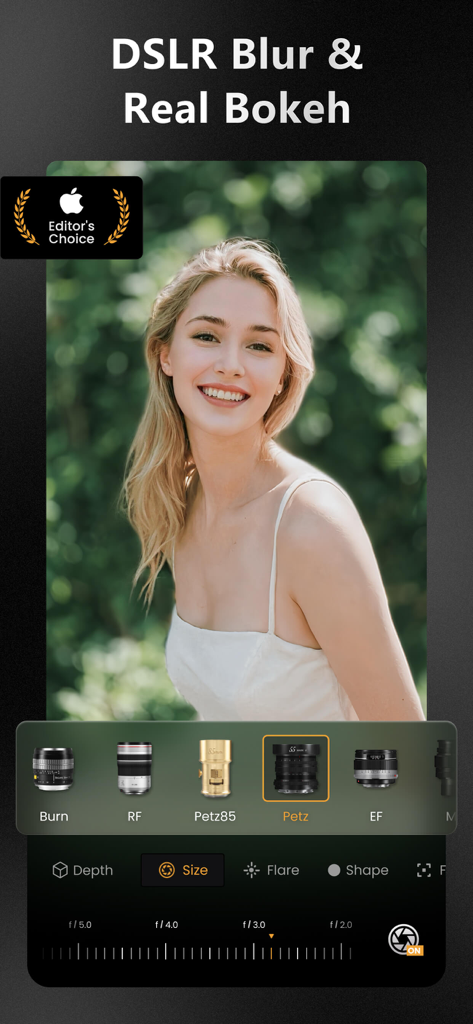
ReLens 앱 인터페이스로, 인물 사진에 대한 DSLR 배경 흐림 및 보케 효과를 위한 전문가용 렌즈 선택을 보여줍니다.

ReLens 앱 인터페이스로, 인물 사진에 대한 DSLR 배경 흐림 및 보케 효과를 위한 전문가용 렌즈 선택을 보여줍니다.

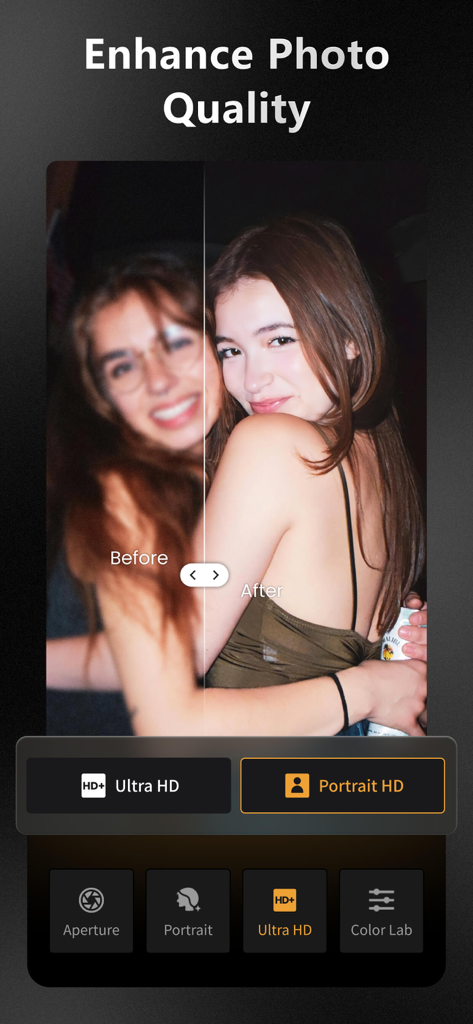
ReLens Ultra HD 기능으로 선명하게 향상된 원본 흐린 사진과 향상된 인물 사진을 비교하는 분할 화면.

ReLens Ultra HD 기능으로 선명하게 향상된 원본 흐린 사진과 향상된 인물 사진을 비교하는 분할 화면.

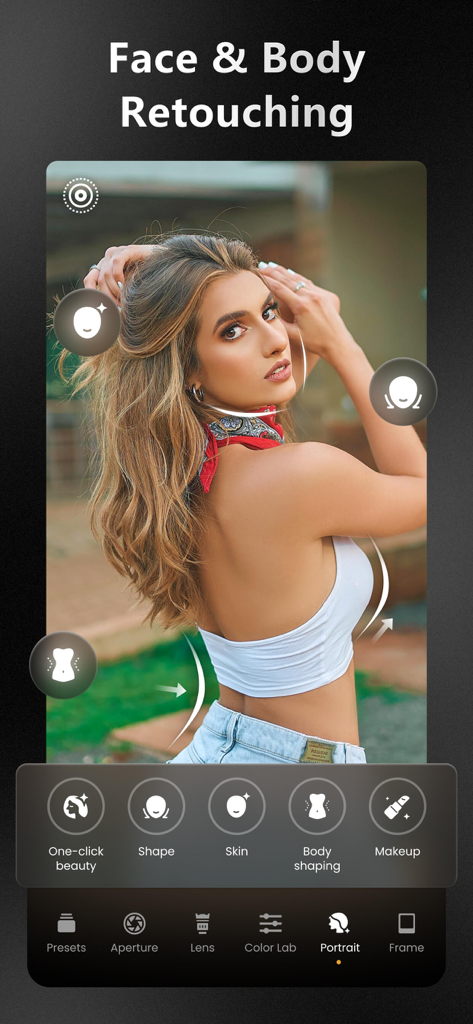
ReLens 앱 인터페이스로, 인물 사진에 적용된 얼굴 및 신체 보정 도구를 보여줍니다.

ReLens 앱 인터페이스로, 인물 사진에 적용된 얼굴 및 신체 보정 도구를 보여줍니다.

ReLens 앱 동영상 촬영 인터페이스로, 4K 안정화 및 Dolby Vision과 같은 전문가 기능을 갖추고 액션 스포츠 장면을 캡처합니다.

ReLens 앱 동영상 촬영 인터페이스로, 4K 안정화 및 Dolby Vision과 같은 전문가 기능을 갖추고 액션 스포츠 장면을 캡처합니다.

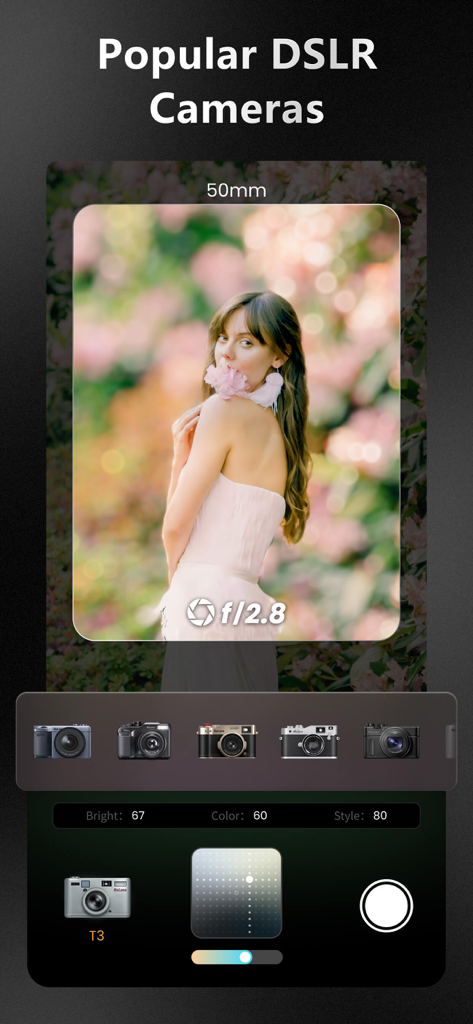
ReLens 앱 인터페이스로, 보케가 있는 인물 사진과 인기 DSLR 카메라 시뮬레이션 선택 화면을 보여줍니다.

ReLens 앱 인터페이스로, 보케가 있는 인물 사진과 인기 DSLR 카메라 시뮬레이션 선택 화면을 보여줍니다.

ReLens 앱 인터페이스로, 야간 인물 사진에 카메라 플래시 시뮬레이션 기능을 보여줍니다.

ReLens 앱 인터페이스로, 야간 인물 사진에 카메라 플래시 시뮬레이션 기능을 보여줍니다.

인물 사진에서 전경 및 배경 보케 효과 비교와 함께 초점 맞추기 기능을 탭하는 것을 보여주는 인터페이스.

인물 사진에서 전경 및 배경 보케 효과 비교와 함께 초점 맞추기 기능을 탭하는 것을 보여주는 인터페이스.

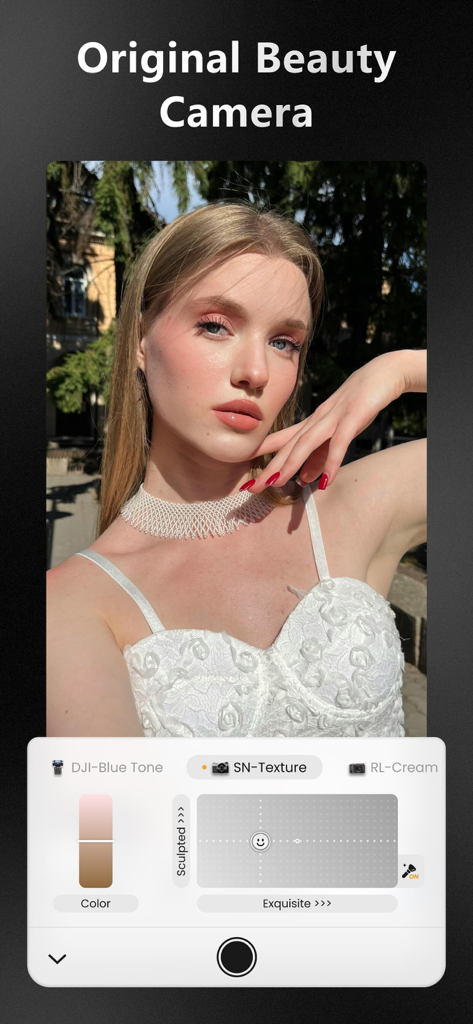
ReLens 앱 스크린샷으로, 피부 질감 및 색상 제어가 포함된 원본 뷰티 카메라 인물 사진 모드를 보여줍니다.

ReLens 앱 스크린샷으로, 피부 질감 및 색상 제어가 포함된 원본 뷰티 카메라 인물 사진 모드를 보여줍니다.

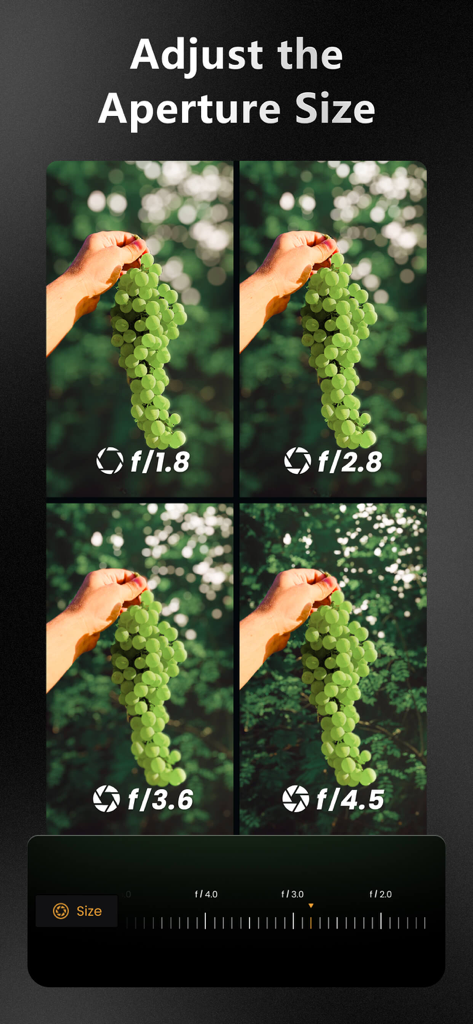
f1.8부터 f4.5까지 조리개 값을 조절하여 배경 보케 흐림 정도가 다른 네 장의 사진을 비교한 이미지.

f1.8부터 f4.5까지 조리개 값을 조절하여 배경 보케 흐림 정도가 다른 네 장의 사진을 비교한 이미지.

ReLens의 모바일 사진을 위한 고급 아트 테두리 템플릿.

ReLens의 모바일 사진을 위한 고급 아트 테두리 템플릿.

주머니 속 전문가급 사진

이 앱을 돋보이게 하는 도구, 7M+ 명의 사용자가 선택.

🤳

시네마틱 보케 및 심도

비싼 인물 사진 렌즈를 모방한 가변 F1.4 조리개와 AI 기반 배경 흐림으로 초점 기술을 마스터하세요.

상징적인 렌즈 시뮬레이션

디지털 룩은 잊으세요. iPhone의 공격적인 자동 선명도 보정을 우회하면서 클래식 SLR 렌즈의 독특한 질감을 재현하세요.

🕹️

완전한 수동 제어

ISO, 셔터 속도, ProRAW 지원 및 전문가급 콘텐츠 제작을 위한 4K MAX 동영상으로 완벽하게 제어하세요.

전 세계 사용자들에게 사랑받는 앱

Trusted by 7M+ 명이 이 앱을 사랑합니다.

"

"과도하게 처리된 iPhone 룩에 정말 지쳤어요. ReLens는 제 소셜 미디어 게임을 완전히 바꿔 놓았어요. 보케가 너무 부드럽고 전문적이어서 팔로워들이 제가 무거운 DSLR을 샀다고 생각할 정도예요. Swirly 렌즈 효과는 제 스타일에 꼭 필요한 기능이에요!"

Chloe M., 라이프스타일 인플루언서
"

"드디어 무거운 카메라 장비를 집에 두고 다닐 수 있게 되었어요. ReLens는 조리개 조절부터 ProRaw 지원까지, 제가 원하는 모든 수동 제어를 휴대폰에서 제공해요. AI 심도 계산이 매우 정확해서 무게 부담 없이 고급 여행 사진을 촬영하기에 완벽한 도구예요."

David R., 취미 사진가

앱 소개

에 대해 알아야 할 모든 것 ReLens Camera-DSLR Portrait.

설명

# App Store Editors' Choice How to turn your mobile into a professional camera in a blink? We did something cool. Applying advanced computational photography and artificial intelligence algorithms, ReLens can instantly turn your phone into a DSLR professional camera. With its powerful DSLR-grade large aperture that creates blur background bokeh effect and its 4K Ultra HD camera, ReLens camera portrait mode makes it easy to capture "DSLR-like" and "cinematic" shots. ReLens is designed to be a professional camera photography app for mobile photography enthusiasts and to help everyone enjoy the fun of photography easily. # Excellent features ● F1.4-F20.0 aperture adjustment range, combined with background bokeh effect, say goodbye to simple and dull Gaussian Blur. ● Reproduction of several classic SLR lenses, such as the 50mm 1.4 fixed focal length lens, Burn 35, and the Swirly bokeh effect lens. ● AI recalculates the depth of field and adds realistic portrait camera bokeh effects. ● Freely modify the depth of field information of the image with the depth brush. ● Abundant professional photography watermarks and artistic photo frames to make your work show off your charm. ● Various professional camera lens optical effects include eclipse, Smooth Trans Focus, out-of-focus reflex, out-of-focus rotation, lens distortions, color shift, etc. ● Simulation of shutter blade shapes, over twenty realistic focus camera bokeh shapes such as the pentagram, hexagon, octagon, heart, etc. ● Reproduction of the unique spots, textures, and light effects of classic lenses. ● Intelligent partitioning for you to adjust different depth-of-field layers. You can tone the foreground, background, or sky without impacting the rest of the image. ● Professional photo editor: specialized color toning tools, such as Posterization, Curves, and HSL. ● AI HDR brightness algorithm analyses the photo scene and applies 5 different brightness fix modes: ultra-low light mode, slightly low light mode, normal low light mode, normal light mode, and backlight mode. ● Ultra-HD restoration enhances image quality comparable to that of a DSLR. ● Using high-speed machine learning algorithms for devices with Apple's chips, including the latest Metal, CoreML, and Apple Neural Engine (ANE) ● Privacy protection: Image processing runs locally on your device and does not upload your images to the server. # All-Purpose Professional Camera Photography App ● Multiple camera modes: manual, auto, aperture (portrait), and self-timer. ● Camera custom color adjustment: White Balance Shift, Sharpening, Contrast, Saturation, Hue; built-in 6 commonly used presets such as Standard, Portrait, Neutral, etc.; dozens of classic cameras and master filters. ● Multiple image-quality options: Smart, De-sharpen, and High Quality. Disable the iPhone's auto-sharpening and auto-greyish. ● iPhone front and rear 20x magnification and a 136mm telephoto lens compared to a DSLR. ● Manual control of Exposure, Shutter, ISO, Focus, and White Balance. ● High-quality video recording, supporting 4K and 4K MAX video recording with up to 120 Mbps encoding rate and up to 240 FPS. ● Video Color Space: supports SDR, HDR10, and Dolby Vision. ● Video stabilization: standard, cinematic, and extreme stabilization. ● Shoot ProRaw format and RAW format, and support shooting full-size HEIF or JPEG. ● Support for Single Autofocus (AF-S) and Continuous Autofocus (AF-C). ● SLR effect beauty: provides three modes: Clear, Natural, Cream, and Ruddy. ● Supports iPhone, iPad, and all other devices. ● Support setting the lock screen and home screen widget to open the camera quickly. # Contact Us risingcabbage@163.com # More Information - Privacy Policy: https://www.risingcabbage.com/privacy.html -Terms of Use: https://www.risingcabbage.com/agreement.html

최신 버전

5.9.3

크기

505.4 MB

출시일

2022년 8월 14일

오늘 바로 휴대폰을 전문가용 DSLR로 바꾸세요

AI 기반 보케 및 수동 제어로 완벽한 샷을 촬영하는 7백만 명 이상의 크리에이터와 함께하세요. 모바일 스냅샷에 만족하지 말고 예술을 창조하세요.

다운로드: App Store
FAQ

자주 묻는 질문

에 대해 알아야 할 모든 것 ReLens Camera-DSLR Portrait

ReLens Camera-DSLR Portrait는 무엇인가요?

ReLens Camera는 모바일 기기를 전문가 수준의 DSLR 카메라로 변환합니다. AI와 컴퓨팅 사진 알고리즘을 사용하여 흐릿한 배경 보케 효과로 영화 같은 장면을 연출합니다.

ReLens Camera-DSLR Portrait는 보케 효과를 제공하나요?

네, ReLens Camera는 DSLR 수준의 대형 조리개 보케 효과를 제공합니다. 흐릿한 배경을 만들고 AI를 사용하여 초점 심도를 재계산하여 사실적인 인물 사진 카메라 보케 효과를 구현합니다.

ReLens Camera-DSLR Portrait는 4K 동영상을 녹화할 수 있나요?

네, ReLens Camera는 고품질 4K 및 4K MAX 동영상 녹화를 지원합니다. 최대 120Mbps의 인코딩 속도와 최대 240FPS의 프레임 속도를 달성합니다.

ReLens Camera-DSLR Portrait는 이미지를 로컬에서 처리하나요?

네, ReLens Camera는 모든 이미지를 기기에서 로컬로 처리합니다. 이미지를 서버로 업로드하지 않아 사용자 개인 정보 보호를 보장합니다.

ReLens Camera-DSLR Portrait는 어떤 조리개 조절 범위를 제공하나요?

ReLens Camera는 F1.4에서 F20.0까지의 조리개 조절 범위를 제공합니다. 이 기능은 초점 심도와 배경 흐림을 정밀하게 제어할 수 있게 해줍니다.

ReLens Camera-DSLR Portrait는 클래식 SLR 렌즈를 시뮬레이션할 수 있나요?

네, ReLens Camera는 여러 클래식 SLR 렌즈를 재현합니다. 예를 들어 50mm 1.4 단초점 렌즈, Burn 35, 스위럴 보케 효과 렌즈 등이 있습니다.

ReLens Camera-DSLR Portrait는 RAW 형식 캡처를 지원하나요?

네, ReLens Camera는 ProRaw 및 RAW 형식 모두로 촬영을 지원합니다. 또한 전체 크기의 HEIF 또는 JPEG 이미지 저장을 허용합니다.

ReLens Camera-DSLR Portrait는 사진 품질을 향상시킬 수 있나요?

네, ReLens Camera는 Ultra-HD 복원 기능으로 이미지 품질을 향상시킵니다. 이는 DSLR 카메라에 필적하는 사진 품질을 달성하는 것을 목표로 합니다.

ReLens Camera-DSLR Portrait는 얼굴 및 신체 보정 기능을 제공하나요?

네, ReLens Camera는 얼굴 및 신체 보정 도구를 제공합니다. 여기에는 원클릭 뷰티, 윤곽 보정, 피부 매끄럽게 하기, 신체 윤곽 보정, 메이크업 적용 기능이 포함됩니다.

ReLens Camera-DSLR Portrait는 어떤 동영상 흔들림 보정 옵션을 제공하나요?

ReLens Camera는 표준, 시네마틱, 익스트림의 세 가지 동영상 흔들림 보정 옵션을 제공합니다. 이 기능들은 사용자가 부드럽고 안정적인 영상을 촬영하는 데 도움을 줍니다.