Roland Piano App

Roland Piano App

다운로드: App Store다운로드: Google Play
Spark by MWM logo
로고: Roland Piano App

Roland Piano App: 연주, 학습, 퍼포먼스를 위한 더 스마트한 방법

매끄러운 무선 제어, 대화형 학습 도구, 그리고 디지털 악보의 세계에 대한 즉각적인 액세스로 악기의 잠재력을 최대한 발휘하세요.

개발사

Roland Corporation

카테고리

Music

다운로드

255K+

사용자 평점

2.4/5

총 평가 수

200

지원 언어

3

모든 탭에 담긴 명작

이 인터페이스를 사용하는 255K+ 명의 사용자.

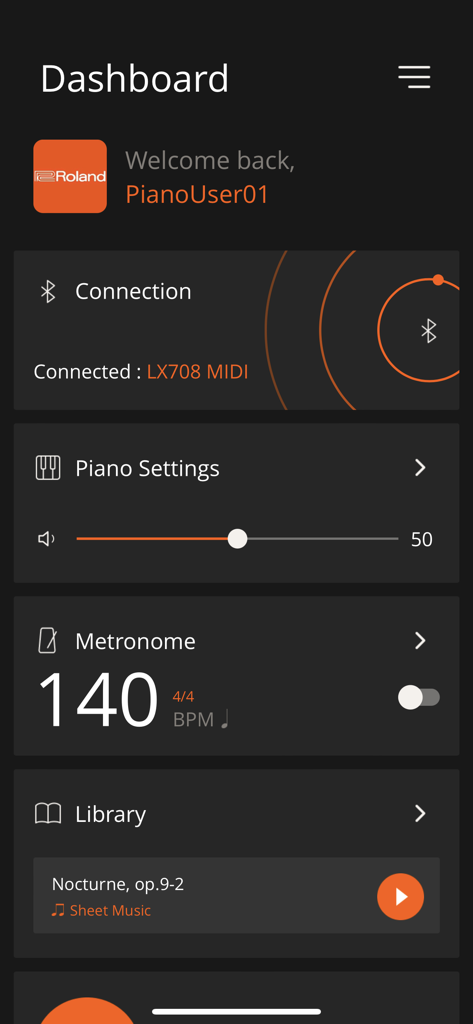
Roland Piano App 대시보드 화면, 블루투스 연결 상태 및 메트로놈 설정 표시

Roland Piano App 대시보드 화면, 블루투스 연결 상태 및 메트로놈 설정 표시

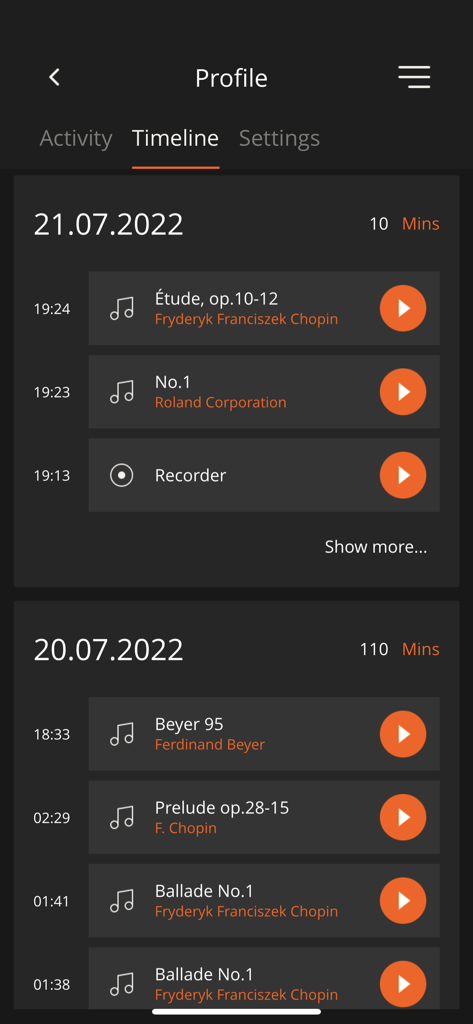
Roland Piano App의 타임라인 뷰, 연습 기록 및 녹음된 음악 세션 표시

Roland Piano App의 타임라인 뷰, 연습 기록 및 녹음된 음악 세션 표시

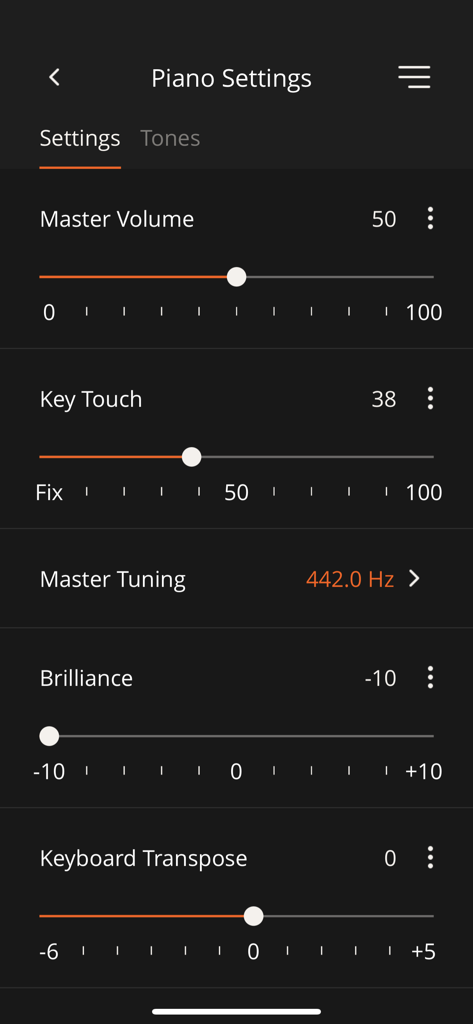
Roland Piano App의 인터페이스, 마스터 볼륨, 키 터치, 브릴리언스 및 키보드 트랜스포즈 조정 가능한 설정 표시

Roland Piano App의 인터페이스, 마스터 볼륨, 키 터치, 브릴리언스 및 키보드 트랜스포즈 조정 가능한 설정 표시

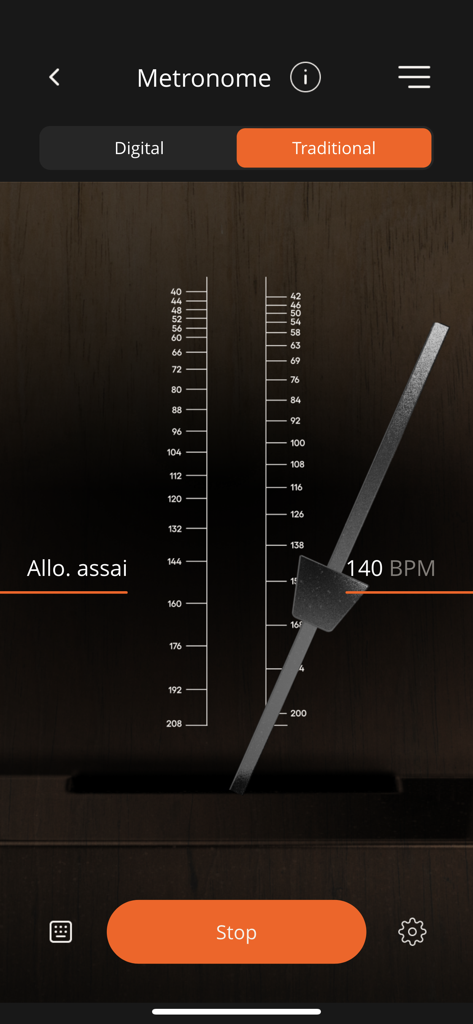
Roland Piano App의 전통적인 기계식 메트로놈 인터페이스, 140 BPM으로 설정

Roland Piano App의 전통적인 기계식 메트로놈 인터페이스, 140 BPM으로 설정

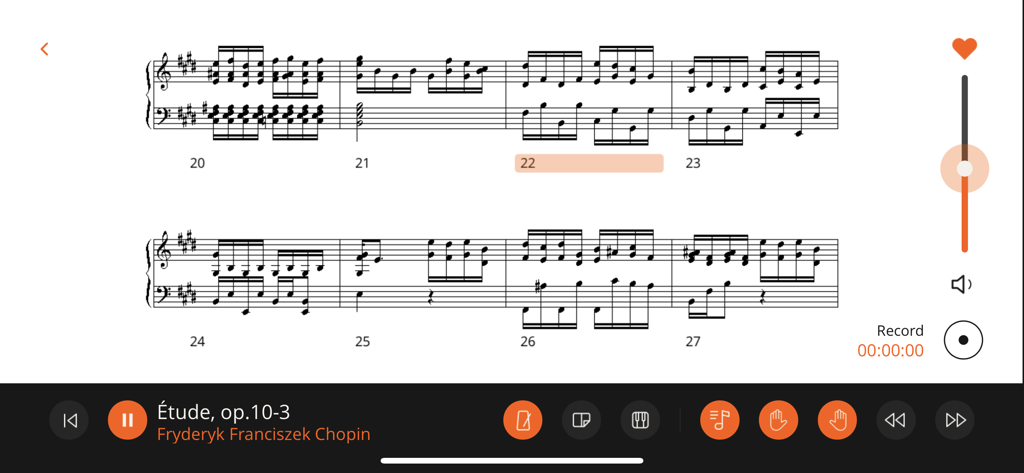
Roland Piano App 인터페이스의 쇼팽 에튀드의 디지털 악보, 재생 및 녹음 컨트롤 표시

Roland Piano App 인터페이스의 쇼팽 에튀드의 디지털 악보, 재생 및 녹음 컨트롤 표시

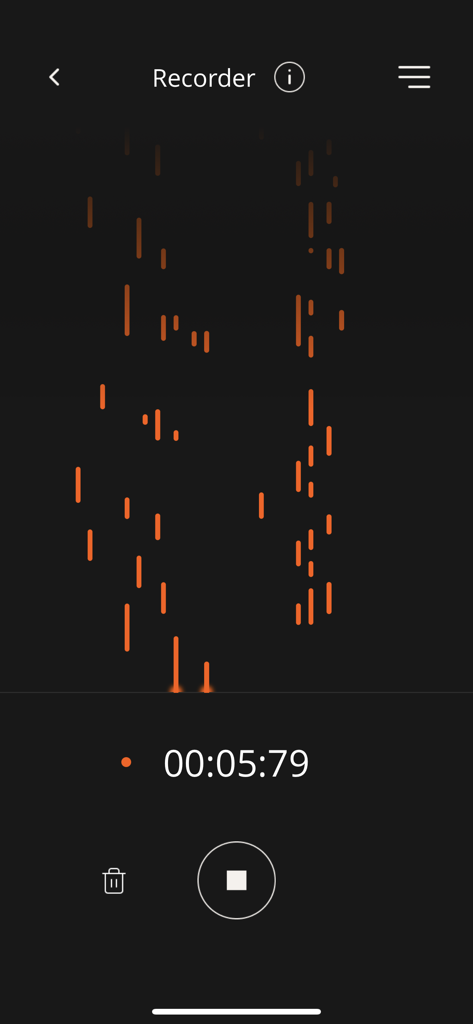
Roland Piano App의 녹음기 인터페이스, 시각적인 피아노 롤 및 활성 녹음 타이머 표시

Roland Piano App의 녹음기 인터페이스, 시각적인 피아노 롤 및 활성 녹음 타이머 표시

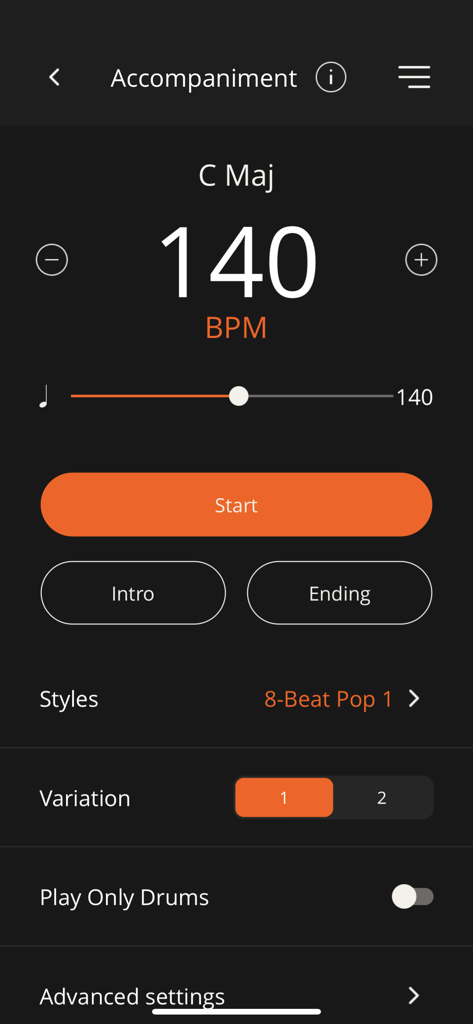
Roland Piano App의 반주 화면, 140 BPM의 템포 컨트롤, 스타일 선택 및 드럼 변형 표시

Roland Piano App의 반주 화면, 140 BPM의 템포 컨트롤, 스타일 선택 및 드럼 변형 표시

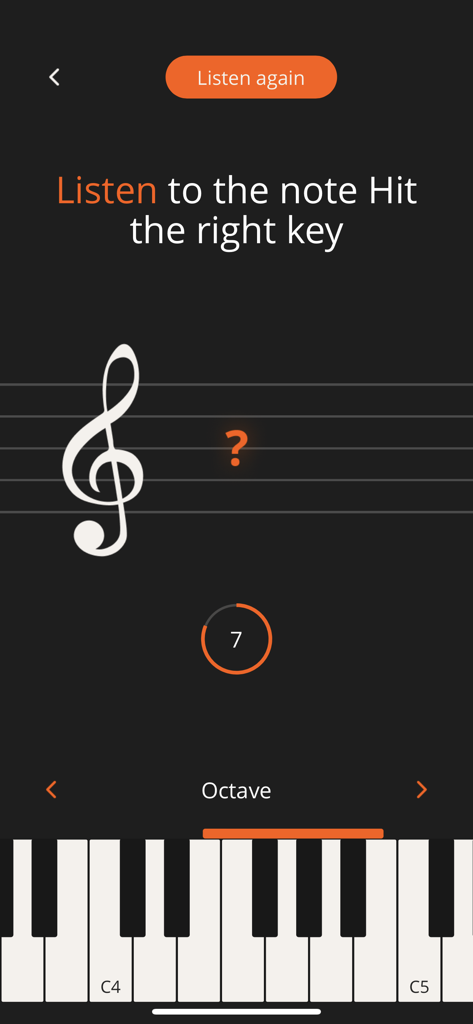
Roland Piano App 화면, 가상 피아노 키보드가 있는 음악 노트 청음 훈련 연습 표시

Roland Piano App 화면, 가상 피아노 키보드가 있는 음악 노트 청음 훈련 연습 표시

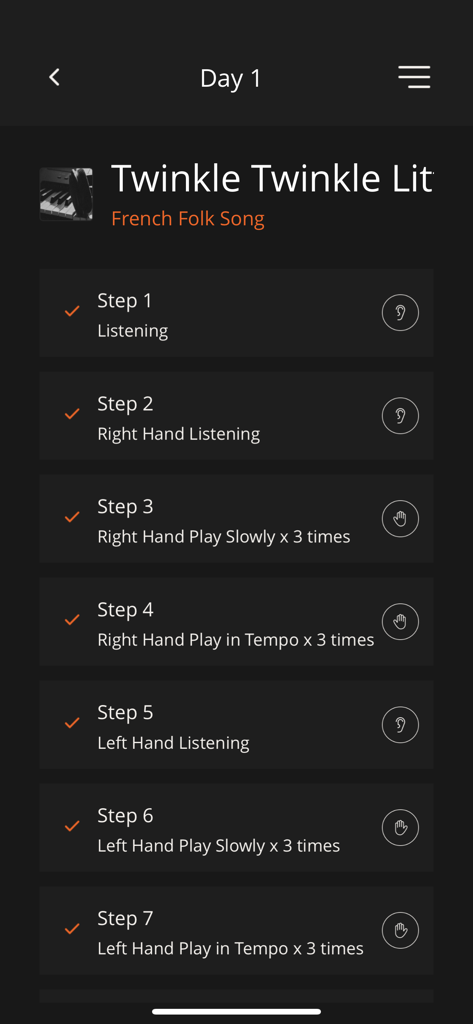
Roland Piano App 인터페이스, One Week Master 기능의 1일차 연습 계획 7단계 표시

Roland Piano App 인터페이스, One Week Master 기능의 1일차 연습 계획 7단계 표시

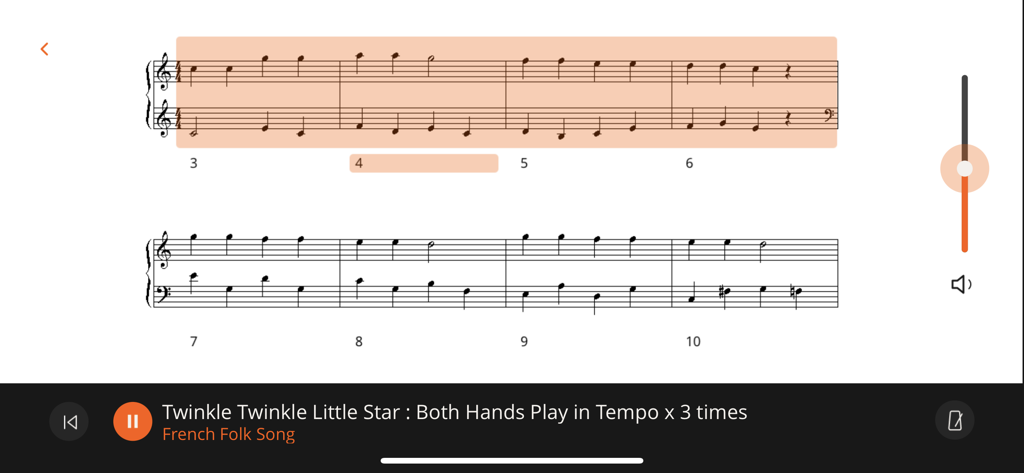
Roland Piano App의 연습 컨트롤이 포함된 트윙클 트윙클 리틀 스타 디지털 악보.

Roland Piano App의 연습 컨트롤이 포함된 트윙클 트윙클 리틀 스타 디지털 악보.

연주 경험을 향상시키세요

이 앱을 돋보이게 하는 도구, 255K+ 명의 사용자가 선택.

📱

매끄러운 무선 제어

복잡한 버튼은 이제 그만. 태블릿이나 스마트폰의 직관적인 인터페이스를 통해 터치, 앰비언스, 악기 사운드를 즉시 조정하세요.

🎹

7일 안에 새로운 곡 마스터하기

One Week Master 기능을 통해 더 빠르게 실력을 향상시키세요. 구조화된 일일 목표는 가장 바쁜 전문가조차도 새로운 곡을 달성 가능하게 학습할 수 있도록 합니다.

🎼

악보의 디지털 라이브러리

수백 곡의 악보와 대화형 연습 문제에 액세스하세요. 어린이를 위한 재미있는 플래시 카드부터 고전 명곡까지, 다음 레슨이 항상 준비되어 있습니다.

전 세계 사용자들에게 사랑받는 앱

Trusted by 255K+ 명이 이 앱을 사랑합니다.

"

"'One Week Master' 기능은 바쁜 일정을 소화할 수 있도록 하여 관리 가능한 일일 단계로 새로운 곡을 배울 수 있게 해주는 완전한 게임 체인저입니다. 또한 iPad에서 하드웨어 버튼을 전혀 만지지 않고도 피아노 설정을 사용자 정의하고 새로운 사운드를 탐색하는 것이 얼마나 쉬운지도 마음에 듭니다."

David Chen
"

"이 앱은 저희 딸의 연습 시간을 숙제에서 게임으로 바꿔놓았습니다. 그녀는 청음 훈련 연습과 플래시 카드에 푹 빠져 있고, 저희는 태블릿에서 Roland Cloud 라이브러리의 악보에 액세스하고 표시하는 것이 얼마나 쉬운지에 감사하고 있습니다."

Sarah Jenkins

앱 소개

에 대해 알아야 할 모든 것 Roland Piano App.

설명

COMPATIBLE ROLAND PIANOS CG-1,* CPF-107,* CPF-140,* DP603, F-140R, F107, F701, FP-10, FP-30, FP-30X, FP-60, FP-60X, FP-90, FP-90X, FRP-1,* FRP-2-ACR(FP-10-ACR),* FRP-NUVOLA,* FRP-NUVOLA EX,* FP-E50, GO:PIANO(GO-61P), GO:PIANO with Alexa Built-in(GO-61P-A), GO:PIANO88(GO-88P), GO:PIANO88 (GO-88PX), GP-3, GP-6, GP-9, GP-9M, GP607, GP609, HP601, HP603, HP603A, HP605, HP702, HP704, KIYOLA(KF-10), LX-5, LX-6, LX-7, LX-17, LX705, LX706, LX708, LX-9, MP-200,* RCP-800,* RP102, RP107, RP-500,* RP501R, RP701, *Available in certain regions only. Additional Roland piano models will support the Roland Piano App in the future. Please check back for the latest compatibility information. Note: Make sure that your Roland digital piano is updated with the current system program. The latest system program and setup instructions for your model can be found on the Support pages at https://www.roland.com/. NOTICE FOR USERS OF THE ROLAND PIANO EVERY DAY APP If you’ve purchased sheet music through the Piano Every Day app, you can continue using it within the Roland Piano App. From the Roland Piano App, create a Roland Account with the same email address that you used to register Piano Every Day, then log into the app using that account. When logged in, your purchases will be available in the app’s Library section. APP INTRODUCTION The Roland Piano App elevates the Roland piano experience, allowing you to take your musical education and enjoyment even further with a smartphone or tablet. This next-generation app is our best ever, combining wireless remote control with enhanced learning features and an updated interface that’s simple, streamlined, and intuitive for everyone in the family to use. • Powerful companion app for select Roland home pianos with Bluetooth® connectivity • Control piano functions such as transpose, split, key touch, ambience, and more • Select and explore different sounds, including many non-piano sounds that may not be available from the instrument’s panel • Visual metronome for timing practice • Recorder function for self-evaluation • Fun flash card and ear training exercises to build skills • Select songs and view musical scores for your piano’s onboard song library • Use the One Week Master feature to gradually learn a new piece in seven days • Play along with a full-band sound using automatic accompaniment that’s controlled with left-hand fingering • Unlock over hundreds of pieces of sheet music with a paid Roland Cloud membership NOTES • To use all functions in this app, a connection with a compatible piano model is required. • Communication between a compatible piano model and an iPad/iPhone requires a Bluetooth connection. • An internet connection is required to use the features of Roland Piano App, including recording, Library access, and addition preset functionality. Any communication expenses (packet communication fees, etc.) incurred while using this application will be charged to customers. • We cannot guarantee full compatibility with all devices that meet the specification requirements.

최신 버전

1.5.9

크기

94.9 MB

출시일

2022년 8월 4일

Roland의 잠재력을 최대한 발휘하세요

Roland Piano App을 다운로드하여 대화형 레슨, 디지털 악보, 그리고 현대적인 음악 라이프스타일을 위해 완벽하게 디자인된 매끄러운 무선 제어를 이용하세요.

다운로드: App Store다운로드: Google Play
FAQ

자주 묻는 질문

에 대해 알아야 할 모든 것 Roland Piano App

Roland Piano App는 무엇인가요?

Roland Piano App는 스마트폰이나 태블릿에서 무선 원격 제어, 향상된 학습 기능 및 직관적인 인터페이스를 제공하여 Roland 피아노 경험을 향상시킵니다.

Roland Piano App와 호환되는 Roland 피아노 모델은 무엇인가요?

Roland Piano App는 DP603, F-140R, FP-30X, HP704, LX706 등 많은 모델과 호환됩니다. 앱 설명에서 지원되는 Roland 디지털 피아노 전체 목록을 확인할 수 있습니다.

피아노를 Roland Piano App에 연결하려면 Bluetooth가 필요한가요?

예, Roland Piano App는 호환되는 피아노 모델과 iPad/iPhone 간의 통신을 위해 Bluetooth 연결이 필요합니다. 앱의 모든 기능을 사용하려면 인터넷 연결도 필요합니다.

Roland Piano App로 피아노 설정을 원격으로 제어할 수 있나요?

예, Roland Piano App는 트랜스포즈, 분할, 건반 터치, 앰비언스, 마스터 볼륨, 마스터 튜닝, 밝기 및 건반 트랜스포즈와 같은 피아노 기능을 제어합니다.

Roland Piano App에 메트로놈이 포함되어 있나요?

예, Roland Piano App에는 타이밍 연습을 위한 시각적 메트로놈이 포함되어 있습니다. 사용자는 BPM을 조정하고 디지털 및 전통적인 메트로놈 스타일 중에서 선택할 수 있습니다.

사용자는 Roland Piano App에서 피아노 연주를 녹음할 수 있나요?

예, Roland Piano App는 자체 평가를 위한 녹음기 기능을 제공합니다. 이 기능을 통해 사용자는 피아노 연주를 녹화하고 검토할 수 있습니다.

Piano Every Day의 악보 구매를 Roland Piano App로 이전하려면 어떻게 해야 하나요?

Piano Every Day와 동일한 이메일을 사용하여 Roland Piano App에서 Roland 계정을 만드세요. 이전 악보 구매 내역은 앱의 라이브러리 섹션에서 사용할 수 있습니다.

Roland Piano App에서 청음 연습을 할 수 있나요?

예, Roland Piano App는 음악 기술을 구축하기 위한 플래시 카드 및 청음 연습을 제공합니다. 연습의 한 예로 음을 듣고 올바른 건반을 식별하는 것이 있습니다.

Roland Piano App의 "One Week Master" 기능은 무엇인가요?

Roland Piano App의 "One Week Master" 기능은 사용자가 안내에 따른 단계별 지침을 통해 7일 동안 점진적으로 새로운 악곡을 배울 수 있도록 합니다.

Roland Piano App에서 자동 반주를 제공하나요?

예, Roland Piano App는 풀 밴드 사운드로 연주하기 위한 자동 반주를 제공합니다. 사용자는 왼손 핑거링을 사용하여 이 기능을 제어합니다.

Roland Piano App에서 악보를 볼 수 있나요?

예, Roland Piano App를 사용하면 피아노의 내장 곡 라이브러리에서 악보를 선택하고 볼 수 있습니다. 또한 다양한 학습 기능에 대한 악보도 표시합니다.