Scriptation: PDF for Film & TV

Scriptation: PDF for Film & TV

다운로드: App Store
Spark by MWM logo
로고: Scriptation: PDF for Film & TV

Scriptation: 영화 및 TV 제작을 위한 에미상(Emmy®) 수상 워크플로우

새 대본 초안에 노트를 수동으로 복사하는 일을 멈추세요. 몇 초 만에 마크업을 지능적으로 전송하고 업계 최고의 디지털 바인더로 제작 과정을 마스터하세요.

개발사

Scriptation LLC

카테고리

Productivity

다운로드

71K+

사용자 평점

4.8/5

총 평가 수

4K+

지원 언어

4

업계 표준의 실제 활용 모습

이 인터페이스를 사용하는 71K+ 명의 사용자.

에미상을 수상한 기술력을 갖춘 영화 및 TV 업계 표준 앱으로서의 상태를 강조하는 Scriptation 시작 화면.

에미상을 수상한 기술력을 갖춘 영화 및 TV 업계 표준 앱으로서의 상태를 강조하는 Scriptation 시작 화면.

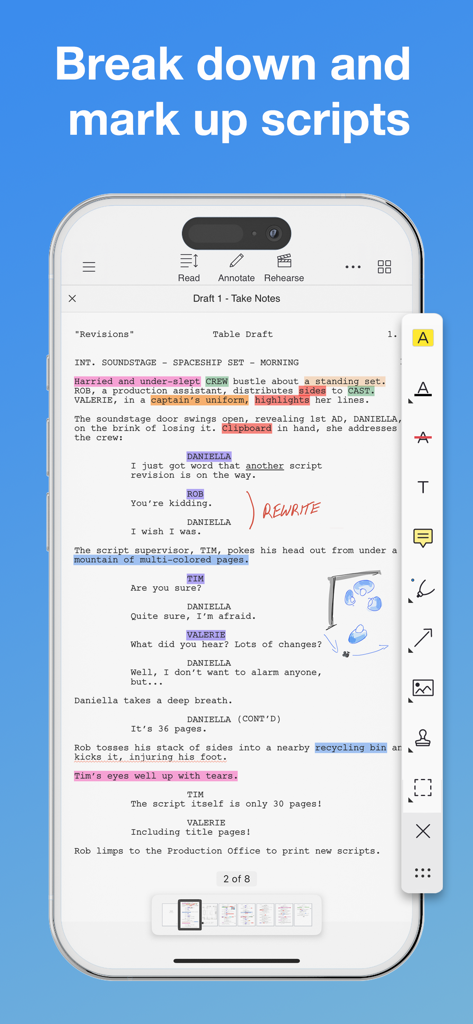
하이라이트와 손글씨 노트가 포함된 대본 주석 작업이 진행 중인 Scriptation 앱 인터페이스를 보여주는 iPhone 화면.

하이라이트와 손글씨 노트가 포함된 대본 주석 작업이 진행 중인 Scriptation 앱 인터페이스를 보여주는 iPhone 화면.

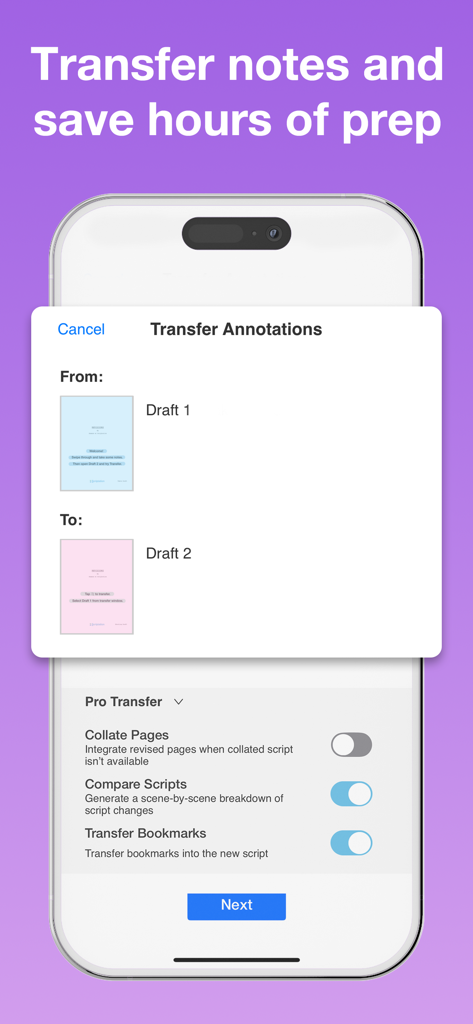
전문가용 전송 옵션과 함께 두 대본 초안 간의 주석 전송 도구를 보여주는 iPhone의 Scriptation 앱 인터페이스.

전문가용 전송 옵션과 함께 두 대본 초안 간의 주석 전송 도구를 보여주는 iPhone의 Scriptation 앱 인터페이스.

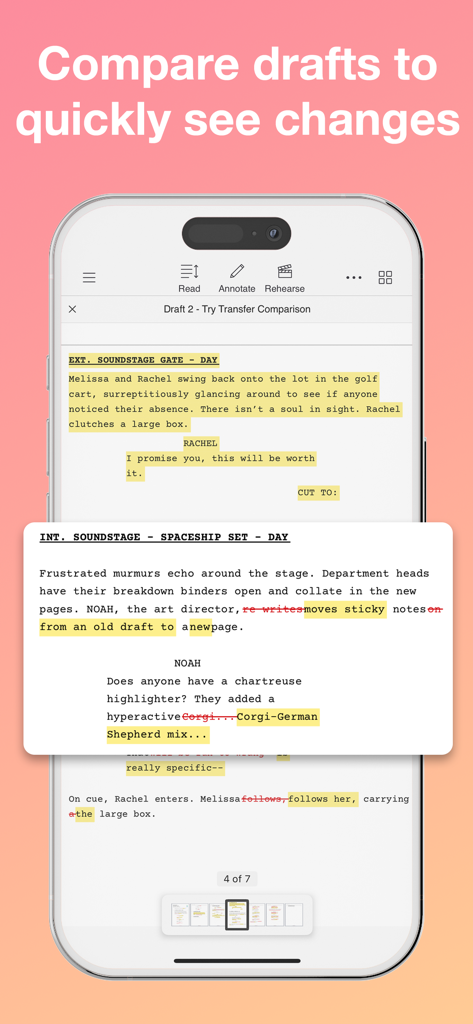
하이라이트된 텍스트와 변경 사항을 나타내는 취소선이 포함된 두 대본 초안의 비교를 보여주는 iPhone의 Scriptation 앱 스크린샷.

하이라이트된 텍스트와 변경 사항을 나타내는 취소선이 포함된 두 대본 초안의 비교를 보여주는 iPhone의 Scriptation 앱 스크린샷.

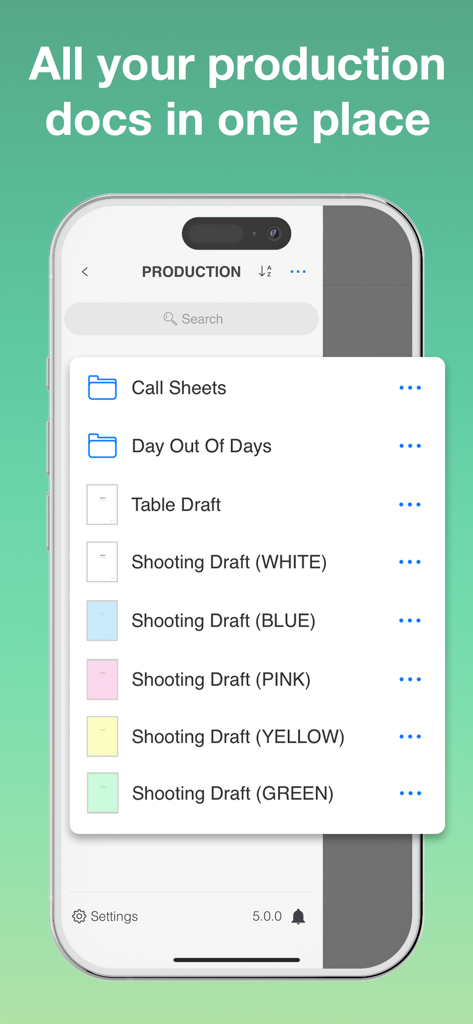
콜시트 폴더와 색상별로 구분된 대본 초안이 포함된 디지털 제작 바인더를 보여주는 Scriptation 앱 화면.

콜시트 폴더와 색상별로 구분된 대본 초안이 포함된 디지털 제작 바인더를 보여주는 Scriptation 앱 화면.

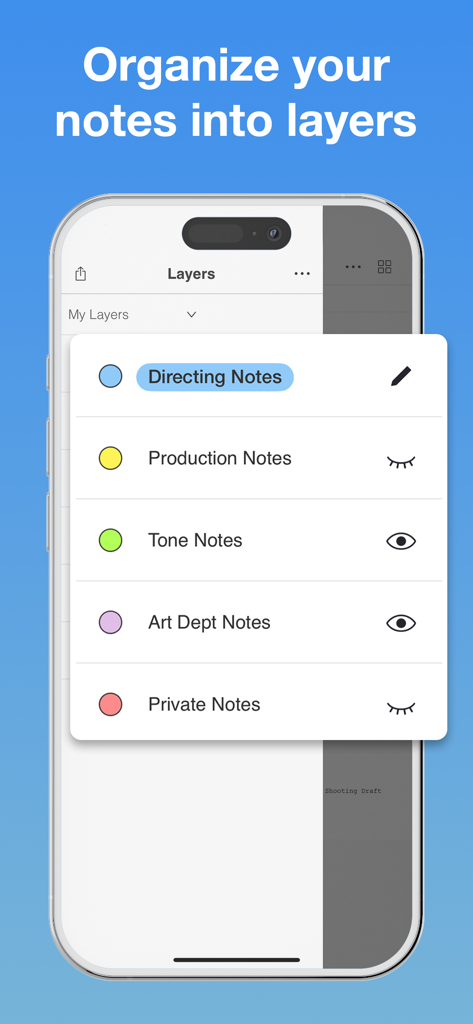
연출 및 제작과 같은 영화 제작 카테고리별로 정리된 노트 레이어를 보여주는 iPhone의 Scriptation 앱.

연출 및 제작과 같은 영화 제작 카테고리별로 정리된 노트 레이어를 보여주는 iPhone의 Scriptation 앱.

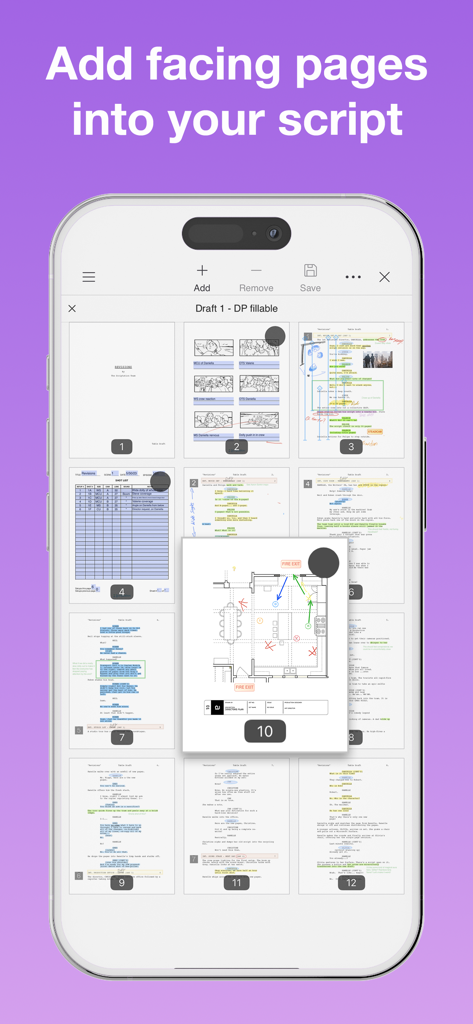
디지털 영화 대본에 평면도와 대면 페이지(facing pages)를 추가하는 모습을 보여주는 Scriptation 앱 인터페이스.

디지털 영화 대본에 평면도와 대면 페이지(facing pages)를 추가하는 모습을 보여주는 Scriptation 앱 인터페이스.

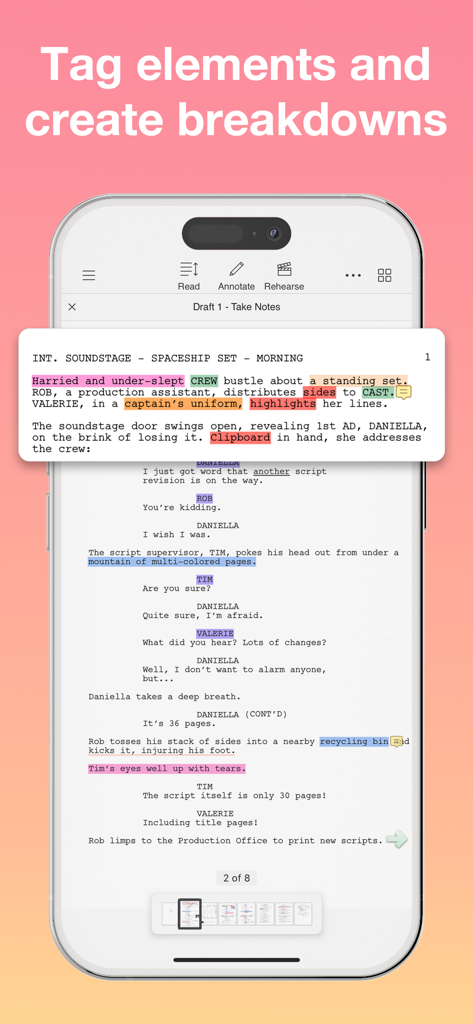
제작 브레이크다운 작성을 위해 사용되는 하이라이트된 대본 요소를 보여주는 iPhone의 Scriptation 앱 인터페이스 스크린샷.

제작 브레이크다운 작성을 위해 사용되는 하이라이트된 대본 요소를 보여주는 iPhone의 Scriptation 앱 인터페이스 스크린샷.

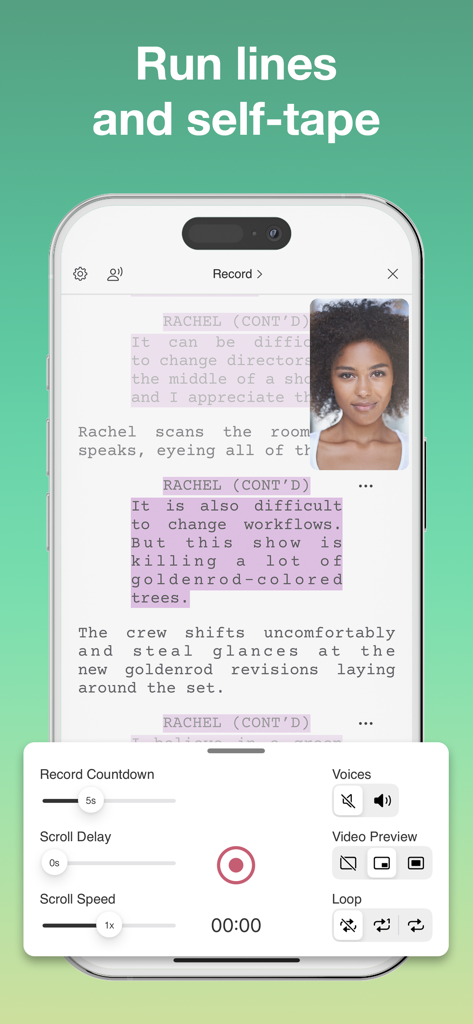
대본과 비디오 미리보기가 포함된 대사 연습 및 셀프 테이프 녹화 기능을 보여주는 iPhone의 Scriptation 앱 인터페이스.

대본과 비디오 미리보기가 포함된 대사 연습 및 셀프 테이프 녹화 기능을 보여주는 iPhone의 Scriptation 앱 인터페이스.

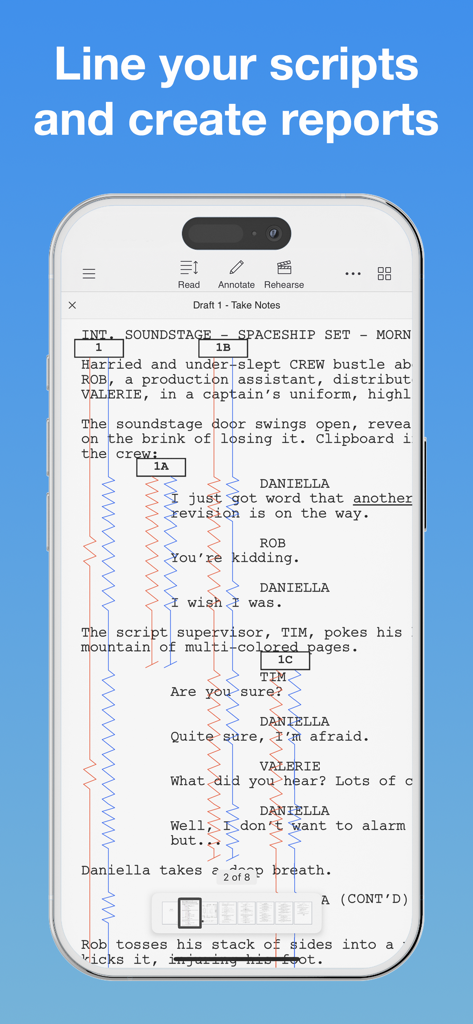
디지털 대본에 빨간색과 파란색 수직선이 포함된 전문 스크립트 수퍼바이저용 라이닝 툴을 보여주는 Scriptation 앱.

디지털 대본에 빨간색과 파란색 수직선이 포함된 전문 스크립트 수퍼바이저용 라이닝 툴을 보여주는 Scriptation 앱.

모든 수정본을 완벽하게 관리하세요

이 앱을 돋보이게 하는 도구, 71K+ 명의 사용자가 선택.

지능형 노트 전송

수동 복사는 이제 그만. 독자적인 알고리즘이 대본 변경 사항을 분석하고 모든 노트를 몇 초 만에 새 초안으로 옮겨줍니다.

📁

디지털 제작 바인더

대본, 콜시트, 일정을 하나의 정리된 허브로 통합하세요. 무거운 바인더 대신 진정한 종이 없는 촬영 현장을 경험하세요.

🎭

각 부서에 최적화된 설계

배우를 위한 대사 자동 하이라이트부터 스크립트 수퍼바이저를 위한 전문가용 라이닝 툴까지, 촬영 현장에서의 역할에 맞춰 최적화되었습니다.

전 세계 사용자들에게 사랑받는 앱

Trusted by 71K+ 명이 이 앱을 사랑합니다.

"

"노트 전송(Note Transfer) 기능은 정말 혁신적입니다. 스크립트 수퍼바이저로서 예전에는 새로운 색상 페이지에 노트를 수동으로 복사하느라 몇 시간을 허비하곤 했습니다. 이제는 몇 초 만에 끝납니다. 촬영 현장에서의 워크플로우가 완전히 효율적으로 바뀌었습니다."

사라 J., 스크립트 수퍼바이저
"

"자동 하이라이트(Auto Highlight) 기능 덕분에 대사 관리가 정말 쉽습니다. 리더 모드와 맞춤형 음성 기능으로 셀프 테이프 오디션 준비가 훨씬 빨라졌어요. 드디어 무거운 물리적 바인더를 완전히 버릴 수 있게 되었습니다."

마커스 L., 배우

앱 소개

에 대해 알아야 할 모든 것 Scriptation: PDF for Film & TV.

설명

"When I mark up my script, I use Scriptation now." - Kathy Bates "Scriptation changed my life. Every time you get a new draft, it transfers all your notes." - Sophia Bush Scriptation, the Emmy® winning PDF annotation app for the film, television, and video industry, is the revolutionary app for production that intelligently transfers your annotations, notes, and markups into new script revisions. NOTE TRANSFER - THE SCRIPTATION DIFFERENCE If you've ever had 30 revision pages on a 40-page script, you know how time consuming it is to copy your notes to new script pages. Scriptation's proprietary note transfer algorithms analyze script changes and transfers every note to its corresponding location in the next draft in literally seconds. ANNOTATE Pen and paper, meet stylus and tablet. Scriptation offers a full set of annotation tools that allow you to highlight text, type notes, add photos, insert stickies, record sound, and more. ORGANIZE You can finally get rid of that 3-ring binder. Scriptation gets you organized by keeping all your scripts, call sheets, schedules, and production documents in a digital production binder. LAYERS Want to separate notes based on meetings? Or share your thoughts with your department? Scriptation's annotation layers makes it easy to navigate between sets of notes. PAGE MAKER Insert facing pages, set plans, photos, diagrams, and more, and transfer them into new script revisions. You can even ditch paper sides by creating your own with all your notes. AUTO HIGHLIGHT That table read script isn't going to highlight itself. Or is it? Built for actors but customized for sound mixers, Scriptation automatically highlights character lines with the tap of a button. READ / REHEARSE / RECORD Elevate your rehearsal process with customizable character voices, line reminders, and scene looping. Use as a read partner or teleprompter for self-tape auditions. Set recording delays for slates and access Auto-Highlight within Reader Mode. TAGGING Break down your script into customizable categories and generate reports. Add scene descriptions, notes, and images to your reports. Export as a formatted PDF or a CSV to integrate the data into other spreadsheets. LINING Professional script supervisor lining tools to streamline your workflow. Easily mark up your script, track coverage, and maintain continuity across scenes and revisions. SCRIPTATION INDUSTRY PRO Scriptation Industry Pro is an auto-renewing subscription service that offers advanced features to optimize the way you work. When you make the jump to Industry Pro, here's what you get across all of your devices. • Pro Note Transfer: Multi-Layer, Collate Pages, Compare Scripts • Tagging: Tag Elements, Generate Reports • Page Maker: Add Facing Pages, Shot Lists • Sides Creator: Generate Daily Sides • Script Supervisor Lining Tools • Layer Upgrades: Show/Hide, Shareable Layers • Reader Upgrades: Read Aloud, Assign Voices, Self-Tape Scriptation Industry Pro has 1 Month and 12 Month subscription options. For offers that include a 14-day free trial, after the free trial period you will be automatically renewed to the current subscription price which you can cancel at any time. Scriptation Industry Pro automatically renews unless auto-renew is turned off at least 24-hours before the end of the current period. Your account will be charged for renewal within 24-hours prior to the end of the current period. Payment will be charged to your iTunes account at confirmation of purchase. You may manage Scriptation Industry Pro subscriptions and turn off auto-renewal by going to your Account Settings after purchase. Any unused portion of a free trial period will be forfeited when you purchase a subscription. Terms of Use: https://scriptation.com/terms Privacy Policy: https://scriptation.com/privacy Facebook: https://facebook.com/scriptationapp Instagram: https://instagram.com/scriptation Twitter: https://twitter.com/scriptation YouTube: https://youtube.com/scriptation

최신 버전

5.1.10

크기

222.1 MB

출시일

2016년 5월 1일

사전 준비 시간을 되찾을 준비가 되셨나요?

수정본 관리를 위해 Scriptation을 신뢰하는 세계 최고의 배우, 감독, 제작진과 함께하세요. 지금 바로 영화 및 TV 제작의 에미상 수상 표준을 다운로드하세요.

다운로드: App Store