VideoCopy: Download manager

VideoCopy: Download manager

다운로드: App Store
Spark by MWM logo
로고: VideoCopy: Download manager

VideoCopy: 다운로드 관리자 — 올인원 AI 비디오 툴킷

클라우드에서 다운로드하고, AI 자막을 몇 초 만에 생성하고, 백그라운드에서 미디어를 재생하세요. 이동 중에도 콘텐츠를 만들고 소비할 수 있는 완벽한 미디어 허브입니다.

개발사

Softnoesis

카테고리

Music

다운로드

3M+

사용자 평점

4.5/5

총 평가 수

23K+

지원 언어

1

올인원 스튜디오

이 인터페이스를 사용하는 3M+ 명의 사용자.

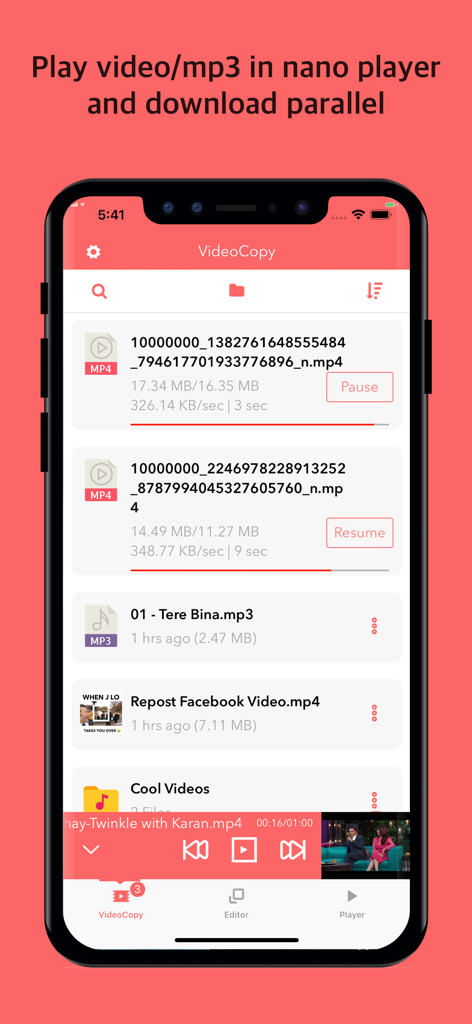
VideoCopy 앱 인터페이스에 여러 파일이 동시에 다운로드되는 모습과 하단에 나노 비디오 플레이어가 표시됩니다.

VideoCopy 앱 인터페이스에 여러 파일이 동시에 다운로드되는 모습과 하단에 나노 비디오 플레이어가 표시됩니다.

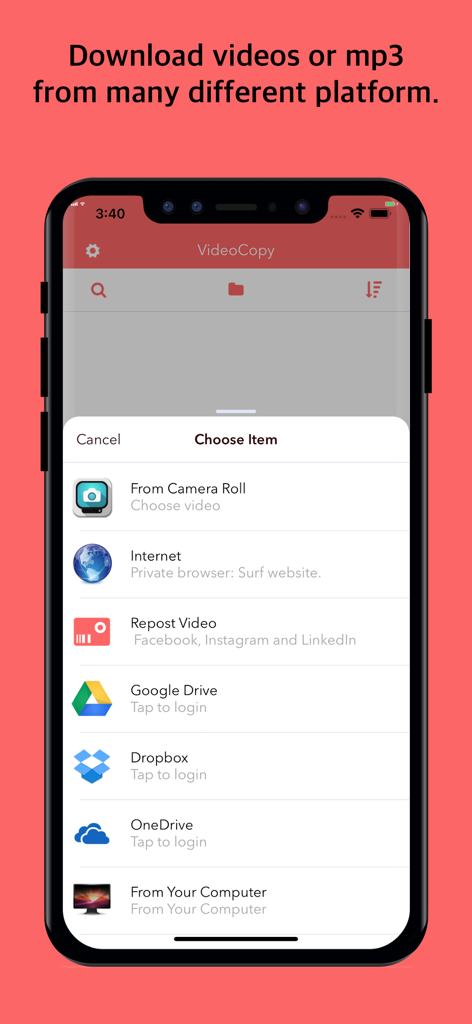
VideoCopy 앱 인터페이스에 소셜 미디어 플랫폼, 클라우드 저장소 및 컴퓨터에서 미디어를 다운로드하거나 가져올 수 있는 여러 옵션이 표시됩니다.

VideoCopy 앱 인터페이스에 소셜 미디어 플랫폼, 클라우드 저장소 및 컴퓨터에서 미디어를 다운로드하거나 가져올 수 있는 여러 옵션이 표시됩니다.

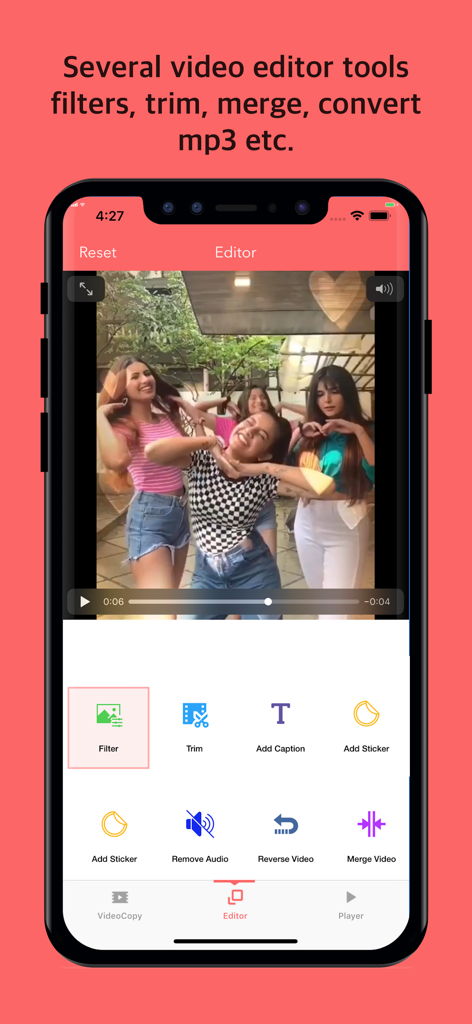
VideoCopy 앱 인터페이스에 필터, 자르기, 자막 추가 등 비디오 편집 도구가 표시됩니다.

VideoCopy 앱 인터페이스에 필터, 자르기, 자막 추가 등 비디오 편집 도구가 표시됩니다.

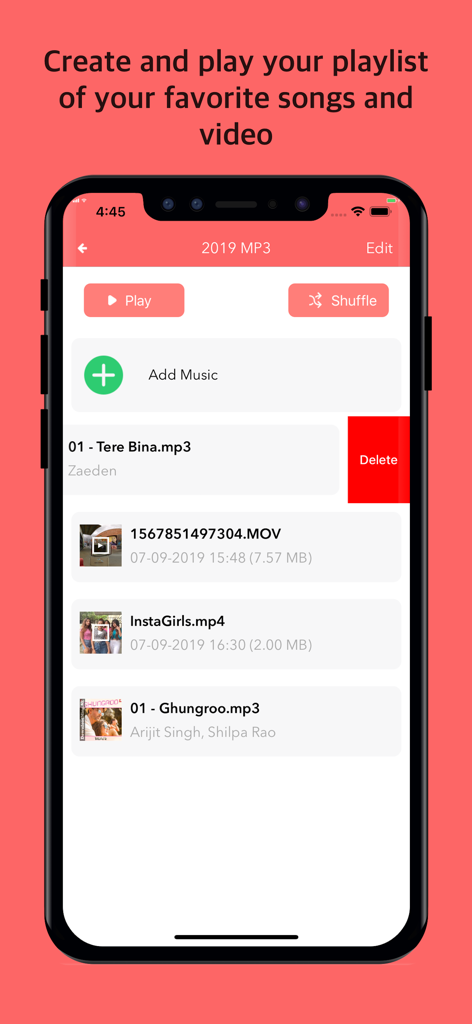
VideoCopy 앱 인터페이스에 음악 및 비디오 파일이 포함된 미디어 재생 목록과 재생 컨트롤이 표시됩니다.

VideoCopy 앱 인터페이스에 음악 및 비디오 파일이 포함된 미디어 재생 목록과 재생 컨트롤이 표시됩니다.

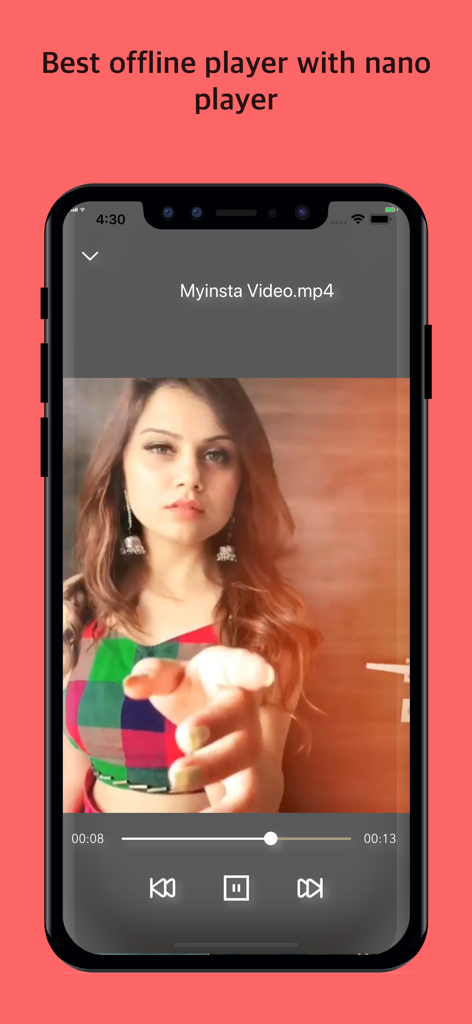
VideoCopy 앱에 스마트폰 화면에서 재생 컨트롤이 있는 오프라인 비디오 플레이어 인터페이스가 표시됩니다.

VideoCopy 앱에 스마트폰 화면에서 재생 컨트롤이 있는 오프라인 비디오 플레이어 인터페이스가 표시됩니다.

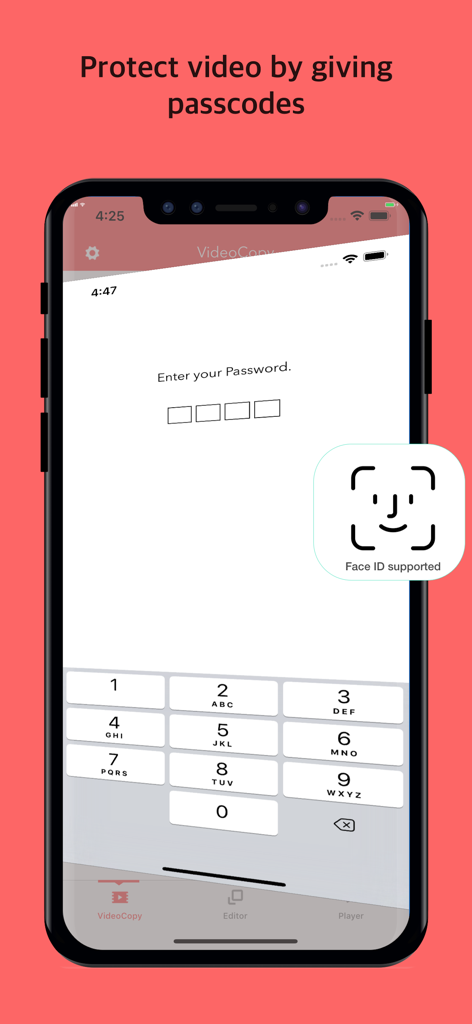
VideoCopy 앱의 비디오에 대한 암호 및 Face ID 보호 기능을 보여주는 스마트폰 화면입니다.

VideoCopy 앱의 비디오에 대한 암호 및 Face ID 보호 기능을 보여주는 스마트폰 화면입니다.

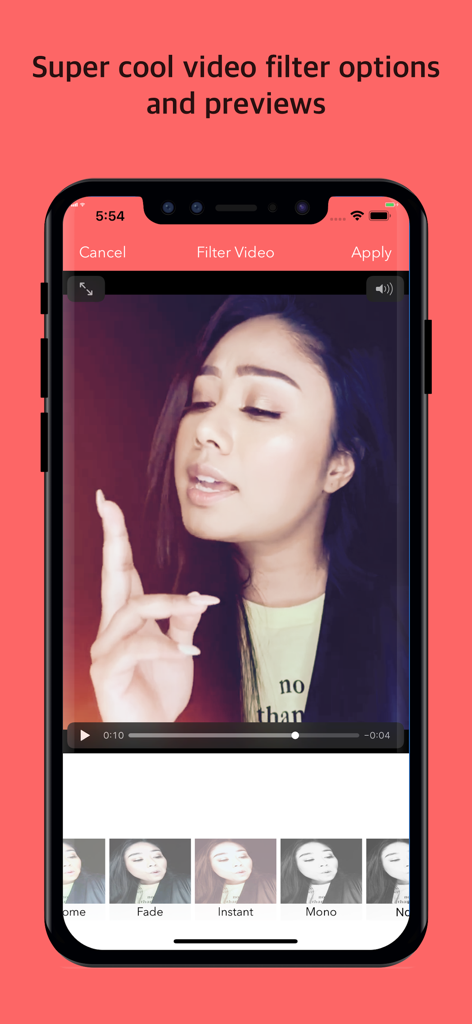
VideoCopy 앱 인터페이스에 편집을 위한 다양한 비디오 필터 및 미리 보기가 표시됩니다.

VideoCopy 앱 인터페이스에 편집을 위한 다양한 비디오 필터 및 미리 보기가 표시됩니다.

미디어를 마스터하는 데 필요한 모든 것

이 앱을 돋보이게 하는 도구, 3M+ 명의 사용자가 선택.

📥

원활한 클라우드 및 소셜 가져오기

Google Drive, Dropbox 또는 소셜 미디어에서 동영상과 노래를 개인 로컬 라이브러리로 즉시 가져옵니다.

🎙️

AI 기반 자동 자막

최첨단 AI로 즉시 생성되는 100개 이상의 언어로 된 바이럴 가라오케 스타일 자막으로 참여도를 높이세요.

🎧

프로 플레이어 및 백그라운드 모드

멀티태스킹 중이거나 화면이 잠긴 상태에서도 음악이나 동영상을 감상하세요. 비싼 가격표 없이 프리미엄 오프라인 재생을 즐기세요.

전 세계 사용자들에게 사랑받는 앱

Trusted by 3M+ 명이 이 앱을 사랑합니다.

"

"VideoCopy는 제 소셜 미디어 워크플로우에 있어 절대적인 게임 체인저입니다. AI 자동 자막 기능은 놀랍도록 정확하며 가라오케 스타일은 제 TikTok을 매우 전문적으로 보이게 합니다. Dropbox에서 동영상을 가져와 편집하고 스티커를 모두 한 앱에서 추가할 수 있다는 점이 마음에 듭니다. 이 앱 덕분에 세 가지 다른 구독 서비스를 대체할 수 있었습니다!"

Chloe M., 콘텐츠 전략가
"

"여행하는 모든 사람에게 완벽한 앱입니다. 모든 비디오 강의와 음악을 OneDrive에서 다운로드하여 비행 중 오프라인으로 시청합니다. 백그라운드 재생 기능은 멀티태스킹 중에 재생 목록을 들을 수 있게 해주는 필수 기능입니다. iOS에서 사용해 본 파일 관리자 중 가장 안정적입니다."

David L., 대학원생

앱 소개

에 대해 알아야 할 모든 것 VideoCopy: Download manager.

설명

We have added feature which allow user to download your own video/songs/mp3 from Google Drive, Dropbox, and OneDrive. AI powered auto caption video with support 100+ languages. The awesome player which helps you play item on nano screen and background mode as well. Edit your video using several tools like filters, trimming, adding caption & sticker, convert to mp3 and many more. Create the best video to share on Facebook, Instagram, Inshots, Youtube, likee app, Dubsmash, etc. Downloader|Saver: - Allow importing video and songs from Google Drive, Dropbox, and Onedrive - Wifi sharing also allows from computer to iPhone - Repost video from Instagram, Facebook, LinkedIn, TikTok AI powered Auto Caption Video: - Upload your own video - Choose your needs caption style - It will upload to server and generate karaoke style captioned video - It support all world major languages in auto caption. Playlist: - Create any number of playlist - Add any number of items of each playlist - Play any selected song - Allow playing by the shuffle - Drag the video or song to any position Awesome music player: - Can play both video, m4a, and mp3 songs - Nano player - Seek music to any time - Next and previous track play - Play music in the background  mode and on the lock screen as well Video editor tools: - Apply different video filters - Trim video - Add sticker - Add caption - Reverse video - Merge video - Remove audio from video - Convert to Audio M4A File Manager: - Create your own subfolders - Add video from any third-party application like Whatsapp, Telegram, etc. - Rename, Delete, Share and Save files For unlocking all features and content, Premium membership offers an auto-renewable subscription. 3 months Premium: subscription renewal time period is 3 month Yearly Premium: subscription renewal time period is one year Lifetime Premium: This is a one-time charge and never need to pay again. Content provided during subscription period: - No folder or file download limitation - No advertisement - All video editing tool allowed to use End of trial and subscription renewal: * Payment will be charged to iTunes Account at confirmation of purchase * The price will be differed from country to country according to the Price Matrix. * Subscription automatically renews unless auto-renew is turned off at least 24-hours before the end of the current period. * Account will be charged for renewal within 24-hours prior to the end of the current period, and identify the cost of the renewal. * Subscriptions may be managed through https://support.apple.com/en-us/HT202039 by the user and auto-renewal may be turned off through the above link after purchase. * Any unused portion of a free trial period, if offered, will be forfeited when the user purchases a subscription to that publication, where applicable. Terms of Service & Privacy Policy (EULA): https://softnoesis.com/apps/videocopy/terms_privacy_policy.php For any query, drop mail us on mayihelpu4app@gmail.com

최신 버전

1.44

크기

36.6 MB

출시일

2019년 9월 9일

지금 바로 크리에이터 역량을 강화하세요

몇 초 만에 다운로드, 편집, AI 자막 추가. 3백만 명 이상의 파워 유저와 함께하여 iPhone을 전문가용 미디어 스튜디오로 바꿔보세요.

다운로드: App Store
FAQ

자주 묻는 질문

에 대해 알아야 할 모든 것 VideoCopy: Download manager

Can VideoCopy download content from cloud storage services like Google Drive?

예, VideoCopy를 사용하면 Google Drive, Dropbox, OneDrive와 같은 클라우드 서비스에서 동영상과 노래를 다운로드하고 가져올 수 있습니다. 또한 컴퓨터에서 iPhone으로 Wi-Fi 공유도 지원합니다.

Does VideoCopy provide AI-powered auto captioning for videos?

예, VideoCopy에는 AI 기반 자동 자막 도구가 있습니다. 동영상을 서버에 업로드하여 100개 이상의 주요 세계 언어를 지원하는 노래방 스타일 자막 동영상을 생성합니다.

What video editing features are available in VideoCopy?

VideoCopy는 필터, 자르기, 자막 추가, 스티커, 동영상 뒤집기, 동영상 병합, 오디오 제거, M4A 오디오로 동영상 변환 등 다양한 동영상 편집 도구를 제공합니다.

Does VideoCopy support background playback and a nano player for media?

예, VideoCopy에는 동영상, M4A, MP3 파일을 지원하는 다용도 플레이어가 포함되어 있습니다. 나노 플레이어, 백그라운드 재생 모드, 잠금 화면 컨트롤을 제공하여 지속적인 청취가 가능합니다.

Can I create and manage playlists within the VideoCopy app?

예, VideoCopy를 사용하면 여러 재생 목록을 만들고 각 재생 목록에 원하는 만큼 항목을 추가할 수 있습니다. 선택한 노래를 재생하고, 섞고, 재생 목록 내의 동영상이나 노래 순서를 다시 지정할 수 있습니다.

Does VideoCopy have a built-in file manager for organizing content?

예, VideoCopy에는 하위 폴더를 만들고, WhatsApp 및 Telegram과 같은 타사 애플리케이션에서 동영상을 추가하고, 파일을 이름 바꾸고, 삭제하고, 공유하고, 저장할 수 있는 파일 관리자가 포함되어 있습니다.

Does VideoCopy offer security features to protect videos?

예, VideoCopy는 동영상에 대한 암호 보호 기능을 포함한 보안 기능을 제공합니다. 또한 향상된 생체 인식 보안을 위해 Face ID를 지원합니다.

What are the benefits of VideoCopy Premium membership?

VideoCopy는 3개월, 연간, 평생 옵션이 있는 프리미엄 멤버십을 제공합니다. 프리미엄은 다운로드 제한 및 광고를 제거하고 모든 동영상 편집 도구를 잠금 해제합니다.

How do VideoCopy subscriptions and renewals work?

VideoCopy Premium의 구독 결제는 구매 시 iTunes 계정으로 청구됩니다. 현재 기간이 종료되기 최소 24시간 전에 자동 갱신을 해제하지 않으면 구독이 자동으로 갱신됩니다.