Yandex Navi – navigation, maps

Yandex Navi – navigation, maps

다운로드: App Store다운로드: Google Play
Spark by MWM logo
로고: Yandex Navi – navigation, maps

Yandex Navi – 글로벌 운전자를 위한 스마트 내비게이션

CIS, 터키 및 그 외 지역을 초현지화된 정확성으로 탐색하세요. 교통 체증을 피하고, 여러 경유지 경로를 최적화하며, 오프라인 지도에 접근하세요. 이 모든 것을 정확성을 중요하게 생각하는 재외 거주자, 여행자 및 물류 전문가를 위해 설계된 하나의 앱에서 이용할 수 있습니다.

다운로드: App Store

개발사

DIRECT CURSUS COMPUTER SYSTEMS TRADING LLC

카테고리

Navigation

다운로드

23M+

사용자 평점

4.7/5

총 평가 수

1M+

지원 언어

11

모든 회전에서의 정확성

이 인터페이스를 사용하는 23M+ 명의 사용자.

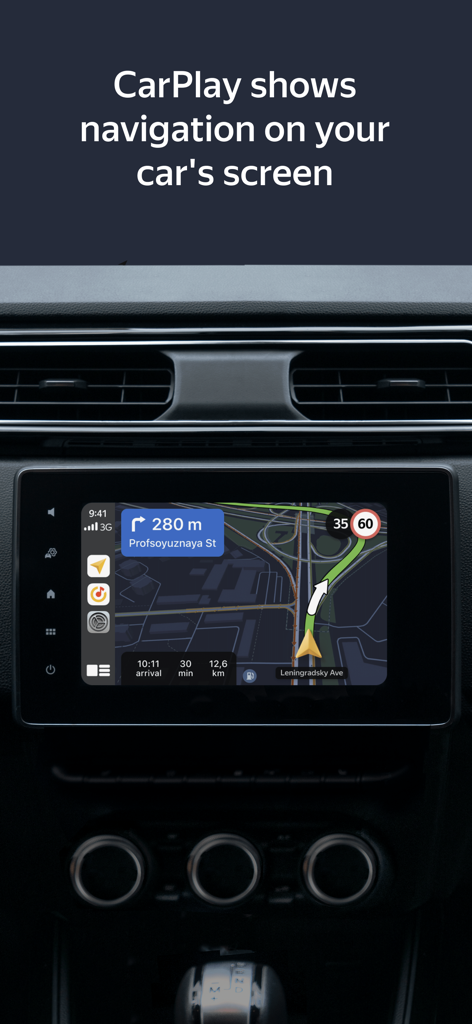
Yandex Navi 내비게이션 지도가 CarPlay를 통해 차량 대시보드 화면에 표시됩니다.

Yandex Navi 내비게이션 지도가 CarPlay를 통해 차량 대시보드 화면에 표시됩니다.

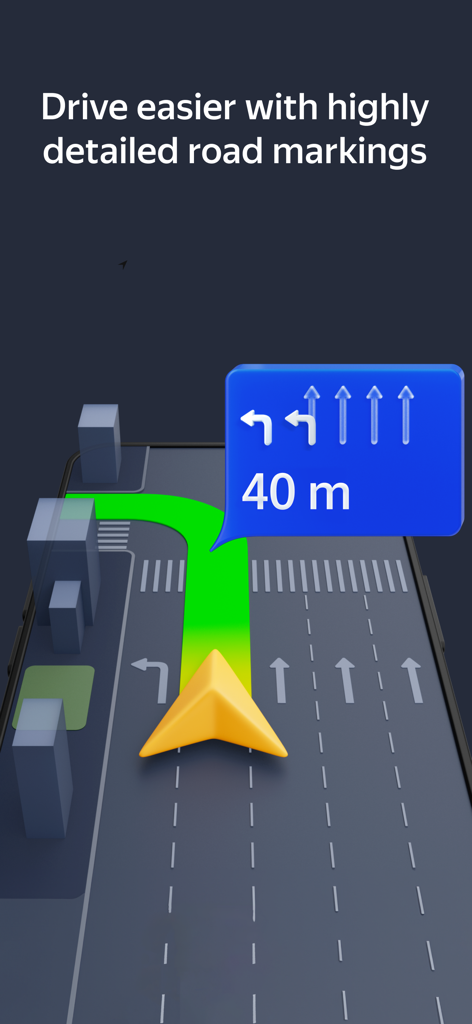
회전을 나타내는 파란색 표시와 함께 상세한 도로 표시 및 차선 안내를 보여주는 3D 내비게이션 인터페이스.

회전을 나타내는 파란색 표시와 함께 상세한 도로 표시 및 차선 안내를 보여주는 3D 내비게이션 인터페이스.

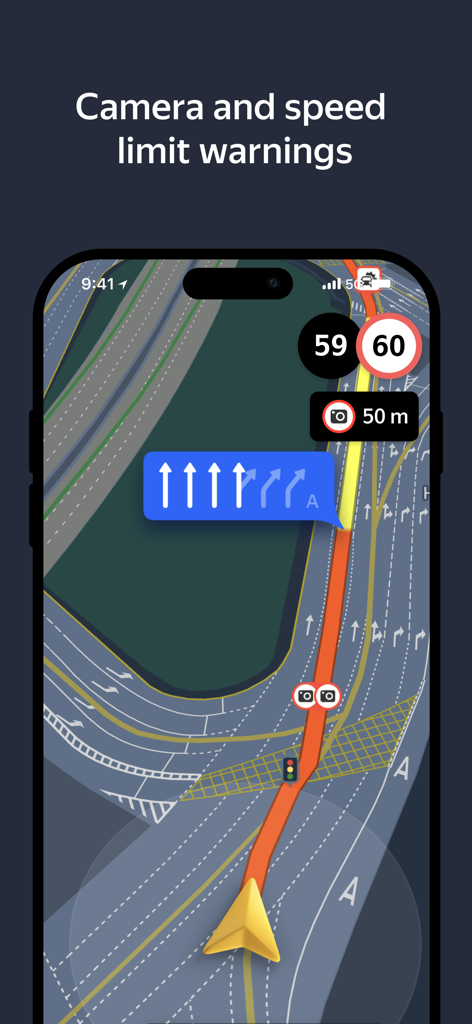
Yandex Navi 내비게이션 인터페이스에 실시간 속도 제한 및 과속 카메라 경고가 표시됩니다.

Yandex Navi 내비게이션 인터페이스에 실시간 속도 제한 및 과속 카메라 경고가 표시됩니다.

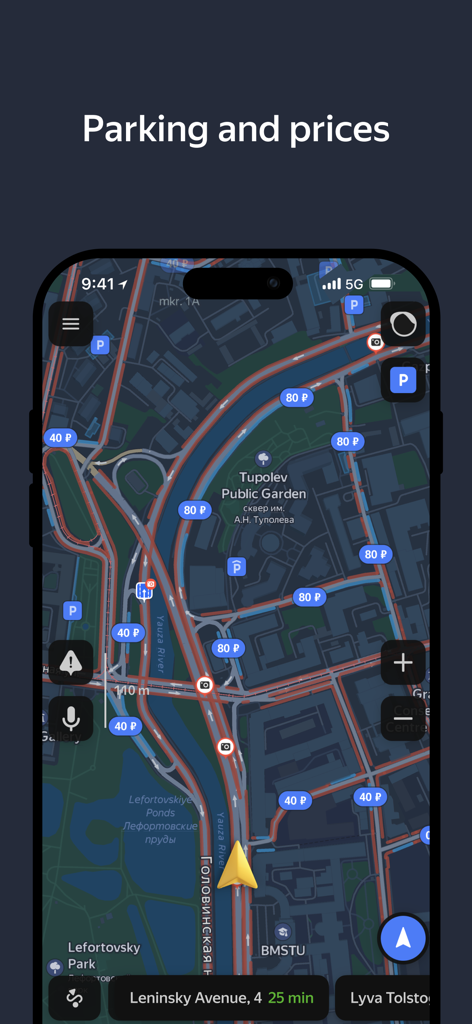
Yandex Navi 앱 인터페이스에 도시 지도상의 주차 공간 및 요금이 표시됩니다.

Yandex Navi 앱 인터페이스에 도시 지도상의 주차 공간 및 요금이 표시됩니다.

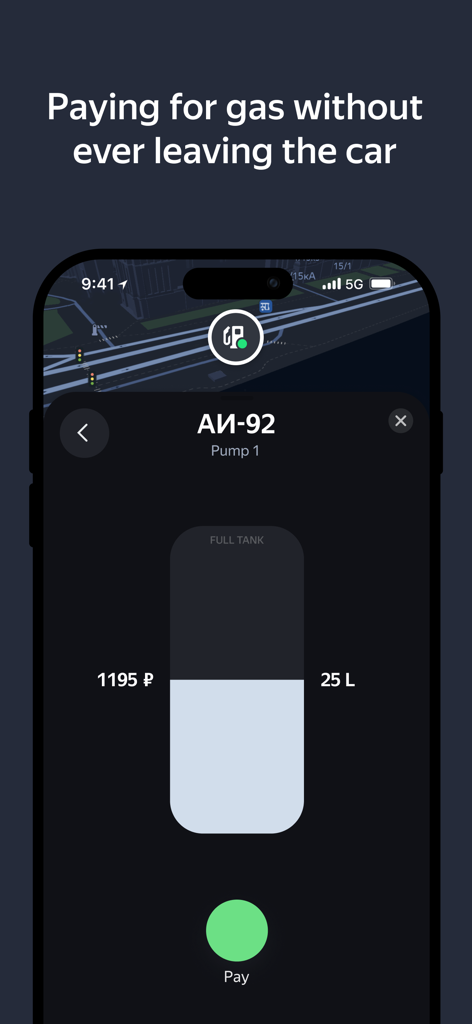
Yandex Navi 스크린샷에 앱 내에서 주유비를 결제하는 기능이 표시됩니다.

Yandex Navi 스크린샷에 앱 내에서 주유비를 결제하는 기능이 표시됩니다.

Yandex Navi의 내비게이션 인터페이스에 고속도로 경로가 다크 모드로 표시됩니다.

Yandex Navi의 내비게이션 인터페이스에 고속도로 경로가 다크 모드로 표시됩니다.

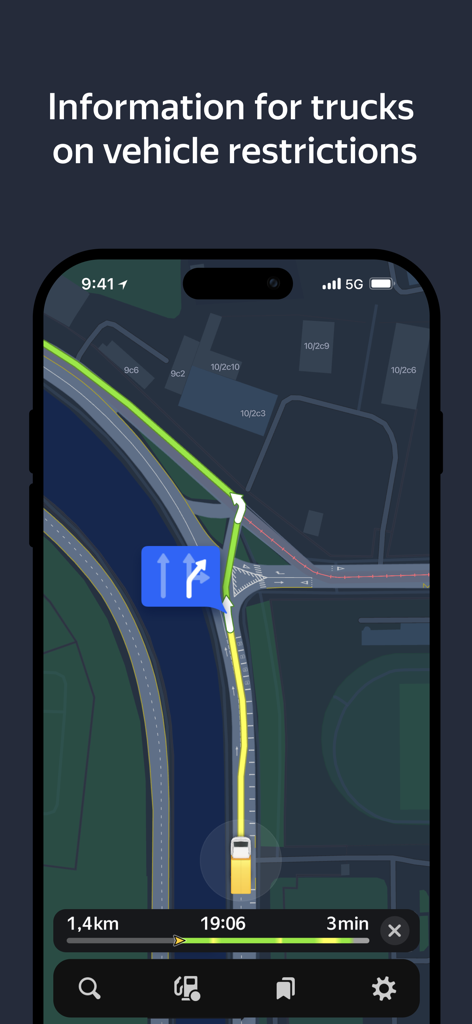
Yandex Navi 인터페이스에 트럭 내비게이션 및 차량 제한 사항이 표시됩니다.

Yandex Navi 인터페이스에 트럭 내비게이션 및 차량 제한 사항이 표시됩니다.

정확하게 세상을 탐색하세요

이 앱을 돋보이게 하는 도구, 23M+ 명의 사용자가 선택.

🌍

원활한 글로벌 이동성

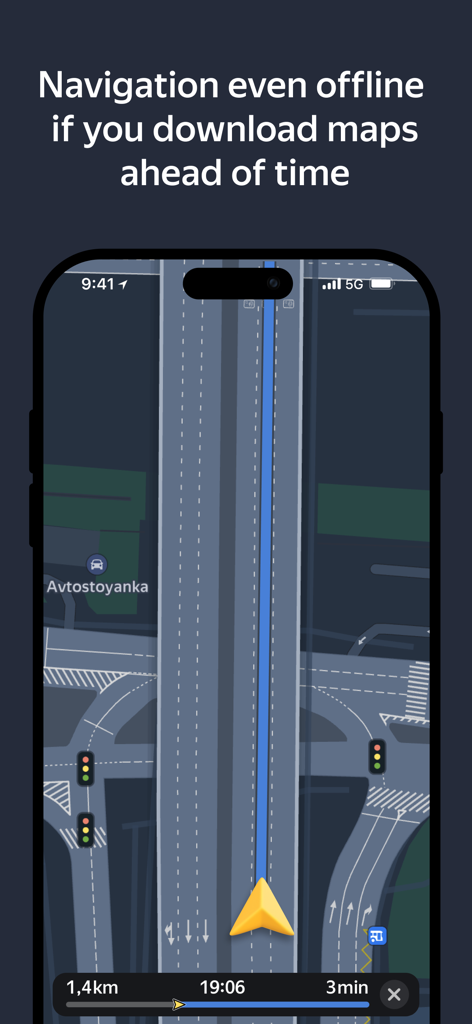
고정밀 다운로드 가능한 오프라인 지도를 사용하여 높은 로밍 요금 없이 CIS 및 MENA 지역의 낯선 도시를 탐색하세요.

🚛

스마트 물류 최적화

최대 10개의 경유지로 복잡한 경로를 계획하거나 트럭 전용 설정을 하여 무게 및 크기 제한을 손쉽게 우회하세요.

종합적인 여정 관리

앱 내에서 직접 주유소 또는 주차장을 찾아 결제하여 운전 경험을 간소화하고 도로에 집중할 수 있습니다.

전 세계 사용자들에게 사랑받는 앱

Trusted by 23M+ 명이 이 앱을 사랑합니다.

"

"뉴욕에 거주하는 재외 거주자로서, Yandex Navi는 고국을 방문하거나 이스탄불 출장 시 절대적으로 필수품입니다. 오프라인 지도는 로밍 요금을 피하는 데 큰 도움이 되며, 다중 경유지 최적화 덕분에 바쁜 일정 관리가 가능합니다. 건물 입구 및 현지 교통 상황에 대한 다른 글로벌 앱보다 훨씬 더 정확합니다."

Aleksei Volkov
"

"특수 트럭 전용 경로 안내와 비포장도로 회피 기능은 제 국제 물류 업무에 혁신적입니다. 화면 전환 없이 앱을 통해 직접 주유 및 주차 요금을 지불할 수 있다는 점이 좋습니다. 또한, CarPlay 지원이 완벽하여 복잡한 교차로에서도 눈을 도로에 고정한 채 명확한 음성 알림을 받을 수 있습니다."

Selin Kaya

앱 소개

에 대해 알아야 할 모든 것 Yandex Navi – navigation, maps.

설명

Yandex Navigator is the perfect companion for drivers. It helps you find your way around the city with fast, convenient directions that avoid traffic jams and road closures. If road conditions change, Yandex Navigator adjusts your route on the fly. No surprises on the road Get detailed directions as you drive and find out about road conditions ahead of time. The app warns you about traffic, speed limits, cameras, and road closures. It also lets you know when there’s an upcoming turn or complex intersection. And since it does that using voice notifications, you can keep your eyes on the road. Get multi-stop directions There’s no need to waste time planning the most efficient routes if you need to make multiple stops along the way. Let Yandex Navigator do the work for you. Plan a route with 4-10 stops and tap "Optimize." Yandex Navigator will reorder them to make the route as quick and convenient as possible. Get your bearings anywhere No matter where you are, Yandex Navigator shows you how to get to where you need to go. Search for restaurants, cafes, bars, shops, gas stations, pharmacies, stadiums, law firms, or anything else, navigating there quickly and stress-free. Never get lost offline Find places and plan routes even without a connection once you’ve downloaded offline maps for your city or region. Pay for parking Look for convenient parking spots near your destination. And since you can pay for them right from Yandex Navigator, you don’t need other apps. Pay for fuel Choose your fuel type, select how much you need, and pay for it without leaving the app. Just tap the fuel tank button, and you'll see all nearby gas stations along with their available payment options. Steer clear of poor road conditions Turn on "Avoid bad and unpaved roads" in the route parameters or app settings. Yandex Navigator will guide you along smooth, paved roads wherever possible. Plan your trips ahead of time Adjust departure date and time settings to see how long your route is in advance. For example, you can plan how to get to the airport the evening before your flight by setting the departure date for the next day. Yandex Navigator shows how long it usually takes to drive that route at that time, taking into account the usual traffic conditions. You'll definitely get there on schedule. Get directions tailored to your vehicle If you're driving a truck or other freight vehicle, select "Add truck" in the app settings and describe your vehicle's characteristics. Yandex Navigator will get directions that account for any weight, size, or emission limitations. Monitor traffic in real time Yandex Navigator updates your route details when traffic conditions change. You can also add widgets to your phone’s home screen that show traffic levels for your favorite routes so you can keep track of them even without opening the app. See your route laid out in front of you Yandex Navigator is available for CarPlay, making it easy to follow your route on the screen in front of you without getting distracted by your phone. To make that work, you'll need a Yandex Plus subscription. The app works in Russia, Abkhazia, Azerbaijan, Armenia, Belarus, Georgia, Kazakhstan, Kyrgyzstan, Moldova, Tajikistan, Turkey, Uzbekistan. Terms of Use: apple.com/legal/itunes/appstore/dev/stdeula Privacy policy: yandex.com/legal/confidential

최신 버전

27.1.2

크기

725.6 MB

출시일

2011년 12월 20일

전 세계 어디에서든 현지인처럼 운전하세요

자신감 있게 길을 찾는 2,300만 운전자의 대열에 합류하세요. Yandex Navi를 다운로드하여 정확한 오프라인 지도, 다중 경유지 최적화, 차량에 맞는 전문적인 경로 안내를 경험하세요.

다운로드: App Store다운로드: Google Play
FAQ

자주 묻는 질문

에 대해 알아야 할 모든 것 Yandex Navi – navigation, maps

Yandex Navi – 내비게이션, 지도는 무엇인가요?

Yandex Navi는 빠른 길 안내, 교통 체증 회피, 실시간 경로 조정을 제공하는 내비게이션 앱입니다. 또한 오프라인 지도, 다중 경유지 계획, 주차 및 주유 요금의 인앱 결제와 같은 기능도 제공합니다.

Yandex Navi는 실시간 교통 정보를 제공하나요?

네, Yandex Navi는 실시간 교통 상황을 모니터링하고 변화하는 조건에 맞게 경로를 조정합니다. 또한 사용자가 즐겨 찾는 경로의 교통량을 홈 화면 위젯으로 추가할 수 있습니다.

Yandex Navi는 도로 상태가 좋지 않은 곳을 피하는 데 도움이 되나요?

네, Yandex Navi에는 "나쁜 도로와 비포장 도로 피하기" 기능이 포함되어 있습니다. 사용자는 경로 매개변수 또는 앱 설정에서 이 설정을 활성화하여 가능한 한 부드럽고 포장된 도로를 따라 안내받을 수 있습니다.

Yandex Navi는 여러 경유지가 있는 경로를 지원하나요?

네, Yandex Navi를 사용하면 4~10개의 경유지가 있는 경로를 계획할 수 있습니다. 앱은 이러한 경유지의 순서를 자동으로 최적화하여 가장 빠르고 편리한 경로를 만듭니다.

Yandex Navi로 주차 요금을 결제할 수 있나요?

네, Yandex Navi를 사용하면 앱 내에서 편리한 주차 공간에 대한 요금을 직접 결제할 수 있습니다. 이 기능을 사용하면 별도의 주차 앱이 필요하지 않습니다.

Yandex Navi로 주유 요금을 결제할 수 있나요?

네, Yandex Navi를 사용하면 앱에서 직접 주유 요금을 결제할 수 있습니다. 연료 종류와 금액을 선택할 수 있으며, 앱은 결제 옵션을 이용할 수 있는 주변 주유소를 표시합니다.

Yandex Navi는 오프라인에서도 작동하나요?

네, Yandex Navi는 오프라인 내비게이션을 지원합니다. 사용자는 인터넷 연결 없이 장소를 찾고 경로를 계획할 수 있도록 미리 도시 또는 지역의 오프라인 지도를 다운로드할 수 있습니다.

Yandex Navi는 트럭 전용 내비게이션을 제공하나요?

네, Yandex Navi는 트럭에 맞는 맞춤형 경로를 제공합니다. 사용자는 앱 설정에 차량의 특성을 추가할 수 있으며, 내비게이션은 무게, 크기 또는 배출 제한을 고려합니다.

Yandex Navi는 속도 제한 및 카메라에 대한 경고를 제공하나요?

네, Yandex Navi는 운전자에게 속도 제한 및 카메라에 대해 경고합니다. 또한 음성을 통해 교통 상황, 도로 폐쇄, 다가오는 회전, 복잡한 교차로에 대한 알림을 제공합니다.

Yandex Navi는 Apple CarPlay와 호환되나요?

네, Yandex Navi는 Apple CarPlay를 지원하여 내비게이션을 차량 화면에 표시할 수 있습니다. 이 기능을 사용하려면 Yandex Plus 구독이 필요합니다.