ZHouse

ZHouse

다운로드: App Store
Spark by MWM logo
로고: ZHouse

ZHouse: 몇 분 만에 전문적인 인테리어 디자인 및 3D 매핑

평면도를 멋진 HD 렌더링으로 변환하고 이동 중에도 전체 CAD 세트를 내보내세요. 디자이너, 부동산 중개인, 주택 리모델링 업체를 위한 최고의 모바일 툴킷으로, 시각화를 통해 더 빠르게 계약을 성사시킬 수 있습니다.

개발사

Xiamen Zhibenjia Technology Co.,LTD.

카테고리

Productivity

다운로드

3M+

사용자 평점

4.2/5

총 평가 수

6K+

지원 언어

5

작동 중인 디자인

이 인터페이스를 사용하는 3M+ 명의 사용자.

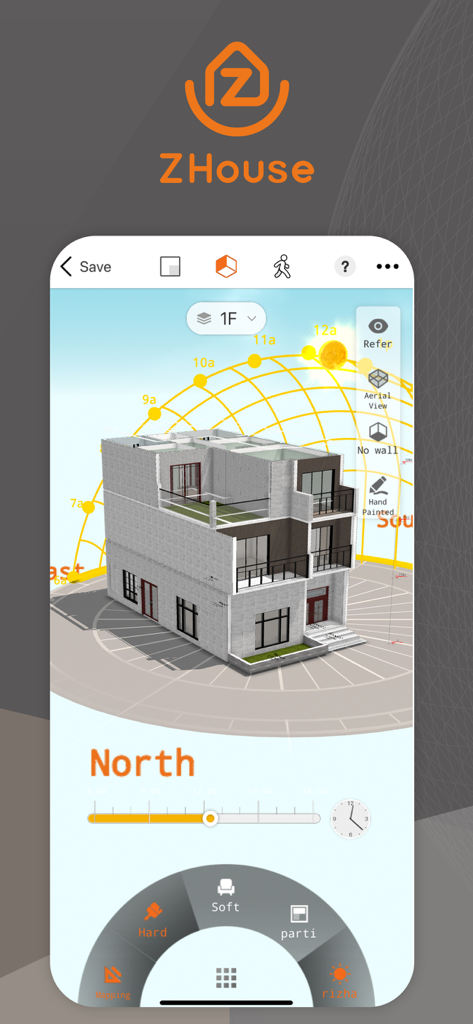
조명 분석을 위한 태양광 경로 시각화가 포함된 3D 건축 주택 모델을 보여주는 ZHouse 앱 인터페이스

조명 분석을 위한 태양광 경로 시각화가 포함된 3D 건축 주택 모델을 보여주는 ZHouse 앱 인터페이스

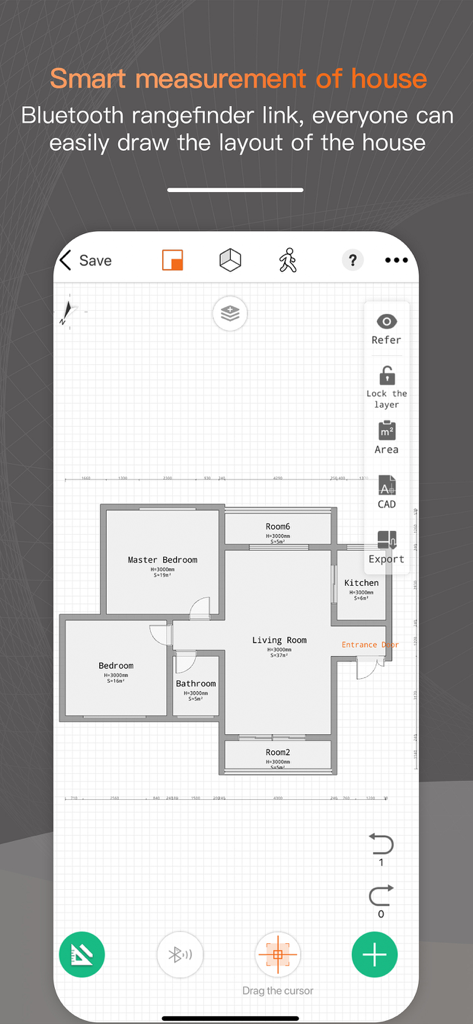
방 라벨 및 디자인 도구가 포함된 2D 주택 평면도 레이아웃을 보여주는 ZHouse 모바일 앱 인터페이스

방 라벨 및 디자인 도구가 포함된 2D 주택 평면도 레이아웃을 보여주는 ZHouse 모바일 앱 인터페이스

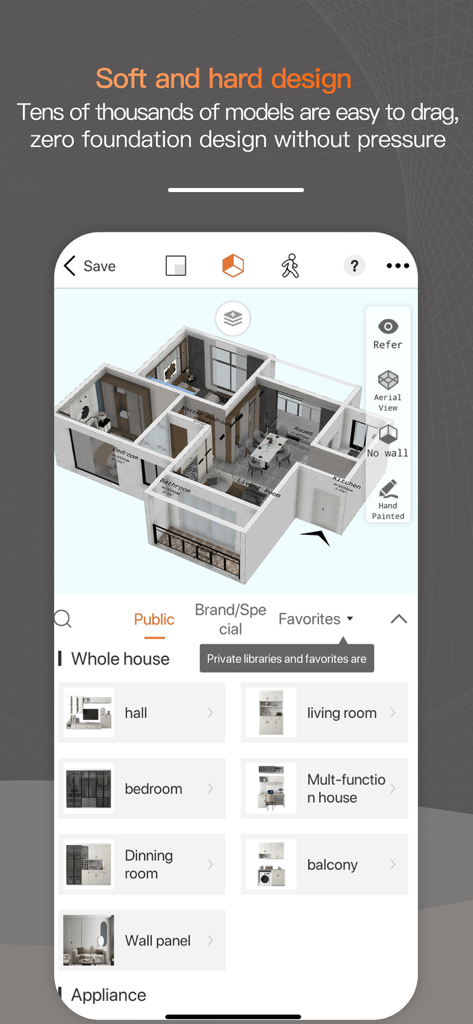
인테리어 디자인을 위한 다양한 방 가구 카테고리가 있는 3D 평면도를 표시하는 ZHouse 앱 인터페이스

인테리어 디자인을 위한 다양한 방 가구 카테고리가 있는 3D 평면도를 표시하는 ZHouse 앱 인터페이스

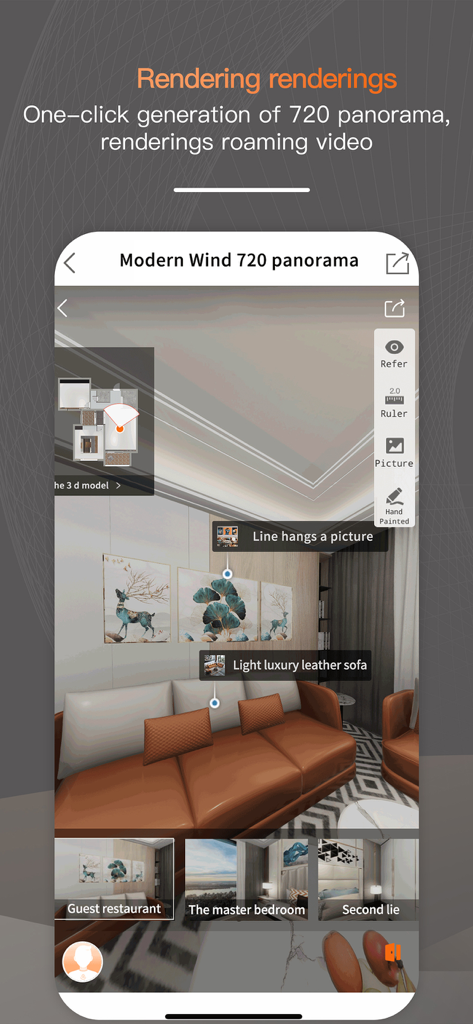
거실의 720도 파노라마 3D 인테리어 디자인 렌더링을 보여주는 ZHouse 모바일 앱 인터페이스

거실의 720도 파노라마 3D 인테리어 디자인 렌더링을 보여주는 ZHouse 모바일 앱 인터페이스

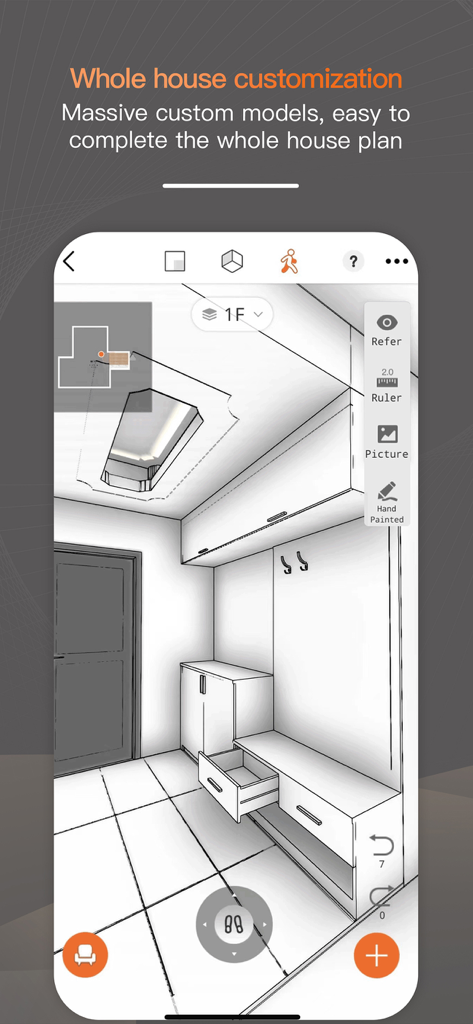
ZHouse 인테리어 디자인 앱에서 맞춤형 가구가 있는 현관의 3D 건축 스케치

ZHouse 인테리어 디자인 앱에서 맞춤형 가구가 있는 현관의 3D 건축 스케치

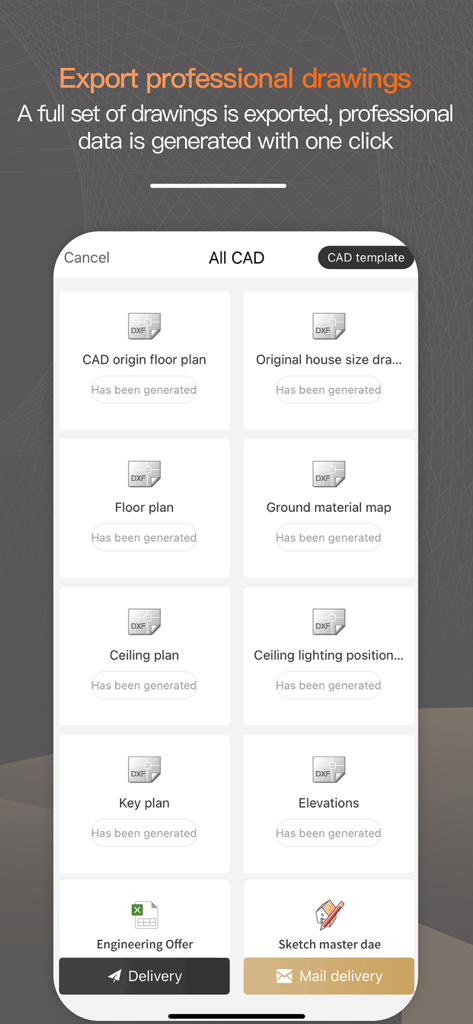
평면도 및 입면도를 포함한 전문 CAD 도면 내보내기 옵션을 표시하는 ZHouse 앱 인터페이스

평면도 및 입면도를 포함한 전문 CAD 도면 내보내기 옵션을 표시하는 ZHouse 앱 인터페이스

휴대폰에서 바로 전문가처럼 디자인하세요

이 앱을 돋보이게 하는 도구, 3M+ 명의 사용자가 선택.

즉각적인 3D 평면도

수동 측정에서 10분 이내에 완전한 3D 레이아웃으로 전환하세요. 게임을 하는 것만큼 쉽지만, 전문가 수준의 정확성을 제공합니다.

📸

사진 같은 720° 뷰

리모델링을 시작하기도 전에 디자인을 미리 둘러볼 수 있는 몰입형 HD 파노라마로 더 많은 계약을 성사시키거나 집 레이아웃을 확정하세요.

📐

원클릭 CAD 내보내기

모바일 컨셉에서 건설로 매끄럽게 전환하세요. 전체 CAD 세트를 즉시 내보내 계약자, 건축가 또는 가구 공급업체와 공유할 수 있습니다.

전 세계 사용자들에게 사랑받는 앱

Trusted by 3M+ 명이 이 앱을 사랑합니다.

"

"ZHouse는 제 작업 흐름을 완전히 바꿔 놓았습니다. 고객의 집에 방문하여 초기 상담이 끝나기도 전에 완벽한 3D 평면도를 준비할 수 있습니다. 아이패드에서 직접 전문 CAD 파일을 내보낼 수 있는 기능은 제 디자인 회사에 혁신적인 변화를 가져왔습니다."

사라 젠킨스, 프리랜서 인테리어 디자이너
"

"빈 집을 파는 것은 어려웠지만, ZHouse는 가상 스테이징을 놀랍도록 쉽게 만듭니다. 720 파노라마 기능을 사용하여 구매자들이 제 휴대폰에서 공간의 잠재력을 시각화하는 데 도움을 줍니다. 게임만큼 직관적이지만, 실제로 계약을 성사시키는 고급 결과물을 제공합니다."

마이클 리베라, 부동산 전문가

리뷰 분석

사용자 리뷰 인사이트.

감정 점수

15%
부정적

요약

This app receives overwhelmingly negative feedback, primarily due to severe concerns about user privacy and aggressive monetization. Numerous users report receiving an influx of spam calls from renovation companies shortly after registering, indicating personal data leakage. Many also express frustration with the app's pricing model, which charges for basic features, hides functionalities behind paywalls, and even applies fees to previously free content. While some users praise the app for its easy learning curve and detailed 2D/3D drawing capabilities, these positive aspects are overshadowed by widespread complaints about technical issues like crashes, bugs, and inaccurate AI recognition, alongside difficulties with registration and account deletion.

주요 테마

Privacy / Data Leakage(27)
Pricing / Hidden Fees(11)
Technical Stability / Bugs(8)
Account Management(5)
Drawing Accuracy / Features(4)
Usability Issues(3)
Learning Curve(2)
AI Recognition Accuracy(1)

앱 소개

에 대해 알아야 할 모든 것 ZHouse.

설명

ZHouse App makes interior design interesting, fast and easy - 1 minute mapping and 10 minutes effect pictures onsite; make floor plans in 2D, 3D and Roaming plans; one-click to export full set CAD; rendering directly via mobile phone; whole house furniture customization etc. Design your sweet home. Whether you are interior designer, or you are a real estate company, or you are doing whole house customized business, or you are house decoration material supplier, or even you are house owner to renovating your sweet home, Joyplay has all you want. 7 years development in China, with over 1 billion downloads and more than 2 million professional users in China, Joyplay makes interior design easier and faster, make your own house design while playing an interesting game! Features: 1. 10 Minutes finish house measuring and sketchup design, plain design transfer to 3D design one second. 2. Interior design easily via mobile phone. Hardware and software design with massive models. 3. Whole house furniture customization, massive models can be selected; material, color and models can be changed easily. 4. Support multi storey villa residence design easily. 5. Special-shaped scheme arbitrarily; Floor, double hollow, ceiling, all in one net. 6. HD real-time rendering 720 panorama, the real effect helps you better show the scheme. Promote rapid transaction of users. 7. One click to export full set CAD plans. 8. Make designs in 2D, 3D and Roaming modes. 9. Easy operation just like playing a game. 【Explanation of automatic renewal】 Benefits: full set of functions (export CAD, fast calculation, rendering of renderings, 720 panorama, roaming video...) 1. Subscription service: Know the commercial version of the apartment type (continuous) (1 month). 2. Subscription price: subject to IAP application information, for example, continuous monthly subscription is 168 yuan per month. 3. Payment: The subscription can be managed by the user, and the user confirms the purchase and pays for it and is credited to the iTunes account. 4. Renewal: Apple iTunes account will be deducted within 24 hours before expiration, and the subscription cycle will be extended by one subscription cycle after the deduction is successful. 5. Cancellation of renewal: To cancel the subscription, please open the iPhone "Settings" --> enter "iTunes Store and App Store" --> click "Apple ID", select "View Apple ID", and enter "Account Settings" page, click "Subscribe", and select "Bunko University Student Edition" to cancel the subscription. This subscription will automatically renew if the subscription is not closed at least 24 hours before the end of the subscription period. 6. Automatic renewal service rules: https://zhx.zbjsaas.com/userProtocol/userAutoRenewRule 7. Privacy Agreement: https://zhx.zbjsaas.com/userProtocol/concealProtocol 8. Member Service Association: https://zhx.zbjsaas.com/userProtocol/memberServiceProtocol If you have any questions, feel free to contact us at: service@joyplanchina.com Mobile phone: + 86 18150100690 Follow us! Youtube:https://www.youtube.com/channel/UCKCCbZqXuGiQzv8-npFT4pQ Facebook: https://www.facebook.com/joyplanheadquarterchina Instgram: https://www.instagram.com/joyplanofficial/

최신 버전

25.12.17

크기

693.9 MB

출시일

2017년 12월 5일

이동 중에도 전문가처럼 디자인을 시작하세요

10분 안에 평면도를 HD 렌더링으로 바꾸세요. 지금 ZHouse를 다운로드하고 어디서든 인테리어 디자인 프로젝트를 현실로 만드세요.

다운로드: App Store
FAQ

자주 묻는 질문

에 대해 알아야 할 모든 것 ZHouse

Does the ZHouse app support 2D and 3D design for floor plans?

예, ZHouse 앱은 2D, 3D 및 Roaming 모드에서 평면도를 만드는 것을 지원합니다. 단순한 디자인을 즉시 3D 디자인으로 변환합니다.

Can I export CAD plans from the ZHouse app?

예, ZHouse 앱은 전문적인 CAD 도면 세트 전체에 대해 원클릭 내보내기를 제공합니다. 여기에는 CAD 원본 평면도, 평면도 및 천장 평면도가 포함됩니다.

Who is the ZHouse app intended for?

ZHouse 앱은 인테리어 디자이너, 부동산 회사, 주택 맞춤형 사업, 자재 공급 업체 및 집을 개조하려는 주택 소유자를 위해 설계되었습니다.

Does the ZHouse app include whole-house furniture customization?

예, ZHouse는 포괄적인 전택 가구 맞춤 설정을 제공합니다. 사용자는 앱 내에서 제공되는 방대한 옵션 중에서 재질, 색상 및 모델을 쉽게 변경할 수 있습니다.

Can the ZHouse app render designs in high definition?

예, ZHouse 앱은 720 파노라마 및 로밍 비디오를 포함한 HD 실시간 렌더링을 지원합니다. 사용자는 사실적인 효과를 위해 모바일 폰을 통해 직접 렌더링합니다.

How do I cancel my ZHouse app subscription?

ZHouse 구독을 취소하려면 iPhone "설정" > "iTunes Store 및 App Store" > "Apple ID" > "계정 설정" > "구독"으로 이동하여 갱신 최소 24시간 전에 관련 구독을 선택하여 취소하십시오.

What features are included with a ZHouse app subscription?

ZHouse 상업용 버전 구독은 전체 기능에 대한 액세스를 제공합니다. 여기에는 CAD 내보내기, 빠른 계산, 렌더링 렌더링, 720 파노라마 및 로밍 비디오 기능이 포함됩니다.

Does the ZHouse app allow for multi-storey house design?

예, ZHouse 앱은 여러 층의 빌라 주택 설계를 쉽게 지원합니다. 또한 임의의 특수 모양 바닥, 이중 공동 및 천장 계획도 처리합니다.

How fast can I measure and design a house plan using the ZHouse app?

ZHouse 앱을 사용하면 10분 안에 주택 측정 및 스케치업 디자인을 완료할 수 있습니다. 동일한 시간 프레임 내에서 현장에서 효과 사진을 생성합니다.