Zip, RAR, 7z File Extractor

Zip, RAR, 7z File Extractor

Download on App Store
Spark by MWM logo
Logo of Zip, RAR, 7z File Extractor

ExZip: The All-in-one File Extractor & Manager for Mobile Pros

Effortlessly decompress any format, secure your data with password protection, and manage your entire workflow on the go—no laptop required.

Publisher

FANGZHOU INTERACTIVE TECHNOLOGY CO., LIMITED

Category

Productivity

Downloads

294K+

User Rating

4.7/5

Total Ratings

700

Locales

21

Efficiency in Action

Discover the interface used by 294K+ users.
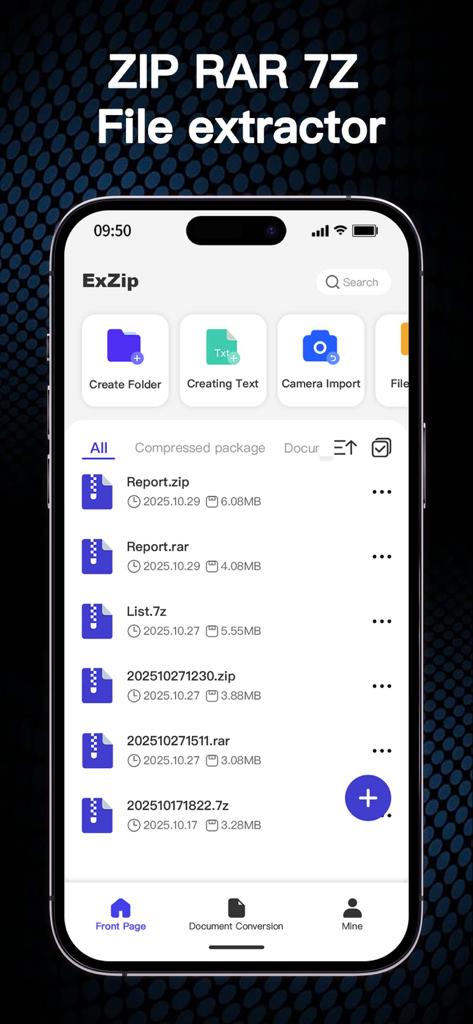
ExZip mobile app main screen showing a list of ZIP RAR and 7Z files

ExZip mobile app main screen showing a list of ZIP RAR and 7Z files

Interface of the ExZip app on an iPhone showing a list of ZIP RAR and 7Z files with management options

Interface of the ExZip app on an iPhone showing a list of ZIP RAR and 7Z files with management options

A mobile interface showing a password entry prompt for an encrypted ZIP RAR or 7Z file

A mobile interface showing a password entry prompt for an encrypted ZIP RAR or 7Z file

ExZip app screenshot showing batch file management features with options to compress and organize files

ExZip app screenshot showing batch file management features with options to compress and organize files

iPhone screen showing the ExZip app video player playing a soccer match with the heading Supports multimedia playback

iPhone screen showing the ExZip app video player playing a soccer match with the heading Supports multimedia playback

ExZip app showing a PDF preview of an annual summary report

ExZip app showing a PDF preview of an annual summary report

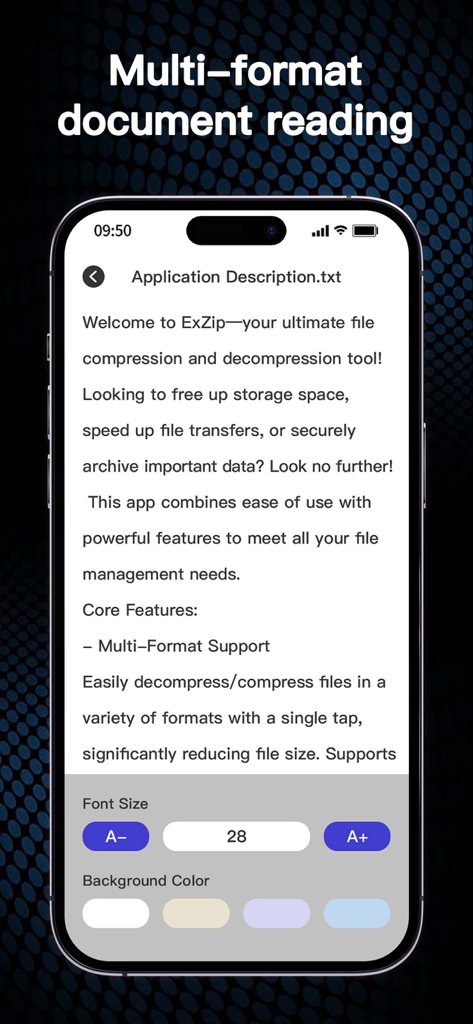
Interface of the ExZip app showing a text file viewer with options to adjust font size and background color.

Interface of the ExZip app showing a text file viewer with options to adjust font size and background color.

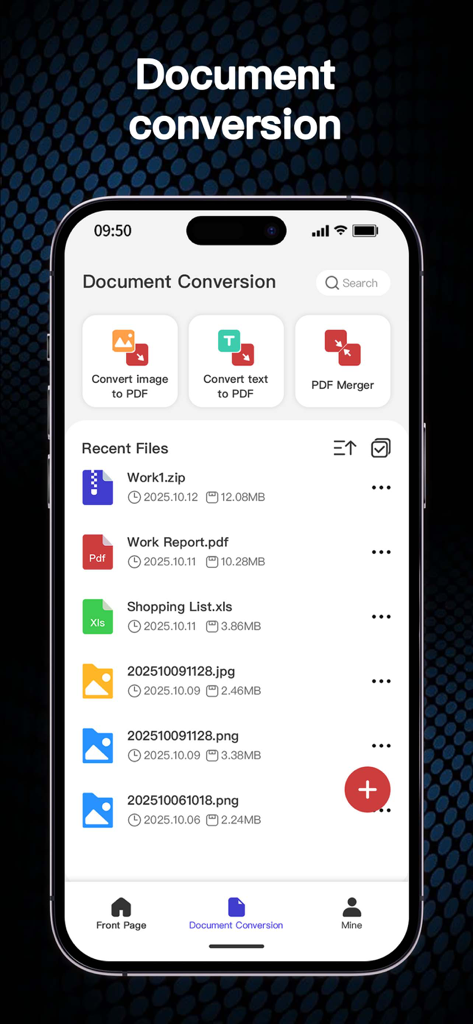
ExZip app document conversion screen showing image to PDF and PDF merger tools

ExZip app document conversion screen showing image to PDF and PDF merger tools

Everything You Need to Manage Files on the Go

The tools that make this app stand out, trusted by 294K+ users.

📦

Open Any Format Instantly

From RAR and 7Z to ISO and TAR, support for over 20+ formats ensures you can access every attachment without needing a computer.

🔒

Pro-Grade Privacy & Security

Protect sensitive business archives with robust password encryption and handle all your file processing locally for maximum data privacy.

🛠️

Built-In Productivity Toolkit

Go beyond extraction. Merge PDFs, edit text files, and convert images into documents within a single, streamlined mobile workspace.

Loved by users worldwide

Trusted by 294K+ people who love this app.

"

"As a freelance designer, I am constantly receiving asset packs in various formats like .7z and .rar. ExZip handles them effortlessly on my iPhone, allowing me to review client files during my commute without needing to open my laptop. The lightning-fast decompression is a total game-changer for my daily productivity."

Sarah Jenkins, Creative Director
"

"This app is an essential part of my iPad-only workflow. The ability to password-protect sensitive contracts and merge PDFs all within one interface is incredible. It provides the professional-grade file management that the native system lacks, making my remote work life much smoother and more secure."

Marcus Thompson, Marketing Consultant

About the app

Everything you need to know about Zip, RAR, 7z File Extractor.

Description

Welcome to ExZip—your ultimate file compression and decompression tool! Looking to free up storage space, speed up file transfers, or securely archive important data? Look no further! This app combines ease of use with powerful features to meet all your file management needs. Core Features: - Multi-Format Support Easily decompress/compress files in a variety of formats with a single tap, significantly reducing file size. Supports ZIP, RAR, 7Z, Lzh, ZIPX, TAR, GZIP, BZIP, TGZ, TBZ, ISO, DEB, CAB, CBZ, CBR, JAR, RPM, GZ, ACE, AES, MSI, and more. - Smart Decompression Automatically identifies and decompresses various compressed files, instantly restoring them to their original state without having to manually select a format. - Comprehensive File Management Powerful file management tools, including move, copy, delete, and rename options, ensure your device stays organized. - Password Protection Protect your sensitive files with password protection for enhanced privacy and security. - Offline Capability Compress and decompress files anytime, anywhere, without an internet connection, making it ideal for travel and mobile work. Advantages and Highlights: · Lightning-Fast Processing Adopting advanced compression algorithms, this app significantly improves compression and decompression speeds, saving you valuable time. · Wide Compatibility Fully compatible with the latest iOS on iPhone, maximizing device performance. · User-Centered Design An intuitive and easy-to-use interface makes it easy for even beginners to get started and enjoy efficient file management. · Regular Updates We continually incorporate user feedback to release new features and optimize the app to maintain optimal performance. Download Now: Say goodbye to tedious file management! Download "ExZip" now and start your smooth file management journey. Whether you're working, studying, or just living your daily life, it's your go-to app! Subscription Information Thank you for using ExZip! Our app offers an auto-renewing subscription. Please read the following details carefully before subscribing: 1. Subscription Content Subscribers can use features such as file compression, encrypted compression records, multi-format compression and decompression, file recovery from the Recycle Bin, PDF merging, and TXT document editing. If you haven't subscribed yet, you can use features such as file compression and decompression, image to PDF conversion, and text to PDF conversion. Subscription benefits are valid throughout the subscription period. 2. Payment Upon confirmation of purchase, payment will be charged to your Apple ID account. Subscription automatically renews unless auto-renew is turned off at least 24 hours before the end of the current period. The renewal fee will be charged within 24 hours prior to the end of the current period. 3. Managing Subscriptions You can manage and cancel your subscription at any time by going to Settings → Apple ID → Subscriptions on your iOS device. After canceling your subscription, your subscription benefits will continue until the end of the current billing period. 4. Free Trial (if applicable) If a free trial is offered, it will automatically convert to a paid subscription unless canceled at least 24 hours before the end of the trial period. Any unused portion of a free trial will be forfeited when you purchase a subscription. Privacy Policy: https://sites.google.com/view/zip-privacy-policy Terms: https://sites.google.com/view/zip-terms

Latest Version

1.2.5

Size

51.2 MB

First Released

Dec 3, 2024

Ready to Handle Any File, Anywhere?

Join 294K+ users who have upgraded their mobile productivity. Download ExZip today for lightning-fast compression, total format support, and secure file management on the go.

Download on App Store
FAQ

Frequently Asked Questions

Everything you need to know about Zip, RAR, 7z File Extractor

What is ExZip and what does it do?

ExZip is a file compression and decompression tool designed to help users free up storage space, speed up file transfers, and securely archive important data on iOS devices. It offers powerful file management capabilities.

What file formats does the ExZip app support?

ExZip supports a wide range of formats for compression and decompression, including ZIP, RAR, 7Z, Lzh, ZIPX, TAR, GZIP, BZIP, TGZ, TBZ, ISO, DEB, CAB, CBZ, CBR, JAR, RPM, GZ, ACE, AES, MSI, and more.

Does ExZip offer automatic file decompression?

Yes, ExZip features Smart Decompression. This allows the app to automatically identify and decompress various compressed files, restoring them to their original state instantly without requiring manual format selection.

Can I password-protect my files using the ExZip app?

Yes, ExZip provides password protection for sensitive files. This core feature enhances privacy and security, allowing users to encrypt compressed packages and protect their data.

Does ExZip work without an internet connection?

Yes, ExZip offers offline capability. Users can compress and decompress files anytime, anywhere, without needing an internet connection, making it suitable for travel and mobile work.

What file management features does ExZip provide?

ExZip includes comprehensive file management tools. These allow users to move, copy, delete, and rename options, which helps keep their device organized and facilitates efficient file handling.

Is ExZip compatible with the latest iOS on iPhone?

ExZip is fully compatible with the latest iOS versions on iPhone. This ensures optimal performance and seamless integration with the most current Apple mobile operating systems.

What exclusive features does an ExZip subscription offer?

An ExZip subscription unlocks additional features including encrypted compression records, multi-format compression/decompression, file recovery from the Recycle Bin, PDF merging, and TXT document editing.

What features are available in ExZip without a subscription?

Without an ExZip subscription, users can still access basic file compression and decompression, image to PDF conversion, and text to PDF conversion features.

How do I manage or cancel my ExZip subscription?

You can manage and cancel your ExZip subscription at any time. Navigate to Settings → Apple ID → Subscriptions on your iOS device to control your subscription.

Does ExZip support document conversion features?

Yes, ExZip supports various document conversions. It provides functionalities like converting images to PDF, converting text to PDF, and merging multiple PDF documents.

Can I play multimedia files within ExZip?

Yes, ExZip supports multimedia playback. The application allows users to view and play various multimedia files directly within its interface.

How does ExZip achieve fast compression and decompression speeds?

ExZip ensures lightning-fast processing speeds by utilizing advanced compression algorithms. This technology significantly improves both compression and decompression times, saving users valuable time.