Begone: Spam Call Blocker

Begone: Spam Call Blocker

Download on App Store
Spark by MWM logo
Logo of Begone: Spam Call Blocker
Begone: Spam Call Blocker — Take Full Control of Who Can Reach You

Effortlessly block entire number ranges with powerful wildcard rules. A professional-grade, privacy-first solution that processes everything locally on your device—no data collection, no contact uploads.

Publisher

AKE Software GmbH

Category

Productivity

Downloads

681K+

User Rating

4.6/5

Total Ratings

5K+

Locales

3

Silence, Visualized

Discover the interface used by 681K+ users.
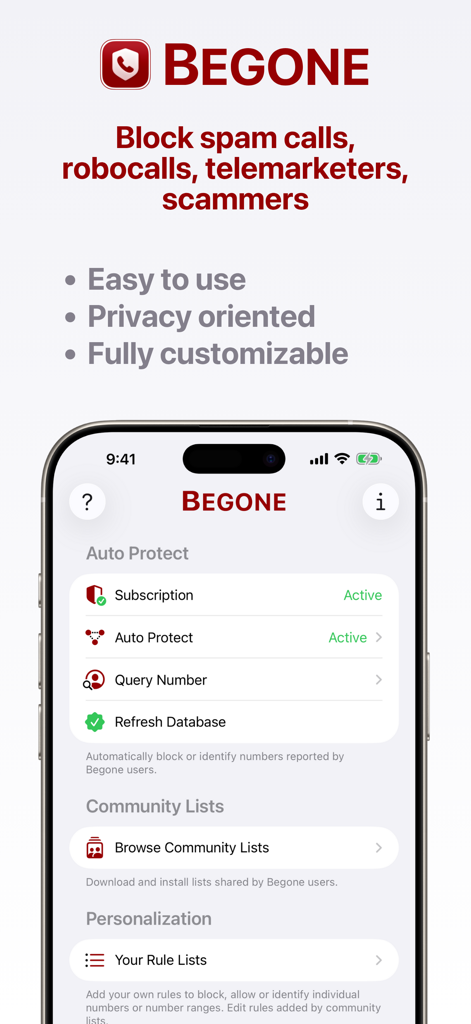
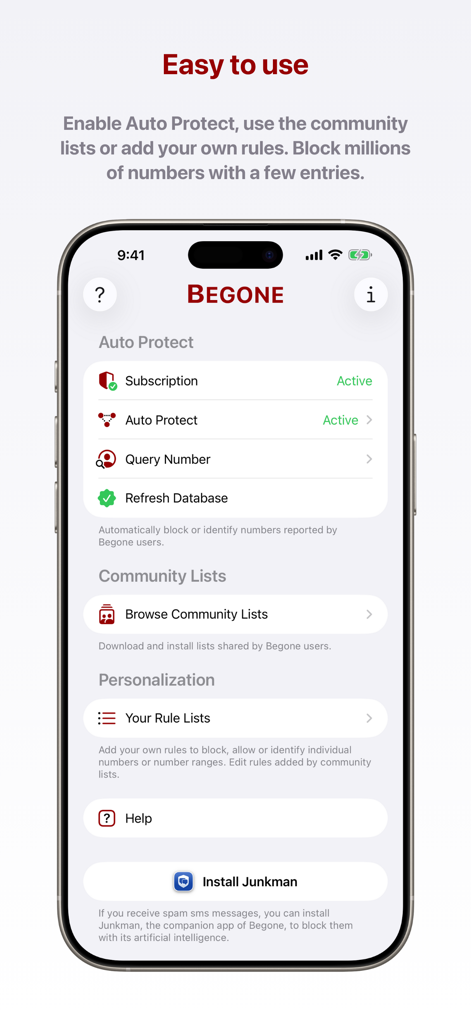
Begone app interface highlighting auto protect community lists and personalization options for blocking spam calls

Begone app interface highlighting auto protect community lists and personalization options for blocking spam calls

The main dashboard of Begone app showing Auto Protect and Community Lists features

The main dashboard of Begone app showing Auto Protect and Community Lists features

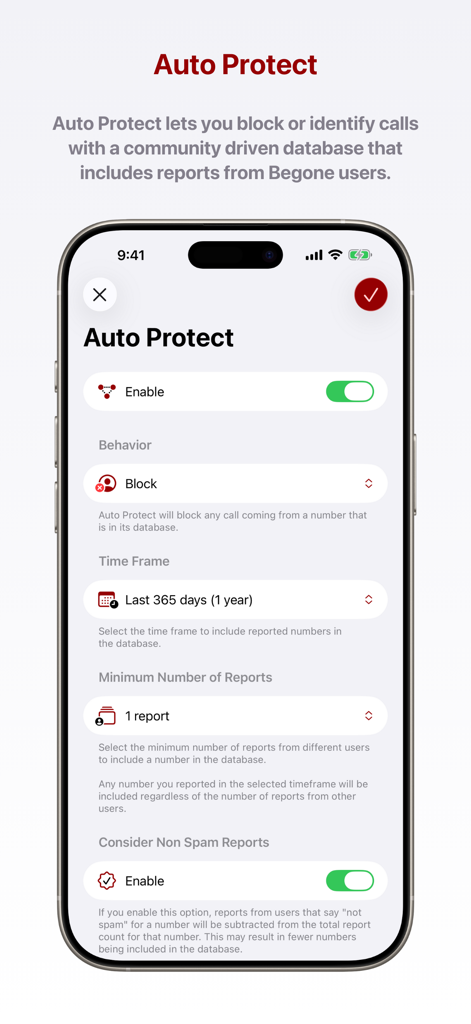
Interface showing Auto Protect settings in the Begone app for community based spam call blocking.

Interface showing Auto Protect settings in the Begone app for community based spam call blocking.

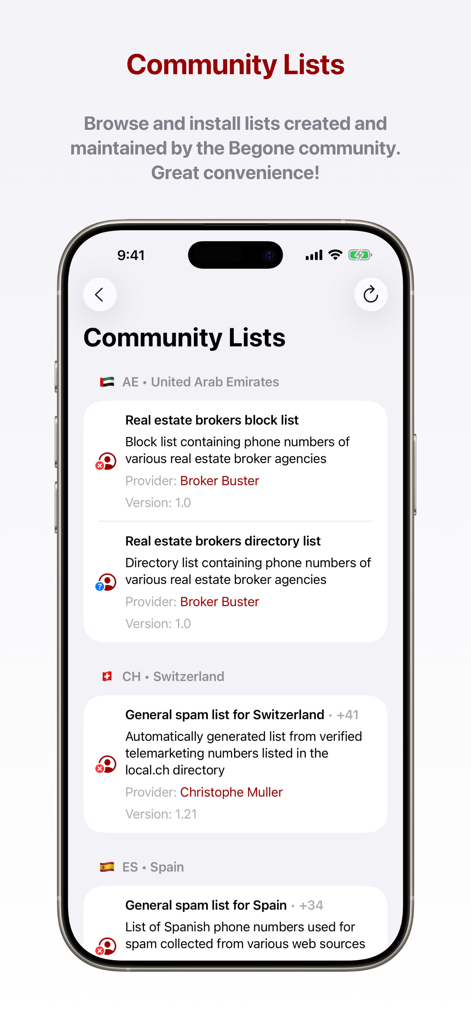
Interface of Begone app showing community-maintained spam call block lists for multiple countries.

Interface of Begone app showing community-maintained spam call block lists for multiple countries.

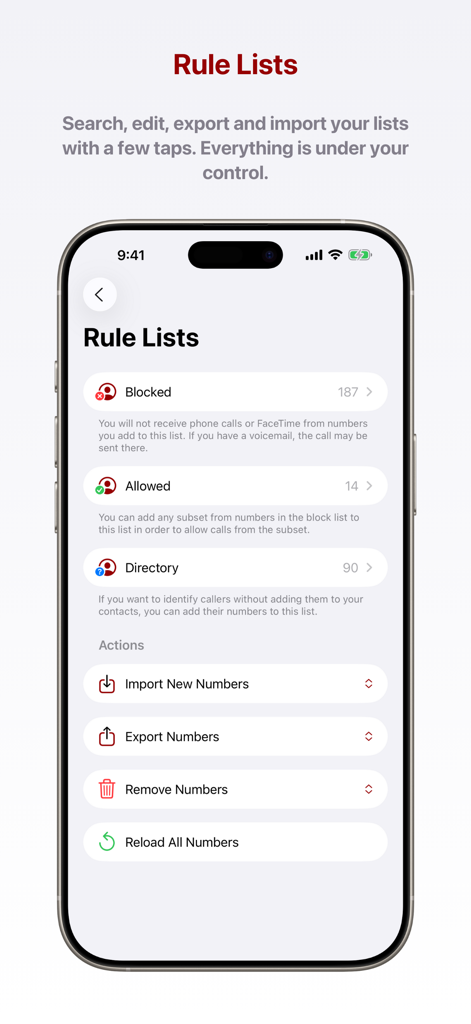
Begone app interface showing Rule Lists with blocked allowed and directory categories and import export options

Begone app interface showing Rule Lists with blocked allowed and directory categories and import export options

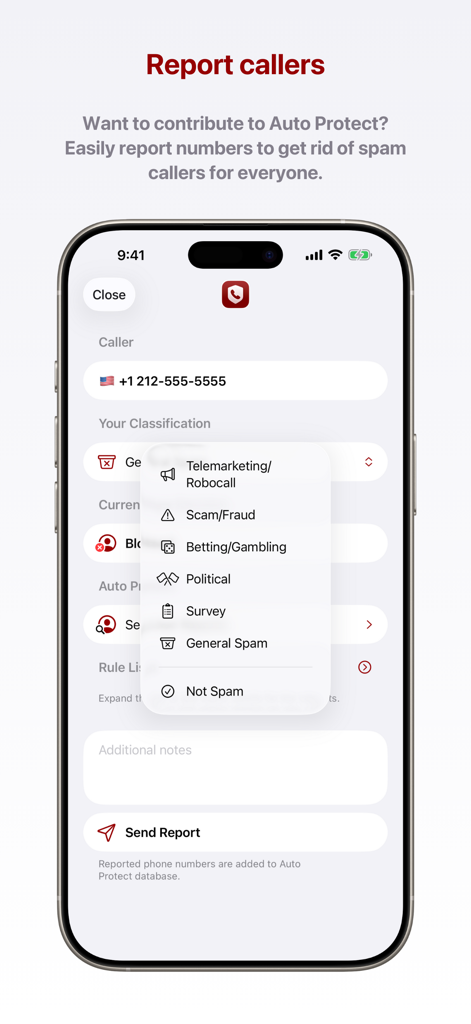
Interface of Begone app showing how to report a spam number with a dropdown menu of categories like telemarketing and fraud.

Interface of Begone app showing how to report a spam number with a dropdown menu of categories like telemarketing and fraud.

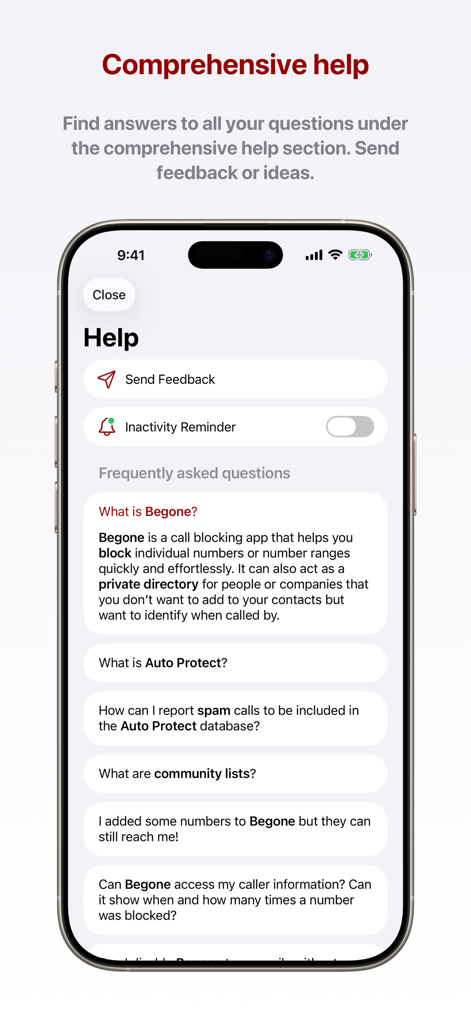
Comprehensive help and FAQ section within the Begone spam call blocker app.

Comprehensive help and FAQ section within the Begone spam call blocker app.

Precision Call Control

The tools that make this app stand out, trusted by 681K+ users.

🔢

Bulk Wildcard Blocking

Stop 'neighbor spoofing' instantly by blocking thousands of related numbers at once using our intuitive wildcard system.

🛡️

100% Local Privacy

Your data never leaves your device. Unlike other blockers, we don't harvest your contacts or upload your call history to the cloud.

📂

Private Caller Directory

Identify recurring callers and businesses without polluting your personal contact list or syncing them to third-party platforms.

Loved by users worldwide

Trusted by 681K+ people who love this app.

"

"As someone who is incredibly cautious about data privacy, Begone is exactly what I was looking for. Unlike other blockers that want access to my entire contact list, this works entirely locally. The wildcard feature is a game-changer for blocking those annoying local spoofed calls that start with the same first six digits as my own number."

Sarah J., Software Engineer
"

"Begone has completely decluttered my phone. I love the private directory feature—I can label delivery drivers and temporary vendors so I know who is calling without having to save them into my permanent personal contacts. It is simple, clean, and the import/export function makes it easy to keep my settings synced across my devices."

Mark D., Freelance Consultant

About the app

Everything you need to know about Begone: Spam Call Blocker.

Description

Begone is a productivity app for iOS. It lets you block individual numbers or number ranges quickly and effortlessly. It can also act as a private directory for people or companies that you don’t want to add to your contacts but want to identify when called by. Begone uses a simple wildcard character mechanism to add numbers into its database. You can use the # character as the wildcard. For example, when you enter +1 212-555-#### to its block list, Begone blocks the numbers from +1 212-555-0000 to +1 212-555-9999. This way, you can immediately block tens of thousands of numbers with one simple entry. If you enter a number or number range to the directory list of Begone, the title you enter will be displayed as the Caller ID of a matching number when you receive a call. This way, you can remember who the number belongs to, without ever adding it to your contacts. You can easily import and export your configuration with a single tap. Then, you can share your lists with friends and family. Features of Begone: • Auto Protect database for one tap protection • Easy to use interface to add number ranges quickly and effortlessly. • Blocked, allowed and directory lists to manage any caller number • Ability to call numbers not added as number ranges • Easy import and export for list configuration • Community lists to easily install lists created by other users • Detailed VoiceOver design for better accessibility support • Dark mode support • Interoperability with Junkman - Smart SMS Spam Filter ----- Begone works completely locally on your device. It does not collect or transmit any data you enter into it. Begone respects the privacy of its users with utmost importance. End user license agreement: https://www.apple.com/legal/internet-services/itunes/dev/stdeula/

Latest Version

8.3

Size

18.5 MB

First Released

Dec 1, 2021

Ready to Silence the Scammers for Good?

Join 681,000+ privacy-conscious users. Block entire ranges of robocalls with surgical precision and keep your personal data 100% local.

Download on App Store
FAQ

Frequently Asked Questions

Everything you need to know about Begone: Spam Call Blocker

What is Begone: Spam Call Blocker?

Begone is an iOS productivity app that blocks individual numbers or number ranges, including spam calls and robocalls. It also functions as a private directory, identifying callers without adding them to your contacts.

How does Begone block a range of numbers?

Begone blocks number ranges using a wildcard character '#'. For example, entering '+1 212-555-####' blocks numbers from +1 212-555-0000 to +1 212-555-9999 with one entry.

Does Begone collect my personal data or call information?

No, Begone works entirely locally on your device. It does not collect or transmit any data you enter, ensuring the privacy of its users.

Can Begone identify callers without adding them to my contacts?

Yes, Begone acts as a private directory. It displays a custom title as the Caller ID for numbers in your directory list, allowing identification without saving them to your main contacts.

What is Begone's Auto Protect feature?

Begone's Auto Protect feature blocks or identifies calls using a community-driven database. This database includes reported numbers from other Begone users, providing immediate protection.

Can I share my Begone block lists with others?

Yes, Begone allows easy import and export of your configuration with a single tap. You can share your customized blocked, allowed, and directory lists with friends and family.

How do Begone's Community Lists function?

Begone's Community Lists enable users to browse and install lists created by other Begone users. These lists offer readily available spam blocking and directory information for various regions.

Does Begone support accessibility features like Dark Mode?

Yes, Begone supports Dark Mode. It also includes a detailed VoiceOver design, which enhances accessibility for users requiring such features, ensuring a better experience.

Is Begone available on Android devices?

No, Begone is an iOS productivity app. It is exclusively designed for use on Apple devices.

How can I report spam calls using Begone?

Begone allows users to easily report callers to contribute to the Auto Protect database. You can classify reported numbers as telemarketing, scam, robocall, or other types.