BuildCores: Part Picker for PC

BuildCores: Part Picker for PC

Download on App Store
Spark by MWM logo
Logo of BuildCores: Part Picker for PC

BuildCores: The Ultimate 3D PC Builder and Part Picker

Architect your dream battlestation with real-time compatibility checks, interactive 3D simulations, and live price tracking across Amazon, Newegg, and Best Buy.

Publisher

BuildCores LLC

Category

Utilities

Downloads

296K+

User Rating

4.6/5

Total Ratings

2K+

Locales

1

Build Before You Buy

Discover the interface used by 296K+ users.
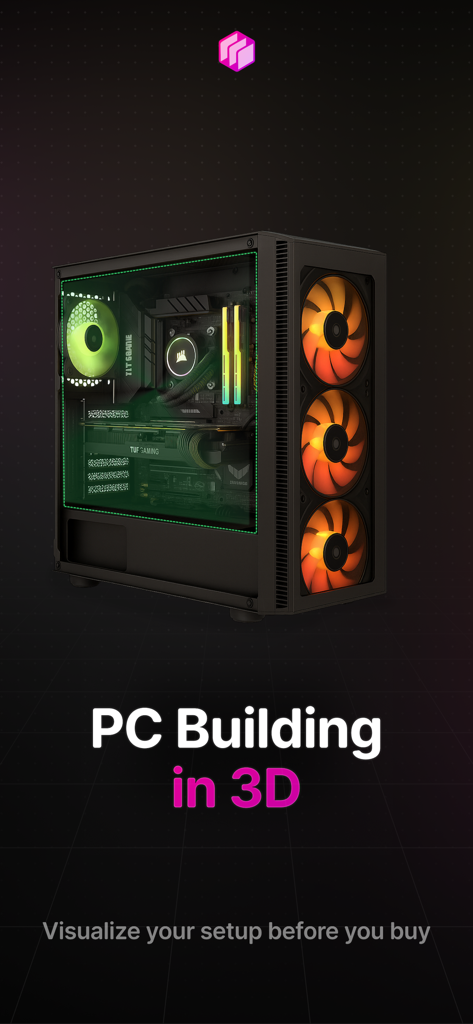
A 3D visualization of a custom gaming PC setup within the BuildCores app

A 3D visualization of a custom gaming PC setup within the BuildCores app

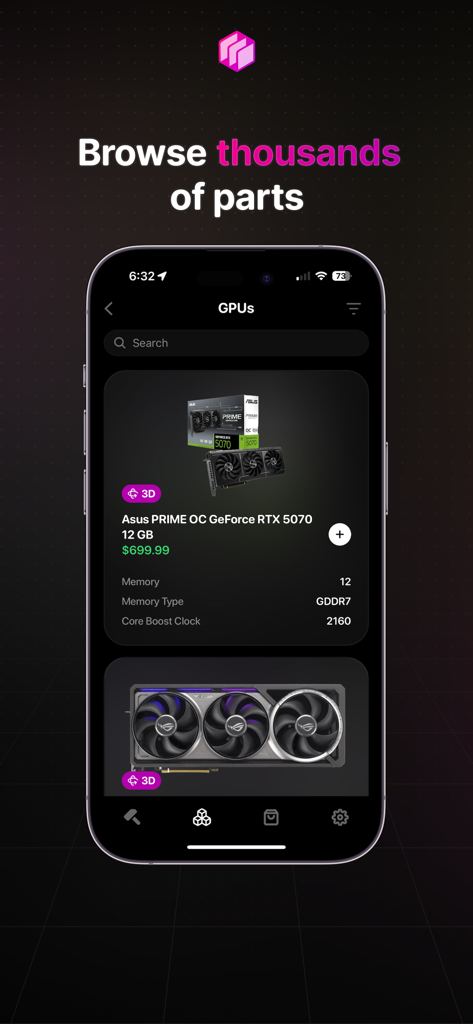
BuildCores app screen showing a list of graphics cards for PC building including an Asus RTX 5070

BuildCores app screen showing a list of graphics cards for PC building including an Asus RTX 5070

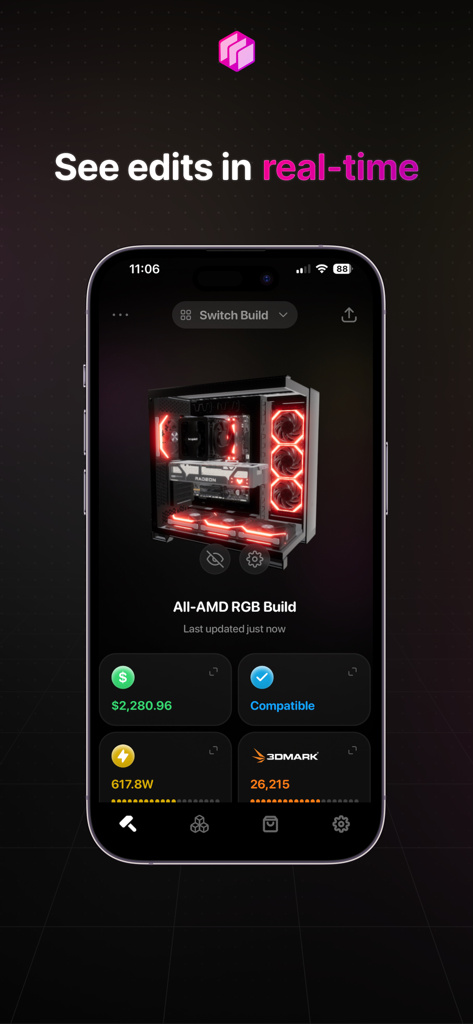
BuildCores 3D PC simulator showing a custom gaming rig with real time price and compatibility stats

BuildCores 3D PC simulator showing a custom gaming rig with real time price and compatibility stats

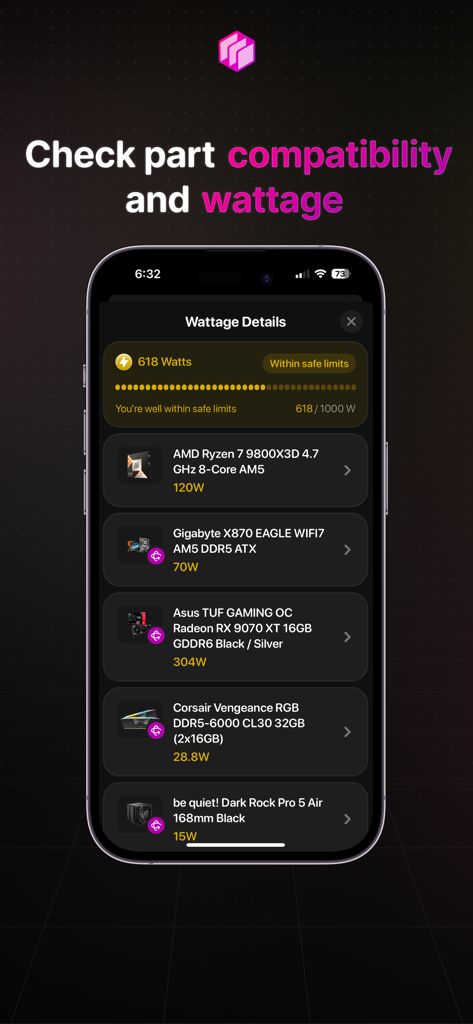
BuildCores app displaying PC part compatibility and total system wattage calculation

BuildCores app displaying PC part compatibility and total system wattage calculation

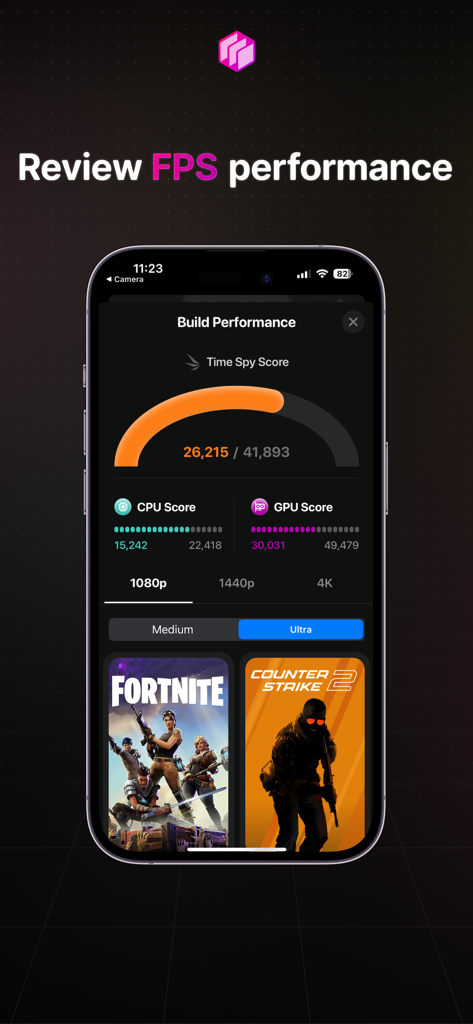
Mobile interface of BuildCores app showing PC build performance scores and FPS estimates for popular games

Mobile interface of BuildCores app showing PC build performance scores and FPS estimates for popular games

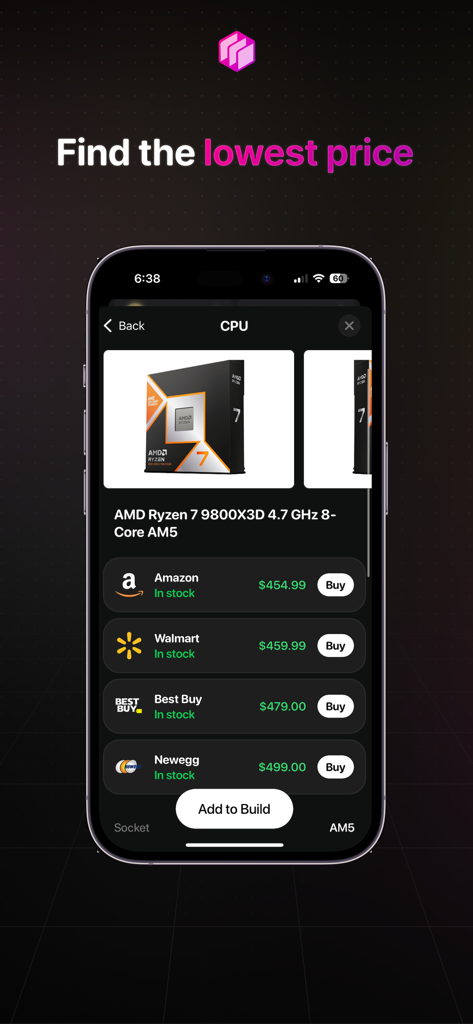
BuildCores mobile app displaying a price comparison for an AMD Ryzen CPU across various retailers like Amazon and Best Buy

BuildCores mobile app displaying a price comparison for an AMD Ryzen CPU across various retailers like Amazon and Best Buy

Master Your Next PC Build

The tools that make this app stand out, trusted by 296K+ users.

Smart Compatibility Check

Avoid the headache of returns. Our engine automatically verifies CPU sockets, RAM clearance, and PSU wattage for zero-risk building.

🎮

Interactive 3D Builder

See your battlestation come to life. Inspect your components in a 3D space to ensure everything fits and looks exactly how you imagined.

💰

Live Price Comparison

Stop overpaying. Access real-time price feeds from top retailers like Amazon and Newegg to track deals and maximize your budget.

Loved by users worldwide

Trusted by 296K+ people who love this app.

"

"As a first-time builder, I was terrified of buying parts that wouldn't fit together. The 3D simulator in BuildCores allowed me to see exactly how my GPU would look in the case before I spent a dime. It turned a stressful process into a fun, visual experience!"

Jordan K.
"

"I've built dozens of PCs, but this app is now my secret weapon. The live sales feed and price comparisons across Amazon and Newegg saved me over $200 on my latest 4K gaming rig. Plus, the Reddit export makes getting feedback from the community a breeze."

Marcus T.

About the app

Everything you need to know about BuildCores: Part Picker for PC.

Description

BuildCores is the next-generation PC Builder and Part Picker. We combine a powerful component database with revolutionary full 3D viewing, giving you the ultimate PC building experience right on your phone. See a simulation of your real-life PC before you build it. FULL 3D PC BUILDER SIMULATOR See Your Build Come to Life: Don't just pick parts, assemble them! We're the only PC Parts Picker that lets you see your components in a fully interactive 3D space. Check Fit & Aesthetics: Rotate, zoom, and inspect your build from every angle to ensure everything looks and fits exactly how you want it to. INTELLIGENT COMPATIBILITY ENGINE Build with Absolute Confidence: Our core mission is perfect compatibility. BuildCores automatically cross-references every part you select—from CPU and motherboard sockets to RAM clearance and PSU wattage—to prevent any issues. Eliminate Guesswork: Stop worrying about returns and headaches. Our system acts as your expert guide, ensuring every part works together flawlessly. GLOBAL PRICE COMPARISON & LIVE SALES FEED Find the Lowest Price, Guaranteed: Compare real-time prices for every component across top retailers like Amazon, Newegg, and Best Buy. We support retailers across the USA, Canada, United Kingdom, Germany, Australia, and more. Regional Price Tracking: Our price comparison isn't limited to one country. Find the absolute best deal by checking prices across different regions. Never Miss a Deal: The dedicated Sales Feed is your secret weapon, alerting you to the latest discounts and price drops on the parts you need, saving you money automatically. POWERFUL ACCOUNTS & BUILD MANAGEMENT Your Builds, Synced Everywhere: Create a free BuildCores account to save, edit, and manage unlimited custom PC builds. Seamless & Organized: Start a build on the go and access it anytime. Your personalized part lists and dream machines are always just a tap away. KEY FEATURES FOR EVERY PC BUILDER: Massive Component Database: An ever-expanding library of CPUs, GPUs, motherboards, RAM, SSDs, and more, with specs and pricing updated hourly. Performance Estimator: Get FPS estimates to see how your build will perform in popular games. Easy Sharing: Export your build list in a Reddit-friendly table or simple text to share with communities like /r/buildapc for feedback.

Latest Version

2025.8.0

Size

99.1 MB

First Released

Jan 24, 2019

Ready to build your ultimate battlestation?

Join over 290,000 builders using the only 3D part picker. Simulate your dream rig, lock in the best prices, and ensure 100% compatibility before you buy.

Download on App Store
FAQ

Frequently Asked Questions

Everything you need to know about BuildCores: Part Picker for PC

What is BuildCores?

BuildCores is a PC Builder and Part Picker app that offers a powerful component database with revolutionary full 3D viewing. It allows users to simulate their real-life PC before building it directly on their phone.

Does BuildCores offer a 3D PC building experience?

Yes, BuildCores features a full 3D PC Builder Simulator. This allows users to see their chosen components in an interactive 3D space, rotating and zooming to check fit and aesthetics.

How does BuildCores ensure PC part compatibility?

BuildCores ensures PC part compatibility using an intelligent compatibility engine. It automatically cross-references every part, checking CPU/motherboard sockets, RAM clearance, and PSU wattage to prevent issues.

Can I compare prices for PC components using BuildCores?

Yes, BuildCores allows users to compare real-time prices for every component across top retailers like Amazon, Newegg, and Best Buy. It also supports regional price tracking globally.

Does BuildCores provide FPS performance estimates for game builds?

Yes, BuildCores provides a Performance Estimator feature. This allows users to get FPS estimates for their build, showing how it will perform in popular games.

Which retailers does BuildCores compare prices from?

BuildCores compares prices from major retailers including Amazon, Newegg, and Best Buy. It supports retailers across the USA, Canada, United Kingdom, Germany, Australia, and more.

Can users save and manage multiple PC builds in BuildCores?

Yes, users can create a free BuildCores account to save, edit, and manage unlimited custom PC builds. This ensures builds are synced and accessible anytime.

How often is the component database updated in BuildCores?

The massive component database in BuildCores is updated hourly. This includes specifications and pricing for CPUs, GPUs, motherboards, RAM, SSDs, and other parts.

Does BuildCores allow sharing of PC build lists?

Yes, BuildCores allows easy sharing of PC build lists. Users can export their build list in a Reddit-friendly table format or as simple text to share with communities.

Can BuildCores show me sales and price drops for PC parts?

Yes, BuildCores features a dedicated Sales Feed that alerts users to the latest discounts and price drops on PC parts. This helps users save money automatically.