Cubasis LE 3

Cubasis LE 3

Download on App StoreDownload on Google Play
Spark by MWM logo
Logo of Cubasis LE 3

Cubasis LE 3: Professional Music Production Anywhere

Turn your iPhone or iPad into a portable studio with Steinberg’s acclaimed multitouch sequencer. Record, edit, and mix with pro-grade tools and a 32-bit audio engine designed for creators on the move.

Download on App Store

Publisher

Steinberg Media Technologies GmbH

Category

Music

Downloads

1M+

User Rating

4.4/5

Total Ratings

4K+

Locales

1

Your Mobile Studio

Discover the interface used by 1M+ users.
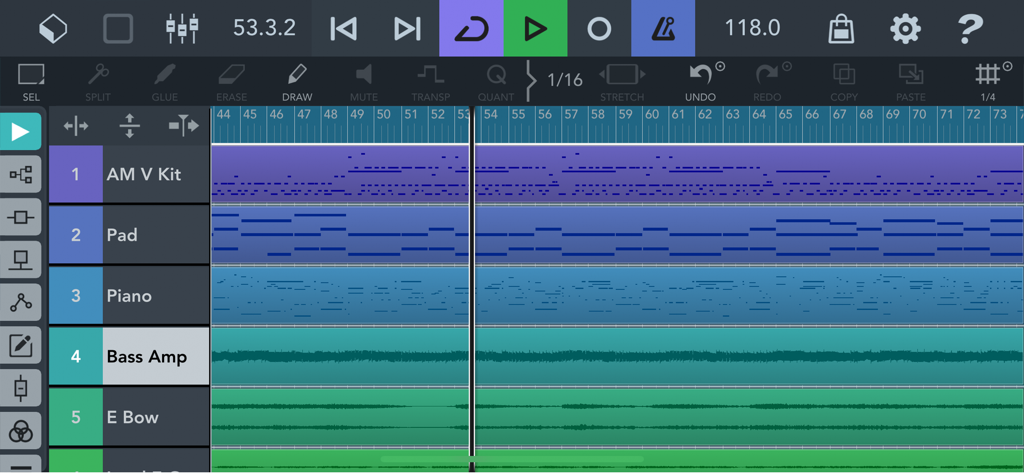
Interface of Cubasis LE 3 showing multiple audio and MIDI tracks for mobile music production.

Interface of Cubasis LE 3 showing multiple audio and MIDI tracks for mobile music production.

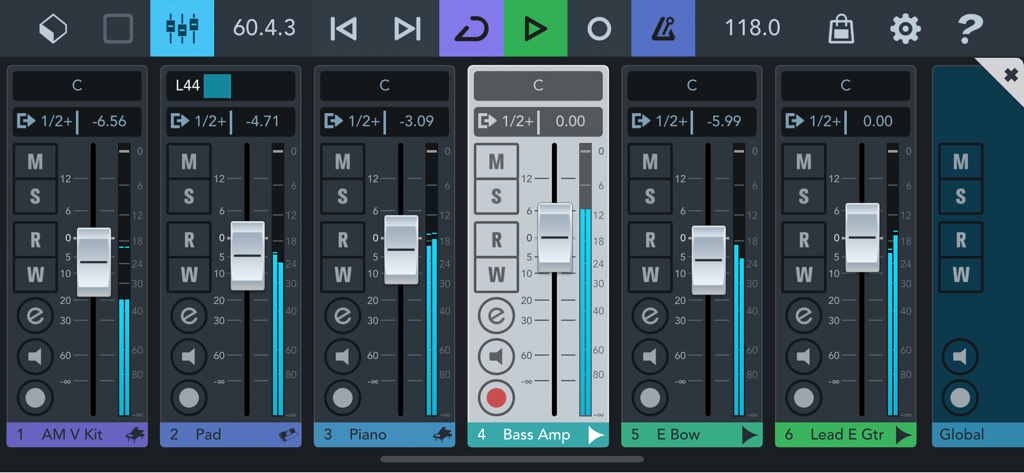
The audio mixer interface of the Cubasis LE 3 mobile music production app

The audio mixer interface of the Cubasis LE 3 mobile music production app

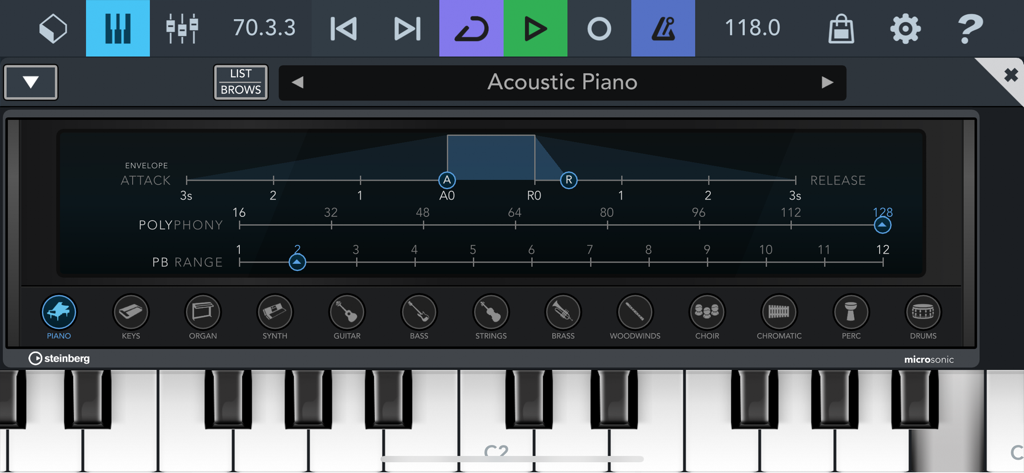
Cubasis LE 3 MicroSonic virtual instrument interface featuring an acoustic piano setting and virtual keyboard

Cubasis LE 3 MicroSonic virtual instrument interface featuring an acoustic piano setting and virtual keyboard

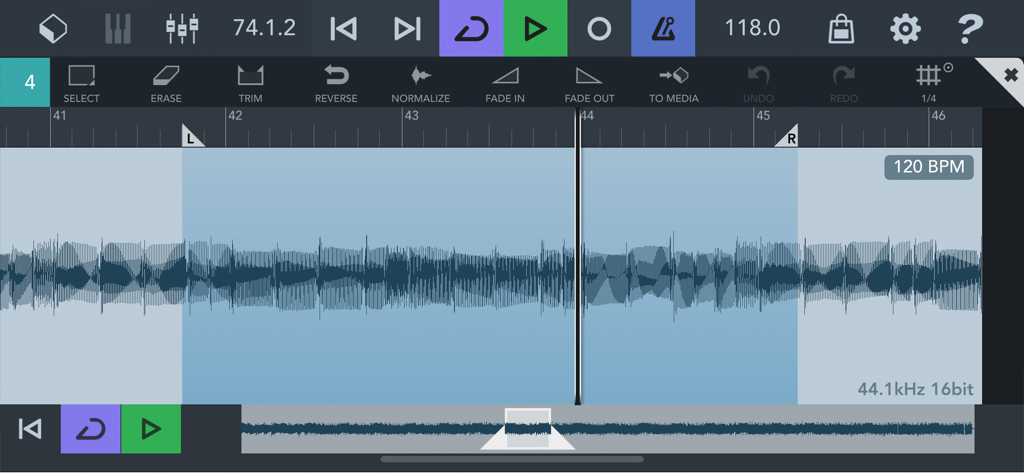
Screenshot of the Cubasis LE 3 audio editor showing a waveform with editing tools like trim normalize and fade

Screenshot of the Cubasis LE 3 audio editor showing a waveform with editing tools like trim normalize and fade

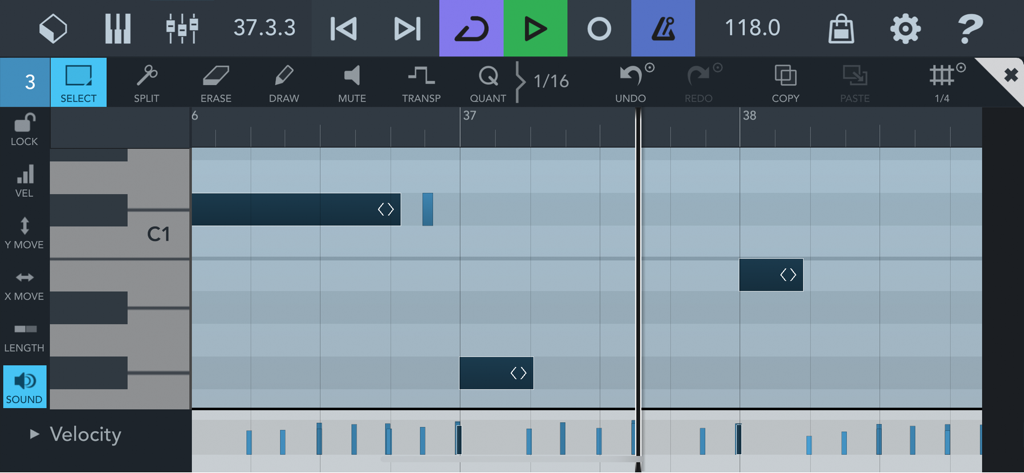
The MIDI editor in Cubasis LE 3 showing the piano roll and note velocity controls for precise music production on mobile

The MIDI editor in Cubasis LE 3 showing the piano roll and note velocity controls for precise music production on mobile

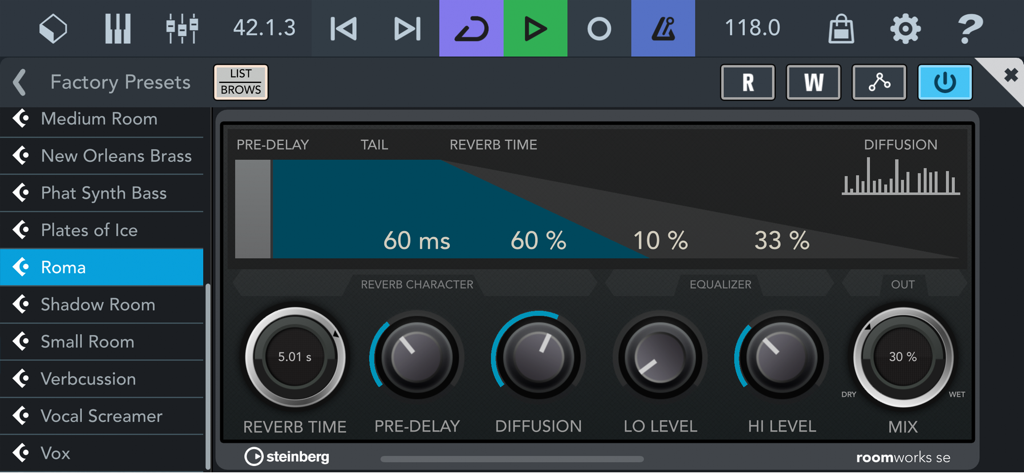
RoomWorks SE reverb plugin interface in Cubasis LE 3

RoomWorks SE reverb plugin interface in Cubasis LE 3

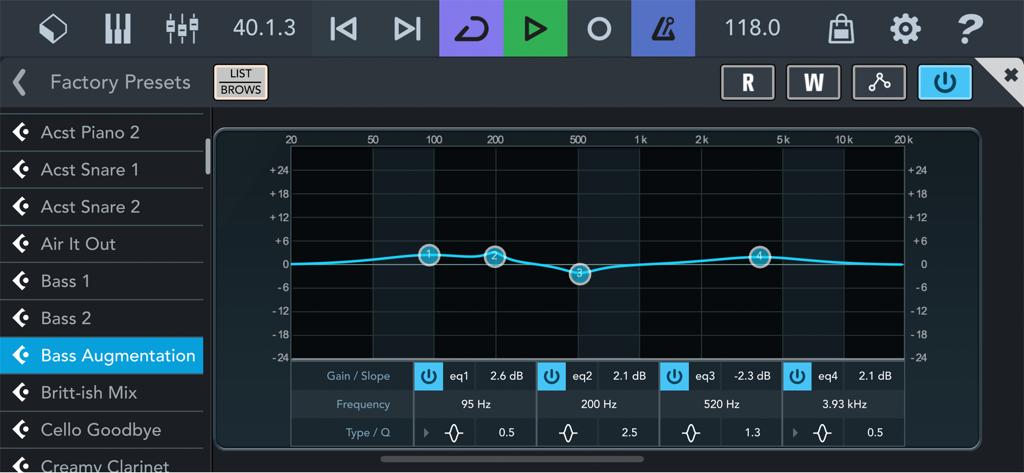
Interface of Cubasis LE 3 showing a four-band parametric equalizer with bass augmentation settings

Interface of Cubasis LE 3 showing a four-band parametric equalizer with bass augmentation settings

Professional Music Production, Unleashed

The tools that make this app stand out, trusted by 1M+ users.

🚀

Desktop Power on Mobile

Harness a professional 32-bit floating-point audio engine that delivers crystal-clear studio quality for every track you record.

🎸

Seamless Gear Integration

Plug in your audio interface or MIDI controller to capture high-quality vocals and instruments with industry-leading low latency.

🎯

Precision Multi-Touch Editing

Refine your tracks with an intuitive MIDI and audio editor featuring 960 PPQN resolution for absolute rhythmic accuracy.

Loved by users worldwide

Trusted by 1M+ people who love this app.

"

"As a music production student, I needed a mobile DAW that didn't feel like a toy. Cubasis LE 3 is a game-changer for my workflow. I can sketch out complex beats on the subway and the 32-bit audio engine ensures my tracks sound professional enough to drop straight into my desktop projects later. It is easily the most intuitive and powerful tool for any creator on the move."

Marcus J.
"

"I've been a Cubase user in the studio for years, and having this level of control on my iPad is incredible. I recently used it to record high-fidelity vocals in a hotel room using my portable interface, and the results were stunning. The integration with Waves plug-ins and the full-screen mixer makes mobile mixing a breeze without sacrificing any technical precision."

Sarah L.

About the app

Everything you need to know about Cubasis LE 3.

Description

*** Please note that a supported hardware device is required to unlock the feature set of Cubasis LE (unless unlocked Cubasis LE runs in demo mode). Please visit https://new.steinberg.net/cubasis/le/#83335 for more details. *** Cubasis LE is the compact version of Steinberg’s mobile multitouch sequencer, providing the same look and feel of its bigger brother Cubasis. Specially designed for quick and easy operation, Cubasis LE makes recording, editing and mixing a breeze, no matter where you are, right there on your iPhone or iPad. • Cubasis LE 3 for iPhone and iPad Capture your musical ideas when inspiration strikes. Cubasis offers excellent usability, ease of use and lightning fast operation for you to perform, record and mix your music quickly and efficiently – no matter if you're using an iPhone or iPad. • Keyboard and MicroSonic virtual instrument Create perfect tracks, beats and melodies from scratch on the integrated keyboard and load great-sounding MicroSonic instruments, based on the acclaimed HALion Sonic workstation and Allen Morgan drum kits. • Hook up your external gear Use your external devices to record your guitar, vocals and more in professional quality. Connect your keyboard hardware including MIDI over Bluetooth LE support. • Audio and MIDI editor Relish the ease of use and intuitive workflows when creating or mastering your audio and MIDI tracks in the editors. Straightforward usability and handy tools ensure you get tasks done at the speed of light. • Full-screen mixer and pro-grade effects Create perfect sounding mixes thanks to a full-blown mixer, which easily extends to full-screen, and make tracks instantly sound great with pro-grade effects that come with ready-to-use effect presets. • In-app purchases for Cubasis LE Easily extend Cubasis LE with great in-app purchases. Get all the features of Cubasis 3 in Cubasis LE, extend the app with excellent pro-grade plug-ins from Waves, add the world's most iconic drum machines and much more. • Free Cubasis LE 2 in-app purchase transfer Have you already purchased instruments or effects plug-ins via Cubasis LE 2 in-app purchases? Once you've installed Cubasis LE 3, simply transfer your previous plug-in in-app purchases from Cubasis LE 2 – free of charge. NEW IN CUBASIS LE 3 • Universal app support: Run Cubasis on the iPhone and iPad • Cubasis for iPhone: Create great music in the palm of your hand • Full-screen mixer: Easily extend the size of the mixer and more • Free Cubasis LE 2 IAP transfer: Freely transfer previous plug-in in-app purchases to Cubasis LE 3 • 960 PPQN MIDI resolution: Precise audio and MIDI event editing at the highest level • FX rearrangement: Quickly rearrange plug-ins and change their pre/post fader position • New effects presets: Make tracks sound great with these ready-to-use presets • Undo with history list: Quickly jump back to earlier versions of your song • Redesigned instruments and effects: Modern styling with more precise operation • Audio, and MIDI editors revisited: File editing is much more effective • Revised MediaBay: Your all-new control center for file and project management • UI scale presets for iPhone and iPad: Quickly change the size and arrangement of Cubasis • Overdub and looper recording modes: Choose the best mode for your recordings HIGHLIGHTS • Up to 4 audio and 4 MIDI tracks • 2 assignable physical inputs and stereo output • 32-bit floating point audio engine • Audio I/O resolution of 16-bit/44.1 + 48 kHz • MicroSonic with 25 instrument sounds based on HALion Sonic and Allen Morgan drum kits • Mixer with 5 effect processors • Super-versatile RoomWorks SE reverb effect with intuitive graphical display • Virtual keyboard with note repeat control • Sample Editor and MIDI Editor • Unlock all the features of the full Cubasis version via in-app purchase Technical support http://www.steinberg.net/cubasisforum If you like Cubasis, please support us by rating this app in the App Store! Thank you!

Latest Version

3.8.1

Size

1.2 GB

First Released

Mar 29, 2020

Start Producing Your Next Masterpiece Anywhere

Connect your gear and experience the power of a pro-level DAW on your iPhone or iPad. Download Cubasis LE 3 and capture your inspiration in high-fidelity today.

Download on App StoreDownload on Google Play
FAQ

Frequently Asked Questions

Everything you need to know about Cubasis LE 3

Does Cubasis LE 3 require a hardware device to unlock its features?

Yes, Cubasis LE 3 requires a supported hardware device to unlock its full feature set. Without it, the app operates in demo mode.

What are the core functions of Cubasis LE 3?

Cubasis LE 3 is a compact mobile multitouch sequencer. It is designed for recording, editing, and mixing music on iPhone and iPad with quick and easy operation.

Is Cubasis LE 3 compatible with both iPhone and iPad?

Yes, Cubasis LE 3 offers universal app support, allowing it to run on both iPhone and iPad. This is a new feature in Cubasis LE 3.

What virtual instruments are available in Cubasis LE 3?

Cubasis LE 3 includes a virtual keyboard and MicroSonic instruments. These feature 25 sounds based on acclaimed HALion Sonic and Allen Morgan drum kits.

Can Cubasis LE 3 connect to external musical equipment?

Yes, Cubasis LE 3 allows connecting external devices like guitars, vocals, and keyboard hardware via MIDI, including Bluetooth LE support.

What is the maximum number of audio and MIDI tracks supported by Cubasis LE 3?

Cubasis LE 3 supports up to 4 audio tracks and 4 MIDI tracks, allowing users to build their musical projects efficiently.

How can I unlock all features of the full Cubasis version within Cubasis LE 3?

You can unlock all features of the full Cubasis version by purchasing an in-app purchase directly within Cubasis LE 3.

Is it possible to transfer in-app purchases from Cubasis LE 2 to Cubasis LE 3?

Yes, Cubasis LE 3 allows users to freely transfer previous plug-in in-app purchases made in Cubasis LE 2.

Does Cubasis LE 3 feature a full-screen mixer and professional effects?

Yes, Cubasis LE 3 includes a full-blown mixer that extends to full-screen. It also offers pro-grade effects with ready-to-use presets.

What audio editing tools are available in Cubasis LE 3?

Cubasis LE 3 provides an Audio Editor with tools such as trim, reverse, normalize, fade in, and fade out for effective file editing.

What is the MIDI resolution offered by Cubasis LE 3?

Cubasis LE 3 offers a 960 PPQN MIDI resolution, ensuring precise audio and MIDI event editing at the highest level.

Does Cubasis LE 3 include a reverb effect?

Yes, Cubasis LE 3 includes the super-versatile RoomWorks SE reverb effect. It features an intuitive graphical display for adjustments and comes with presets.

What audio engine and resolution does Cubasis LE 3 use?

Cubasis LE 3 uses a 32-bit floating point audio engine. It supports an audio I/O resolution of 16-bit/44.1 + 48 kHz.

Does Cubasis LE 3 have an undo history?

Yes, Cubasis LE 3 includes an undo with history list feature. This allows users to quickly revert to earlier versions of their song.