DIY Anemometer (Wind Meter)

DIY Anemometer (Wind Meter)

Download on App Store
Spark by MWM logo
Logo of DIY Anemometer (Wind Meter)

DIY Anemometer (Wind Meter): Turn Your iPhone into a Precision Wind Gauge

Stop buying expensive gear and start building. Unlock your iPhone's hidden magnetometer to measure wind speed and airflow with a simple, resourceful hardware hack designed for makers, drone pilots, and DIY enthusiasts.

Publisher

Dmitriy Kharutskiy

Category

Weather

Downloads

31K+

User Rating

4.6/5

Total Ratings

0

Locales

11

Precision in Action

Discover the interface used by 31K+ users.
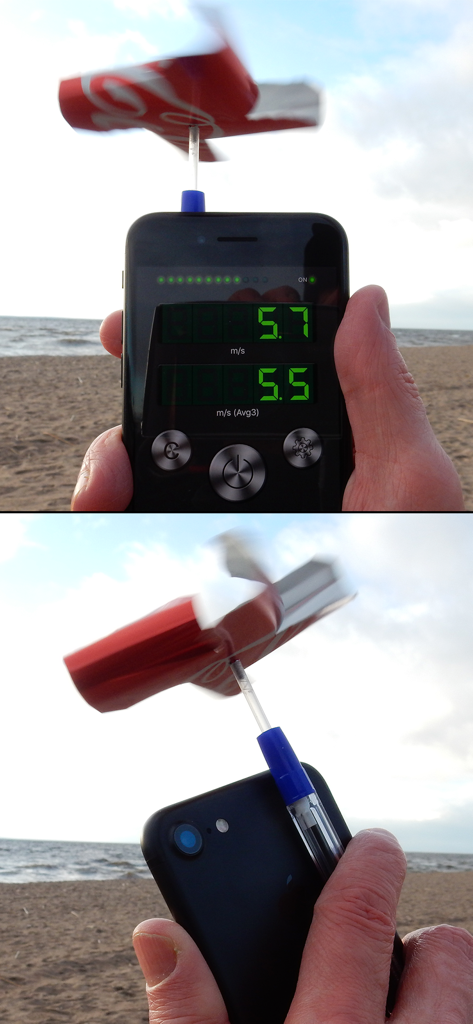
DIY wind meter made with an iPhone and a soda can turbine measuring wind speed on a beach

DIY wind meter made with an iPhone and a soda can turbine measuring wind speed on a beach

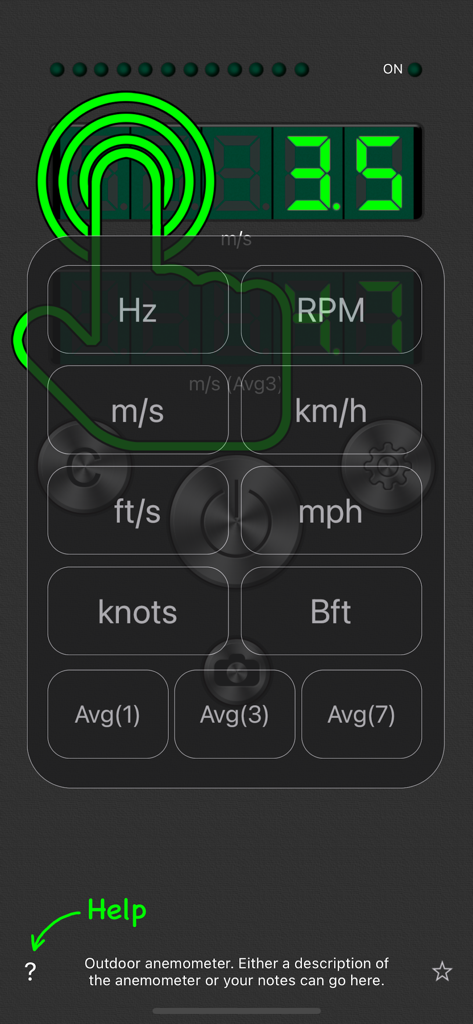
DIY Anemometer app interface showing measurement units and averaging settings for wind speed monitoring

DIY Anemometer app interface showing measurement units and averaging settings for wind speed monitoring

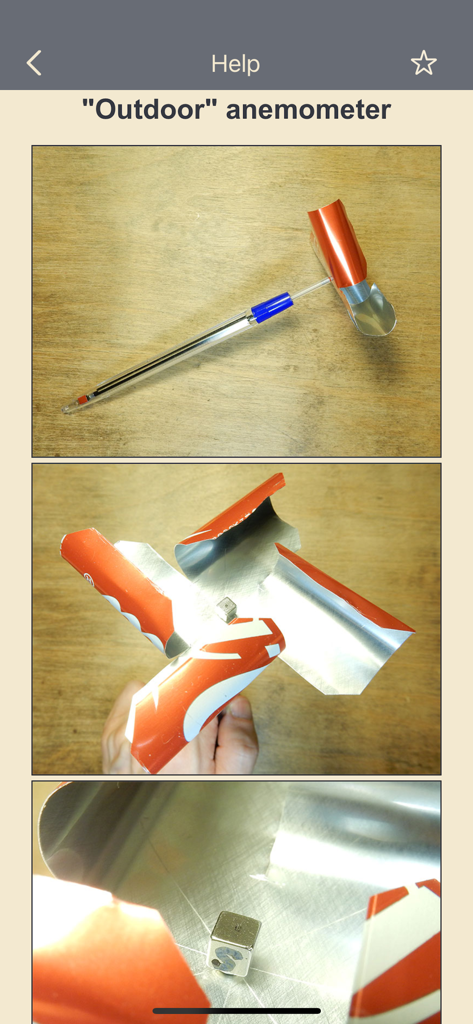
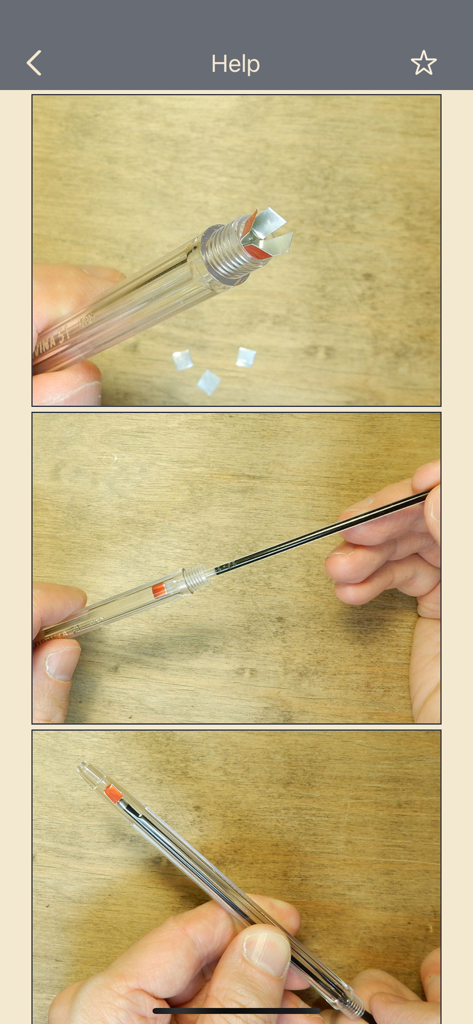
Assembly photos for a homemade outdoor wind meter using recycled cans and a magnet

Assembly photos for a homemade outdoor wind meter using recycled cans and a magnet

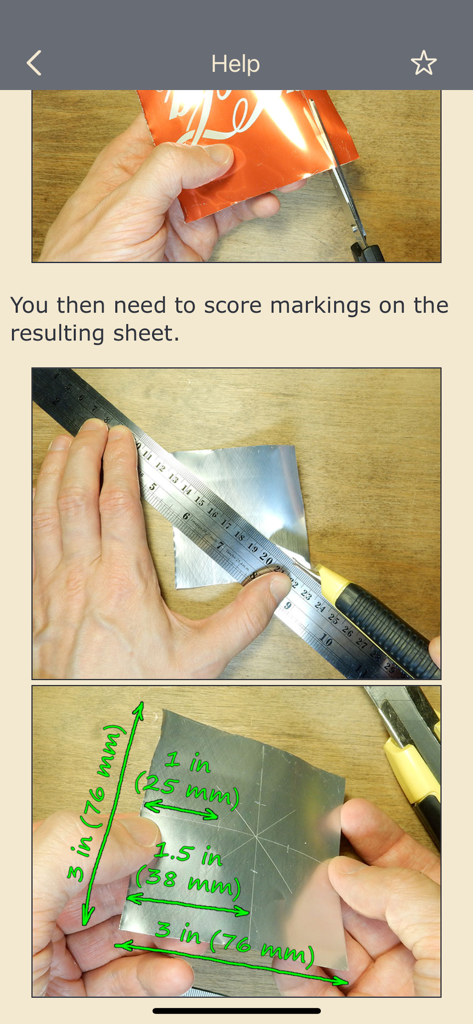
Step by step instructions for cutting and marking metal sheet dimensions for a DIY wind meter

Step by step instructions for cutting and marking metal sheet dimensions for a DIY wind meter

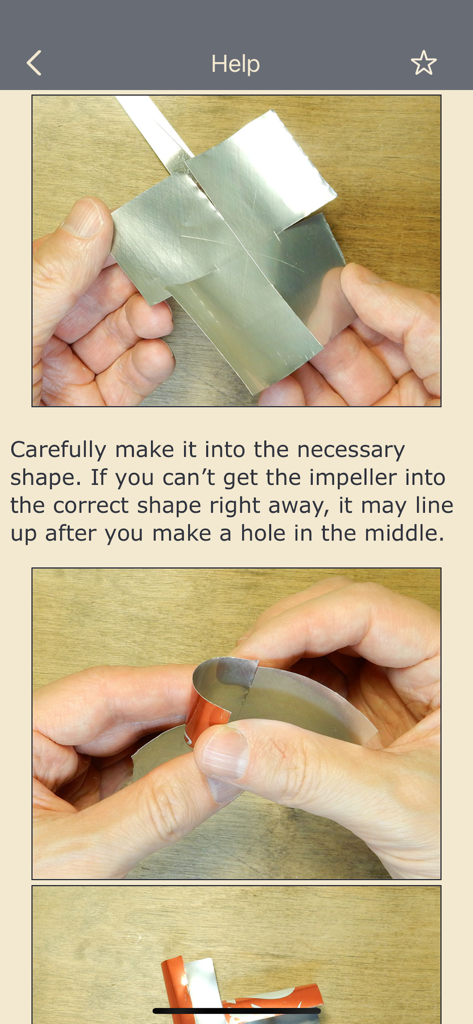
Instructional photos showing how to shape a metal sheet for a DIY anemometer impeller

Instructional photos showing how to shape a metal sheet for a DIY anemometer impeller

Step-by-step guide for building a DIY wind meter using common household materials.

Step-by-step guide for building a DIY wind meter using common household materials.

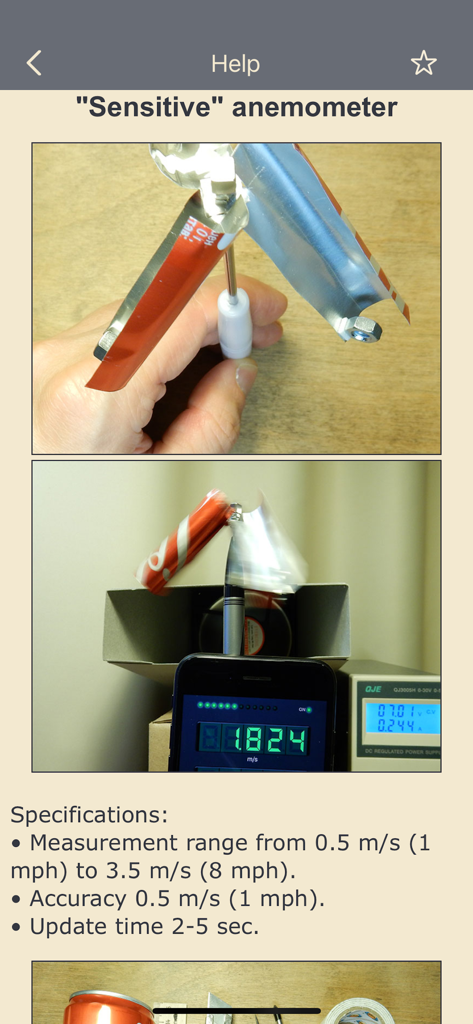
DIY sensitive anemometer build guide and wind speed specifications

DIY sensitive anemometer build guide and wind speed specifications

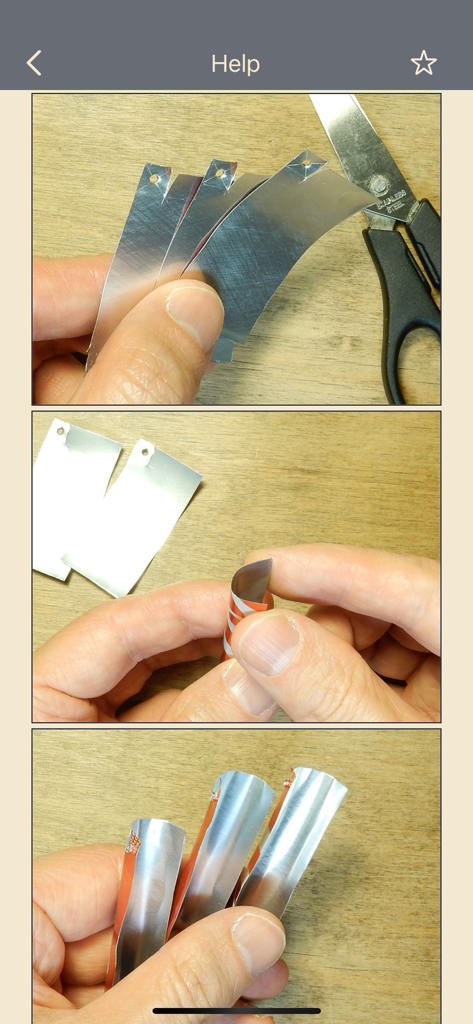
Step by step instructional photos for creating wind meter blades from metal strips

Step by step instructional photos for creating wind meter blades from metal strips

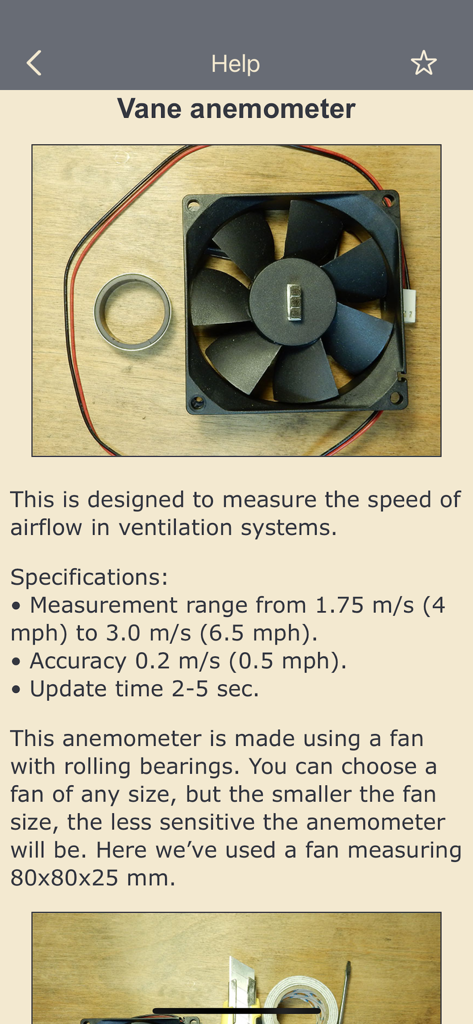
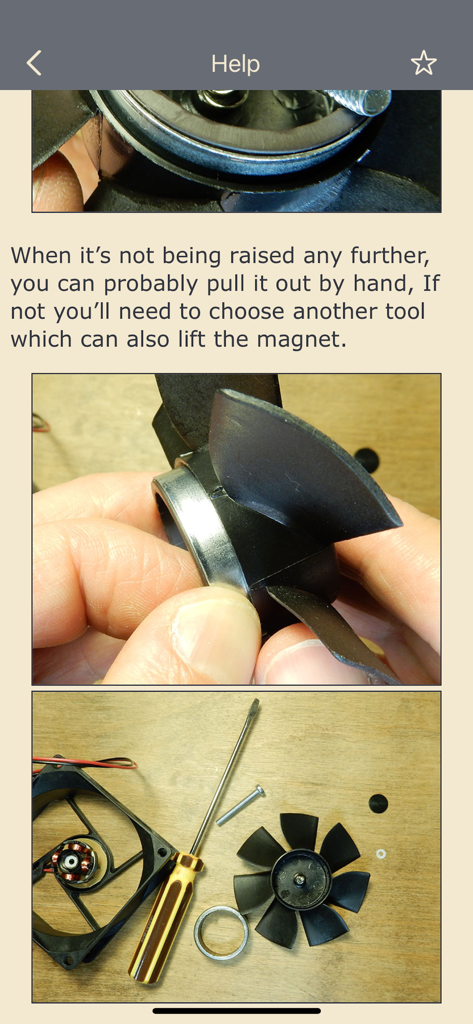
DIY vane anemometer assembly using a computer fan and magnet

DIY vane anemometer assembly using a computer fan and magnet

Hands assembling a DIY wind meter using a fan impeller and magnets

Hands assembling a DIY wind meter using a fan impeller and magnets

Engineer Your Own Scientific Tool

The tools that make this app stand out, trusted by 31K+ users.

🧲

Magnetometer Precision

Unlock the hidden power of your phone's sensors to measure airflow through real-time magnetic rotation tracking.

⚙️

Tailored Calibration

Fine-tune your build for maximum accuracy. Adjust the relationship between rotation and speed to suit your custom hardware.

🚁

Hobbyist Optimized

Perfect for drone pilots and HVAC DIYers. Get instant readings in Knots, mph, or m/s to ensure safe flying and efficient ventilation.

Loved by users worldwide

Trusted by 31K+ people who love this app.

"

"As a frequent drone flyer, I love that I can build my own precision tool instead of buying more expensive gear. Calibrating it was straightforward, and the accuracy is impressive for a DIY setup. It is a must-have for any maker who needs real-time wind data on the field."

David Miller
"

"This was the perfect weekend project to do with my kids. We learned about physics and magnetism while building a functional weather tool. The app interface is clean, and the ability to switch units like knots and m/s makes it a great educational resource."

Elena Rodriguez

About the app

Everything you need to know about DIY Anemometer (Wind Meter).

Description

Using this app along with a very simple homemade device, you’ll have a working anemometer for measuring wind speed or the airflow in a ventilation system. You can choose the type of anemometer which best suits your needs. The wind speed is determined by measuring the rotation speed of the magnet in your iPhone’s magnetometer. The relationship between the rotation speed and the speed of airflow is set in each version of the anemometer and can be adjusted. You can make improvements to the suggested designs or make and calibrate your own. In order to select units of measurement (m/s, km/h, ft/s, mph, knots, Bft) or the average value ("Avg1" - most recent value, "Avg3" and "Avg7" - average value) press the seven-segment display. Don’t forget to put a protective cover on your iPhone. Specifications ("Outdoor" anemometer): • Measurement range from 0.5 m/s (1 mph) to 15 m/s (34 mph). • Accuracy 0.5 m/s (1 mph). • Update time 2-5 sec. IMPORTANT!!! Small children should not be given magnets because they may swallow them. If two (or more) magnets are swallowed, the magnets can become magnetized to each other in the intestines, squeezing the intestinal tissues between themselves. This can result in serious injury and hospitalization. Children who already think well (and do not swallow everything in a row) can be given only one magnet, and if the magnet is gone, then you definitely need to find a magnet. Telling children not to swallow magnets is probably not necessary, as this can lead to the opposite result. For more information, see the Help section in the app.

Latest Version

1.0.5

Size

11.8 MB

First Released

Nov 20, 2017

Ready to Build Your Own Wind Meter?

Join over 31,000 makers and tech enthusiasts. Download now to unlock your iPhone's magnetometer and transform it into a precision scientific instrument for your next drone flight, DIY project, or STEM experiment.

Download on App Store