GDevelop - Create & Play Games

GDevelop - Create & Play Games

Download on App Store
Spark by MWM logo
Logo of GDevelop - Create & Play Games

GDevelop - Create, Play, and Share Your Own Indie Games

Join the no-code revolution. Use AI-powered tools to build games in minutes, or explore thousands of unique indie titles instantly—no experience needed.

Publisher

GDEVELOP FRANCE

Category

Developer Tools

Downloads

70K+

User Rating

4.4/5

Total Ratings

1K+

Locales

1

Your Creative Workspace

Discover the interface used by 70K+ users.
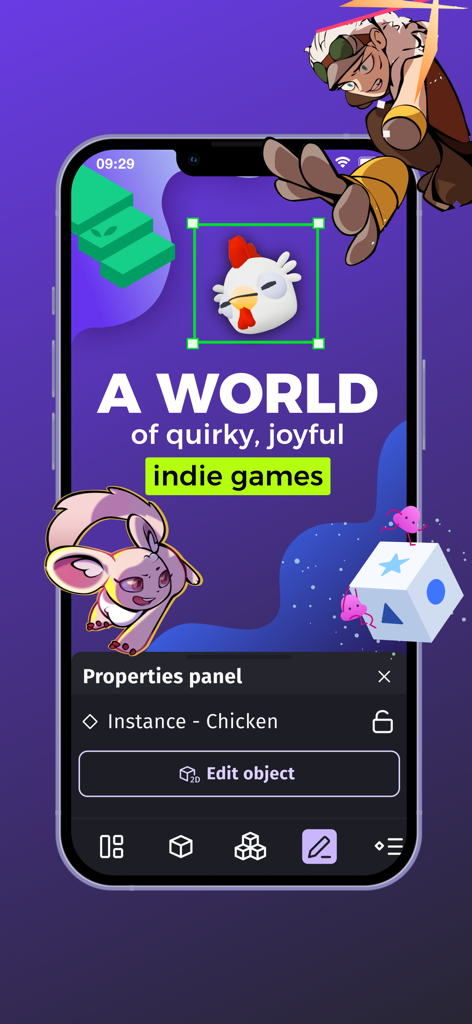
A mobile interface for the GDevelop app showing a chicken character being edited within a game development environment with the text A world of quirky joyful indie games.

A mobile interface for the GDevelop app showing a chicken character being edited within a game development environment with the text A world of quirky joyful indie games.

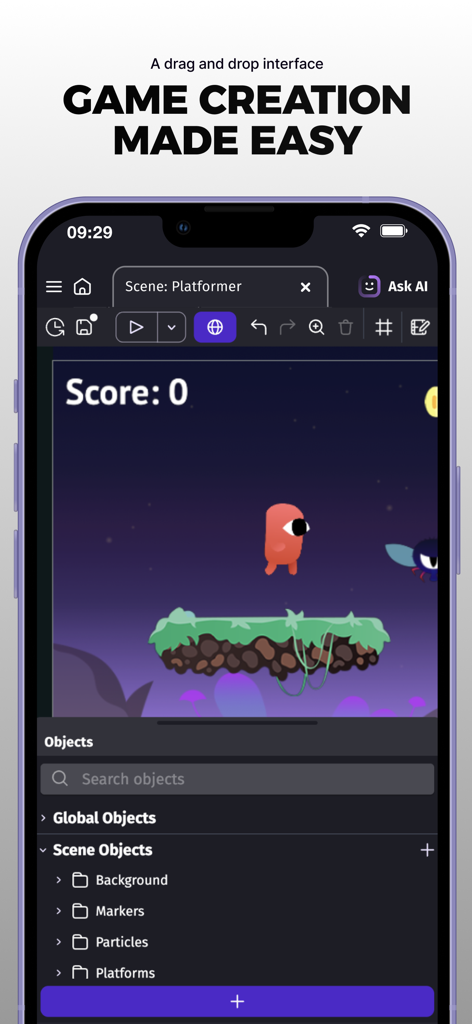
GDevelop mobile app interface showing a drag and drop game editor for creating a platformer game

GDevelop mobile app interface showing a drag and drop game editor for creating a platformer game

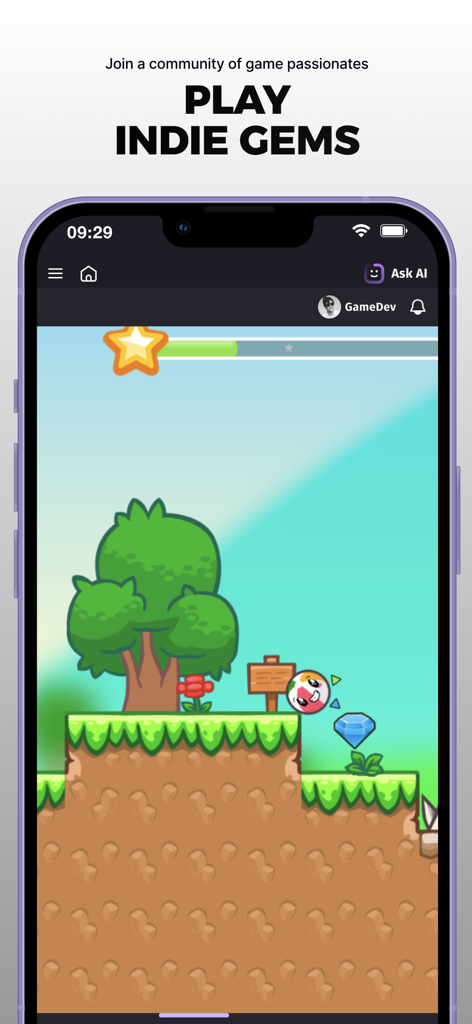
GDevelop mobile app interface showing a 2D indie platformer game with a round character and colorful environment

GDevelop mobile app interface showing a 2D indie platformer game with a round character and colorful environment

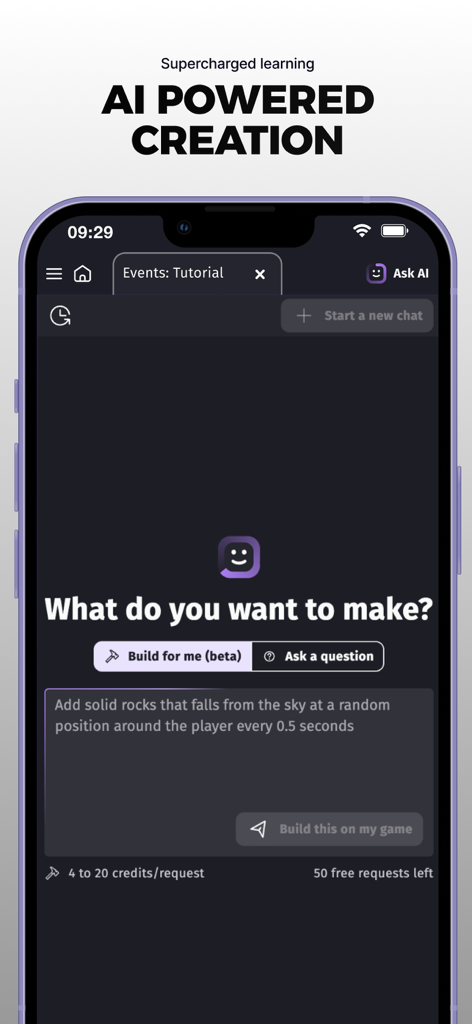
AI powered game creation interface in the GDevelop app showing a natural language prompt to build game mechanics

AI powered game creation interface in the GDevelop app showing a natural language prompt to build game mechanics

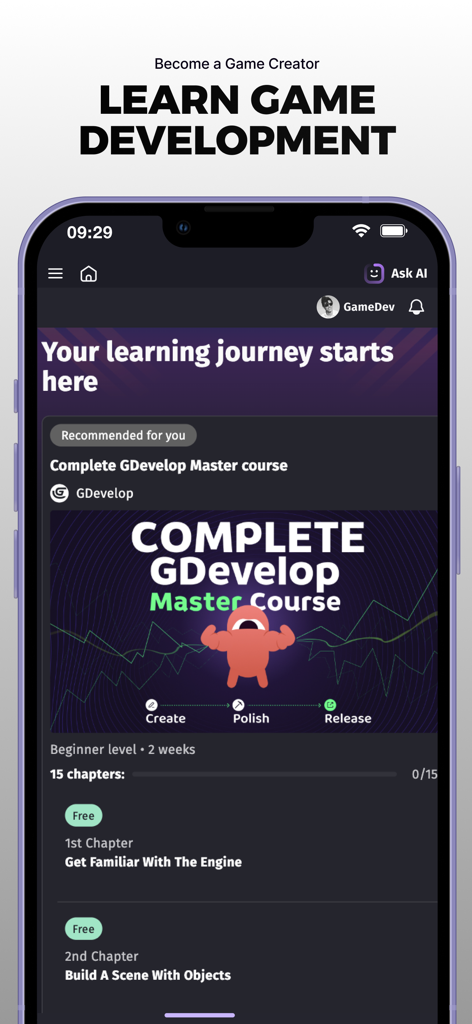
A screen from the GDevelop app showing a game development master course with chapters for beginners

A screen from the GDevelop app showing a game development master course with chapters for beginners

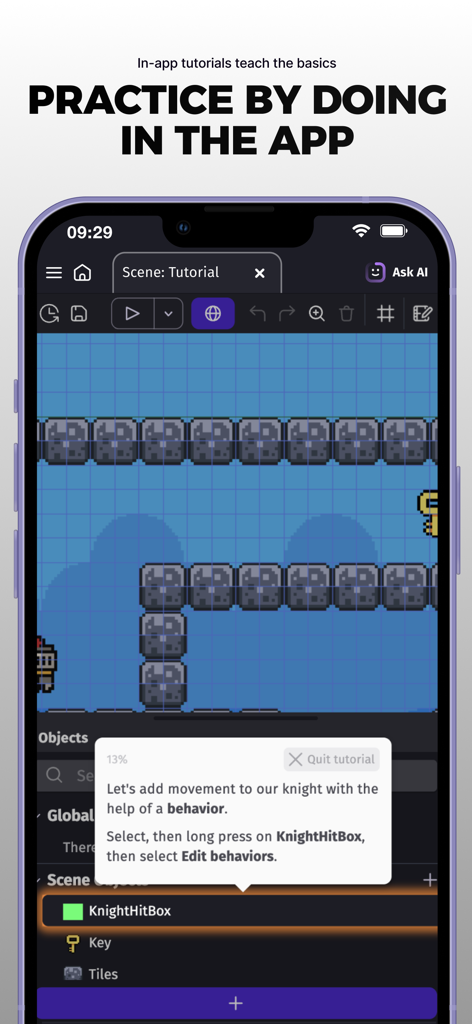
An in-app tutorial showing how to add movement behaviors to game objects in the GDevelop mobile editor.

An in-app tutorial showing how to add movement behaviors to game objects in the GDevelop mobile editor.

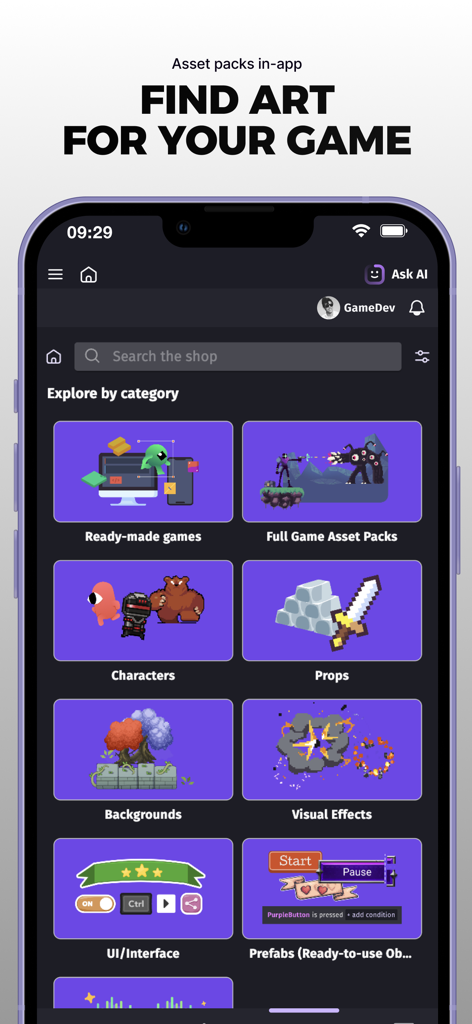
GDevelop mobile app screen displaying a store with categories for game assets like characters, props, and backgrounds

GDevelop mobile app screen displaying a store with categories for game assets like characters, props, and backgrounds

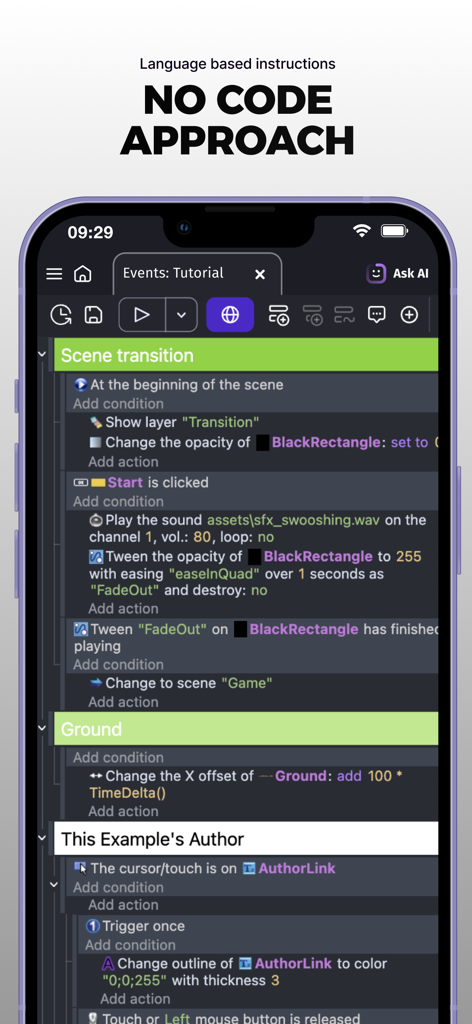
Mobile screen showing the GDevelop visual logic editor with no code instructions

Mobile screen showing the GDevelop visual logic editor with no code instructions

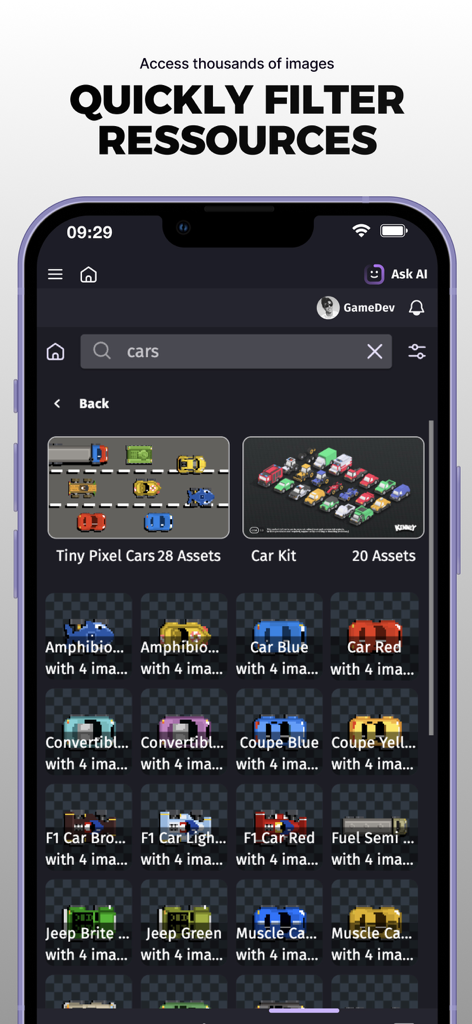
Searching and filtering car assets in the GDevelop game resource library

Searching and filtering car assets in the GDevelop game resource library

From Player to Creator

The tools that make this app stand out, trusted by 70K+ users.

🪄

Build Without Coding

Skip the steep learning curve. Use visual logic and AI-powered tools to create complex gameplay mechanics in minutes.

🕹️

Instant Indie Feed

Dive into a growing world of thousands of community-made games. Play instantly within the app with zero installation required.

🚀

Publish Like a Pro

Go from a blank canvas to a playable game in record time. Share your creations with friends or publish to the world with a single tap.

Loved by users worldwide

Trusted by 70K+ people who love this app.

"

"I used to spend all my time playing Roblox, but GDevelop let me finally build my own standalone games. The no-code logic is so intuitive that I had my first platformer running on my phone in less than an hour! It is amazing to see people from all over the world playing my levels."

Leo S., Student & Aspiring Creator
"

"As an illustrator, I always wanted to bring my characters to life but felt gatekept by traditional coding. GDevelop changed everything. The visual event system and AI tools allowed me to build a polished 2D adventure on my iPad during my commute. It is the ultimate engine for artists."

Sarah M., Digital Artist & Indie Hobbyist

About the app

Everything you need to know about GDevelop - Create & Play Games.

Description

Play a growing world of quirky, joyful indie games. Discover, play and support games made by independent creators from around the world... and create your own! Play and help shape the next indie gem: - Unlimited indie games instantly in-app, no install needed - Sharing feedback with creators - Explore new games every week, from around the world Every game in the app was built with GDevelop: the no-code and AI powered, open-source game engine used by thousands of creators, artists, and independent developers. Start exploring. Play something small. Or weird. Or wonderful. Create your own games. Or play any game you're dreaming of! It's fast, easy, and no technical knowledge is required to get started. Try it, or get a GDevelop subscription to unlock every feature! - Explore dozens of game templates or start from scratch. - Use AI to help you build your game step by step. - Use your own characters, or choose from a library of pre-made objects such as characters, animations, sounds, and music. - Quickly add pre-made logic to your game objects with GDevelop's Behaviors. - Write game logic with GDevelop's innovative event system based on "if / then" actions and conditions. - Publish your game in a few seconds and share it with your friends, colleagues, or customers. - Allow players to submit their scores with ready-to-use leaderboards or make online multiplayer games. Dozens of thousands of games are made every month with GDevelop. Unleash your creativity, and create all kinds of games: platformers, shoot’em up, strategy, 8-bit, or hyper-casual games... the sky is the limit. GDevelop is a powerful game engine that will transform you into a game designer: - Add explosions and effects with particles. - Use visual effects ("shaders"). - Pathfinding and advanced movements (bounce, elliptic movement, screen wrap, projectiles...). - Advanced rendering engine that can handle pixel-art games, modern 2D games, 2.5D isometric games and 3D games. - Text objects for scores, dialogues, with optional typewriter effects. - Transitions and smooth movement for objects. - Leaderboards and Real-time Multiplayer. - Platformer engine. - Realistic 2D and 3D physics engine. - Sound effects and music handling. - Ready-to-use objects for your game interface: text input, buttons, joysticks, progress bars... - Complete documentation available for each feature. - Dozens of extensions that give new behaviors, new actions, and new conditions: checkpoints, object shaking, 3D flip effects... GDevelop makes game development easy, even for those with no prior experience. Download the app and join a community of 400k+ monthly creators: gamers, hobbyists, teachers, and professionals. GDevelop's unique design makes game creation fast and fun! Our Terms & Conditions: https://gdevelop.io/page/terms-and-conditions Our Privacy Policy: https://gdevelop.io/page/privacy-policy

Latest Version

1.0.258

Size

353.3 MB

First Released

Apr 10, 2023

Stop Playing. Start Creating.

Join 400,000+ creators using AI-powered no-code tools to build, publish, and share your dream games with the world today.

Download on App Store
FAQ

Frequently Asked Questions

Everything you need to know about GDevelop - Create & Play Games

What is GDevelop - Create & Play Games?

GDevelop is an app for playing and creating indie games using a no-code, AI-powered, open-source game engine. It enables users to develop various game types without prior technical knowledge.

Does GDevelop require coding knowledge to create games?

No, GDevelop does not require coding knowledge. It employs a no-code approach with an intuitive event system based on "if / then" actions, making game creation accessible to all.

Can I play games made with GDevelop directly in the app?

Yes, GDevelop allows users to play unlimited indie games directly in-app without installation. It features a continually growing collection of quirky and joyful indie games.

How does GDevelop assist with game creation using AI?

GDevelop assists game creation with AI by helping users build games step-by-step. It offers an "Ask AI" feature where requests consume credits, as shown in the interface.

What types of games can users create with GDevelop?

GDevelop enables the creation of diverse game types, including platformers, shoot’em ups, strategy, 8-bit, and hyper-casual games. It supports 2D, 2.5D isometric, and 3D game rendering.

Does GDevelop offer resources for learning game development?

Yes, GDevelop provides learning resources for game development, including a "Complete GDevelop Master course" with multiple chapters and interactive in-app tutorials for practical learning.

Is a GDevelop subscription required to access all features?

Yes, a GDevelop subscription is required to unlock every feature within the app. Users can try GDevelop initially, but full access necessitates a subscription.

Can users customize game objects in GDevelop?

Yes, GDevelop users can customize game objects. The app provides a properties panel to edit instances, and pre-made logic can be applied to objects using GDevelop's Behaviors.

How can GDevelop users find assets for their games?

GDevelop users can find game assets through an in-app shop that categorizes resources like characters, visual effects, and full game asset packs. A search and filter function is also available.

Where can I find the privacy policy for GDevelop - Create & Play Games?

The privacy policy for GDevelop - Create & Play Games is accessible via the link provided in the app description: https://gdevelop.io/page/privacy-policy.