MAE by Maybank2u

MAE by Maybank2u

Download on App StoreDownload on Google Play
Spark by MWM logo
Logo of MAE by Maybank2u

MAE by Maybank2u: Your Borderless Financial & Lifestyle Companion

Bridge the distance between the US and home. Manage your Malaysian accounts, automate savings with Tabung, and enjoy secure cross-border banking—all in one powerful app designed for your global lifestyle.

Publisher

Malayan Banking Berhad

Category

Finance

Downloads

7M+

User Rating

2.6/5

Total Ratings

22K+

Locales

1

Banking Without Borders

Discover the interface used by 7M+ users.
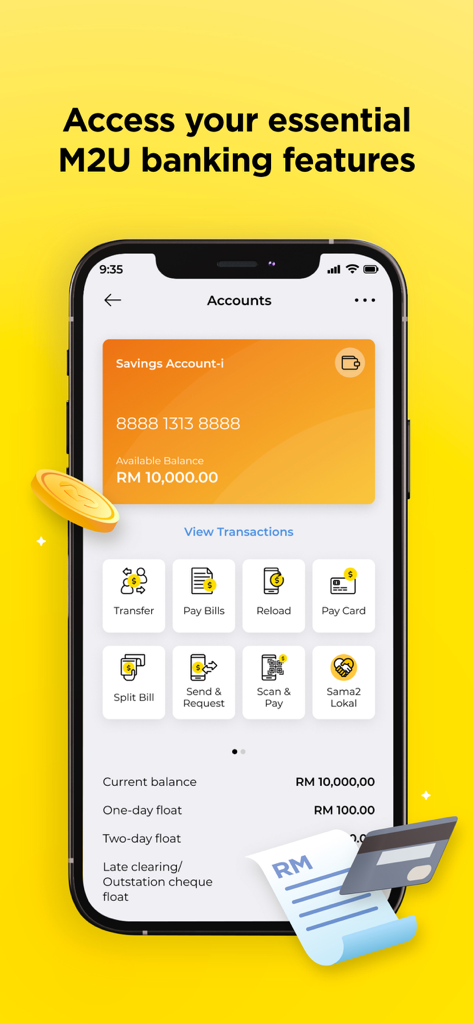
MAE by Maybank2u app interface showing savings account balance and quick access banking features like transfer and pay bills

MAE by Maybank2u app interface showing savings account balance and quick access banking features like transfer and pay bills

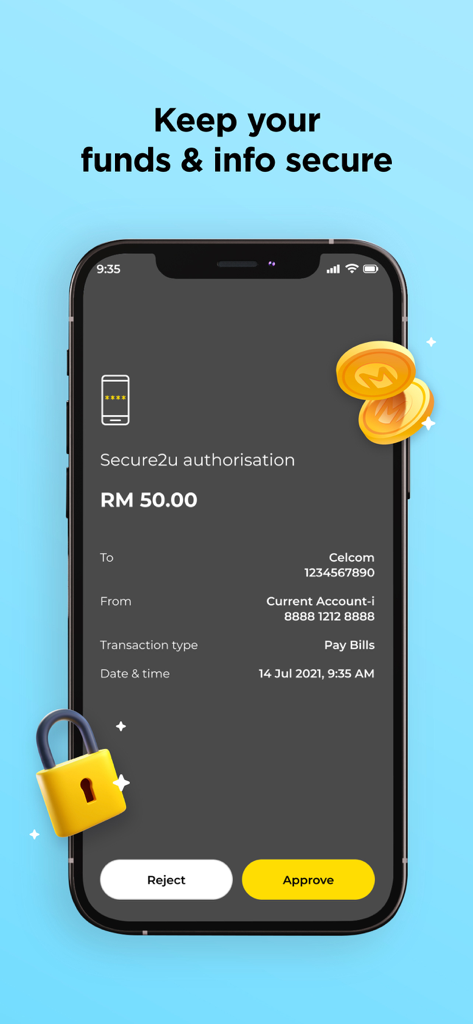
MAE by Maybank2u app screen showing a Secure2u transaction authorization for a bill payment with approve and reject buttons

MAE by Maybank2u app screen showing a Secure2u transaction authorization for a bill payment with approve and reject buttons

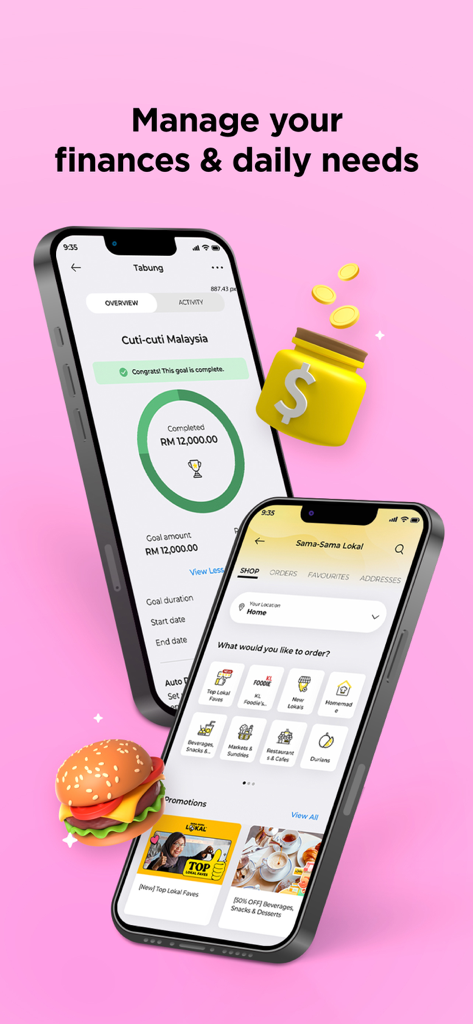
Two smartphones displaying the MAE app with a savings goal tracker and a local food delivery service interface

Two smartphones displaying the MAE app with a savings goal tracker and a local food delivery service interface

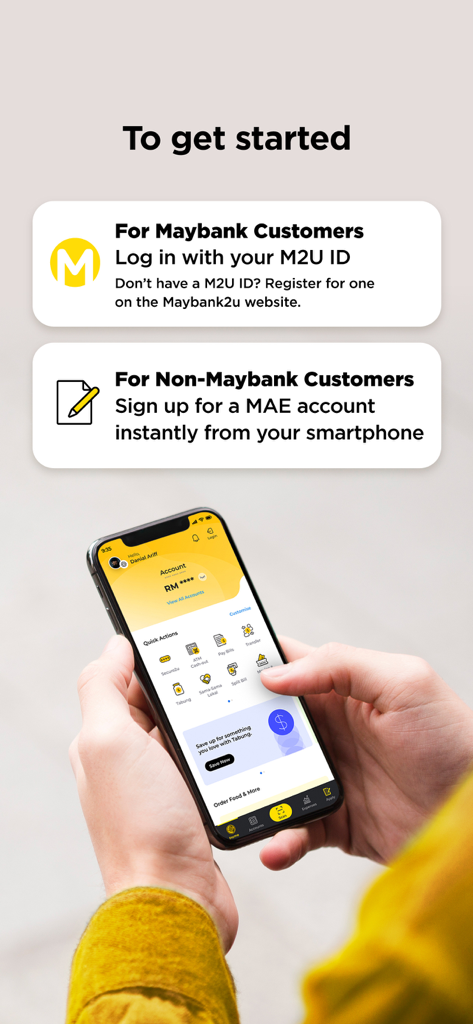
MAE by Maybank2u onboarding screen showing login options for existing customers and instant sign up for new users

MAE by Maybank2u onboarding screen showing login options for existing customers and instant sign up for new users

Your Financial Bridge to Malaysia

The tools that make this app stand out, trusted by 7M+ users.

🌐

Global Account Management

Access all your M2U banking features from abroad. Pay Malaysian utilities, transfer funds, and view your balances instantly without the friction of international distance.

🎯

Smart Savings with Tabung

Save for your next trip home or a property investment in Malaysia. Use automated boosters to reach your goals faster while managing your US-based budget.

🛡️

Bank-Grade Secure2u Security

Protect your assets with biometric login and Secure2u. Authorize transactions safely and receive instant alerts, ensuring your Malaysian funds stay secure while you are overseas.

Loved by users worldwide

Trusted by 7M+ people who love this app.

"

"Managing my finances between New York and Kuala Lumpur has never been easier. I use the Tabung feature to save for my yearly trips home, and the Expenses tracker keeps my budget on point while I am living abroad."

Sarah J., Graduate Student
"

"The Secure2u feature is a game-changer for security. I can approve transactions for my property back home instantly and safely from California. It is the perfect bridge for my cross-border financial life."

Marcus Tan, Senior Tech Lead

About the app

Everything you need to know about MAE by Maybank2u.

Description

The MAE app has all your M2U banking features and beyond. Apart from viewing, tracking, and managing your finances, the MAE app helps you manage tasks and plan your lifestyle with just a few taps. Here are a few reasons why the MAE app is the only banking app you need: Banking Enjoy all your essential banking features like View Accounts, Bank Transfer, Pay Bills and more! Security Made to keep your info and funds extra secure, the MAE app is equipped with biometric login, instant alerts for your transaction, Secure2u for safer and faster transaction approvals, and the ability to hide your wallet balance whenever you need it. Lifestyle Stay on top of your daily tasks and life goals with the MAE app’s vast array of lifestyle features, like Expenses, Tabung, and Sama-Sama Lokal food delivery. How do I get started? - Maybank customers: (i) With M2U ID - simply log in with your M2U ID and all your M2U settings will be automatically synced with the MAE app. (ii) Without M2U ID - register for one online on the Maybank2u website. - Non-Maybank customers: skip the queue at the branch and sign up instantly with just your phone to enjoy all the benefits of a Maybank customer. The MAE app will seek permission for the following: i. Access to your camera to enable you to scan QR code and also upload documents when you apply for a new product or service. ii. Access to your contact directory to give you the convenience of selecting your contacts when you make a transaction to a mobile number. iii. Access to your location to offer you the most relevant food listings, marketing promotions or deals by our merchant partners while you are on the go. iv. Access to your phone’s audio to enable you to make a direct call to the bank's hotline. v. Access to your settings to enable push notifications to receive Secure2u alerts.

Latest Version

0.9.43

Size

278.6 MB

First Released

Oct 7, 2020

Your Financial Bridge to Home, From Anywhere in the USA

Join over 7 million users managing their lifestyle and cross-border finances with bank-grade security. Download MAE today and take control of your Malaysian accounts, no matter the distance.

Download on App StoreDownload on Google Play
FAQ

Frequently Asked Questions

Everything you need to know about MAE by Maybank2u

What are the primary banking features available in the MAE app?

The MAE app offers essential banking features such as viewing accounts, bank transfers, and bill payments. Users can also reload, pay cards, split bills, send & request money, and use Scan & Pay functionalities.

How does the MAE app ensure transaction security?

The MAE app secures transactions with biometric login, instant transaction alerts, and Secure2u for approvals. It also provides the option to hide your wallet balance for enhanced privacy.

Can I manage my personal finances and daily needs with the MAE app?

Yes, the MAE app integrates finance and lifestyle management. Features like Expenses, Tabung for savings goals, and Sama-Sama Lokal for food delivery help users manage daily tasks and life goals.

How do Maybank customers begin using the MAE app?

Maybank customers with an M2U ID log in directly; their M2U settings sync automatically. If without an M2U ID, registration is required online via the Maybank2u website.

Can non-Maybank customers create an account with the MAE app?

Yes, non-Maybank customers can sign up instantly for a MAE account directly from their phone. This allows them to access all Maybank customer benefits without needing to visit a branch.

What permissions does the MAE app request on my device?

The MAE app requests permissions for camera (QR scanning, document upload), contacts (mobile transactions), location (relevant listings, promotions), audio (hotline calls), and settings (Secure2u notifications).

Does the MAE app support setting savings goals?

Yes, the MAE app includes a "Tabung" feature designed for setting and tracking financial savings goals. Screenshot #3 visually confirms a completed savings goal named "Cuti-cuti Malaysia."