Procore

Procore

Download on App Store
Spark by MWM logo
Logo of Procore

Procore: Streamline Your Job Site from Field to Office

The all-in-one construction management platform to manage drawings, RFIs, and safety. Connect your entire project team in real-time to finish every job on schedule and under budget.

Download on App Store

Publisher

Procore Technologies

Category

Business

Downloads

1M+

User Rating

4.6/5

Total Ratings

47K+

Locales

11

Command the Jobsite

Discover the interface used by 1M+ users.
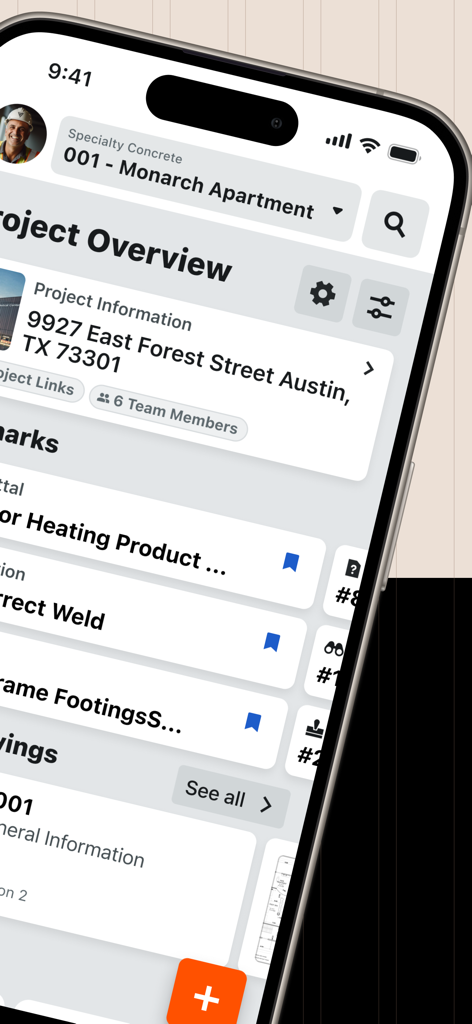
Procore mobile app interface displaying construction project data and drawings on a smartphone

Procore mobile app interface displaying construction project data and drawings on a smartphone

Procore mobile app interface showing construction project overview and site location details on an iPhone

Procore mobile app interface showing construction project overview and site location details on an iPhone

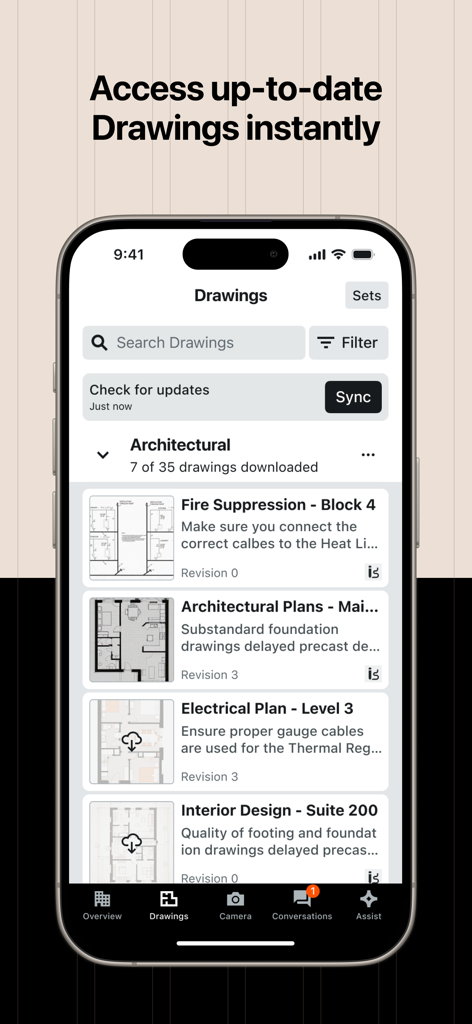
Procore mobile app interface showing architectural and electrical drawings for construction project management

Procore mobile app interface showing architectural and electrical drawings for construction project management

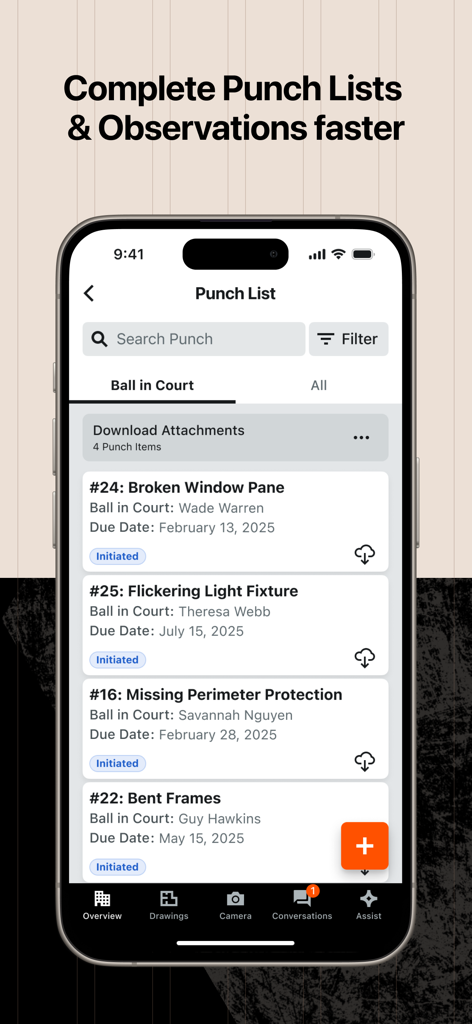
Procore mobile app interface showing a construction punch list with tasks and due dates on an iPhone screen.

Procore mobile app interface showing a construction punch list with tasks and due dates on an iPhone screen.

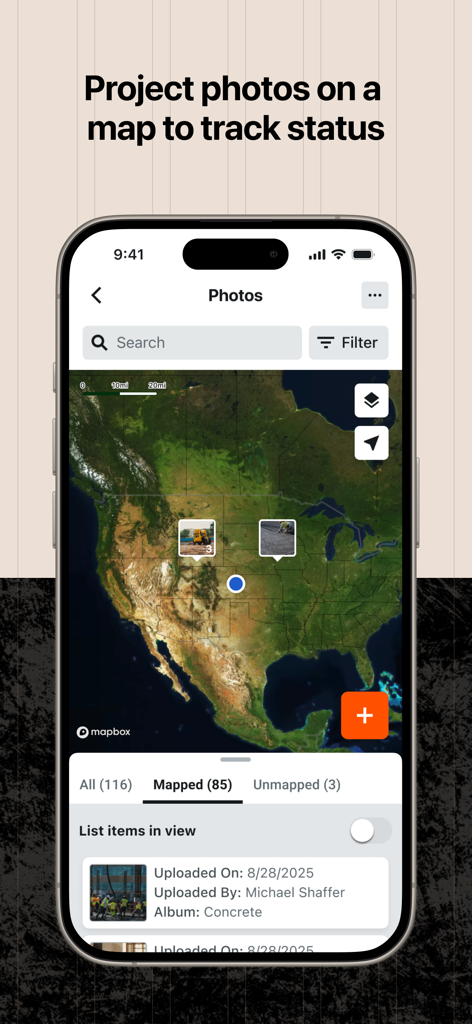
Procore app interface showing construction project photos pinned on a map for tracking site progress

Procore app interface showing construction project photos pinned on a map for tracking site progress

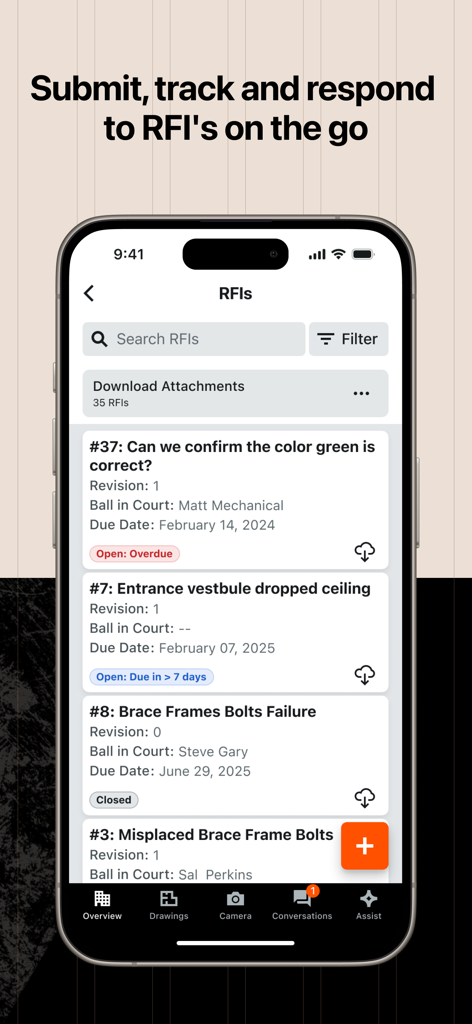
Procore mobile app interface for tracking and responding to construction RFIs on a job site

Procore mobile app interface for tracking and responding to construction RFIs on a job site

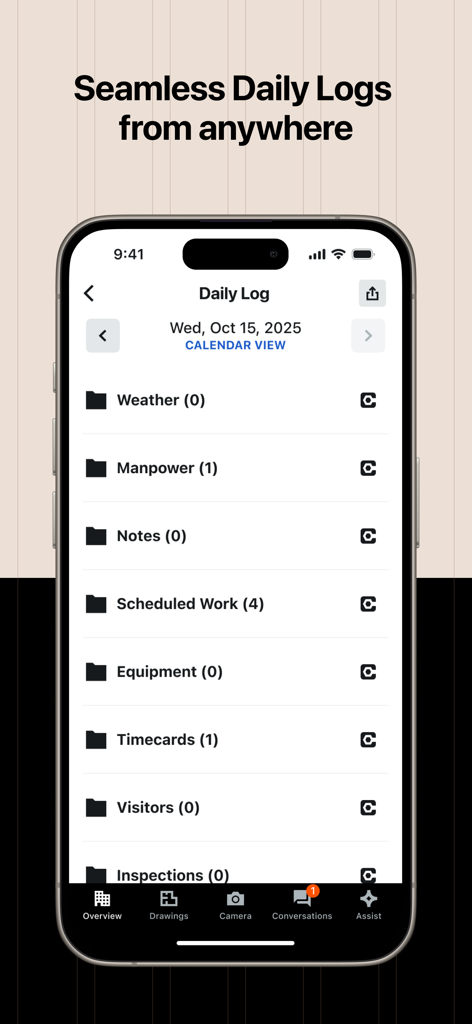
Procore mobile app interface displaying a construction daily log with categories like manpower and scheduled work

Procore mobile app interface displaying a construction daily log with categories like manpower and scheduled work

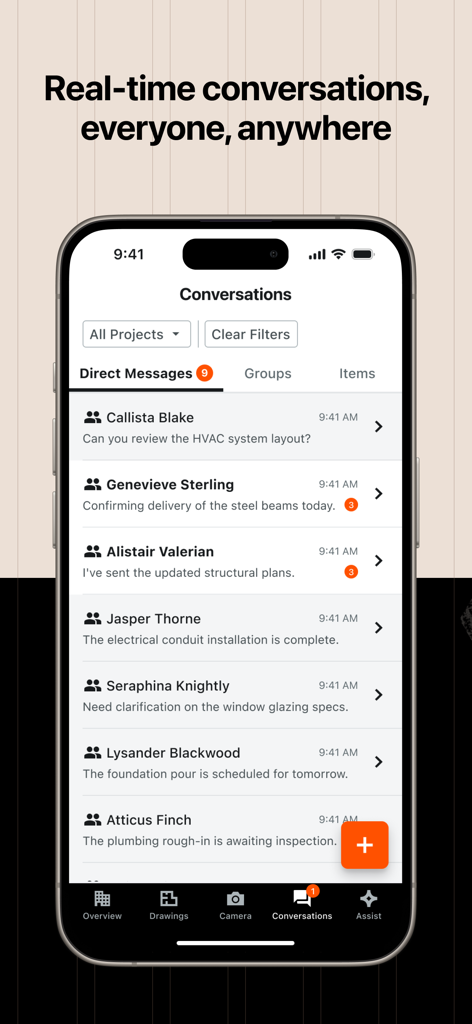
Procore mobile app screenshot showing the real-time conversations and direct messaging interface for construction projects.

Procore mobile app screenshot showing the real-time conversations and direct messaging interface for construction projects.

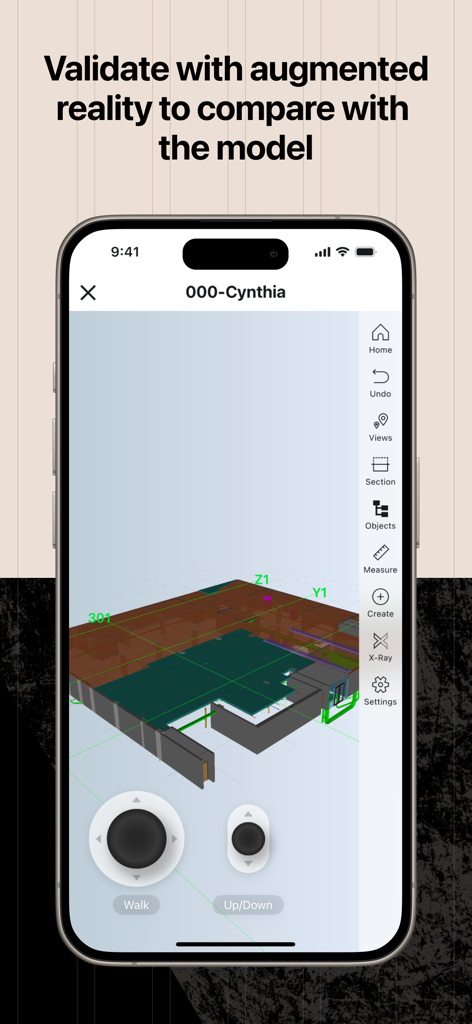
Procore mobile app interface displaying a 3D construction model with augmented reality tools for field validation.

Procore mobile app interface displaying a 3D construction model with augmented reality tools for field validation.

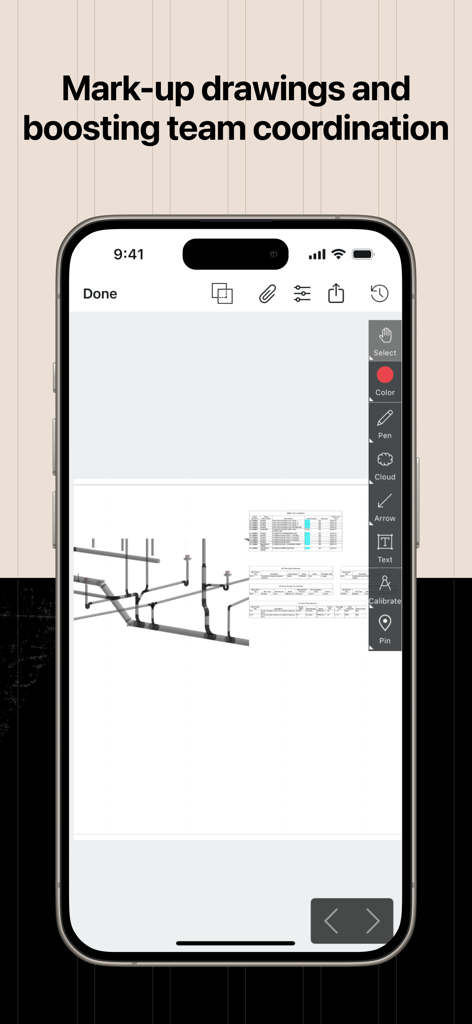
Procore mobile app interface showing a technical construction drawing with markup and coordination tools on an iPhone

Procore mobile app interface showing a technical construction drawing with markup and coordination tools on an iPhone

Master the Job Site with Precision

The tools that make this app stand out, trusted by 1M+ users.

📐

One Single Source of Truth

Access the most current drawings and submittals instantly on your iPad. Stop disputes and rework by ensuring every foreman and contractor is building from the same set of plans.

🎙️

Voice-Enabled Quick Capture

Record punch items hands-free while walking the site. Our voice technology transcribes your notes automatically, saving you hours of manual data entry at the end of a long shift.

🏗️

Instant Field-to-Office Sync

Bridge the communication gap with real-time RFIs, Daily Logs, and Conversations. Resolve critical site issues in minutes, not days, to maintain your project's momentum.

Loved by users worldwide

Trusted by 1M+ people who love this app.

"

"As a Project Manager, Procore has become my single source of truth. The seamless sync between the office and the field ensures everyone is working from the latest drawings, which has virtually eliminated costly reworks and communication delays on our sites."

Michael R., Senior Project Manager
"

"The Quick Capture tool is a total game-changer for my daily walk-throughs. Being able to verbally describe punch items while recording video saves me hours of manual data entry every week, allowing me to focus on keeping the crew safe and on schedule."

David S., Site Superintendent

Review Analysis

Insights from user reviews.

Sentiment Score

18%
Negative

Summary

The mobile app receives predominantly negative feedback, with many users expressing frustration over frequent crashes, lagging performance, and a non-intuitive user interface. Key issues include difficulties with mark-up tools, particularly the inability to pan while zoomed on drawings, and the constant need to re-download documents and photos, impacting efficiency in areas with poor service. While some users acknowledge its theoretical utility for project management, accessing plans, and creating markups, the numerous bugs and cumbersome workflows severely hinder its overall usability, especially following recent updates.

Common Themes

Project Management Features(10)
Overall User Experience(5)
Document and Drawing Access(1)
Markup Functionality(1)
Efficiency(1)
Scalability for Large Projects(1)

About the app

Everything you need to know about Procore.

Description

Procore is the leading construction management platform that connects over 2 million construction professionals in more than 150 countries. Procore provides owners, general contractors, and specialty contractors with the tools they need to get the job done. Access to critical project information, powerful collaboration tools, and streamlined processes make it easy to stay on schedule and on budget. Companies that use Procore can experience more work capacity, weekly hours saved, and greater project visibility. Conversations (Open beta for all customers) Procore Conversations provides a convenient way for stakeholders across office and field teams to communicate right in Procore. You can privately message others with direct messages, start conversations on project items, or create groups to discuss various project topics. Procore’s Quick Capture uses voice-enabled input technology to help cut down the time to create punch items. Quick Capture converts videos you record of issues on the job site into punch items. While recording a video, you can verbally describe what you are seeing and the audio will be transcribed to automatically populate the punch item's Title and Description fields from the drawing as well as the punch item. Easily track and manage important project items with bookmarks on mobile. You can now bookmark items from: Change Events, Commitments, Drawings, Observations, RFIs, Submittals, T&M Tickets, Inspections, Incidents, Punch List. FIELD ENABLEMENT Procore’s field enablement tools increase productivity for field teams by connecting office and field teams in real-time. + Drawings + Daily Log + Punch List + RFIs + Photos + Documents WORKFORCE MANAGEMENT Put the right people on the right jobs and track real-time productivity with Procore’s workforce management solutions. Easily manage crews, schedules, and tasks to optimize your workforce’s productivity. + Timecards + Timesheets + Time and Material Tickets PROJECT MANAGEMENT Connect teams and project information with access to all the tools you need to manage your projects. + Specifications + Submittals + Schedule QUALITY & SAFETY Procore’s quality and safety management solutions help field teams more easily comply with safety regulations and quality specifications. Access to tools on your mobile device like Observations, Incidents, and Inspections help you achieve the highest quality build in the safest environment. + Observations + Incidents + Inspections PROJECT FINANCIALS Procore’s cost management solutions make it easier to collaboratively manage project costs. + Commitments + Change Events

Latest Version

2026.0105

Size

336.0 MB

First Released

Jun 3, 2010

Ready to Build with Total Certainty?

Join over 2 million construction professionals who use Procore to eliminate rework and stay on schedule. Download the industry's most trusted platform and bring your office to the field today.

Download on App Store
FAQ

Frequently Asked Questions

Everything you need to know about Procore

What is Procore?

Procore is a leading construction management platform that connects over 2 million construction professionals across more than 150 countries. It provides tools for owners, general contractors, and specialty contractors.

How does Procore improve construction project management?

Procore provides critical project information, powerful collaboration tools, and streamlined processes. This helps companies achieve greater project visibility, increased work capacity, and saved weekly hours.

Can Procore users communicate within the app?

Yes, Procore Conversations allows users to communicate directly through private messages, project item discussions, and group chats. This feature is currently in open beta for all customers.

Does Procore offer a tool for quick punch list creation?

Yes, Procore's Quick Capture uses voice-enabled input technology. It converts recorded videos of job site issues into punch items, transcribing audio to populate titles and descriptions automatically.

What project items can Procore users bookmark on mobile?

Procore mobile users can bookmark Change Events, Commitments, Drawings, Observations, RFIs, Submittals, T&M Tickets, Inspections, Incidents, and Punch Lists for easy tracking.

What field enablement tools does Procore provide?

Procore offers field enablement tools including Drawings, Daily Log, Punch List, RFIs, Photos, and Documents. These tools connect office and field teams in real-time.

Can I access project drawings instantly with Procore?

Yes, Procore allows instant access to up-to-date drawings from anywhere. Users can view architectural, electrical, and interior design plans, and sync for updates.

Does Procore support project photo tracking on a map?

Yes, Procore enables users to project photos on a map to track project status. This provides a visual overview of site progress and locations.

How does Procore assist with daily logs?

Procore provides seamless Daily Logs from anywhere. Users can record and access information on weather, manpower, notes, scheduled work, timecards, visitors, and inspections.

Can Procore help with augmented reality model validation?

Yes, Procore includes functionality to validate with augmented reality. This allows users to compare real-world conditions with the project model directly on their device.

Does Procore allow users to mark up drawings?

Yes, Procore provides tools to mark up drawings. Users can add annotations, clouds, text, and pins to drawings to boost team coordination and communication.

What workforce management features are available in Procore?

Procore's workforce management solutions include Timecards, Timesheets, and Time and Material Tickets. These features help optimize productivity by managing crews, schedules, and tasks.