PureLibro: ebook reader

PureLibro: ebook reader

Download on App Store
Spark by MWM logo
Logo of PureLibro: ebook reader

PureLibro: The Ultimate All-in-One Reader for Books and Comics

Break free from walled gardens with support for every format, AI-powered image enhancement, and total privacy for your personal digital library.

Publisher

添欢 谢

Category

Books

Downloads

276K+

User Rating

4.8/5

Total Ratings

17K+

Locales

4

Your Library, Refined

Discover the interface used by 276K+ users.
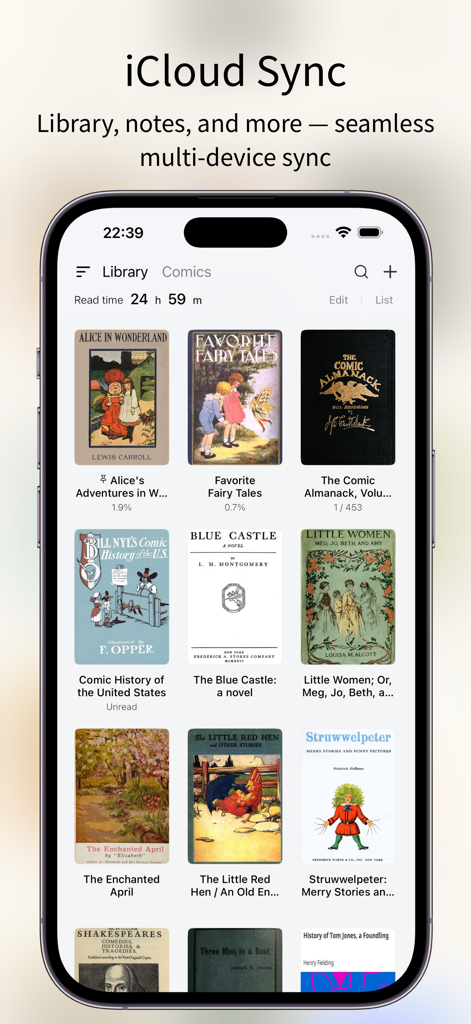
PureLibro app interface showing iCloud sync feature and digital book library

PureLibro app interface showing iCloud sync feature and digital book library

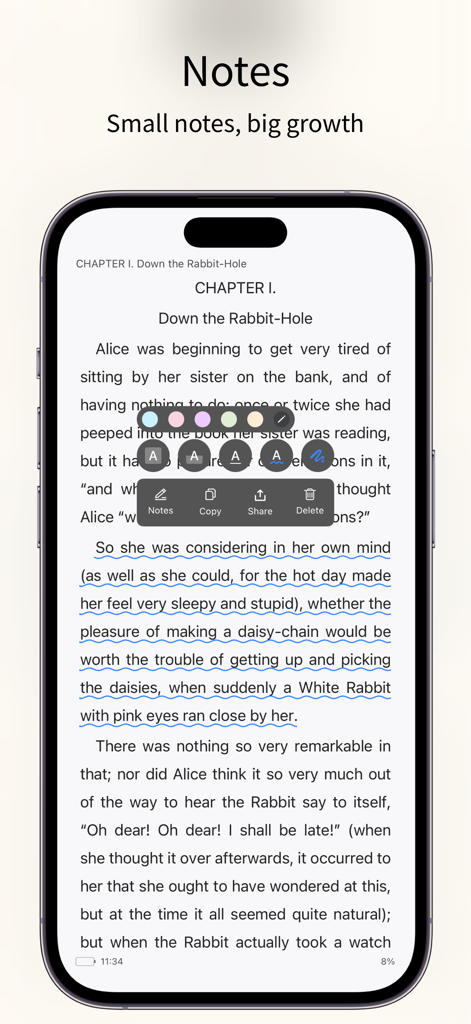
PureLibro app interface highlighting text annotation and note taking tools on an ebook page

PureLibro app interface highlighting text annotation and note taking tools on an ebook page

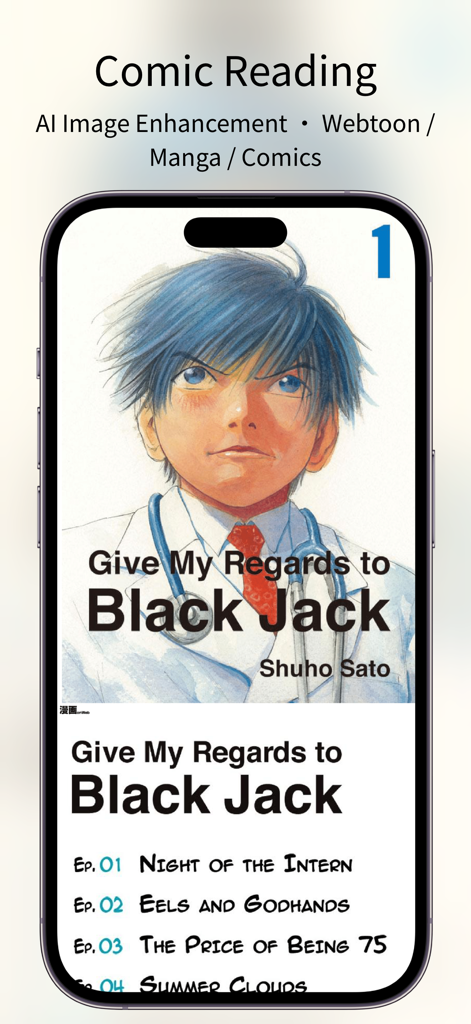
A smartphone showing the PureLibro app interface with manga reading and AI image enhancement features.

A smartphone showing the PureLibro app interface with manga reading and AI image enhancement features.

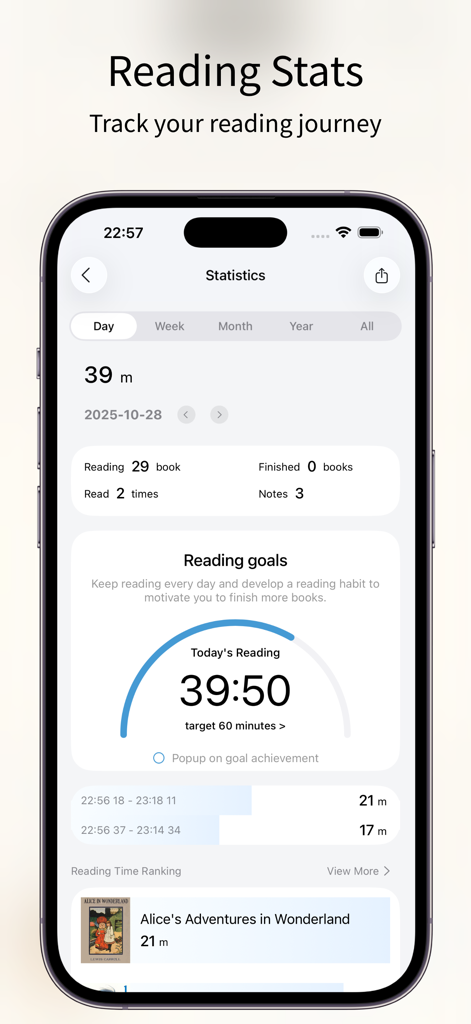
PureLibro ebook reader app statistics screen showing reading progress goals and history

PureLibro ebook reader app statistics screen showing reading progress goals and history

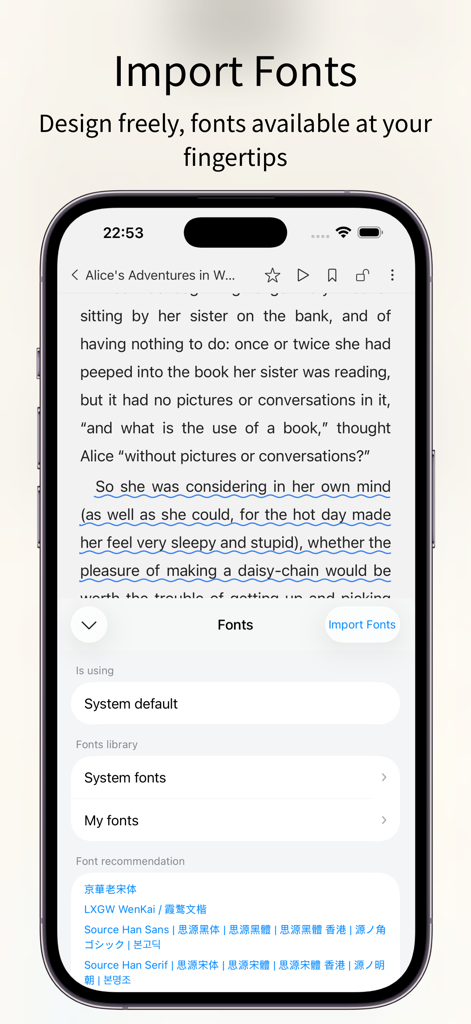
PureLibro ebook reader app interface showing custom font import and selection settings on an iPhone

PureLibro ebook reader app interface showing custom font import and selection settings on an iPhone

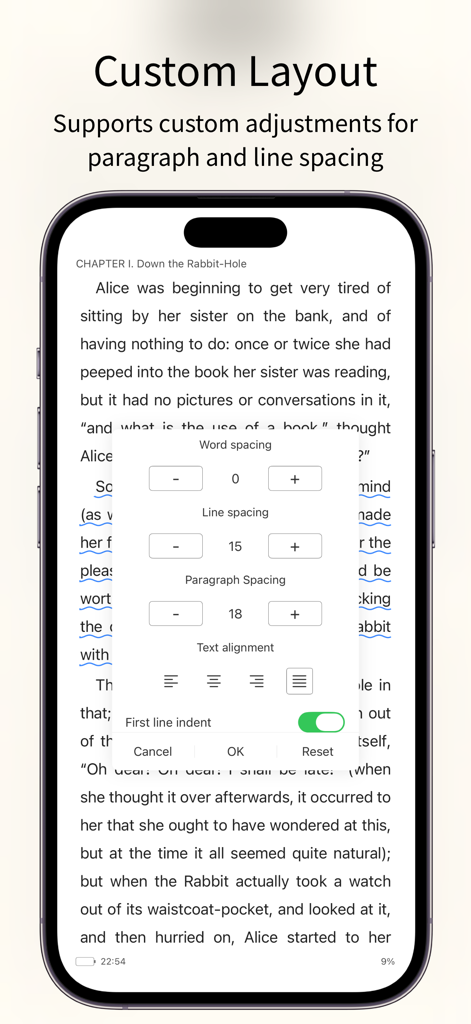
PureLibro ebook reader app showing custom layout settings for word spacing line spacing and paragraph alignment

PureLibro ebook reader app showing custom layout settings for word spacing line spacing and paragraph alignment

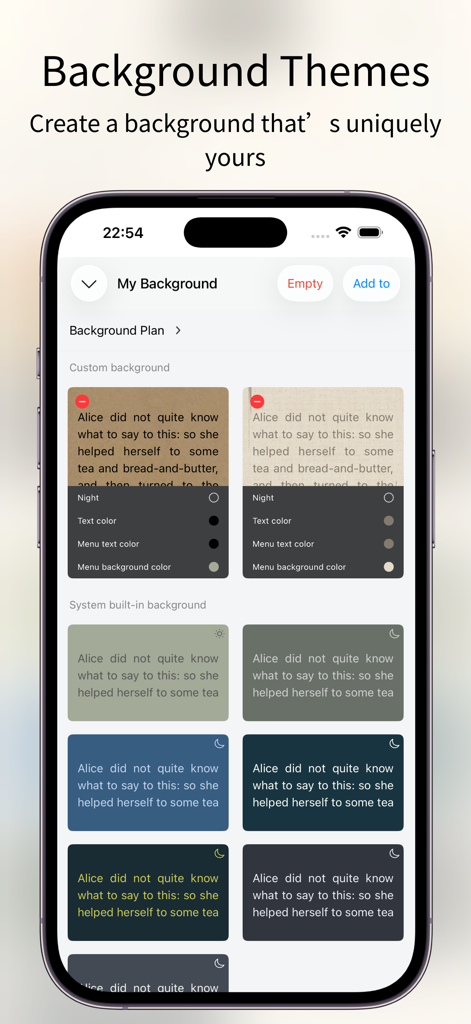
Customizable reading background themes and color options in PureLibro ebook reader

Customizable reading background themes and color options in PureLibro ebook reader

Master Your Digital Library

The tools that make this app stand out, trusted by 276K+ users.

📚

Universal Format Support

Break free from walled gardens. Seamlessly read EPUB, AZW3, CBR, and even ZIP/RAR files without ever needing to convert a file again.

🪄

AI-Enhanced Manga

Bring your comics to life with integrated Waifu2x and Anime4K AI upscaling, ensuring crystal-clear visuals even on high-resolution displays.

🛡️

Privacy by Design

Your library is your business. Secure sensitive collections with Face ID, gesture locks, and hidden folders to keep your reading habits private.

Loved by users worldwide

Trusted by 276K+ people who love this app.

"

"The CBR and CBZ support is flawless, but the real magic is the AI image enhancement. It brings my manga collection to life with incredible clarity on my iPad's Retina display. Best comic reader on the App Store, hands down."

Leo Marshall
"

"PureLibro is exactly what I needed to manage my DRM-free library. The level of customization—from custom fonts to WebDAV support—is unparalleled. Plus, the Face ID protection for my private collections gives me total peace of mind."

Elena Rodriguez

About the app

Everything you need to know about PureLibro: ebook reader.

Description

Feature Highlights – All for a Better Reading Experience 1. Supports a wide range of popular reading formats: TXT, EPUB, MOBI, AZW3, AZW4, AZW, CBZ, CBR, PDF, ZIP, RAR (DRM-free files only). 2. Comic reader: Supports ZIP, RAR, CBZ, and CBR comic formats. EPUB and MOBI files can also be switched to comic mode with one tap for an immersive image-based reading experience. 3. AI-powered image enhancement (supports Waifu2x / Anime4K, available in comic mode only). 4. iCloud sync: Automatically keeps your reading data consistent across devices. 5. Data backup: One-tap backup to cloud drives or other storage options—your reading data is always safe. 6. TXT file editing support. 7. Multiple import methods: WebDAV, cloud drives, Wi-Fi transfer, iCloud, and more. 8. Auto reading: Hands-free reading for a more relaxed experience. 9. Full customization: Adjust line spacing, paragraph layout, background images, and font colors to create your own reading style. 10. Eye-care interface: Night mode, page curl, slide, and scroll reading modes. Supports Simplified and Traditional Chinese. 11. Privacy protection: Password, gesture, and Face ID unlock supported. Books can be encrypted or hidden for extra privacy. 12. Reading statistics: Track reading time, frequency, and progress to stay motivated and achieve your reading goals. 13. Flexible library management: Custom groups, book renaming, and sorting for a clean and organized library. 14. Custom covers: Freely customize book covers (including TXT files) to personalize your library. 15. Automatic chapter detection: Instantly recognize chapters in TXT novels for a smoother reading experience. 16. Font support: Choose from system fonts or import your own custom fonts. 17. Text-to-speech support: System narration and Alibaba Cloud TTS with multiple voice options available. [Professional Version] Professional version benefits: After opening the professional version, you can use all professional advanced features during the service period and exempt from all advertising. Continuous monthly (one month), continuous quarterly (3 months), and continuous annual (one year) are automatic renewal services. The above product prices are based on actual prices. The price of purchasing the above products will be charged in your local currency according to the current exchange rate defined by iTunes, and payment will be deducted from the iTunes account when confirming the purchase. [Continuous monthly, quarterly, and annual services] If you subscribe to the continuous monthly, quarterly, or annual service, it is deemed that you authorize Window Reading to deduct the professional version service fee for the next billing cycle from your iTunes account (referred to as "account") when your professional version service subscription is about to expire. The deduction time is within 24 hours before the billing cycle. If the deduction fails due to insufficient balance in the account, Window Reading has the right to suspend or terminate your professional version service without prior notice. Regarding canceling the auto-renewal service that has been opened, on iOS devices, go to "Settings" → "iTunes Store and App Store" → select "Apple ID" → click "View Apple ID" → click "Subscription" on the account settings page → cancel subscription. Privacy policy: https://gitee.com/coder_to/luck/blob/master/App/Privacy_en.md Service terms and automatic renewal terms: https://gitee.com/coder_to/luck/blob/master/App/serviceForMembers_en.md Icon Design Studying icons created by Freepik - Flaticon

Latest Version

3.3.2

Size

39.3 MB

First Released

Jan 15, 2021

Ready to Build Your Ultimate Digital Library?

Join over 276,000 power readers today. Take total control of your ebooks, manga, and documents with the most private and customizable reader on iOS.

Download on App Store
FAQ

Frequently Asked Questions

Everything you need to know about PureLibro: ebook reader

What reading formats does PureLibro support?

PureLibro supports TXT, EPUB, MOBI, AZW3, AZW4, AZW, CBZ, CBR, PDF, ZIP, and RAR (DRM-free files only) for a wide range of reading needs.

Does PureLibro offer comic reading features?

Yes, PureLibro is a comic reader supporting ZIP, RAR, CBZ, and CBR formats. It can also switch PDF, EPUB, and MOBI files to comic mode with one tap.

How does PureLibro synchronize reading data across devices?

PureLibro uses iCloud Sync to automatically keep your reading library, notes, and other data consistent and seamlessly synced across all your devices.

Can I customize the reading interface in PureLibro?

Yes, PureLibro offers full customization. Users can adjust line spacing, paragraph layout, background images, font colors, and choose from various eye-care modes like night mode.

How does PureLibro protect user privacy?

PureLibro prioritizes privacy protection. It supports password, gesture, and Face ID unlock, and allows users to encrypt or hide books for extra confidentiality.

What are the benefits of PureLibro's Professional Version?

The PureLibro Professional Version grants access to all advanced features during the service period and removes all advertising, enhancing the reading experience.

How do I cancel the auto-renewal for PureLibro Professional Version?

On iOS, navigate to "Settings" → "iTunes Store and App Store" → "Apple ID" → "View Apple ID" → "Subscription" on the account page, then cancel the subscription.

Does PureLibro offer text-to-speech functionality?

Yes, PureLibro supports text-to-speech. It provides system narration and Alibaba Cloud TTS with multiple voice options for an auditory reading experience.

Does PureLibro track reading progress and statistics?

Yes, PureLibro tracks reading statistics. It monitors reading time, frequency, and progress to help users stay motivated and achieve their reading goals.

What methods can I use to import books into PureLibro?

PureLibro offers multiple import methods. These include WebDAV, various cloud drives, Wi-Fi transfer, and iCloud, ensuring flexible content acquisition.

Can I add custom fonts to PureLibro?

Yes, PureLibro supports custom fonts. You can choose from system fonts or import your own custom fonts to personalize your reading experience.

Does PureLibro have an eye-care reading mode?

Yes, PureLibro features an eye-care interface. It includes night mode, page curl, slide, and scroll reading modes for comfortable reading.