SAP Mobile Start

SAP Mobile Start

Download on App StoreDownload on Google Play
Spark by MWM logo
Logo of SAP Mobile Start

SAP Mobile Start: Your Business Entry Point for Peak Productivity

Streamline your workday with instant access to apps, tasks, and real-time KPIs. Handle approvals in seconds and stay informed on the go with deep integration across your iPhone and Apple Watch.

Publisher

SAP SE

Category

Business

Downloads

140K+

User Rating

4.5/5

Total Ratings

300

Locales

21

Business at a Glance

Discover the interface used by 140K+ users.
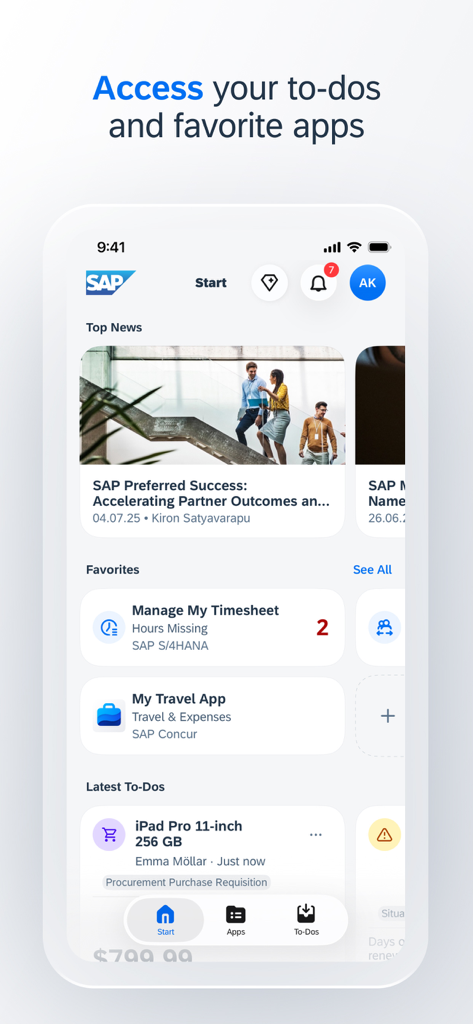
SAP Mobile Start app interface showing a personalized business dashboard with top news favorite apps and a list of to-do tasks

SAP Mobile Start app interface showing a personalized business dashboard with top news favorite apps and a list of to-do tasks

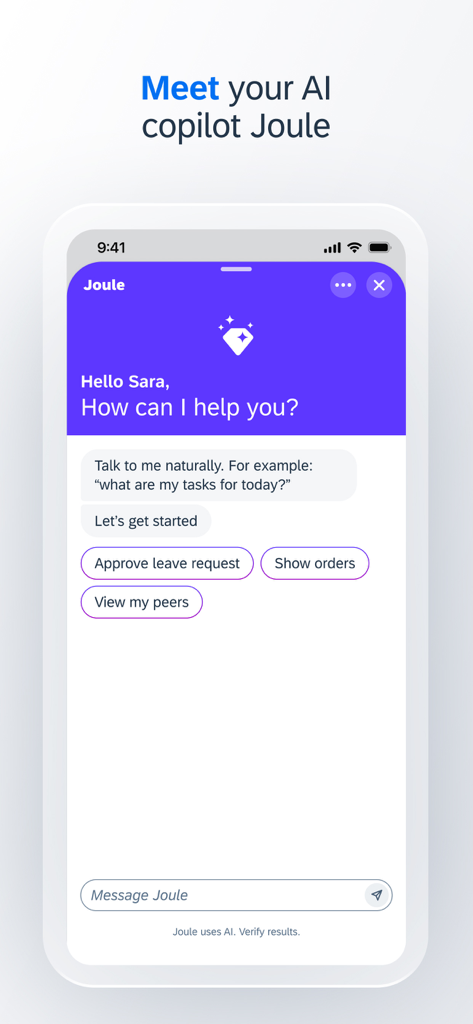
SAP Mobile Start app chat interface with Joule AI copilot for business tasks

SAP Mobile Start app chat interface with Joule AI copilot for business tasks

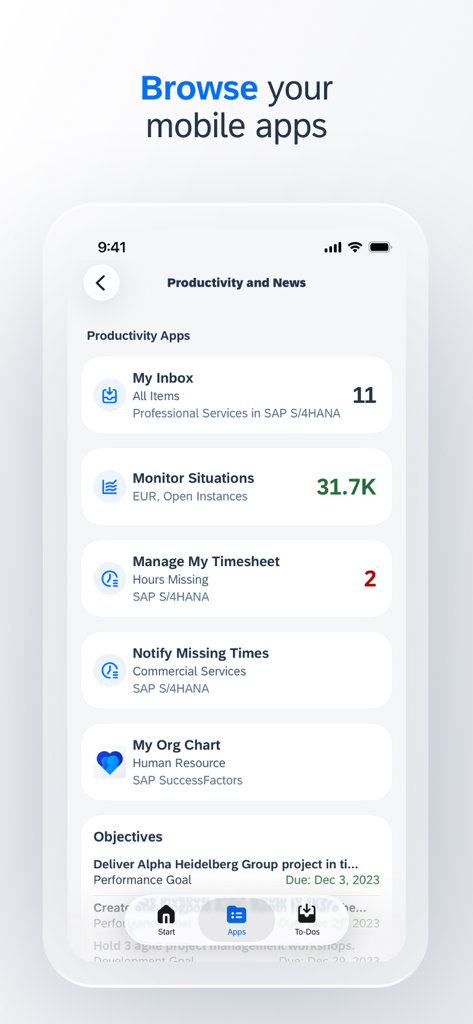
SAP Mobile Start app interface showing a list of business productivity applications including inbox situations and timesheets

SAP Mobile Start app interface showing a list of business productivity applications including inbox situations and timesheets

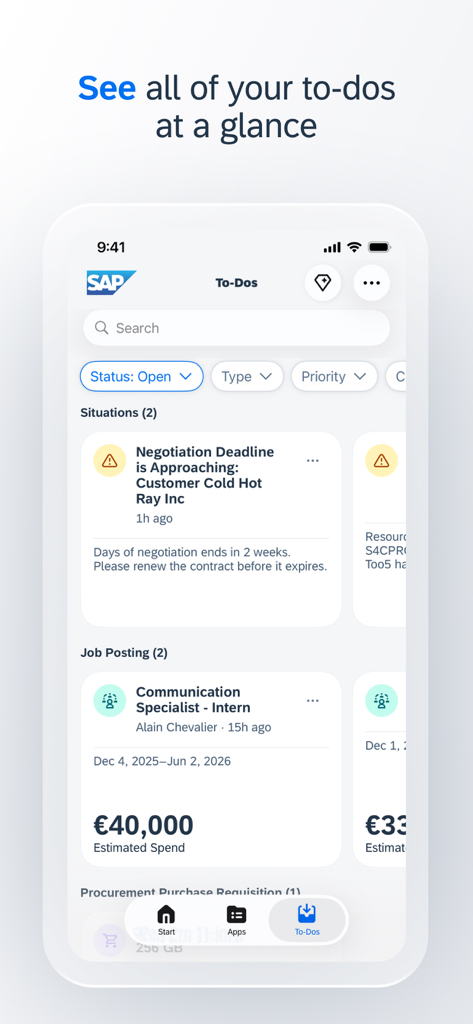
A mobile interface displaying a list of business tasks and deadlines in the SAP Mobile Start app.

A mobile interface displaying a list of business tasks and deadlines in the SAP Mobile Start app.

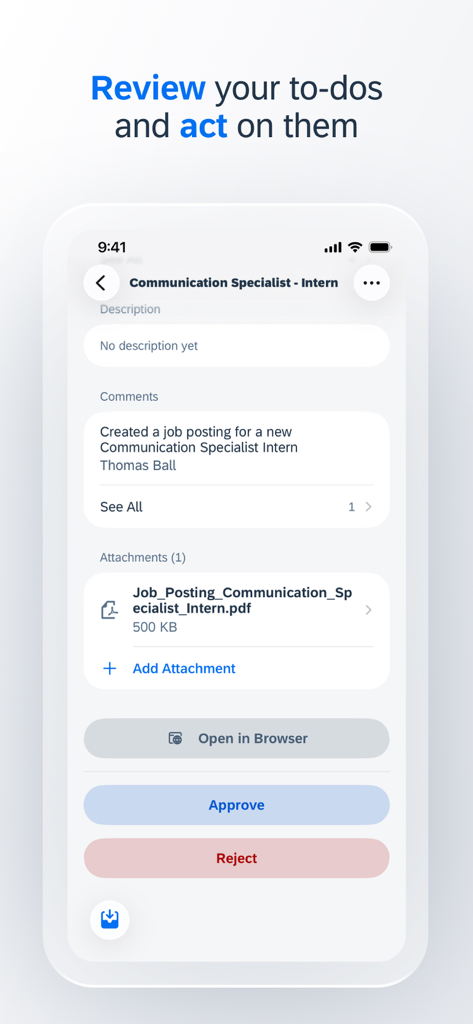
SAP Mobile Start app screen showing a business task approval for a job posting with options to approve or reject.

SAP Mobile Start app screen showing a business task approval for a job posting with options to approve or reject.

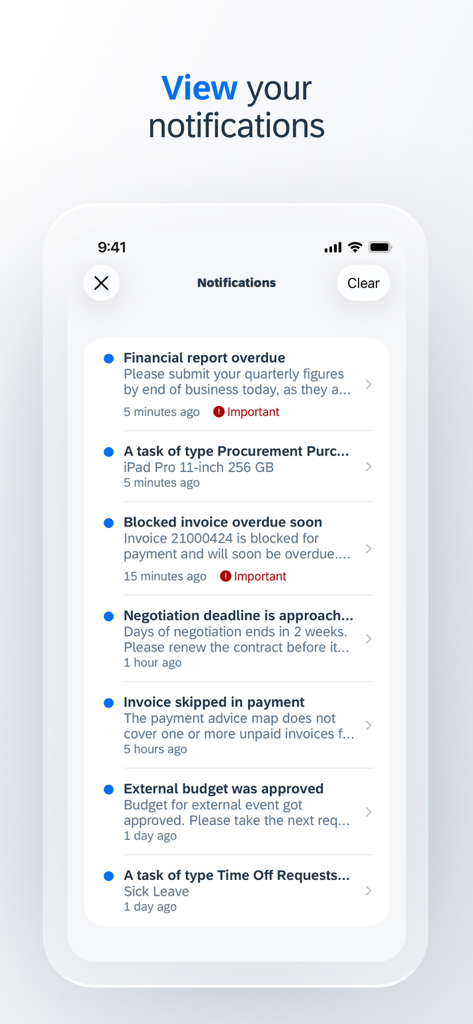
Notifications screen in SAP Mobile Start showing business task alerts.

Notifications screen in SAP Mobile Start showing business task alerts.

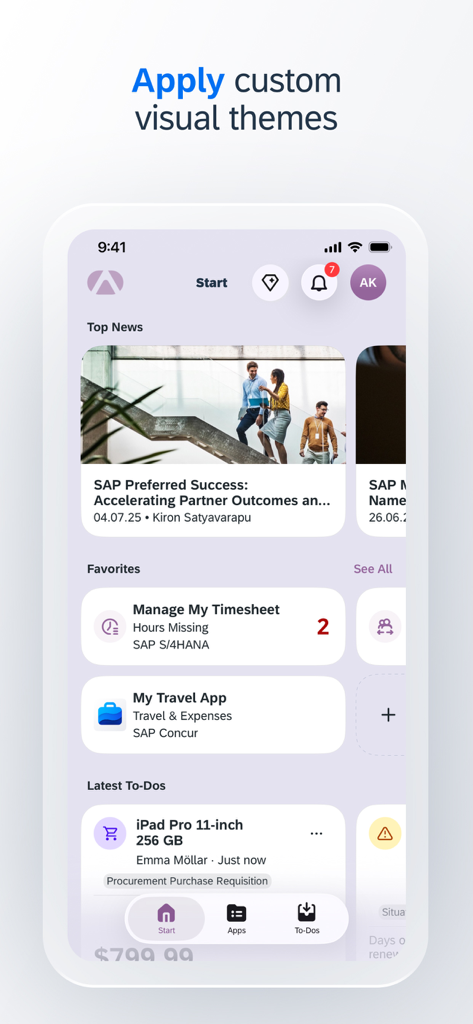
Dashboard of the SAP Mobile Start app with custom visual themes and business task sections.

Dashboard of the SAP Mobile Start app with custom visual themes and business task sections.

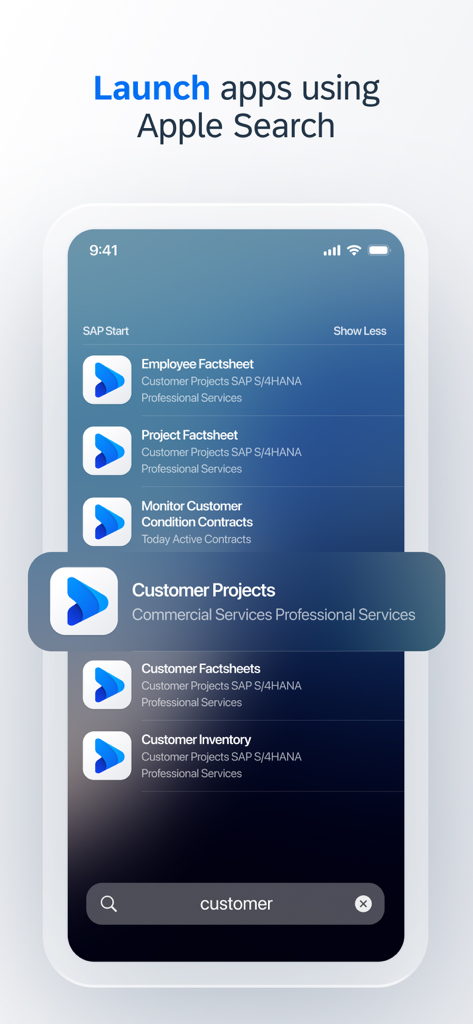
iPhone screen showing SAP business apps appearing in Apple Search results for quick access

iPhone screen showing SAP business apps appearing in Apple Search results for quick access

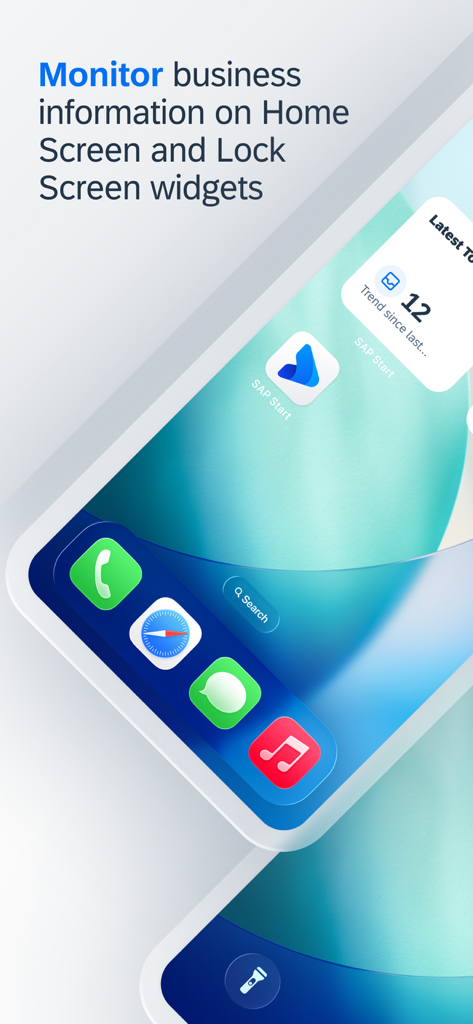
SAP Mobile Start home screen widgets displaying business information and tasks on a smartphone

SAP Mobile Start home screen widgets displaying business information and tasks on a smartphone

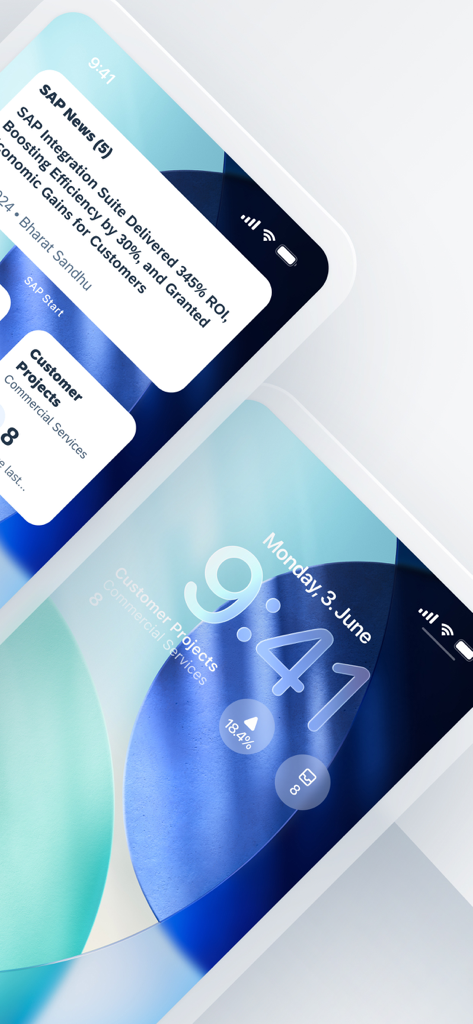
SAP Mobile Start app interface and iOS lock screen widgets showing business news and project status

SAP Mobile Start app interface and iOS lock screen widgets showing business news and project status

Empower Your Mobile Workforce

The tools that make this app stand out, trusted by 140K+ users.

📥

One-Touch Task Approval

Accelerate your business processes by handling all pending approvals in a single, unified view across your iPhone and Apple Watch.

📈

Glanceable Business Insights

Stay ahead of critical trends with customizable Home Screen widgets and Insight Cards that keep your most vital KPIs front and center.

🚀

Intelligent Personalization

Maximize productivity with AI-driven app suggestions and real-time push notifications tailored specifically to your unique work patterns.

Loved by users worldwide

Trusted by 140K+ people who love this app.

"

"SAP Mobile Start has transformed my workflow. I can handle all my approvals via the Apple Watch app while commuting, which means I start my office hours focused on strategy rather than catching up on admin tasks. It is the ultimate productivity tool for modern leadership."

Marcus J., Regional Vice President
"

"Finally, an enterprise app that feels like it was designed in this decade. The Insights Cards provide a perfect snapshot of my team's KPIs without me needing to dig through complex menus. It makes staying informed effortless, no matter where I am."

Elena G., Senior Operations Manager

About the app

Everything you need to know about SAP Mobile Start.

Description

SAP Mobile Start is the entry point that places your business directly at your fingertips. Access your important business information, apps and processes through a harmonized and intuitive user interface. The app uses latest device and OS capabilities like widgets, Apple Search and push notifications to make sure you never miss an important event. The SAP Task Center integration combines all tasks in one user-friendly view and allows the swift handling of tasks to speed up business processes. Keep track of your to-dos and KPIs on our accompanying Apple Watch app. SAP Mobile Start enables you to make informed and timely decisions and increases your productivity, anytime and anyplace.   Key features of SAP Mobile Start: - Easy access to your important apps - All your approval tasks available and ready to process on the To-Dos tab and in the Apple Watch app - Rich at-a-glance information with Insights Cards (SAP Start required) - Intelligent app suggestions based on user behavior - Widgets to monitor business information - Support for Apple Watch - Apple Search and in-app search to immediately find native and web apps - Push notifications to always stay up to date* - Themes for custom corporate branding for iPhone and iPad - MDM (Mobile Device Management) support for iPhone, iPad and Apple Watch   * Push notifications are currently not available in China.   Note: To use SAP Mobile Start with your business data, you must be a user of the underlying business solutions and have an SAP Build Work Zone, standard edition site or SAP Start site enabled by your IT department. You can test the app by using the demo mode.

Latest Version

2.5.1

Size

377.7 MB

First Released

Aug 30, 2021

Empower Your Workday, Anywhere

Don't let your desk hold you back. Download SAP Mobile Start to access your tasks, KPIs, and business apps with an intuitive interface designed for the modern professional.

Download on App StoreDownload on Google Play
FAQ

Frequently Asked Questions

Everything you need to know about SAP Mobile Start

What is SAP Mobile Start?

SAP Mobile Start is an entry point app that provides harmonized and intuitive access to important business information, applications, and processes. It leverages device capabilities like widgets, Apple Search, and push notifications for enhanced productivity.

What are the key functionalities of SAP Mobile Start?

SAP Mobile Start features include easy access to apps, approval tasks, Insights Cards, intelligent app suggestions, business information widgets, Apple Watch support, Apple Search, in-app search, push notifications, themes, and MDM support.

Can I manage and approve tasks using SAP Mobile Start?

Yes, SAP Mobile Start enables users to manage and process all approval tasks. They are available on the To-Dos tab within the app and on the accompanying Apple Watch app, streamlining business processes.

Is SAP Mobile Start compatible with Apple Watch?

Yes, SAP Mobile Start is compatible with Apple Watch. Users can monitor their to-dos and key performance indicators (KPIs) directly from the dedicated Apple Watch application, enhancing on-the-go productivity.

How does SAP Mobile Start utilize Apple Search?

SAP Mobile Start utilizes Apple Search and in-app search to instantly locate native and web applications. This integration ensures quick access to important business tools and information across the device.

Does SAP Mobile Start provide push notifications?

Yes, SAP Mobile Start provides push notifications to keep users informed about important events and updates. However, push notifications are not available for users located in China.

Can I apply custom branding themes in SAP Mobile Start?

Yes, SAP Mobile Start allows for custom corporate branding through themes for iPhone and iPad. This feature enables organizations to personalize the app's visual identity to match their brand guidelines.

Does SAP Mobile Start support widgets for business information?

Yes, SAP Mobile Start supports widgets for monitoring business information. These widgets can be displayed on the Home Screen and Lock Screen, providing immediate, at-a-glance insights into key data.

Is Mobile Device Management (MDM) supported by SAP Mobile Start?

Yes, SAP Mobile Start supports Mobile Device Management (MDM) for iPhone, iPad, and Apple Watch. This capability assists IT departments in efficiently managing and securing the application across corporate devices.

What are the prerequisites for using SAP Mobile Start with business data?

To use SAP Mobile Start with business data, users must be part of underlying business solutions. An SAP Build Work Zone, standard edition site or an SAP Start site must also be enabled by their IT department.

Can I try SAP Mobile Start in a demo mode?

Yes, SAP Mobile Start offers a demo mode for testing the application's functionalities. This allows users to explore the app without needing to connect to their live business data or IT setup.

Does SAP Mobile Start feature an AI assistant?

Yes, SAP Mobile Start features Joule, an integrated AI solution. Joule assists users by providing natural language interaction for tasks like approving leave requests or accessing specific orders.