ShutterSnitch

ShutterSnitch

Download on App Store
Spark by MWM logo
Logo of ShutterSnitch

ShutterSnitch: The Ultimate Wireless Workflow for Professional Photographers

Ditch the cables and experience instant, high-resolution tethering on your iPad. Streamline your studio or field shoots with real-time previews, automated metadata, and lightning-fast delivery to clients and editors.

Download on App Store

Publisher

Brian Gerfort

Category

Photo & Video

Downloads

41K+

User Rating

3.7/5

Total Ratings

1K+

Locales

6

Your Workflow, Visualized

Discover the interface used by 41K+ users.
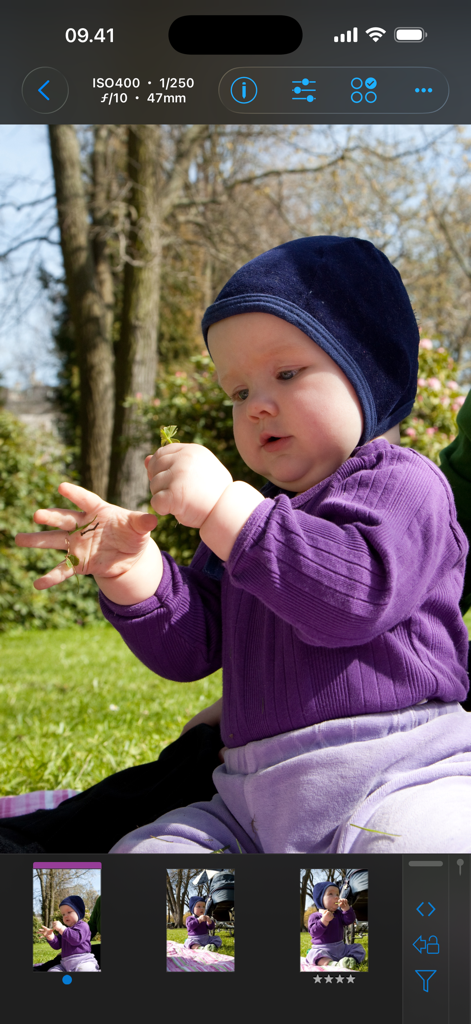
ShutterSnitch app interface showing a high-resolution photo preview with camera metadata and a filmstrip of images.

ShutterSnitch app interface showing a high-resolution photo preview with camera metadata and a filmstrip of images.

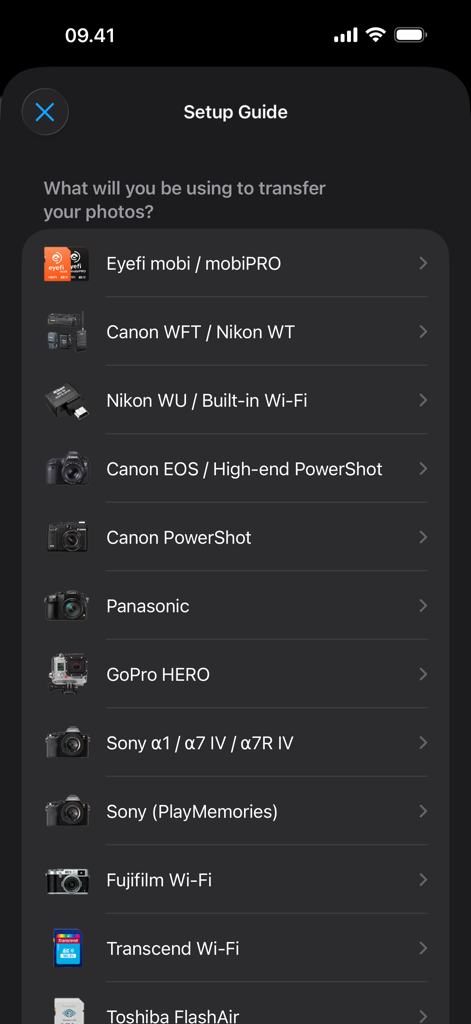
ShutterSnitch setup guide screen showing a list of supported camera brands and wireless transfer options like Canon Nikon and Sony

ShutterSnitch setup guide screen showing a list of supported camera brands and wireless transfer options like Canon Nikon and Sony

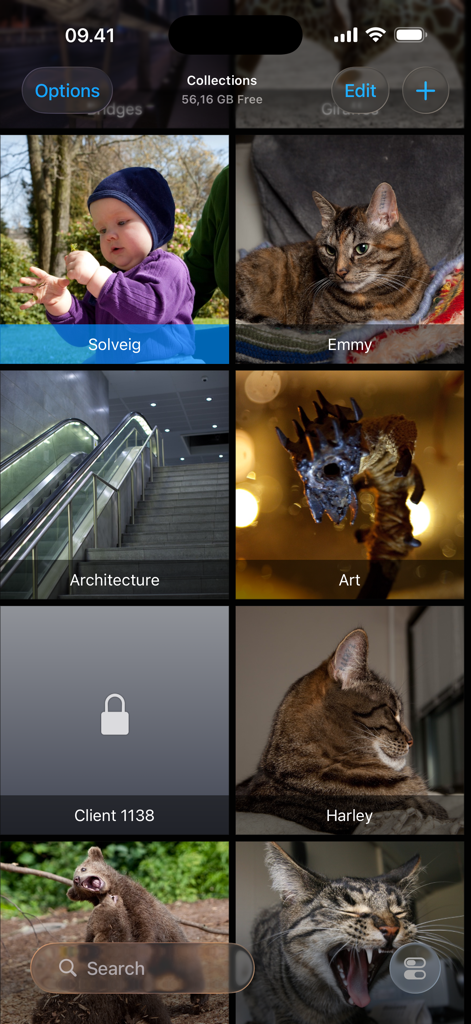
Interface of the ShutterSnitch app showing a grid of organized photo collections and albums

Interface of the ShutterSnitch app showing a grid of organized photo collections and albums

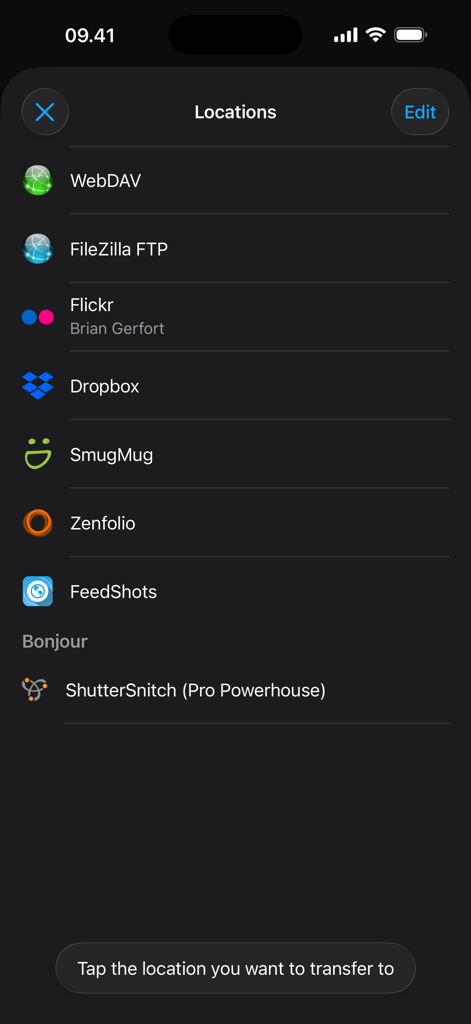
A list of image transfer destination options in the ShutterSnitch app including Dropbox, Flickr, and FTP servers.

A list of image transfer destination options in the ShutterSnitch app including Dropbox, Flickr, and FTP servers.

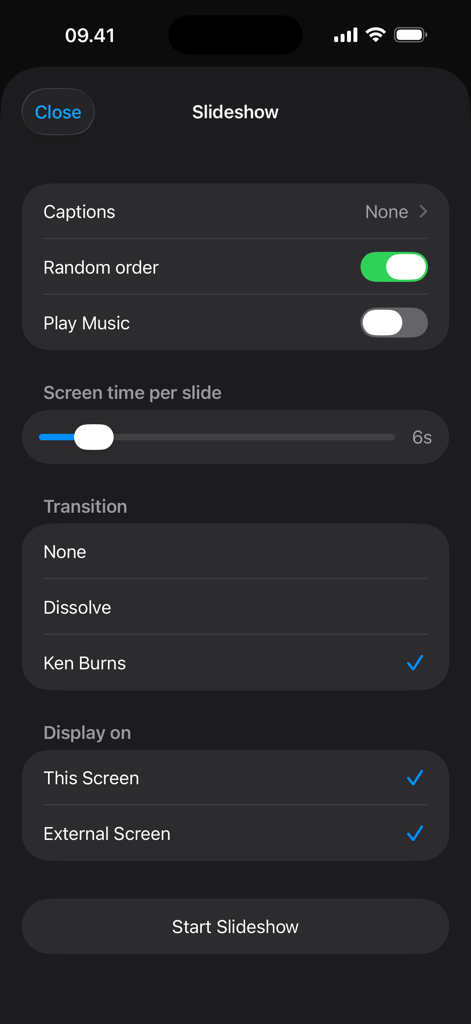
Slideshow settings screen in the ShutterSnitch app showing options for transitions like Ken Burns and external display support

Slideshow settings screen in the ShutterSnitch app showing options for transitions like Ken Burns and external display support

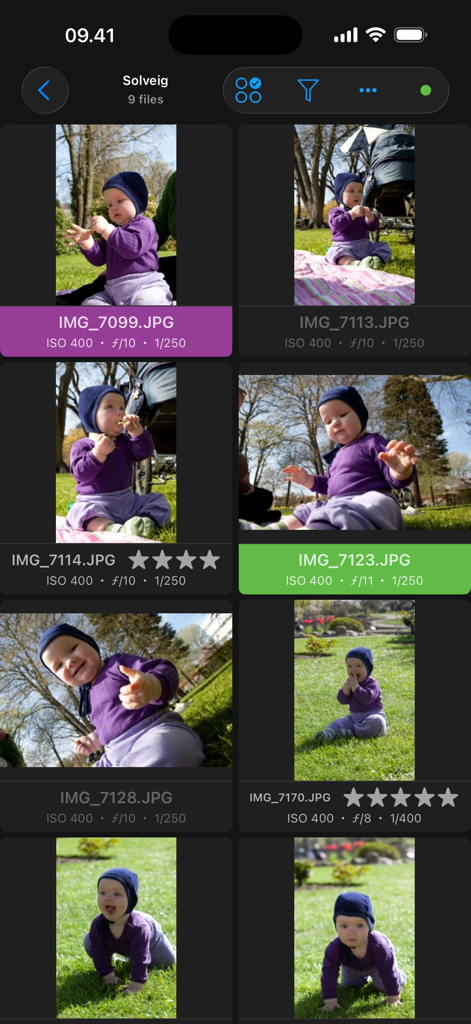
A photo gallery view in the ShutterSnitch app displaying technical metadata and star ratings for each image.

A photo gallery view in the ShutterSnitch app displaying technical metadata and star ratings for each image.

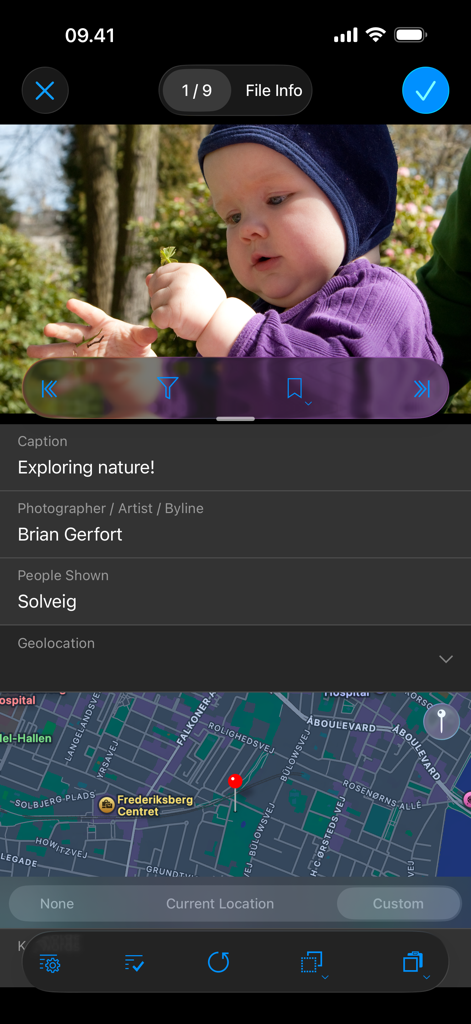
Interface of ShutterSnitch app displaying photo details including caption, photographer name, and map location

Interface of ShutterSnitch app displaying photo details including caption, photographer name, and map location

Master Your Wireless Workflow

The tools that make this app stand out, trusted by 41K+ users.

📶

Universal Wireless Tethering

Break free from cables. Receive high-resolution images instantly from Canon, Nikon, Sony, Fujifilm, and more, right to your iPad or iPhone as you shoot.

🖥️

Instant Client Review

Elevate your studio sessions by handing an iPad to your client. Photos appear in seconds on a gorgeous Retina display, allowing for immediate feedback and selection.

🚀

Pro-Grade Delivery Tools

Beat the deadline with automated FTP uploads, non-destructive mobile editing, and advanced IPTC metadata support including Code Replace for rapid captioning.

Loved by users worldwide

Trusted by 41K+ people who love this app.

"

"Forget the clunky camera manufacturer apps; ShutterSnitch is in a league of its own. I use it at every wedding I shoot to give my clients an instant 'sneak peek' on a dedicated iPad. The wireless transfer is lightning fast, and the custom warnings have saved me more than once when my settings accidentally shifted. It's the most reliable tool in my gear bag."

Elena Rodriguez, Lifestyle & Portrait Photographer
"

"As a sports photographer, speed is everything. ShutterSnitch allows me to tag photos with IPTC metadata and FTP them to my editor before I even leave the sidelines. The 'Code Replace' feature is a game-changer for my workflow, and being able to evaluate focus on a Retina display seconds after the shutter clicks is invaluable. It is the gold standard for mobile tethering."

David Chen, Sports Photojournalist

About the app

Everything you need to know about ShutterSnitch.

Description

ShutterSnitch is subscription based. With a subscription you get access to all features and updates. The first week is *free* so you can verify that things work with your specific camera or wi-fi card. Wirelessly transfer images to your iOS device from an Eye-Fi, Transcend Wi-Fi, Toshiba FlashAir, PQI Air, or ez Share card, GoPro HERO, Fujifilm cameras with built-in Wi-Fi, PTP/IP enabled device (such as the Nikon WU / D750 / Z7 or Canon EOS 5D Mark IV / 6D / 70D / M3 / EOS R) or a Canon, Nikon or other filetransmitter that supports uploading to an FTP server over your wireless network. When a JPEG arrives, ShutterSnitch analyzes shutter speed, aperture, ISO, focal length, and light level and warns you if anything differs from the rules you've set up. You now have a large preview screen that you can browse, pinch, zoom, and evaluate seconds after snapping your picture. In a studio environment it's now easy to share shoots with crew and models. More fun and less juggling cards, adapters, and cables! Please note: A large part of the magic of the wireless delivery lies in the setup of the devices outside of the ShutterSnitch app. For older FTP systems, be prepared to spend more than just a couple of minutes on this initial setup. Features: • Works with iPad, iPhone, and iPod touch. • Full Retina & Retina HD display support. • Crop, straighten, and adjust colors in the sRGB color space (temperature & tint, exposure, contrast, highlights, shadows, whites, blacks, clarity, vibrance, and saturation). All edits are non-destructive, so you can always fine-tune or revert to the original photo. • Advanced metadata editing with presets and Code Replace. • Slideshow function with Ken Burns effect. • Arrange your shoots in albums. • Lock private albums. • Resize and/or watermark photos before sharing them via e-mail, Dropbox, Flickr, FTP, Google Drive, SmugMug, WebDAV, or Zenfolio. • Large scale histograms (RGB,R,G,B). • Visible and/or audible warnings. • Map integration. Geo-tag JPEG photos automatically or manually. • Highlight warnings. • Add a caption and byline to the photos by tapping and holding the currently displayed full image. • Custom username, password, and port for the built-in FTP and WebDAV servers. • Receive files directly from one or more Eye-Fi cards. • Receive photos from your GoPro HERO, Transcend Wi-Fi, Toshiba FlashAir, PQI Air, or ez Share card/adapter as you shoot them or import files from the card manually. *Note for GoPro cameras in burst or time-laps mode*: Photos can only be retrieved once the camera exits the mode. • Supports receiving and importing photos via PTP/IP. For example from Nikon WU transmitters, D750 / D850 / Z7 / Z9 and Canon EOS 5D Mark IV / 6D / 70D / M3 / EOS R. • Supports receiving photos from Panasonic cameras that work with their LUMIX LINK app such as the GH3 and GH4. (Not the 'Image App' or 'LUMIX Sync' apps, so DMC-G7 and DC-G9M2 are not supported.) • Supports Sony α1, α7 IV, α7R IV, and NEX cameras. • Supports Fujifilm cameras with built-in Wi-Fi such as X100T, X-M1, GFX100, and X-T2. • Supports Canon PowerShot G16 and other Canon cameras that work with their CameraWindow app. • AirDrop export. • Bonjour support for easy discovery in your Bonjour enabled applications. ShutterSnitch can also be used as a regular image browser if you simply transfer the pictures from your computer through an FTP client. Subscription payments ($2.99 monthly or $29.99 yearly) are charged through your iTunes Account at confirmation of purchase and are auto-renewed. The account will be charged for renewal within 24-hours prior to the end of the current period. Renewal can be turned off 24-hours before the end of the current period in your Account Settings in the App Store. Any unused portion of a free trial period will be forfeited when a subscription is purchased. Privacy Policy & Terms of Use: https://2ndnaturesoftware.com/privacypolicy

Latest Version

7.6.2

Size

35.8 MB

First Released

Apr 2, 2010

Ready to Transform Your Workflow?

Join thousands of professional photographers who trust ShutterSnitch for high-speed wireless tethering. Start your 7-day free trial today and experience the freedom of real-time previews and instant delivery on your iPad or iPhone.

Download on App Store