Soundboard Studio

Soundboard Studio

Download on App Store
Spark by MWM logo
Logo of Soundboard Studio

Soundboard Studio: Professional Sound Playback for Live Production

The smart, low-latency playback app trusted by podcasters and AV pros. Organize your music, SFX, and voiceovers with a customizable grid designed for flawless live execution.

Publisher

App Business Ventures LLC

Category

Music

Downloads

625K+

User Rating

4.7/5

Total Ratings

4K+

Locales

1

Professional Control at Your Fingertips

Discover the interface used by 625K+ users.
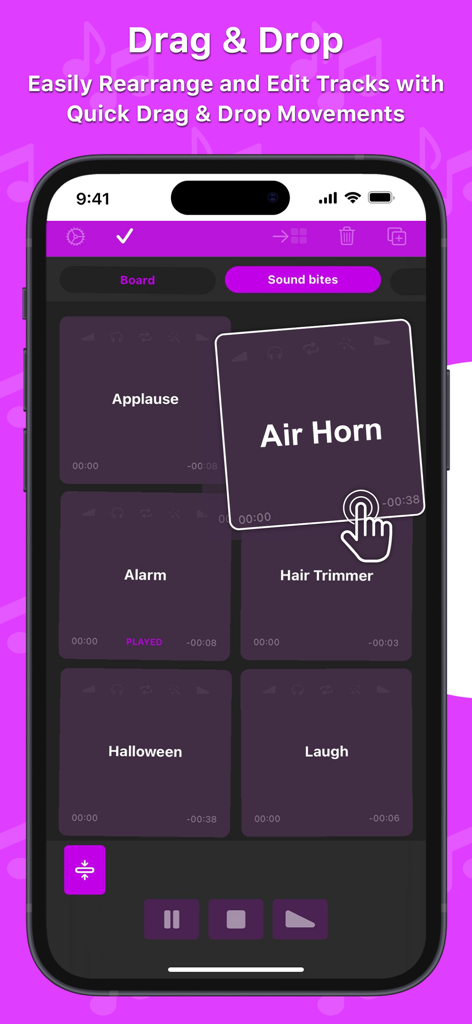
Smartphone screen showing the Soundboard Studio app with a hand icon demonstrating the drag and drop feature to rearrange sound tiles like Air Horn and Applause

Smartphone screen showing the Soundboard Studio app with a hand icon demonstrating the drag and drop feature to rearrange sound tiles like Air Horn and Applause

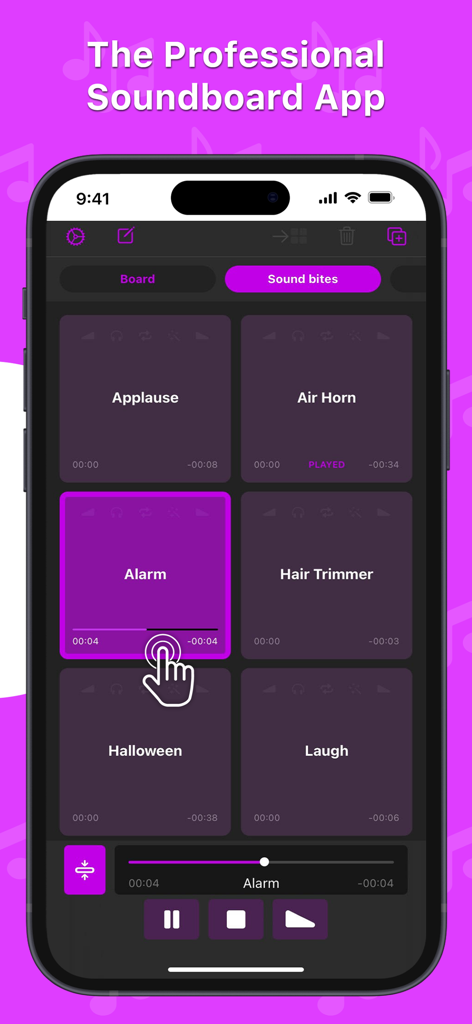
Professional soundboard app grid featuring sound effect buttons like applause and alarm with playback controls

Professional soundboard app grid featuring sound effect buttons like applause and alarm with playback controls

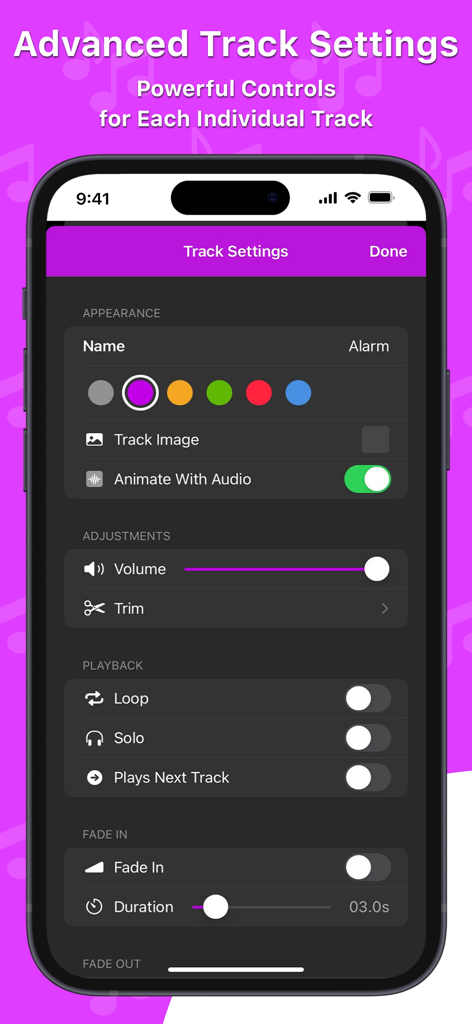
Interface of Soundboard Studio showing advanced track settings and audio controls on an iPhone.

Interface of Soundboard Studio showing advanced track settings and audio controls on an iPhone.

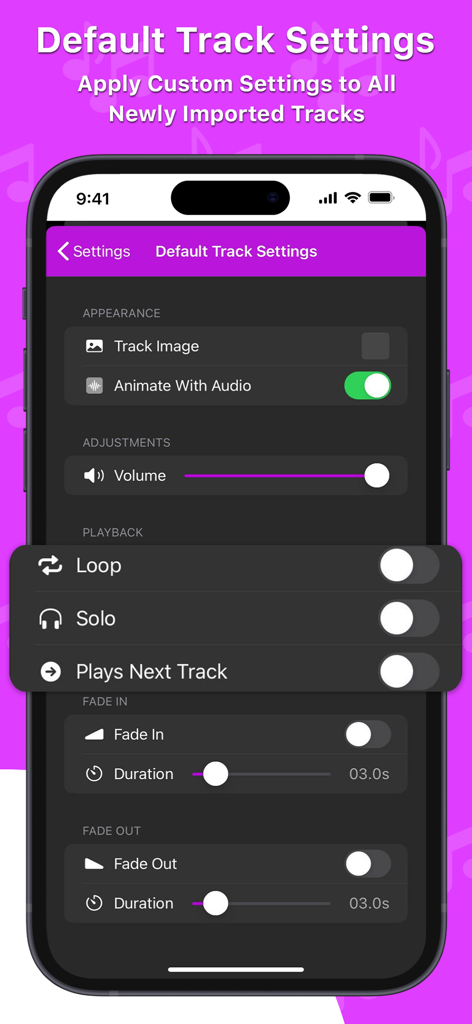
Interface showing the default track settings for audio playback in Soundboard Studio app on a smartphone

Interface showing the default track settings for audio playback in Soundboard Studio app on a smartphone

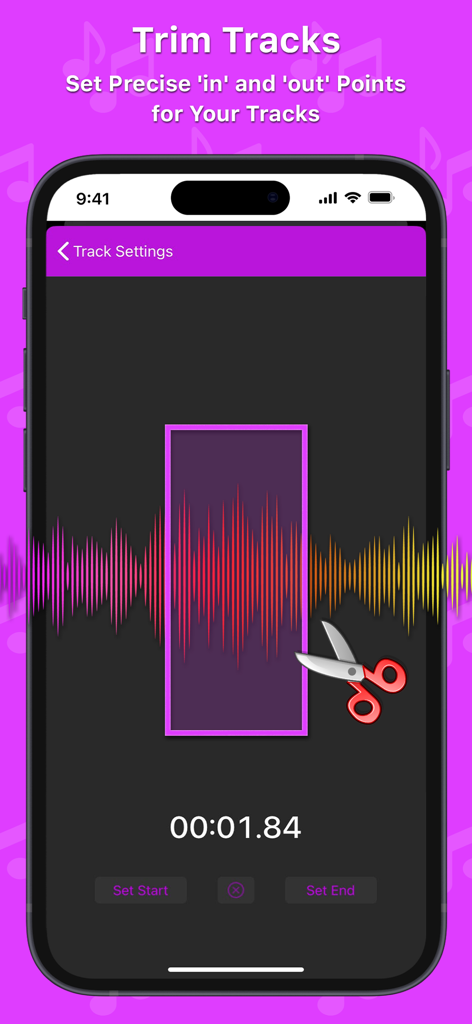
Interface of Soundboard Studio app showing the audio trimming feature with waveform visualization and precise start and end points.

Interface of Soundboard Studio app showing the audio trimming feature with waveform visualization and precise start and end points.

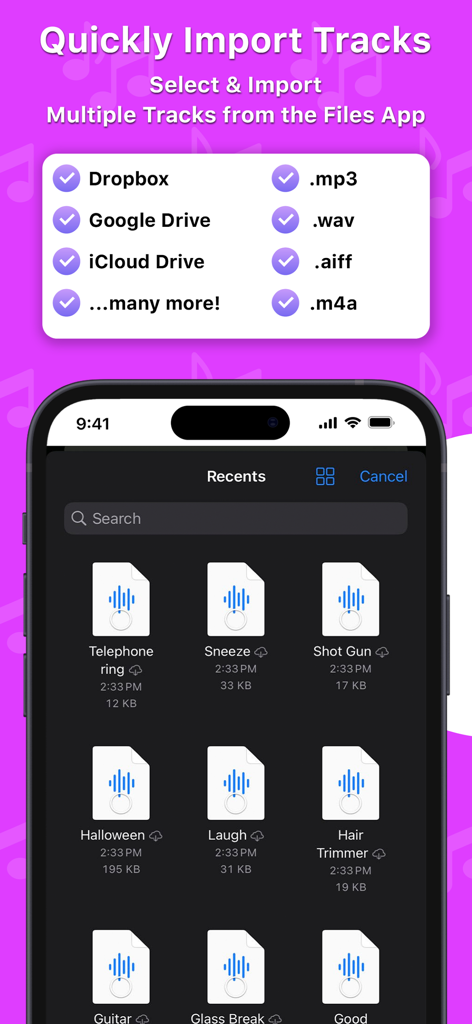
Interface showing the ability to import multiple audio tracks from the Files app and cloud storage into Soundboard Studio.

Interface showing the ability to import multiple audio tracks from the Files app and cloud storage into Soundboard Studio.

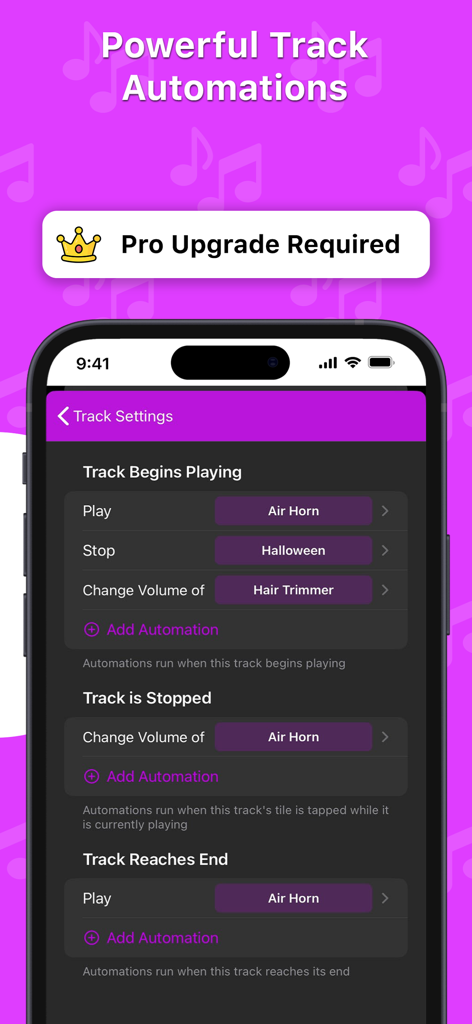
Interface of Soundboard Studio app showing professional track automation settings for triggers like track begins playing or stops

Interface of Soundboard Studio app showing professional track automation settings for triggers like track begins playing or stops

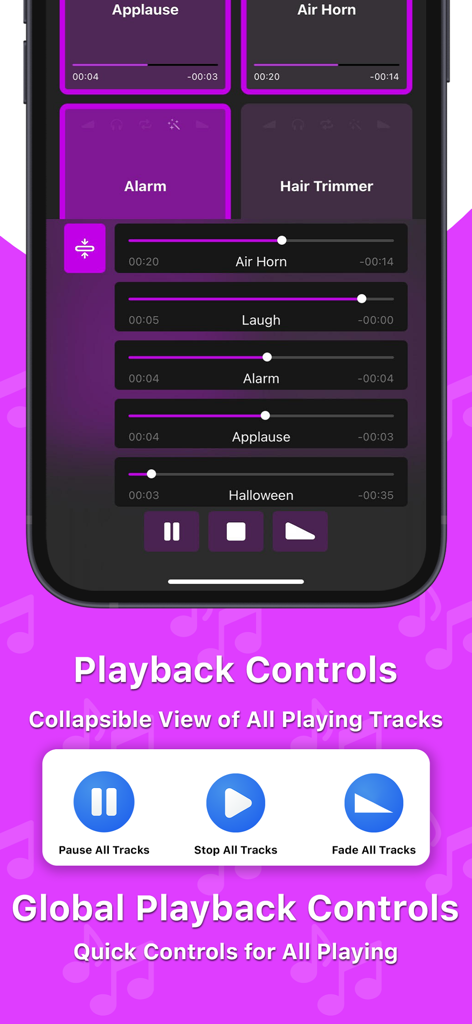
Interface of Soundboard Studio app showing global playback controls and a list of active sound tracks with progress bars

Interface of Soundboard Studio app showing global playback controls and a list of active sound tracks with progress bars

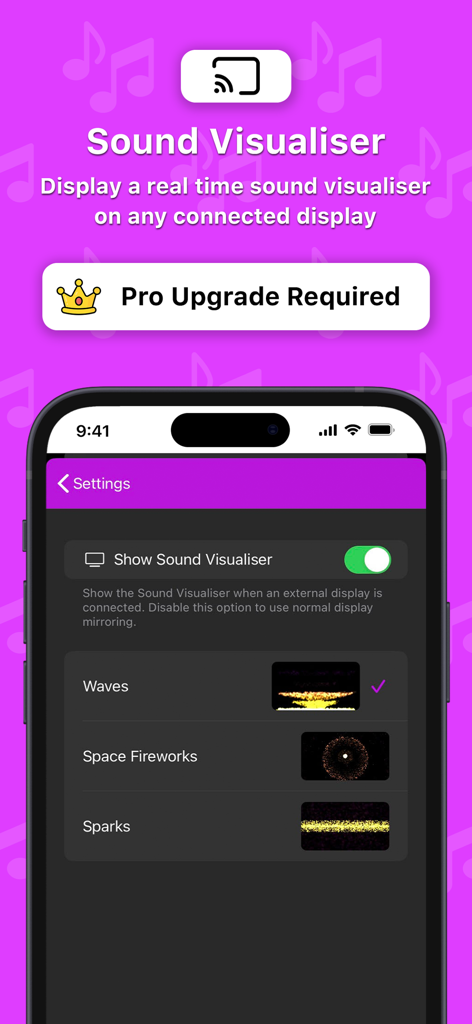
Soundboard Studio app settings for real-time sound visualiser on external displays

Soundboard Studio app settings for real-time sound visualiser on external displays

Professional Audio Control at Your Fingertips

The tools that make this app stand out, trusted by 625K+ users.

Low-Latency Live Triggering

Experience instant playback with zero lag. Trigger multiple tracks simultaneously to create complex soundscapes during live broadcasts or stage performances.

🎨

Visual Grid Organization

Color-code your tracks and add custom icons for easy recognition. Our large-button layout is designed for peripheral vision, ensuring you never miss a cue.

🔄

Pro Workflow & Automation

Streamline your production with smart track automations, custom fades, and iPad split-screen support to manage your script and soundboard side-by-side.

Loved by users worldwide

Trusted by 625K+ people who love this app.

"

"Soundboard Studio has completely transformed my podcasting workflow. I used to rely on expensive hardware, but this app handles all my intro music, transitions, and sound bites with zero lag. The iPad split-screen support is a lifesaver for reading my script while triggering effects. It’s the most professional tool in my kit."

Marcus Thorne, Independent Podcaster
"

"We use this app for every live theater production and church service we run. The large, color-coded grid makes it impossible to miss a cue, even in high-pressure environments. The reliability is unmatched—I’ve never had a crash or a delay. It's simply the gold standard for live sound playback."

Sarah Jenkins, Technical Director

About the app

Everything you need to know about Soundboard Studio.

Description

Soundboard Studio is the professional and smart sound playback app, perfect for for music, sound effects, voiceovers, pads, soundbites or anything else! Soundboard Studio is designed for playing ad-lib sounds and music, with its large grid of buttons for each of your tracks. You can customise the layout, colours and detailed settings for all of your tracks. For years, Soundboard Studio has been the app of choice for many pro podcasters, studios, event venues and more. Here's just a few of their thoughts: • “For the price it knocks everything else out of the ring that compares to work on a tablet or laptop.” • “For me, this is the best of any program out there, and I’ve tried a lot.” • “My worship Live looping is in a whole new Level! Thank you guys!” • “This app is professional grade and made for—you guessed it—professionals! You won't regret this investment.” • “Podcasters, look no further: This is your soundboard app!” • “This is for serious professionals, so if that's you, add this app to your arsenal immediately.” Top Features: • Play multiple tracks simultaneously • Set tracks to fade in and/or fade out • Set individual volume levels for each track • Trim the start and end of individual tracks • Set tracks to automatically play the next adjacent track when they reaches their end • Monitor and control multiple playing tracks • Add images to your tracks to make them instantly recognisable • Create multiple 'Boards' of tracks and quickly navigate between them • Assign default track settings to apply to all newly imported tracks • Import tracks from the Music library on your device • Import audio files from your favourite apps and services like Dropbox, Google Drive, iCloud Drive and more via the Files app • Use iTunes File Sharing to import files directly from your computer • Drag & drop support – Drag any compatible audio files into Soundboard Studio • See which tracks you have already played • Low latency playback using the power and simplicity of iOS • Colours! Select from 6 colours for your tracks and boards • Collapsible view of all playing tracks for better control • Easy drag & drop track arrangement • Move tracks between boards • Import multiple files at once from the Files app • iPad split-screen multitasking support • iPad slide-over multitasking support Upgrade to Pro for extra features including: • Create unlimited boards (limited to 4 boards without Pro) • Add unlimited tracks (limited to 24 tracks without Pro) • Background audio playback: Your tracks will continue playing when you close the app • Add images to your tracks to easily identify them at a glance • Program smart Track Automations to trigger events such as playing other tracks, or changing other track volumes • Connect your device to an external display and chose from three realtime visualisers fo your sound Soundboard Studio was designed to be perfect for... • Podcasts • Events • Live theatre • Church services • Workshops • Voice presenters • Wedding planners • Choreographers • Stage Managers • Magicians • Puppeteers • Dance recitals Information about Soundboard Studio Pro: Soundboard Studio Pro is available as a subscription or a one-time purchase. If you subscribe to one of the subscription options, your subscription will start with a 7-day free trial. Your subscription will be applied to your iTunes account at the end of the trial. Subscriptions will automatically renew unless canceled within 24-hours before the end of the current period. You can cancel anytime in the Settings menu in Soundboard Studio, or from your iTunes account settings. Any unused portion of a free trial will be forfeited if you purchase a subscription. For more information, go to soundboardstudio.com/terms You can also upgrade to Pro without a subscription with a one-time purchase. No other soundboard app comes close to the versatility, usability and experience of Soundboard Studio.

Latest Version

2.6.1

Size

30.0 MB

First Released

May 5, 2016

Take Command of Your Performance

Join over 625,000 podcasters, event managers, and worship leaders who trust Soundboard Studio for flawless, low-latency audio playback. Elevate your production today.

Download on App Store
FAQ

Frequently Asked Questions

Everything you need to know about Soundboard Studio

What is Soundboard Studio?

Soundboard Studio is a professional sound playback app designed for ad-lib sounds, music, and sound effects. It offers customizable track layouts and detailed settings for various audio needs.

Can Soundboard Studio play multiple tracks simultaneously?

Yes, Soundboard Studio allows users to play multiple tracks at the same time. This feature is fundamental for mixing various sounds during live use.

How can I customize tracks in Soundboard Studio?

Soundboard Studio offers extensive track customization, including individual volume levels, trim for start/end points, fade in/out effects, and options to add images or assign colors.

What audio file types can Soundboard Studio import?

Soundboard Studio supports importing audio files like .mp3, .wav, .aiff, and .m4a. Users can import from the device's music library, cloud services, or via iTunes File Sharing.

Does Soundboard Studio Pro offer unlimited boards and tracks?

Yes, Soundboard Studio Pro provides unlimited boards and tracks. Without the Pro upgrade, users are limited to 4 boards and 24 tracks.

Does Soundboard Studio support background audio playback?

Yes, Soundboard Studio Pro enables background audio playback. This feature ensures that tracks continue playing even when the app is closed.

How much does Soundboard Studio Pro cost?

Soundboard Studio Pro is available through a subscription or a one-time purchase. Subscription options include a 7-day free trial. Pricing details are managed via iTunes account settings.

Does Soundboard Studio Pro offer a free trial?

Yes, Soundboard Studio Pro subscriptions include a 7-day free trial. The subscription applies to your iTunes account after the trial period concludes.

Who is Soundboard Studio designed for?

Soundboard Studio is designed for professionals in podcasts, live theatre, events, church services, and workshops. It also benefits voice presenters, wedding planners, and choreographers.

Can I automate tracks in Soundboard Studio?

Yes, Soundboard Studio Pro offers powerful track automations. Users can program events to trigger actions like playing other tracks or changing volumes when a track begins, stops, or ends.

Does Soundboard Studio have sound visualizers?

Yes, Soundboard Studio Pro features real-time sound visualizers. Users can connect their device to an external display and choose from three visualizer options, such as Waves or Space Fireworks.

Does Soundboard Studio support drag and drop for tracks?

Yes, Soundboard Studio supports drag & drop functionality. Users can easily rearrange and edit tracks with quick drag and drop movements for efficient organization.

Can I set default track settings in Soundboard Studio?

Yes, Soundboard Studio allows users to assign default track settings. These settings apply automatically to all newly imported tracks, streamlining the setup process.

How can I cancel my Soundboard Studio Pro subscription?

Users can cancel their Soundboard Studio Pro subscription within 24-hours before the end of the current period. Cancellation is possible via the app's Settings menu or your iTunes account settings.