Splice: Make music now

Splice: Make music now

Download on App Store
Spark by MWM logo
Logo of Splice: Make music now
Splice: Make music now—The Professional Sound Library in Your Pocket

Capture every spark of inspiration with millions of royalty-free samples and pro-grade recording tools. Build stacks in seconds and export directly to your DAW to turn mobile ideas into your next hit.

Publisher

Distributed Creation Inc

Category

Music

Downloads

833K+

User Rating

3.5/5

Total Ratings

1K+

Locales

1

The Studio, Visualized

Discover the interface used by 833K+ users.

Interface of the Splice mobile app showing the browse section with recommended music sample packs like Lowkey Drip and AmaPercussion.

Interface of the Splice mobile app showing the browse section with recommended music sample packs like Lowkey Drip and AmaPercussion.

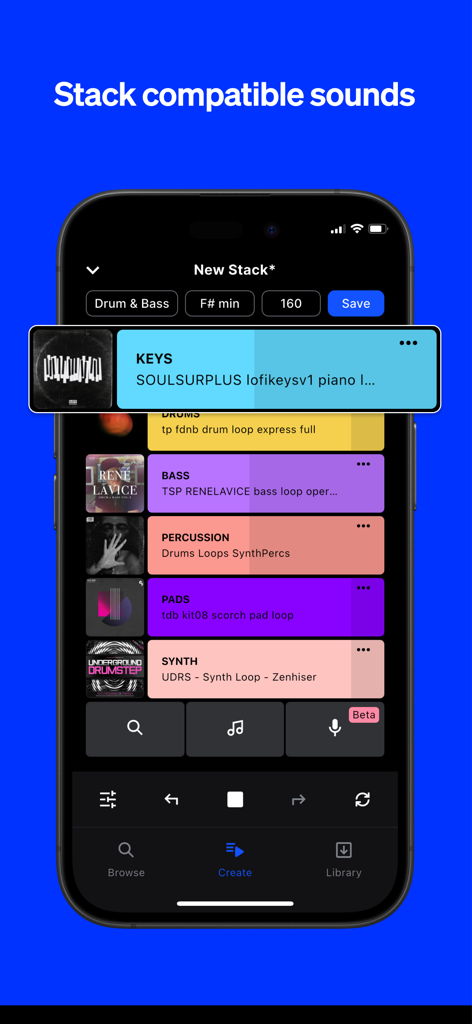
A mobile phone screen showing the Splice app interface for stacking compatible music loops.

A mobile phone screen showing the Splice app interface for stacking compatible music loops.

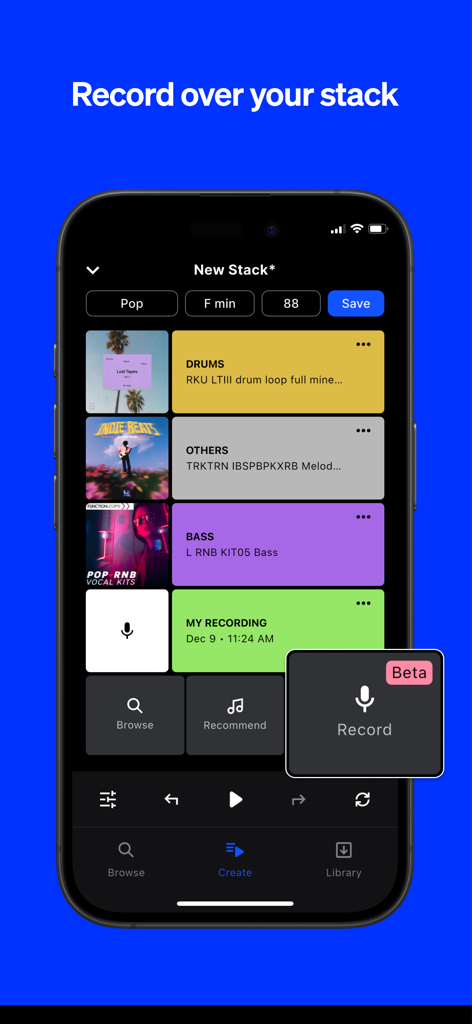
iPhone screen showing Splice app's Create Mode with multi-track loops and a voice recording feature

iPhone screen showing Splice app's Create Mode with multi-track loops and a voice recording feature

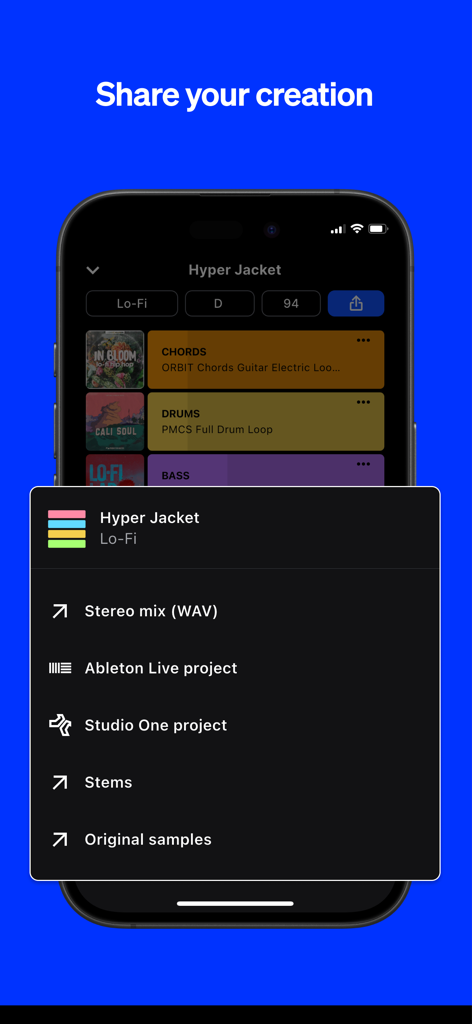
A screenshot of the Splice app showing options to export a music project as a stereo mix, stems, or DAW files for Ableton Live and Studio One.

A screenshot of the Splice app showing options to export a music project as a stereo mix, stems, or DAW files for Ableton Live and Studio One.

Your Professional Studio, Anywhere

The tools that make this app stand out, trusted by 833K+ users.

🎧

Pro-Grade Sample Library

Browse millions of royalty-free sounds used by chart-topping producers to find the perfect vibe for your next project.

Instant Vibe with Create Mode

Beat writer's block by automatically stacking compatible loops that sound great together in seconds.

🎤

Capture Melodies on the Fly

Use Splice Mic to record vocal ideas or riffs over your loops and export them directly to your DAW when you're back in the studio.

Loved by users worldwide

Trusted by 833K+ people who love this app.

"

"Splice Mobile has completely transformed my daily commute. I used to waste hours scrolling social media, but now I'm building professional-sounding Stacks and finding rare gems for my next track while on the train. The seamless export to Ableton Live means my mobile sketches are ready to be polished the second I get back to my home studio."

Marcus J., Producer & Beatmaker
"

"As a songwriter, I need to capture melodies the moment they hit. Splice Mic is a total lifesaver—I can record vocal toplines directly over world-class loops right from my phone. It’s so easy to test out different vibes and genres without a complex setup, and knowing everything is royalty-free makes sharing my snippets on TikTok stress-free."

Chloe Reese, Singer-Songwriter

About the app

Everything you need to know about Splice: Make music now.

Description

Splice is a royalty-free sample library, trusted and used by your favorite music creators. With Splice Mobile, you now have the power to browse the entire Splice catalog, organize your favorite sounds, discover hidden gems, record your own audio, and start countless new ideas with Create mode—right from your phone. Splice Mobile keeps inspiration within reach wherever you are. DISCOVER NEW SPLICE SOUNDS ON THE GO Inspiration isn’t limited to the studio, and now, neither is your creativity. With our mobile app, you can browse the entire Splice catalog all from your phone. Dive deep into packs and genres and discover hidden gems. Search by keyword and filter by tags to find the perfect sound for your project. Quickly audition loops, tap the heart icon to save your favorite sounds, and organize them into Collections. VOICE TO VERSE—ANYWHERE The latest mobile feature, Splice Mic, redefines mobile music creation for songwriters who know inspiration doesn’t wait. More than just a recording app, it lets you hear every topline, verse, or riff in full musical context over Splice sounds—right from your phone. Instantly test ideas, explore genres, and unlock new creative possibilities. Humming a melody? Strumming a riff? Working out lyrics? Splice Mic turns spontaneous moments into real musical opportunities. Every take is a step toward your next track. When you're ready, export to your DAW and turn those mobile ideas into full songs. INSTANT INSPIRATION WITH CREATE MODE Generating new musical ideas and starting beats on the go has never been easier. Simply tap on the Create icon, select your desired genre, and immediately drop into a Stack of loops from the Splice library. You may find the generated Stack fits what you’re looking for perfectly, but if not, that’s great too. Developing a musical idea is often about trying combinations of sounds and figuring out what feels good to you—Create Mode is a great companion for that process. Create Mode leaves creative control in your hands—shuffle to create a whole new Stack or add new layers of compatible sounds and your own recordings. If you want to replace a single loop with a new option of the same type of sound, swipe right. If you want to delete the layer altogether, swipe left. You can also solo a layer by holding down, or tap the layer to mute. Once you’ve chosen your Stack layers, you can fine-tune your loop with volume adjustments and BPM control. When your idea hits the spot, save it with a click. You can also click the Stack icon to hear any individual loop in the Splice library in musical context with Create mode. SAVE IT. SEND IT. SHARE IT. Creating and saving your Stack is just the beginning. Not only is the Stack accessible from anywhere you can access your Splice account, but you can also share it directly with a unique link, AirDrop it to friends, or upload to Dropbox, Drive, or another cloud service right from your device for seamless collaboration. If you work in Ableton Live or Studio One, you can export your Stack as a DAW file and open it up with key and tempo information synced when you’re back in the studio. You can also save as a bounced stereo mix to hear the full idea rendered. START WITH SPLICE Subscribe to use Splice's expansive library of royalty-free samples, presets, MIDI, and creative tools in your music. Use Splice samples to create anything—they’re cleared for commercial use in new works. Cancel your subscription anytime and keep everything you've downloaded. Privacy Policy: https://splice.com/privacy-policy Terms of Use: https://splice.com/terms

Latest Version

v.3.6.5+6279

Size

80.0 MB

First Released

May 17, 2016

Turn Your Creative Sparks into Industry-Ready Tracks

Access the world’s most trusted royalty-free library from your pocket. Start your next beat in seconds and export directly to your DAW when you're back in the studio.

Download on App Store
FAQ

Frequently Asked Questions

Everything you need to know about Splice: Make music now

What is the Splice Mobile app?

Splice Mobile is an app allowing users to browse the entire Splice royalty-free catalog, organize sounds, record audio with Splice Mic, and start new music ideas using Create mode, all from their phone.

Can I browse the full Splice catalog on the Splice Mobile app?

Yes, the Splice Mobile app allows users to browse the entire Splice catalog directly from their phone. Users can search by keyword, filter by tags, and audition loops to find specific sounds.

Does the Splice Mobile app allow me to record my own audio?

Yes, Splice Mobile includes a feature called Splice Mic, which allows users to record their own audio. This feature integrates recordings into musical contexts over existing Splice sounds.

How does Splice Mobile's Create mode function?

Splice Mobile's Create mode instantly generates new musical ideas. Users tap the Create icon, select a genre, and drop into a Stack of loops from the Splice library to start beats and develop ideas.

Are Splice samples from the Splice app cleared for commercial use?

Yes, Splice samples are cleared for commercial use. Users can utilize them to create any new works, ensuring legal compliance for their music projects.

What are the export options for creations made in Splice Mobile?

Splice Mobile offers several export options, including stereo mix (WAV), Ableton Live project, Studio One project, Stems, and original samples. Creations can also be shared via unique links or cloud services.

Is a subscription necessary to use the Splice library in the Splice Mobile app?

Yes, a subscription is required to access Splice's expansive library of royalty-free samples, presets, MIDI, and creative tools within the Splice app.

Can I cancel my Splice subscription anytime?

Yes, users can cancel their Splice subscription at any time. All downloaded content remains accessible even after cancellation.