TimePlanner : Tasks & Habits

TimePlanner : Tasks & Habits

Download on App Store
Spark by MWM logo
Logo of TimePlanner : Tasks & Habits

TimePlanner : Tasks & Habits – Design Your Life, One Focused Moment at a Time

The minimalist all-in-one workspace to organize tasks, track habits, and master deep work. Join over 4 million people regaining control of their day with elegant design and zero distractions.

Download on App Store

Publisher

Beijing Fingertip Fusion Technology Co., LTD

Category

Productivity

Downloads

4M+

User Rating

4.8/5

Total Ratings

150K+

Locales

3

Focus Made Visual

Discover the interface used by 4M+ users.

TimePlanner mobile app calendar screen showing daily tasks and schedule.

TimePlanner mobile app calendar screen showing daily tasks and schedule.

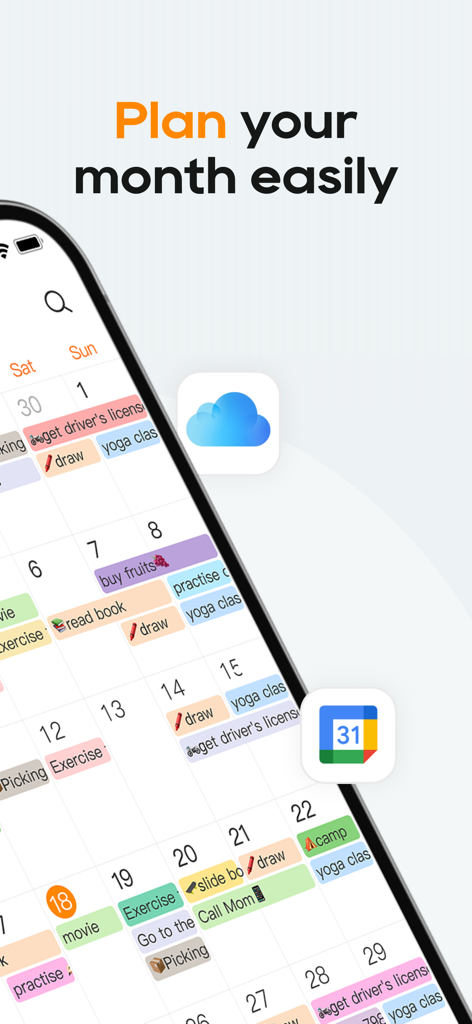
Smartphone screen displaying a monthly calendar view with color coded tasks and habit reminders.

Smartphone screen displaying a monthly calendar view with color coded tasks and habit reminders.

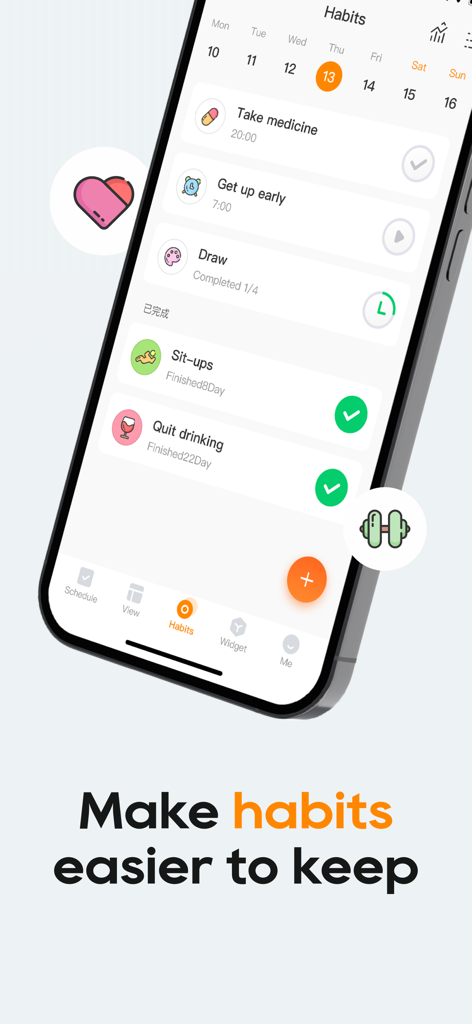
A smartphone showing the TimePlanner app habit tracking screen with a daily task checklist and progress indicators.

A smartphone showing the TimePlanner app habit tracking screen with a daily task checklist and progress indicators.

A selection of minimalist productivity widgets for a mobile home screen showing task lists habit tracking and progress charts.

A selection of minimalist productivity widgets for a mobile home screen showing task lists habit tracking and progress charts.

TimePlanner app focus timer screen featuring a minimalist Pomodoro countdown for deep work

TimePlanner app focus timer screen featuring a minimalist Pomodoro countdown for deep work

A minimalist mobile dashboard showing time tracking statistics, focus trends, and a colorful activity breakdown chart.

A minimalist mobile dashboard showing time tracking statistics, focus trends, and a colorful activity breakdown chart.

Monthly calendar view in TimePlanner app showing shared tasks and plans

Monthly calendar view in TimePlanner app showing shared tasks and plans

TimePlanner app interface showing a customizable pink theme with a panda character and a habit checklist.

TimePlanner app interface showing a customizable pink theme with a panda character and a habit checklist.

TimePlanner app interface synchronized across MacBook iPad iPhone and Apple Watch

TimePlanner app interface synchronized across MacBook iPad iPhone and Apple Watch

A smartphone screen displaying the TimePlanner app countdown feature for upcoming tasks and personal life events.

A smartphone screen displaying the TimePlanner app countdown feature for upcoming tasks and personal life events.

Take Back Your 24 Hours

The tools that make this app stand out, trusted by 4M+ users.

🎯

Smart Task Mastery

Clear the mental clutter with GTD-inspired planning. Set priorities and smart reminders to ensure you never miss a deadline or a side-hustle goal.

🎧

Immersive Focus Mode

Trigger your flow state with built-in Pomodoro timers and ambient white noise. Perfect for blocking out coffee shop distractions or deep study sessions.

📈

Visual Growth Analytics

Turn your daily actions into data. Use Time Footprints and visual reports to see exactly where your hours go and optimize your path to your ideal self.

Loved by users worldwide

Trusted by 4M+ people who love this app.

"

"TimePlanner literally saved my semester. I used to get so distracted by my phone, but the Pomodoro timer combined with the rain sounds keeps me in the zone for hours. I love seeing my habit streaks for morning yoga and reading—it actually makes productivity feel aesthetic and rewarding."

Chloe R., University Senior
"

"As a remote freelancer managing four different clients, this app is a total game-changer. The time footprints feature lets me see exactly how much work I am putting in versus what I am billing. Having my tasks, focus timer, and habit tracker in one place for such an affordable price is unbeatable."

Marcus T., Freelance Designer

About the app

Everything you need to know about TimePlanner : Tasks & Habits.

Description

Time planner-Your Smart GTD Companion Capture ideas with ease. Execute tasks with focus. Do you ever feel like time slips away unnoticed—your schedule packed but your efficiency low? Fingertip Time is a minimalist time management and personal growth partner, designed to help you regain control of your day. We believe change starts with recording, and success grows from focus. With elegant design and powerful features, Fingertip Time helps you beat procrastination and embrace productivity. Task List • Plan with clarity: Create daily or weekly tasks, set priorities, and see your goals at a glance. • Smart reminders: Get notified at the right moment so you never miss what matters. • Organized views: Categorize tasks by project or scenario—work, study, or life. Focus Mode • Pomodoro timer: Balance work and rest with science-backed intervals. • White noise: Choose from rain, forest, ocean, and more to block distractions and dive into flow. • Focus stats: Track your accumulated focus time and witness your progress. Time Footprints • One-tap logging: Record time spent on reading, workouts, work, and more. • Visual reports: Gain insights with intuitive charts that reveal where your time really goes. • Time audit: Review and adjust your schedule regularly to focus on what truly matters. Habit Builder • Daily check-ins: Build habits like early rising, hydration, or exercise with simple streak tracking. • Positive reinforcement: Earn badges and milestones that keep you motivated. • Data-driven insights: Monitor completion rates and trends to refine your plan. Why Choose Fingertip Time? • Minimalist design: Clean interface, distraction-free, no ad • Data security: Your data is safely stored—we respect and protect your privacy. • Highly customizable: Themes, labels, reminders—tailor the app to your unique workflow. Auto-Renewable VIP Subscription Instructions Subscription Periods: 1 month (auto-renewable monthly plan), 12 months (auto-renewable yearly plan) Subscription Pricing: Auto-renewable monthly plan: $2.49 per month Auto-renewable yearly plan: $9.99 per year Payment: Payment will be charged to the user’s iTunes Account upon confirmation of purchase. Cancel Auto-Renewal: To cancel the subscription, please manually disable the auto-renewal option in iTunes / Apple ID settings at least 24 hours before the current subscription period ends. Auto-Renewal: The iTunes account will be charged for renewal within 24 hours prior to the end of the current period, and the subscription term will be extended for one additional period once the payment is successful. Subscriptions can be managed by the user, and auto-renewal can be turned off in the user’s Account Settings after purchase. Privacy Policy: http://sg.zhijiantime.com/apptime/privacy Auto-Renewable Membership Agreement: http://sg.zhijiantime.com/timecalendar/renewprotocol Terms of Use (EULA): https://www.apple.com/legal/internet-services/itunes/dev/stdeula/ Stop letting time slip silently away. Download Time Planner now and take charge of your life—one focused moment at a time. Every tap is a step closer to your ideal self.

Latest Version

8.8.3

Size

323.0 MB

First Released

Jul 4, 2018

Ready to Master Your Day and Reclaim Your Focus?

Join 4 million+ high-achievers who use TimePlanner to bridge the gap between their goals and their reality. Your minimalist journey to a more productive, balanced life starts with one tap.

Download on App Store
FAQ

Frequently Asked Questions

Everything you need to know about TimePlanner : Tasks & Habits

What is TimePlanner and what does it do?

TimePlanner is an intelligent GTD partner designed for time management and personal growth. It helps users capture inspiration, execute tasks efficiently, and achieve self-discipline through elegant design and powerful features.

How does TimePlanner organize tasks and reminders?

TimePlanner helps manage tasks by allowing users to easily create daily and weekly tasks, set priorities, and receive smart reminders. It also provides categorized views by project or scenario like work and study.

Does TimePlanner feature a Pomodoro timer for focus?

Yes, TimePlanner includes a Pomodoro Technique timer. Users can set focus and rest durations, utilize white noise modes for concentration, and track their accumulated focus time to monitor progress.

Can TimePlanner assist with habit tracking and formation?

Yes, TimePlanner helps form habits through its habit check-in feature. Users can set good habits, track daily progress, and receive positive reinforcement via continuous check-in days and achievement badges.

What are the subscription costs for TimePlanner VIP?

TimePlanner's VIP subscription costs 15 CNY per month for the continuous monthly package, and 68 CNY per year for the continuous annual package. Both are auto-renewing subscriptions.

How do I cancel my TimePlanner VIP auto-renewal?

To cancel a TimePlanner VIP subscription, users must manually disable the auto-renewal function in their iTunes/Apple ID settings management. This must be done at least 24 hours before the current subscription period ends.

Is user data secure with TimePlanner?

Yes, TimePlanner ensures data security by storing all user data safely and protecting privacy. The app provides a detailed privacy policy for user review.

What customization options does TimePlanner provide?

TimePlanner offers high customization, including multiple theme colors, personalized tags, and reminder ringtones. This allows users to create a time assistant tailored to their preferences.

Does TimePlanner track and report time spent on activities?

Yes, TimePlanner includes "时光足迹" (Time Footprint) to record time spent on activities like reading or working. It generates visual reports and charts for clear insight into time allocation.

Does TimePlanner offer home screen widgets?

Yes, TimePlanner provides powerful widgets. These widgets allow users to complete schedules and habit check-ins directly from their device's home screen for quick access and convenience.

Can TimePlanner synchronize across multiple devices?

Yes, TimePlanner supports multi-device synchronization. This enables users to access and manage their schedules and tasks across various devices, including phones, tablets, and desktops, meeting different scenario needs.

Does TimePlanner allow for multi-person collaboration?

Yes, TimePlanner supports multi-person collaboration. This feature facilitates work coordination, sharing among couples, and various other scenarios that require shared task management and scheduling.