3d Scanner App™

3d Scanner App™

Download on App Store
Spark by MWM logo
Logo of 3d Scanner App™

3D Scanner App™: Professional LiDAR Precision in the Palm of Your Hand

Transform your device into a high-performance 3D scanner. Capture spaces, objects, and floor plans with pro-grade accuracy and export directly to Blender, AutoCAD, or your 3D printer.

Download on App Store

Publisher

AI Photo Editor Lab SRL

Category

Utilities

Downloads

7M+

User Rating

4.6/5

Total Ratings

79K+

Locales

14

Precision in Every Scan

Discover the interface used by 7M+ users.
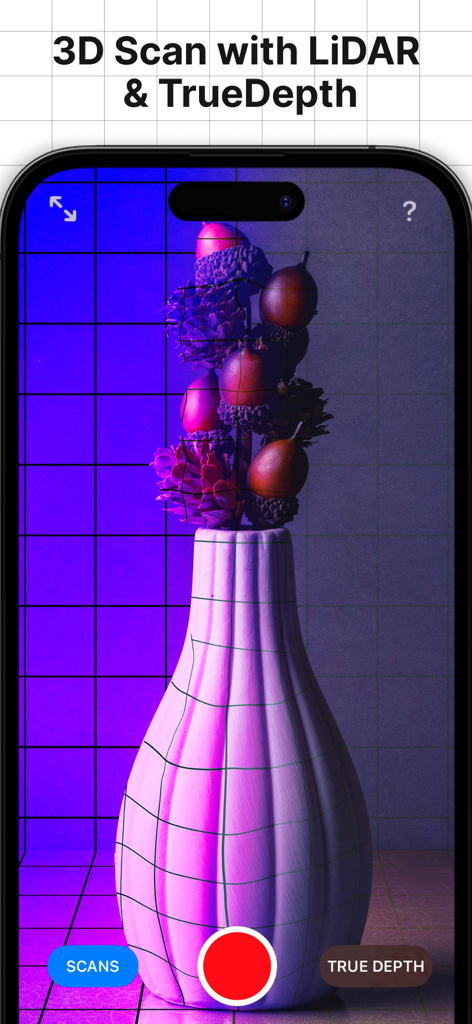
iPhone interface showing a 3D scan of a decorative vase with LiDAR and TrueDepth technology

iPhone interface showing a 3D scan of a decorative vase with LiDAR and TrueDepth technology

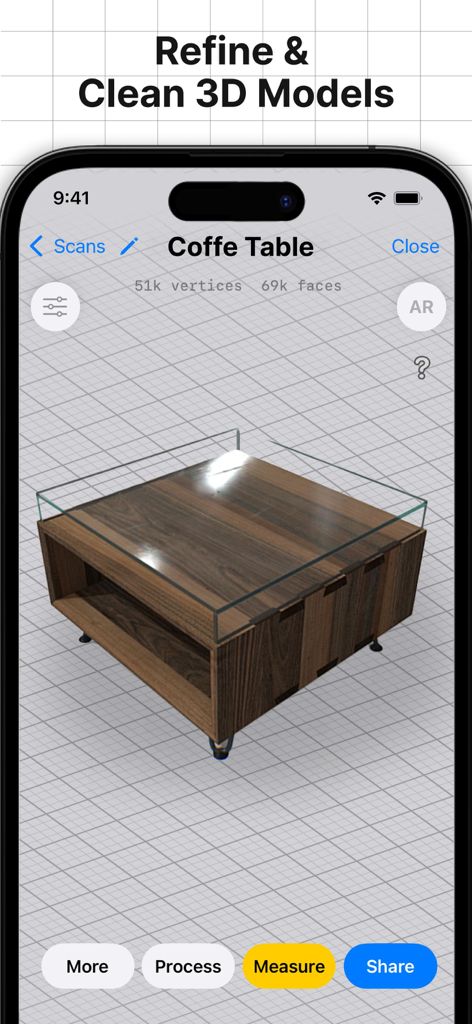
A 3D scan of a wooden coffee table in the 3D Scanner App interface featuring tools to refine and clean models

A 3D scan of a wooden coffee table in the 3D Scanner App interface featuring tools to refine and clean models

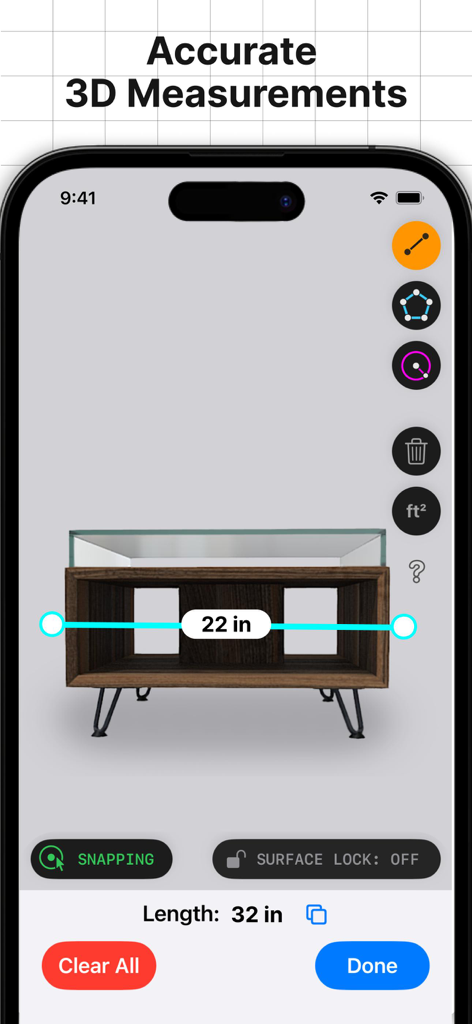
A 3D model of a wooden table being measured digitally in the 3D Scanner App interface showing a 22 inch width and 32 inch length.

A 3D model of a wooden table being measured digitally in the 3D Scanner App interface showing a 22 inch width and 32 inch length.

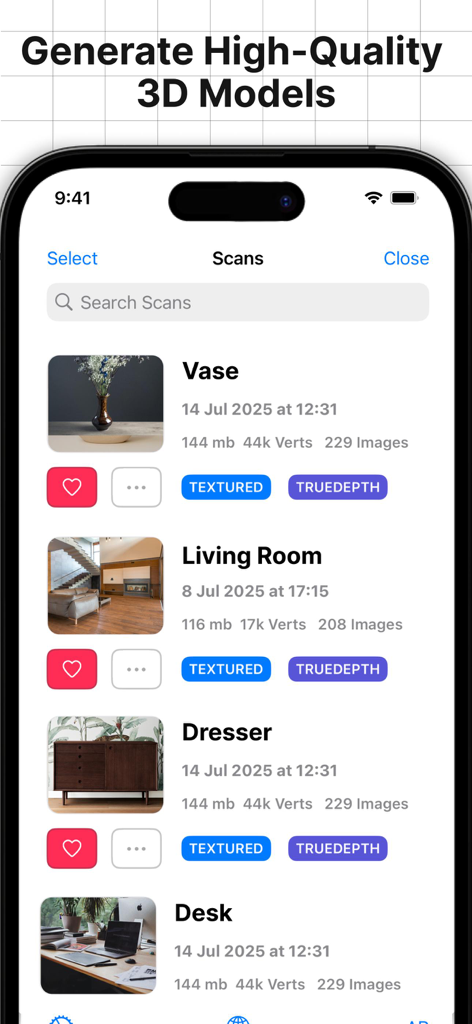
Library of high quality 3D models in the 3D Scanner App

Library of high quality 3D models in the 3D Scanner App

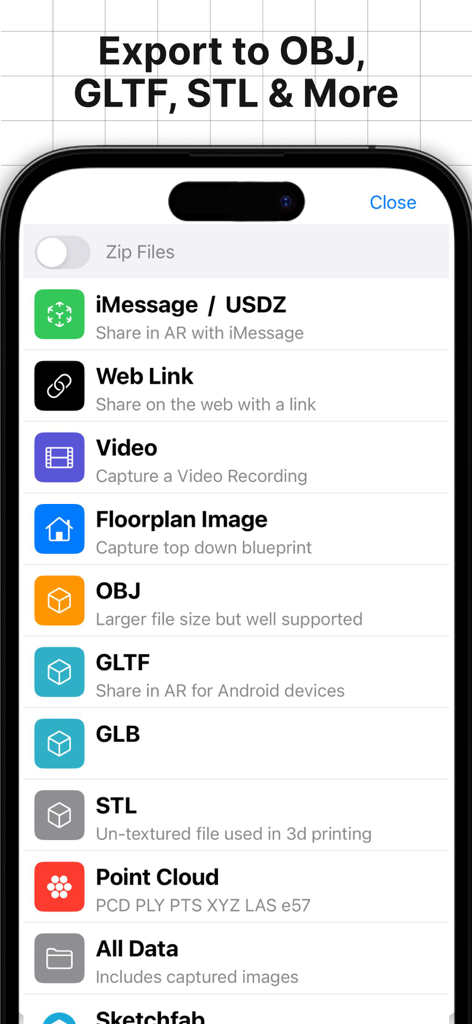
Menu showing various 3D export formats like OBJ GLTF and STL

Menu showing various 3D export formats like OBJ GLTF and STL

Professional Precision, Pocket-Sized

The tools that make this app stand out, trusted by 7M+ users.

📐

High-Accuracy LiDAR Capture

Instantly transform rooms and objects into detailed 3D models with millimeter precision, replacing hours of manual measurement.

📤

Professional-Grade Exports

Seamlessly export to OBJ, STL, DXF, and LAS. Fully compatible with Blender, AutoCAD, and SketchUp for a friction-free workflow.

Real-Time AR Visualization

View your scans in immersive Augmented Reality or share them via USDZ to preview designs and dimensions in real-world environments.

Loved by users worldwide

Trusted by 7M+ people who love this app.

"

"As an architect, this app has completely transformed my workflow. I can scan a client's entire living room in minutes and export the floor plan directly to DXF for CAD. It saves me hours of manual measuring and ensures I have a reliable digital reference before I even leave the site."

Marcus Chen
"

"I'm obsessed with the level of detail I can get using the Photo Mode for my 3D printing projects. Being able to capture real-world objects and bring them straight into Blender as OBJ files is a game-changer for my creative process. It's the best use of the LiDAR sensor I've found yet."

Sarah Jenkins

About the app

Everything you need to know about 3d Scanner App™.

Description

Transform your device into a powerful 3D scanner using LIDAR or TrueDepth technology. 3D Scanner app, downloaded by 11+ Million users, effortlessly makes you capture spaces and objects in full-color 3D and explore them in stunning, high-quality detail. Easily share your 3D scans Share your 3D models via iMessage or AR QuickLook in USDZ format, or export them in popular formats like OBJ, GLTF, GLB, DAE, and STL. Export in advanced formats Beyond standard exports, you can save your models as raw point clouds (PTS, PCD, PLY, XYZ, LAS) or floor plan images in DXF format, giving you full flexibility for professional workflows. Seamless integration with professional software Export geo-referenced LAS point clouds to GIS tools like ArcGIS or transfer raw scan data (including photos) to photogrammetry software such as Pix4D or Reality Capture. Edit directly on your device Refine, crop, and perfect your scans directly on your device for maximum control and precision. Accurate scans for any space or object Capture your home, garden, or any environment in 3D with LIDAR support. Easily import your scans into 3D modeling software like Blender, 3ds Max, SketchUp, Maya, and more. Use RoomPlan mode for quick floor plans, or TrueDepth mode for smaller, detailed objects. Capture ultra-detailed scans with Photo Mode Leverage our advanced "Photo Mode" to create highly detailed models using Apple’s Object Capture photogrammetry API. Intuitive sharing and measuring tools Share your 3D models effortlessly with the new "Share to Web" feature. Measure your scans with a virtual ruler or create bounding boxes to precisely calculate dimensions such as width, length, and height. Discover the power of the LIDAR sensor Transform your device into a real-time LIDAR scanner and unlock next-level accuracy and detail. View your scans in AR Visualize all your saved scans in an immersive augmented reality viewer for a truly interactive experience. 3D Scanner App is the perfect companion to Sweet Home 3D, enabling you to design, capture, and visualize your dream home with precision and ease. Its 3D scanning technology is supported in Sweet Home 3D, as the generated models can be easily imported and integrated into your projects. Subscribe to access to premium app features; subscription details are the following: - Length: weekly, yearly - Your payment will be charged to your iTunes Account as soon as you confirm your purchase - You can manage your subscriptions and turn off auto-renewal from your Account Settings after the purchase - Your subscription will renew automatically, unless you turn off auto-renew at least 24 hours before the end of the current period - The cost of renewal will be charged to your account in the 24 hours prior to the end of the current period - When canceling a subscription, your subscription will stay active until the end of the period. Auto-renewal will be disabled, but the current subscription will not be refunded - Any unused portion of a free trial period, if offered, will be forfeited when purchasing a subscription 3D Scanner App has been developed by Laan Labs Consulting, a company specialized in AR, CV, and ML algorithms. Visit https://labs.laan.com/ to learn more about Laan Labs Consulting. Terms of Use: https://www.apple.com/legal/internet-services/itunes/dev/stdeula/

Latest Version

2.4

Size

232.1 MB

First Released

Jul 20, 2020

Ready to Revolutionize Your 3D Workflow?

Join over 11 million professionals and makers. Capture, measure, and export high-precision LiDAR scans directly to your favorite 3D software.

Download on App Store
FAQ

Frequently Asked Questions

Everything you need to know about 3d Scanner App™

What is the primary function of the 3D Scanner App™?

The 3D Scanner App™ transforms your device into a powerful 3D scanner. It captures spaces and objects in full-color 3D using LIDAR or TrueDepth technology.

What file formats does the 3D Scanner App™ support for export?

Yes, the 3D Scanner App™ supports exporting 3D models in OBJ, GLTF, GLB, DAE, and STL formats. It also exports raw point clouds (PTS, PCD, PLY, XYZ, LAS) and DXF floor plans.

Can users edit 3D scans within the 3D Scanner App™?

Yes, the 3D Scanner App™ allows users to refine, crop, and perfect their captured 3D scans directly on their device for maximum control and precision.

Does the 3D Scanner App™ provide measurement tools for 3D models?

Yes, the 3D Scanner App™ includes measuring tools. Users can measure scans with a virtual ruler or create bounding boxes to precisely calculate dimensions like width, length, and height.

What scanning modes are available in the 3D Scanner App™?

The 3D Scanner App™ offers RoomPlan mode for quick floor plans and TrueDepth mode for small, detailed objects. It also features a "Photo Mode" for highly detailed models.

How does the subscription work for premium features in 3D Scanner App™?

The 3D Scanner App™ offers weekly and yearly subscriptions for premium features. Payment is charged to your iTunes Account, and auto-renewal can be managed in Account Settings.

Can the 3D Scanner App™ integrate with professional GIS software?

Yes, the 3D Scanner App™ offers seamless integration. It exports geo-referenced LAS point clouds which are compatible with GIS tools like ArcGIS.

Is the 3D Scanner App™ compatible with Sweet Home 3D?

Yes, the 3D Scanner App™ is compatible with Sweet Home 3D. Generated 3D models can be easily imported and integrated into Sweet Home 3D projects for design and visualization.

Can I view my 3D scans in Augmented Reality using the 3D Scanner App™?

Yes, the 3D Scanner App™ allows users to visualize all their saved scans. They can be viewed in an immersive augmented reality viewer for an interactive experience.

Who developed the 3D Scanner App™?

The 3D Scanner App™ was developed by Laan Labs Consulting. This company specializes in AR, Computer Vision (CV), and Machine Learning (ML) algorithms.