Alaska Airlines

Alaska Airlines

Download on App Store
Spark by MWM logo
Logo of Alaska Airlines

Alaska Airlines: Your Ultimate Companion for Hassle-Free Travel

Check in, track rewards, and glide through the airport with ease. Join millions of frequent flyers who enjoy a seamless, digital-first journey designed for your lifestyle.

Download on App Store

Publisher

Alaska Airlines, Inc.

Category

Travel

Downloads

12M+

User Rating

4.8/5

Total Ratings

1M+

Locales

1

Your Journey at a Glance

Discover the interface used by 12M+ users.
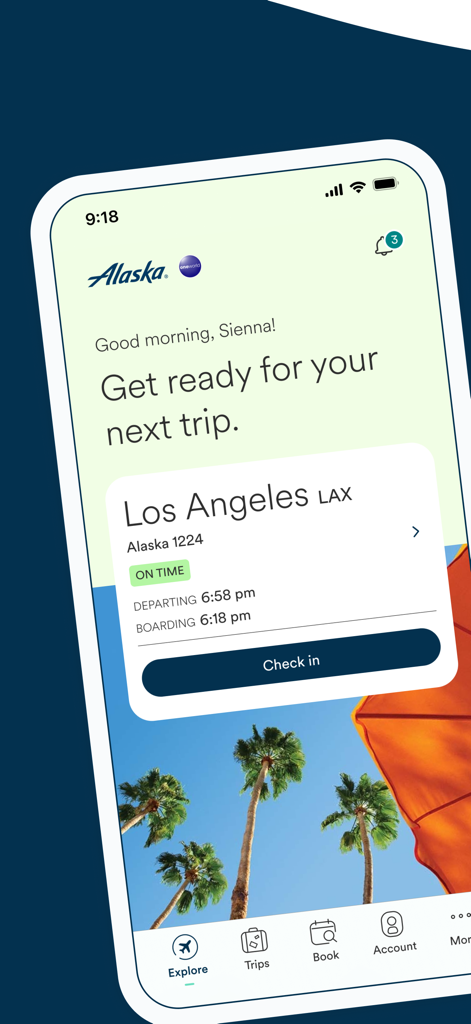
Alaska Airlines mobile app dashboard showing an upcoming flight to Los Angeles with a check-in button.

Alaska Airlines mobile app dashboard showing an upcoming flight to Los Angeles with a check-in button.

Alaska Airlines app promotional screen with the text Dream plan fly repeat

Alaska Airlines app promotional screen with the text Dream plan fly repeat

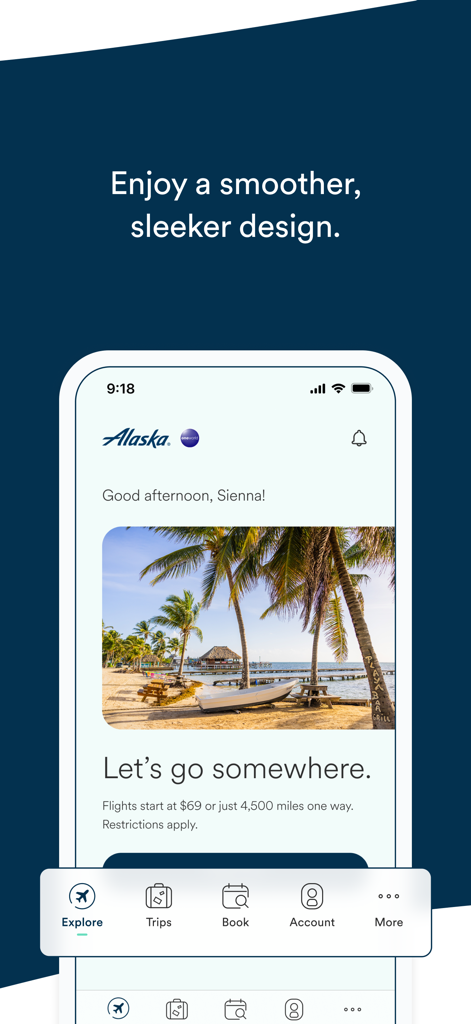
Alaska Airlines mobile app home screen featuring a tropical travel destination and a sleek design

Alaska Airlines mobile app home screen featuring a tropical travel destination and a sleek design

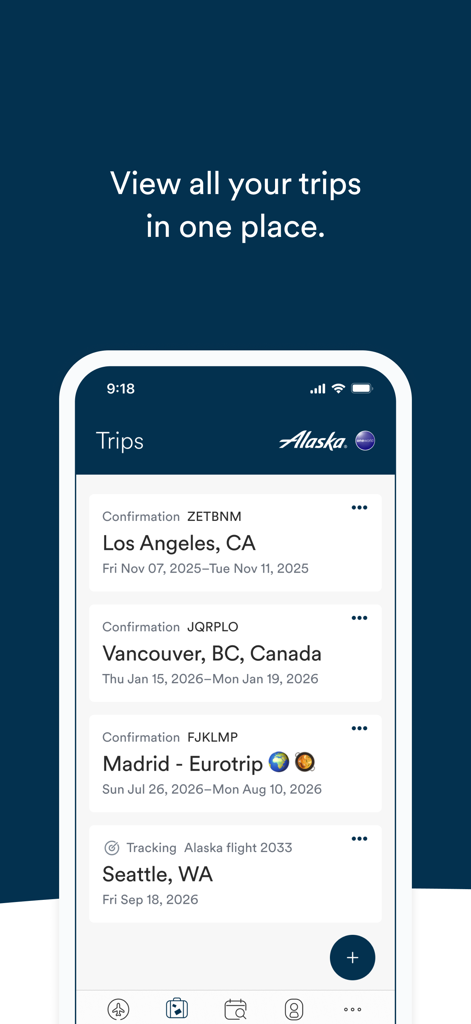
A mobile phone screen showing a list of upcoming flight trips in the Alaska Airlines app

A mobile phone screen showing a list of upcoming flight trips in the Alaska Airlines app

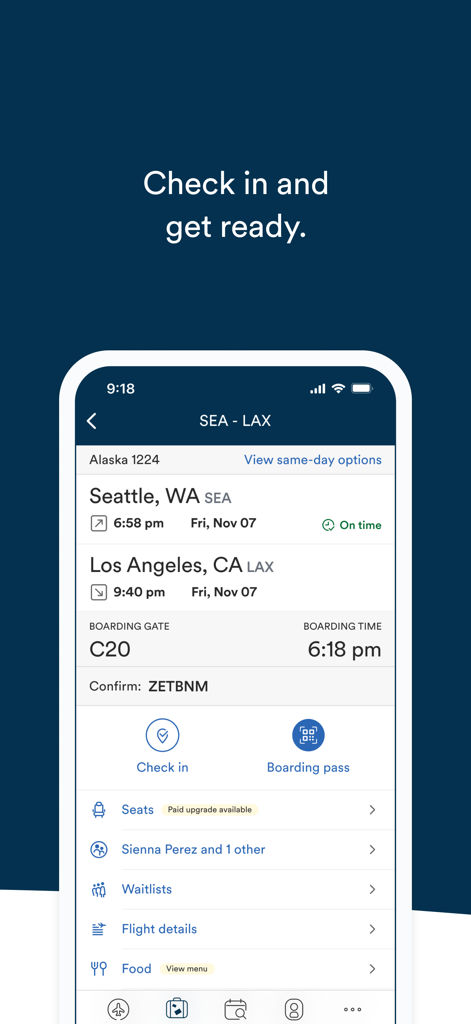
Alaska Airlines app screen showing flight details from Seattle to Los Angeles with check-in and boarding pass options

Alaska Airlines app screen showing flight details from Seattle to Los Angeles with check-in and boarding pass options

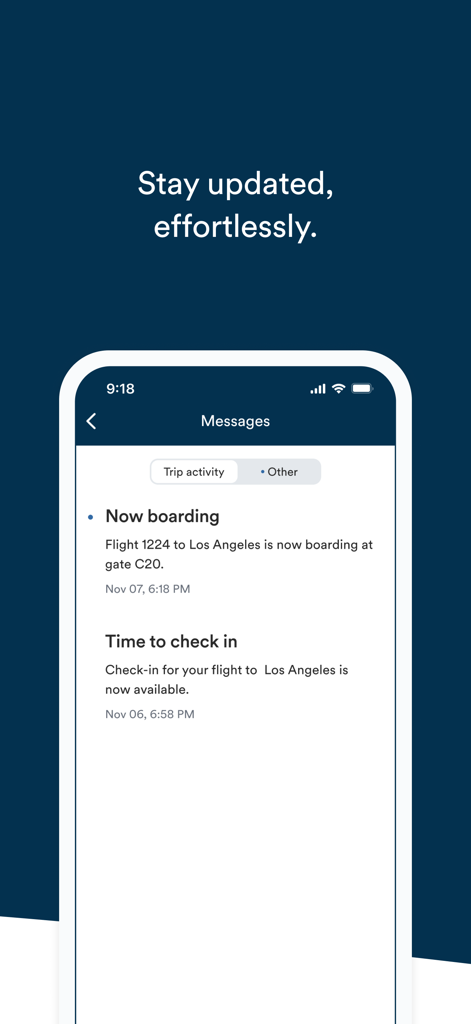
Alaska Airlines app message center showing boarding and check in notifications

Alaska Airlines app message center showing boarding and check in notifications

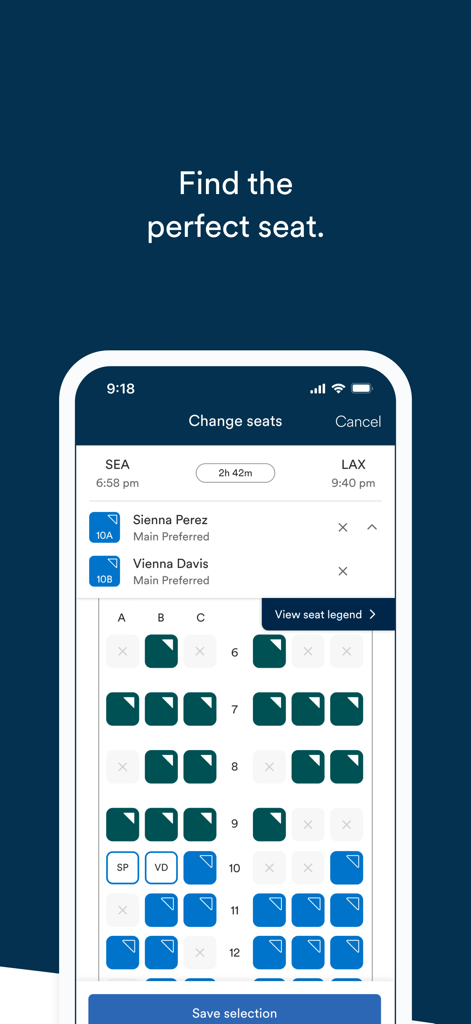
Alaska Airlines app seat selection screen showing a seat map for a flight from Seattle to Los Angeles.

Alaska Airlines app seat selection screen showing a seat map for a flight from Seattle to Los Angeles.

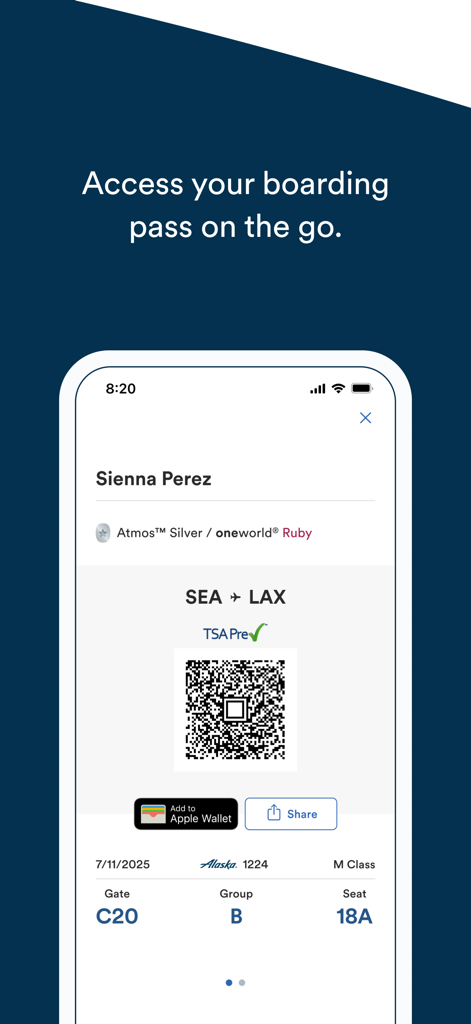
A digital boarding pass displayed on the Alaska Airlines mobile app featuring a QR code, flight details, and Apple Wallet integration.

A digital boarding pass displayed on the Alaska Airlines mobile app featuring a QR code, flight details, and Apple Wallet integration.

Travel with Confidence and Ease

The tools that make this app stand out, trusted by 12M+ users.

🎫

Seamless Digital Check-In

Skip the lines by checking in up to 24 hours before your flight and save your boarding pass directly to your Apple Wallet for instant, offline access.

📈

Maximize Your Rewards

Keep your Mileage Plan balance and elite status points at your fingertips. Easily track your progress, view upgrade lists, and use points to book new adventures.

🔔

Real-Time Trip Management

Stay informed with instant push notifications for gate changes and delays, and take control by pre-ordering meals or changing flights with just a few taps.

Loved by users worldwide

Trusted by 12M+ people who love this app.

"

"As a frequent traveler for work, this app is my most trusted companion. The Apple Wallet integration and real-time gate change notifications allow me to move through the airport effortlessly. I especially love being able to track my status points and check the upgrade list in seconds. It has truly turned air travel into a friction-free experience."

Marcus Thompson, Management Consultant
"

"This is hands-down the best airline app I have ever used. Pre-ordering my favorite Fruit & Cheese plate before I even reach the airport is a total game-changer. I also love how easy it is to share boarding passes with my family and keep track of everyone's flight details in one place. It makes our regional trips so much more relaxed."

Sarah Jenkins, PNW Resident & Family Traveler

Review Analysis

Insights from user reviews.

Sentiment Score

24%
Negative

Summary

The mobile app elicits predominantly negative sentiment from users, largely due to significant app stability and performance issues like bugs, crashes, and slow loading times. Many users report that a recent update associated with the "Atmos" rebranding and Hawaiian Airlines merger has broken the app, leading to widespread login and authentication problems, as well as frustrating booking process timeouts. While several users commend the exceptional customer service and highlight the ease of booking and check-in when the app functions correctly, these positive aspects are overshadowed by the app's current unreliability. Moreover, some users have encountered issues with loyalty program benefits and credit card functionalities following the integration.

Common Themes

App Stability and Performance(20)
Impact of Recent Updates and Rebranding (Atmos)(11)
Login and Authentication Issues(10)
Booking Process Issues (Timeouts, Errors)(8)
Customer Service(6)
Loyalty Program and Credit Card Issues(5)
Ease of Booking(4)

About the app

Everything you need to know about Alaska Airlines.

Description

Travel light at each stage of your journey with our companion mobile app. Explore options, book trips, check in, and move hassle-free through airports. Find all the flight information that matters to you, as you need it. Features of our travel app: • Book a flight; using Wallet funds or a discount code. You can use your points too! • Make sure to sign into your Rewards account; for easy access to all of your upcoming trips, view your balance and track your status points • Pre-order your Fruit & Cheese plate in Main Cabin, Premium Class and First Class (there's other goodies to choose from too) • Add your Atmos Rewards or TSA precheck numbers to your flight. How? Tap on your name on your flight info screen • Never miss an important push notifications with Message center. Where you can find messages about flight delays, gate changes, and more • Cancel or change your flight easily by tapping the 3 dots on the trip list • Purchase a seat upgrade using Apple Pay or stored payment • Check-in up to 24 hours before your flight • Add your boarding pass, Atmos Rewards and Lounge card to Apple Wallet for easy access • Share boarding passes, and flight details with family and friends • Keep an eye on First Class and Standby wait lists • Change to an earlier or later flight starting at 24 hours before your flight • Add flight details to your iPhone’s calendar • Track flights taken by friends and family You can find additional information about the Alaska Air travel app by visiting alaskaair.com/mobile or Atmos Rewards at atmosrewards.com Thanks for sending us feedback at iphoneapp@alaskaair.com. We are listening, and welcome your suggestions.

Latest Version

7.6.8

Size

136.8 MB

First Released

Feb 20, 2010

Your Smoother Journey Starts Here

Join 12 million travelers moving hassle-free through the airport. Download the app today to manage your trips, track your rewards, and travel light at every stage.

Download on App Store
FAQ

Frequently Asked Questions

Everything you need to know about Alaska Airlines

Can I book flights using the Alaska Airlines app?

Yes, the Alaska Airlines app allows users to book flights. You can use Wallet funds, discount codes, or reward points for bookings.

How do I check in for my flight using the Alaska Airlines app?

Yes, the Alaska Airlines app allows check-in up to 24 hours before your flight. You can find the 'Check in' option on your trip details screen.

Can I manage my Atmos Rewards account in the Alaska Airlines app?

Yes, you can sign into your Atmos Rewards account within the Alaska Airlines app. This provides easy access to upcoming trips, balance viewing, and status point tracking.

How can I purchase a seat upgrade with the Alaska Airlines app?

Yes, you can purchase a seat upgrade using the Alaska Airlines app. Payment options include Apple Pay or a stored payment method.

Can I add my boarding pass to Apple Wallet from the Alaska Airlines app?

Yes, the Alaska Airlines app enables you to add your boarding pass, Atmos Rewards, and Lounge card directly to Apple Wallet for convenient access.

Does the Alaska Airlines app provide flight delay notifications?

Yes, the Alaska Airlines app provides push notifications for important updates. The Message center displays alerts regarding flight delays, gate changes, and more.

Can I change or cancel my flight through the Alaska Airlines app?

Yes, you can easily change or cancel your flight using the Alaska Airlines app by tapping the three dots on the trip list.

Can I pre-order food for my flight using the Alaska Airlines app?

Yes, the Alaska Airlines app allows you to pre-order food, such as a Fruit & Cheese plate, for Main Cabin, Premium Class, and First Class.

How do I add my TSA PreCheck number to a flight in the Alaska Airlines app?

To add your TSA PreCheck or Atmos Rewards numbers, tap on your name on the flight info screen within the Alaska Airlines app.

Can I share my flight details from the Alaska Airlines app?

Yes, the Alaska Airlines app allows you to share boarding passes and flight details with family and friends.

Can I track flights of friends and family using the Alaska Airlines app?

Yes, the Alaska Airlines app provides a feature to track flights taken by your friends and family members.

Can I add Alaska Airlines flight details to my iPhone calendar?

Yes, the Alaska Airlines app enables users to add flight details directly to their iPhone's calendar for easy scheduling.