Southwest Airlines: Travel App

Southwest Airlines: Travel App

Download on App StoreDownload on Google Play
Spark by MWM logo
Logo of Southwest Airlines: Travel App

Southwest Airlines: Your Ultimate Mobile Travel Companion

Book in seconds, secure your boarding position 24 hours early, and manage your travel funds with total transparency. Experience the speed of one-tap booking and the freedom to travel stress-free.

Download on App StoreDownload on Google Play

Publisher

Southwest Airlines

Category

Travel

Downloads

35M+

User Rating

4.8/5

Total Ratings

6M+

Locales

1

Your Travel Remote Control

Discover the interface used by 35M+ users.

Southwest Airlines blue airplane and travel destination photos with text Wanna Get Away

Southwest Airlines blue airplane and travel destination photos with text Wanna Get Away

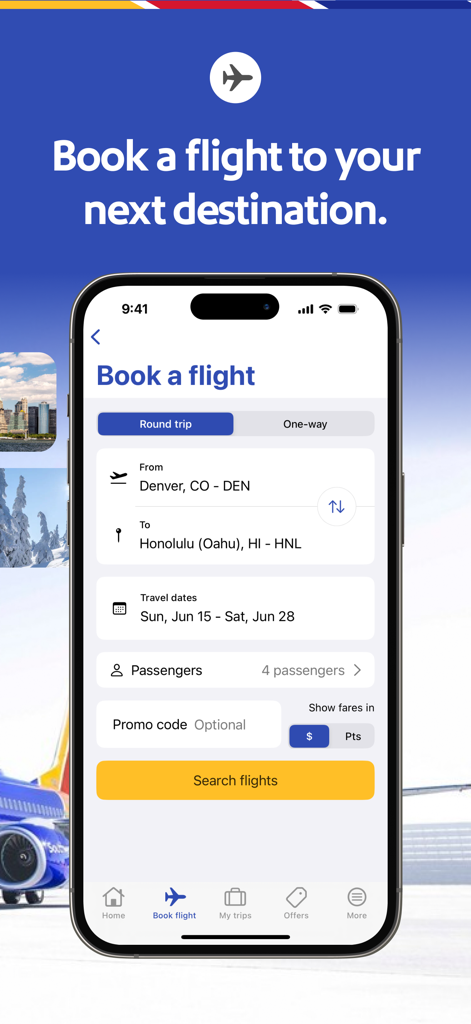
Southwest Airlines mobile app screen for booking a flight from Denver to Honolulu

Southwest Airlines mobile app screen for booking a flight from Denver to Honolulu

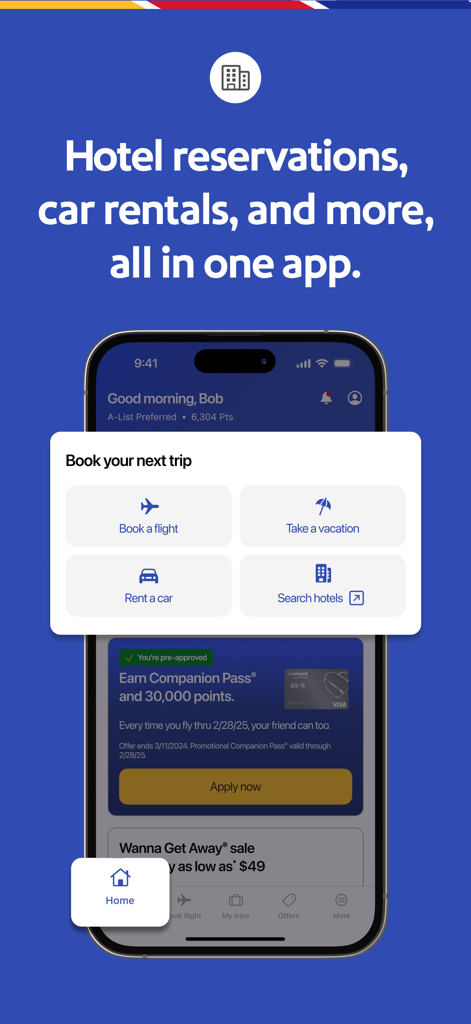
Southwest Airlines app screen with flight hotel and car rental booking buttons

Southwest Airlines app screen with flight hotel and car rental booking buttons

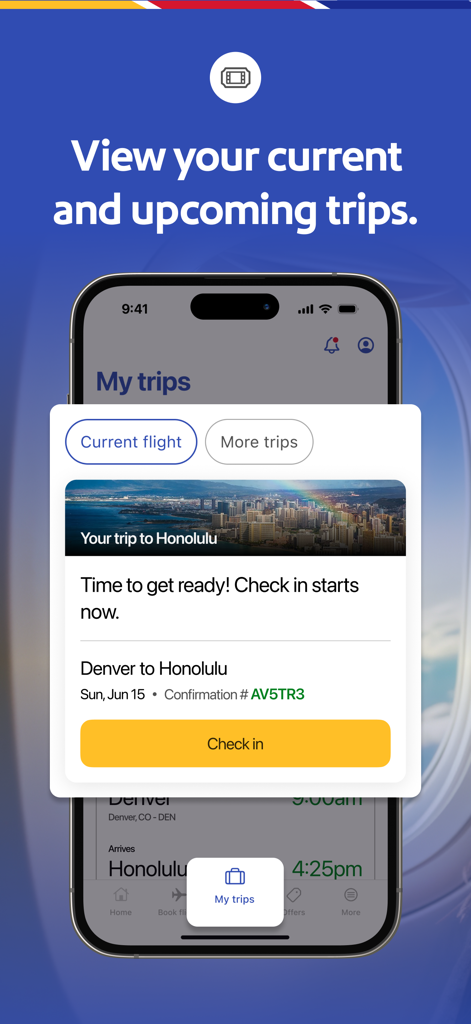
Southwest Airlines app interface showing flight information from Denver to Honolulu and a check in button

Southwest Airlines app interface showing flight information from Denver to Honolulu and a check in button

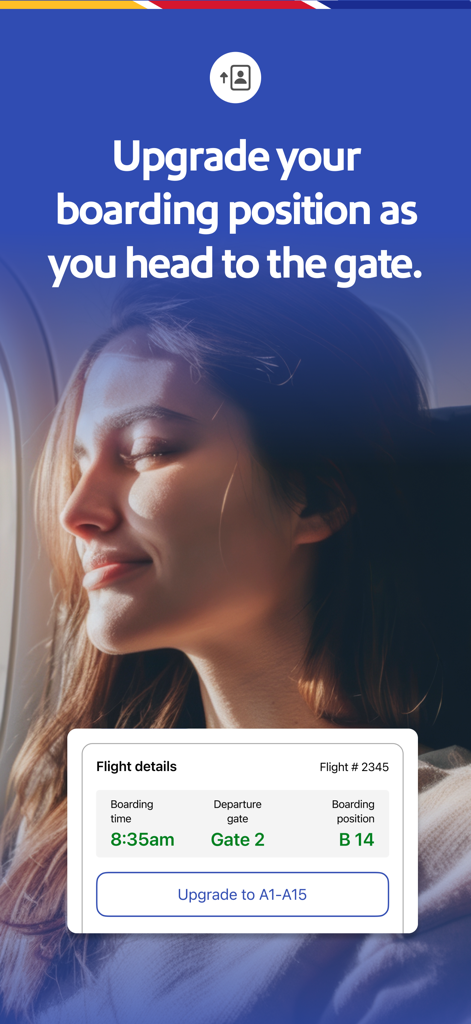
Southwest Airlines mobile app interface showing flight details and boarding position upgrade option

Southwest Airlines mobile app interface showing flight details and boarding position upgrade option

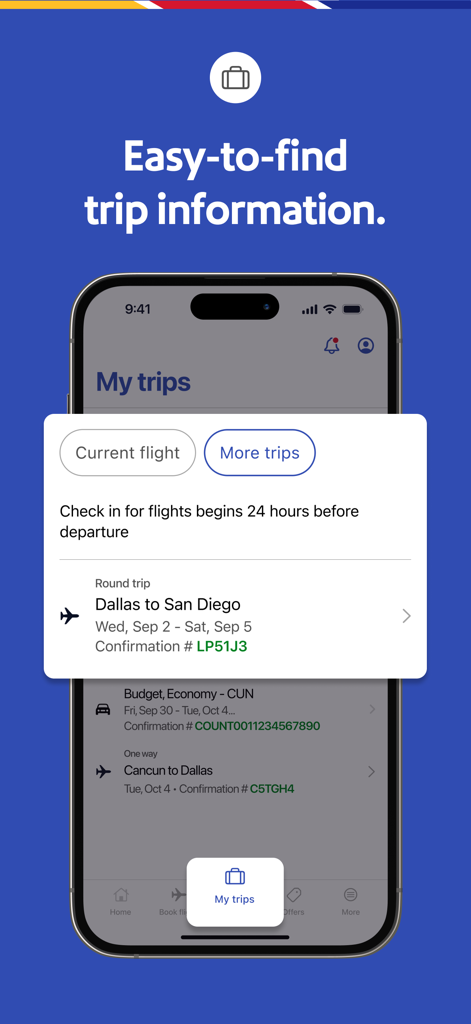
Southwest Airlines mobile app displaying flight details and trip information on the My Trips screen.

Southwest Airlines mobile app displaying flight details and trip information on the My Trips screen.

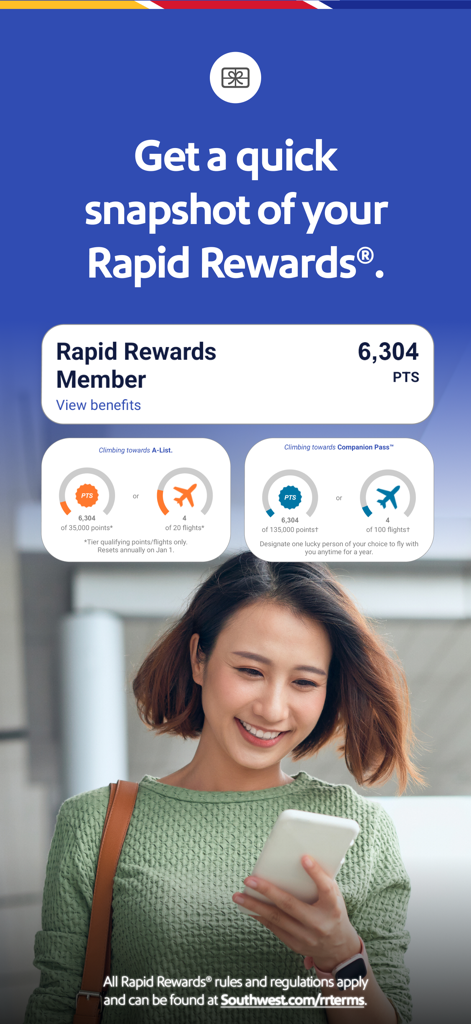
A woman using the Southwest Airlines app to check her Rapid Rewards points and status progress.

A woman using the Southwest Airlines app to check her Rapid Rewards points and status progress.

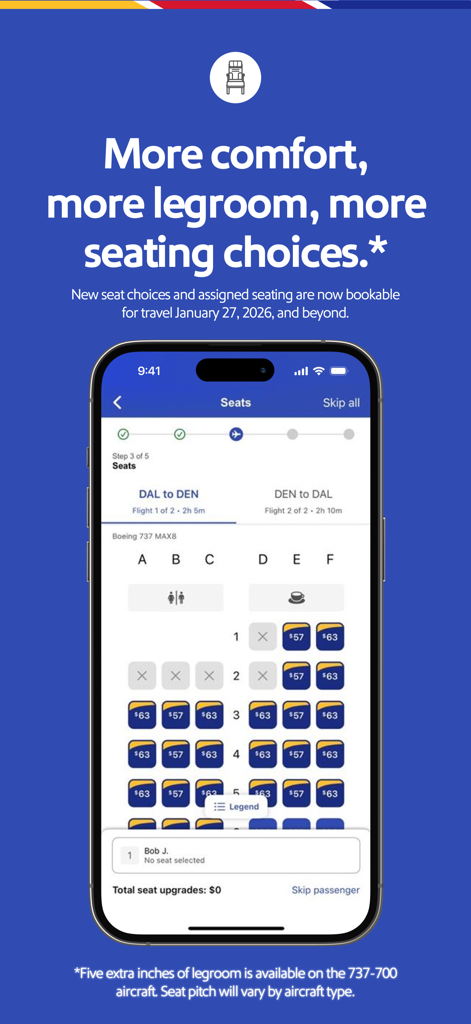
Southwest Airlines mobile app interface showing a seat selection map for a Boeing 737 flight with seat pricing and legroom options.

Southwest Airlines mobile app interface showing a seat selection map for a Boeing 737 flight with seat pricing and legroom options.

Your Essential Travel Remote Control

The tools that make this app stand out, trusted by 35M+ users.

⏱️

Master the 24-Hour Check-In

Secure your boarding position the moment it opens and receive real-time gate updates so you are always one step ahead.

💸

Track Every Reward and Credit

Monitor your Rapid Rewards points and never lose a cent with instant access to your unused Travel Funds and LUV Vouchers.

📱

Frictionless One-Tap Booking

Book flights in seconds using Face ID and Apple Pay, then manage your entire trip—including cars, hotels, and Lyft—in one place.

Loved by users worldwide

Trusted by 35M+ people who love this app.

"

"Traveling with my kids used to be a headache, but this app makes it so much easier. I love the 24-hour check-in notifications that help us get a great boarding position, and having all our passes in my Apple Wallet is a lifesaver at security. It's the most transparent and user-friendly travel tool I have."

Sarah Jenkins
"

"As a frequent business traveler, I value efficiency above all else. Booking with Face ID and Apple Pay is incredibly fast, and the live gate updates on the home screen save me from constantly checking airport monitors. The Lyft integration makes the transition from the plane to my meeting completely seamless."

Marcus Thompson

About the app

Everything you need to know about Southwest Airlines: Travel App.

Description

Book a flight in just a few easy steps Check in, change or cancel your flights. Plus, add extras like EarlyBird Check-In®. Super-Fast Shopping & Booking Book a trip in just a few quick taps. Use Face ID® to make booking even faster! You can also store your credit cards. Everything you need to Travel Get the information you need right at your fingertips on the home screen - gate information, boarding position, flight status, and more. Boarding Pass on the Go Get mobile boarding passes for all passengers on your trip 24 hours in advance. Southwest passes have rich color and bold font, which makes seeing your Gate and Boarding Position very clear. Find the details you need quickly: Flight Number, Confirmation Number, Boarding Time, Tier Status, and TSA Pre-Check. Don’t forget to add your Mobile Boarding Passes to Apple Wallet! Apple Pay® Apple Pay® is now available as a payment option in the iOS app! This is an additional option to our other available payment methods - PayPal® or Credit/Debit Cards. Travel Funds You can now use flight credits, Southwest LUV Vouchers, and gift cards when changing your flight in the app. Your unused Southwest® flight credit(s) will show in ‘My Account’, within ‘travel funds’ section. Inflight Entertainment Use the app to take you to our Inflight Entertainment Portal1 where you can watch free live TV2, listen to free music from iHeartRadio2, access free on-demand TV episodes, and view free movies. 1Available only on WiFi-enabled aircraft. Limited time offer. Where available. 2Due to licensing restrictions, on WiFi-enabled international flights free live TV and iHeartRadio may not be available for the full duration of flight. Live Chat Contact our Customer Representatives through Live Chat by scrolling down to Contact Us in the navigation drawer and then tap on “Chat.” Airport Pickup and Drop-off Thanks to our partnership with Lyft®, you can now use the app to help you request a Lyft®! You’ll know key information like estimated time of arrival and estimated price before booking. More of a rental car person? You can do that in the app, too. Cars, Hotels, and Vacations Use our app to quickly book all of your travel needs. Earn Rewards when you Travel Sign up for Rapid Rewards® and earn points on your flights. Did you forget to add your Rapid Rewards® number during booking? – No worries, add it after booking your flight and earn points. You can then use those points to purchase more flights!

Latest Version

12.15.3

Size

232.9 MB

First Released

Dec 18, 2009

Your Travel Remote Control is Just a Tap Away

Join 35 million travelers who choose transparency and ease. Download the app today to manage your flights, track Rapid Rewards, and secure your boarding position with a single tap.

Download on App StoreDownload on Google Play
FAQ

Frequently Asked Questions

Everything you need to know about Southwest Airlines: Travel App

Can users book flights using the Southwest Airlines app?

Yes, users can book flights in just a few easy steps directly within the Southwest Airlines app. It supports both round trip and one-way bookings.

What flight management options are available in the Southwest Airlines app?

The Southwest Airlines app allows users to check in for flights, change existing bookings, cancel flights, and add extras like EarlyBird Check-In®.

Does the Southwest Airlines app support fast booking features?

Yes, the Southwest Airlines app offers super-fast shopping and booking. Users can book a trip with quick taps, use Face ID® for expedited booking, and store credit cards securely.

What travel information does the Southwest Airlines app provide on its home screen?

The Southwest Airlines app provides essential travel information on its home screen. This includes gate information, current boarding position, and real-time flight status updates.

Can I get mobile boarding passes through the Southwest Airlines app?

Yes, the Southwest Airlines app provides mobile boarding passes for all passengers 24 hours in advance. These passes are designed with rich color and bold font for clarity and can be added to Apple Wallet.

What payment options are available in the Southwest Airlines app?

The Southwest Airlines app offers multiple payment options. Users can pay using Apple Pay®, PayPal®, or traditional Credit/Debit Cards for their bookings and purchases.

Can users apply travel funds like flight credits or gift cards in the Southwest Airlines app?

Yes, users can apply travel funds in the Southwest Airlines app. This includes flight credits, Southwest LUV Vouchers, and gift cards, especially when changing a flight. Unused credits appear in 'My Account'.

Does the Southwest Airlines app offer in-flight entertainment?

Yes, the Southwest Airlines app provides access to an Inflight Entertainment Portal. On WiFi-enabled aircraft, users can watch free live TV, listen to iHeartRadio, and view free on-demand TV episodes and movies.

How can I contact customer service through the Southwest Airlines app?

Users can contact customer representatives via Live Chat in the Southwest Airlines app. Navigate to "Contact Us" in the navigation drawer, then tap on the "Chat" option to start a conversation.

Can the Southwest Airlines app assist with airport ground transportation?

Yes, the Southwest Airlines app helps with airport ground transportation. Through a partnership with Lyft®, users can request rides and see estimated times/prices. Rental cars are also bookable within the app.

Can I book hotels and rental cars using the Southwest Airlines app?

Yes, the Southwest Airlines app allows users to quickly book various travel needs beyond flights. This includes booking hotels, rental cars, and entire vacation packages directly within the application.

How does the Rapid Rewards program integrate with the Southwest Airlines app?

The Southwest Airlines app fully integrates with Rapid Rewards. Users can sign up, earn points on flights, add their Rapid Rewards number after booking, and redeem points for future flights directly.

Can users upgrade their boarding position using the Southwest Airlines app?

Yes, the Southwest Airlines app allows users to upgrade their boarding position. The app displays options like "Upgrade to A1-A15", enabling passengers to improve their boarding group.

Can passengers select their seats in the Southwest Airlines app?

Yes, passengers can select their seats using the Southwest Airlines app. The "Seats" screen displays available seating options, including pricing for specific seats or upgrades.