AutoCAD

AutoCAD

Download on App Store
Spark by MWM logo
Logo of AutoCAD

AutoCAD: Precision Drafting and DWG Design Anywhere You Work

Bring the power of the industry standard to the field. View, edit, and annotate your drawings on mobile to bridge the gap between the office and the job site with seamless cloud integration and offline access.

Publisher

Autodesk

Category

Productivity

Downloads

10M+

User Rating

4.2/5

Total Ratings

61K+

Locales

12

Precision in Your Pocket

Discover the interface used by 10M+ users.
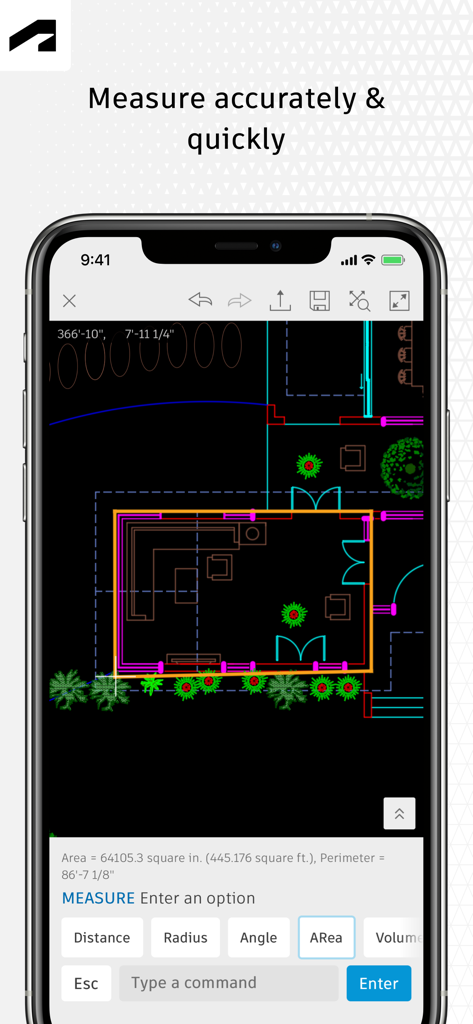
AutoCAD mobile app interface showing a 2D floor plan with the measurement tool active on a smartphone screen.

AutoCAD mobile app interface showing a 2D floor plan with the measurement tool active on a smartphone screen.

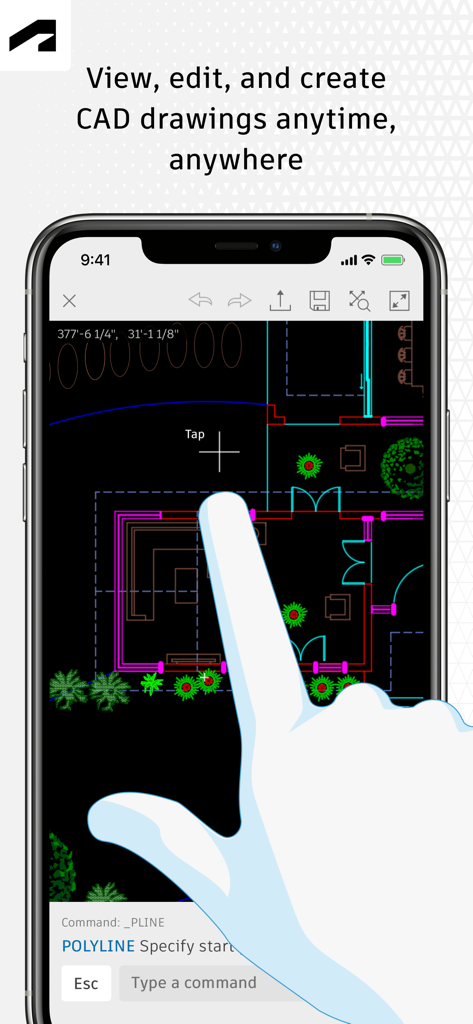
User interface of AutoCAD mobile app showing a 2D floor plan being edited on a smartphone

User interface of AutoCAD mobile app showing a 2D floor plan being edited on a smartphone

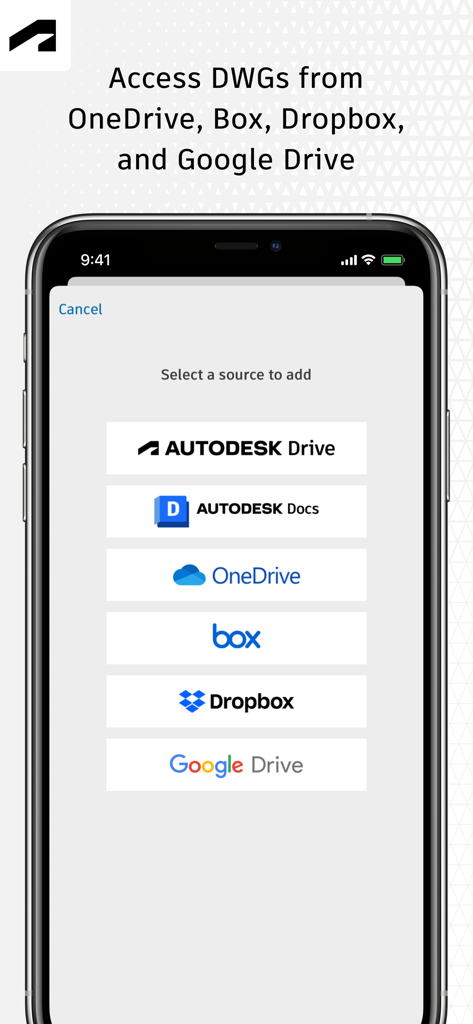
AutoCAD mobile app screen showing options to access DWG files from cloud services like OneDrive, Dropbox, and Google Drive.

AutoCAD mobile app screen showing options to access DWG files from cloud services like OneDrive, Dropbox, and Google Drive.

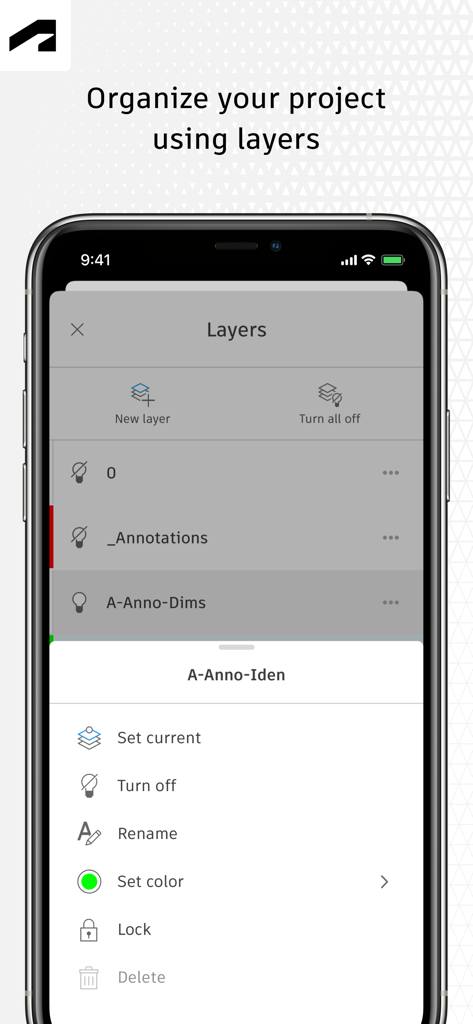
AutoCAD mobile app interface showing project layer organization and management tools

AutoCAD mobile app interface showing project layer organization and management tools

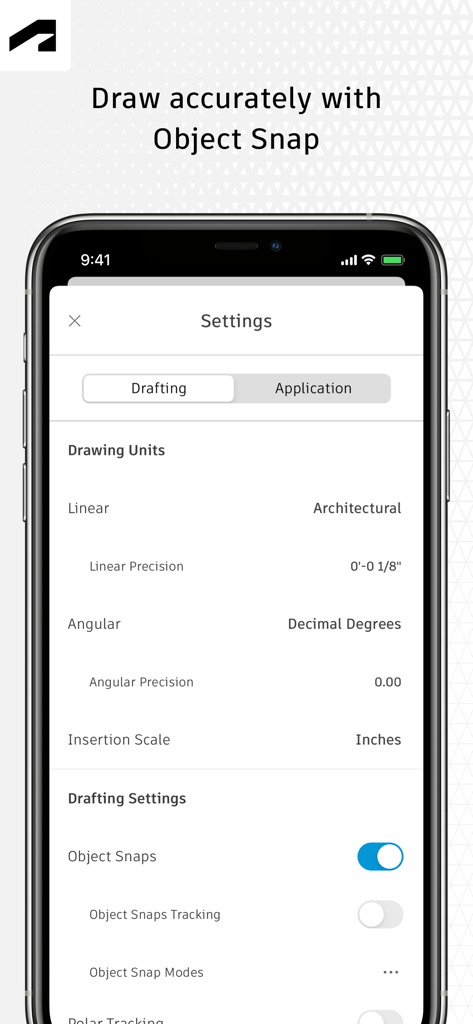
AutoCAD mobile app settings screen showing drafting units and object snap options for precision drawing

AutoCAD mobile app settings screen showing drafting units and object snap options for precision drawing

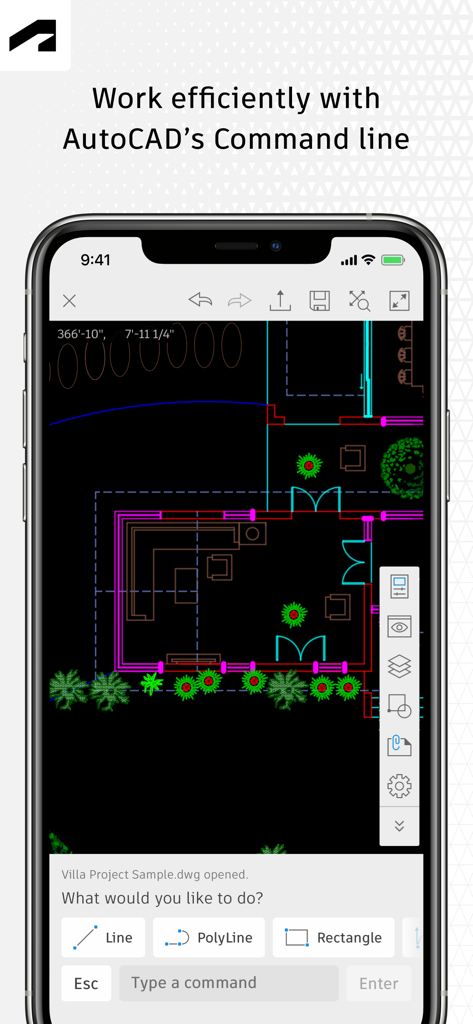
Architectural floor plan and command line tools in AutoCAD mobile app

Architectural floor plan and command line tools in AutoCAD mobile app

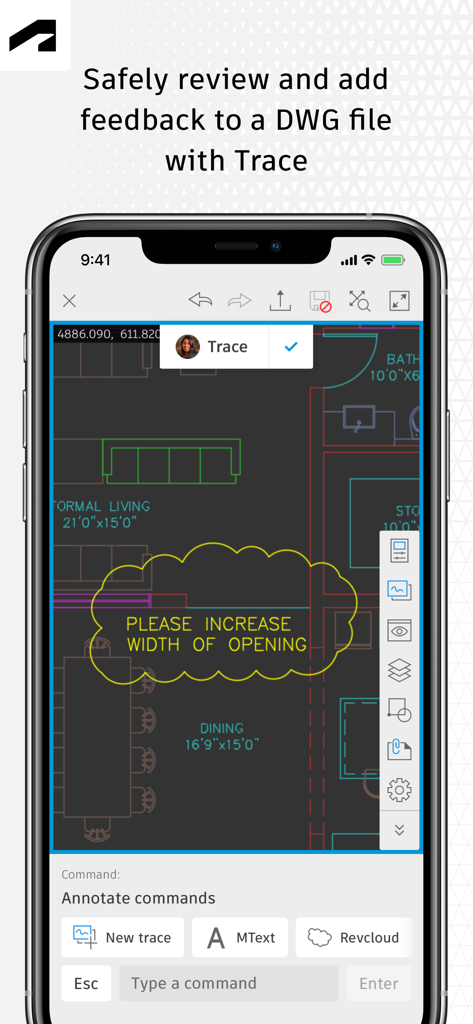
AutoCAD mobile app Trace feature for reviewing and marking up DWG drawings

AutoCAD mobile app Trace feature for reviewing and marking up DWG drawings

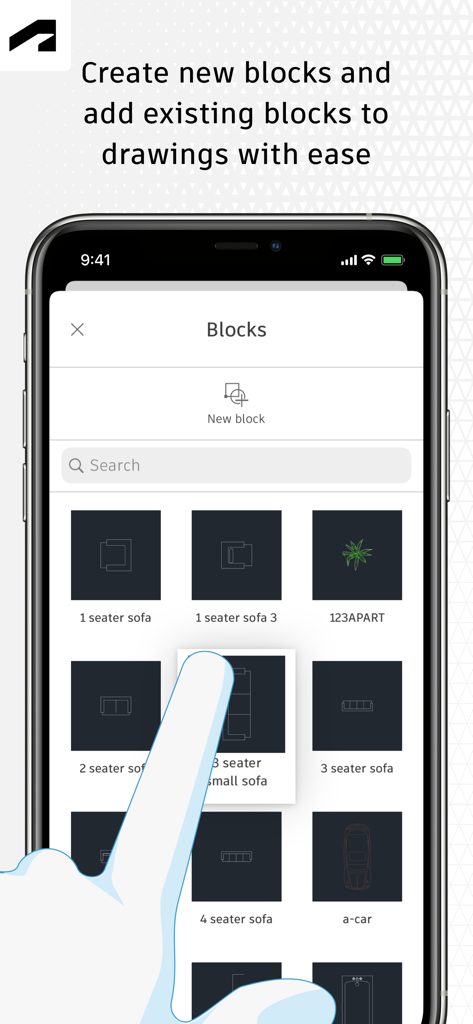
AutoCAD mobile app interface showing a blocks library with furniture and car icons

AutoCAD mobile app interface showing a blocks library with furniture and car icons

Your Professional Studio, Reimagined for the Field

The tools that make this app stand out, trusted by 10M+ users.

🏗️

Leave the Blueprints Behind

Access your entire DWG library without the weight of paper rolls. Work offline in remote locations and sync your changes automatically when you're back online.

📏

High-Precision Drafting

Maintain professional standards with familiar AutoCAD tools. Create, edit, and measure geometry with pixel-perfect accuracy, ensuring every dimension is correct before construction begins.

☁️

Seamless Cloud Collaboration

Connect directly to Autodesk Drive, OneDrive, or Dropbox. Share real-time markups and annotations with your team to reduce errors and accelerate project lifecycles.

Loved by users worldwide

Trusted by 10M+ people who love this app.

"

"As an architect constantly moving between the studio and client meetings, this app is a game-changer. Using it on my iPad Pro with the Apple Pencil feels natural and precise. I can make quick edits to DWG files or show designs to clients without lugging around heavy blueprint rolls. The seamless integration with Google Drive ensures I am always working on the latest version."

Sarah Jensen
"

"This is a must-have tool for any project manager in the field. I often work in basements or remote sites with zero cell service, so the offline mode is a lifesaver. I can measure distances on-site, mark up changes, and sync everything once I am back online. It has significantly reduced communication errors between the job site and the drafting team."

Marcus Rivera

Review Analysis

Insights from user reviews.

Sentiment Score

20%
Negative

Summary

The AutoCAD mobile app receives largely negative feedback from users, primarily due to persistent issues with login and frequent crashes, especially when opening DWG files or after recent updates. Many users find the application frustratingly slow and report significant battery drain on various devices, including newer models like the iPhone 13 Pro and iPad Pro. Furthermore, critical functionalities expected from a CAD software, such as robust offline capabilities, a comprehensive copy-paste feature, and full 3D viewing, are noted as missing or severely limited, pushing some users to seek alternatives. Several version-specific bugs are also reported, including the app not opening on iOS 15.8 and login keyboard issues on iOS 18.5.

Common Themes

Missing/Limited Features(19)
Login & Account Creation(12)
App Stability & Crashes(8)
Cost & Subscription Model(7)
iPad/Mobile Optimization(4)
Performance & Battery Drain(2)
Offline Capability(2)

About the app

Everything you need to know about AutoCAD.

Description

The official AutoCAD app. View & edit CAD drawings anytime, anywhere! Essential drafting and design capabilities for your everyday needs: Autodesk® AutoCAD® Web on mobile is a trusted solution that gives you access to the core AutoCAD commands that you need for light editing and generating fundamental designs, all at an attractive price. AutoCAD Web subscription plans are available in the following options: • Monthly for $9.99 • Yearly for $99.99 • Included free with AutoCAD and AutoCAD LT subscriptions Use familiar AutoCAD drafting tools on your mobile device in a simplified interface, allowing you to access, create, and update DWG™ files anytime, anywhere. 30 day trial: Enjoy a fully functional free trial of AutoCAD Web for 30 days. After the trial is completed, you can access limited read-only functionality without a paid subscription. Current AutoCAD or AutoCAD LT desktop subscribers: Sign in with your Autodesk account to access AutoCAD Web on mobile. Key Benefits: • Work offline on your projects without an Internet connection and sync later • Safeguard drawings in your Autodesk account or with your own external accounts • Collaborate in real time with team members and reduce mistakes • Replace blueprints at job sites with drawings on mobile • Simplify workflows by opening DWG files directly from Autodesk Drive, Autodesk Docs, Microsoft OneDrive, Box, Dropbox, or Google Drive. Features: • 2D file viewing • Create, edit, and share 2D drawings • Work offline and sync your changes once back online • Insert blocks from your DWG drawing • Manage layers and layer visibility • Drafting and geometry editing tools • Annotation and markup tools • Measure distance, angle, area, and radius • View and edit DWG files from your internal storage, email, or from the cloud • View coordinates and properties All new users have access to a free trial of AutoCAD Web for 30 days. Subscriptions will be charged to your credit card through your Apple ID. Subscriptions are automatically renewed unless cancelled at least 24-hours before the end of the current period. You will not be able to cancel a subscription during the active period. Manage your subscriptions in Account Settings after purchase. *Free products and services are subject to the Autodesk Terms of Use at https://www.autodesk.com/company/terms-of-use/en/general-terms Learn more: Autodesk Website: https://www.autodesk.com/products/autocad-web Term of Use: https://www.autodesk.com/company/legal-notices-trademarks/terms-of-service-autodesk360-web-services/autodesk-autocad-mobile-terms-of-service AutoCAD Service is not provided to children under the age of 14, and users under 14 cannot use this Service.

Latest Version

6.20.1

Size

522.1 MB

First Released

Sep 29, 2010

Carry Your Projects, Not the Paper

The official AutoCAD app for professionals on the move. View, edit, and markup DWG files offline with the precision you trust. Start your 30-day free trial now.

Download on App Store
FAQ

Frequently Asked Questions

Everything you need to know about AutoCAD

What is the AutoCAD mobile app?

The AutoCAD app is an official Autodesk solution for viewing, editing, and creating CAD drawings on mobile devices, providing essential drafting and design capabilities, including DWG™ file support.

Does the AutoCAD app offer a free trial?

Yes, new users can enjoy a fully functional 30-day free trial of AutoCAD Web. After the trial, limited read-only functionality is available without a paid subscription.

How much does an AutoCAD Web subscription cost?

A monthly AutoCAD Web subscription costs $9.99, while a yearly subscription costs $99.99. The service is also included free with existing AutoCAD and AutoCAD LT desktop subscriptions.

Can I use the AutoCAD mobile app offline?

Yes, the AutoCAD app allows users to work offline on their projects without an internet connection. Changes made offline will sync later when the device is back online.

Which cloud storage services does the AutoCAD app integrate with?

The AutoCAD app simplifies workflows by directly opening DWG files from Autodesk Drive, Autodesk Docs, Microsoft OneDrive, Box, Dropbox, and Google Drive.

Can I measure objects in the AutoCAD mobile app?

Yes, the AutoCAD app includes various measurement tools. Users can measure distance, angle, area, and radius directly within their drawings.

Does the AutoCAD app support layers for organizing drawings?

Yes, the AutoCAD app supports managing layers. Users can organize projects by managing layers and controlling their visibility within the application.

How do AutoCAD Web subscriptions handle renewals and cancellations?

AutoCAD Web subscriptions automatically renew unless canceled at least 24 hours before the current period ends. Cancellation is not possible during an active subscription period.

Is there an age restriction for using AutoCAD Service?

No, AutoCAD Service is not provided to children under the age of 14. Users who are under 14 years old cannot use this service.