Energy Tracker

Energy Tracker

Download on App Store
Logo
Logo of Energy Tracker

Energy Tracker: Master Your Home Consumption and Savings

Take total control of your utilities with the ultimate data-driven dashboard for homeowners. Scan your meters, visualize usage trends with professional-grade analytics, and eliminate bill surprises today.

Download on App Store

Publisher

Stefan Nebel

Category

Finance

Downloads

85K+

User Rating

4.7/5

Total Ratings

7K+

Locales

28

Insights in Action

Join over 85K+ musicians using our pro interface.

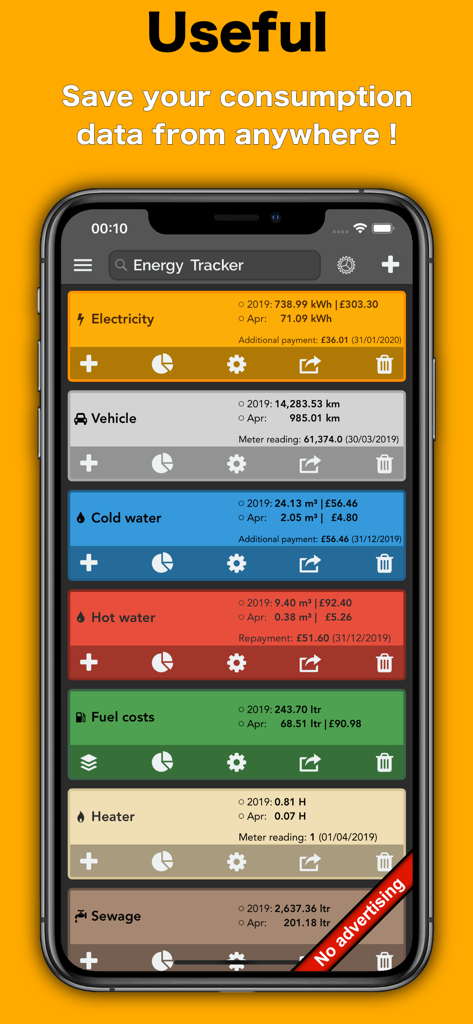
Energy Tracker app interface on an iPhone showing consumption data for electricity vehicle water and fuel

Energy Tracker app interface on an iPhone showing consumption data for electricity vehicle water and fuel

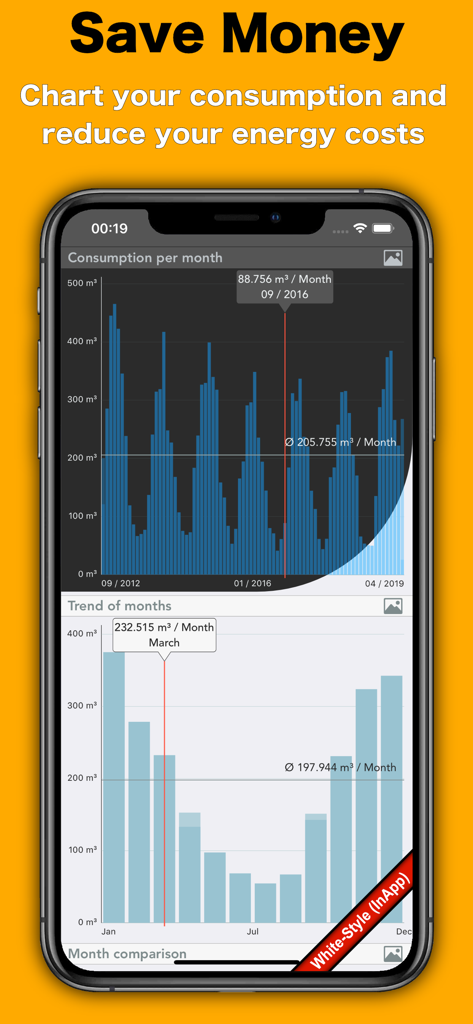
Energy Tracker app showing monthly consumption charts and trends to help save money on utility costs

Energy Tracker app showing monthly consumption charts and trends to help save money on utility costs

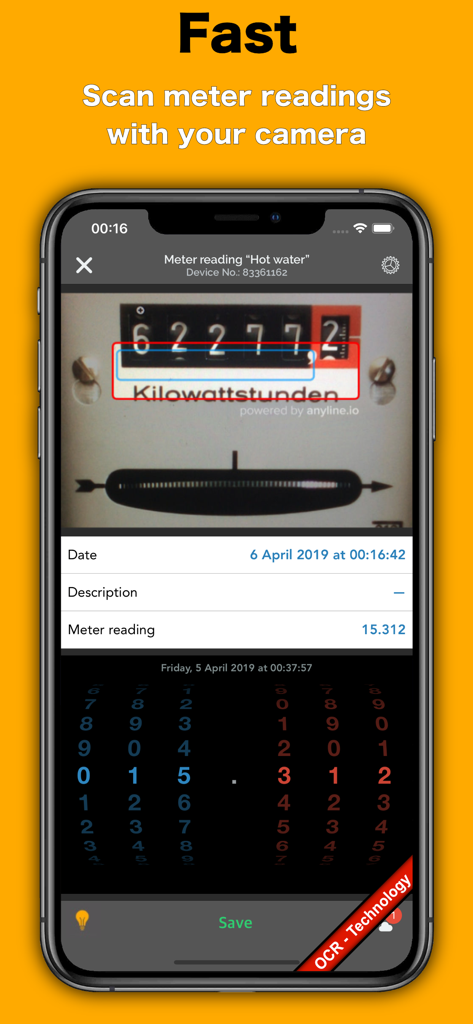
Energy Tracker app scanning a physical utility meter using OCR technology

Energy Tracker app scanning a physical utility meter using OCR technology

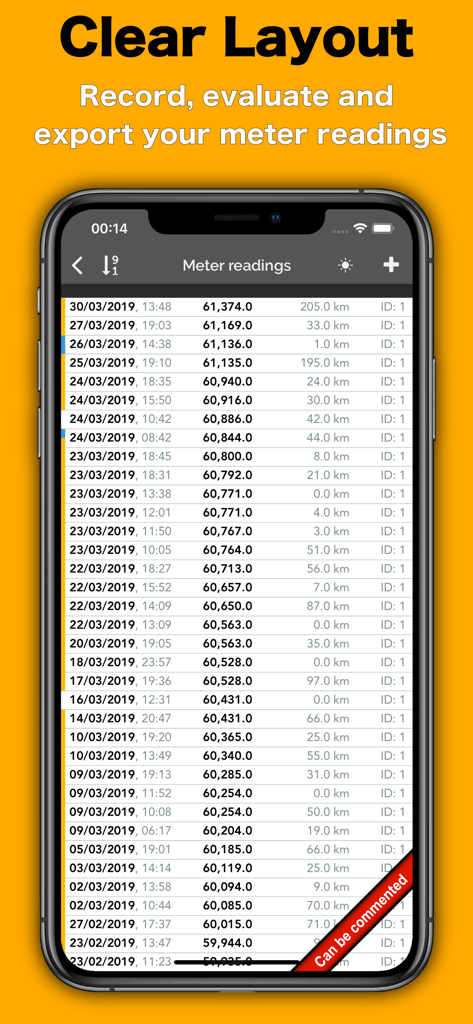
A list of meter readings in the Energy Tracker app showing dates and values in a clear layout.

A list of meter readings in the Energy Tracker app showing dates and values in a clear layout.

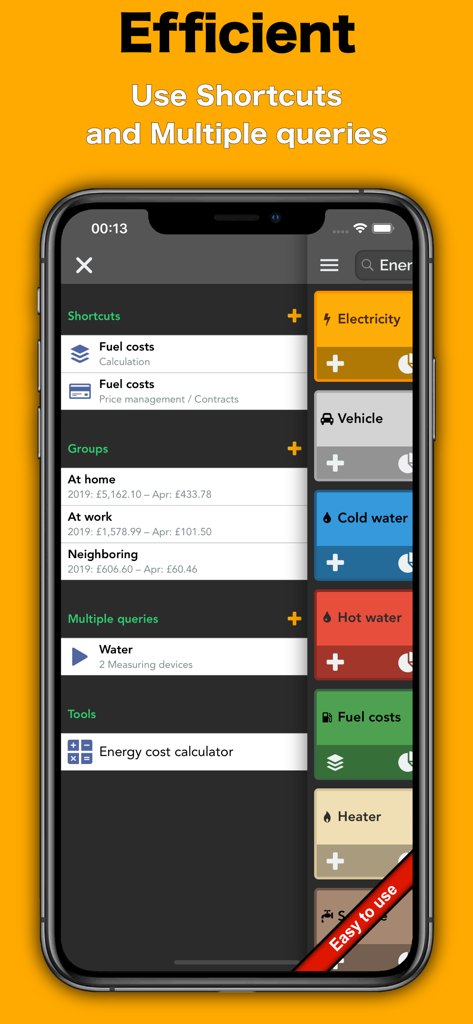
iPhone screen displaying the Energy Tracker app interface with shortcuts for fuel costs and utility categories like electricity and water

iPhone screen displaying the Energy Tracker app interface with shortcuts for fuel costs and utility categories like electricity and water

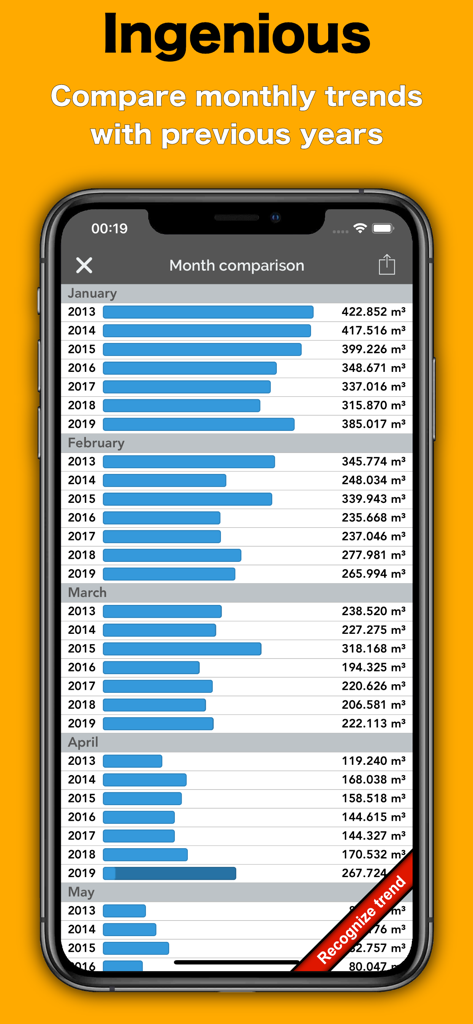
A bar chart in the Energy Tracker app comparing monthly utility consumption across several years

A bar chart in the Energy Tracker app comparing monthly utility consumption across several years

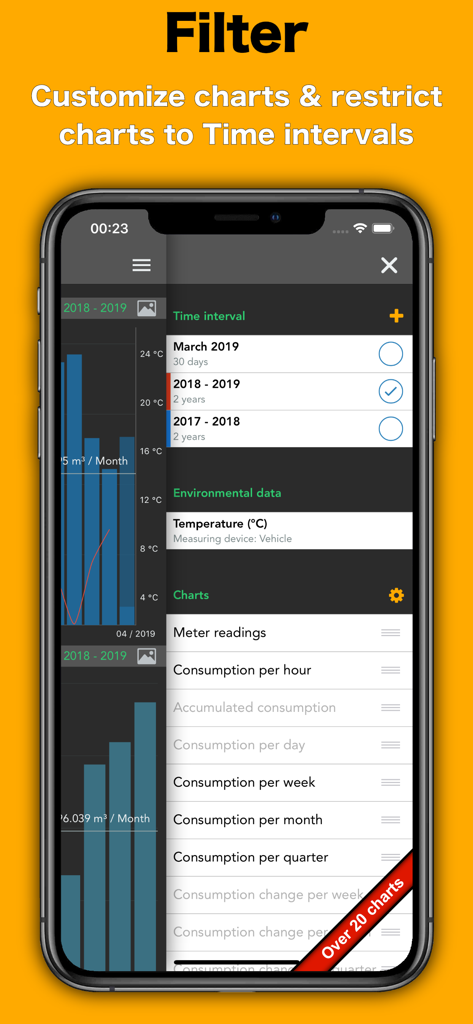
Energy Tracker app interface for filtering consumption charts by time interval

Energy Tracker app interface for filtering consumption charts by time interval

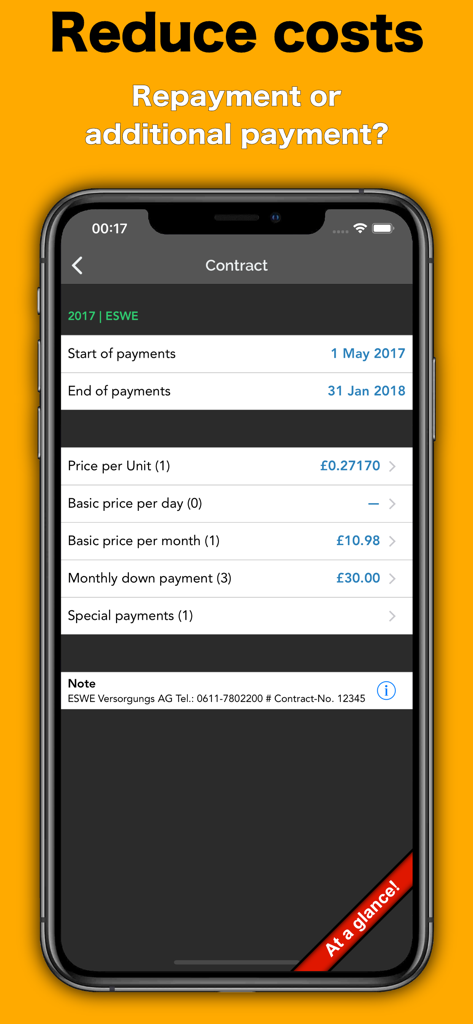
Energy Tracker app interface showing utility contract and payment details

Energy Tracker app interface showing utility contract and payment details

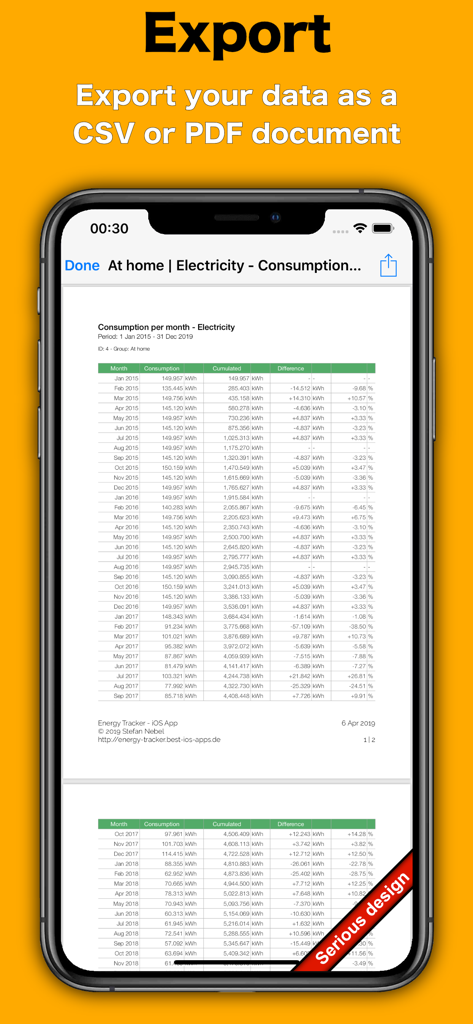
Energy Tracker app displaying a monthly electricity consumption table for PDF or CSV export

Energy Tracker app displaying a monthly electricity consumption table for PDF or CSV export

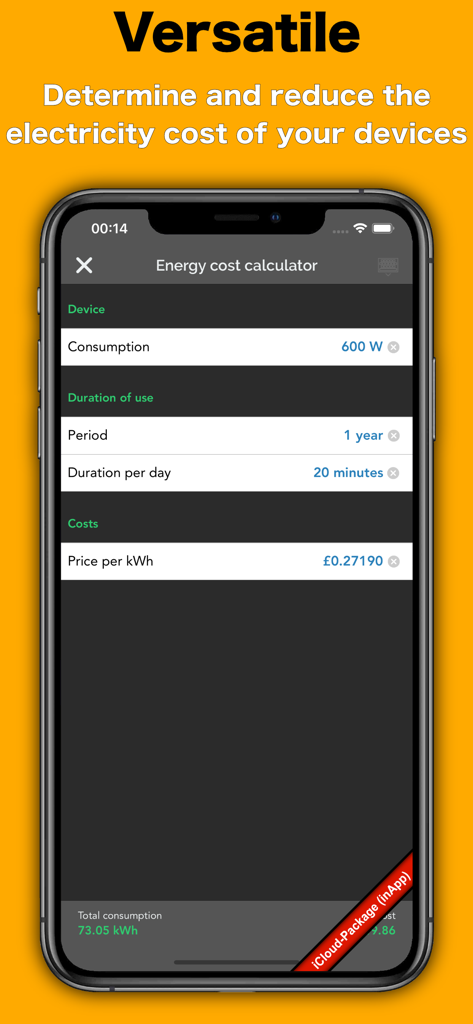
Energy cost calculator screen in the Energy Tracker app showing estimated electricity costs for a device based on wattage and duration of use.

Energy cost calculator screen in the Energy Tracker app showing estimated electricity costs for a device based on wattage and duration of use.

Master Your Home Energy Consumption

Join 85K+ users who mastered their instrument with these tools.

📸

Smart OCR Meter Scanning

Stop typing and start scanning. Use your iPhone camera to instantly capture readings from any meter with high-precision text recognition.

📊

In-Depth Data Visualization

Turn numbers into insights. Explore beautiful charts comparing 3-year trends, seasonal shifts, and hourly consumption to optimize your habits.

💰

Predictive Billing & Savings

Forecast your next utility bill and calculate repayments before they arrive. Identify saving potentials and manage contracts in one secure place.

Loved by users worldwide

Trusted by 85K+ people who have transformed their experience with this app.

"

"As someone who tracks every penny in my budget, Energy Tracker is a game-changer. The OCR scanning makes logging meter readings effortless, and the billing period predictions mean I am never surprised by my utility bills anymore. No ads and the ability to export CSV files for my records makes this a must-have tool for any organized homeowner."

Mark S.
"

"I have been looking for a way to visualize our household's carbon footprint reduction, and the three-year comparison charts here are perfect. It is incredibly satisfying to see our energy consumption trend downward after installing solar panels. The app is clean, private, and syncs perfectly across my iPhone and iPad via iCloud."

Sarah J.

About the app

Everything you need to know about Energy Tracker.

Description

With Energy Tracker, you can easily add, manage and evaluate meter readings. You can simply record your consumption of electricity, water, gas and heat. Use the smart CSV import function for fast setup !! How to add older meter readings is described in detail in the FAQ (general settings)! Does your consumption increase or decrease? The app gives you the answer! • No annoying advertising • E-Mail Support (German / English) • Easy to use • iCloud & backup function > Protect yourself against data loss > Automatic Backup (Local & Cloud) • CSV import function > Recognition of date and meter readings > Recognition of environmental data & descriptions > Demo CSV available on the website • Intelligent scanning - function for new meter readings > Meter readings with the camera recognize (OCR) • Reminder function • New meter? - no problem! > Supports meter exchange and much more • Add older meter readings? - no problem! > Possible via manual input > Can also be implemented by using CSV import • Combine meters in groups • Virtual measuring device > For high and low tariffs > Ideal for converting m³ in kWh (gas meter) > Determine fuel consumption (for example, from km to liter) > Add any number of consumption factors > Combined measuring devices (e.g., cold & hot water) • Investigating your saving potential > Where can you save money? - EnergyTracker knows it! • Evaluate your consumption directly in the app > Graphical analysis of: • Continuous consumption • Consumption per hour / day / week • Consumption per month / quarter / year • Change per week / month / quarter / year • Trend of hours (00:00 - 23:59) • Trend of days (Mon. - Sun.) • Trend of months (Jan. - Dec.) • Month comparison • 3 - year - comparison • Savings potential • Current billing period • Continuous costs • Costs per day / week / month / quarter / year > Rearrange, hide & rename charts > Charts are available as full screen & exportable > Set the interval of the evaluation • Export your measurements with analysis as PDF or CSV file • Style function > Even more colors and icons available > Individually set / import colors of the meter • Calculate your billing period > Easily create their own contracts! > Repayment or additional payment? > How much should the new monthly advance payment be? • Write a note to each measured value • Share this with your friends! • Password protection • Help / Tutorial / FAQ available + Support further development Users can support the developer via InApp purchase / subscription (see general settings / Support further development). The following subscriptions are offered: Package: XXS, XS, S, M, L, XL and XXL. The subscriptions have a period of one month and charge your iTunes account after confirmation of purchase. Note that the subscription is automatically renewed if automatic renewal is not deactivated at least 24 hours before expiration. If renewed, your iTunes account will be charged within 24 hours before the end of the current period. In the account settings subscriptions can be managed by the user. Among other things, automatic renewal can be deactivated here. Energy Tracker does not offer free subscriptions. • Social networks > https://www.facebook.com/EnergyTrackeriOS • Privacy Policy & Terms of Use > https://energy-tracker.best-ios-apps.de/#bottom-d • Website / Contact > https://energy-tracker.best-ios-apps.de • PS: If you have any questions or requests feel free to contact the support. Please check beforehand, if your questions can already be solved with FAQ / Video Tutorial. Every comment helps to improve Energy Tracker. enjoy ..

Latest Version

8.1.1

Size

130.4 MB

First Released

Feb 8, 2017

Take Full Control of Your Utility Costs

Join 85,000+ data-driven homeowners optimizing their consumption. Download Energy Tracker today to eliminate bill shock and unlock your home's true saving potential.

Download on App Store