
Ivanti Secure Access Client



Empower your professional life with instant, reliable SSL VPN access to corporate applications and data, ensuring your work remains secure from any location on your iOS device.
Publisher
Category
BusinessDownloads
2M+User Rating
Total Ratings
17K+Locales
10Discover the interface used by 2M+ users.
The tools that make this app stand out, trusted by 2M+ users.
Protect sensitive corporate data and intellectual property with robust SSL VPN encryption, ensuring every connection remains private and compliant.
Gain instant access to internal business applications, files, and networks from your iPhone or iPad, whether you're at home, in a cafe, or traveling.
Designed for professional environments with full MDM support, offering a reliable, 'always-on' experience that integrates perfectly with your iOS workflow.
Trusted by 2M+ people who love this app.
"Accessing corporate data while traveling used to be a headache, but this app makes it seamless. It connects instantly and stays stable even on spotty hotel Wi-Fi. It's a must-have for anyone working remotely on an iPhone."
"Our IT team deployed this through MDM and it has been a game-changer for my productivity. I can securely review confidential documents from my iPad without any complex setup. It's fast, reliable, and gives me peace of mind."
Insights from user reviews.
Sentiment Score
Summary
This app receives predominantly negative feedback, primarily due to severe connection stability issues, with many users reporting frequent disconnections, inability to establish VPN connections, and false 'connected' statuses. Users on iOS 17 frequently encounter problems, ranging from complete non-functionality to inability to access VPN sites. The app also suffers from crashes across various devices, notably with version 22.7.3 on iPod Touch 6th generation and version 22.6.1 generating constant error messages. While a small number of users praise its ease of use and reliable, secure connections, the recurring problems with connection, compatibility, and app stability significantly hinder the overall user experience.
Common Themes
Everything you need to know about Ivanti Secure Access Client.
Description
Latest Version
22.8.5
Size
36.8 MB
First Released
Jan 11, 2015
Join over 2 million professionals and gain instant, encrypted access to your corporate applications and data from anywhere.
Everything you need to know about Ivanti Secure Access Client
Ivanti Secure Access Client enables secure connectivity over SSL VPN to corporate applications and data. It allows users to connect securely to corporate SSL VPN gateways for instant access to business resources from any location.
Ivanti Secure Access Client provides secure access using SSL VPN technology. This secures the connection to corporate applications and data, allowing users to access resources as if they are directly on the corporate network.
Yes, it is recommended to deploy Ivanti Secure Access Client through MDM solutions. This deployment method allows administrators to effectively control the client on various endpoint devices.
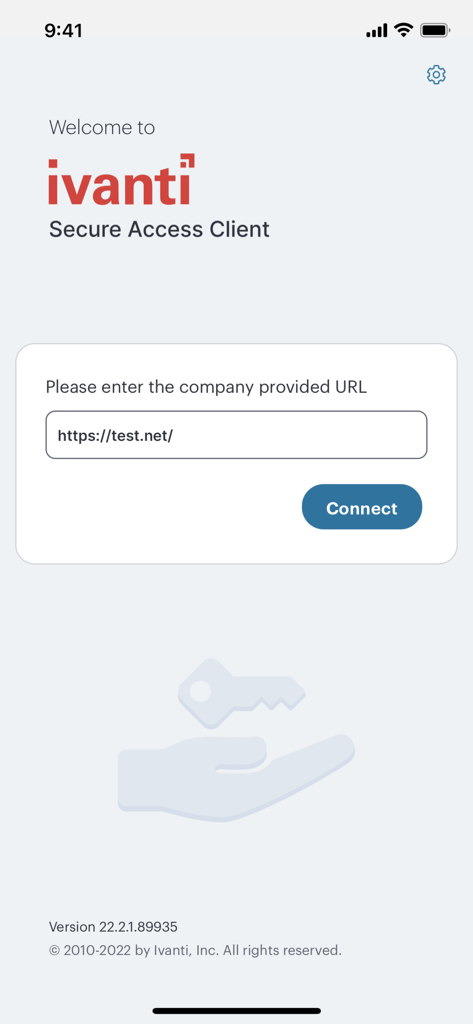
Users connect by entering a company-provided URL into the Ivanti Secure Access Client interface and then tapping the "Connect" button. The application then establishes an SSL VPN connection.
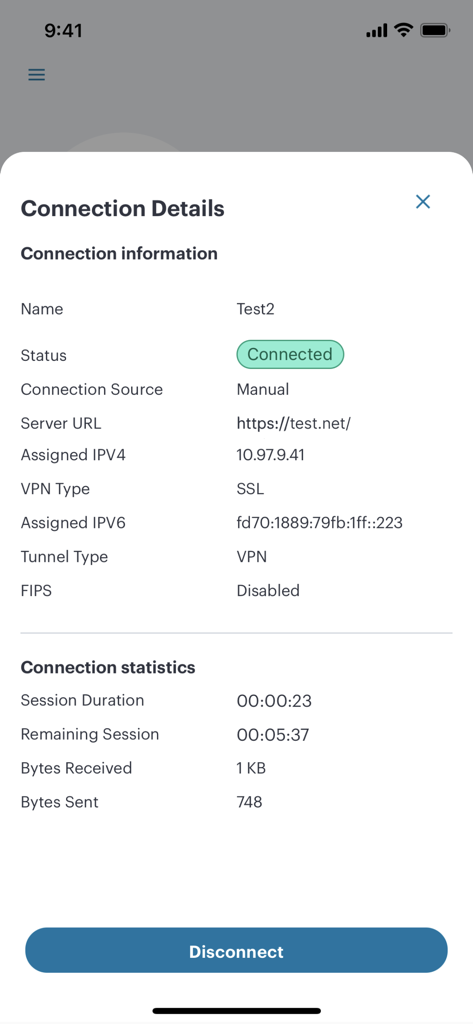
Ivanti Secure Access Client utilizes SSL for its VPN type and "VPN" for its tunnel type. It establishes secure connections to corporate resources over an SSL VPN gateway.
Yes, Ivanti Secure Access Client displays detailed connection information. This includes status, server URL, assigned IP addresses (IPv4 and IPv6), VPN type, tunnel type, and FIPS status.
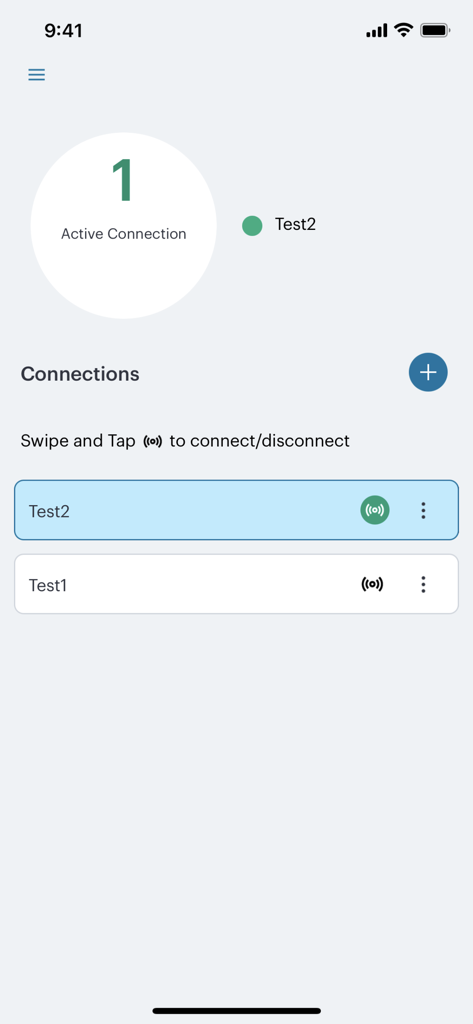
Users can disconnect an active connection in Ivanti Secure Access Client by tapping the "Disconnect" button shown within the connection details screen. They can also swipe and tap on the main connections screen.
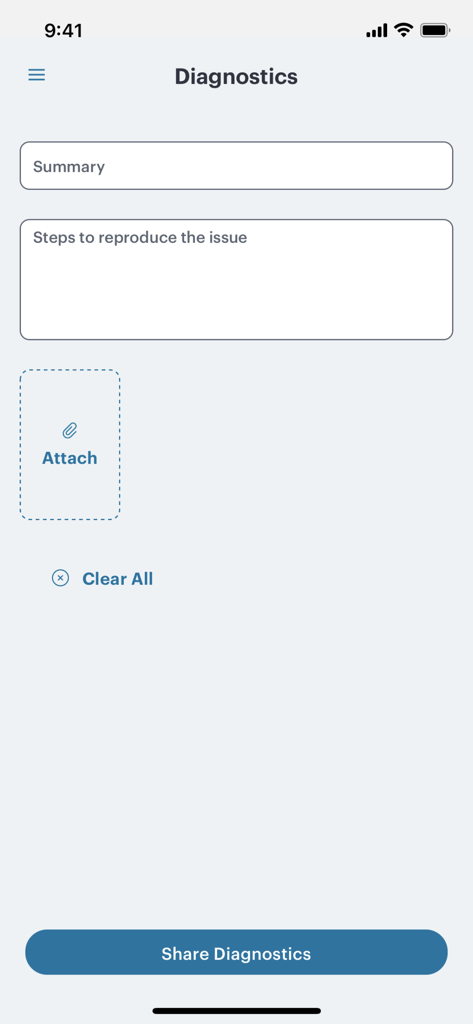
Yes, Ivanti Secure Access Client includes a Diagnostics screen. Users can input a summary and steps to reproduce an issue, attach files, and share diagnostic information for troubleshooting purposes.
Apps with similar features and user experience

OpenVPN Inc.
Palo Alto Networks

Pickpointio LLC

Shanghai best oray information s&t co.,ltd

Fortinet, Inc

Cisco

Publicroam B.V.

Zscaler inc

Check Point Software Technologies Ltd.