剪影 - 视频剪辑 & 卡点影集制作

剪影 - 视频剪辑 & 卡点影集制作

Download on App Store
Spark by MWM logo
Logo of 剪影 - 视频剪辑 & 卡点影集制作

剪影 - Silhouette: Master Viral Video Editing with Pro-Level Effects

Elevate your aesthetic on TikTok and Reels. From effortless beat-syncing to cinematic filters and unique mirroring tools, create the high-end content your followers will love.

Publisher

Shanghai Jian Ji Software Technology Co., Ltd

Category

Photo & Video

Downloads

3M+

User Rating

4.8/5

Total Ratings

52K+

Locales

5

A Lens into Creativity

Discover the interface used by 3M+ users.
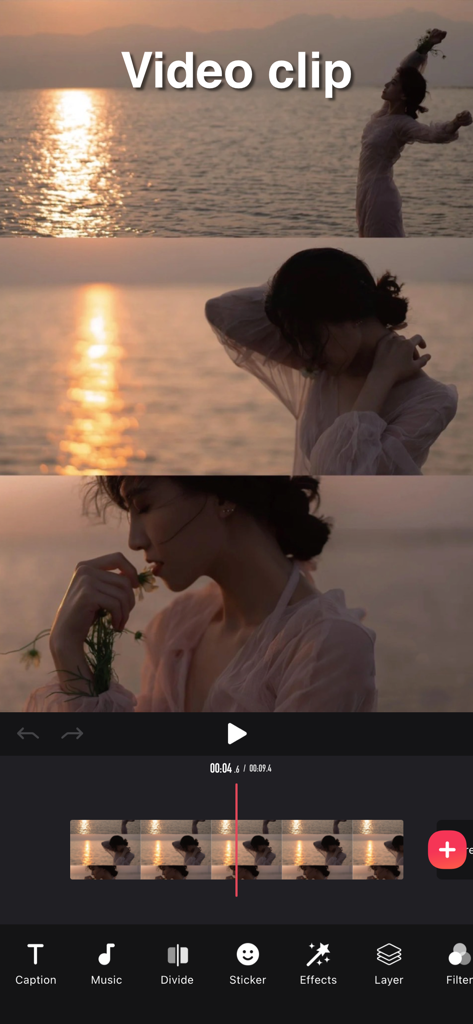
Interface of the Silhouette video editing app showing a video clip being edited with a timeline and tools like music and filters.

Interface of the Silhouette video editing app showing a video clip being edited with a timeline and tools like music and filters.

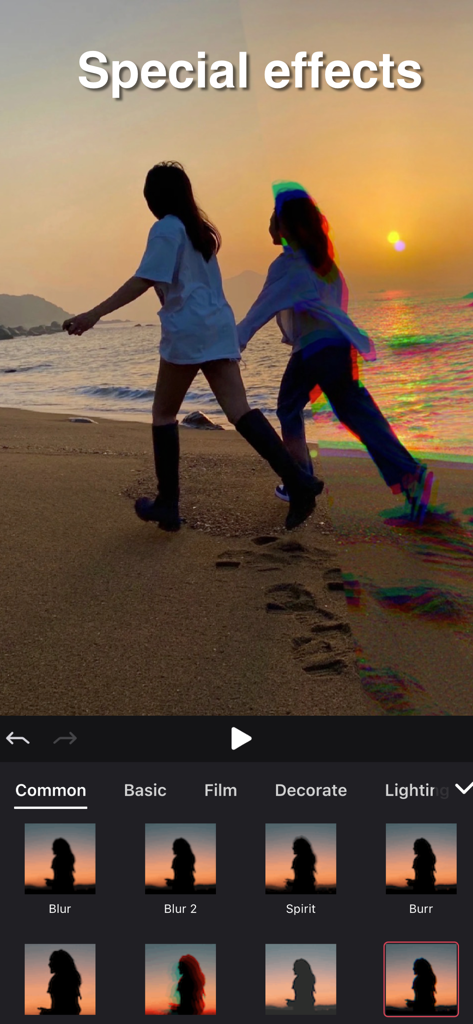
Interface of Silhouette video editing app showing special effects like Spirit and Burr applied to a beach sunset video.

Interface of Silhouette video editing app showing special effects like Spirit and Burr applied to a beach sunset video.

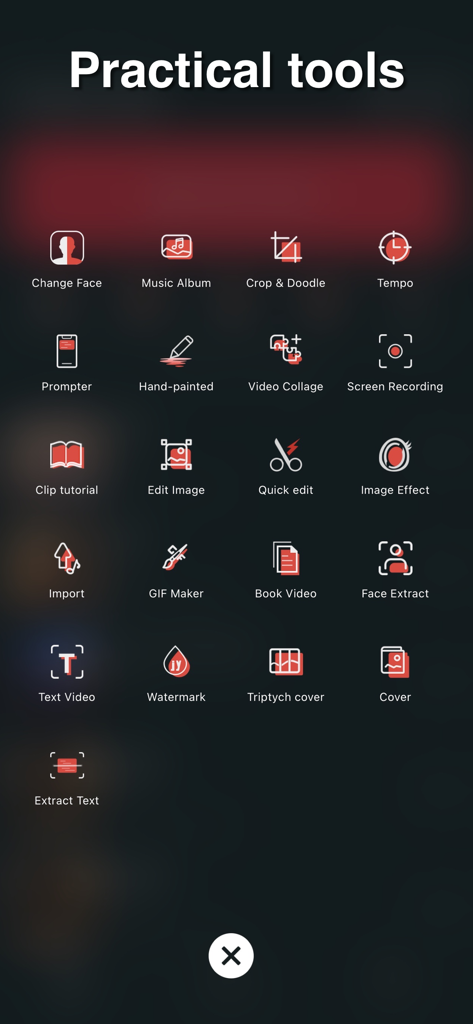
A menu display within the Silhouette video editor app titled Practical tools showing icons for GIF Maker Video Collage and more

A menu display within the Silhouette video editor app titled Practical tools showing icons for GIF Maker Video Collage and more

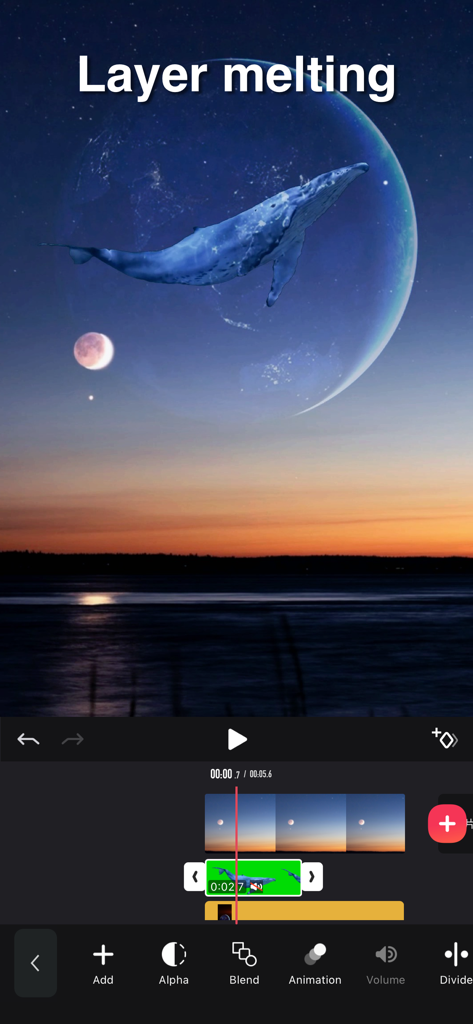
A mobile video editing interface showcasing a layer melting effect with a whale superimposed over a moon and sunset landscape.

A mobile video editing interface showcasing a layer melting effect with a whale superimposed over a moon and sunset landscape.

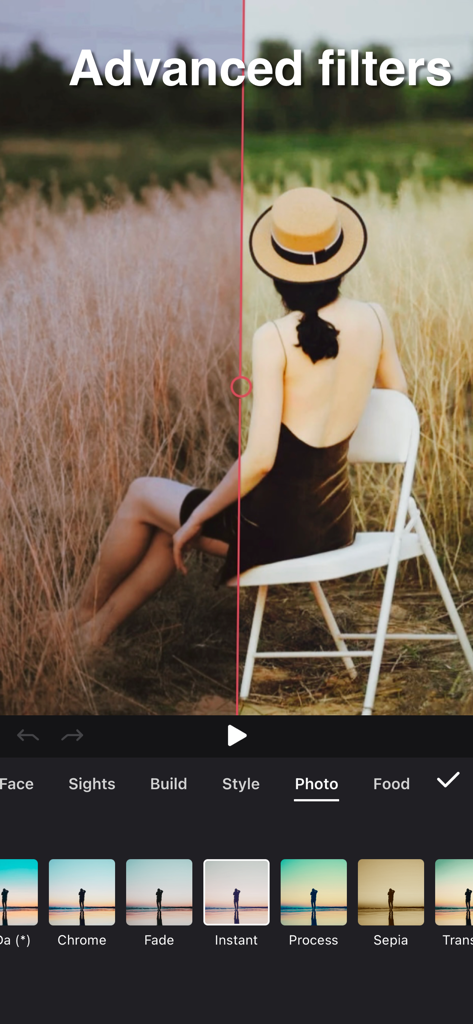
Split screen comparison of advanced filters in the Silhouette video editing app

Split screen comparison of advanced filters in the Silhouette video editing app

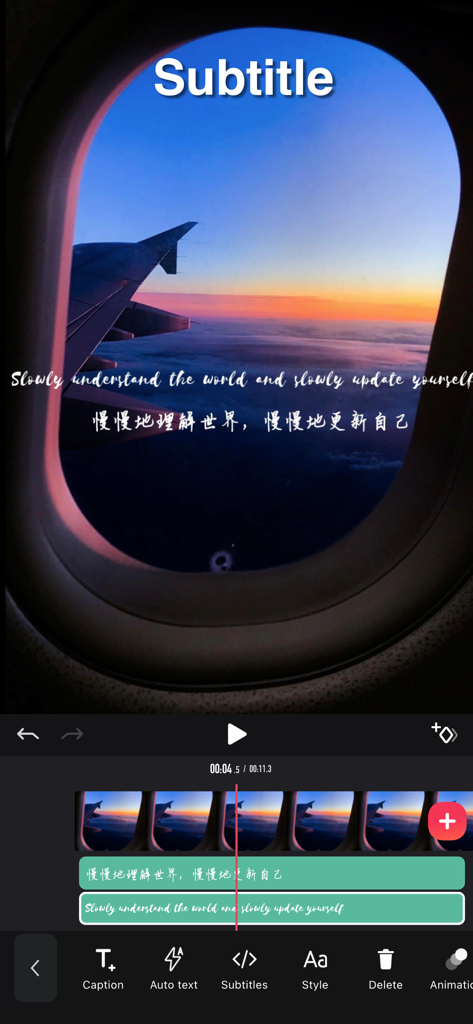
A mobile video editing screen showing the addition of multi-layer English and Chinese subtitles over a cinematic airplane sunset video.

A mobile video editing screen showing the addition of multi-layer English and Chinese subtitles over a cinematic airplane sunset video.

Level Up Your Social Game

The tools that make this app stand out, trusted by 3M+ users.

🎵

Effortless Beat-Syncing

Master the rhythm with tools that automatically align your transitions to the music for that perfect viral flow.

Cinematic Filters & Effects

Access a massive library of aesthetic filters and professional stickers to give your vlogs a polished, high-end look.

🚀

Viral-Ready Utilities

Unlock exclusive tools like audio extraction, mirroring, and 9-square grids to stand out in a crowded algorithm.

Loved by users worldwide

Trusted by 3M+ people who love this app.

"

"I've tried so many editing apps, but Silhouette is a game-changer for my Reels. The beat-syncing tool is literally a lifesaver—I can create professional-looking transitions in seconds without any technical skills. The filters give my vlogs that perfect cinematic aesthetic my followers love!"

Chloe V.
"

"This is the secret weapon for my TikTok growth. Features like the 9-square mirror and the audio extractor make it so easy to jump on viral trends before they fade. It's way more powerful than the built-in editors, and the multi-layer subtitles look amazing."

Marcus J.

Review Analysis

Insights from user reviews.

Sentiment Score

30%
Negative

Summary

Many users praise the app for its intuitive interface, ease of use, and simple operations, with some highlighting its efficiency compared to other editing software and its basic free functionalities. However, a significant portion of feedback is highly negative, primarily criticizing the aggressive VIP paywall which restricts essential features such as video export, extended editing duration, and access to various effects or audio, often leading to unexpected charges and frustration. Common complaints also include critical bugs and stability issues like app crashes, auto-save failures resulting in lost work, subtitle synchronization problems, and video loading difficulties. Specifically, some users reported a degraded experience and new bugs, including issues with subtitle display and video quality, after a recent update.

Common Themes

VIP & Pricing(20)
App Stability & Bugs(9)
Overall Satisfaction(9)
Feature Limitations(6)
Ease of Use(5)

About the app

Everything you need to know about 剪影 - 视频剪辑 & 卡点影集制作.

Description

Video Tools - Powerful video editing tool, Instagram, Youtube video. Features: Video clip: - Video clip, beginning/end/middle etc. fixed duration - Merge, copy, split multiple videos and add transitional animation Video filter: - Diverse filters options, support photo retouch - Video subtitles: - Multi-layer subtitles available, subtitle display time adjustable, plenty of fonts Video collage: - multiple video can be pasted together like stickers, and the masterpiece is born easily. Video dubbing: - you can extract dubbing from the album video and apply it to your created video - provide rich music to create colourful video Video watermark: - very handy for adding personalized video watermarks to video Video stickers: - A wide selection of interesting video stickers for use. - Video mirroring: - Still having headache for 9-square in TikTok APP? Simply steps here can achieve this effect Video in the same frame - Easy making same-frame effect - Proportion, direction adjustable Video speed adjustment - Slow motion, 0.2 time slowest - Fast motion, up to 4 times faster Video playback - Easy step for playback Video border and background - Add border or photos - Borders can be synchronized as blurry as video - Adapted to all social media APP ratios Video screen snipping - Image video snipping available, doodle the video and image - Advanced editing such as brightness, blur etc. available [Automatic renewal of Pro membership] --Pro membership benefits: Unlock all VIP functions --Subscription period: 1 month (Pro members have continuous monthly subscription products), 12 months (Pro members have continuous annual subscription products). If required, we also offer one-time paid services in addition to existing subscription plans. --Subscription price: subject to iAP application information, for example, continuous monthly subscription product is $6.99 per month, continuous annual subscription product is $36.99 per year. --Payment: After the user confirms the purchase and makes the payment, it will be credited to the iTunes account. --Cancel renewal: If you need to cancel the renewal, please manually turn off the automatic renewal function in iTunes/Apple ID settings management 24 hours before the expiration of the current subscription period. --Renewal: The Apple iTunes account will be deducted within 24 hours before expiration. After the deduction is successful, the subscription period will be extended by one subscription period. -- Free trial for annual membership: If you renew or cancel the renewal during the free trial period, the free trial rights will not be recovered from the user. The user can continue the trial until the end of the trial period. --Privacy Policy: https://jianyingeditor.cn/privacy/privacy-new.html --User Agreement: https://jianyingeditor.cn/privacy/agreement-new.html Feel free to contact us: jianyinghelper@163.com Your problems or suggestions are important to us!

Latest Version

5.11.19

Size

185.4 MB

First Released

Apr 1, 2019

Ready to Win the Feed?

Join over 3 million creators using Silhouette to master perfect beat-syncs, trending transitions, and aesthetic effects. Your next viral video starts here.

Download on App Store
FAQ

Frequently Asked Questions

Everything you need to know about 剪影 - 视频剪辑 & 卡点影集制作

What are the main video editing features available in the 剪影 app?

The 剪影 app provides extensive video editing features including clipping, merging, splitting, adding filters, subtitles, music, watermarks, stickers, and adjusting speed. It also supports multi-layer editing.

Can I create video collages using the 剪影 - Video Tools app?

Yes, the 剪影 - Video Tools app allows users to create video collages. You can paste multiple videos together like stickers to form a single masterpiece directly within the app.

How much does a Pro membership for the 剪影 app cost?

The 剪影 app's Pro membership costs $6.99 per month for a continuous monthly subscription or $36.99 per year for a continuous annual subscription, subject to iAP information.

How do I cancel the automatic renewal for my 剪影 Pro membership?

To cancel Pro membership renewal for the 剪影 app, manually turn off the automatic renewal function in your iTunes/Apple ID settings management at least 24 hours before your current subscription period expires.

Does the 剪影 video editing app allow for adjusting video playback speed?

Yes, the 剪影 video editing app supports video speed adjustment. Users can set slow motion up to 0.2 times slowest and fast motion up to 4 times faster.

Does 剪影 - 视频剪辑 & 卡点影集制作 offer advanced video filters for editing?

Yes, 剪影 - 视频剪辑 & 卡点影集制作 offers diverse and advanced video filters. These filters support photo retouching and include categories like Photo and Food, as shown in the app interface.

Can users perform multi-layer video editing in the 剪影 app?

Yes, the 剪影 app supports multi-layer video editing. This includes features like layer blending, animation, and volume control for individual layers, enhancing complex video projects.

Where can I find the Privacy Policy for the 剪影 - 视频剪辑 & 卡点影集制作 app?

The Privacy Policy for the 剪影 - 视频剪辑 & 卡点影集制作 app is available at https://jianyingeditor.cn/privacy/privacy-new.html. This link provides details on data handling.