Lightroom AI Photo Editor

Lightroom AI Photo Editor

Download on App StoreDownload on Google Play
Spark by MWM logo
Logo of Lightroom AI Photo Editor

Lightroom AI Photo Editor: Professional Quality for Your Unique Aesthetic

Transform your mobile shots into editorial masterpieces. Use powerful AI to remove distractions, apply creator-inspired presets, and batch-edit your memories with the precision of a pro.

Publisher

Adobe Inc.

Category

Photo & Video

Downloads

156M+

User Rating

4.8/5

Total Ratings

2M+

Locales

23

Your Aesthetic, Elevated

Discover the interface used by 156M+ users.

A smiling woman in a colorful sweater with different photo filter options shown at the bottom of the Adobe Lightroom app interface

A smiling woman in a colorful sweater with different photo filter options shown at the bottom of the Adobe Lightroom app interface

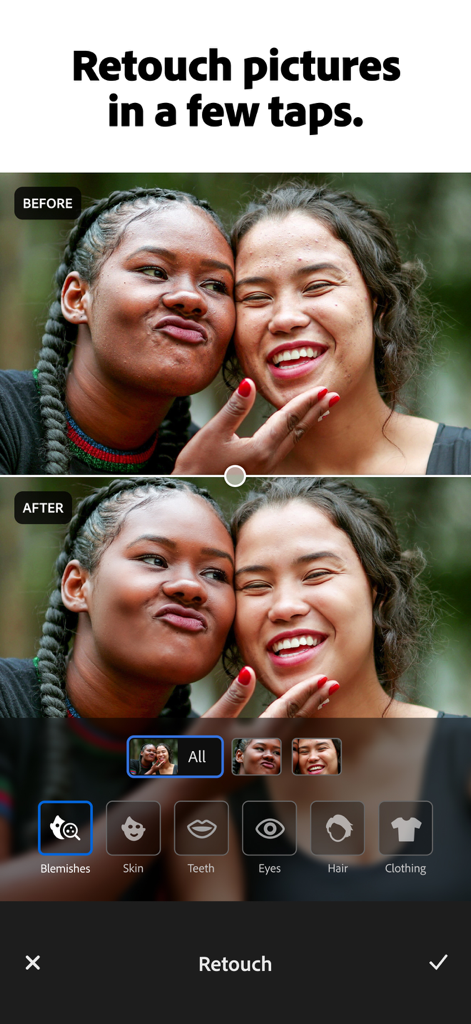
Before and after comparison of a portrait photo using the retouch feature in Adobe Lightroom mobile app

Before and after comparison of a portrait photo using the retouch feature in Adobe Lightroom mobile app

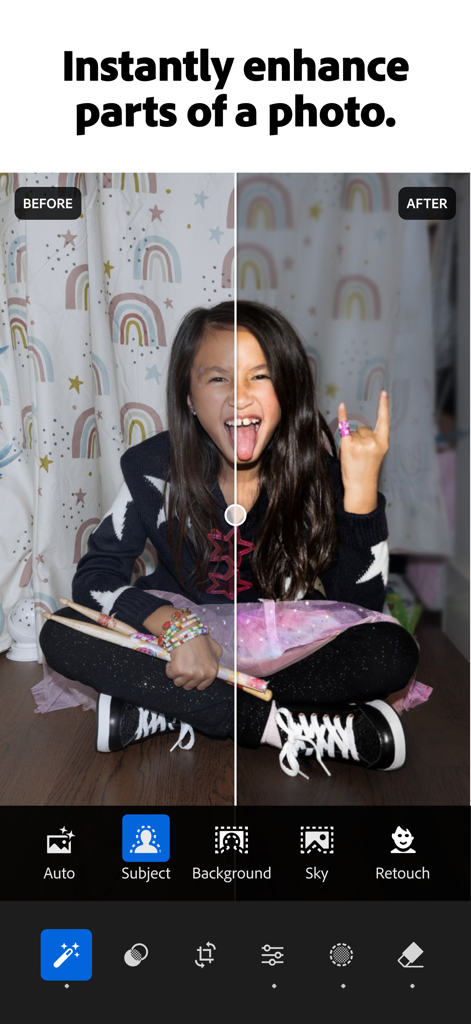
A split screen showing a before and after comparison of a photo edited with Adobe Lightroom AI enhancement tools

A split screen showing a before and after comparison of a photo edited with Adobe Lightroom AI enhancement tools

Before and after comparison of a street photo showing the Adobe Lightroom AI generative remove feature erasing background people

Before and after comparison of a street photo showing the Adobe Lightroom AI generative remove feature erasing background people

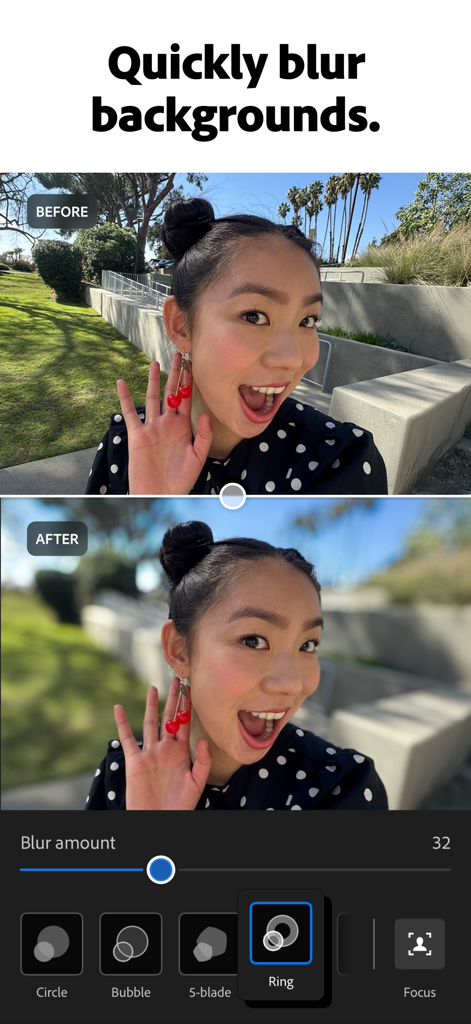
Before and after portrait comparison showing the background blur feature in Adobe Lightroom

Before and after portrait comparison showing the background blur feature in Adobe Lightroom

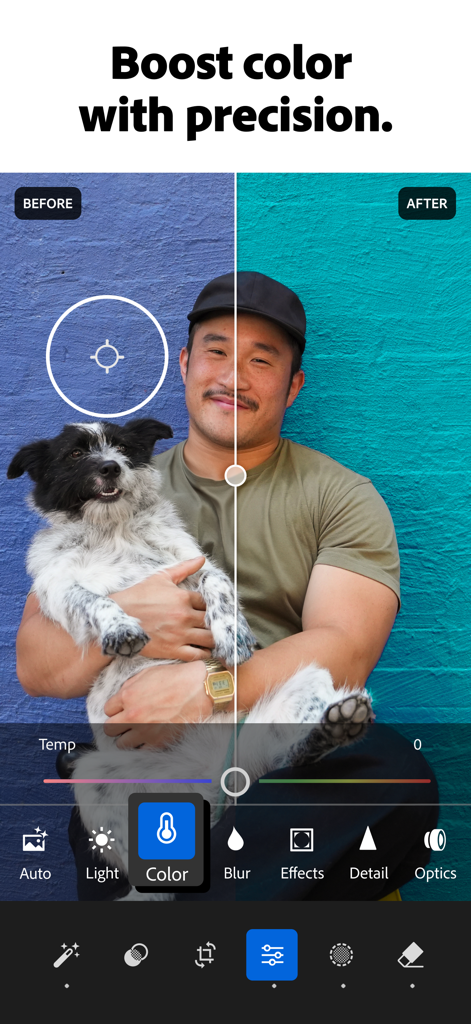
Before and after comparison of color adjustment on a photo in Adobe Lightroom mobile app

Before and after comparison of color adjustment on a photo in Adobe Lightroom mobile app

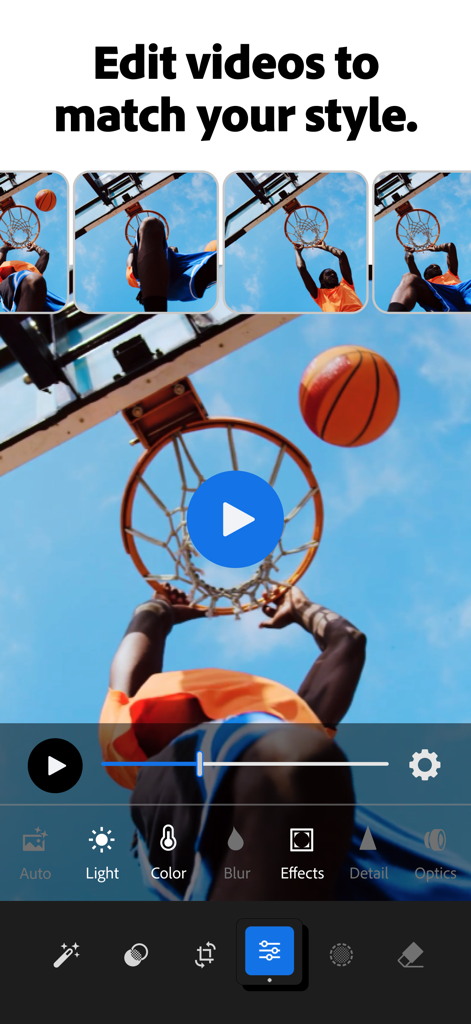
Adobe Lightroom mobile interface for editing videos featuring a basketball player clip and professional color tools

Adobe Lightroom mobile interface for editing videos featuring a basketball player clip and professional color tools

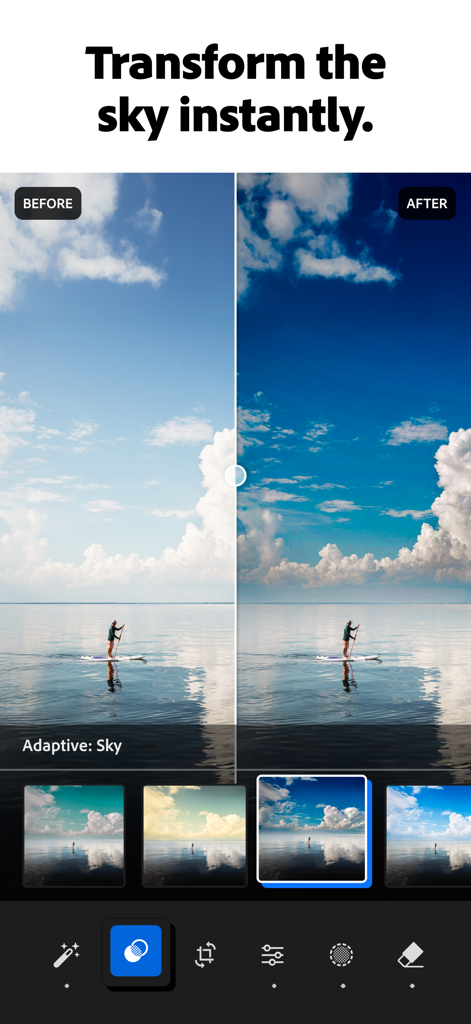
Before and after comparison of a sky transformation using Adobe Lightroom AI photo editor

Before and after comparison of a sky transformation using Adobe Lightroom AI photo editor

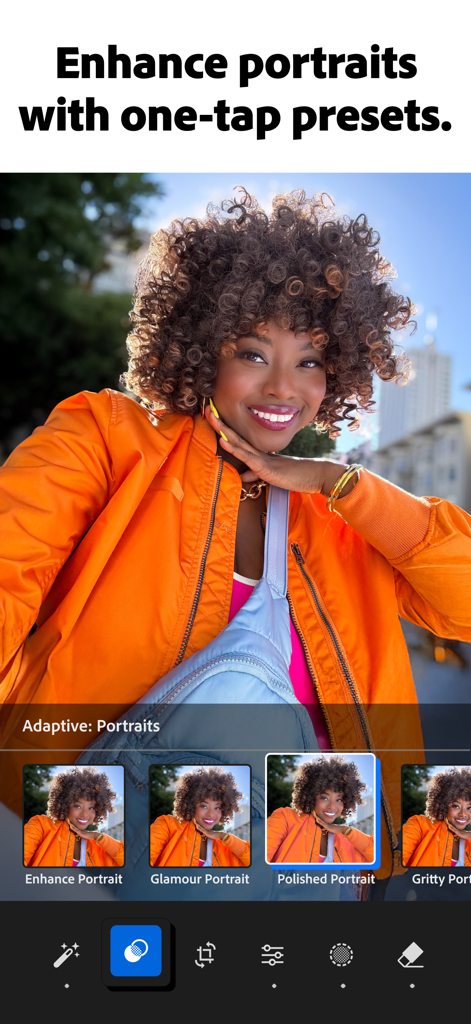
Adobe Lightroom app interface showing adaptive portrait presets for quick photo enhancement

Adobe Lightroom app interface showing adaptive portrait presets for quick photo enhancement

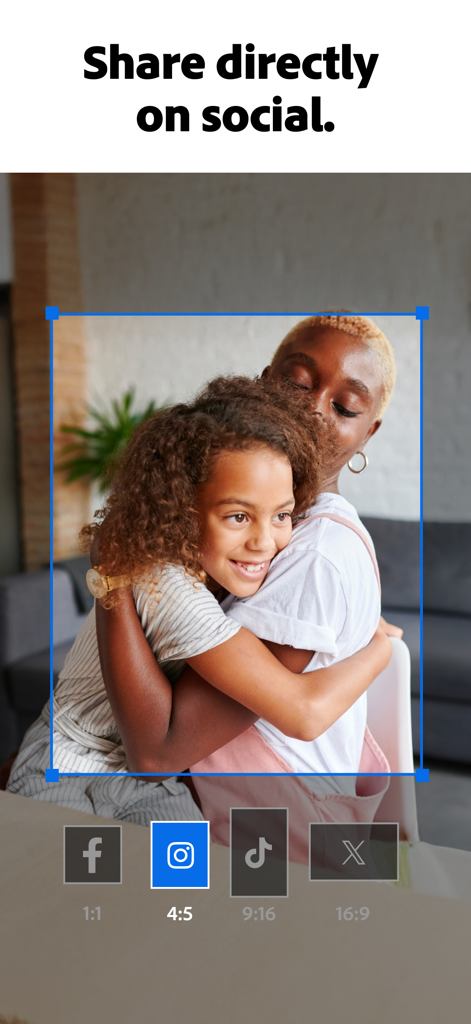
Adobe Lightroom app interface showing social media aspect ratio crop options and sharing buttons for Facebook Instagram TikTok and X

Adobe Lightroom app interface showing social media aspect ratio crop options and sharing buttons for Facebook Instagram TikTok and X

Transform Every Shot into a Masterpiece

The tools that make this app stand out, trusted by 156M+ users.

🪄

Magic AI Eraser

Remove distracting wires, objects, or people with Generative AI tools that make every photo look intentional and clean.

Aesthetic Presets

Unlock a world of creator-shared filters. Save your favorite looks to give your entire feed a professional, cohesive vibe.

Effortless Batch Edits

Perfect for photo dumps. Edit one image and instantly sync that look across your entire gallery to save time and stay consistent.

Loved by users worldwide

Trusted by 156M+ people who love this app.

"

"Lightroom has completely changed how I share my travels. The Generative Remove tool is like magic for erasing distracting objects like trash cans or crowds, and the batch editing saves me so much time when I am posting a photo dump. It makes my iPhone shots look like they were taken on a professional camera."

Taylor R.
"

"Finding my signature aesthetic was so easy with the community presets. I love using the AI Quick Actions for a fast touch-up before I post to my feed. The background blur gives my portraits that high-end bokeh effect instantly. It is the only photo editor I actually enjoy using every day."

Jordan K.

About the app

Everything you need to know about Lightroom AI Photo Editor.

Description

Ever wish your photos could really show what makes a moment special? Adobe Lightroom is a free photo and video editor that helps you do just that. From your dog’s goofy grin to that sunset that took your breath away, Adobe Lightroom makes it simple to bring those moments to life, just the way you see them. Whether you’re snapping pics on the go or curating your social feed, Lightroom puts powerful AI editor tools in your pocket to make quick edits easy and fun. Adobe Lightroom is here to help you create photos you’re proud to share. EASILY MAKE YOUR PHOTOS LOOK AMAZING Want brighter colors? Softer, blurry backgrounds? A quick touch-up to crop and resize a photo? Adobe Lightroom’s one-tap features like Quick Actions and Adaptive Presets let you enhance photo quality in seconds. These AI editor tools suggest the best edits for your images. Perfect for quick fixes or adding a unique vibe, no experience required. Use it as your go-to photo editor. REMOVE DISTRACTIONS AND BLUR BACKGROUND Adobe Lightroom gives you access to tools that feel professional but stay approachable. Blur the photo background for a polished look, adjust the finer details, or use Generative Remove as an object eraser in photos with a few taps. POWERFUL EDITS WITH ZERO HASSLE Take control of light with tools to tweak exposure, highlights, and shadows. Fix photos with presets, photo effects, color grading, hue, saturation, or add a blurry bokeh effect to nail the perfect vibe. It’s all about giving you creative control while keeping it simple. GET INSPIRATION FROM THE COMMUNITY Not sure where to start? Browse photo filters and presets shared by creators around the world. From vintage photo effects to applying a retro photo filter, Adobe Lightroom has the presets to match your aesthetic. Whether you’re looking to make bold edits with AI editor tools or subtle tweaks for polished portrait edits, find a look that matches your style — or create your own. Save your favorites and make every photo feel like you. EDIT ONCE, APPLY EVERYWHERE Snapped a whole concert, travel day, or family gathering? Instead of editing each shot one by one, use Lightroom’s AI photo editor tools. Fix photos in batches to keep your photo edits looking consistent — fast, easy, done. WHY ADOBE LIGHTROOM? • It’s for every moment: whether editing photos for fun, capturing memories, gaining confidence, or sharing on social media. • It’s flexible: start with simple photo editing and grow into a better photographer along the way. Fix photos, crop and resize images, blur background elements, or remove distractions with our object eraser — the editing options are endless with Adobe Lightroom. • It’s an AI photo editor designed to help build confidence, spark creativity, and showcase your authentic style. TOOLS YOU'LL LOVE • Quick Actions: Fix photos with suggested edits tailored to your pics. • Preset Edits: Discover filters or make your own signature look. • Background Blur: Create depth with a blurry background effortlessly. • Generative Remove Edits: Take out the things you didn’t want with this AI photo eraser. • Video Editing: Bring the same creative energy to your clips with tools for light, color, and presets. FOR EVERY KIND OF PHOTOGRAPHER Photo editing has never been easier. Lightroom is here to empower you - to capture sunsets, family moments, or your latest foodie find. With tools to fix pictures, enhance photo quality, and edit videos, Adobe Lightroom gives you the right balance of ease and control. Download Adobe Lightroom today. Terms & Conditions: Your use of this application is governed by the Adobe General Terms of Use http://www.adobe.com/go/terms_au and the Adobe Privacy Policy https://www.adobe.com/go/privacy_policy_au Do not sell or share my personal information www.adobe.com/go/ca-rights

Latest Version

11.1

Size

327.3 MB

First Released

Jun 22, 2014

Ready to level up your aesthetic?

Join over 150 million creators using AI-powered tools and professional presets to turn everyday moments into editorial masterpieces. Download Lightroom for free today.

Download on App StoreDownload on Google Play
FAQ

Frequently Asked Questions

Everything you need to know about Lightroom AI Photo Editor

Is Adobe Lightroom a free app?

Yes, Adobe Lightroom is a free photo and video editor. It helps users enhance photos and videos with powerful AI editor tools and creative controls.

What AI editing features does Adobe Lightroom offer?

Adobe Lightroom offers AI editor tools such as Generative Remove for object removal, Quick Actions for suggested edits, and Adaptive Presets for enhancing specific photo elements.

Can I remove unwanted objects from photos using Lightroom?

Yes, Adobe Lightroom features Generative Remove, an AI photo eraser tool. It allows users to remove unwanted distractions or objects from photos with a few taps.

Does Adobe Lightroom provide video editing capabilities?

Yes, Adobe Lightroom includes video editing features. Users can apply creative energy to clips using tools for light, color, and presets to match their style.

How does Adobe Lightroom help improve portrait photos?

Adobe Lightroom offers Adaptive Presets for portraits and retouching tools. Users can enhance portraits with one-tap adjustments, including options for blemishes, skin, teeth, and eyes.

Can I apply edits to multiple photos at once in Adobe Lightroom?

Yes, Adobe Lightroom enables batch editing. Users can apply edits once and then fix photos in batches to maintain consistent photo edits across multiple images quickly and easily.

How can I blur the background in my photos using Lightroom?

Adobe Lightroom allows users to blur photo backgrounds for a polished look. It provides a "Background Blur" tool with various shapes and adjustable blur amounts.

Does Adobe Lightroom allow users to adjust sky elements?

Yes, Adobe Lightroom features Adaptive: Sky presets that instantly transform the sky in photos. Users can enhance specific parts of a photo like the sky.

Where can I find the Terms & Conditions for Adobe Lightroom?

The Terms & Conditions for Adobe Lightroom are available at http://www.adobe.com/go/terms_linkfree_en. This link is provided within the app's description.

Does Adobe Lightroom offer color correction tools?

Yes, Adobe Lightroom provides tools to boost color with precision. Users can adjust hue, saturation, color grading, and temperature to achieve the desired look for their photos.