SharkClean

SharkClean

Download on App Store
Spark by MWM logo
Logo of SharkClean

SharkClean: Effortless Cleaning and Precision Control for Your Modern Home

Take total control of your home with custom mapping, smart scheduling, and voice-activated cleaning. Experience the ultimate convenience of a spotless home without lifting a finger.

Publisher

SHARKNINJA OPERATING LLC

Category

Lifestyle

Downloads

5M+

User Rating

4.7/5

Total Ratings

462K+

Locales

8

A Smarter Clean, Visualized

Discover the interface used by 5M+ users.
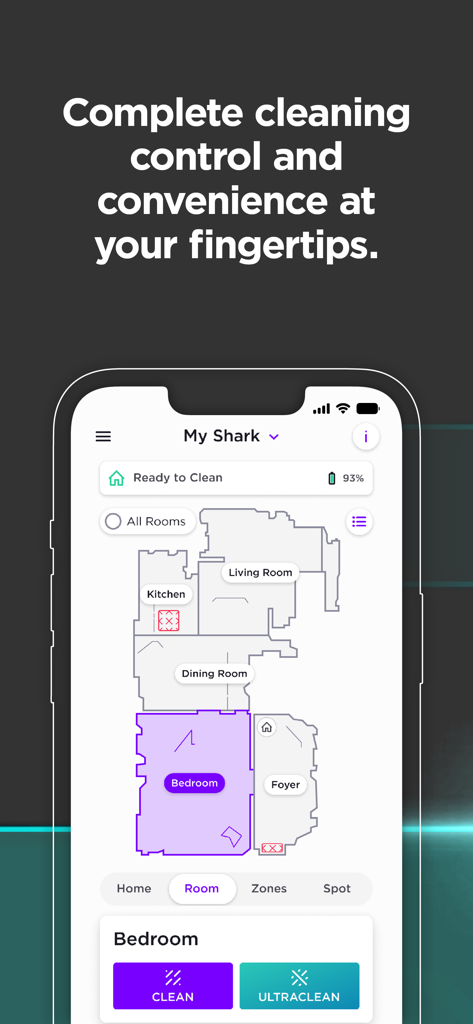
SharkClean app interface displaying a detailed home map and cleaning controls

SharkClean app interface displaying a detailed home map and cleaning controls

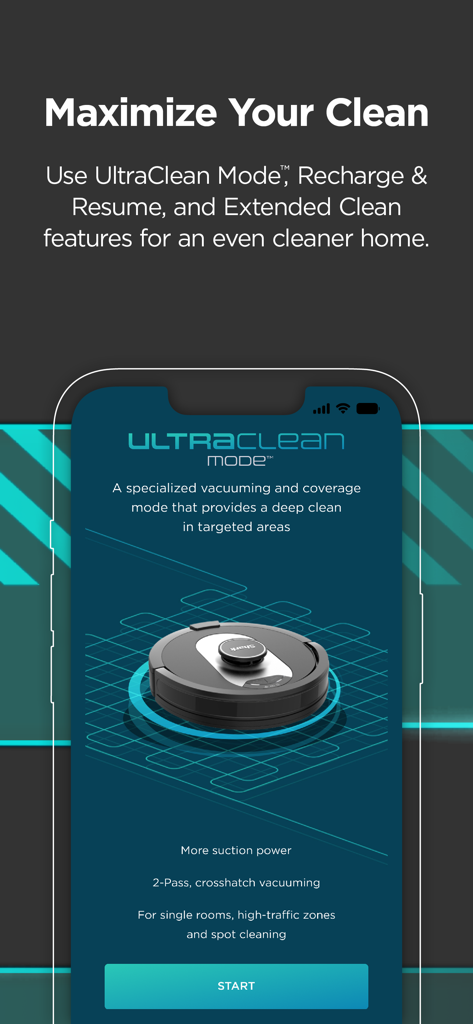
SharkClean app interface displaying the UltraClean Mode feature for deep cleaning specific home areas

SharkClean app interface displaying the UltraClean Mode feature for deep cleaning specific home areas

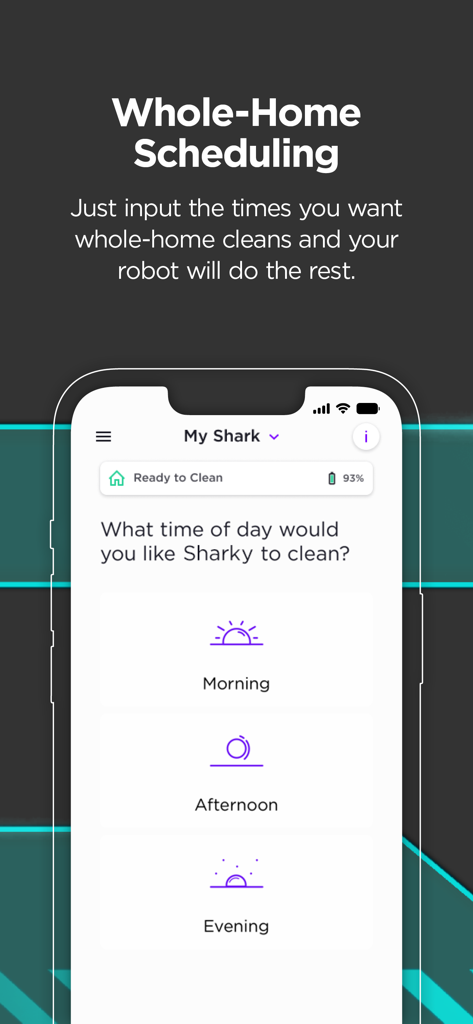
SharkClean app screen for scheduling robot vacuum cleaning cycles for morning afternoon or evening

SharkClean app screen for scheduling robot vacuum cleaning cycles for morning afternoon or evening

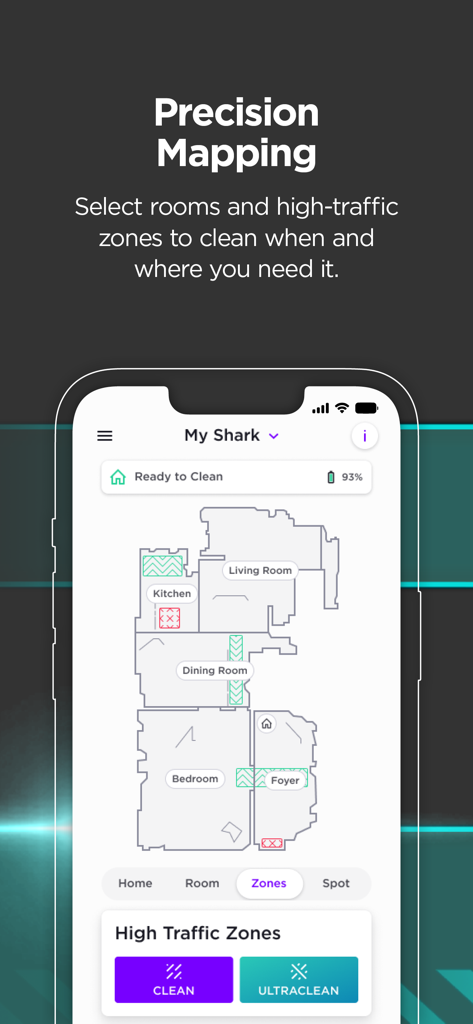
Smartphone screen showing the SharkClean app interface with a house floor plan map and high-traffic cleaning zones

Smartphone screen showing the SharkClean app interface with a house floor plan map and high-traffic cleaning zones

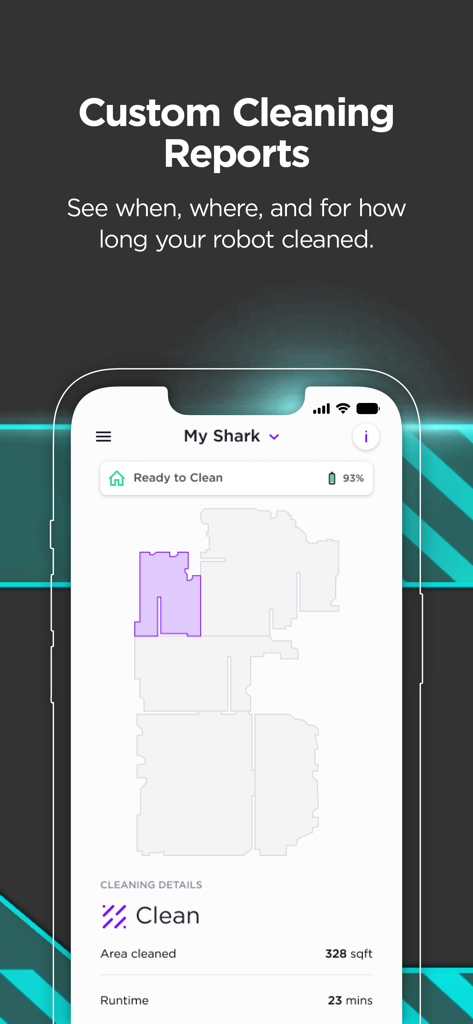
SharkClean app screen showing a detailed cleaning report with a home floor map and runtime stats

SharkClean app screen showing a detailed cleaning report with a home floor map and runtime stats

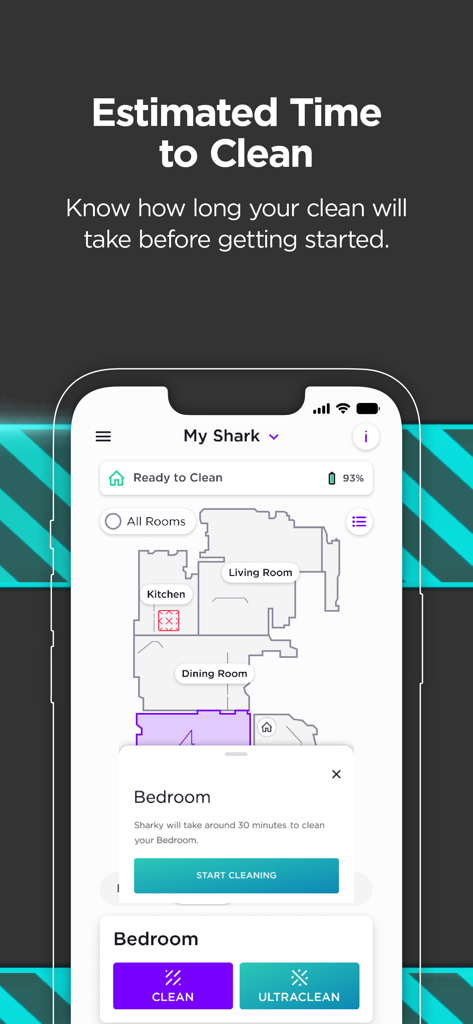
SharkClean app interface showing a house map with an estimated 30-minute cleaning time for the bedroom

SharkClean app interface showing a house map with an estimated 30-minute cleaning time for the bedroom

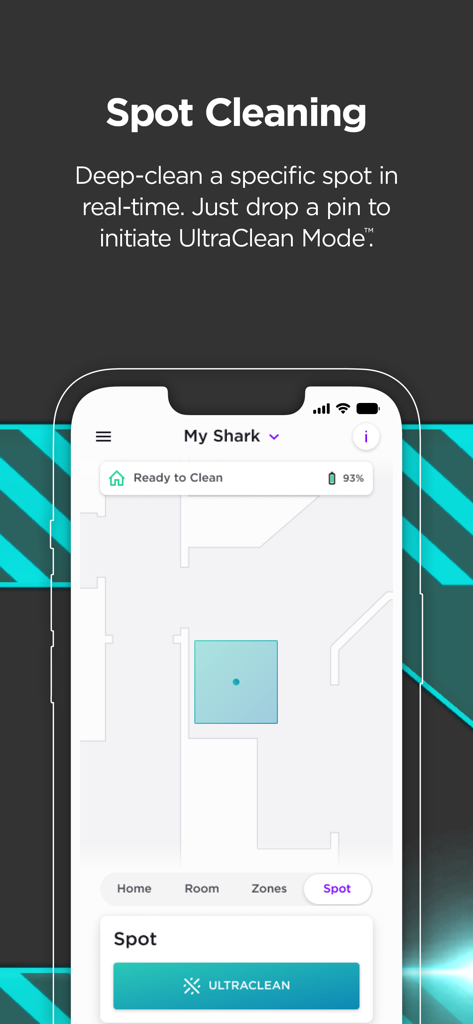
SharkClean app interface showing spot cleaning feature with UltraClean mode on a home map

SharkClean app interface showing spot cleaning feature with UltraClean mode on a home map

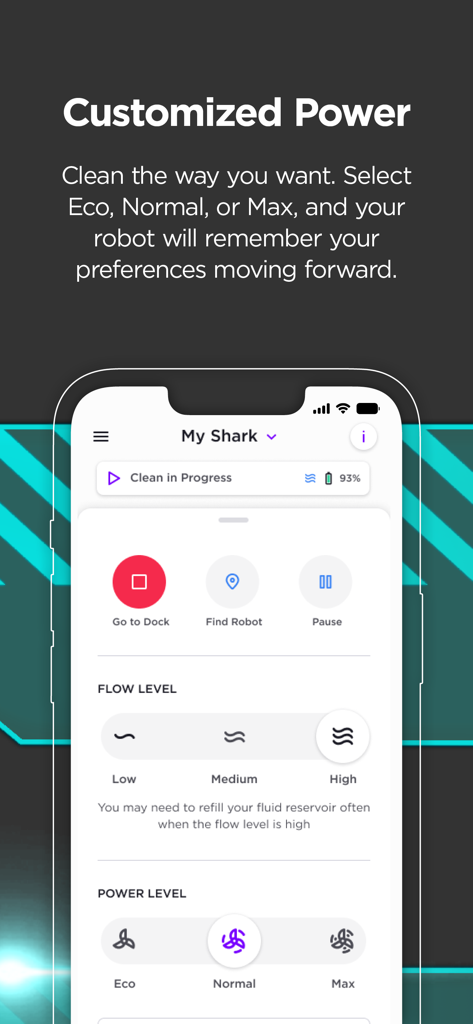
SharkClean mobile app screen showing customized power and flow level settings for a robot vacuum

SharkClean mobile app screen showing customized power and flow level settings for a robot vacuum

Take Command of Every Corner

The tools that make this app stand out, trusted by 5M+ users.

🗺️

Precision Home Mapping

Define specific rooms and high-traffic zones to target the messiest areas of your home with surgical precision and total control.

🕒

Set-and-Forget Scheduling

Automate your daily routine by scheduling whole-home cleanings at times that never interrupt your work, family, or fitness time.

🚫

Smart No-Go Zones

Protect your furniture, pet bowls, and play areas by creating virtual boundaries your robot will intelligently avoid in every cycle.

Loved by users worldwide

Trusted by 5M+ people who love this app.

"

"Between two shedding dogs and a busy toddler, my floors used to be a constant struggle. Now, I just schedule a daily run through the app while we're at the park. Coming home to perfectly clean carpets and seeing the detailed cleaning report gives me such peace of mind. It’s truly a lifesaver for busy parents!"

Sarah Jenkins, Suburban Homeowner
"

"The precision mapping is incredibly impressive. I’ve set up specific No-Go Zones around my desk cables and use the VACMOP mode to keep my hardwood floors polished. Being able to trigger a Spot Clean via Alexa right after cooking is the peak of smart home convenience. Highly recommended for anyone who values their time."

Mark Thompson, Tech Professional

About the app

Everything you need to know about SharkClean.

Description

Your ultimate cleaning partner is here. Meet the redesigned SharkClean® app. Cleaning convenience, confidence, and control are at your fingertips. Finally, cleaning has never been easier. Now, your unique home is at the center of the SharkClean® app. With precision home mapping, you can customize where, when, and how your robot cleans, right from the home screen.* You can set cleaning schedules, send your robot to clean certain rooms or spots on-demand in UltraClean Mode™, mark areas for your robot to avoid altogether, and more. Plus, easily access troubleshooting tips and FAQs, control notifications, and view custom cleaning reports (varies by series). 1. PRECISION MAPPING (1000 & 2000 series) • Once your robot generates a map of your home, you can create rooms and high-traffic zones using our improved editing functionality. • Take advantage of our brand-new interactive map interface where you can customize cleaning by immediately sending your robot to clean specific rooms and zones. • Tackle messes or pesky debris with the new Spot Clean feature (2000 series). 2. SCHEDULE WHOLE-HOME CLEANINGS (All series) • Schedule your Shark to run when it’s convenient for you. • Easily adjust the days and times your robot cleans your home. 3. VOICE CONTROLS WITH AMAZON ALEXA & GOOGLE HOME (All series) • Use voice commands to control your Shark. It’s as easy as “Alexa, tell Shark to start cleaning.” • Compatible with Google Assistant** and Alexa*** enabled devices. 4. ENABLE CLEANING SETTINGS (1000 & 2000 series) • Activate Recharge & Resume: your robot returns to the base, recharges, and can pick up where it left off. This is especially helpful for larger homes. • Turn on Extended Clean to get even cleaner floors. Your robot will continue cleaning with any remaining battery power after a full home clean until it’s time to recharge. 5. SWITCH TO VACMOP™ MODE (RV2000WD series) • Vacuum and mop your floors at the same time with VACMOP ™ mode. • Add carpet zones on your home map. Your robot will intelligently avoid carpets while mopping. Requirements: • Shark® Wi-Fi-Connected Robotic Vacuum (Models supported: 700, 800, 900, 1000, and 2000). • Wi-Fi with 2.4GHz band support. Supported OS: • iOS 13, 14, and 15 For U.S. support, visit sharkclean.com for additional information. For E.U. support, visit sharkclean.eu for additional information. * Applies to 2000 series **Google is a trademark of Google LLC. *** Alexa is a trademark of Amazon LLC.

Latest Version

6.11.0

Size

177.5 MB

First Released

Sep 8, 2017

Take Command of Your Clean

Join over 5 million homeowners who have simplified their lives. Download the SharkClean® app now to schedule, map, and control your home from anywhere.

Download on App Store
FAQ

Frequently Asked Questions

Everything you need to know about SharkClean

What is the SharkClean app?

The SharkClean app provides control and convenience for managing your Shark® Wi-Fi-Connected Robotic Vacuum. Users can customize cleaning schedules, map their homes, and activate specific cleaning modes directly from their mobile device.

Can I schedule cleanings with the SharkClean app?

Yes, the SharkClean app allows users to schedule whole-home cleanings. You can easily adjust the days and times your Shark robot cleans your home to fit your convenience.

Does the SharkClean app support voice control?

Yes, the SharkClean app supports voice control. It is compatible with Amazon Alexa and Google Assistant enabled devices, allowing users to start cleaning using simple voice commands.

What is UltraClean Mode™ in the SharkClean app?

UltraClean Mode™ is a specialized vacuuming and coverage mode available in the SharkClean app. It provides a deep clean in targeted areas, offering more suction power and 2-Pass, crosshatch vacuuming for thorough cleaning.

Which Shark robot models are compatible with the SharkClean app?

The SharkClean app is compatible with Shark® Wi-Fi-Connected Robotic Vacuum models 700, 800, 900, 1000, and 2000 series. It also requires Wi-Fi with 2.4GHz band support.

Does the SharkClean app offer precision mapping?

Yes, the SharkClean app offers precision home mapping for 1000 and 2000 series robots. Users can create rooms, high-traffic zones, and customize cleaning with an interactive map interface.

Can I set areas for the SharkClean robot to avoid?

Yes, the SharkClean app allows you to mark areas for your robot to avoid altogether. This feature provides customized cleaning control for your unique home layout.

What are Recharge & Resume and Extended Clean features in the SharkClean app?

Recharge & Resume allows the robot to return to its base, recharge, and then continue cleaning where it left off. Extended Clean enables the robot to continue cleaning with remaining battery power after a full home clean.

Can the SharkClean app vacuum and mop simultaneously?

Yes, the SharkClean app supports VACMOP™ MODE for RV2000WD series robots, enabling simultaneous vacuuming and mopping. It also allows adding carpet zones to ensure the robot intelligently avoids them while mopping.

Can I view cleaning reports with the SharkClean app?

Yes, the SharkClean app provides custom cleaning reports. Users can see when, where, and for how long their robot cleaned, although this feature varies by robot series.