SketchUp - 3D Modeling

SketchUp - 3D Modeling

Download on App StoreDownload on Google Play
Spark by MWM logo
Logo of SketchUp - 3D Modeling

SketchUp: Create, Visualize, and Build Your World in 3D

The most intuitive 3D design platform for architects, designers, and DIYers. Scan real-world spaces, harness generative AI, and present your visions in Augmented Reality—anytime, anywhere.

Publisher

Trimble Inc.

Category

Graphics & Design

Downloads

8M+

User Rating

4.6/5

Total Ratings

85K+

Locales

15

Your Vision, Visualized

Discover the interface used by 8M+ users.

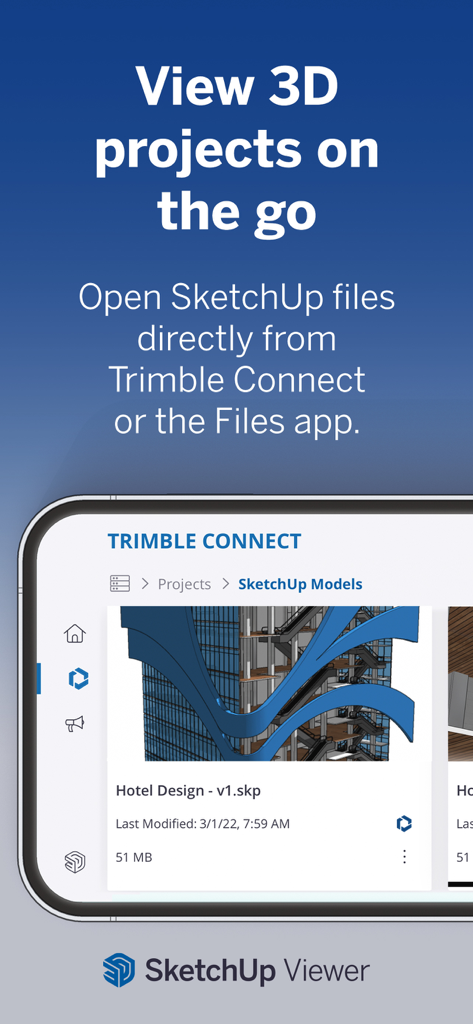
A smartphone interface showing the SketchUp Viewer app with a 3D hotel design project open from Trimble Connect.

A smartphone interface showing the SketchUp Viewer app with a 3D hotel design project open from Trimble Connect.

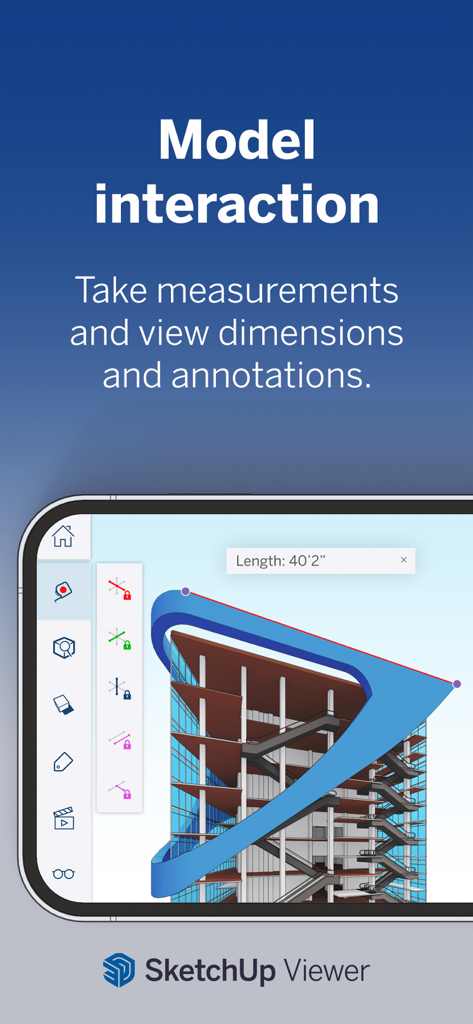
SketchUp Viewer app interface showing 3D architectural model measurements and annotations.

SketchUp Viewer app interface showing 3D architectural model measurements and annotations.

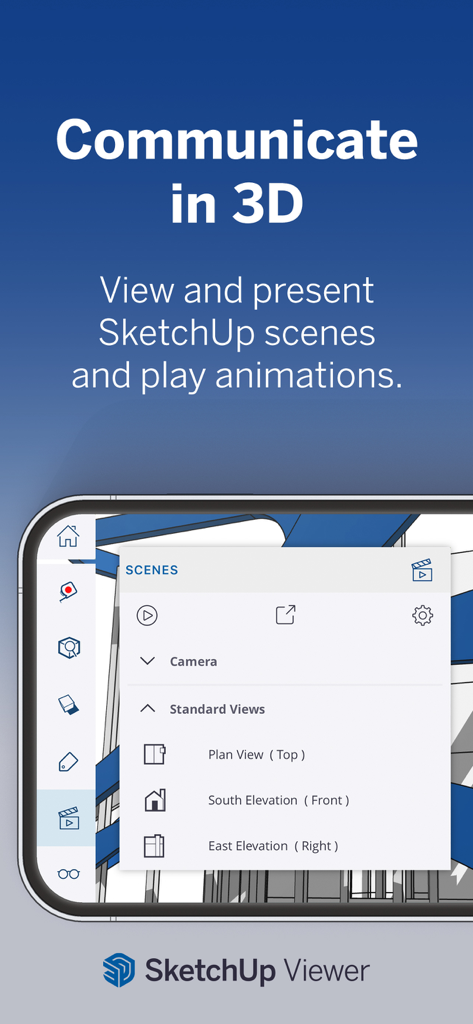
Interface of SketchUp Viewer showing 3D scene presentation and camera view options on a mobile device.

Interface of SketchUp Viewer showing 3D scene presentation and camera view options on a mobile device.

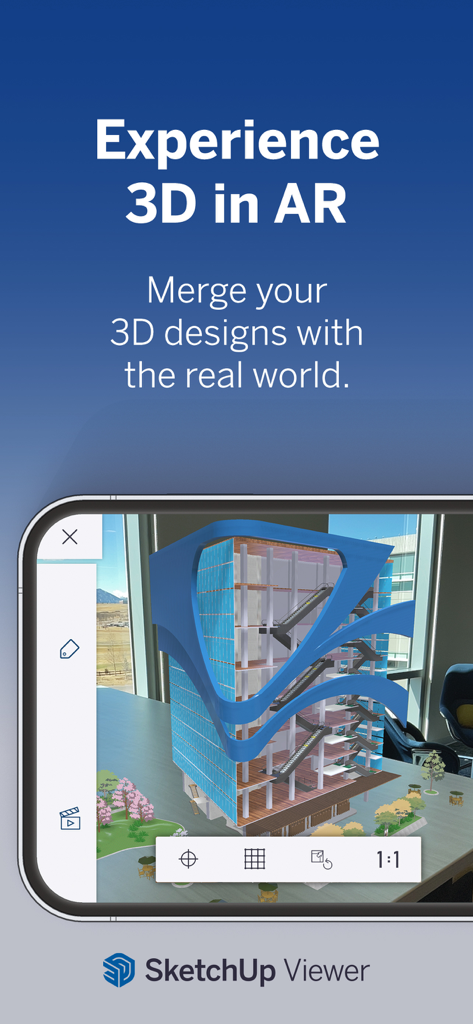
A 3D building model displayed in augmented reality within an office setting using SketchUp

A 3D building model displayed in augmented reality within an office setting using SketchUp

Professional 3D Design, Anywhere You Go

The tools that make this app stand out, trusted by 8M+ users.

📱

Instant Room Scanning

Skip the manual measurements. Use LiDAR technology to capture real-world spaces and transform them into editable 3D models in seconds.

🕶️

Augmented Reality Previews

Walk through your designs before they are built. Overlay 3D models onto physical environments to visualize the perfect fit and close deals faster.

AI-Powered Creativity

Fuel your design process with Generative AI. Create stunning, photorealistic visuals and explore endless layout options with the power of artificial intelligence.

Loved by users worldwide

Trusted by 8M+ people who love this app.

"

"The Scan-to-Design feature is an absolute game-changer for my workflow. I can capture a client's space and turn it into a 3D model in minutes right on my iPad. Showing them the final design in AR helps close deals faster than ever."

David R., General Contractor
"

"I used SketchUp to plan my kitchen renovation and it saved me from making so many expensive mistakes. The generative AI tools gave me amazing inspiration for finishes, and the Apple Pencil support makes the whole design process feel like sketching on paper."

Elena S., DIY Home Remodeler

Review Analysis

Insights from user reviews.

Sentiment Score

32%
Negative

Summary

This app receives mixed feedback, with many users appreciating its professional capabilities, intuitive interface, and suitability for design work, particularly when making adjustments comfortably on an iPad. However, the overall sentiment leans heavily negative due to several critical issues. Primary concerns include the high and often non-transparent subscription pricing model, lack of a free trial, and absence of a one-time purchase option. Users frequently encounter severe bugs and instability, such as app crashes, freezing, core functionality failures like inability to start or open projects, and persistent login and connectivity problems that render the app unusable for many.

Common Themes

Pricing & Subscription Model(11)
Overall Positive Experience(8)
Bugs & Instability(7)
Core Functionality Issues(7)
Login & Security Challenges(5)
Missing Advanced Features(5)
Professional Workflow & Ease of Use(4)

About the app

Everything you need to know about SketchUp - 3D Modeling.

Description

Experience the world's leading 3D design platform with a free 7-day Go trial! Without a subscription, you can still view 3D projects for free. Go offers essential 3D design tools, including SketchUp for iPad and SketchUp for Web. Created for design enthusiasts, architects, interior designers, contractors, home remodelers, construction professionals, and set designers, our intuitive tools streamline the creative process, allowing you to effortlessly craft 3D models and visualize concepts. Whether you're planning a home renovation, designing interiors, or creating a detailed architectural model, SketchUp helps bring your visions to life through 3D design. Go Features: - Work seamlessly across devices: Create 3D models on your iPad and computer using SketchUp.com. - Generative AI Designs: Harness the power of AI to create stunning visuals for architectural and home designs. Generate images that inspire your creative process and support your design narrative. - Room Planner & Space Design: Experiment with different layouts and design options to find the perfect fit for your space. Model your space with designer fixtures and furniture. - Real-time, realistic visuals: Create stunning photorealistic visuals by integrating environments and customizable real-world materials. - Scan-to-Design: Use our 3D scanning feature to capture real-world spaces, which AI intelligently transforms and organizes into editable 3D models. - Augmented Reality (AR): Visualize your designs in the real world with our AR capabilities. - DWG Compatibility: Import and export DWG files seamlessly, ensuring compatibility with other CAD software. - Import real-world information: Import images to textures, satellite imagery, 3D terrain, 3D buildings, and location information to power your designs with real-world context. Why Go? - Architects & Contractors: Transform your architectural visions into reality with intuitive 3D modeling tools. Quickly visualize and iterate design concepts and present ideas to clients and stakeholders. - Interior Designers & Home Remodelers: Visualize your ideas in 3D and AR, ensuring your designs meet expectations. Use AI image generation to inspire additional finishes and layouts. - Landscape Designer: Plan and visualize outdoor spaces, from planters to parks, with our 3D landscape tools, like real-time shadow studies, geo-locating satellite imagery, and 3D terrain. - DIYer: Whether you're planning a small remodel or a complete home renovation, SketchUp provides the tools you need to design and execute your projects with confidence. Without a subscription: - Switch between perspective and orthographic camera views. - Control the visibility of parts of your model. - Adjust the look and feel of your model by controlling Edge and Face styles, Shadows, Hidden Geometry, Section Planes, and Section Cuts. - Take measurements and get information about edge lengths, the area of faces, the volume of solids, and component and group definitions. - View models in augmented reality. IMPORT/EXPORT -Import: SKP, SKE, SKM, HDR, EXR, PNG, JPG, PDF, DWG, DXF, STL -Export: Images (PNG), Animations (MP4), SKP, USDz, PDF, DWG, DXF, OBJ, STL, MP4 REQUIREMENTS Requires iOS 17 or higher with a minimum of 1024Mb of RAM. For additional info, please visit help.sketchup.com. The AR model viewing feature uses ARKit and is compatible with iPhone 6s and newer, iPad Pro, or any 2017 iPad or newer. SUBSCRIPTION DETAILS Create 3D designs with a free 7-day Go trial. Payment will be charged to your Apple Account on confirmation of purchase. Your subscription will automatically renew unless auto-renew is turned off at least 24 hours before your subscription expiration date. Your account will be charged for renewal within 24 hours before your subscription expiration date. After completing your initial purchase, you can manage your subscription and/or turn off auto-renew by visiting your Apple Account Settings.

Latest Version

8.1.0

Size

634.6 MB

First Released

Apr 14, 2014

Ready to Bring Your Vision to Life?

Join over 8 million creators. Start your 7-day free trial to scan, design, and visualize your projects in 3D from anywhere.

Download on App StoreDownload on Google Play
FAQ

Frequently Asked Questions

Everything you need to know about SketchUp - 3D Modeling

How can I try SketchUp's 3D design features?

You can try SketchUp's Go features with a free 7-day trial. This trial provides access to essential 3D design tools for a limited period.

Can I view 3D projects in SketchUp without a subscription?

Yes, you can view 3D projects for free in SketchUp without an active subscription. The app allows you to interact with models and perform measurements.

Does SketchUp - 3D Modeling include AI-powered design features?

Yes, SketchUp - 3D Modeling offers Generative AI Designs. This feature helps create stunning visuals for architectural and home designs, inspiring your creative process.

Does SketchUp - 3D Modeling support Augmented Reality?

Yes, SketchUp - 3D Modeling supports Augmented Reality (AR). You can visualize your 3D designs in the real world using the app's AR capabilities, even without a subscription.

Is SketchUp - 3D Modeling compatible with DWG files?

Yes, SketchUp - 3D Modeling offers DWG Compatibility. It allows you to import and export DWG files seamlessly, ensuring interoperability with other CAD software.

What types of files can SketchUp - 3D Modeling import?

SketchUp - 3D Modeling can import various file types, including SKP, SKE, SKM, HDR, EXR, PNG, JPG, PDF, DWG, DXF, and STL. It also imports real-world information like satellite imagery.

What file formats can SketchUp - 3D Modeling export?

SketchUp - 3D Modeling can export images (PNG), animations (MP4), SKP, USDz, PDF, DWG, DXF, OBJ, STL, and MP4 files. This ensures broad compatibility for sharing designs.

What are the minimum iOS requirements for SketchUp - 3D Modeling?

SketchUp - 3D Modeling requires iOS 17 or higher and a minimum of 1024Mb of RAM. The AR model viewing feature needs ARKit compatible devices.

Who is SketchUp - 3D Modeling designed for?

SketchUp - 3D Modeling is designed for design enthusiasts, architects, interior designers, contractors, home remodelers, construction professionals, set designers, and DIYers.

Can I take measurements within the SketchUp app without a subscription?

Yes, even without a subscription, you can take measurements and get information about edge lengths, face area, and solid volume within the SketchUp app.

How does SketchUp's subscription renewal work?

SketchUp subscriptions automatically renew unless auto-renew is turned off at least 24 hours before expiration. Your Apple Account will be charged for the renewal within 24 hours before the expiration date.

Does SketchUp - 3D Modeling offer room planning tools?

Yes, SketchUp - 3D Modeling includes Room Planner & Space Design features. Users can experiment with layouts and design options, modeling spaces with designer fixtures and furniture.