Tayasui Sketches School

Tayasui Sketches School

Download on App StoreDownload on Google Play
Spark by MWM logo
Logo of Tayasui Sketches School

Tayasui Sketches School: Where every child becomes a digital artist.

The ultra-realistic, mess-free drawing app designed for young creators. Give your child the professional tools they need to bring their imagination to life on the iPad.

Publisher

SKETCHES SRL

Category

Education

Downloads

1M+

User Rating

4.5/5

Total Ratings

21K+

Locales

12

A Canvas for Every Creation

Discover the interface used by 1M+ users.

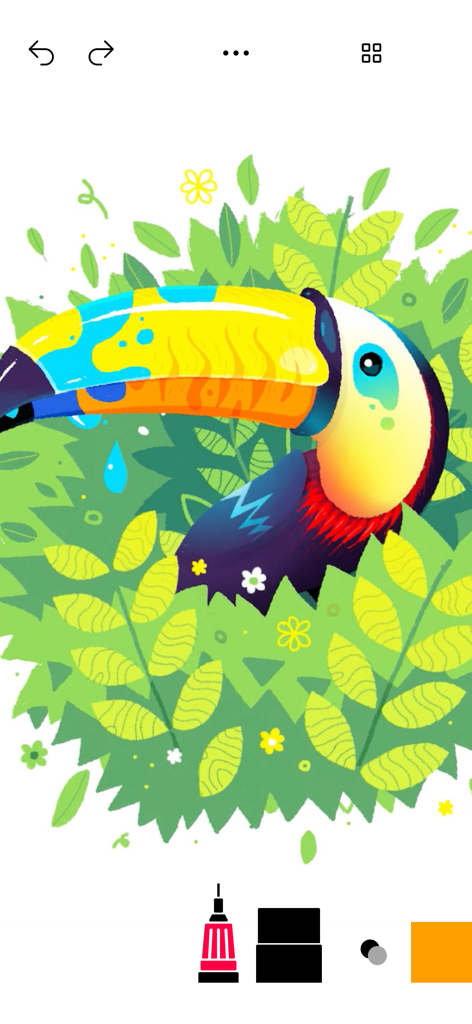
A colorful digital illustration of a toucan in a jungle created with Tayasui Sketches School

A colorful digital illustration of a toucan in a jungle created with Tayasui Sketches School

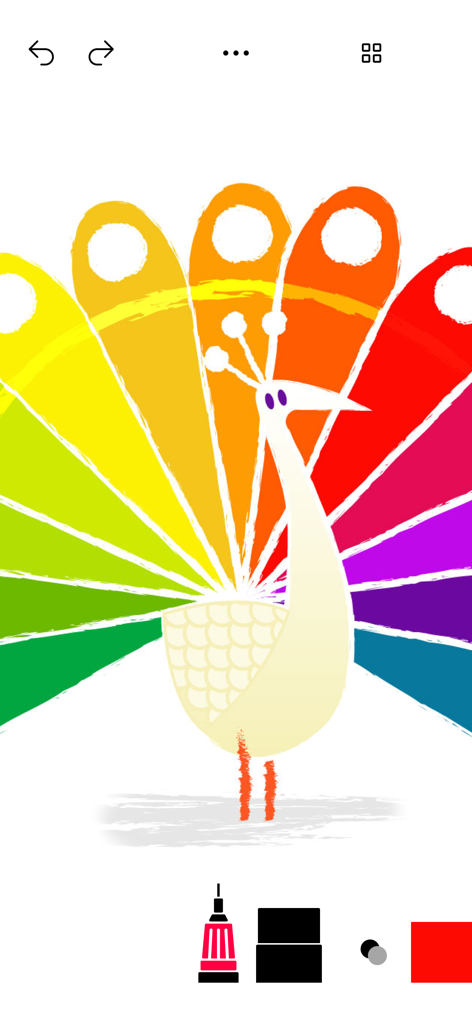
A colorful rainbow peacock drawing created with digital art tools in the Tayasui Sketches School app.

A colorful rainbow peacock drawing created with digital art tools in the Tayasui Sketches School app.

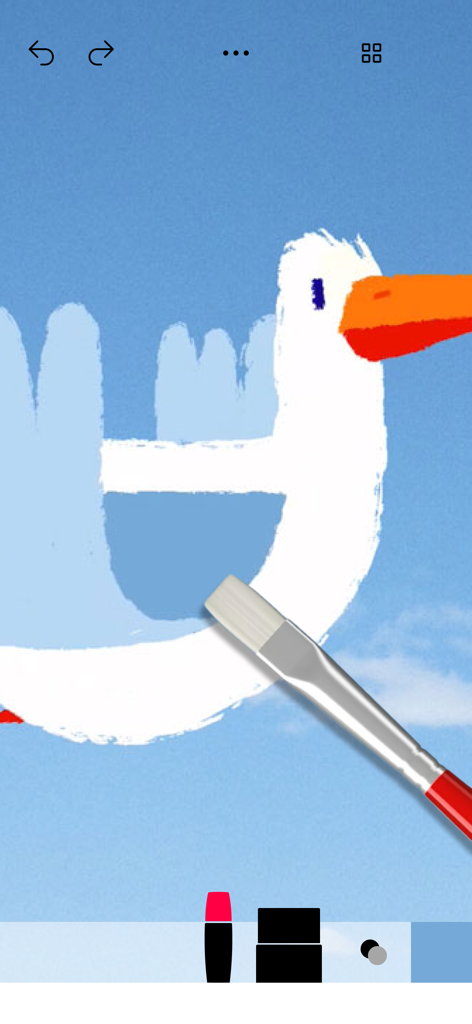
A digital drawing of a white bird with an orange beak being created with a realistic paintbrush tool in the app

A digital drawing of a white bird with an orange beak being created with a realistic paintbrush tool in the app

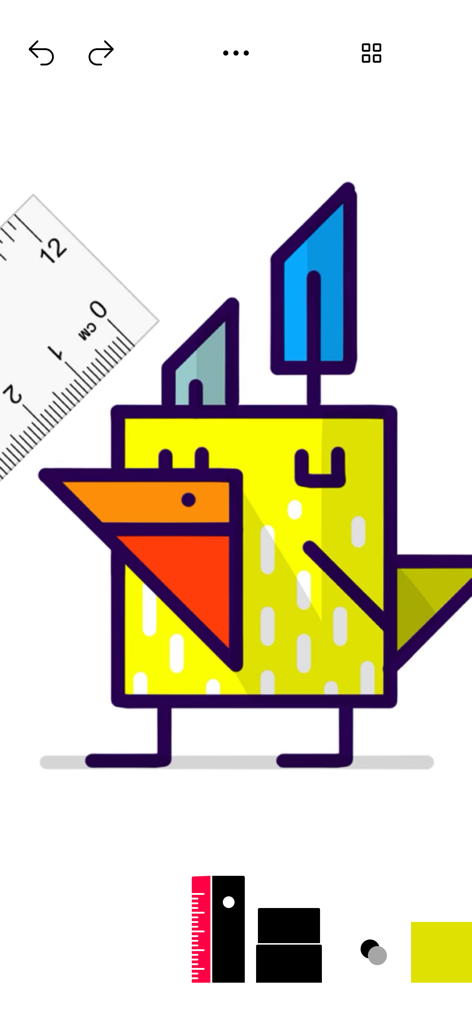
A colorful geometric bird drawing created with digital tools in Tayasui Sketches School

A colorful geometric bird drawing created with digital tools in Tayasui Sketches School

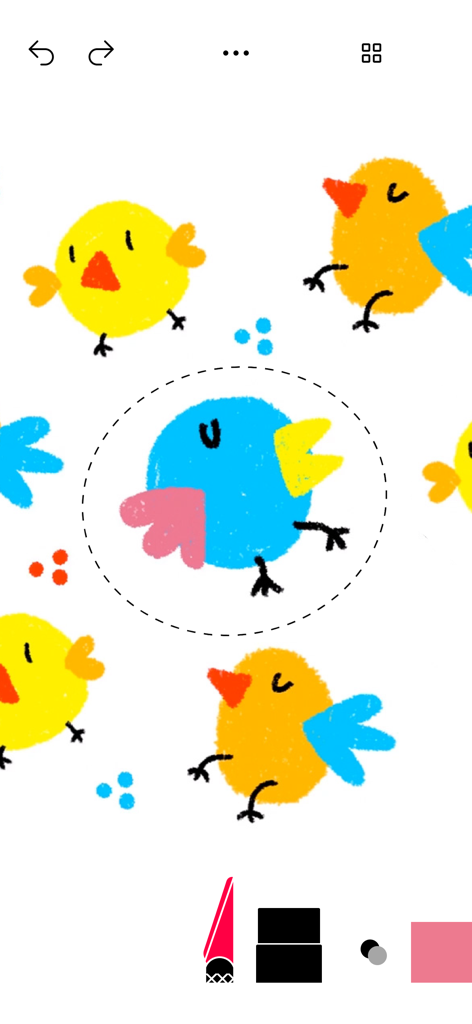
Colorful digital drawings of birds being edited with a selection tool in the Tayasui Sketches School app

Colorful digital drawings of birds being edited with a selection tool in the Tayasui Sketches School app

The Creative Studio for Budding Artists

The tools that make this app stand out, trusted by 1M+ users.

🎨

Ultra-Realistic Art Tools

Watch as watercolors blend and markers bleed naturally, giving kids the satisfaction of real painting without the cleanup.

🚀

Simple, Kid-Friendly Interface

No confusing layers or hidden menus—just a clean canvas that makes digital art accessible and fun from the very first stroke.

✏️

Perfect for Apple Pencil

Pressure-sensitive tools react to every movement, helping students develop fine motor skills while organizing work in neat folders.

Loved by users worldwide

Trusted by 1M+ people who love this app.

"

"Finally, an art app that doesn't feel like a cluttered game! My students love how the watercolor actually bleeds like real paint, and the interface is so clean that even my youngest learners can dive right in without a tutorial."

Emily R., Elementary Art Teacher
"

"My daughter has spent hours creating incredible illustrations on her iPad. It is the perfect middle ground between basic coloring apps and complex professional software. The Apple Pencil support makes her feel like a real artist!"

Jason M., Parent of a 10-year-old

About the app

Everything you need to know about Tayasui Sketches School.

Description

Because beautiful tools make beautiful drawings, we endlessly refined Sketches brushes to create the most realistic drawing tools. Sketches school is a special edition of Sketches targeted for a younger audience, with a specifically designed interface making it very accessible to kids. Sketches is the most realistic, versatile and user-friendly sketching app designed for iPad. This exhaustive artist's toolbox helps users create dazzling sketches, cheerful paintings and smashing illustrations on the go. • Features - Over 20 ultra realistic tools - Import photos • Folders Easily organize your drawings in beautiful and easy to personalize folders. • Pressure Stylus support Discover even more realistic brushes while Apple Pencil. A Unique feeling: Each stroke behaves vividly and truly like a brush on paper, adapting the opacity, angle, and width to your movements. • List of tools - Pencil - Marker - Felt Pen - Pen Brush - Oil Pastel - Watercolor - Acrylic brush - Airbrush - Area and Filling tool - Text - Shapes - Eraser - Cutter - Smudge tool - Ruler Subscribe to access to premium app features; subscription details are the following: • Length: weekly, yearly • Your payment will be charged to your iTunes Account as soon as you confirm your purchase • You can manage your subscriptions and turn off auto-renewal from your Account Settings after the purchase • Your subscription will renew automatically, unless you turn off auto-renew at least 24 hours before the end of the current period • The cost of renewal will be charged to your account in the 24 hours prior to the end of the current period • When canceling a subscription, your subscription will stay active until the end of the period. Auto-renewal will be disabled, but the current subscription will not be refunded • Any unused portion of a free trial period, if offered, will be forfeited when purchasing a subscription Terms of Use: https://www.apple.com/legal/internet-services/itunes/dev/stdeula/ If you have any questions please contact us: sketchesschool.help@gmail.com

Latest Version

2.8

Size

219.0 MB

First Released

Mar 26, 2018

Ready to Create Your Masterpiece?

Join over 1 million young artists and turn your iPad into a mess-free studio with the most realistic tools. Download now and start sketching today.

Download on App StoreDownload on Google Play
FAQ

Frequently Asked Questions

Everything you need to know about Tayasui Sketches School

What is Tayasui Sketches School?

Tayasui Sketches School is a special edition of the Sketches app. It is designed for a younger audience with an accessible interface, offering realistic drawing tools on iPad.

What drawing tools are included in Tayasui Sketches School?

Tayasui Sketches School includes over 20 realistic tools such as Pencil, Marker, Watercolor, Acrylic brush, Airbrush, Text, Shapes, Eraser, Cutter, Smudge tool, and Ruler.

Does Tayasui Sketches School support Apple Pencil?

Yes, Tayasui Sketches School supports Pressure Stylus, including Apple Pencil. This provides users with more realistic brush experiences, adapting opacity, angle, and width to movements.

How can users organize their drawings in Tayasui Sketches School?

Tayasui Sketches School allows users to easily organize their drawings. The app provides beautiful, personalizable folders for managing creative projects efficiently.

Can I import photos into Tayasui Sketches School?

Yes, users can import photos into Tayasui Sketches School. This feature allows for integrating external images directly into the app's drawing environment.

What are the subscription options for Tayasui Sketches School?

Tayasui Sketches School offers weekly and yearly subscription lengths. These subscriptions provide users with access to premium app features.

How does auto-renewal work for Tayasui Sketches School subscriptions?

Subscriptions for Tayasui Sketches School automatically renew. Users must turn off auto-renewal in their iTunes Account Settings at least 24 hours before the current period ends.

Does Tayasui Sketches School offer a free trial?

Yes, if offered, any unused portion of a free trial period for Tayasui Sketches School is forfeited when a user purchases a subscription.

Where can I find the Terms of Use for Tayasui Sketches School?

The Terms of Use for Tayasui Sketches School are accessible via the provided link: https://www.apple.com/legal/internet-services/itunes/dev/stdeula/. This document outlines the legal agreements for app usage.

Does Tayasui Sketches School have a ruler tool?

Yes, Tayasui Sketches School includes a Ruler tool among its listed drawing instruments. This tool is visible in the app's interface, as shown in the screenshots.

Is there a selection or cutting tool in Tayasui Sketches School?

Yes, Tayasui Sketches School provides a Cutter tool. This allows users to select and manipulate specific areas within their drawings for editing or other creative purposes.