Timemark: Photo Proof

Timemark: Photo Proof

Download on App Store
Spark by MWM logo
Logo of Timemark: Photo Proof

Timemark: Photo Proof: Your Trusted Standard for Professional Field Documentation

Capture 100% trustworthy photos with anti-tamper timestamps and GPS. Automate daily reports, sync with your team, and provide undeniable proof of work in seconds.

Download on App Store

Publisher

OCEAN GALAXY PTE. LTD.

Category

Photo & Video

Downloads

2M+

User Rating

4.9/5

Total Ratings

257K+

Locales

21

Accountability at a Glance

Discover the interface used by 2M+ users.
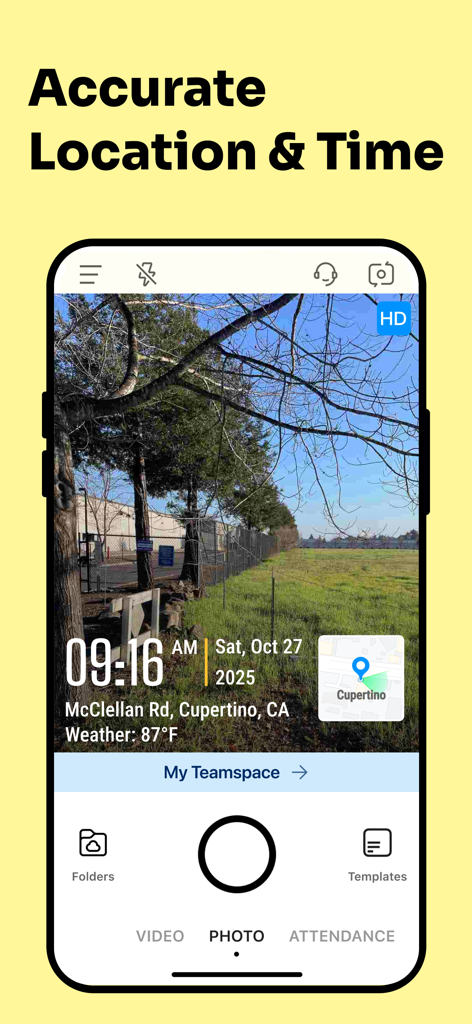
Timemark app screen showing a photo with accurate timestamp GPS location and weather data

Timemark app screen showing a photo with accurate timestamp GPS location and weather data

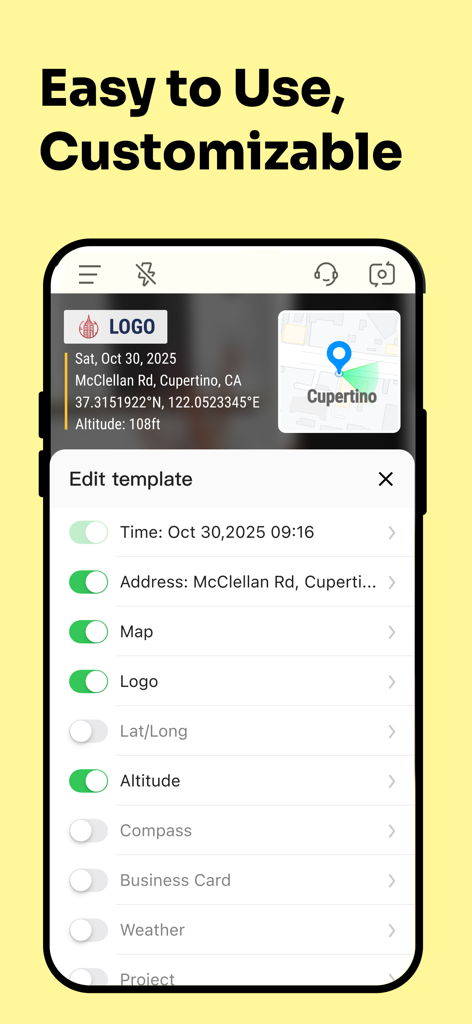
User interface showing customizable options for timestamped photos including GPS map and logo toggles in the Timemark app.

User interface showing customizable options for timestamped photos including GPS map and logo toggles in the Timemark app.

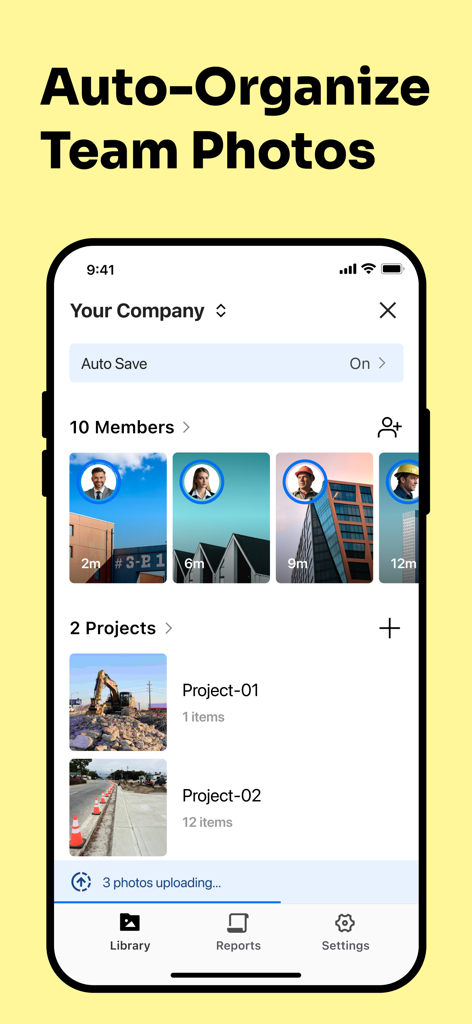
Timemark app interface showing auto organized team photos and project folders for construction sites

Timemark app interface showing auto organized team photos and project folders for construction sites

Collage of professionals using Timemark app for timestamped photo documentation in construction, security, and delivery industries.

Collage of professionals using Timemark app for timestamped photo documentation in construction, security, and delivery industries.

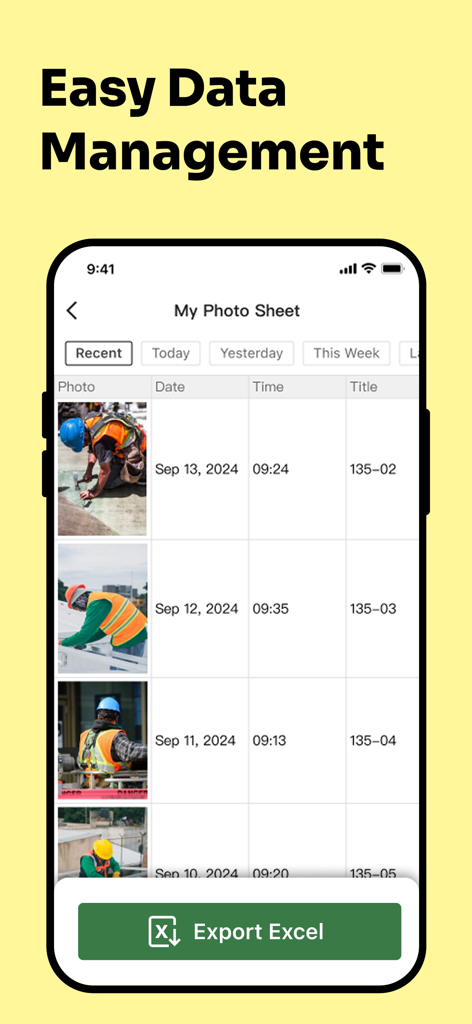
Timemark app interface showing a photo sheet of construction work with an Excel export button

Timemark app interface showing a photo sheet of construction work with an Excel export button

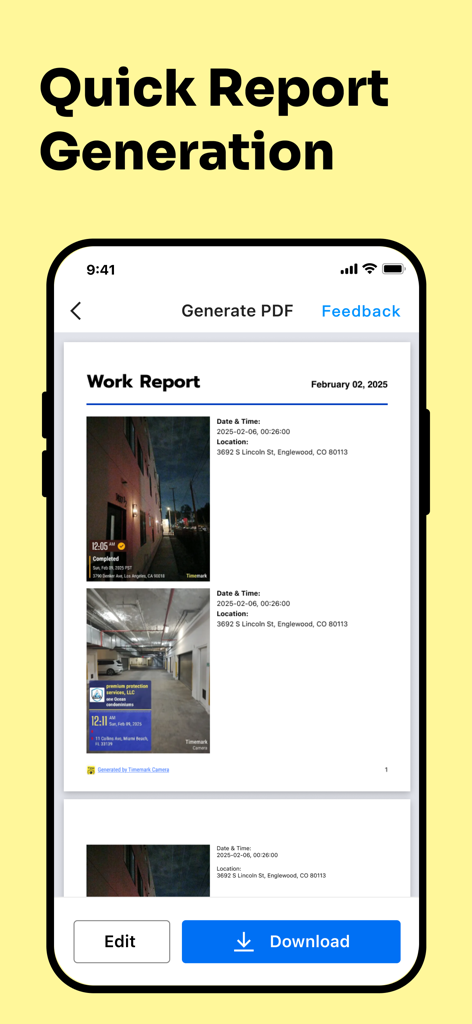
Timemark app interface for generating a professional PDF work report with timestamped photos

Timemark app interface for generating a professional PDF work report with timestamped photos

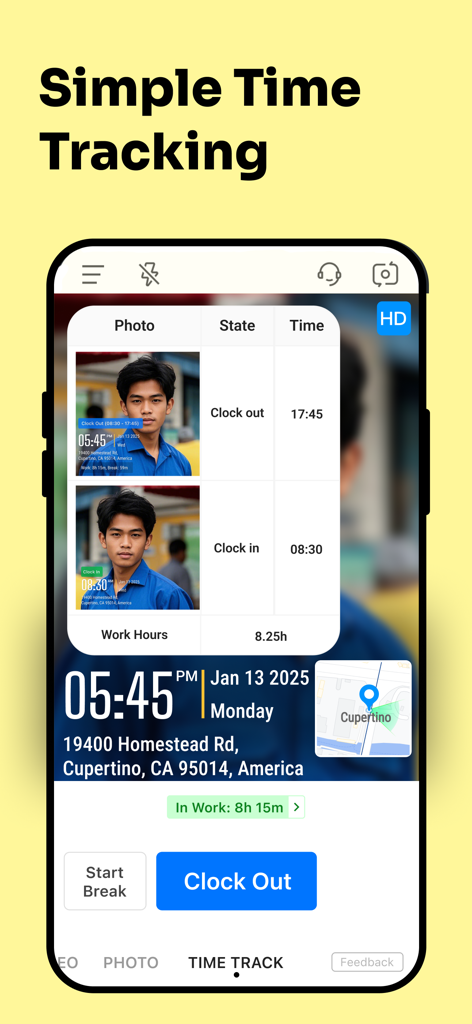
Timemark app interface for simple time tracking featuring clock-in and clock-out with timestamped photos and GPS location

Timemark app interface for simple time tracking featuring clock-in and clock-out with timestamped photos and GPS location

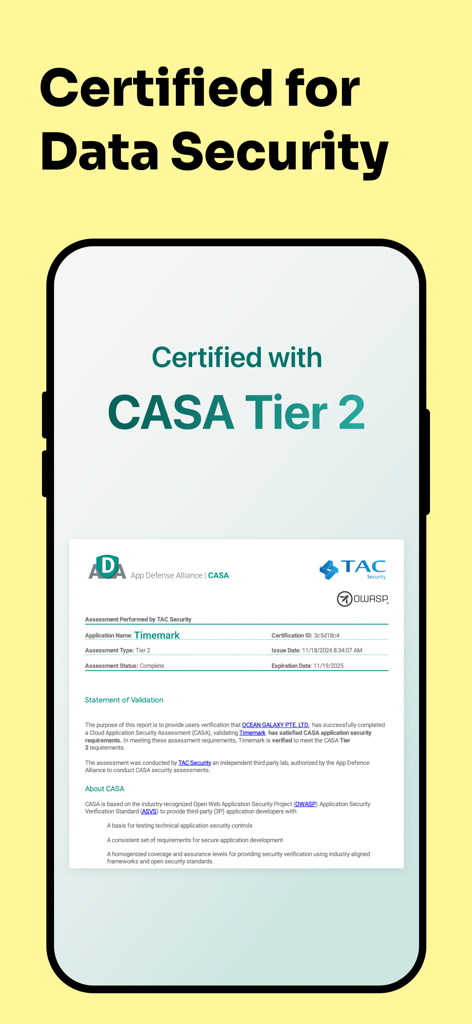
Timemark app display showing its CASA Tier 2 data security certification from the App Defense Alliance.

Timemark app display showing its CASA Tier 2 data security certification from the App Defense Alliance.

Built for Professional Accountability

The tools that make this app stand out, trusted by 2M+ users.

📍

Verified Field Evidence

Protect your reputation with unalterable GPS, time, and weather stamps on every photo, providing undeniable proof of work for every job site.

One-Click Professional Reports

Skip the evening paperwork. Instantly generate branded PDF or Excel reports from the field to trigger faster client payments and project approvals.

📂

Organized Team Workspaces

Keep your personal camera roll clean. Automatically sync project photos to secure team folders for real-time oversight and seamless collaboration.

Loved by users worldwide

Trusted by 2M+ people who love this app.

"

"Timemark has completely streamlined our site documentation. The anti-tamper timestamps and GPS data provide the accountability we need for our clients. Being able to generate a professional PDF report right from the field saves me at least four hours of office work every week. It is an essential tool for any contractor."

Mark Sullivan, Construction Project Manager
"

"This app is a lifesaver for avoiding delivery disputes. The instant photo proof with accurate location and time overlays keeps our records 100% trustworthy. I love the Teamspace feature because it automatically organizes everyone's photos into the right folders without cluttering our personal galleries."

Jessica Miller, Logistics & Delivery Lead

About the app

Everything you need to know about Timemark: Photo Proof.

Description

Timemark helps you take and organize job photos and videos. It’s great for daily reports, team communication, virtual site visits, and proof of work. Easy to use and trusted by millions of users. Timestamped Photo & Video - Every photo and video shows accurate date, time and gps location - Add map, GPS, weather, notes, company logo, job tag, or altitude - Anti-tamper time and location keep your photos 100% trustworthy - Use it for check-ins, clock-in/out, or tracking site progress - Take before-and-after photos and create reports in PDF, Excel, or KMZ Photo Collection & Organization - With Teamspace, all your team’s photos are auto-collected into the right project folders - Review job photos in map view, gallery view, or sheet view - Generate PDF, Excel, or KMZ reports in seconds - Store work photos in Teamspace only to keep your camera roll clean Who Uses Timemark - Construction – Track project progress with templates and cloud sync - Field Service – Auto-collect job photos and quickly make client reports - Security – Record patrols and incidents with map links - Field Technicians – Add notes and maps, no more paper forms - Delivery – Take proof-of-delivery photos and avoid disputes - Service Jobs – Clock in/out, log breaks, show before-and-after work - Retail & Sales – Record store visits and audits with timestamped proof - Business Owners – Create branded photos with your logo or business card - Other Jobs – Flexible templates for any kind of work Contact us Get in touch with us if you have any problems or suggestions. Mail: timemarkofficial@gmail.com ------------------- Subscription Plan Information: - Payment is charged to iTunes Account at the time a user confirms purchase. - Subscriptions automatically renew unless auto-renew is turned off at least 24 hours before the end of the current period. Account will be charged for renewal within 24-hours prior to the end of the current period, and identify the cost of the renewal. - Subscriptions may be managed by the user and auto-renewal may be turned off by going to the settings after purchase. - Cancellation of the current subscription is not allowed during the active subscription period. Privacy Policy https://timemark.com/timemark-camera/privacyTerms Terms of Use https://timemark.com/timemark-camera/privacyTerms

Latest Version

10.0.10

Size

99.1 MB

First Released

Mar 9, 2023

Get the Proof That Protects Your Business

Join over 2 million professionals who use Timemark to automate reporting, eliminate disputes, and provide 100% trustworthy evidence of work.

Download on App Store
FAQ

Frequently Asked Questions

Everything you need to know about Timemark: Photo Proof

What is Timemark: Photo Proof?

Timemark: Photo Proof is an application designed to help users take and organize job-related photos and videos. It facilitates daily reports, team communication, and serves as proof of work.

How does Timemark: Photo Proof ensure photo trustworthiness?

Timemark: Photo Proof ensures trustworthiness by embedding accurate date, time, and GPS location into every photo and video. It also uses anti-tamper time and location features to prevent alterations.

Can I add custom information to photos taken with Timemark?

Yes, Timemark allows users to add custom information to photos. This includes maps, GPS coordinates, weather data, notes, company logos, job tags, and altitude details.

Does Timemark support team collaboration and photo organization?

Yes, Timemark features Teamspace, which automatically collects team photos into designated project folders. Users can review these photos in map, gallery, or sheet view for organized collaboration.

What kind of reports can Timemark: Photo Proof generate?

Timemark: Photo Proof generates various reports from collected photos and videos. Users can create reports in PDF, Excel, or KMZ formats for different operational needs.

Is Timemark: Photo Proof suitable for construction project tracking?

Yes, Timemark: Photo Proof is specifically tailored for construction, allowing users to track project progress using templates and cloud sync. It is designed for various field service applications.

How does subscription renewal work for Timemark: Photo Proof?

Subscriptions for Timemark: Photo Proof automatically renew unless auto-renew is turned off at least 24 hours before the current period ends. The account is charged for renewal within 24 hours prior.

Can I manage or cancel my Timemark: Photo Proof subscription?

Yes, users can manage their Timemark: Photo Proof subscriptions and turn off auto-renewal through their device's settings after purchase. Cancellation is not permitted during an active subscription period.

Does Timemark: Photo Proof offer time tracking features?

Yes, Timemark: Photo Proof includes simple time tracking features. Users can clock in/out, log breaks, and view their total work hours directly within the app.

Is Timemark: Photo Proof certified for data security?

Yes, Timemark: Photo Proof is certified for data security. It has achieved CASA Tier 2 certification, indicating compliance with industry-recognized security standards.

Can Timemark display both latitude/longitude and altitude on photos?

Yes, Timemark: Photo Proof allows users to display both latitude/longitude coordinates and altitude directly on their photos. These options are customizable within the app's template settings.