Voice Recorder - Audio Record

Voice Recorder - Audio Record

Download on App Store
Spark by MWM logo
Logo of Voice Recorder - Audio Record
Voice Recorder - Audio Record: Professional Clarity for Every Capture

From university lectures to high-stakes boardrooms, capture crystal-clear 44.1KHz audio with advanced noise reduction and seamless cloud integration for a frictionless workflow.

Download on App Store

Publisher

LiveBird Technologies Private Limited

Category

Business

Downloads

734K+

User Rating

4.7/5

Total Ratings

33K+

Locales

10

A Glimpse of Precision

Discover the interface used by 734K+ users.
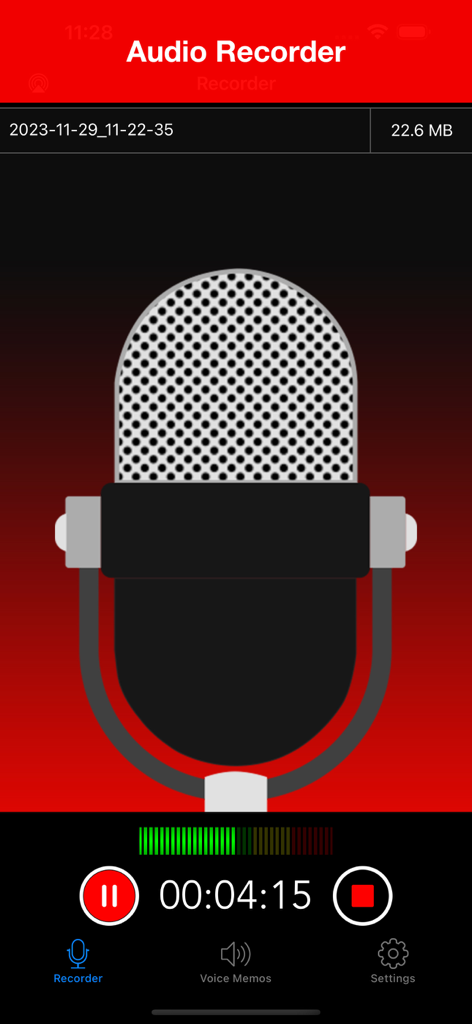
Active recording screen of the Voice Recorder app with a large microphone illustration and progress timer

Active recording screen of the Voice Recorder app with a large microphone illustration and progress timer

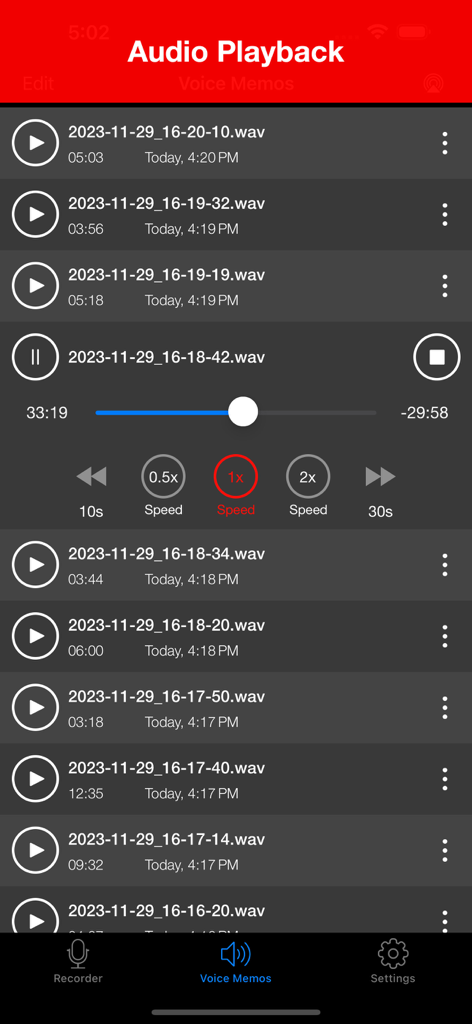
The audio playback interface of the Voice Recorder app showing a list of recorded memos and media controls including playback speed.

The audio playback interface of the Voice Recorder app showing a list of recorded memos and media controls including playback speed.

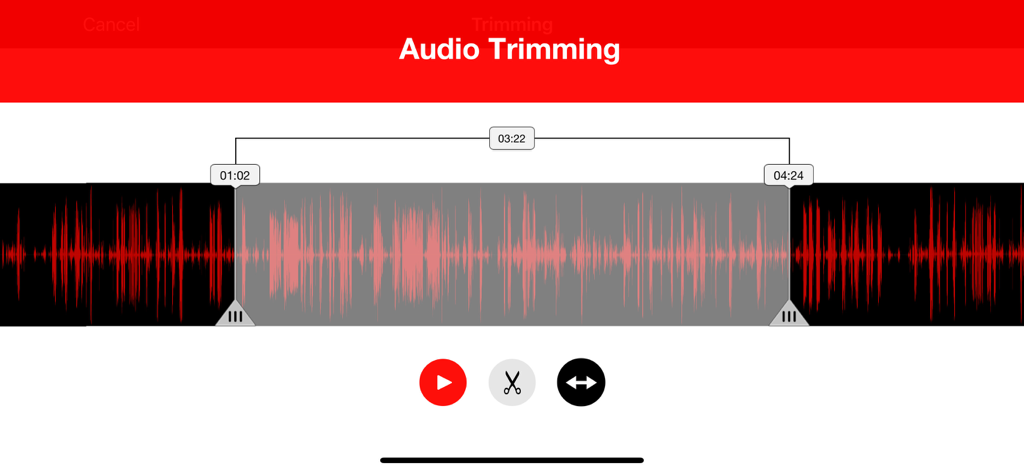
Audio trimming interface showing a red waveform with selection markers and editing tools

Audio trimming interface showing a red waveform with selection markers and editing tools

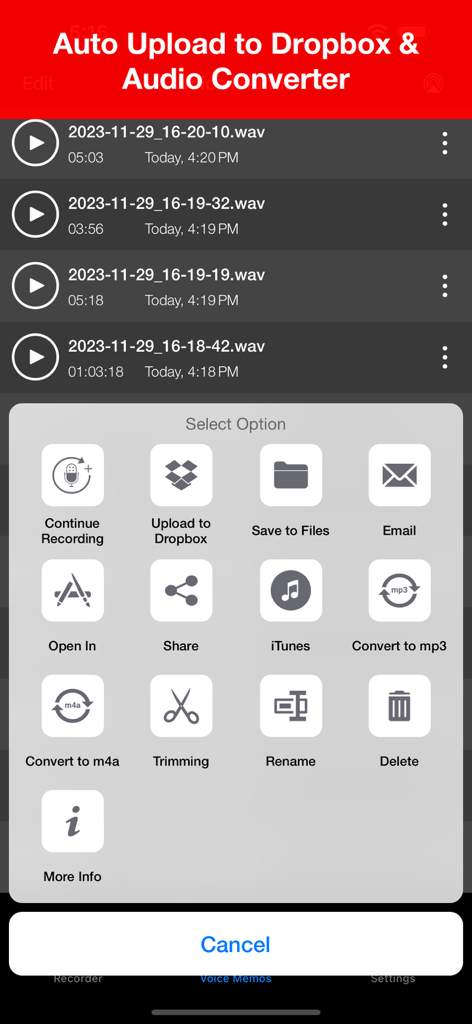
Voice recorder app interface showing options to upload to Dropbox and convert audio files

Voice recorder app interface showing options to upload to Dropbox and convert audio files

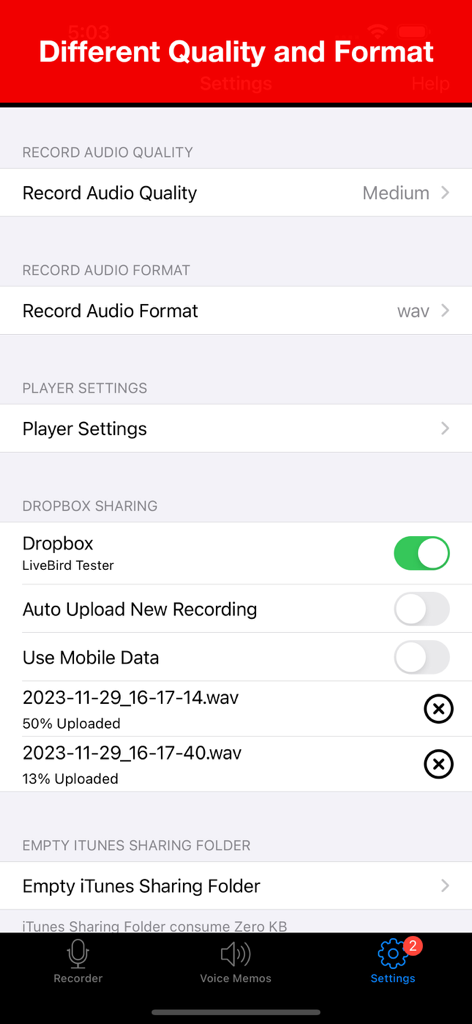
Voice Recorder app settings screen showing options for audio quality format and Dropbox cloud synchronization

Voice Recorder app settings screen showing options for audio quality format and Dropbox cloud synchronization

Capture Every Detail with Professional Clarity

The tools that make this app stand out, trusted by 734K+ users.

🎙️

Studio-Grade Audio Quality

Record in crystal-clear 44.1KHz quality with active noise reduction and full support for external Tascam or Bluetooth microphones.

☁️

Frictionless Cloud Workflow

Stay organized with auto-uploads to Dropbox and iCloud, allowing you to sync, trim, and share your files across devices instantly.

🛡️

Uninterrupted Reliability

Capture audio from up to 100 meters away with background recording and smart call-interruption handling that never drops a session.

Loved by users worldwide

Trusted by 734K+ people who love this app.

"

"This app is an absolute game-changer for my graduate studies. The 100-meter range allows me to capture every word from the back of large lecture halls, and the noise reduction is incredible at filtering out background chatter. I love how it automatically syncs to my iCloud so I can start transcribing on my Mac immediately after class."

Emily Chen, PhD Candidate
"

"Finally, a recorder that treats my iPhone like a professional tool. The support for external Bluetooth microphones and the ability to record in WAV format at high fidelity is exactly what I needed for my podcast interviews. It is incredibly reliable; even when a call comes in, it picks right back up without losing a single second of audio."

David Miller, Freelance Journalist

About the app

Everything you need to know about Voice Recorder - Audio Record.

Description

Live sound with its true feelings. Enjoy recording, playback and audio editing with Voice Recorder. We have fine tuned it for your day-to-day activities. Attending something important and want to record it for later playback, Voice Recorder will allow you to record your meetings, lectures, and other events with codec noise reduction technology. You can record anything within 10-100 meters around you. Edit the recording as per your need and save it for later playback. Voice Recorder has multiple playback options helping you decide how you want to hear your recording. Developed specially for Apple, it plays just as excellent with Apple EarPods as it plays with our old earphones. You can auto upload and even share the recording on cloud (Dropbox) in seconds. Voice Recorder is an easy to use and handy app to record the meeting, lecture, music and many more. The interface is designed to make it quick. With single tap you can record and share the recordings. Enjoy sound, record, edit, play and listen! List of Features # Audio Recorder - Quality options: (Low:8KHz, Medium:22.05KHz, High:44.1KHz) - Format options: (WAV, CAF, M4A) - External input device support : Bluetooth Mic, Other External Mic (Tested with Tascam mic) - Background recording support (New) - Continue recording into existing recordings. - Call Interruption handling - Recording will continue after a call or other interruption. # Audio Player - Quick audio player - Playback controls (Fast backward, Fast backward) - External output device support (Bluetooth and External speaker devices) - Background audio playing # Audio Trimming - Select a part of recording and trim it. # Sharing - Email recordings - Dropbox sharing (Auto upload recording support) - Upload to iCloud Drive - Import recordings to computer with iTunes file sharing - Airdrop sharing with iOS and Mac devices. # Universal App - Support for both iPhone and iPad devices. # AVAILABLE IN 11 DIFFERENT LANGUAGE English, Español, Français, Deutsch, Português (Br.),Português, Italiano, 中文 (Simplified), Русский, 日本語, 한국어

Latest Version

8.5

Size

35.4 MB

First Released

Nov 20, 2014

Elevate Your Audio Workflow Today

Join over 734,000 professionals and students who trust Voice Recorder for studio-quality, noise-reduced audio that syncs instantly to the cloud.

Download on App Store
FAQ

Frequently Asked Questions

Everything you need to know about Voice Recorder - Audio Record

What is Voice Recorder - Audio Record?

Voice Recorder - Audio Record is an iOS app designed for recording, playing back, and editing audio. It features noise reduction, multiple playback options, and sharing capabilities for various events.

Can Voice Recorder - Audio Record record audio in the background?

Yes, Voice Recorder - Audio Record supports background recording. The app continues recording even if a call or other interruption occurs during an active recording session.

What audio quality options are available in Voice Recorder - Audio Record?

Voice Recorder - Audio Record offers three audio quality options: Low (8KHz), Medium (22.05KHz), and High (44.1KHz). Users can select their preferred recording quality.

Does Voice Recorder - Audio Record support external microphones?

Yes, Voice Recorder - Audio Record supports external input devices. This includes Bluetooth microphones and other external mics, with Tascam mics specifically tested for compatibility.

Can I trim audio recordings in Voice Recorder - Audio Record?

Yes, Voice Recorder - Audio Record allows users to trim audio recordings. You can select a specific segment of a recording and precisely trim it to your desired length.

How can I share recordings from Voice Recorder - Audio Record?

Voice Recorder - Audio Record provides multiple sharing options, including email, Dropbox (with auto-upload), iCloud Drive, iTunes file sharing, and AirDrop for iOS and Mac devices.

Does Voice Recorder - Audio Record support auto-upload to cloud services?

Yes, Voice Recorder - Audio Record supports auto-uploading recordings to Dropbox. This feature can be enabled to automatically save new recordings to your connected cloud storage.

What playback speed options does Voice Recorder - Audio Record offer?

Voice Recorder - Audio Record offers playback speed controls. Users can adjust the playback speed to 0.5x, 1x (normal), or 2x to suit their listening preferences.

Is Voice Recorder - Audio Record a universal app for Apple devices?

Yes, Voice Recorder - Audio Record is a universal app. It provides full compatibility and support for both iPhone and iPad devices, ensuring a consistent user experience.

What audio formats does Voice Recorder - Audio Record support for recording?

Voice Recorder - Audio Record supports WAV, CAF, and M4A audio formats for recording. Users can select their desired recording format within the app's settings.