Yono Lite SBI

Yono Lite SBI

Download on App Store
Spark by MWM logo
Logo of Yono Lite SBI

Yono Lite SBI: Your Secure Financial Bridge to India

The essential mobile banking companion for the Indian diaspora. Manage your NRE/NRO accounts, transfer funds instantly, and handle bill payments back home with SBI's fastest and most reliable application.

Download on App Store

Publisher

State Bank of India

Category

Finance

Downloads

5M+

User Rating

4.0/5

Total Ratings

44K+

Locales

1

A Glimpse Inside

Discover the interface used by 5M+ users.
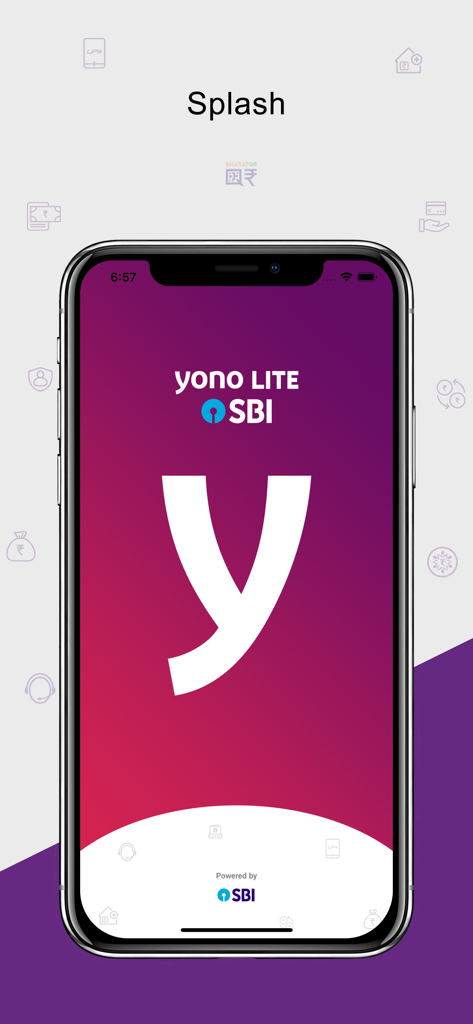
Splash screen of the Yono Lite SBI mobile banking app showing the y logo on a purple gradient background.

Splash screen of the Yono Lite SBI mobile banking app showing the y logo on a purple gradient background.

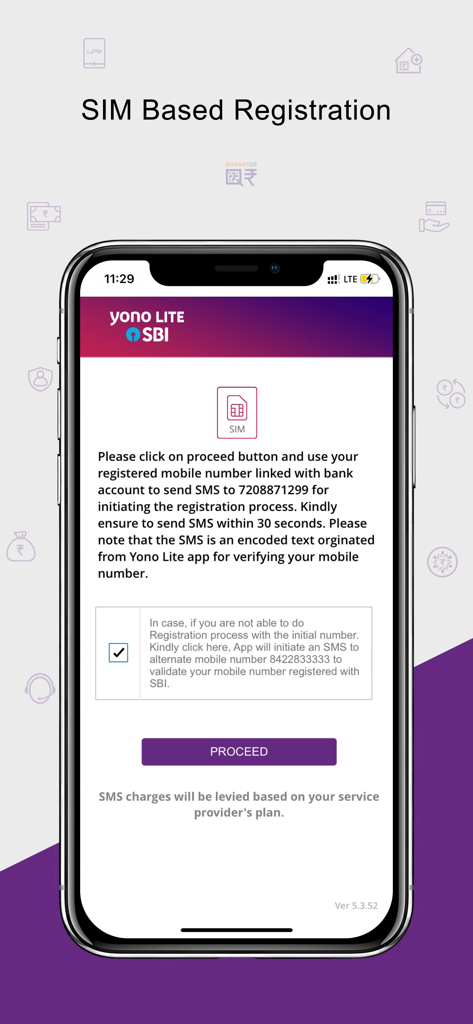
Yono Lite SBI app SIM based registration screen showing mobile number verification instructions.

Yono Lite SBI app SIM based registration screen showing mobile number verification instructions.

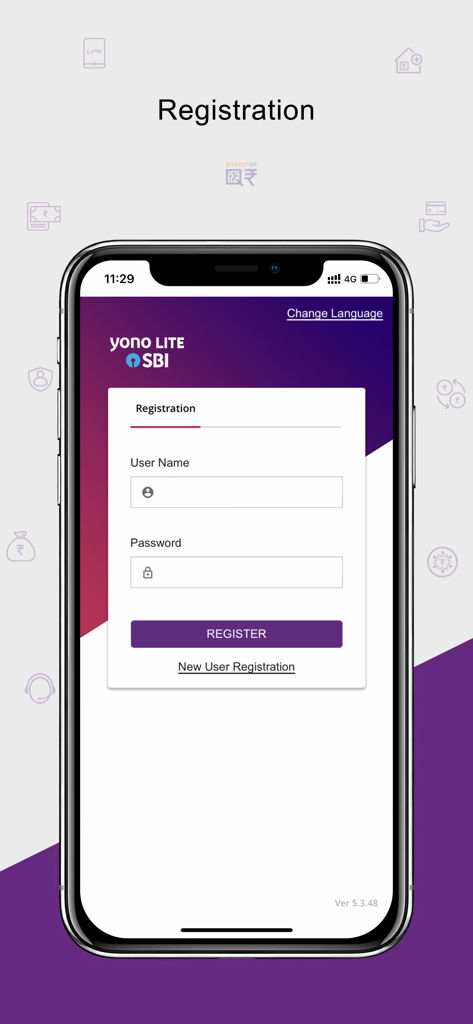
Registration screen of the Yono Lite SBI mobile banking application

Registration screen of the Yono Lite SBI mobile banking application

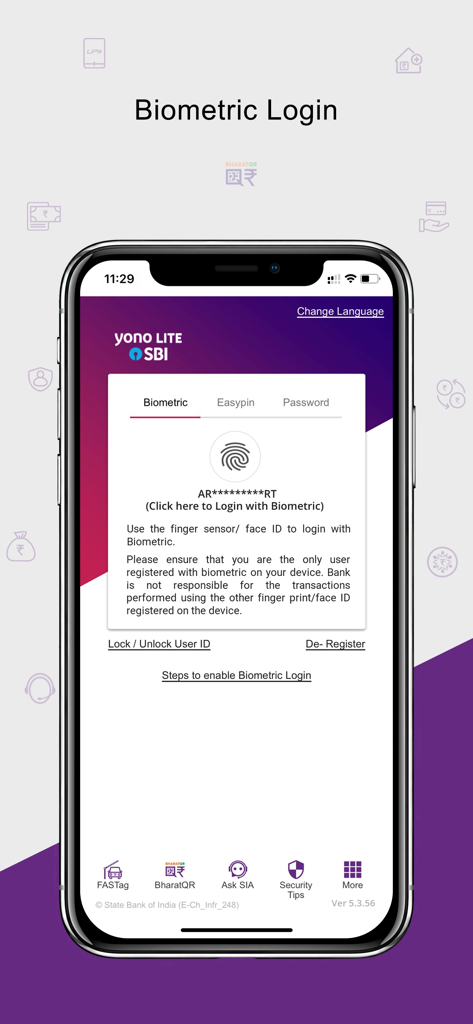
Yono Lite SBI mobile app biometric login screen with fingerprint authentication option

Yono Lite SBI mobile app biometric login screen with fingerprint authentication option

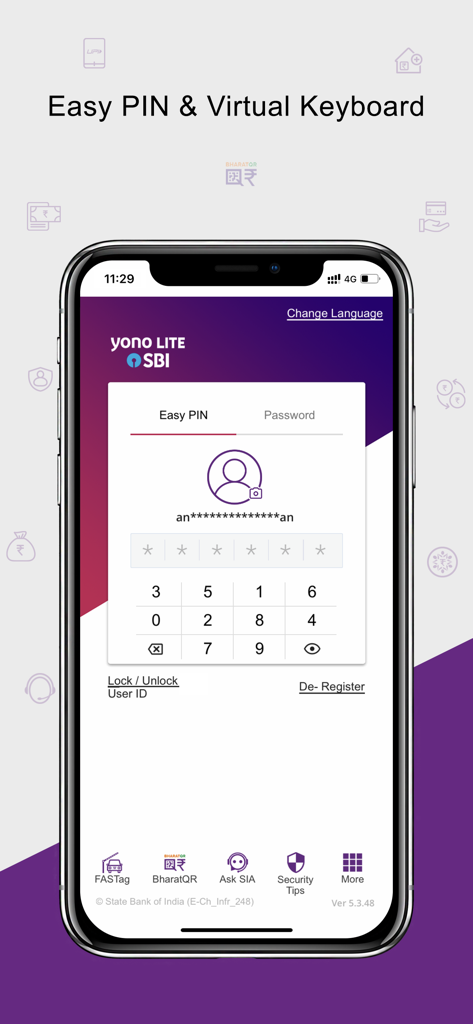
Yono Lite SBI mobile app login screen featuring the Easy PIN and virtual keyboard for secure access.

Yono Lite SBI mobile app login screen featuring the Easy PIN and virtual keyboard for secure access.

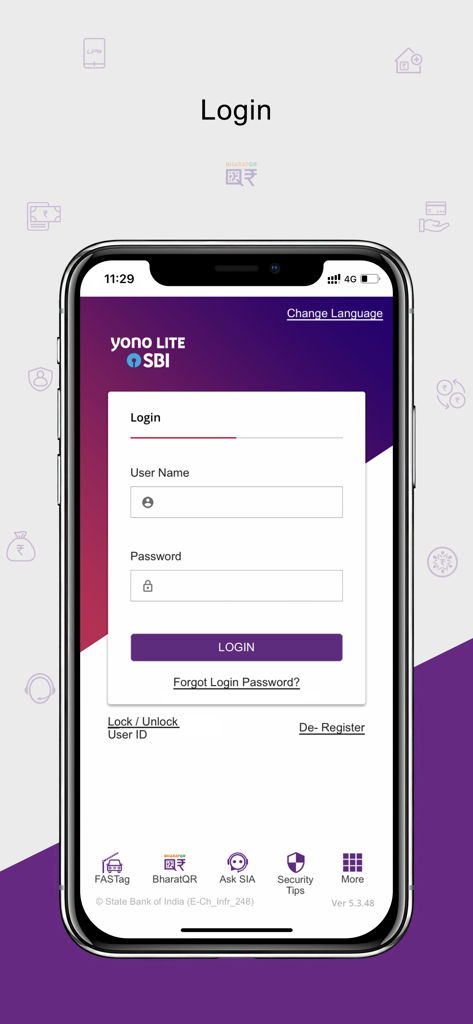
Login screen of the Yono Lite SBI mobile banking app with fields for username and password.

Login screen of the Yono Lite SBI mobile banking app with fields for username and password.

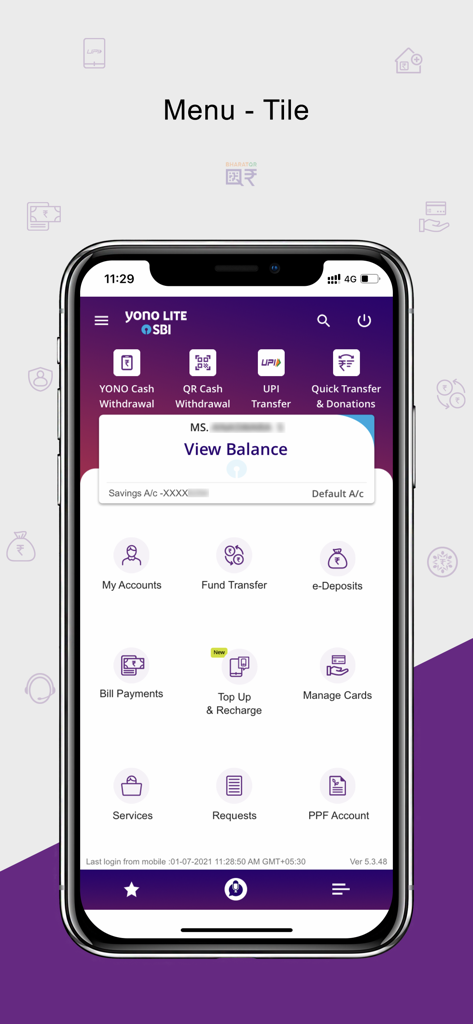
Yono Lite SBI mobile app dashboard showing menu tiles for fund transfer bill payments and account services

Yono Lite SBI mobile app dashboard showing menu tiles for fund transfer bill payments and account services

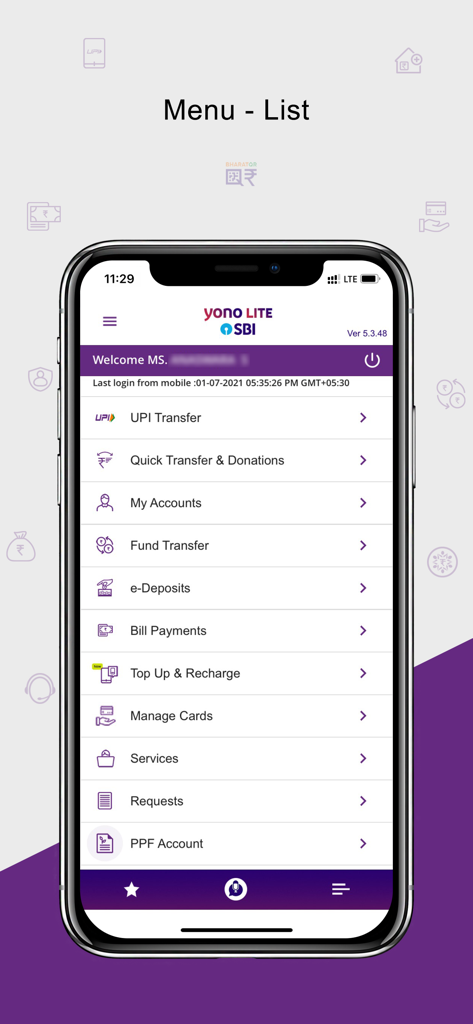
Main menu of the Yono Lite SBI app showing various banking options like UPI transfer, fund management, and bill payments.

Main menu of the Yono Lite SBI app showing various banking options like UPI transfer, fund management, and bill payments.

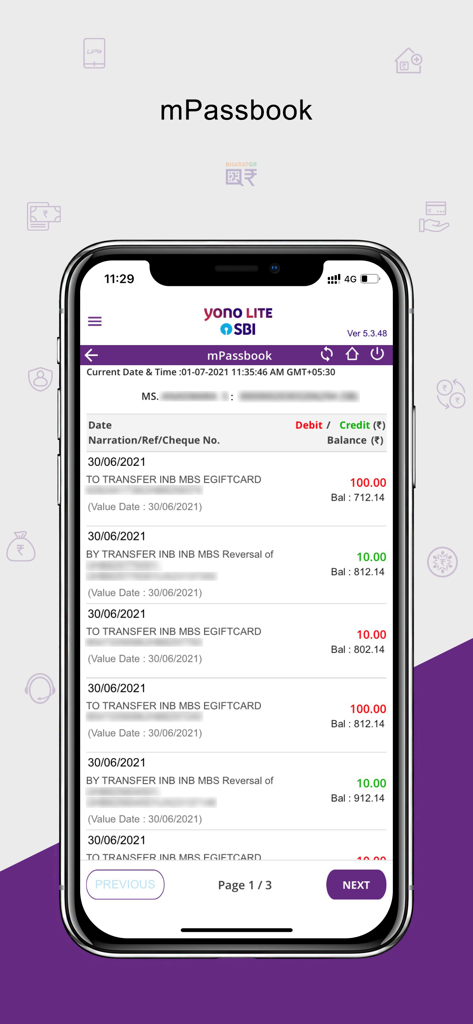
The mPassbook interface of the Yono Lite SBI app displaying a list of recent bank transactions with debit and credit amounts.

The mPassbook interface of the Yono Lite SBI app displaying a list of recent bank transactions with debit and credit amounts.

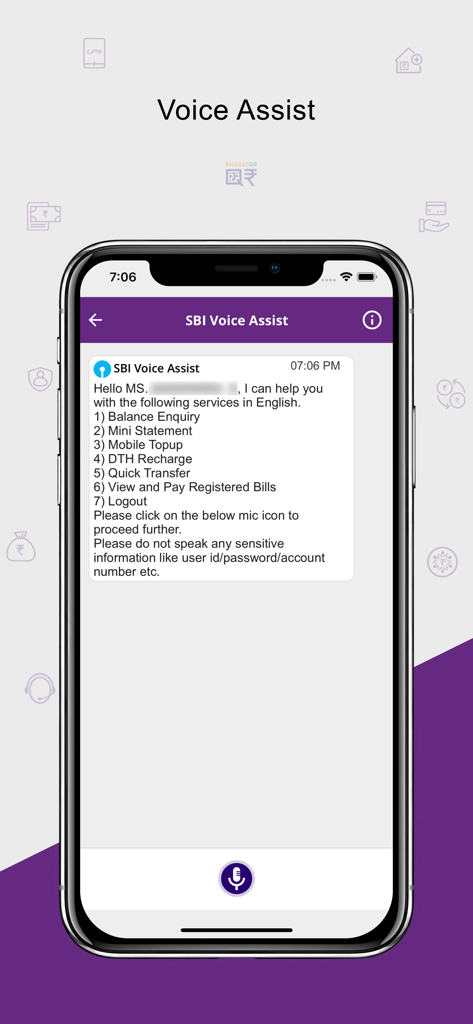
Yono Lite SBI app voice assist interface showing available banking services via voice command

Yono Lite SBI app voice assist interface showing available banking services via voice command

Your Financial Bridge to India

The tools that make this app stand out, trusted by 5M+ users.

💸

Instant Global Transfers

Send money to family or manage your Indian investments with quick IMPS and RTGS transfers directly from your smartphone.

🛡️

Secure NRI Account Management

Access your NRE/NRO accounts, view detailed transaction history, and download e-statements with bank-grade security protocols.

🧾

Seamless Bill Payments

Easily pay Indian utility bills, insurance premiums, and mobile recharges for yourself or your parents from anywhere in the world.

Loved by users worldwide

Trusted by 5M+ people who love this app.

"

"Managing my NRE and NRO accounts from California used to be a headache. Yono Lite is a game-changer—it is fast, secure, and lets me handle my Indian home loan payments and fund transfers in minutes. The interface is clean and doesn't feel cluttered like other banking apps."

Vikram S., Software Engineer in San Jose
"

"As an NRI, I need a reliable way to pay utility bills for my parents back home. This app makes it incredibly simple. I love the mPassbook feature to track my transactions on the go. It gives me real peace of mind knowing I am using a trusted SBI platform while living abroad."

Priya R., Healthcare Professional in New Jersey

Review Analysis

Insights from user reviews.

Sentiment Score

19%
Negative

Summary

The YONO Lite SBI app receives highly polarized feedback, with a substantial number of users reporting critical functional issues despite some praise for its fundamental aspects. While it is commended for its ease of use, general reliability, and providing essential banking features, many users frequently encounter problems such as app crashes, inability to log in, and recurring "technical issue" errors. A particularly prominent concern involves compatibility, with version 7.0.0 not working on IOS 26 and displaying messages about unmet minimum security requirements. Additionally, the new IPO application process is widely criticized for being problematic, and users desire improvements in features like transaction sharing, screenshot functionality, and passbook display.

Common Themes

Ease of Use(4)
App Reliability(2)
YONO Lite Preference(2)
Core Banking Features(1)
Security Measures(1)
Regular Updates(1)

About the app

Everything you need to know about Yono Lite SBI.

Description

Yono Lite SBI is Mobile Banking Smart Phone application for SBI Customers in English, Hindi, Telugu, Tamil, Kannada, Malayalam, Marathi, Gujarati, Punjabi, Bengali, Odia, Assamese, and Kashmiri languages. Yono Lite is SBI’s retail internet banking-based application for your smartphones. A safe, convenient, and easy to use application with a host of features to help users manage your finances on the move. Please complete the one-time registration process to start using the application. New Registration process: - A message will be shown on the screen regarding initiating an SMS to +917208871299 from the mobile device for validating user's mobile number. Users has to send this app generated encrypted SMS manually. Users have an option to retry sending SMS to an alternate number 8422833333. - Click on ‘Proceed’ button and an SMS containing a unique code will be sent from the device to a predefined number. Kindly note that for sending SMS will incur standard SMS charges as per your telecom SMS plan. - On registration screen, please enter Username and Password and click REGISTER button. - Accept the Terms & Conditions for registration by selecting the check box and click ‘Ok’ button. - An activation code will be sent to the registered mobile number. User has to complete the activation by inputting the Activation code in the app. - User can now login to Yono Lite application. Features: My Accounts • Detailed account information (Transaction / Deposit /Loan / PPF / SSA accounts) • Mini Statement (Last 10 transactions) • mPassbook (upto 150 transactions) • View /Download statement • eStatement Subscription • PPF Accounts Fund Transfer • Funds Transfer within Self Accounts • Third Party Transfer within SBI • Inter-Bank Transfer (RTGS / NEFT /IMPS) • Quick Transfer to Unregistered Beneficiaries using QR Code • IMPS Transfer (using IFSC & Account Number or Mobile Number & MMID) • Transfer to mobile number or email id using mCash • Schedule Transactions • Add / Manage Beneficiary eDeposits • Open Fixed Deposit • Open Recurring Deposit • Open Multi option deposit UPI • Fund Transfer to Unregistered beneficiaries through beneficiary VPA • Fund Transfer to registered beneficiaries using Account No & IFSC code • Dispute Status • Set UPI transaction limit within overall daily limit • Enable/ Disable UPI Manage Cards • Physical Debit Cards • Virtual Debit Cards • Prepaid Cards Bill / Merchant Payments • Pay Bills • SBI Life Premium • Credit Card (VISA) Transfer • Bill Payment History SBI Voice Assist • Voice assisted functionality to know Balance, mini-statement, Mobile & DTH recharge and Quick Transfer using voice instructions Top-up and Recharge options are available under 'Bill Payments' Menu • Mobile Recharge • DTH Recharge • Top-up of State Bank Prepaid Cards • Google Pay Recharge Code • Gift Voucher Requests • IPO • Get MMID • Cancel MMID • Cheque book • Positive Pay System • TDS Enquiry Services • Standing Instruction • Online Nomination • Submit 15 GH • Transfer of Savings account • eLocker • My Certificates Facility of QR based Cash withdrawal from ATMs. - User can withdraw cash by scanning the QR displayed on ATM screen through Yono Lite app. Quick Transfer and Donations • Send Money using Account Details • Donations Facility of Yono Cash for Card less cash withdrawal through ATMs Prelogin • Bhim SBI Pay • Bharat QR • FasTag • SBI Collect • Donations to Religious Entities • Bharat Bill Pay • SBI Finder • Complaints • Lock/Unlock User ID • Apply for Loan • FAQs • Ask SIA • Branch/ATM • Cyber Crime Helpline • Transit Cards • Complaints of Unauthorized Transactions

Latest Version

7.2.0

Size

85.8 MB

First Released

May 7, 2014

Secure Your Financial Bridge to India

Join over 5 million users who trust Yono Lite SBI for seamless NRI and NRE/NRO account management. Experience fast, secure, and multi-lingual banking designed for your life in the USA.

Download on App Store
FAQ

Frequently Asked Questions

Everything you need to know about Yono Lite SBI

What is Yono Lite SBI?

Yono Lite SBI is a mobile banking application developed for State Bank of India customers. It provides a safe, convenient, and easy way to manage personal finances, offering a host of banking features on the go.

How do I register for Yono Lite SBI?

To register for Yono Lite SBI, initiate an SMS to +917208871299 for mobile number validation. Then, enter your Username and Password, accept the Terms & Conditions, and activate the app using a code sent to your registered mobile number.

What languages does the Yono Lite SBI application support?

The Yono Lite SBI application supports multiple languages, including English, Hindi, Telugu, Tamil, Kannada, Malayalam, Marathi, Gujarati, Punjabi, Bengali, Odia, Assamese, and Kashmiri, for its SBI customers.

Can I transfer funds to other banks using Yono Lite SBI?

Yes, Yono Lite SBI supports inter-bank fund transfers through RTGS, NEFT, and IMPS. Users can also transfer funds within self accounts and to third parties within SBI, and to unregistered beneficiaries via QR code.

What types of cards can Yono Lite SBI users manage?

Yono Lite SBI allows users to manage physical debit cards, virtual debit cards, and prepaid cards. This feature helps users oversee various aspects of their card usage directly within the application.

Does Yono Lite SBI offer cardless cash withdrawal from ATMs?

Yes, Yono Lite SBI provides the Yono Cash facility for cardless cash withdrawal from ATMs. Users can also withdraw cash by scanning a QR code displayed on the ATM screen through the app.

Does Yono Lite SBI support biometric login?

Yes, Yono Lite SBI supports biometric login, allowing users to log in using a finger sensor or face ID if registered with biometric authentication on their device.

Are there SMS charges for Yono Lite SBI registration?

Yes, sending the app-generated encrypted SMS for mobile number validation during Yono Lite SBI registration incurs standard SMS charges as per your telecom service provider's plan.

What UPI features are available in the Yono Lite SBI app?

Yono Lite SBI's UPI features include fund transfers to unregistered beneficiaries via VPA, transfers to registered beneficiaries using account number and IFSC, dispute status checks, and the ability to set or enable/disable UPI transaction limits.

What services does SBI Voice Assist offer in Yono Lite SBI?

SBI Voice Assist in Yono Lite SBI offers balance enquiry, mini-statement, mobile and DTH recharge, quick transfers, and the ability to view and pay registered bills using voice instructions.