Camo Studio – Stream & Record

Camo Studio – Stream & Record

ダウンロード: App Store
Spark by MWM logo
ロゴ: Camo Studio – Stream & Record
Camo Studio – ストリーム&録画:iPad上のプロフェッショナル制作スタジオ

iPadをスタジオグレードのコマンドセンターに変えましょう。Twitchにコンソールゲームをストリーミングし、プロのオーバーレイで4K録画し、バックパックに入るデスクトップセットアップのパワーでどこでもライブ配信しましょう。

ダウンロード: App Store

開発元

Reincubate Ltd

カテゴリ

Photo & Video

ダウンロード

258K+

ユーザー評価

4.6/5

評価数

2K+

対応言語

1

あなたのスタジオ、どこでも

このインターフェースを利用する 258K+ 人のユーザー.

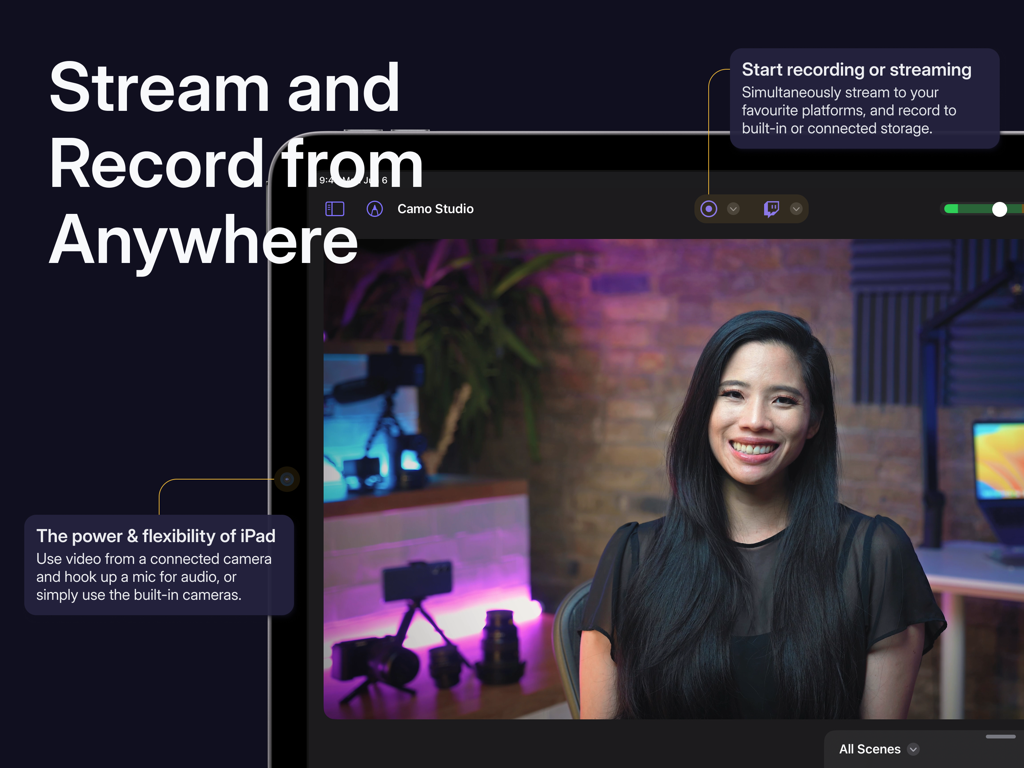
iPad上のCamo Studioアプリインターフェイス、ライブビデオストリームと録画コントロールを表示

iPad上のCamo Studioアプリインターフェイス、ライブビデオストリームと録画コントロールを表示

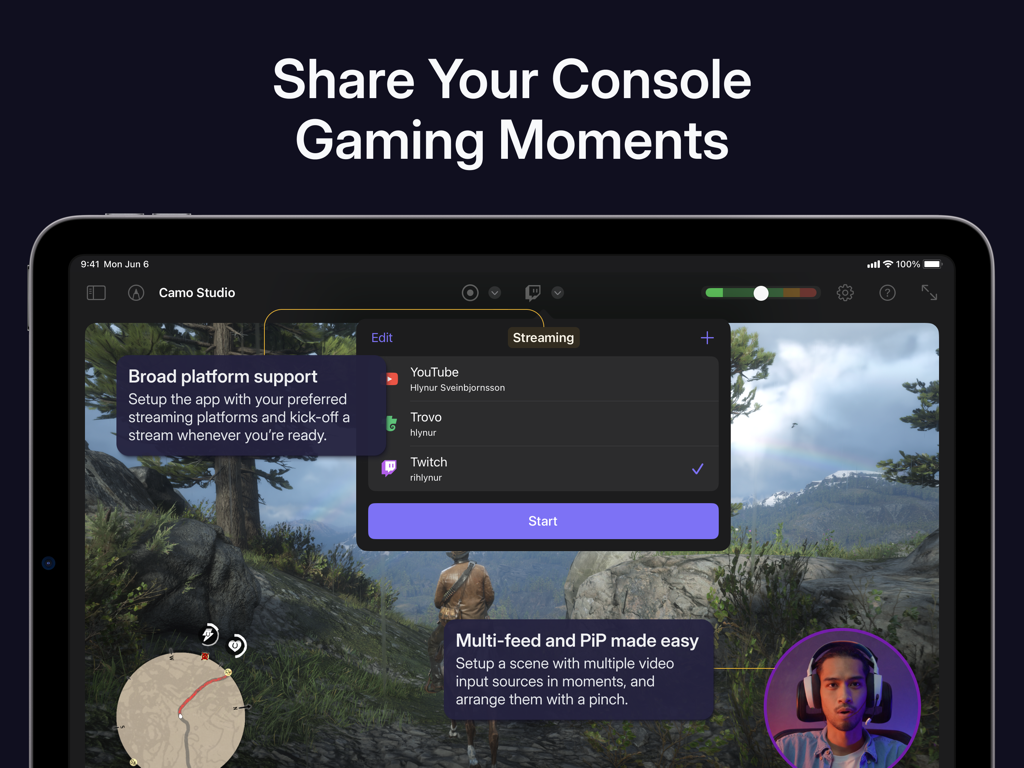
iPad上のCamo Studioのインターフェイス、プラットフォームオプションとピクチャーインピクチャーを備えたコンソールゲームストリームセットアップを表示

iPad上のCamo Studioのインターフェイス、プラットフォームオプションとピクチャーインピクチャーを備えたコンソールゲームストリームセットアップを表示

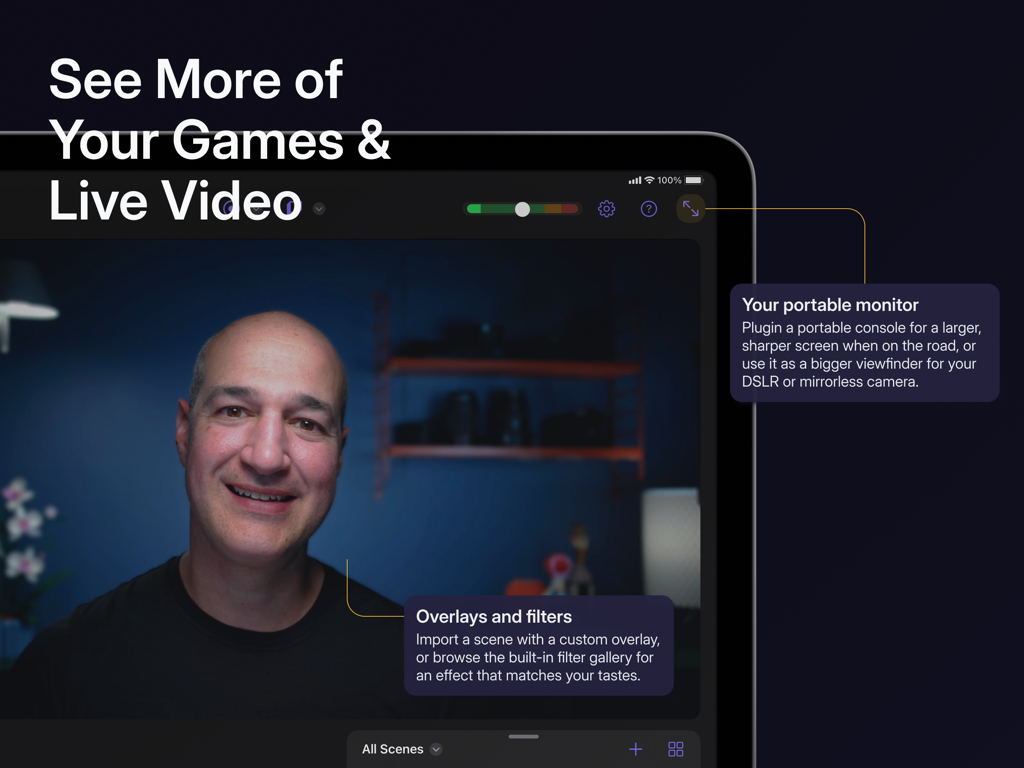
カスタムオーバーレイとフィルターを使用して、ライブビデオおよびゲームのポータブルモニターとしてiPad上のCamo Studioを使用している人

カスタムオーバーレイとフィルターを使用して、ライブビデオおよびゲームのポータブルモニターとしてiPad上のCamo Studioを使用している人

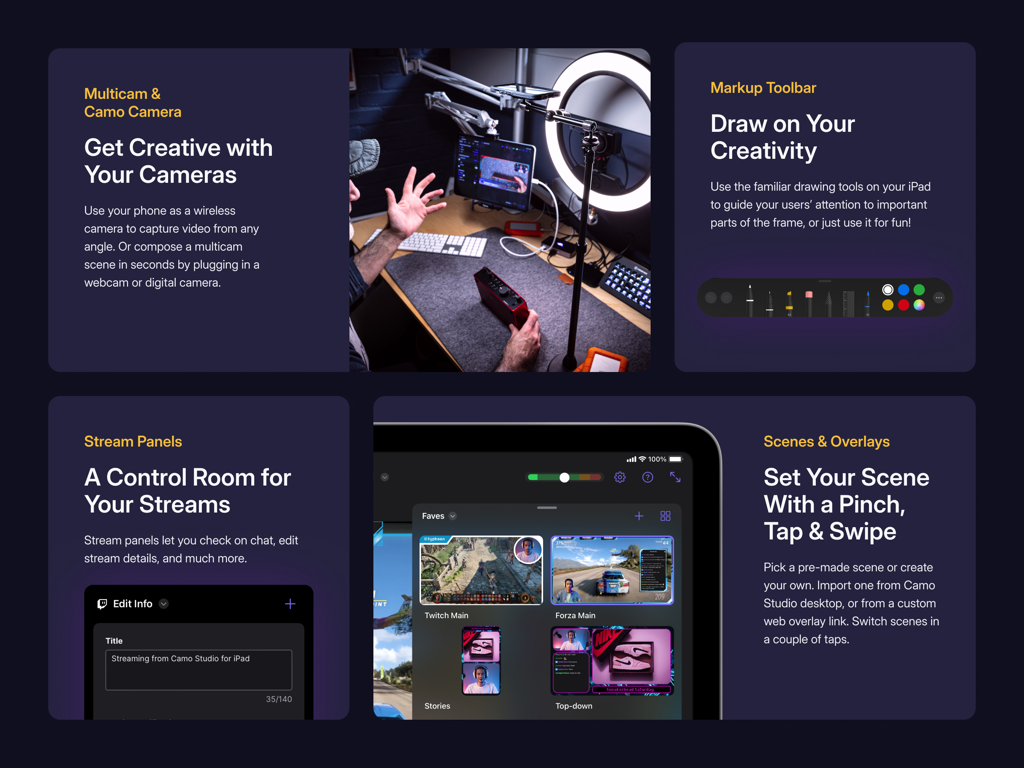
Camo Studioアプリインターフェイス、マルチカムサポートストリームパネルおよびシーンオーバーレイを表示

Camo Studioアプリインターフェイス、マルチカムサポートストリームパネルおよびシーンオーバーレイを表示

プロのように作成するために必要なすべて

このアプリを際立たせるツール、 258K+ 人のユーザーが選択.

🎮

究極のゲームセットアップ

キャプチャカード経由でコンソールを接続し、iPadをシャープなポータブルモニターとして使用しながら、お気に入りのプラットフォームにライブストリーミングしましょう。

🎨

プロのオーバーレイ&シーン

StreamElementsのWebオーバーレイでブランドを際立たせ、複数のシーンをカスタマイズして、ダイナミックでインタラクティブな視聴者体験を実現しましょう。

🚀

AI搭載ビジュアル

映画のような背景ボケ、インテリジェントな自動フレーミング、そして焦点を正確に合わせ続ける4K録画で差をつけましょう。それはあなたにあります。

世界中のユーザーに愛されています

Trusted by 258K+ 人がこのアプリを愛用しています.

"

"Camo Studioは、旅行中のストリームのために、かさばるPCセットアップを完全に置き換えました。SwitchのハイデフモニターとしてiPadを使用しながら、プロのオーバーレイでTwitchに同時にブロードキャストできるのは信じられないほどです。これは私のクリエイターキットの中で最も汎用性の高いツールです。"

Marcus T.、インディーストリーマー
"

"常に移動しているコンテンツクリエイターにとって、このアプリは命綱です。4K録画と組み込みのボケ効果により、以前はミラーレスカメラが必要だった映画のようなビデオの外観が得られます。インターフェースは直感的で、プライバシーを最優先するローカルストレージは大きなプラスです。"

Elena R.、ライフスタイルVlogger

アプリについて

について知っておくべきこと Camo Studio – Stream & Record.

説明

Dive into streaming, or record your next video, in just a few taps – hone your scene, connect your camera, and start creating with ease – all directly from your iPad. Why not try the iPad version of the 2023 Apple Design Award finalist app today? — STREAM & RECORD FROM ANYWHERE — Connect a camera and mic to your iPad and start streaming on the move, and simultaneously record your video to built-in storage or a connected SD card for editing and uploading high-quality content later. — SHARE YOUR CONSOLE GAMING MOMENTS — Stream console games with a capture card to Twitch, YouTube, Trovo and more. Setup your scene with tactile controls that make multi-feed and PiP (picture-in-picture) simple to configure. Take your streams to another level with web overlays, and always stay in control with integrated stream controls. — SEE MORE OF YOUR GAMES & LIVE VIDEO — Connect your iPad to your portable console, such as a Nintendo Switch, via a dongle or USB hub and use it as a bigger, sharper screen to heighten your gaming experience when you’re on the road. Or, if you’re looking to get a better viewfinder for your camera, plug it into your iPad and use it as a video monitor through Camo Studio. — SWITCH UP YOUR SCENES — Quickly switch between a collection of built-in or custom scenes with a tap to help engage your audience or show a different shot. Each scene can be configured individually with different cameras, video and audio sources, and output profiles. — PRO STREAMS WITH WEB OVERLAYS — Imbue your streams with your personal aesthetic, or a professional touch, with support for web overlays from StreamElements, Streams Labs, Uno Overlays and more. Import template or custom web overlays, with live content, alerts, embedded control panels, and a wide array of other widgets. — A ONE-APP STREAM CONTROL CENTRE — Stay in touch with your chat, trigger in-stream events, and check on your mods, all through Camo Studio’s stream panels. Add exactly the panels you need – each is custom to the streaming service you use, and gives you powerful controls for your livestreams. — POWERFUL VIDEO ENHANCEMENTS & ADJUSTMENTS — Camo Studio comes loaded with functionality that helps you stand out. Easily apply a subtle “Bokeh” effect to your background, or replace it or remove it entirely! Adjust the framing and orientation of each input feed, including Auto-framing modes that help you stay in-shot. — MAKE THE MOST OF YOUR IPAD — Your iPad supports connecting a breadth peripherals, external devices and cameras; making Camo Studio for iPad the most versatile Camo experience yet. M1 and M2 powered iPads can even run Camo Studio in the background while streaming or recording, capturing the device’s screen at the same time, and can integrate with your Stream Deck. — SECURITY AND PRIVACY FIRST — Camo Studio transmits your video directly to the streaming services of your choosing, and all recordings are entirely local to your iPad, connected storage device or selected storage service. Your data is your business, not ours. — NOT ONLY BUT ALSO! — - Pro-quality video in a range of resolutions, including 4K UHD, 1080p HD, and 720p - Built-in galleries come preloaded with backgrounds and filters to try in your videos - Work in landscape or portrait orientations, great for TikTok-style shots at 9:16 aspect ratio - Use your iPad’s front and back cameras as part of your scene - Looks great in light and dark mode - No ads in the app, ever — WE’RE HERE TO HELP — With millions of users trying our apps over the last decade, Reincubate is one of the UK’s most-loved software companies. We’re fanatical about supporting our users, and we’d love to help you make the most of Camo Studio on your iPad. Reach out to us any time: support@reincubate.com — LEARN MORE — About us: https://reincubate.com/camo/ipad/ How to make the most of Camo: https://reincubate.com/support/camo-ipad/how-to-use-camo-ipad/ FAQ: https://reincubate.com/support/camo-ipad/camo-ipad-faq/

最新バージョン

2.4.1

サイズ

112.1 MB

リリース日

2023年9月18日

コンテンツをレベルアップする準備はできましたか?

25万人以上のクリエイターに参加し、iPadをプロフェッショナルな放送 powerhouse に変えましょう。バックパックに入る受賞歴のある4Kストリーミングスタジオを体験してください。

ダウンロード: App Store
FAQ

よくある質問

について知っておくべきこと Camo Studio – Stream & Record

Camo Studio for iPadとは何ですか?

Camo Studio for iPadは、iPadから直接ビデオのストリーミングと録画、カメラとマイクの接続、ライブコンテンツの管理を可能にします。2023年のApple Design Awardファイナリストでした。

Camo StudioはiPadで直接ビデオを録画できますか?

はい、Camo Studioはストリーミングと同時に、iPadの内蔵ストレージまたは接続されたSDカードにビデオを録画します。これにより、後で高品質なコンテンツ編集が可能になります。

Camo Studioはどのプラットフォームでコンソールゲームのストリーミングをサポートしていますか?

Camo Studioは、Twitch、YouTube、Trovoなどのプラットフォームへのコンソールゲームのストリーミングをサポートしています。ユーザーは、ストリームのためにマルチフィードとピクチャーインピクチャーオプションでシーンを設定します。

Camo StudioでiPadをモニターとして使用できますか?

はい、Camo StudioはiPadをポータブルモニターに変えます。Nintendo Switchなどのコンソールに接続して大画面で表示したり、DSLR/ミラーレスカメラに接続してビューファインダーを改善したりできます。

Camo Studioはストリーム用のカスタムWebオーバーレイをサポートしていますか?

はい、Camo StudioはStreamElements、Stream Labs、Uno OverlaysなどのサービスからのWebオーバーレイをサポートしています。ユーザーは、ライブコンテンツ、アラート、ウィジェットを含むカスタムまたはテンプレートのオーバーレイをインポートします。

Camo Studioで利用できるビデオ強化機能は何ですか?

Camo Studioは、「ボケ」背景効果、背景の置き換えまたは削除、フレーミング調整などの強力なビデオ強化機能を提供します。また、被写体をショットに収めるための自動フレーミングモードも含まれています。

ストリーミングと録画にCamo Studioを使用する場合、私のデータはプライベートですか?

はい、Camo Studioはユーザーのプライバシーを優先します。ビデオは選択したストリーミングサービスに直接送信され、すべての録画はiPadまたは接続されたストレージにローカルに保存されます。あなたのデータは収集されません。

Camo Studioはどのビデオ解像度をサポートしていますか?

Camo Studioは、4K UHD、1080p HD、720pなどのプロ品質のビデオ解像度をサポートしています。また、さまざまなコンテンツ作成のために、ランドスケープとポートレートの両方の向きに対応しています。

Camo Studio for iPadはバックグラウンドで実行できますか?

はい、M1およびM2搭載のiPadにより、Camo Studioはストリーミングまたは録画中にバックグラウンドで実行できます。この機能は、デバイスからの同時画面キャプチャもサポートしています。

Camo Studioには広告が含まれていますか?

いいえ、Camo Studio for iPadはアプリケーション内に広告を表示しないため、中断のないユーザーエクスペリエンスを保証します。