Lazy Lighting

Lazy Lighting

ダウンロード: App Store
Spark by MWM logo
ロゴ: Lazy Lighting

Lazy Lighting: iPhoneとiPadのための再発明されたプロジェクションマッピング

数分であらゆる表面をデジタルキャンバスに変えましょう。アーティスト、DJ、クリエイター向けに、ラップトップ不要でプログレードのワーピング、マスキング、リアルタイムビジュアルを提供します。

開発元

AUDITY APPS LLC

カテゴリ

Graphics & Design

ダウンロード

49K+

ユーザー評価

4.0/5

評価数

100

対応言語

6

動きの中のビジュアル

このインターフェースを利用する 49K+ 人のユーザー.

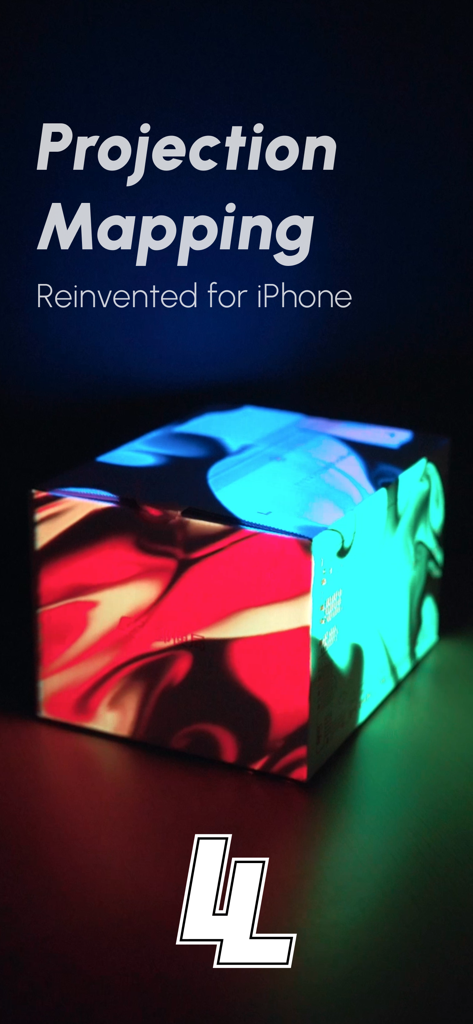
Lazy Lightingアプリを使用して、カラフルなプロジェクションライトパターンで箱に光を当てている様子

Lazy Lightingアプリを使用して、カラフルなプロジェクションライトパターンで箱に光を当てている様子

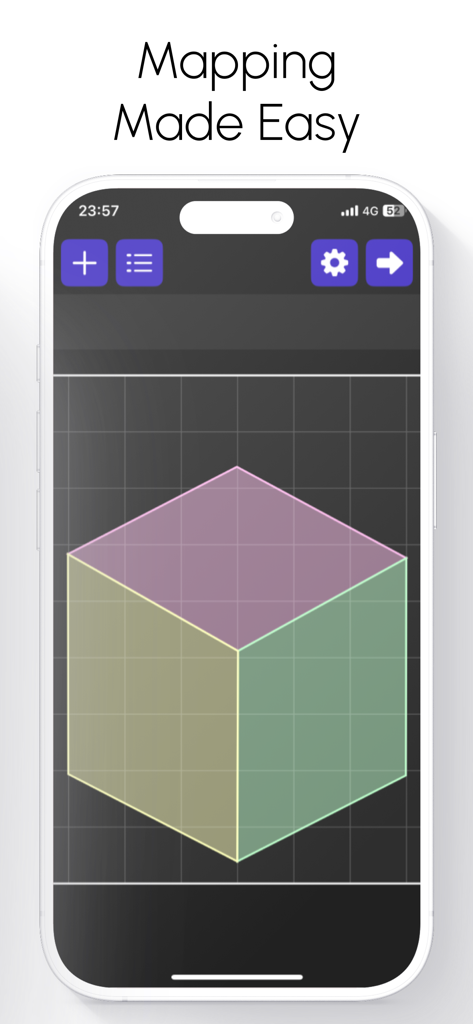
Lazy Lightingアプリのインターフェース。プロジェクションマッピングを容易にするための3DキューブグリッドがiPhoneに表示されている。

Lazy Lightingアプリのインターフェース。プロジェクションマッピングを容易にするための3DキューブグリッドがiPhoneに表示されている。

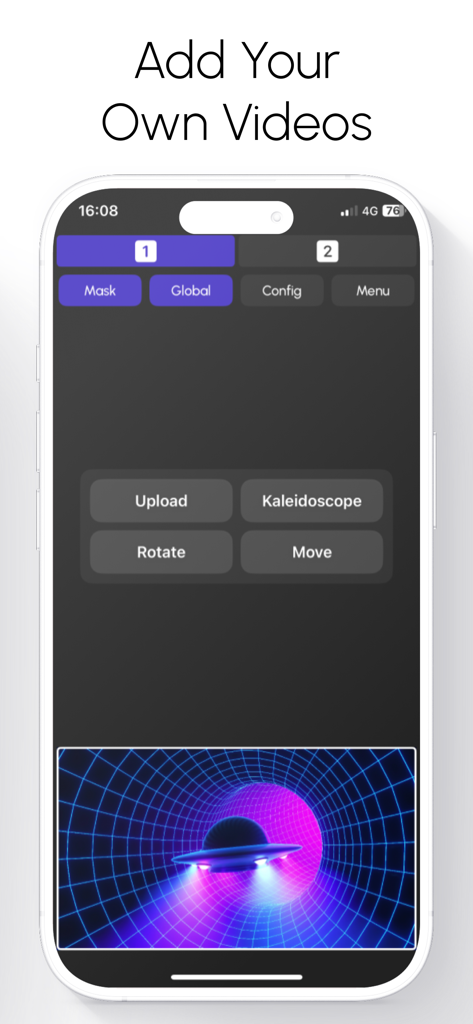
プロジェクションマッピング用のカスタムビデオの追加と編集を行うLazy Lightingアプリのインターフェースを示すスマートフォンの画面

プロジェクションマッピング用のカスタムビデオの追加と編集を行うLazy Lightingアプリのインターフェースを示すスマートフォンの画面

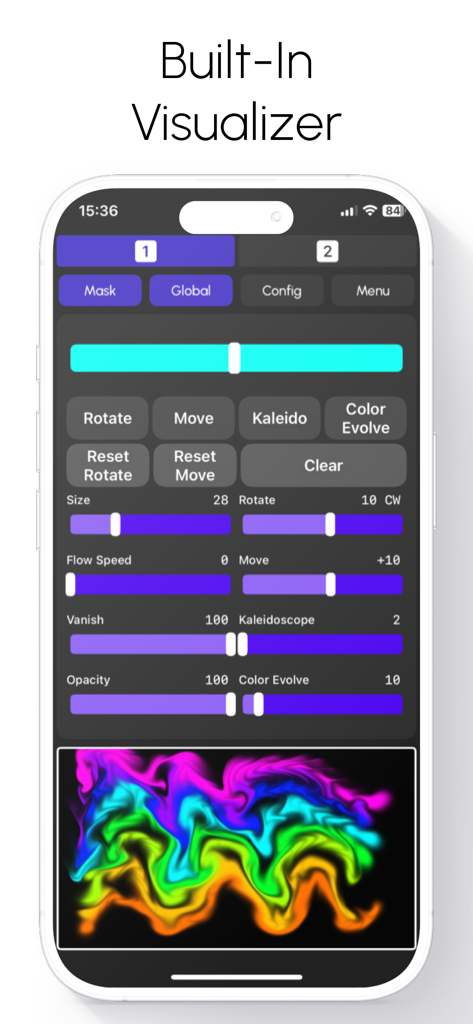
Lazy Lightingアプリのインターフェース。フロー速度、万華鏡効果、カラフルなネオンウェーブプレビューを調整できるスライダーを備えた組み込みビジュアライザーが表示されている

Lazy Lightingアプリのインターフェース。フロー速度、万華鏡効果、カラフルなネオンウェーブプレビューを調整できるスライダーを備えた組み込みビジュアライザーが表示されている

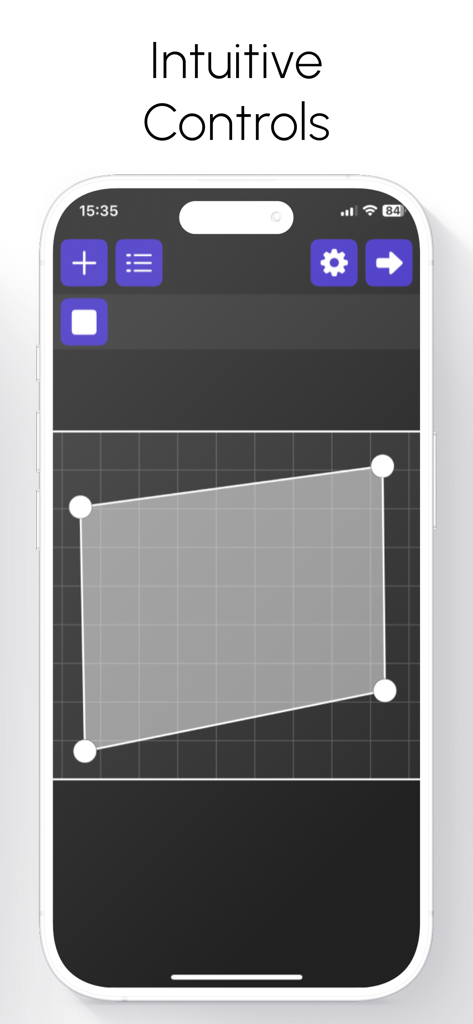
iPhone上で直感的なプロジェクションマッピングコントロールを示すLazy Lightingアプリのインターフェース。

iPhone上で直感的なプロジェクションマッピングコントロールを示すLazy Lightingアプリのインターフェース。

プロのマッピングをシンプルに

このアプリを際立たせるツール、 49K+ 人のユーザーが選択.

📐

直感的なタッチマッピング

複雑なワークフローはもう必要ありません。指を使って、不規則な表面やオブジェクトに、正確な精度でビジュアルを歪ませ、マスクし、完璧にフィットさせます。

🎛️

ライブパフォーマンスコントロール

デュアルチャンネルをミックスし、リアルタイムエフェクトをレイヤーし、プロのようにクロスフェードします。技術的な手間をかけずにインパクトのあるビジュアルを必要とするDJやVJに最適です。

📽️

制限のないプロジェクション

HDMI、USB-C経由で接続するか、AirPlayで完全にワイヤレスに。小規模ギャラリーからリビングルームのパーティーまで、あなたのクリエイティブスタジオがポケットに収まります。

世界中のユーザーに愛されています

Trusted by 49K+ 人がこのアプリを愛用しています.

"

"Lazy Lightingは私のライブセットにとって、まさにゲームチェンジャーです。以前は基本的なビジュアルのためだけに重いラップトップとケーブルの山を持ち運んでいましたが、今ではiPadから数分でステージグラフィックを直接マッピングできます。タッチ・トゥ・ワープ機能は信じられないほど正確で、観客はプロフェッショナルな仕上がりに驚嘆しました。ツアーミュージシャンとしての私のワークフローを完全に変えました。"

Marcus Reed
"

"私はテクノロジーの専門家ではありませんが、今年のホリデーディスプレイで何か特別なことをしたかったのです。このアプリのおかげで、プロジェクションマッピングはゲームのように感じられました。iPhoneだけを使って、家の不規則な表面にアニメーションを完璧にマッピングすることができました。使い方はとても簡単で、リアルタイムエフェクトは驚くほどです。一夜にして私の家を地元のランドマークに変えました!"

Sarah Jenkins

アプリについて

について知っておくべきこと Lazy Lighting.

説明

Projection Mapping. Reinvented for iPhone and iPad. Lazy Lighting makes projection mapping simple, affordable, and accessible to everyone. No computer. No expensive software. Just your iPhone or iPad and any projector. From small portable models to professional systems. Connect directly with HDMI, USB-C, or Lightning, or go completely wireless using AirPlay. Map walls, stages, sculptures, or any surface in minutes with an intuitive, touch-based interface. Whether you’re an artist, musician, or just experimenting at home, Lighting gives you the creative freedom of full projection mapping anywhere. Map Anything, Anywhere Lazy Lighting brings powerful projection mapping tools into a portable, easy-to-use app. You can project onto irregular surfaces, objects, or multiple panels without needing a laptop or complex setup. Simply aim your projector, open the app, and start shaping your visuals. Drag corners to fit perfectly, cut out areas with masking tools, and layer effects in real time. The entire mapping process is designed around direct touch interaction. Fast, precise, and incredibly intuitive. Key Features Projection Mapping Tools – Cut, mask, and warp visuals to perfectly match any surface or object. Draw Mode – Create visuals by hand in real time using a fluid drawing engine. Video Import – Load and map your own videos directly from your device’s library. Custom Shapes – Import vector outlines or logos to map specific designs or stage elements. Dual Channels – Mix, layer, and crossfade between two independent visuals for dynamic live control. Built-In Effects – Access a library of real-time visual effects including kaleidoscopes, tunnels, color morphs, and distortions. External Display Output – Project full-resolution visuals while keeping your control interface private. Wireless and Wired Compatibility – Works with AirPlay, HDMI, USB-C, and Lightning connections. Everything runs in real time, fully optimized for Apple’s graphics hardware, ensuring smooth playback even during complex visual setups. For Every Creator and Every Setup Artists and Creators – Bring walls, canvases, and sculptures to life with moving light. Bands and Performers – Add projection to your stage show without extra hardware or setup. Installations and Galleries – Design immersive spaces that react and evolve with light. Event Organizers – Transform venues, festivals, or exhibits with dynamic mapped visuals. Home Projection – Create ambient visuals for relaxation, parties, or decoration. Holiday Displays – Design your own Halloween, Christmas, or themed light shows effortlessly. Whether you’re using a $100 portable projector or a high-end stage setup, Lazy Lighting adapts perfectly to your hardware and environment. Simple Design, Professional Results Lazy Lighting is built around real-time performance and creative flow. The interface is clean, fast, and responsive, allowing you to stay focused on your visuals instead of menus and settings. Every parameter updates instantly, giving you complete control over colors, shapes, and movement. Because all rendering happens live, no two performances are ever the same. Every show feels organic, fluid, and unique. The Future of Projection Mapping Lazy Lighting brings the art of projection mapping into the modern era. Powerful enough for professionals, yet simple enough for anyone to use. It replaces complicated desktop workflows with a touch-first design built specifically for iPhone and iPad. You can create, perform, and project anywhere: no laptop, no cables, no extra equipment. From living room experiments to professional stage productions, Lazy Lighting delivers stunning real-time visuals that anyone can create. Lazy Lighting – Projection Mapping, Live Visuals, and Real-Time Video Effects. The easiest way to project, map, and perform with any projector, anywhere. Terms of Use: https://sites.google.com/view/lazylighting-terms Privacy Policy: https://sites.google.com/view/lazylighting-privacy

最新バージョン

2.6

サイズ

44.1 MB

リリース日

2025年9月21日

今日、あなたのビジョンを光に変えよう

ラップトップと高価なソフトウェアはもう不要です。49,000人以上のクリエイターに加わり、iPhoneまたはiPadを数分でプロフェッショナルなプロジェクションマッピングリグに変えましょう。

ダウンロード: App Store
FAQ

よくある質問

について知っておくべきこと Lazy Lighting

Lazy Lightingとは何ですか?

Lazy Lightingは、プロジェクションマッピングをシンプルでアクセスしやすいものに変えるiPhoneおよびiPadアプリです。コンピューターを必要とせずに、デバイスとプロジェクターを使用してあらゆる表面にビジュアルをマッピングできます。

Lazy Lightingはどのようにプロジェクターに接続しますか?

Lazy Lightingは、HDMI、USB-C、Lightningケーブル、またはAirPlayを介したワイヤレス接続でプロジェクターに接続します。これにより、さまざまなプロジェクター設定に対応する柔軟なオプションが提供されます。

Lazy Lightingで自分の動画を使用できますか?

はい、Lazy Lightingでは、デバイスのライブラリから直接自分の動画をインポートしてマッピングできます。この機能により、個人的なコンテンツをプロジェクションマッピングプロジェクトに統合できます。

Lazy Lightingはどのような表面に投影できますか?

Lazy Lightingは、壁、ステージ、彫刻、不規則な表面、オブジェクト、または複数のパネルなど、さまざまな表面に投影できます。あらゆる環境に合わせて正確なマッピングが可能です。

Lazy Lightingには組み込みのビジュアルエフェクトがありますか?

はい、Lazy Lightingには組み込みのリアルタイムビジュアルエフェクトのライブラリが含まれています。これらのエフェクトは、カレイドスコープ、トンネル、カラーモーフィング、歪みを特徴とし、プロジェクションを動的に強化します。

Lazy Lightingはライブパフォーマンスに使用できますか?

はい、Lazy Lightingはライブパフォーマンス向けに設計されています。リアルタイムコントロール、ビジュアルミキシング用のデュアルチャンネル、Appleのグラフィックハードウェアに最適化されたスムーズな再生機能を提供し、ダイナミックなショーに最適です。

Lazy Lightingのマッピングツールの主な機能は何ですか?

Lazy Lightingのマッピングツールを使用すると、ユーザーはビジュアルをカット、マスク、ワープできます。これにより、直接的なタッチ操作でガイドされ、あらゆる表面やオブジェクトに正確に合わせるための微調整が可能になります。

Lazy Lightingでプロジェクションマッピングにラップトップが必要ですか?

いいえ、Lazy Lightingでプロジェクションマッピングにラップトップは必要ありません。すべてのマッピングタスクをiPhoneまたはiPadから直接実行できるため、複雑なデスクトップワークフローを置き換えることができます。