Cisco Secure Client

Cisco Secure Client

ダウンロード: App Store
Spark by MWM logo
ロゴ: Cisco Secure Client

Cisco Secure Client:ハイブリッドなワークスペースをシームレスに保護

常時接続の暗号化ネットワーク接続における業界標準。業務に必要な信頼性とパフォーマンスで、企業リソース、ビジネスメール、重要なアプリにアクセスできます。

開発元

Cisco

カテゴリ

Business

ダウンロード

14M+

ユーザー評価

3.2/5

評価数

8K+

対応言語

1

インターフェースを見る

このインターフェースを利用する 14M+ 人のユーザー.

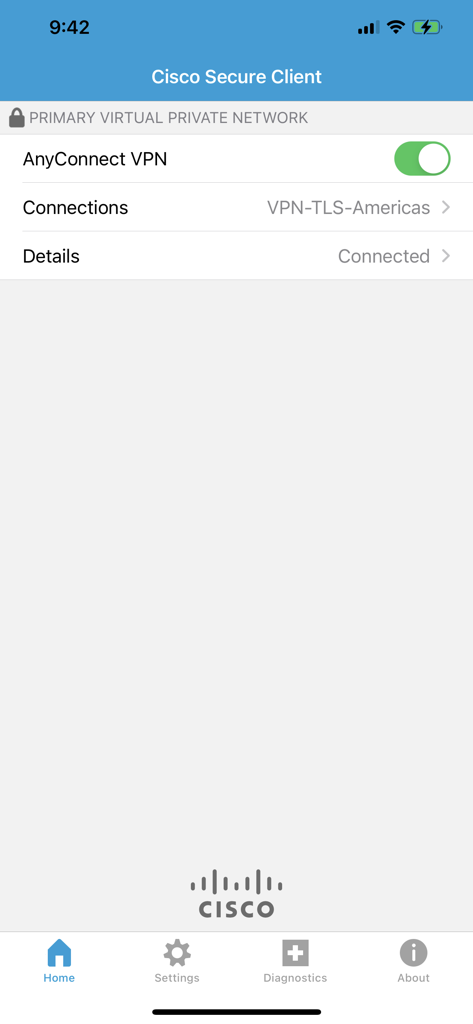
iPhoneでVPN接続ステータスを表示しているCisco Secure Clientアプリのホーム画面

iPhoneでVPN接続ステータスを表示しているCisco Secure Clientアプリのホーム画面

現代のプロフェッショナルのためのエンタープライズ級アクセス

このアプリを際立たせるツール、 14M+ 人のユーザーが選択.

🔄

シームレスなネットワークローミング

手動での再起動なしで接続を維持。自宅のWi-Fi、公共のホットスポット、モバイルデータ通信の間を移動しても、VPNセッションは自動的に再開されます。

🛡️

堅牢なセキュリティとコンプライアンス

次世代の暗号化と多要素認証で機密性の高い企業データを保護し、HIPAA、金融、政府の厳しいセキュリティ基準への準拠を確実にします。

リアルタイム作業に最適化

ラグのないビデオ通話とクリアなVoIPセッションを体験。DTLSテクノロジーが遅延に敏感なトラフィックを優先するため、会議を中断することなくプロフェッショナルな状態に保ちます。

世界中のユーザーに愛されています

Trusted by 14M+ 人がこのアプリを愛用しています.

"

"新しいCisco Secure Clientへの移行は完璧でした。DTLSのサポートによりVoIP通話に明らかな違いが生じ、5GとオフィスのWi-Fiを切り替える際のネットワークローミングも驚くほど安定しています。iOSで使用した中で最も信頼できるVPNクライアントです。"

David L.、シニア ネットワーク エンジニア
"

"仕事で常に移動している私にとって、作業を停滞させないセキュリティが必要です。このアプリは瞬時に接続され、空港の公共ネットワーク上でも企業データを安全に保ちます。シンプルで信頼性が高く、私のリモートワークフローには欠かせません。"

Sarah M.、プロジェクト ディレクター

アプリについて

について知っておくべきこと Cisco Secure Client.

説明

This is the Cisco Secure Client (including AnyConnect VPN) application for Apple iOS. Please report any questions to ac-mobile-feedback@cisco.com. Please consult with your EMM/MDM vendor on configuration changes required to configure this new version if you are not setting it up manually. Samples at: https://community.cisco.com/t5/security-blogs/anyconnect-apple-ios-transition-to-apple-s-latest-vpn-framework/ba-p/3098264 LICENSING AND INFRASTRUCTURE REQUIREMENTS: You must have an active AnyConnect Plus, Apex or VPN Only term/contract to utilize this software. Use is no longer permitted for older Essentials/Premium with Mobile licensing. AnyConnect may never be used with non-Cisco servers. Trial AnyConnect Apex (ASA) licenses are available for administrators at www.cisco.com/go/license AnyConnect for iOS requires Cisco Adaptive Security Appliance (ASA) Boot image 8.0(4) or later. Per App VPN requires ASA 9.3(2) or later (5500-X/ASAv only) with Plus, Apex or VPN Only licensing and a minimum Apple iOS version of 10.x. For additional licensing questions, please contact ac-mobile-license-request (AT) cisco.com and include a copy of "show version" from your Cisco ASA. Ordering and Licensing Guide: https://www.cisco.com/c/en/us/products/collateral/security/anyconnect-secure-mobility-client/secure-client-og.html Cisco Secure Client (including AnyConnect VPN) provides reliable and easy-to-deploy encrypted network connectivity from any Apple iOS by delivering persistent corporate access for users on the go. Whether providing access to business email, a virtual desktop session, or most other iOS applications, AnyConnect enables business-critical application connectivity. Through the use of Datagram Transport Layer Security (DTLS), TCP-based applications and latency-sensitive traffic (such as voice over IP [VoIP]) are provided an optimized communication path to corporate resources. Additionally, the Cisco Secure Client support IPsec IKEv2 with Next Generation Encryption. Features: - Automatically adapts its tunneling to the most efficient method possible based on network constraints, using TLS and DTLS. - DTLS provides an optimized connection for TCP-based application access and latency-sensitive traffic, such as VoIP traffic - Network roaming capability allows connectivity to resume seamlessly after IP address change, loss of connectivity, or device standby - Wide Range of Authentication Options: RADIUS, RSA SecurID, Active Directory/Kerberos, Digital Certificates, LDAP, multifactor authentication - Supports certificate deployment using Apple iOS and AnyConnect integrated SCEP - Compatible with Apple iOS Connect On Demand VPN capability for automatic VPN connections when required by an application - Policies can be preconfigured or configured locally, and can be automatically updated from the VPN headend - Access to internal IPv4 and IPv6 network resources - Administrator-controlled split / full tunneling network access policy - Per App VPN (TCP and UDP) - MDM controlled If you are an end-user and have any issues or concerns, please contact your organization’s support department. If you are a System Administrator having difficulties configuring or utilizing the Application, please contact your designated support point of contact. Release Notes: https://www.cisco.com/c/en/us/support/security/anyconnect-secure-mobility-client/products-release-notes-list.html User Guide: https://www.cisco.com/c/en/us/support/security/anyconnect-secure-mobility-client/products-user-guide-list.html End user license: https://www.cisco.com/c/dam/en_us/about/doing_business/legal/seula/anyconnect-SEULA-v4x.pdf

最新バージョン

5.1.11423

サイズ

24.7 MB

リリース日

2017年6月14日

シームレスな接続。絶対的なセキュリティ。

信頼される業界標準で、ハイブリッドなワークスペースを強化。Cisco Secure Clientをダウンロードして、あらゆる場所から企業リソースに安全にアクセスしましょう。

ダウンロード: App Store
FAQ

よくある質問

について知っておくべきこと Cisco Secure Client

Cisco Secure Client for iOSとは何ですか?

Cisco Secure Client (AnyConnect VPNを含む)は、Apple iOSデバイスに信頼性が高く暗号化されたネットワーク接続を提供し、ユーザーに永続的な企業アクセスを実現します。ビジネスに不可欠なアプリケーション接続をサポートします。

Cisco Secure ClientはApple iOSでVPNをサポートしていますか?

はい、Cisco Secure ClientにはAnyConnect VPNが含まれており、あらゆるApple iOSデバイスから暗号化されたネットワーク接続を可能にします。外出中のユーザーに永続的な企業アクセスを提供します。

Cisco Secure Client (AnyConnect VPN)の使用にはどのようなライセンスが必要ですか?

アクティブなAnyConnect Plus、Apex、またはVPN Onlyの期間契約が必要です。古いEssentials/Premium with Mobileライセンスは、Cisco Secure Clientでの使用は許可されていません。

iOSでCisco Secure Clientを使用するには、どのCisco ASAバージョンが必要ですか?

iOS用Cisco Secure Clientには、Cisco Adaptive Security Appliance (ASA) Boot image 8.0(4)以降が必要です。Per App VPN機能にはASA 9.3(2)以降が必要です。

Cisco Secure ClientはどのようなVPNトンネリング方法を使用しますか?

Cisco Secure Clientは、ネットワークの制約に基づいて、TLSとDTLSを使用して最適な接続を実現する、最も効率的な方法にトンネリングを自動的に適応させます。

Cisco Secure Clientは多要素認証 (MFA) をサポートしていますか?

はい、Cisco Secure Clientは、多要素認証 (MFA)、RADIUS、RSA SecurID、Active Directory/Kerberos、デジタル証明書、LDAPなど、幅広い認証オプションをサポートしています。

Cisco Secure ClientはiOSでVPNを自動的に接続できますか?

はい、Cisco Secure Clientは、アプリケーションが必要とする場合に自動的にVPN接続を行うApple iOS Connect On Demand VPN機能と互換性があります。

Cisco Secure ClientでVPN接続ステータスを確認するにはどうすればよいですか?

アプリの上部に「PRIMARY VIRTUAL PRIVATE NETWORK」と表示され、「Details」の下に「Connected」と表示されることで、アクティブなVPN接続を確認できます。「AnyConnect VPN」の緑色のトグルがアクティブであることを示します。