Fitbit Sync to Apple Health

Fitbit Sync to Apple Health

ダウンロード: App Store
Spark by MWM logo
ロゴ: Fitbit Sync to Apple Health
FitbitをApple Healthに同期:フィットネスデータの究極のブリッジ

24の主要なヘルスケア指標をFitbitからApple Healthへ自動転送します。手動入力をやめ、履歴データを保存し、簡単なセットアップでiPhone上のフィットネスジャーニーを一元化しましょう。

ダウンロード: App Store

開発元

MPR MEDIA INC

カテゴリ

Health & Fitness

ダウンロード

130K+

ユーザー評価

4.6/5

評価数

10K+

対応言語

1

アクションにおけるデータの調和

このインターフェースを利用する 130K+ 人のユーザー.

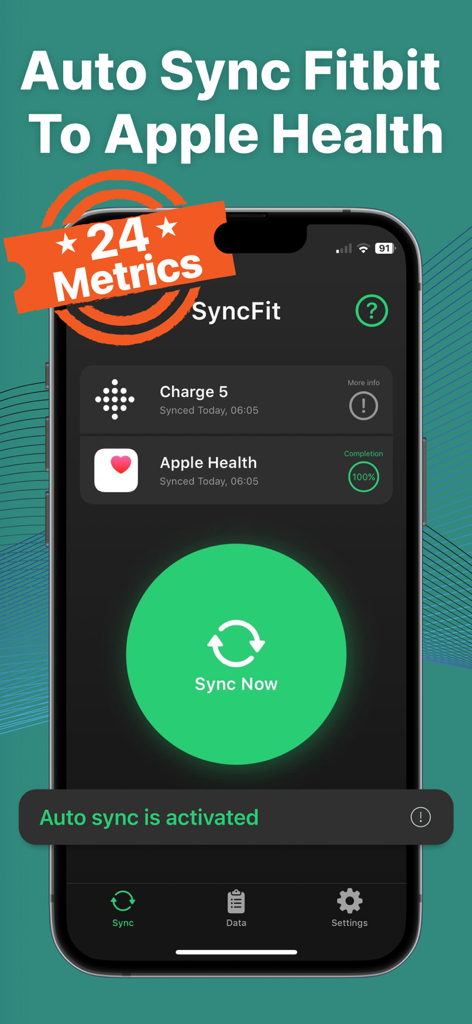
Fitbit Charge 5とApple Health間の同期が成功し、自動同期が有効になっているSyncFitアプリのダッシュボードを表示

Fitbit Charge 5とApple Health間の同期が成功し、自動同期が有効になっているSyncFitアプリのダッシュボードを表示

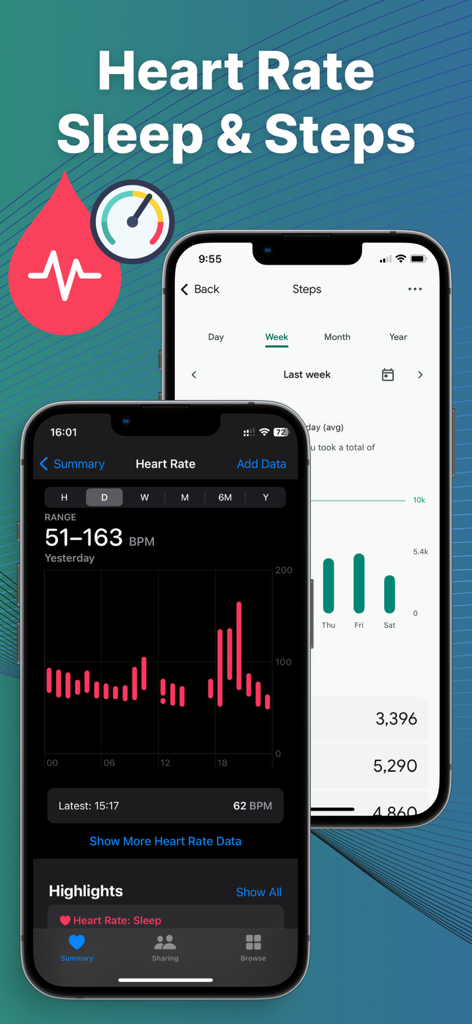
iPhone上のApple Healthに同期されたFitbitの心拍数と歩数のデータ

iPhone上のApple Healthに同期されたFitbitの心拍数と歩数のデータ

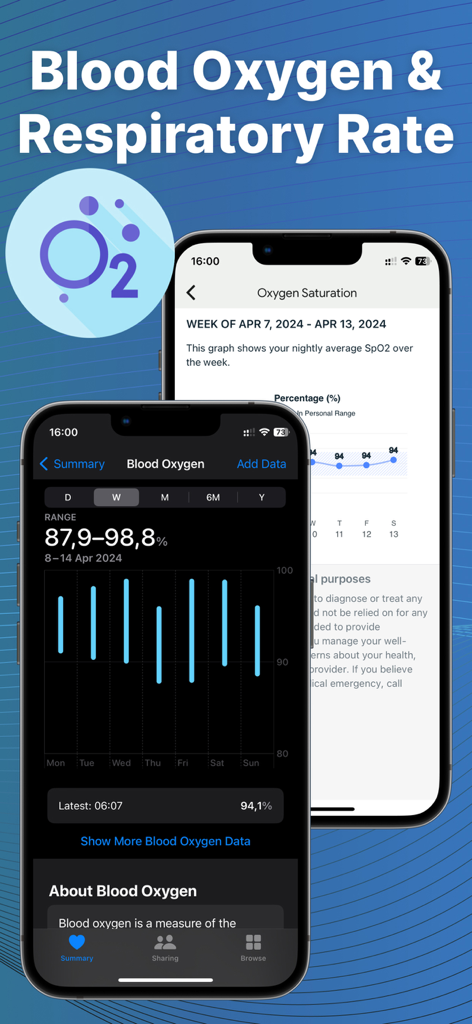
FitbitからApple Healthへの血中酸素濃度と呼吸数データの視覚化を示すSyncfitアプリのインターフェース

FitbitからApple Healthへの血中酸素濃度と呼吸数データの視覚化を示すSyncfitアプリのインターフェース

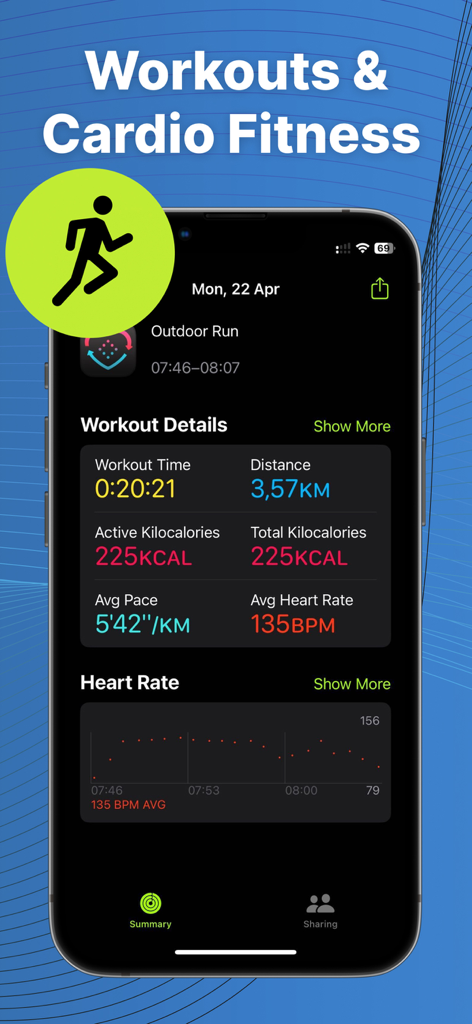
Apple Healthに同期された詳細なワークアウト概要と心拍数データ

Apple Healthに同期された詳細なワークアウト概要と心拍数データ

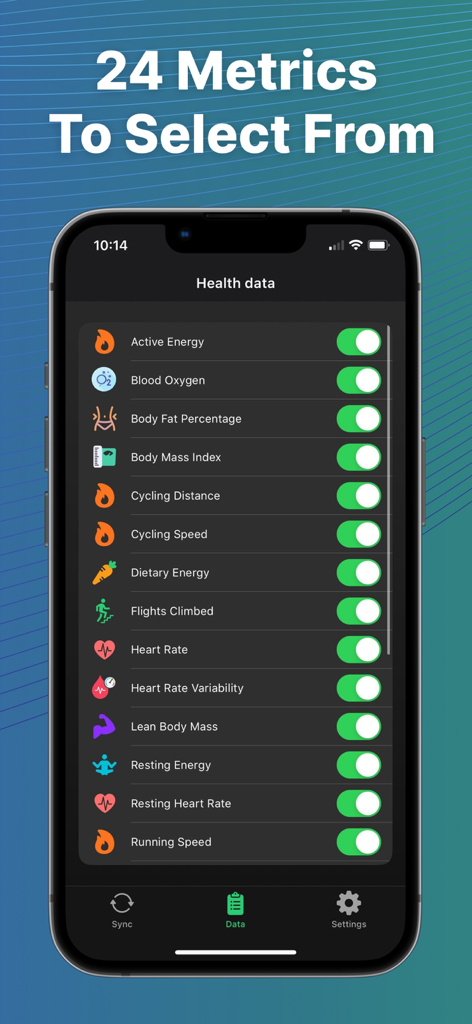
iPhone画面上のFitbitからApple Healthに同期可能な24のヘルスケア指標のリスト

iPhone画面上のFitbitからApple Healthに同期可能な24のヘルスケア指標のリスト

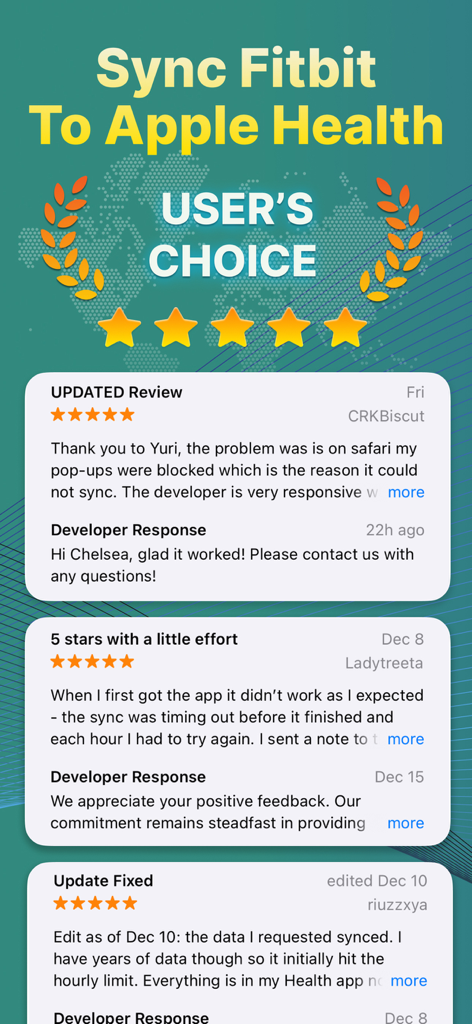
FitbitをApple Healthに同期するアプリのユーザーレビューと5つ星評価

FitbitをApple Healthに同期するアプリのユーザーレビューと5つ星評価

フィットネスエコシステムを接続する

このアプリを際立たせるツール、 130K+ 人のユーザーが選択.

🔄

設定したら、あとはお任せ

バックグラウンドでデータを転送するプレミアム自動同期を有効にします。手動入力をやめ、目標に集中している間に統計情報を楽に更新させましょう。

📅

履歴全体を同期

長年のFitbitの履歴データをインポートして、進捗を保存しましょう。長期的なトレンドを維持し、長年にわたる進歩を確認しましょう。

📊

24の正確なデータポイント

歩数だけでなく、睡眠、心拍数、体脂肪などの詳細な追跡も可能です。Apple Healthダッシュボードが完全に最適化されるように、すべての詳細を同期します。

世界中のユーザーに愛されています

Trusted by 130K+ 人がこのアプリを愛用しています.

"

"長年Fitbitを使用してきましたが、iPhoneに切り替えたときにこれまでのすべての履歴データを失うことを考えると耐えられませんでした。Syncfitは移行をシームレスにしてくれました!自動同期はバックグラウンドで完璧に機能し、今では考えなくても、すべての睡眠と歩数のデータがApple Healthに表示されます。Fitbitを愛用しているが、Appleエコシステムに留まりたい人にとっては、まさに救世主です。"

Sarah M.
"

"血中酸素濃度から除脂肪体重まで、あらゆるものを追跡している私にとって、手動でのデータ入力は最大の悩みでした。このアプリは信じられないほど効率的で、バッテリーの消耗もありません。常に24のデータポイントを正確に取得します。Fitbitハードウェアと、Apple Healthのデータが必要な健康保険の報酬プログラムとの間に完璧なブリッジとなっています。プレミアムバージョンの価値は十分にあります!"

David K.

アプリについて

について知っておくべきこと Fitbit Sync to Apple Health.

説明

Auto Sync Fitbit to Health App or Syncfit is designed to seamlessly transfer your health and fitness data from your Fitbit account to the Apple Health app. With this app you can easily sync your Fitbit data listed below: Active Energy Blood Oxygen Body Fat Percentage Body Mass Index Cardio Fitness Score Cycling Distance Cycling Speed Dietary Energy Flights Climbed Heart Rate Lean Body Mass Respiratory Rate Resting Energy Resting Heart Rate Running Speed Sleep Steps Swimming Distance Walking + Running Distance Walking Speed Water Weight Workouts Using the app is straightforward and user-friendly. After downloading the app, you simply connect your Fitbit account to the app and authorize the data transfer. Once you've done that, the app will automatically sync your data to the Apple Health app in the background, so you don't have to worry about manually entering your data into both apps. FAQs: Fitbit to Apple Health Sync Made Easy with Syncfit Q: What's the deal with Fitbit to Apple Health sync using Syncfit? A: Syncfit makes it easy to get your Fitbit data into Apple Health. Simplifies tracking of 24 data points of your fitness journey. Q: Why should I bother syncing Fitbit with Apple Health through Syncfit? A: Syncfit creates a one-stop shop for all your health data. No more app-hopping to check your stats. Q: Is Syncfit the best app for Fitbit to Apple Health sync? A: Yep, Syncfit's my go-to. It's user-friendly and gets the job done without fuss. Q: How often should I use Syncfit to sync my Fitbit data? A: Syncfit works on autopilot or manually. Q: Will using Syncfit to sync drain my battery? A: Nah, Syncfit's pretty efficient. You won't notice much difference. Q: How to sync Fitbit with Apple Health using Syncfit? A: Download Syncfit, connect your Fitbit account, link to Apple Health, and hit Sync Now. Easy peasy. Q: Can I sync old Fitbit data to Apple Health with Syncfit? A: Sure can. Syncfit lets you pull in all historical data! Q: Is my data safe when syncing with Syncfit? A: Syncfit takes privacy seriously. Your data's safe, no worries. Q: How to sync Fitbit to Health app automatically with Syncfit? A: Auto-sync turn on right with premium plan. It'll keep your data fresh without you lifting a finger. Q: Can I pick which data to sync using Syncfit? A: Absolutely. Syncfit lets you choose what to sync out of 24 data points. Steps, sleep, workouts - you name it. Q: Will syncing with Syncfit mess up my existing Apple Health data? A: Nope, Syncfit just adds to it. Your Apple Health data stays put. Q: How accurate is the data synced by Syncfit? A: Pretty spot on. Syncfit transfers data as is from Fitbit. Q: How much does Syncfit cost for Fitbit to Apple Health sync? A: Syncfit has a free version, but the paid one's got more features. Worth every penny if you ask me. Subscription terms: Subscription unlocks all activities and auto-sync feature Information about the auto-renewable nature of the subscription: • Payment will be charged to iTunes Account at confirmation of purchase • Subscription automatically renews unless auto-renew is turned off at least 24-hours before the end of the current period • Promotional subscriptions do not have trial period. • 3-day free trial, after that payment will be charged to iTunes Account • Account will be charged for renewal within 24-hours prior to the end of the current period, and identify the cost of the renewal • Subscriptions may be managed by the user and auto-renewal may be turned off by going to the user's Account Settings after purchase • Any unused portion of a free trial period, if offered, will be forfeited when the user purchases a subscription to that publication, where applicable Privacy Policy: http://mprapps.com/privacy.html Terms of service: http://mprapps.com/syncfit_tos.html

最新バージョン

1.0.58

サイズ

56.4 MB

リリース日

2023年5月30日

ヘルスケアデータを統合する準備はできましたか?

アプリを行き来するのをやめ、FitbitとApple Healthの間のギャップを埋めましょう。自動パイロットで履歴と毎日の統計情報を同期する13万人以上のユーザーに加わりましょう。

ダウンロード: App Store
FAQ

よくある質問

について知っておくべきこと Fitbit Sync to Apple Health

Syncfit for Fitbit Sync to Apple Healthとは何ですか?

Syncfitは、Fitbitアカウントのヘルス&フィットネスデータをApple Healthアプリに直接シームレスに転送するように設計されたアプリです。24種類のデータポイントの同期をサポートしています。

SyncfitはFitbitからApple Healthにどのようなデータポイントを転送できますか?

Syncfitは、アクティブエネルギー、血中酸素、心拍数、睡眠、歩数、体重、ワークアウトなど、24種類のデータポイントを転送します。ユーザーはApple Healthに同期する特定のメトリックを選択できます。

Syncfitを使用してFitbitデータをApple Healthに同期するにはどうすればよいですか?

はい、SyncfitでFitbitデータを同期するのは簡単です。アプリをダウンロードし、Fitbitアカウントを接続し、Apple Healthにリンクして、データ転送を承認します。その後、アプリはバックグラウンドで自動的に同期できます。

Syncfitは自動データ同期をサポートしていますか?

はい、Syncfitは自動データ同期をサポートしています。プレミアムサブスクリプションで自動同期機能が有効になり、手動操作なしでFitbitデータがApple Healthで最新の状態に保たれます。

Syncfitは古いFitbitデータをApple Healthに同期できますか?

はい、Syncfitではすべての過去のFitbitデータをインポートできます。この機能により、Apple Healthアプリ内で過去のフィットネスおよびヘルス指標の完全な記録が保証されます。

Syncfitアプリで同期する際、ユーザーデータは安全ですか?

はい、Syncfitはユーザーデータの安全性を保証します。このアプリは、FitbitからApple Healthへのヘルス&フィットネス情報の転送中のプライバシーを優先します。詳細については、プライバシーポリシーを参照してください。

FitbitからApple Healthへの同期のためのSyncfitアプリの料金はいくらですか?

Syncfitは無料バージョンを提供しており、有料のプレミアムサブスクリプションではすべてのアクティビティと自動同期機能が利用可能になります。プレミアムプランでは3日間の無料トライアルが利用できます。

Syncfitはプレミアム機能の無料トライアルを提供していますか?

はい、Syncfitはプレミアムサブスクリプションの3日間の無料トライアルを提供しています。これにより、ユーザーは購入を決定する前に、すべてのロック解除されたアクティビティと自動同期機能を体験できます。

Syncfitはデータ同期中にデバイスのバッテリーを消耗しますか?

いいえ、Syncfitは効率的であり、デバイスのバッテリーを大幅に消耗しません。アプリのバックグラウンド同期プロセスは、バッテリー寿命への影響を最小限に抑えます。

ユーザーはSyncfitサブスクリプション設定を管理できますか?

はい、ユーザーはSyncfitサブスクリプションを直接管理できます。購入後、iTunesでユーザーのアカウント設定にアクセスすることで、自動更新をオフにすることができます。

SyncfitはFitbitから同期する特定のデータを選択できますか?

はい、Syncfitでは同期するデータポイントを選択できます。利用可能な24のメトリックのうち、ユーザーは歩数、睡眠、ワークアウトなどの特定のものを選択して同期できます。

SyncfitはApple Healthアプリの既存のデータを変更しますか?

いいえ、SyncfitはApple Healthアプリに新しいデータのみを追加します。Apple Healthに既に存在する既存のヘルスデータを変更したり、台無しにしたりすることはありません。