MarginNote 3

MarginNote 3

ダウンロード: App Store
Spark by MWM logo
ロゴ: MarginNote 3

MarginNote 3:知識を構築し、複雑な科目をマスターする

PDFをインタラクティブなマインドマップやフラッシュカードに変換し、ディープラーニングと長期記憶を実現する、パワーユーザーのための究極のオールインワンワークスペース。

開発元

Beijing Yunsi Software Technology Co., Ltd

カテゴリ

Productivity

ダウンロード

5M+

ユーザー評価

4.8/5

評価数

172K+

対応言語

4

あなたの習得を視覚化する

このインターフェースを利用する 5M+ 人のユーザー.

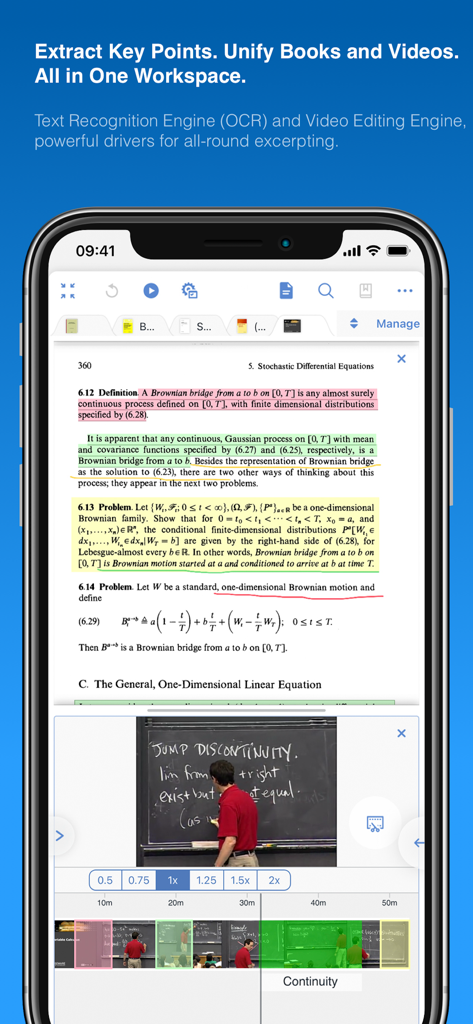
MarginNote 3アプリの分割画面。統合学習のために、ハイライトされた数学のPDFと講義ビデオが表示されています

MarginNote 3アプリの分割画面。統合学習のために、ハイライトされた数学のPDFと講義ビデオが表示されています

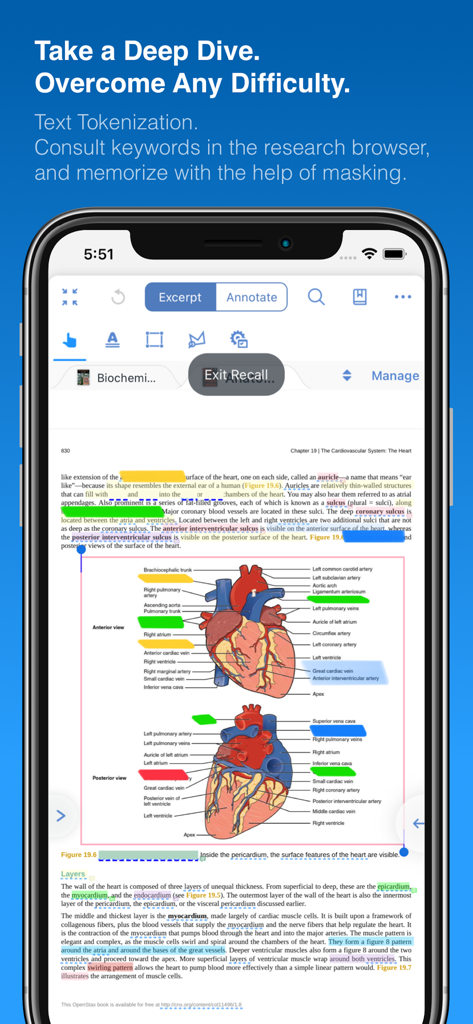
MarginNote 3のリコールモード。心臓の解剖図にマスクされたラベルが表示されています。

MarginNote 3のリコールモード。心臓の解剖図にマスクされたラベルが表示されています。

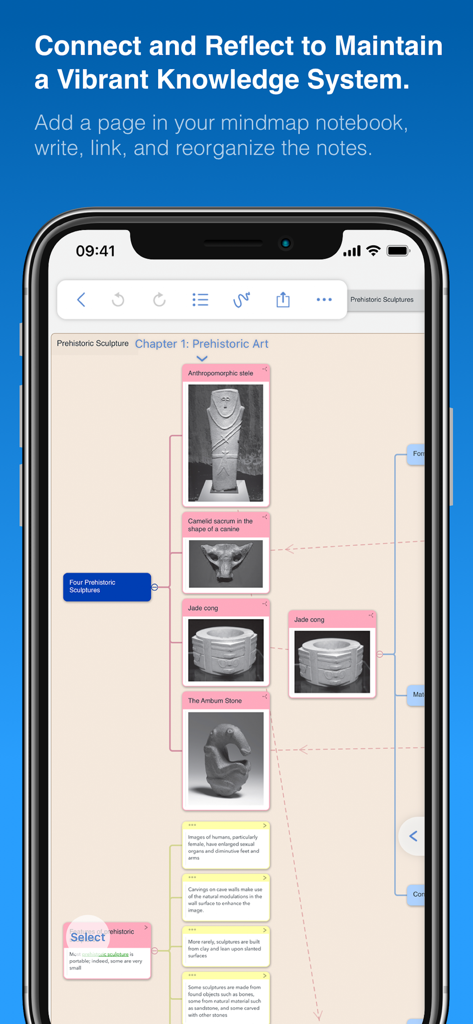
MarginNote 3のマインドマップインターフェース。研究ノートと古代彫刻の画像が表示されています

MarginNote 3のマインドマップインターフェース。研究ノートと古代彫刻の画像が表示されています

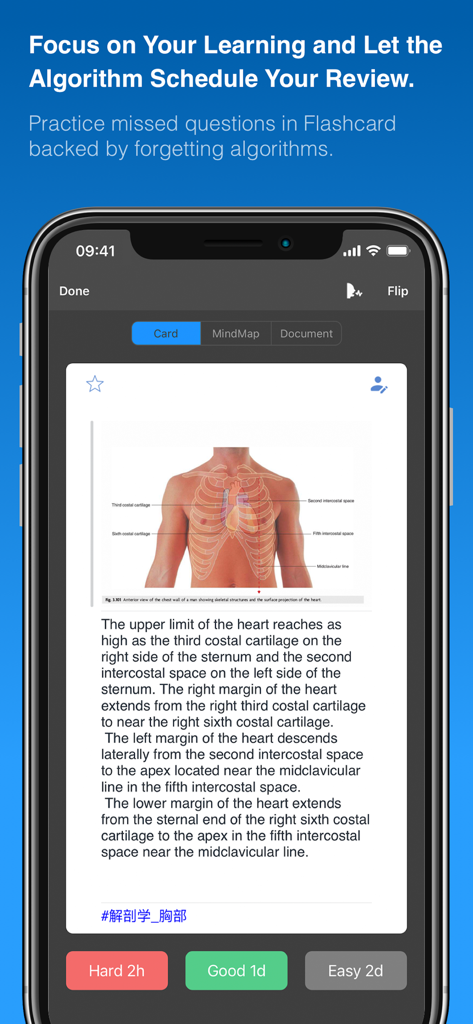
MarginNote 3のフラッシュカードインターフェース。医学図と間隔反復ボタンが表示されています

MarginNote 3のフラッシュカードインターフェース。医学図と間隔反復ボタンが表示されています

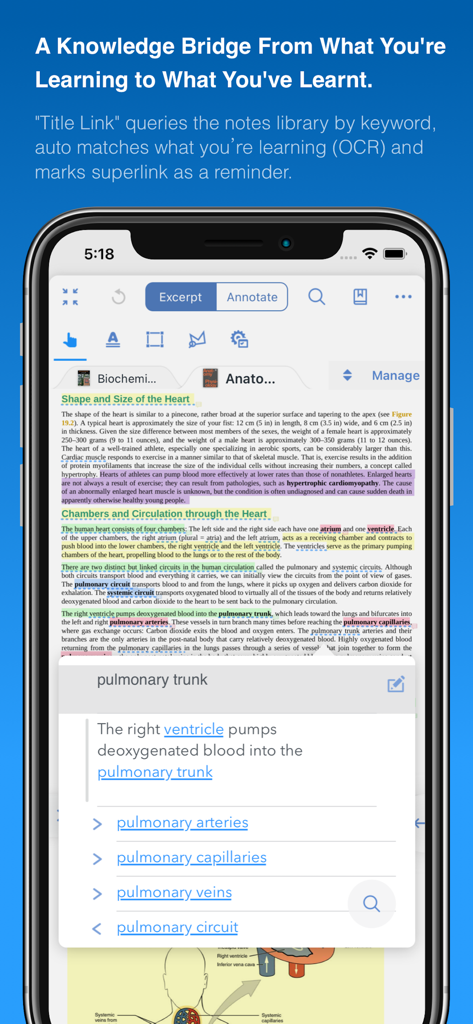
iPhone上のMarginNote 3アプリインターフェース。OCRを介して医学研究用語を接続するタイトルリンク機能が表示されています

iPhone上のMarginNote 3アプリインターフェース。OCRを介して医学研究用語を接続するタイトルリンク機能が表示されています

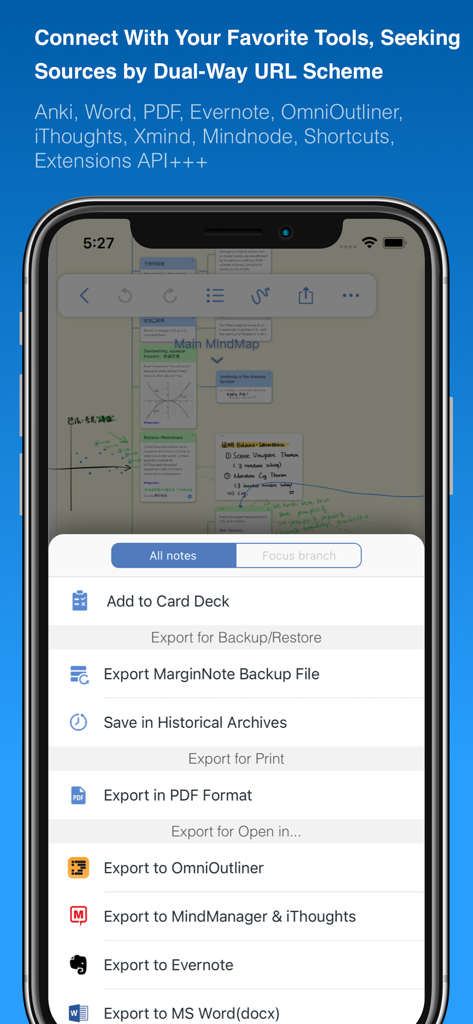
MarginNote 3のエクスポートメニュー。Anki Word EvernoteおよびPDFとの統合が表示されています

MarginNote 3のエクスポートメニュー。Anki Word EvernoteおよびPDFとの統合が表示されています

受動的な読書から能動的な習得へ

このアプリを際立たせるツール、 5M+ 人のユーザーが選択.

🧠

統合学習パイプライン

読書と記憶の間のギャップを埋めます。高効率ワークスペースで、PDFから直接テキストを抽出し、マインドマップを生成します。

自動アクティブリコール

ハイライトを瞬時にクローズデリクションフラッシュカードに変換します。Ankiにエクスポートして、間隔反復を使用して大量の情報をマスターします。

🗺️

視覚的知識マッピング

断片化されたノートを論理的なフレームワークに整理します。複数のドキュメントにわたるアイデアをリンクして、研究の「全体像」を視覚化します。

世界中のユーザーに愛されています

Trusted by 5M+ 人がこのアプリを愛用しています.

"

"MarginNote 3は医学部にとって究極のツールです。PDF抜粋からマインドマップ、Ankiスタイルのフラッシュカードへのシームレスなパイプラインは、国家試験準備中に数え切れないほどの時間を節約してくれました。これは、私が毎日習得する必要のある情報量に対応できる最初のアプリです。"

Dr. Sarah Jenkins, Medical Resident
"

"複雑な訴訟を管理するには、数千ページにわたる点をつなぎ合わせる必要があります。さまざまなドキュメントからの抜粋を単一の視覚的フレームワークにリンクする機能は革新的です。これは、私の法的調査および事件戦略の中心的なハブになりました。"

Marcus Thorne, Senior Legal Researcher

レビュー分析

ユーザーレビューの分析.

感情スコア

27%
ネガティブ

概要

This mobile app receives mixed to largely negative feedback from users. Many appreciate its robust PDF reading capabilities and powerful study-oriented functionalities, and some note initial positive impressions and helpful customer support. However, the overall user experience is significantly hampered by widespread issues including frequent app crashes, critical data loss, and unreliable synchronization across devices. Furthermore, many users report a persistently non-functional translation feature and express strong dissatisfaction with the app's upgrade and pricing policy, citing perceived unfairness for long-term users.

主なテーマ

App Functionality(3)
PDF Reading(2)
Study Tools(2)
Customer Support(1)
Initial Impression(1)

アプリについて

について知っておくべきこと MarginNote 3.

説明

MarginNote 3, all brand new e-reader to better study and digest your books Integrating powerful tools for book annotation, mindmapping, flashcards and more, to build up your reading notes as never before. ============================================ Welcome to MarginNote. This is a highly powerful reading and study software and is applicable to Mac, iPad, and iPhone. By integrating the PDF/EPUB reader and multiple powerful study tools, MarginNote will enable learners to reorganize and connect knowledge from different aspects, then memorize and grasp it accordingly. Whatever your profession, such as student, educator, researcher, lawyer, or life-long learner, you may annotate and take notes through MarginNote, organize notes via Mindmap and Outline, connect knowledge horizontally via Hashtag and raise memory effect via the Flashcards. You will discover what MarginNote does is not to simply integrate these tools. Instead, it combines them deeply and skillfully, which makes it easier for users to toggle between different tools. What's New in MarginNote 3 * New and Clean UI Completely redesigned. * Improved performance and Running more smoothly * Support both Document Reading mode & Study Reading mode. * Excerpts & Note-taking * Enhanced Handwriting & apple-pencil support. * Support TextBox on PDF. * Support direct text-typing & sketching when editing note cards. * Support Auto OCR when excerpting on scanned PDFs. * Emphasis & Cloze * Support direct emphasis in powerful Emphasis mode both on PDF or Outline. * Support auto convert emphasis to Cloze in CardDeck. * Support creating Image-Occlusion flashcards. * Multi-Documents * Support both document tabs & split views to switch between documents. * MindMap * Auto grouping new excerpts by Document Table of Contents. * Support new brach display mode: Framework. * Swipe/Drag gestures to slide in/out Outline & Documents in Study mode. * Enhanced grouped cut/paste, drag to merge,.. etc. * Outline * Improved search and displaying keywords in results. * Improved styles. * CardDeck: * View Flashcards in MindMap mode and Document mode. * Enhanced Anki Export: Card styles, Image occlusions, Cloze * Enhanced Research web browser. * iCloud Sync * Fixed several design issue in previous versions. * More stable & improved performance. * Categories * Separate categories for Document, Study and Review. * Trash * Recover data from Trash and make data more safe. * Trial * 14-days free trial. MarginNote 2 features: Reading: - Support PDF and EPUB format; Annotating and NoteTaking: - Support text highlight and rectangular highlight; - Add notes directly at the page margin; the note editing area will not overlap with the book content at all; - Text, voice, picture, sketching and many other forms of comments in note; - Add hashtags to notes to facilitate the connection of notes; Outline and Mindmap: - Outline and Mindmap in one view; - Create Outline tree by swipe gestures; - Multi-selection editing such as group, merge, clone, etc; - Quick searching and filtering according to colors, hashtags, books. Flashcard: - Highlights and notes can be automatically turned into flashcards for review; - Spaced repetition adopting the Anki-based algorithm; - Switch to the linking book page at any time; iPad Pro & Apple pencil: - Split View of multiple tasks; - High-precision drawing by Apple pencil; - Fine tuned for Apple pencil; - Keyboard shortcuts; Import, Export and Sync: - Import webpages and notes from Evernote; - Export flashcards to Anki; - Export Outline to OmniOutliner; - Export Mindmap to iThoughts or MindManager; - Export to Evernote; - Export all the margin notes, MindManager, Outline and Pages to a printable PDF; - Sync books & notes with iCloud; Terms of Use: https://www.marginnote.com/press/marginnote-3-term-of-use Privacy Policy: https://www.iubenda.com/privacy-policy/92678020

最新バージョン

3.7.32

サイズ

392.4 MB

リリース日

2018年8月4日

今日からあなたのパーソナルナレッジエンパイアを構築しましょう

ただ読むだけでなく、教材をマスターすることに情熱を注ぐ500万人以上の研究者、医学生、法律専門家が参加しています。14日間の無料トライアルを開始して、シームレスな学習ワークフローの力を体験してください。

ダウンロード: App Store
FAQ

よくある質問

について知っておくべきこと MarginNote 3

MarginNote 3とは何ですか?

MarginNote 3は、PDF/EPUBリーダーと、注釈、マインドマップ、フラッシュカード作成ツールを統合した強力な読書・学習ソフトウェアです。ユーザーが知識を再編成し、関連付け、記憶するのを助けます。

MarginNote 3はどのプラットフォームをサポートしていますか?

MarginNote 3は、Mac、iPad、iPhoneデバイスをサポートしています。これらのAppleプラットフォームで利用できる多目的な読書・学習ツールです。

MarginNote 3はPDFとEPUBの両方の形式を扱えますか?

はい、MarginNote 3はPDFとEPUBの両方のドキュメント形式をサポートしています。これにより、ユーザーはアプリ内で幅広いデジタル書籍や記事を読んだり、注釈を付けたりできます。

MarginNote 3はOCR機能を提供していますか?

はい、MarginNote 3はスキャンされたPDFから抜粋する際に自動OCR(光学文字認識)を提供します。また、より広範なテキスト処理のためのテキスト認識エンジンも含まれています。

MarginNote 3はノートの整理にどのように役立ちますか?

MarginNote 3は、マインドマップビューとアウトラインビューを通じてノートを整理します。ユーザーはハッシュタグで知識を関連付け、フラッシュカードで記憶効果を高め、効果的な知識管理を可能にします。

MarginNote 3はApple Pencilをサポートしていますか?

はい、MarginNote 3はApple Pencilの強化された手書きサポートと微調整機能を備えています。また、ノートカードの編集時にスケッチもサポートしています。

MarginNote 3からAnkiにフラッシュカードをエクスポートできますか?

はい、MarginNote 3ではフラッシュカードをAnkiにエクスポートできます。カードスタイル、画像占有、クロージ削除をサポートする強化されたAnkiエクスポートを提供します。

MarginNote 3の無料トライアルはありますか?

はい、MarginNote 3は14日間の無料トライアルを提供しています。これにより、ユーザーは購入を決定する前にアプリの機能と性能をテストできます。

MarginNote 3はドキュメント表示をどのように処理しますか?

MarginNote 3は、ドキュメント閲覧モードと学習閲覧モードの両方をサポートしています。また、ドキュメントタブと分割ビューによる複数ドキュメント表示で、それらを切り替えることもできます。

MarginNote 3のプライバシーポリシーはどこで見られますか?

MarginNote 3のプライバシーポリシーはiubendaのウェブサイトで入手できます。特定のURLは https://www.iubenda.com/privacy-policy/92678020 です。

MarginNote 3にはiCloud同期がありますか?

はい、MarginNote 3はiCloud同期をサポートしています。この機能により、書籍とノートがユーザーのデバイス間で同期され、全体的なパフォーマンスが向上します。

MarginNote 3のノートにはどのような種類のコメントを追加できますか?

MarginNote 3は、テキスト、音声、画像、スケッチなど、さまざまな形式のコメントをノートに追加することをサポートしています。ユーザーはハッシュタグを追加してノートを関連付けることもできます。

MarginNote 3は削除されたデータを復元できますか?

はい、MarginNote 3にはゴミ箱機能が含まれています。ユーザーはゴミ箱からデータを復元でき、データの安全性を確保し、偶発的な損失を防ぎます。

MarginNote 3の「タイトルリンク」機能とは何ですか?

MarginNote 3の「タイトルリンク」機能は、キーワードでノートライブラリを検索します。OCRを使用して、現在の学習内容と学習済みの内容を自動的に照合し、リマインダーとして機能します。

MarginNote 3はフラッシュカードで記憶をどのように強化しますか?

MarginNote 3は、ハイライトとノートを自動的にフラッシュカードに変換して復習できるようにします。Ankiに基づいた間隔反復アルゴリズムを使用して、記憶の定着を最適化します。