Money Manager Expense & Budget

Money Manager Expense & Budget

ダウンロード: App Storeダウンロード: Google Play
Spark by MWM logo
ロゴ: Money Manager Expense & Budget

Money Manager: プロフェッショナルグレードの精度であなたの財政をマスターしましょう

あなたの富を完全に管理することを求める800万人以上のユーザーに加わりましょう。銀行口座をリンクする必要なく、複式簿記、詳細な予算追跡、シームレスなPC管理の力を体験してください。

開発元

Realbyte Inc.

カテゴリ

Finance

ダウンロード

8M+

ユーザー評価

4.8/5

評価数

284K+

対応言語

19

財務の透明性を可視化

このインターフェースを利用する 8M+ 人のユーザー.

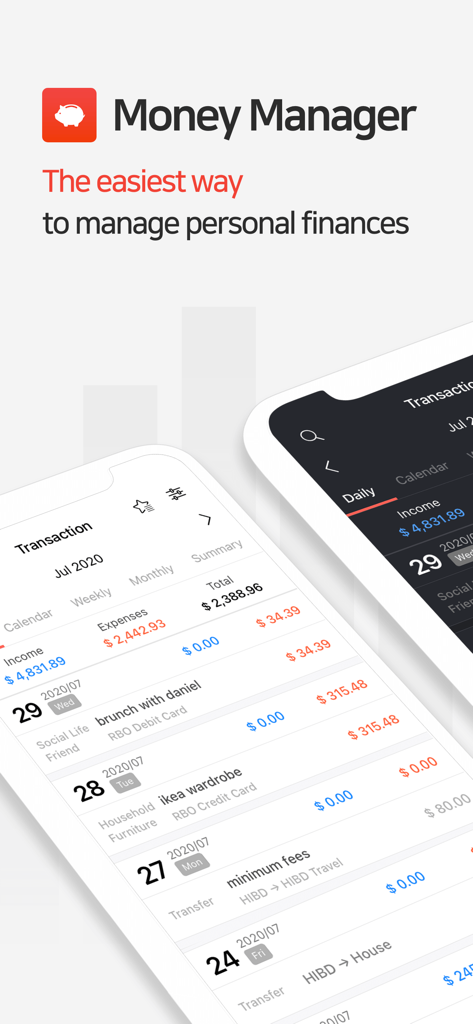
ライトモードとダークモードでトランザクションログを表示する2つのモバイル画面。日々の経費追跡機能を備えています。

ライトモードとダークモードでトランザクションログを表示する2つのモバイル画面。日々の経費追跡機能を備えています。

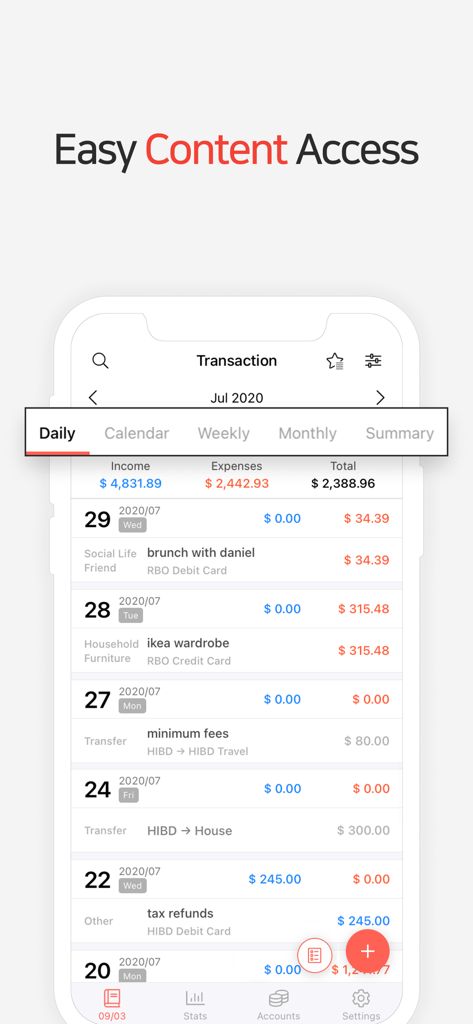
Money Managerのモバイルインターフェース。日々の財務取引と支出合計を表示しています。

Money Managerのモバイルインターフェース。日々の財務取引と支出合計を表示しています。

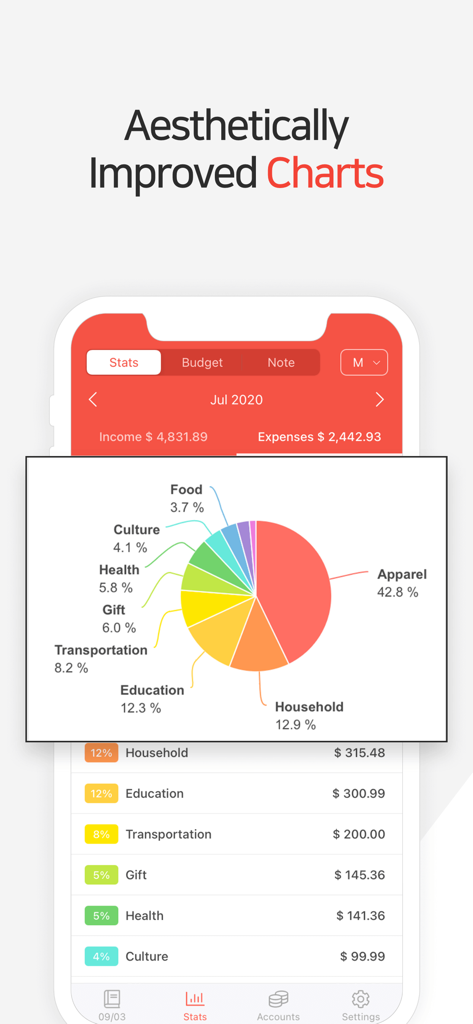
Money Managerアプリのインターフェース。月々の支出カテゴリ別内訳の詳細な円グラフを表示しています。

Money Managerアプリのインターフェース。月々の支出カテゴリ別内訳の詳細な円グラフを表示しています。

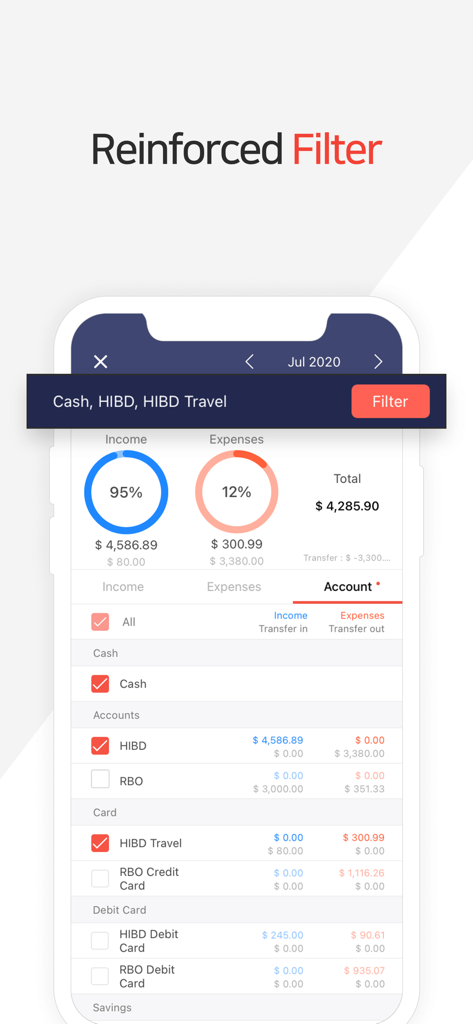
アカウントフィルタリングと財務概要グラフの詳細を表示するモバイルアプリインターフェース。

アカウントフィルタリングと財務概要グラフの詳細を表示するモバイルアプリインターフェース。

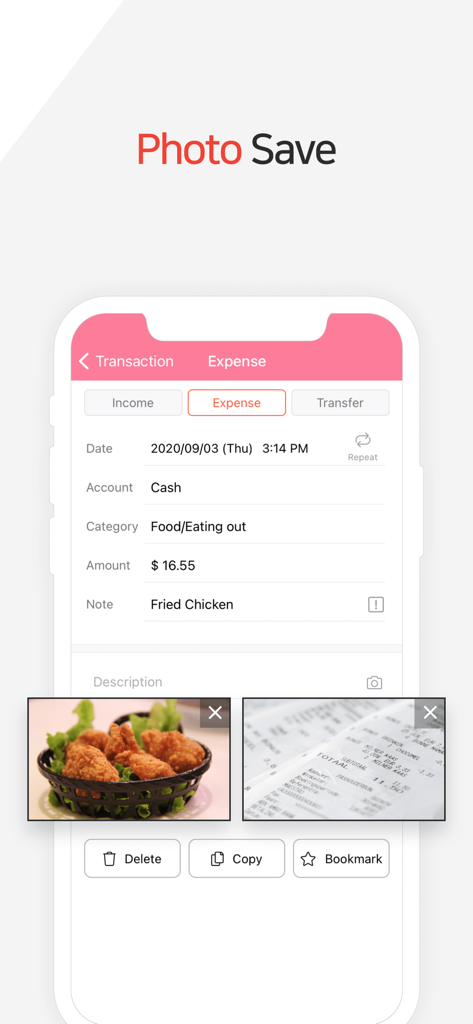
Money Managerのトランザクション画面。食品の写真と経費入力のレシートが添付されています。

Money Managerのトランザクション画面。食品の写真と経費入力のレシートが添付されています。

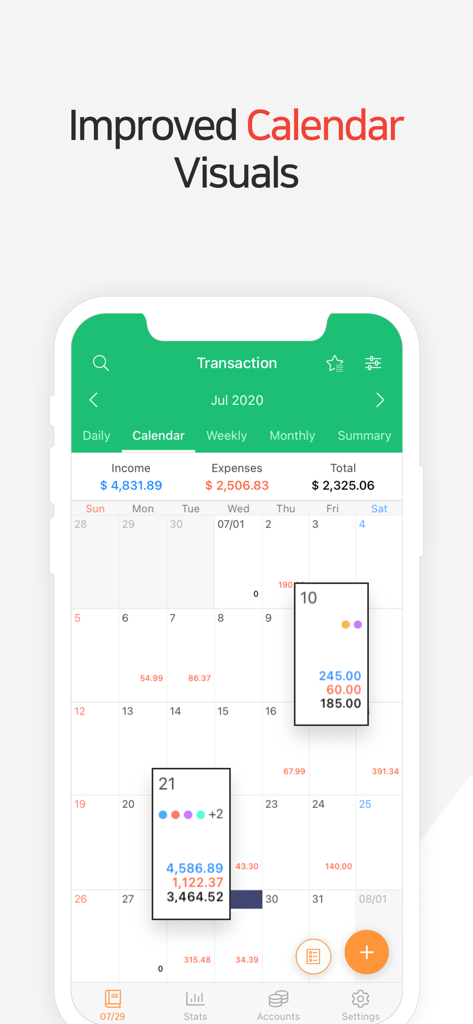
Money Managerアプリのインターフェース。日々の収入と支出の概要が表示された月間カレンダーを表示しています。

Money Managerアプリのインターフェース。日々の収入と支出の概要が表示された月間カレンダーを表示しています。

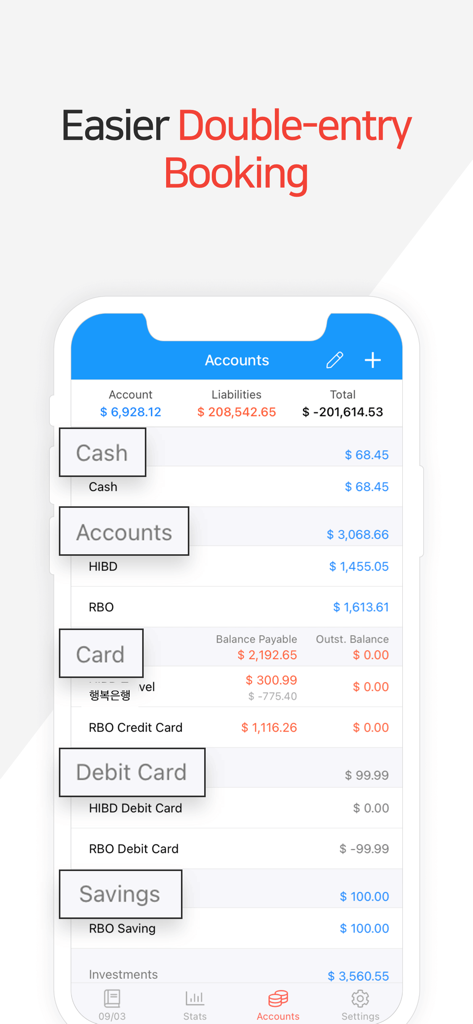
Money Managerアプリのインターフェース。現金、カード、貯蓄のアカウント概要と複式簿記のヘッダーを表示しています。

Money Managerアプリのインターフェース。現金、カード、貯蓄のアカウント概要と複式簿記のヘッダーを表示しています。

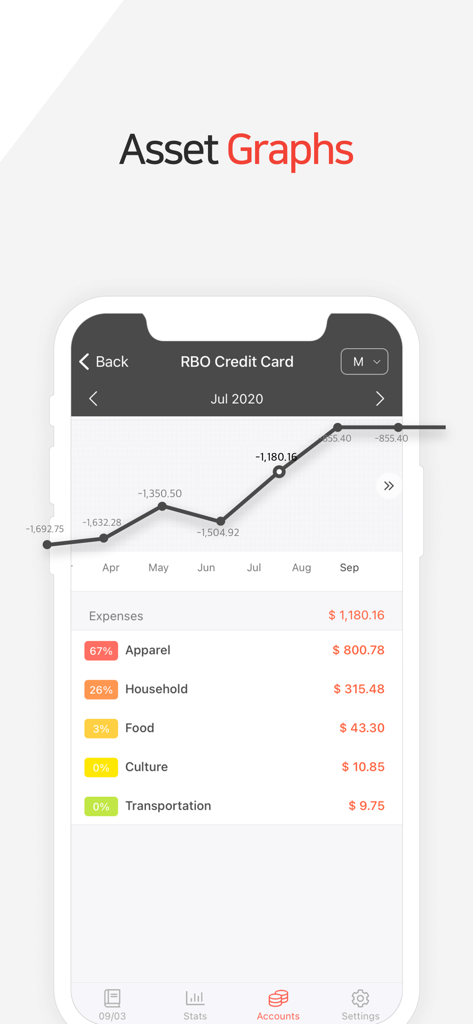
Money Managerアプリのクレジットカード資産グラフと月々の支出カテゴリ別内訳を表示するスクリーンショット。

Money Managerアプリのクレジットカード資産グラフと月々の支出カテゴリ別内訳を表示するスクリーンショット。

財務の完璧主義者のために設計

このアプリを際立たせるツール、 8M+ 人のユーザーが選択.

⚖️

プロフェッショナルな複式簿記の精度

プロの会計の精度を体験してください。すべての取引は完全にバランスが取れており、帳簿が常に正確でエラーがないことを保証します。

📊

洞察力のあるビジュアル分析

データを意思決定に変えましょう。インタラクティブなグラフと詳細な統計を使用して、支出パターンを特定し、予算を即座に最適化しましょう。

💻

シームレスなPC管理

両方の世界のベストを楽しみましょう。携帯電話で外出先で支出を記録し、Wi-Fi PCマネージャーを使用してコンピューターで詳細なレビューを実行しましょう。

世界中のユーザーに愛されています

Trusted by 8M+ 人がこのアプリを愛用しています.

"

"フリーランスのグラフィックデザイナーとして、ビジネス経費と個人支出を分けることは悪夢でした。Money Managerの複式簿記システムとカスタムカテゴリは、エンタープライズソフトウェアの複雑さなしに、プロレベルの詳細を提供してくれます。PCマネージャー機能は、月末のレポート作成に完全に役立ちます!"

Sarah M.
"

"プライバシー上の理由から、銀行口座をリンクするよりも手動入力の方を好みます。このアプリは完璧なソリューションです。ビジュアル統計と予算計画機能は、予想よりも早く住宅頭金のために貯蓄するのに役立ちました。信頼性が高く、安定しており、自動化されたアプリでは決して一致しない詳細な制御を提供します。"

David L.

アプリについて

について知っておくべきこと Money Manager Expense & Budget.

説明

“Money Manager Expense & Budget ” is an optimized application for personal account management. Household account management is complicated. But we make it simple by simplifying the things that are complex. The default settings will get you started, and once you get used to it, you can alter the settings according to your needs with the highly flexible and customizable functions available. - Super easy and simple to enter data anytime, anywhere. - View your spending tendencies graphically. - View statistics by simply entering the data. - Search and calculator functions. - Set up sub-categories and main categories as necessary. - Manage all your accounts at once. - Use multiple currencies. - Check weekly, monthly, and annual statistics. - Use the calendar view. - Use budget planning features to plan weekly, monthly, and annual budgets. - Change the start date of the month. ※ Applying double entry bookkeeping It facilitates efficient account management. Automatic double entry bookkeeping. ※ PC manager function You can view ‘“Money Manager” application using Wi-Fi. You can edit and sort the data by date, category or account group on the screen of your PC. In addition, you can see fluctuations of your accounts indicated on graphs on your PC. ※ Budget management function You can manage your budget. It shows your budget and expenditures on a graph so you can compare a number of your expenditures against your budget quickly. ※ Credit Card / Debit Card management function When entering a future payment date, you can see the payment amount and outstanding balance on the accounts page. You can connect your debit card to your accounts so that expenses are automatically recorded under a specific account. ※ Passcode You can specify the desired time lapse before the app requests a passcode. ※ Automatic money transfer and frequency functions You can set up automatic money transfers between your accounts and configure the frequency of those transfers. ※ Sort expenses by the recipient You can sort your expenses by the recipient and view this information graphically. ※ Payment Profiles You can easily enter frequent expenditures by creating payment profiles. ※ Backup / Restore You can backup and restore your data via email, iTunes and iCloud. ※ Multiple currency support – you can have individual entries in multiple currencies, and configure each account to calculate the total balance in your desired currency. In Full Version. (https://itunes.apple.com/app/id564730202?mt=8) Manage from PC is available. There are no Ads. There is no limit the accounts. (In the lite version, 10 accounts is available.) Subscription pricing and terms: Money Manager offers auto-renewing monthly subscription at US$2.49/month and an auto-renewing yearly subscription at US$19.99/year to provide you with unlimited access to the Money Manager Data Sync Service while you maintain an active subscription. Payment will be charged to the credit card connected to your iTunes Account when you confirm the initial subscription purchase. Subscriptions automatically renew unless auto-renew is turned off at least 24-hours before the end of the current subscription period. Your account will be charged for renewal within 24-hours prior to the end of the current period, and the cost of the renewal will be identified. You may manage your subscription and auto-renewal may be turned off by going to your Account Settings after the purchase. Read more about our terms and conditions here: https://realbyteapps.com/policy/terms.html Privacy Policy: https://realbyteapps.com/policy/privacy.html

最新バージョン

2.12.3

サイズ

59.4 MB

リリース日

2012年11月5日

プロフェッショナルな精度であなたの財政をマスターする準備はできましたか?

透明性のためにMoney Managerを信頼する800万人以上のユーザーに加わりましょう。複式簿記、マルチデバイス同期、目標達成に必要な詳細な洞察を体験するために今すぐダウンロードしてください。

ダウンロード: App Storeダウンロード: Google Play
FAQ

よくある質問

について知っておくべきこと Money Manager Expense & Budget

Money Manager Expense & Budget とは何ですか?

Money Manager Expense & Budget は、ユーザーの複雑な家計管理タスクを簡素化するように設計された、個人口座管理に最適化されたアプリケーションです。

Money Manager Expense & Budget は支出をグラフで追跡できますか?

はい、Money Manager Expense & Budget は支出の傾向をグラフで追跡し、入力されたデータから自動的に統計を生成します。

Money Manager Expense & Budget は複数通貨をサポートしていますか?

はい、Money Manager Expense & Budget は複数通貨をサポートしています。ユーザーは異なる通貨で個別の入金を行い、好みの通貨で口座残高を設定できます。

PC で Money Manager Expense & Budget のデータを管理できますか?

はい、Money Manager Expense & Budget には PC マネージャー機能が含まれています。ユーザーは Wi-Fi 経由で PC 上で、日付、カテゴリ、または口座グループ別にデータを表示、編集、並べ替えできます。

Money Manager Expense & Budget は予算計画機能を提供していますか?

はい、Money Manager Expense & Budget は予算計画機能を組み込んでいます。ユーザーは週次、月次、年次の予算を計画し、支出をグラフで比較できます。

Money Manager Expense & Budget はクレジットカードとデビットカードをどのように扱いますか?

Money Manager Expense & Budget はクレジットカードとデビットカードを管理します。将来の支払い額、未払い残高を表示し、デビットカードの支出を口座に自動記録できます。

Money Manager Expense & Budget をパスコードで保護できますか?

はい、Money Manager Expense & Budget では、ユーザーはパスコードでアプリを保護できます。ユーザーは、アプリがパスコードを要求するまでの時間を指定することもできます。

Money Manager Expense & Budget のサブスクリプションはどのように機能しますか?

Money Manager Expense & Budget では、自動更新される月次(2.49 米ドル)および年次(19.99 米ドル)サブスクリプションを提供しています。これらは、アクティブな間、データ同期サービスへの無制限アクセスを提供します。

Money Manager Expense & Budget のサブスクリプションは自動更新されますか?

はい、Money Manager Expense & Budget のサブスクリプションは自動更新されます。自動更新は、現在の期間が終了する少なくとも 24 時間前に、アカウント設定でオフにする必要があります。

Money Manager Expense & Budget にレシート写真を保存できますか?

はい、Money Manager Expense & Budget では、ユーザーは詳細な記録保持と簡単な参照のために、支出エントリ内に直接レシートの写真を保存できます。

Money Manager Expense & Budget はどのような種類の財務データビジュアルを提供しますか?

Money Manager Expense & Budget は、カテゴリ別の支出の内訳を示す見栄えの良い円グラフや、時間の経過に伴う残高を追跡するための資産グラフなど、さまざまなビジュアルを提供します。

Money Manager Expense & Budget のプライバシーポリシーはどこで見つけられますか?

Money Manager Expense & Budget のプライバシーポリシーは、Realbyte Apps のウェブサイト(https://realbyteapps.com/policy/privacy.html)で入手できます。