Money Manager (Remove Ads)

Money Manager (Remove Ads)

ダウンロード: App Storeダウンロード: Google Play
Spark by MWM logo
ロゴ: Money Manager (Remove Ads)

Money Manager: 詳細まで管理するプロフェッショナルな財務管理

複式簿記、高度なデータ視覚化、完全なプライバシーで家計を管理しましょう。精度を自動化よりも重視する、細部までこだわる支出家のために設計された、広告なしのプロフェッショナルグレードの元帳です。

開発元

Realbyte Inc.

カテゴリ

Finance

ダウンロード

498K+

ユーザー評価

4.8/5

評価数

48K+

対応言語

19

あなたの財務を可視化

このインターフェースを利用する 498K+ 人のユーザー.

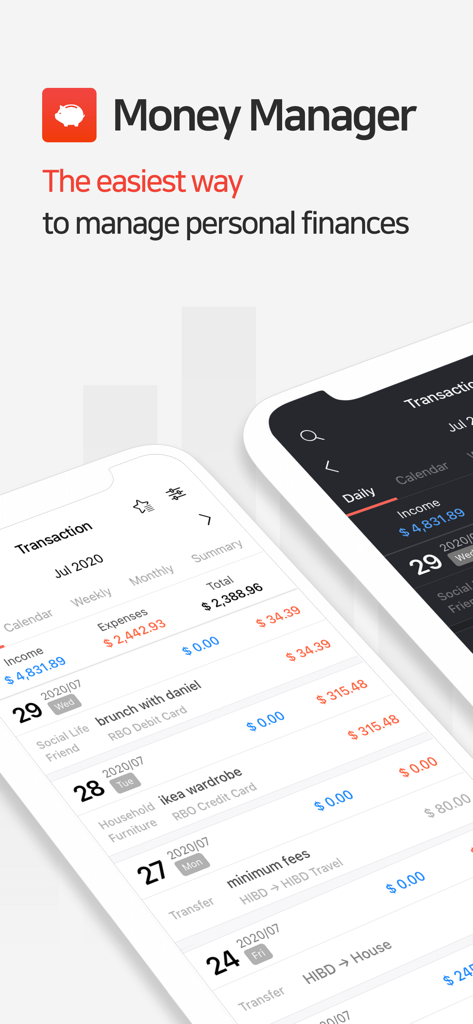
Money Managerアプリのインターフェース。モバイルデバイスでの詳細なトランザクション履歴と予算追跡を表示。

Money Managerアプリのインターフェース。モバイルデバイスでの詳細なトランザクション履歴と予算追跡を表示。

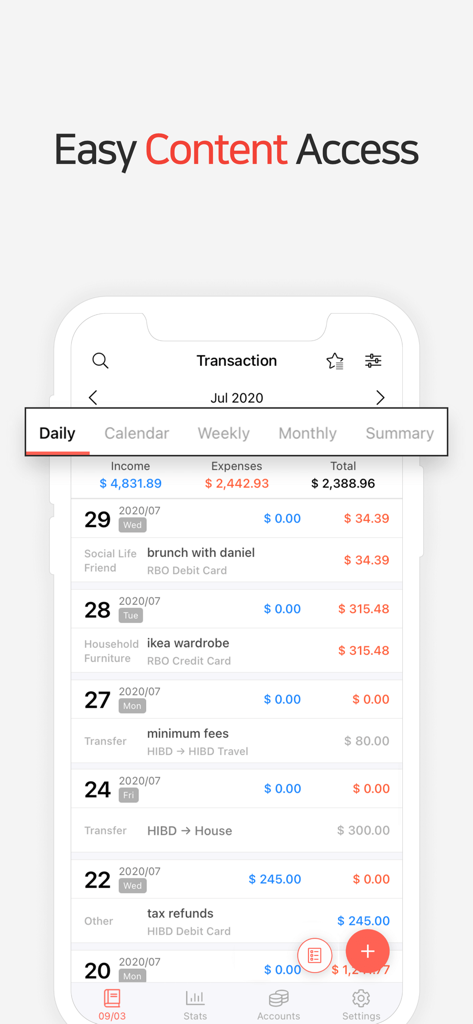
Money Managerアプリの毎日のトランザクションリスト。月間の収入と支出を表示。

Money Managerアプリの毎日のトランザクションリスト。月間の収入と支出を表示。

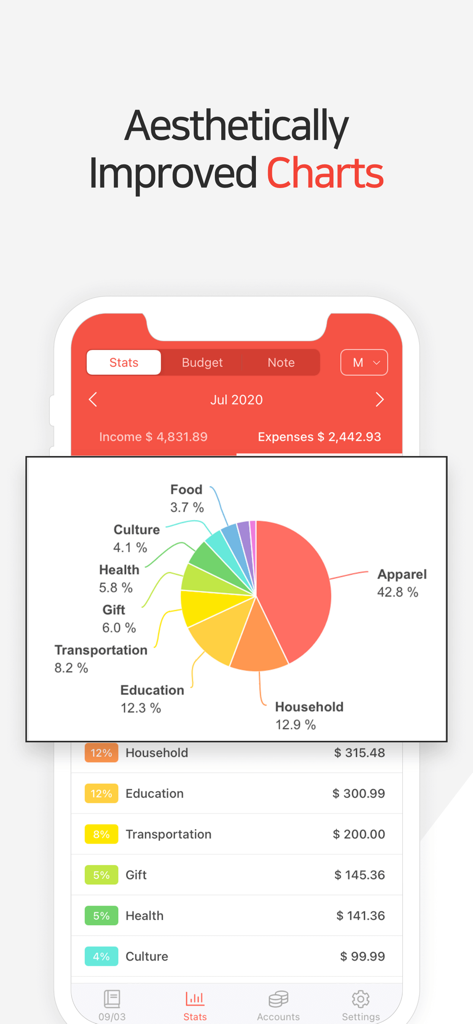
Money Managerアプリのインターフェース。支出の円グラフとカテゴリ別の支出統計を表示。

Money Managerアプリのインターフェース。支出の円グラフとカテゴリ別の支出統計を表示。

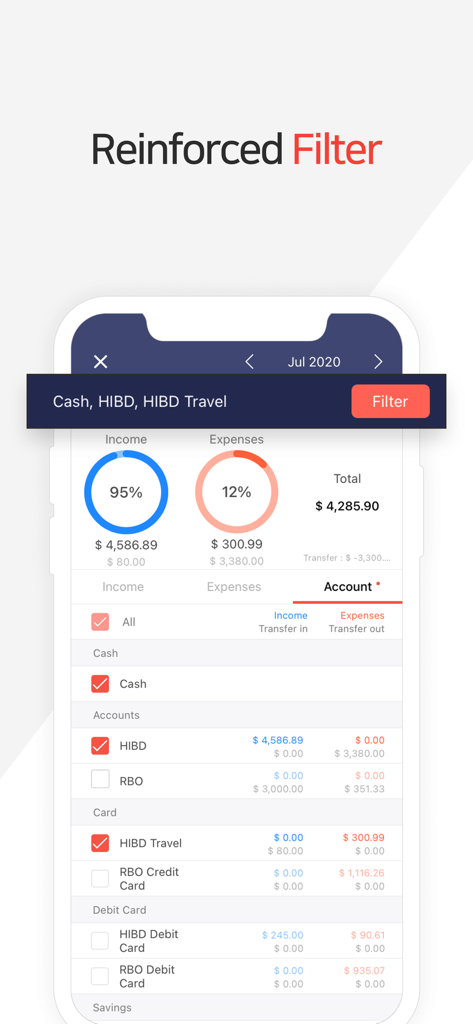
Money Managerアプリの画面。特定の銀行口座やカードの収入と支出を追跡するための強化されたフィルター機能を表示。

Money Managerアプリの画面。特定の銀行口座やカードの収入と支出を追跡するための強化されたフィルター機能を表示。

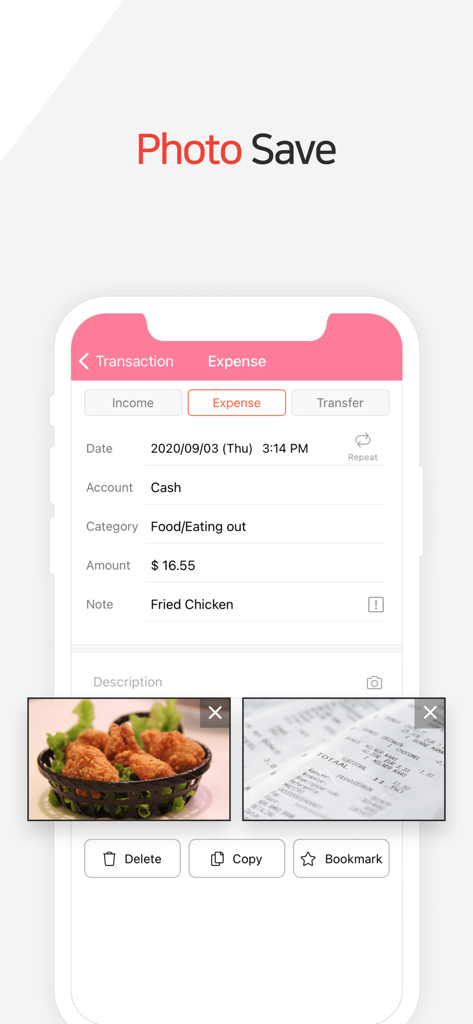
Money Managerアプリのインターフェース。食事の写真とレシートが添付された食費トランザクションを表示。

Money Managerアプリのインターフェース。食事の写真とレシートが添付された食費トランザクションを表示。

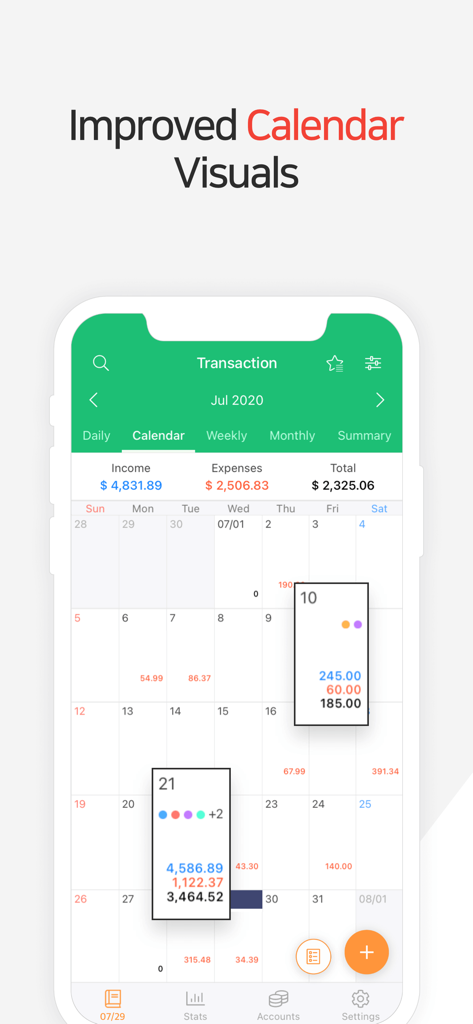
Money Managerの月間カレンダーインターフェース。毎日の財務トランザクションと合計を表示。

Money Managerの月間カレンダーインターフェース。毎日の財務トランザクションと合計を表示。

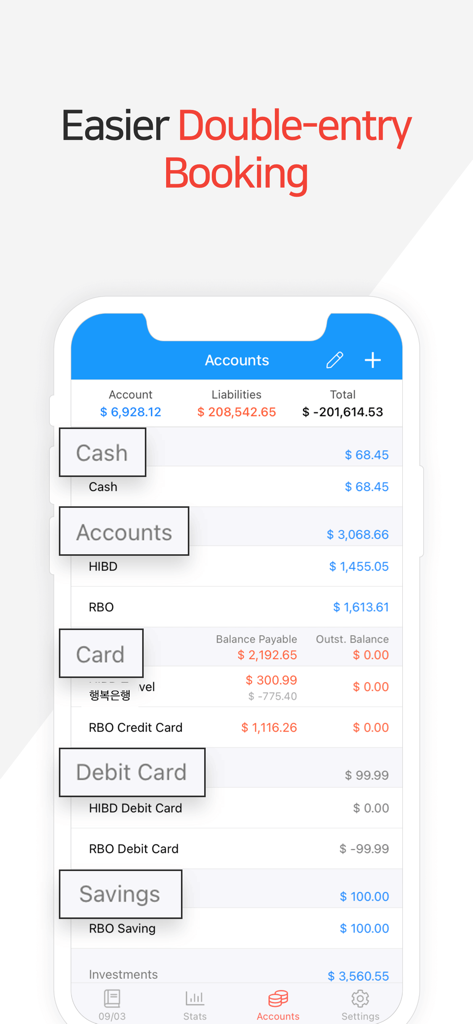
Money Managerアプリのインターフェース。口座残高と複式簿記の概要を表示。

Money Managerアプリのインターフェース。口座残高と複式簿記の概要を表示。

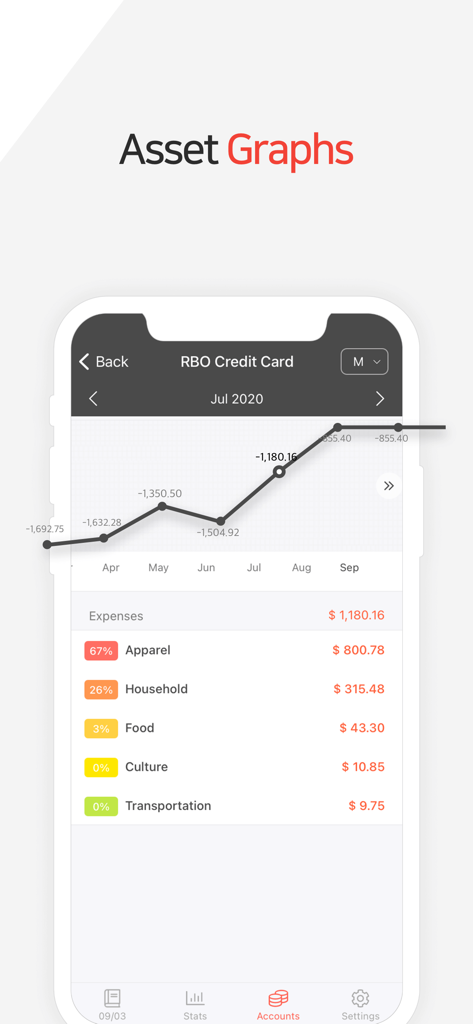
Money Managerアプリのインターフェース。財務資産のグラフと支出カテゴリを表示。

Money Managerアプリのインターフェース。財務資産のグラフと支出カテゴリを表示。

プロフェッショナルな精度で財務をマスターする

このアプリを際立たせるツール、 498K+ 人のユーザーが選択.

⚖️

プロフェッショナル複式簿記システム

プロの元帳を模倣したシステムで、記録が完全にバランスが取れていることを保証し、完全な正確性を実現します。

🔒

プライバシー重視の手動追跡

危険な銀行リンクを避けましょう。安全な手動入力とプライベートなクラウドバックアップで、データの完全な管理を維持します。

💻

高度なPCデータ管理

モバイル追跡をシンプルかつ広告なしに保ちながら、Wi-Fi経由でデスクトップで詳細な財務レビューを実行しましょう。

世界中のユーザーに愛されています

Trusted by 498K+ 人がこのアプリを愛用しています.

"

"あらゆる財務アプリを試しましたが、Money Managerだけが私が必要とする精度を提供してくれます。複式簿記システムにより、口座が実際にバランスが取れていることが保証され、銀行口座をリンクせずに財務状況を把握できるのが気に入っています。プロフェッショナルでプライベート、そして信じられないほど強力です。"

Sarah J., Financial Analyst
"

"PCマネージャー機能は、毎月のレビューにとってまったくのゲームチェンジャーです。日中はモバイルアプリで素早く入力し、週の終わりにラップトップでグラフを分析して予算を調整します。カテゴリをカスタマイズしたり、月の開始日を変更したりできるため、家計費の管理がはるかに簡単になります。"

Michael K., Tech Consultant

アプリについて

について知っておくべきこと Money Manager (Remove Ads).

説明

“Money Manager” is an optimized application for personal account management. Household account management is complicated. But we make it simple by simplifying the things that are complex. The default settings will get you started, and once you get used to it, you can alter the settings according to your needs with the highly flexible and customizable functions available. - Super easy and simple to enter data anytime, anywhere. - View your spending tendencies graphically. - View statistics by simply entering the data. - Search and calculator functions. - Set up sub-categories and main categories as necessary. - Manage all your accounts at once. - Use multiple currencies. - Check weekly, monthly, and annual statistics. - Use calendar view. - Use budget planning features to plan weekly, monthly, and annual budgets. - Change the start date of the month. ※ Applying double entry bookkeeping It facilitates efficient account management. Automatic double entry bookkeeping. ※ PC manager function You can view ‘“The New Money Manager” application using Wi-Fi. You can edit and sort the data by date, category or account group on the screen of your PC. In addition, you can see fluctuations of your accounts indicated on graphs on your PC. ※ Budget management function You can manage your budget. It shows your budget and expenditures on a graph so you can compare the number of your expenditures against your budget quickly. ※ Credit Card / Debit Card management function When entering a future payment date, you can see the payment amount and outstanding balance on the accounts page. You can connect your debit card to your accounts so that expenses are automatically recorded under a specific account. ※ Passcode You can specify the desired time lapse before the app requests a passcode. ※ Automatic money transfer and frequency functions You can set up automatic money transfers between your accounts and configure the frequency of those transfers. ※ Sort expenses by the recipient You can sort your expenses by the recipient and view this information graphically. ※ Payment Profiles You can easily enter frequent expenditures by creating payment profiles. ※ Backup / Restore You can backup and restore your data via email, iTunes and iCloud. ※ Multiple currency support – you can have individual entries in multiple currencies, and configure each account to calculate the total balance in your desired currency. Subscription pricing and terms: Money Manager offers auto-renewing monthly subscription at US$2.49/month and an auto-renewing yearly subscription at US$19.99/year to provide you with unlimited access to the Money Manager Data Sync Service while you maintain an active subscription. Payment will be charged to the credit card connected to your iTunes Account when you confirm the initial subscription purchase. Subscriptions automatically renew unless auto-renew is turned off at least 24-hours before the end of the current subscription period. Your account will be charged for renewal within 24-hours prior to the end of the current period, and the cost of the renewal will be identified. You may manage your subscription and auto-renewal may be turned off by going to your Account Settings after the purchase. Read more about our terms and conditions here: https://realbyteapps.com/policy/terms.html Privacy Policy: https://realbyteapps.com/policy/privacy.html

最新バージョン

2.12.3

サイズ

58.5 MB

リリース日

2012年10月4日

あなたの財務の未来を完全に管理しましょう

複式簿記の精度と邪魔のない環境で、498,000人以上のパワーユーザーに加わり、資産を管理しましょう。

ダウンロード: App Storeダウンロード: Google Play
FAQ

よくある質問

について知っておくべきこと Money Manager (Remove Ads)

Money Manager (広告削除) とは何ですか?

Money Managerは、個人口座管理に最適化されたアプリケーションで、簡単なデータ入力、グラフィカルな支出分析、カスタマイズ可能な機能を提供し、家計をシンプルにします。

Money Managerは複数通貨をサポートしていますか?

はい、Money Managerは複数通貨をサポートしています。ユーザーは異なる通貨で個別のエントリを作成し、アカウントを設定して希望の通貨で合計残高を計算することができます。

Money Managerは予算編成にどのように役立ちますか?

Money Managerには、週次、月次、年次の予算編成機能が含まれています。予算と支出をグラフィカルに表示し、予算との迅速な比較を可能にします。

Money Managerでクレジットカードとデビットカードを管理できますか?

はい、Money Managerはクレジットカードとデビットカードの管理機能を提供しています。今後の支払い金額や未払い残高を確認でき、デビットカードをリンクして支出を自動記録できます。

Money Managerの月額サブスクリプションの料金はいくらですか?

Money Managerの月額サブスクリプションは月額2.49米ドルです。これは自動更新されるサブスクリプションで、データ同期サービスへの無制限アクセスを提供します。

Money Managerは複式簿記を使用していますか?

はい、Money Managerは複式簿記を適用しています。自動的な複式簿記により、効率的な口座管理を促進します。

Money Managerを使用してPCで財務データを確認するにはどうすればよいですか?

Money ManagerはPCマネージャー機能を提供しています。Wi-Fiを使用して、PC画面上で日付、カテゴリ、または口座グループ別にデータを表示、編集、並べ替えることができます。

Money Managerでデータをバックアップするにはどうすればよいですか?

Money Managerでは、データのバックアップと復元が可能です。これらの操作は、電子メール、iTunes、iCloud経由で行えます。

Money Managerはパスコードで財務情報を保護できますか?

はい、Money Managerにはパスコード機能が搭載されています。アプリがアクセスにパスコードを要求するまでの時間間隔を指定できます。

Money Managerは支出の視覚的なグラフを提供しますか?

はい、Money Managerは支出傾向のグラフィカルビューを提供します。統計を表示し、ユーザーがグラフに示された口座の変動を表示できるようにします。

Money Managerで受取人別に支出を並べ替えることは可能ですか?

はい、Money Managerでは受取人別に支出を並べ替えることができます。この情報はアプリ内でグラフィカルに表示することもできます。

Money Managerにレシートの写真を保存できますか?

はい、Money Managerではユーザーが写真を保存できます。アプリは、インターフェースに示されているように、支出エントリに画像を含める機能を提供します。

Money Managerの年間サブスクリプションの料金はいくらですか?

Money Managerの年間サブスクリプションは年間19.99米ドルです。この自動更新されるサブスクリプションは、データ同期サービスへの無制限アクセスを提供します。