Power Barcode Scanner

Power Barcode Scanner

ダウンロード: App Store
Spark by MWM logo
ロゴ: Power Barcode Scanner

Power Barcode Scanner:ビジネスのためのプロフェッショナル在庫&一括スキャン

デバイスを産業グレードのツールに変えましょう。高価なハードウェアなしで、一括スキャン、在庫管理、Excelへのエクスポートを正確に行えます。

ダウンロード: App Store

開発元

Irvinesoft Inc

カテゴリ

Utilities

ダウンロード

509K+

ユーザー評価

4.8/5

評価数

12K+

対応言語

2

効率を実際の動作で確認

このインターフェースを利用する 509K+ 人のユーザー.

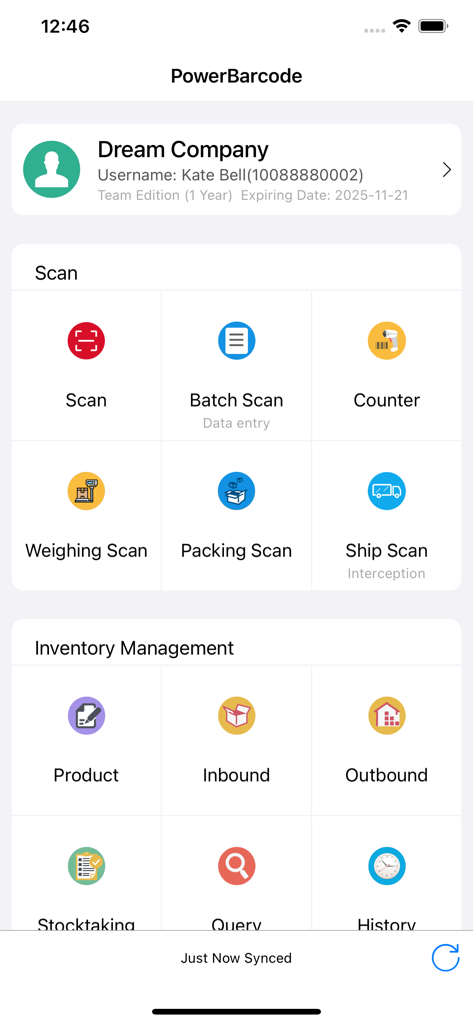
Power Barcode Scannerのダッシュボード。ビジネス向けのスキャンおよび在庫管理ツールが表示されています。

Power Barcode Scannerのダッシュボード。ビジネス向けのスキャンおよび在庫管理ツールが表示されています。

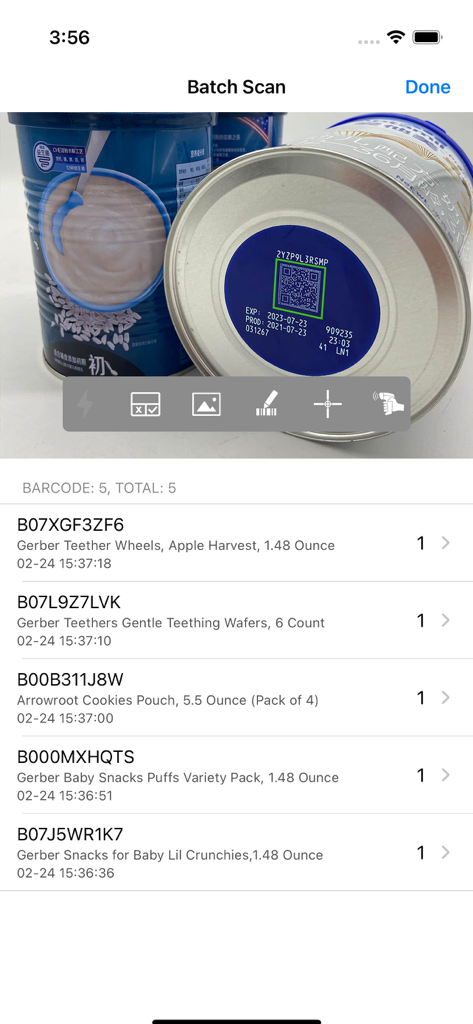
Power Barcode Scannerアプリのインターフェース。スキャンされたベビー用品のリストとその数量が表示される一括スキャン機能を示しています。

Power Barcode Scannerアプリのインターフェース。スキャンされたベビー用品のリストとその数量が表示される一括スキャン機能を示しています。

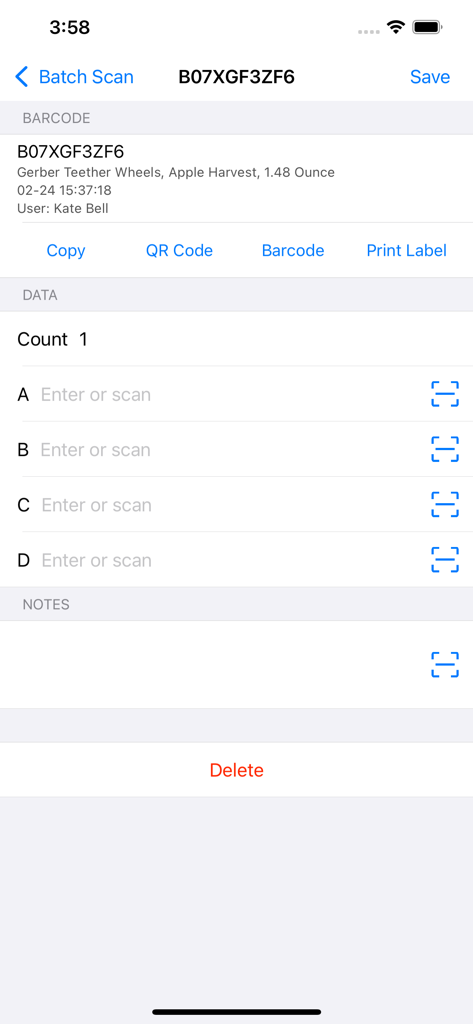
Power Barcode Scannerアプリのスクリーンショット。在庫管理のための製品詳細とデータ入力フィールドが表示されています。

Power Barcode Scannerアプリのスクリーンショット。在庫管理のための製品詳細とデータ入力フィールドが表示されています。

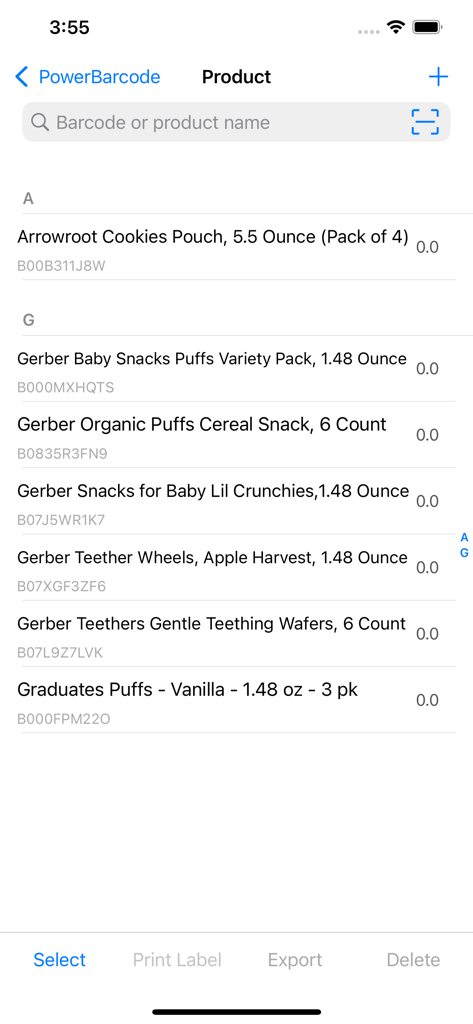
モバイル製品在庫リスト。バーコード識別子と管理オプションが表示されています。

モバイル製品在庫リスト。バーコード識別子と管理オプションが表示されています。

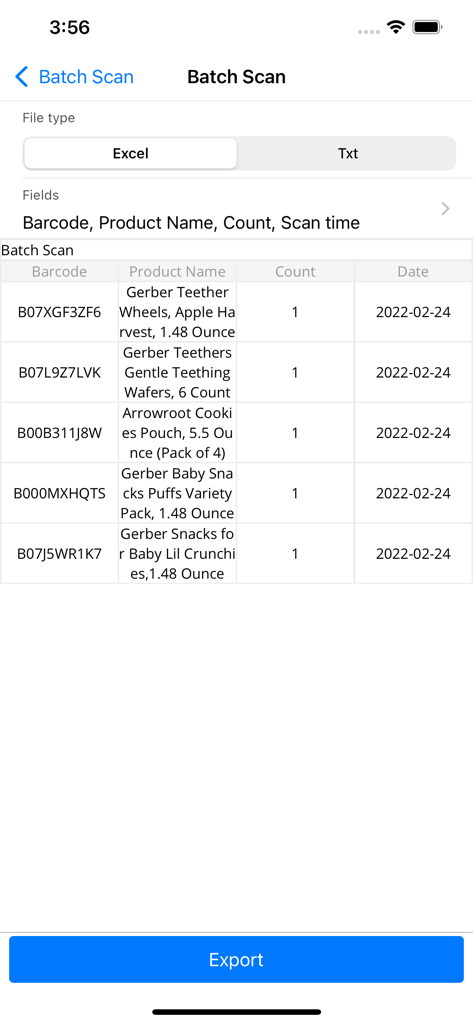
Power Barcode Scannerアプリの一括スキャン画面。スキャンされた製品のリストとExcelへのエクスポートオプションが表示されています。

Power Barcode Scannerアプリの一括スキャン画面。スキャンされた製品のリストとExcelへのエクスポートオプションが表示されています。

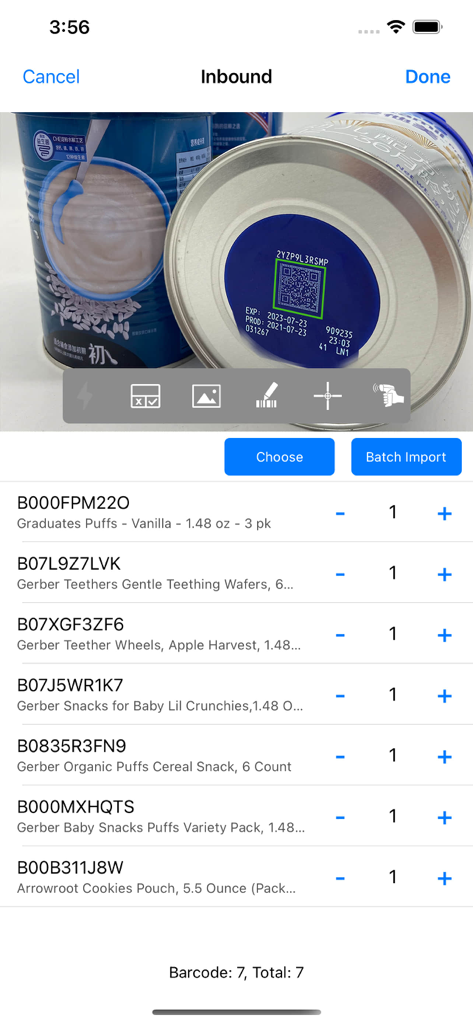
Power Barcode Scannerアプリの受信在庫画面。スキャンされたベビー用品の一括リスト、QRコードスキャン、アイテムリストが表示されています。

Power Barcode Scannerアプリの受信在庫画面。スキャンされたベビー用品の一括リスト、QRコードスキャン、アイテムリストが表示されています。

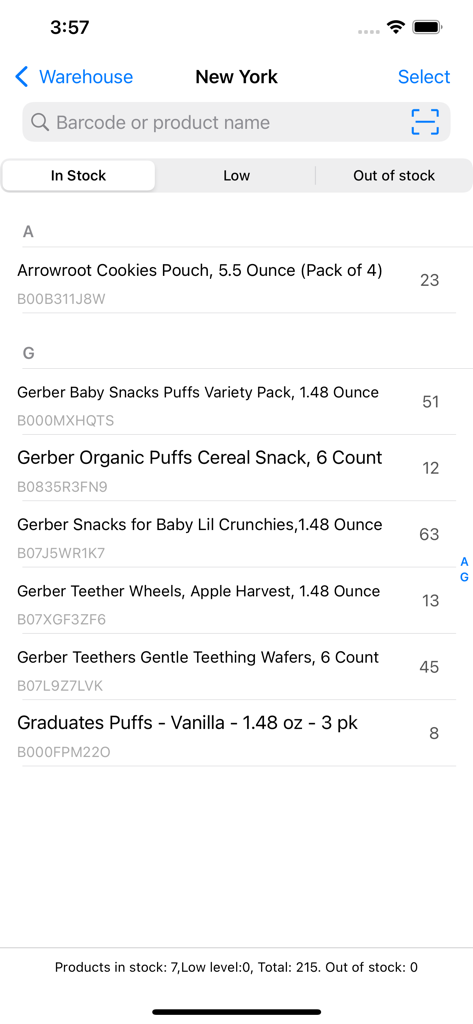
Power Barcode Scannerアプリのモバイル在庫管理画面。製品名、数量、バーコードIDが表示されています。

Power Barcode Scannerアプリのモバイル在庫管理画面。製品名、数量、バーコードIDが表示されています。

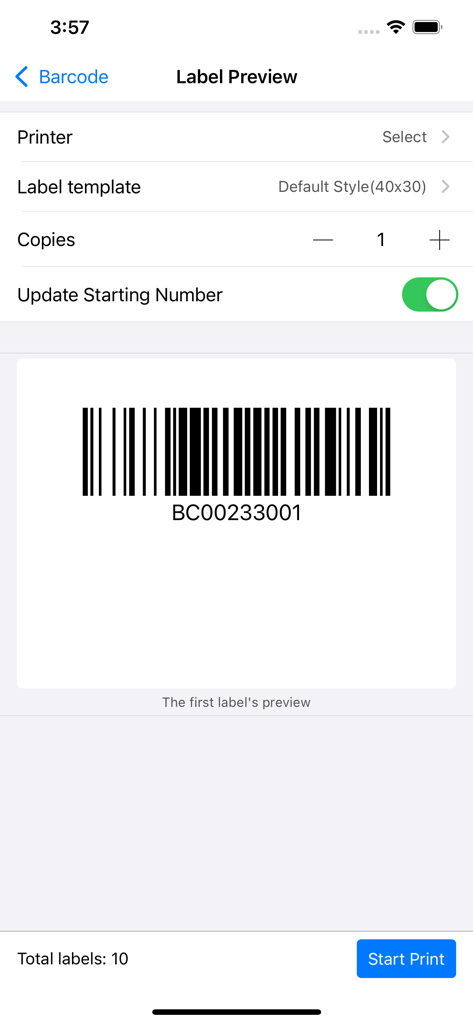
ラベルプレビュー画面。生成されたバーコードとビジネス在庫用の印刷設定が表示されています。

ラベルプレビュー画面。生成されたバーコードとビジネス在庫用の印刷設定が表示されています。

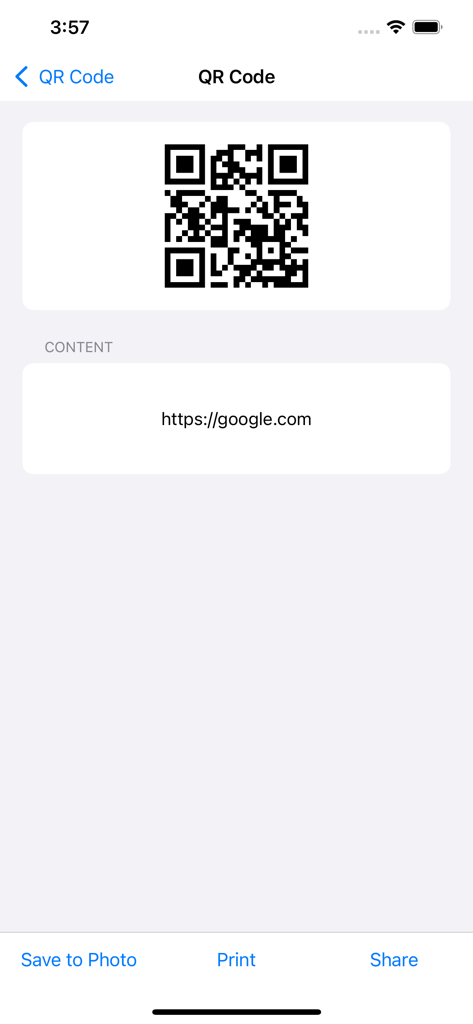
Power Barcode Scannerアプリのインターフェース。Webリンク用のQRコードが表示され、保存、印刷、共有オプションがあります。

Power Barcode Scannerアプリのインターフェース。Webリンク用のQRコードが表示され、保存、印刷、共有オプションがあります。

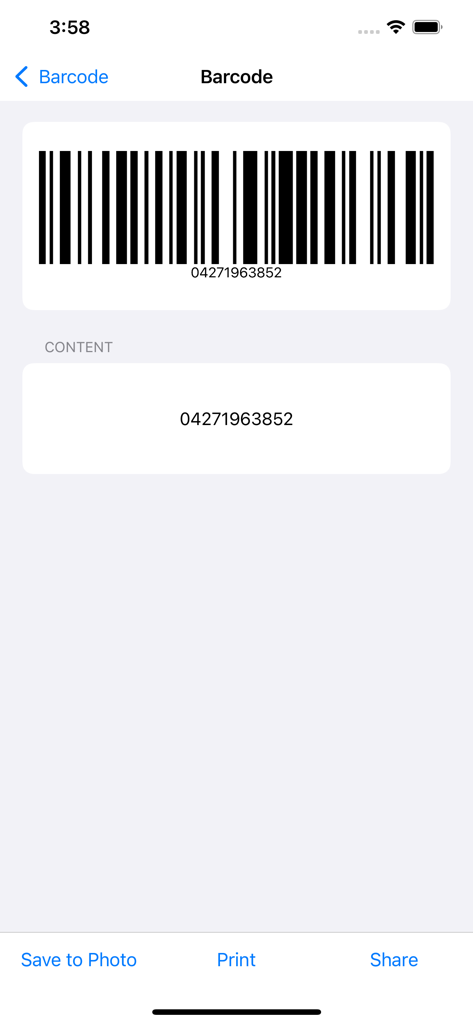
スキャンされたバーコードとその数値コンテンツ、および保存、印刷、共有のためのアクションボタンが表示される画面。

スキャンされたバーコードとその数値コンテンツ、および保存、印刷、共有のためのアクションボタンが表示される画面。

プロフェッショナルスキャンでビジネスをスケールアップ

このアプリを際立たせるツール、 509K+ 人のユーザーが選択.

高速一括スキャン

産業グレードの速度で、一度のセッションで数百アイテムを処理できます。高度なクロスヘアにより、混雑した在庫室でも常に正しいコードを捉えます。

📊

シームレスなExcel&CSVエクスポート

手作業によるエラーを排除し、作業時間を節約します。スキャンしたデータとカスタム製品詳細を直接プロフェッショナルなスプレッドシートにエクスポートし、即座に在庫レポートを作成できます。

🖨️

A4ステッカー&ラベル印刷

既存のオフィスプリンターを使用して、バーコードステッカーを生成・印刷します。倉庫を完璧に整理しながら、高価な専用ラベルメーカーのコストを回避できます。

世界中のユーザーに愛されています

Trusted by 509K+ 人がこのアプリを愛用しています.

"

"Power Barcode Scannerは、Amazon FBAの在庫管理方法を完全に変えてくれました。一括スキャンは非常に高速で、すべてを直接Excelにエクスポートできるため、週に少なくとも5時間は節約できます。私の副業にとって、これ以上の投資はありません。"

ジェシカ・ミラー
"

"エンタープライズ価格なしで、プロフェッショナルな在庫ソリューションが必要でした。クロスヘアの精度は、当社の密集した倉庫ラックに最適で、A4ステッカー印刷機能は素晴らしいコスト削減になります。これにより、iPadが高性能な産業用ツールに変わりました。"

デビッド・ロドリゲス

アプリについて

について知っておくべきこと Power Barcode Scanner.

説明

Power Barcode is a super powerful barcode scanner and QR code scanner. The batch scanning feature helps you continuously scan a batch of barcodes/ QR codes and export them. The advanced Crosshair in screen center helps you identify the right barcode/QR code during scanning. The copy/export feature helps you export scanned barcode as text or excel file. Also, it is a barcode generator and QR code generator. Save generated barcodes and QR code images to Photos or export for print. The data entry feature helps you input custom information for a scanned barcode, such as quantity, product properties, customer name, tracking code, part-numbers. The inventory management application helps you do inventory management, warehouse management, assets management. The sticker print features helps you print barcodes and QR codes stickers with A4 paper printer. No need to buy a sticker printer, saves a lot :-). There are more features in this barcode solution app. Try it and you will love it. [Supported code type] • QR code • Code 128 • EAN-8 • EAN-13 • UPC-E • Aztec • PDF 417 • ITF-14 • Data Matrix • Interleaved 2 of 5 • Code 93 • Code 39 Power Barcode makes iPhone/iPad into a smart mobile scanner, which can be used to scan a variety of applications anytime, anywhere. People from different areas are use Power Barcode to improve their work efficiency every day. * Shops and supermarkets are using it to manage purchases, sales and inventory. * Production companies are using it to manage production, manage inventory, product traceability, and logistics tracking. * Agricultural food companies are using it to manage the traceability of green products. * The courier is using it to manage goods distribution and inventory management. * Micro-business entrepreneurs are using it to manage orders and shipments. * Accountant is using it to batch scan and register invoices and reimbursement forms. We are proud of serving so many people every day. [Contact us] Numob Technologies Email: support@numob.com [Subscriptions & Price] You can use this App for free. We also provide subscription Edition to offer advanced features, such as cloud data backup, team collaboration, enterprise custom apps. Payment will be charged to iTunes Account at confirmation of purchase. Subscription automatically renews unless auto-renew is turned off at least 24-hours before the end of the current period. Account will be charged for renewal within 24-hours prior to the end of the current period, and identify the cost of the renewal. Subscriptions may be managed by the user and auto-renewal may be turned off by going to the user's Account Settings after purchase. Any unused portion of a free trial period, if offered, will be forfeited when the user purchases a subscription to that publication, where applicable. If you turn off the auto-renew, you can still keep all your data on the device. [Terms & Policy] Terms of use: https://www.numob.com/#/terms-of-use/ Privacy policy: https://www.numob.com/#/privacy-policy/

最新バージョン

4.1.5

サイズ

56.4 MB

リリース日

2012年8月13日

高価なハードウェアはもう不要—プロのようにスキャンを開始

スマートフォンを高速度在庫ツールに変えましょう。50万人以上のビジネスが、高価な専用ハードウェアなしで、一括スキャン、Excelへのエクスポート、在庫管理を4.8つ星の精度で行っています。

ダウンロード: App Store