PureLibro: ebook reader

PureLibro: ebook reader

ダウンロード: App Store
Spark by MWM logo
ロゴ: PureLibro: ebook reader

PureLibro: 書籍とコミックのための究極のオールインワンリーダー

あらゆるフォーマットのサポート、AI強化画像、個人デジタルライブラリの完全なプライバシーで、ウォールドガーデンから解放されましょう。

開発元

添欢 谢

カテゴリ

Books

ダウンロード

276K+

ユーザー評価

4.8/5

評価数

17K+

対応言語

4

あなたのライブラリを洗練させる

このインターフェースを利用する 276K+ 人のユーザー.

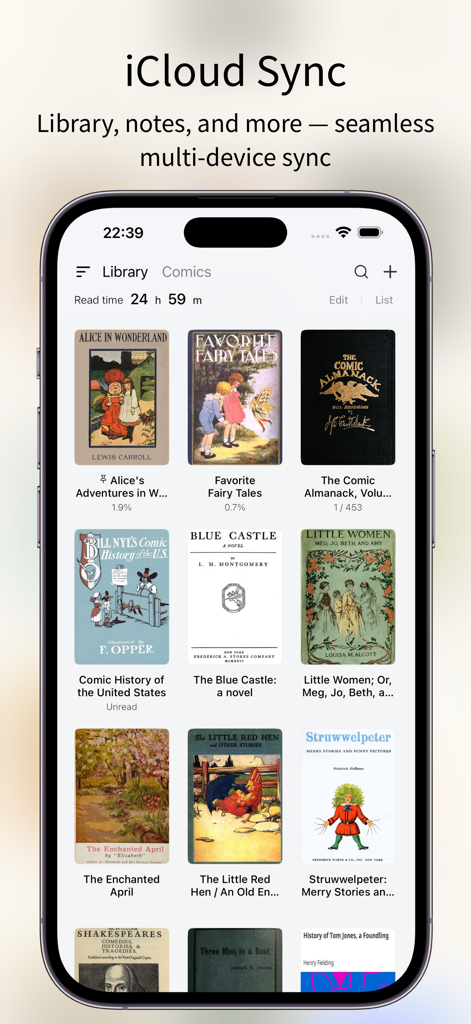
PureLibroアプリのインターフェース。iCloud同期機能とデジタルブックライブラリを表示

PureLibroアプリのインターフェース。iCloud同期機能とデジタルブックライブラリを表示

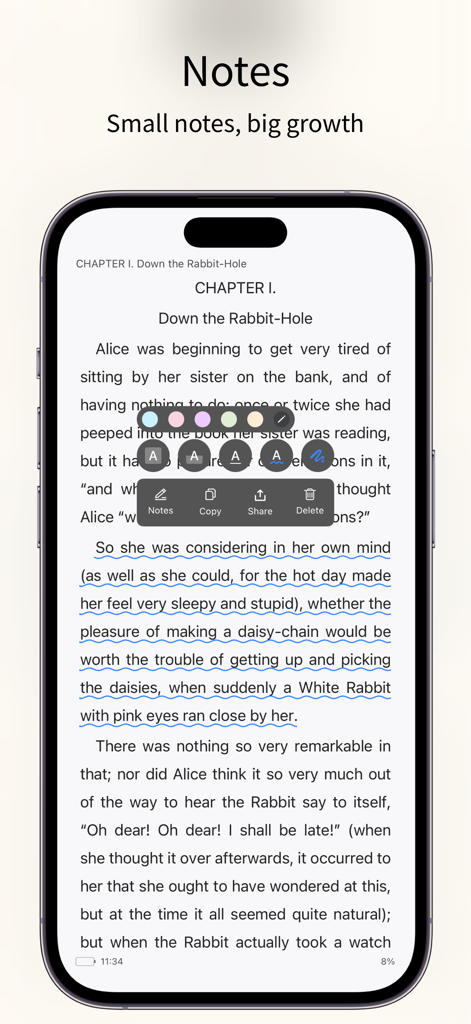
PureLibroアプリのインターフェース。電子書籍ページでのテキスト注釈とメモ作成ツールを強調

PureLibroアプリのインターフェース。電子書籍ページでのテキスト注釈とメモ作成ツールを強調

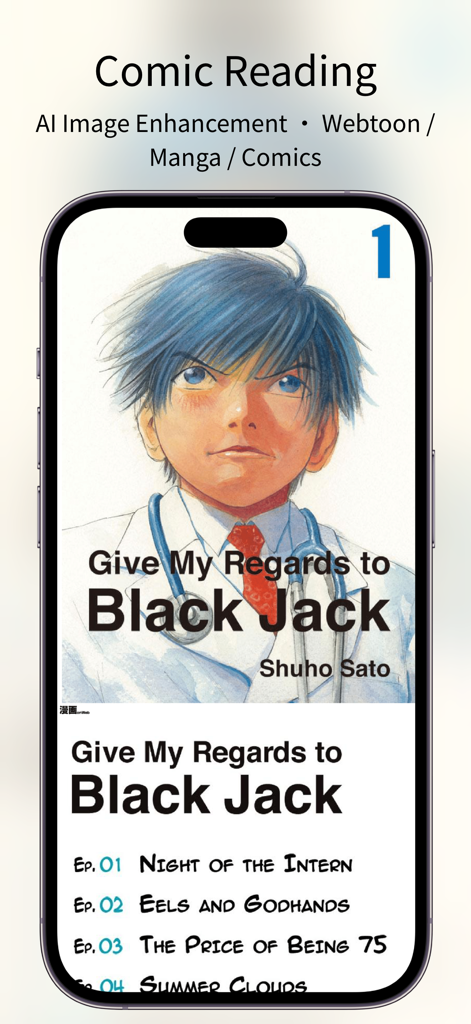
スマートフォンにPureLibroアプリのインターフェースを表示。マンガ読書とAI画像強化機能が含まれる

スマートフォンにPureLibroアプリのインターフェースを表示。マンガ読書とAI画像強化機能が含まれる

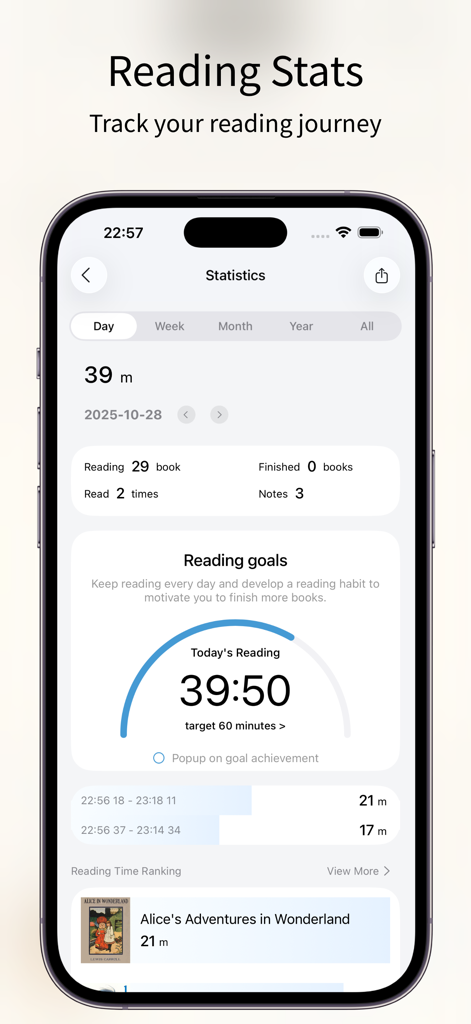
PureLibro電子書籍リーダーアプリの統計画面。読書進捗目標と履歴を表示

PureLibro電子書籍リーダーアプリの統計画面。読書進捗目標と履歴を表示

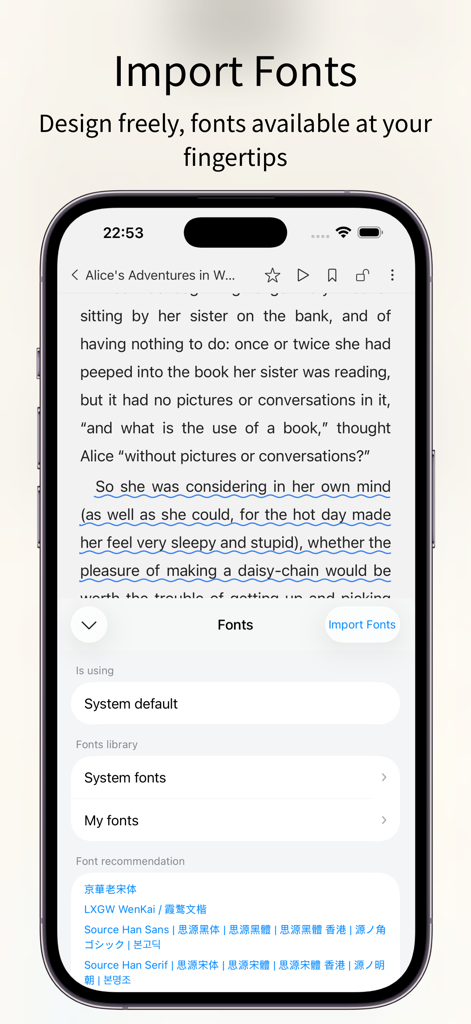
PureLibro電子書籍リーダーアプリのインターフェース。iPhoneでのカスタムフォントインポートと選択設定を表示

PureLibro電子書籍リーダーアプリのインターフェース。iPhoneでのカスタムフォントインポートと選択設定を表示

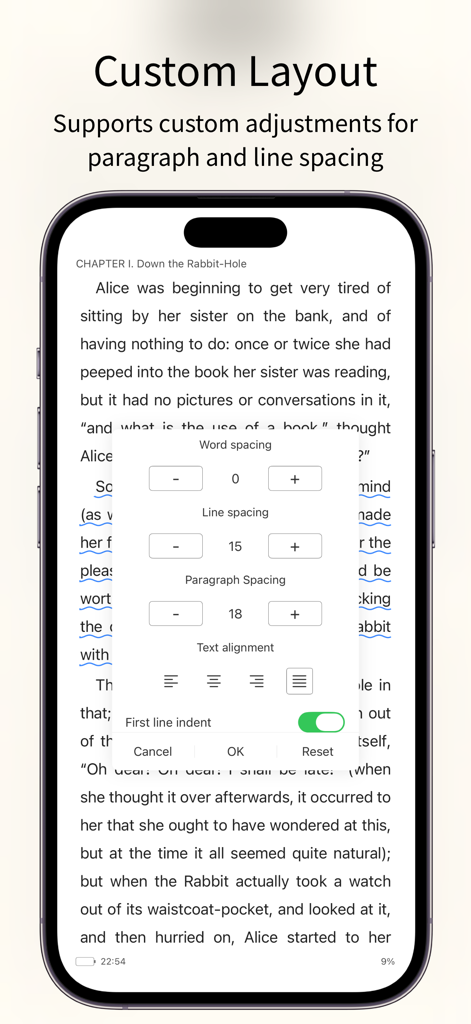
PureLibro電子書籍リーダーアプリ。単語間隔、行間隔、段落配置のカスタムレイアウト設定を表示

PureLibro電子書籍リーダーアプリ。単語間隔、行間隔、段落配置のカスタムレイアウト設定を表示

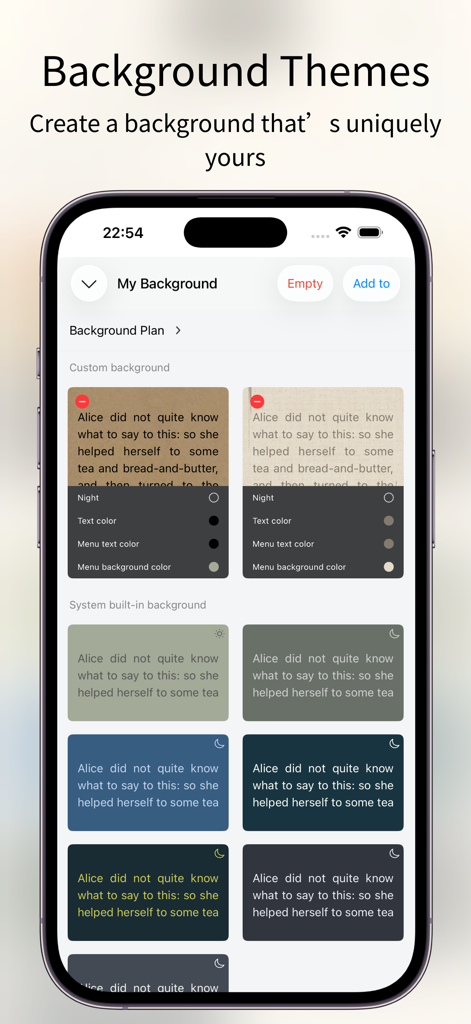
PureLibro電子書籍リーダーのカスタマイズ可能な読書背景テーマとカラーオプション

PureLibro電子書籍リーダーのカスタマイズ可能な読書背景テーマとカラーオプション

デジタルライブラリをマスターする

このアプリを際立たせるツール、 276K+ 人のユーザーが選択.

📚

ユニバーサルフォーマットサポート

ウォールドガーデンから解放されましょう。ファイルを変換することなく、EPUB、AZW3、CBR、さらにはZIP/RARファイルもシームレスに読み込めます。

🪄

AI強化マンガ

統合されたWaifu2xとAnime4K AIアップスケーリングでコミックに命を吹き込みましょう。高解像度ディスプレイでも鮮明なビジュアルを保証します。

🛡️

プライバシー設計

あなたのライブラリはあなたのビジネスです。Face ID、ジェスチャーロック、隠しフォルダで機密コレクションを保護し、読書習慣をプライベートに保ちましょう。

世界中のユーザーに愛されています

Trusted by 276K+ 人がこのアプリを愛用しています.

"

"CBRとCBZのサポートは完璧ですが、真の魔法はAI画像強化です。iPadのRetinaディスプレイで私のマンガコレクションに信じられないほどの鮮明さで命を吹き込みます。App Storeで最高のコミックリーダーです。"

Leo Marshall
"

"PureLibroは、DRMフリーライブラリを管理するためにまさに必要としていたものです。カスタムフォントからWebDAVサポートまでのカスタマイズレベルは比類なきものです。さらに、私のプライベートコレクションのためのFace ID保護は、私に完全な安心感を与えてくれます。"

Elena Rodriguez

アプリについて

について知っておくべきこと PureLibro: ebook reader.

説明

Feature Highlights – All for a Better Reading Experience 1. Supports a wide range of popular reading formats: TXT, EPUB, MOBI, AZW3, AZW4, AZW, CBZ, CBR, PDF, ZIP, RAR (DRM-free files only). 2. Comic reader: Supports ZIP, RAR, CBZ, and CBR comic formats. EPUB and MOBI files can also be switched to comic mode with one tap for an immersive image-based reading experience. 3. AI-powered image enhancement (supports Waifu2x / Anime4K, available in comic mode only). 4. iCloud sync: Automatically keeps your reading data consistent across devices. 5. Data backup: One-tap backup to cloud drives or other storage options—your reading data is always safe. 6. TXT file editing support. 7. Multiple import methods: WebDAV, cloud drives, Wi-Fi transfer, iCloud, and more. 8. Auto reading: Hands-free reading for a more relaxed experience. 9. Full customization: Adjust line spacing, paragraph layout, background images, and font colors to create your own reading style. 10. Eye-care interface: Night mode, page curl, slide, and scroll reading modes. Supports Simplified and Traditional Chinese. 11. Privacy protection: Password, gesture, and Face ID unlock supported. Books can be encrypted or hidden for extra privacy. 12. Reading statistics: Track reading time, frequency, and progress to stay motivated and achieve your reading goals. 13. Flexible library management: Custom groups, book renaming, and sorting for a clean and organized library. 14. Custom covers: Freely customize book covers (including TXT files) to personalize your library. 15. Automatic chapter detection: Instantly recognize chapters in TXT novels for a smoother reading experience. 16. Font support: Choose from system fonts or import your own custom fonts. 17. Text-to-speech support: System narration and Alibaba Cloud TTS with multiple voice options available. [Professional Version] Professional version benefits: After opening the professional version, you can use all professional advanced features during the service period and exempt from all advertising. Continuous monthly (one month), continuous quarterly (3 months), and continuous annual (one year) are automatic renewal services. The above product prices are based on actual prices. The price of purchasing the above products will be charged in your local currency according to the current exchange rate defined by iTunes, and payment will be deducted from the iTunes account when confirming the purchase. [Continuous monthly, quarterly, and annual services] If you subscribe to the continuous monthly, quarterly, or annual service, it is deemed that you authorize Window Reading to deduct the professional version service fee for the next billing cycle from your iTunes account (referred to as "account") when your professional version service subscription is about to expire. The deduction time is within 24 hours before the billing cycle. If the deduction fails due to insufficient balance in the account, Window Reading has the right to suspend or terminate your professional version service without prior notice. Regarding canceling the auto-renewal service that has been opened, on iOS devices, go to "Settings" → "iTunes Store and App Store" → select "Apple ID" → click "View Apple ID" → click "Subscription" on the account settings page → cancel subscription. Privacy policy: https://gitee.com/coder_to/luck/blob/master/App/Privacy_en.md Service terms and automatic renewal terms: https://gitee.com/coder_to/luck/blob/master/App/serviceForMembers_en.md Icon Design Studying icons created by Freepik - Flaticon

最新バージョン

3.3.2

サイズ

39.3 MB

リリース日

2021年1月15日

究極のデジタルライブラリを構築しませんか?

本日、276,000人以上のパワーリーダーに加わりましょう。iOSで最もプライベートでカスタマイズ可能なリーダーで、電子書籍、マンガ、ドキュメントを完全に管理しましょう。

ダウンロード: App Store
FAQ

よくある質問

について知っておくべきこと PureLibro: ebook reader

PureLibroはどのような読書フォーマットをサポートしていますか?

PureLibroは、TXT、EPUB、MOBI、AZW3、AZW4、AZW、CBZ、CBR、PDF、ZIP、RAR(DRMフリーファイルのみ)など、幅広い読書ニーズに対応したフォーマットをサポートしています。

PureLibroはコミック読書機能を提供していますか?

はい、PureLibroはZIP、RAR、CBZ、CBRフォーマットをサポートするコミックリーダーです。PDF、EPUB、MOBIファイルをワンタップでコミックモードに切り替えることもできます。

PureLibroはどのようにデバイス間で読書データを同期しますか?

PureLibroはiCloud Syncを使用して、読書ライブラリ、メモ、その他のデータをすべてのデバイス間で自動的に一貫性を保ち、シームレスに同期させます。

PureLibroで読書インターフェースをカスタマイズできますか?

はい、PureLibroは完全なカスタマイズを提供します。ユーザーは行間、段落レイアウト、背景画像、フォントの色を調整でき、ナイトモードなどのさまざまな目のケアモードを選択できます。

PureLibroはユーザーのプライバシーをどのように保護しますか?

PureLibroはプライバシー保護を最優先します。パスワード、ジェスチャー、Face IDでのロック解除をサポートし、ユーザーは機密性を高めるために本を暗号化または非表示にすることができます。

PureLibro Professional Versionの利点は何ですか?

PureLibro Professional Versionは、サービス期間中にすべての高度な機能へのアクセスを許可し、すべての広告を削除して、読書体験を向上させます。

PureLibro Professional Versionの自動更新をキャンセルするにはどうすればよいですか?

iOSでは、「設定」→「iTunes StoreとApp Store」→「Apple ID」→「Apple IDを表示」→アカウントページの「サブスクリプション」に移動し、サブスクリプションをキャンセルしてください。

PureLibroはテキスト読み上げ機能を提供していますか?

はい、PureLibroはテキスト読み上げをサポートしています。システムナレーションとAlibaba Cloud TTSを複数の音声オプションで提供し、聴覚的な読書体験を提供します。

PureLibroは読書進捗と統計を追跡しますか?

はい、PureLibroは読書統計を追跡します。読書時間、頻度、進捗を監視して、ユーザーがモチベーションを維持し、読書目標を達成するのを支援します。

PureLibroに本をインポートするにはどのような方法がありますか?

PureLibroは複数のインポート方法を提供しています。WebDAV、さまざまなクラウドドライブ、Wi-Fi転送、iCloudなどが含まれ、柔軟なコンテンツ取得を保証します。

PureLibroにカスタムフォントを追加できますか?

はい、PureLibroはカスタムフォントをサポートしています。システムフォントから選択するか、独自のカスタムフォントをインポートして読書体験をパーソナライズできます。

PureLibroには目のケア読書モードがありますか?

はい、PureLibroは目のケアインターフェースを備えています。ナイトモード、ページめくり、スライド、スクロール読書モードが含まれており、快適な読書が可能です。