Send fax with WiseFax

Send fax with WiseFax

ダウンロード: App Storeダウンロード: Google Play
Spark by MWM logo
ロゴ: Send fax with WiseFax

WiseFaxでファックスを送信:スマホからファックスできるサブスクリプション不要の方法

使わない月額プランに支払うのはもうやめましょう。機密性の高い契約書、医療フォーム、法律文書などを、透明性の高い従量課金制で240カ国以上に安全にスキャンして送信できます。

ダウンロード: App Store

開発元

VANAIA LLC

カテゴリ

Business

ダウンロード

8K+

ユーザー評価

5.0/5

評価数

0

対応言語

2

指先でファックス

このインターフェースを利用する 8K+ 人のユーザー.

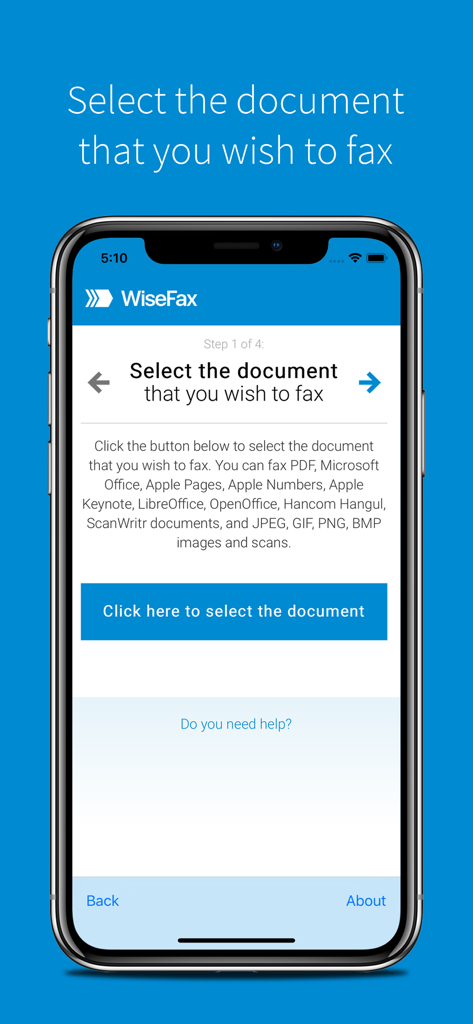
WiseFaxモバイルアプリのインターフェース。ファックス送信用の書類を選択する最初のステップを表示しています。

WiseFaxモバイルアプリのインターフェース。ファックス送信用の書類を選択する最初のステップを表示しています。

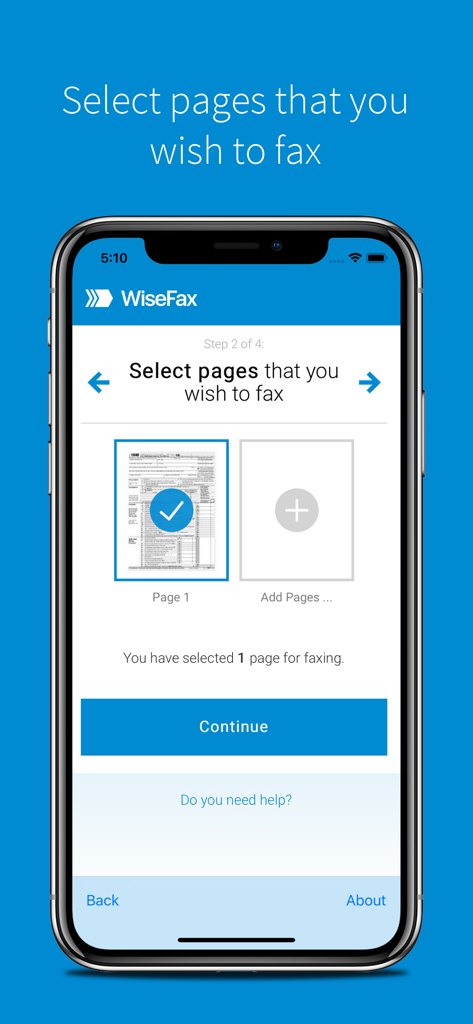
WiseFaxアプリのインターフェース。ファックス送信用の書類ページを選択する画面を表示しています。

WiseFaxアプリのインターフェース。ファックス送信用の書類ページを選択する画面を表示しています。

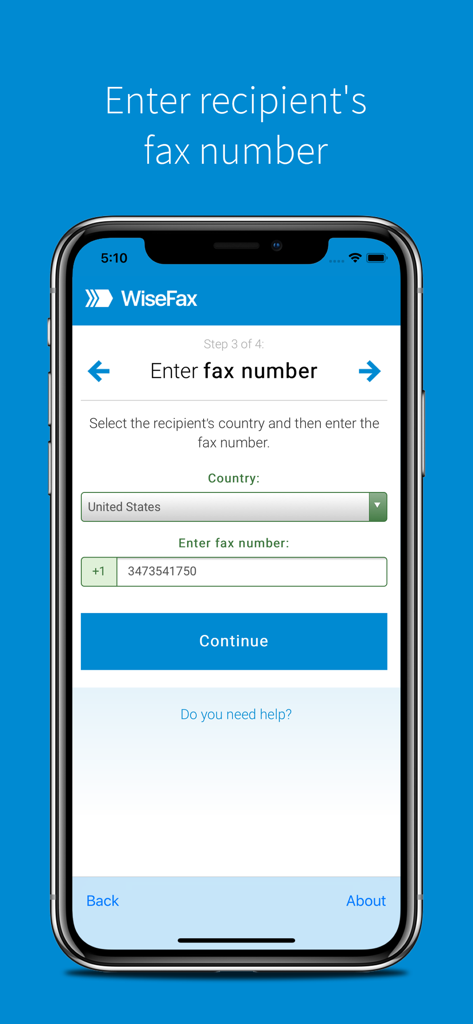
WiseFaxモバイルアプリの画面。受信者の国とファックス番号を入力するステップを表示しています。

WiseFaxモバイルアプリの画面。受信者の国とファックス番号を入力するステップを表示しています。

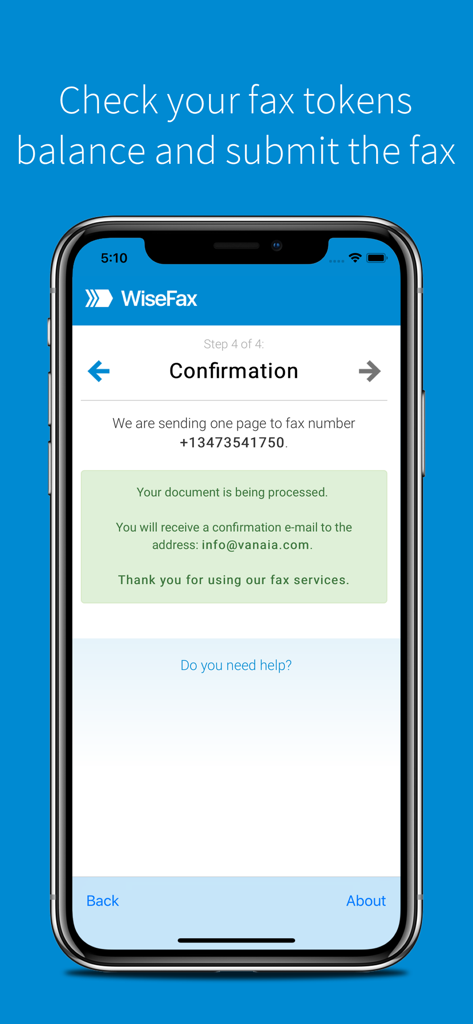
WiseFaxアプリの確認画面。受信者番号とメール確認の詳細とともに、ファックス送信の成功を表示しています。

WiseFaxアプリの確認画面。受信者番号とメール確認の詳細とともに、ファックス送信の成功を表示しています。

賢くファックス、楽にファックス

このアプリを際立たせるツール、 8K+ 人のユーザーが選択.

💸

サブスクリプションは一切不要

サブスクリプション疲れを解消しましょう。当社の透明性の高い従量課金制モデルは、実際に送信したページにのみお支払いいただくことを意味します。

📸

プロフェッショナルなスキャン品質

カメラを使用して、物理的な書類を鮮明なファックスに変換します。AIが自動的にエッジを検出し、読みやすさを向上させます。

即時配送証明

届いたかどうか推測する必要はありません。ファックスが正常に配信された瞬間に、詳細なメール確認とデジタルコピーを受け取ります。

世界中のユーザーに愛されています

Trusted by 8K+ 人がこのアプリを愛用しています.

"

"年に1〜2回、契約のためにファックスを送る必要があるだけなのですが、他のアプリが毎月サブスクリプションを強制してくるのにうんざりしていました。WiseFaxは救世主です。必要な分だけ支払えばよく、書類のスキャン品質も完璧で、すぐに確認メールも届きました。本当に手間がかかりません。"

Sarah J., フリーランスデザイナー
"

"保険関連の書類は、物理的なファックス機を探さなければならないことを考えると、さらにストレスが溜まります。WiseFaxを使って、iPadから直接12ページのスキャンと送信を行いました。エッジ検出機能のおかげで、私の写真はプロのスキャンのように見え、従量課金制モデルはまさに私が探していたものでした。"

Michael R., 家主

アプリについて

について知っておくべきこと Send fax with WiseFax.

説明

Send fax online quickly and easily without subscription with WiseFax. Perfect efax solution! Send fax with WiseFax quickly and easily! You only need internet connection on your iPhone or iPad and send fax in four simple steps. Just add WiseFax app on your iPhone or iPad which will allow you to easy select documents you want to send to fax. Pay as you go, with no monthly or yearly subscription and send fax anywhere in the world. WiseFax supports numerous document and file formats such as Apple Pages, Apple Numbers and Apple Keynote documents and spreadsheets, PDF documents, Microsoft Office, OpenOffice and LibreOffice documents and spreadsheets, Hancom Hangul documents, ScanWritr documents, and JPEG, GIF, PNG, BMP images. You can also take a picture or scan a document and import it into WiseFax and send it to fax. When doing so WiseFax efficiently detects edges of your document using advanced edge detection algorithm and makes picture clearer with picture enhancement algorithm. This makes scanning easier and fax more readable. You can easily select which pages you want to fax. Displayed preview of the pages will look the same as they will come out on fax at recipient side. Type fax number and wait for response. Regardless if it was successful or no, you will get an email notification and in case send fax will be successful also full document copy. Send fax with WiseFax as simple as that. Try it, you’ll like it. Four easy steps of how to send fax with WiseFax are: 1. Upload your existing document from your mobile device. 2. Click and select pages that you want to fax. 3. Select among 240 countries where you want to send your fax to and type recipient's fax number. 4. Authenticate with your existing Google, Facebook, Windows Live account or create a new Vanaia account. Buy fax token, if you already didn’t do so, and send fax. Wait for fax status confirmation which you will receive to your e-mail.

最新バージョン

2.3.1

サイズ

12.4 MB

リリース日

2018年3月7日

今すぐファックスを送信 — サブスクリプション不要

オフィス用品店をスキップする何千人ものプロフェッショナルに加わりましょう。送信したものにのみ支払い、iPhoneまたはiPadから直接、すべての書類の即時確認を受け取れます。

ダウンロード: App Storeダウンロード: Google Play