Teleprompter.com

Teleprompter.com

ダウンロード: App Storeダウンロード: Google Play
Spark by MWM logo
ロゴ: Teleprompter.com

Teleprompter.com:ワンテイクのプロフェッショナリズムでカメラをマスターする

クリエイターやリーダー向けの究極のビデオツールで、あなたのブランドを強化しましょう。AI音声スクロールでスクリプトを自然に配信し、高画質で録画し、どこでも、どのデバイスでも完璧なアイコンタクトを維持しましょう。

ダウンロード: App Store

開発元

Teleprompter LLC

カテゴリ

Productivity

ダウンロード

2M+

ユーザー評価

4.8/5

評価数

74K+

対応言語

28

完璧なビジョン

このインターフェースを利用する 2M+ 人のユーザー.

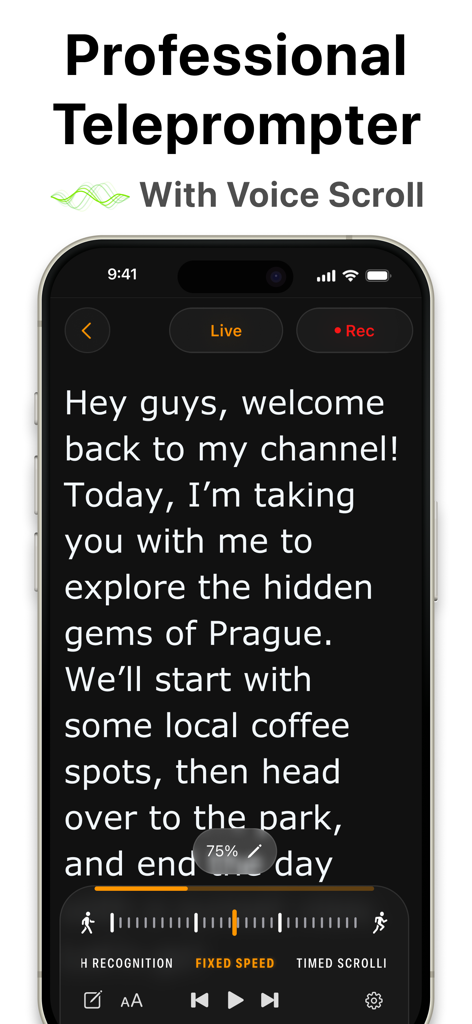
Teleprompterアプリのインターフェースを表示するiPhone、スクリプトと音声スクロール機能付き

Teleprompterアプリのインターフェースを表示するiPhone、スクリプトと音声スクロール機能付き

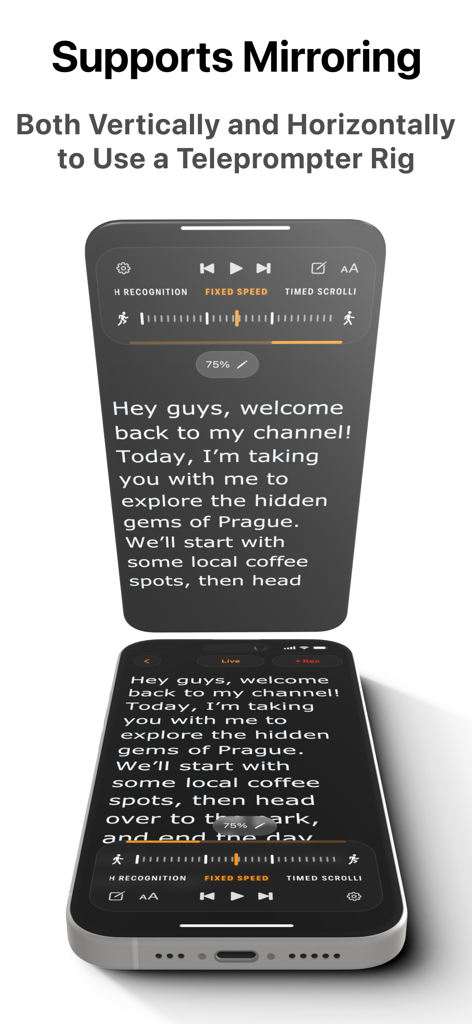
ハードウェアリグ用の縦横ミラーリングを備えたプロフェッショナルテレプロンターアプリ

ハードウェアリグ用の縦横ミラーリングを備えたプロフェッショナルテレプロンターアプリ

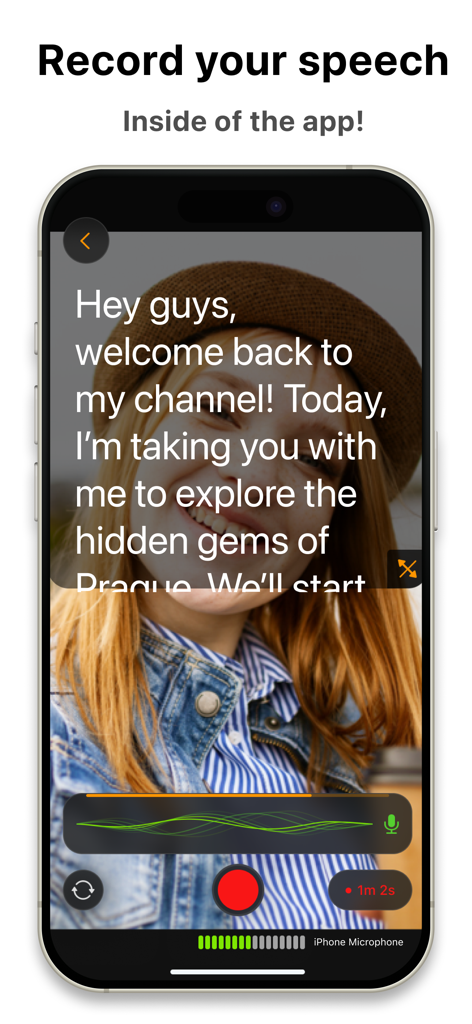
スクリプトオーバーレイ付きのTeleprompter.comアプリ録画インターフェースを表示するiPhone

スクリプトオーバーレイ付きのTeleprompter.comアプリ録画インターフェースを表示するiPhone

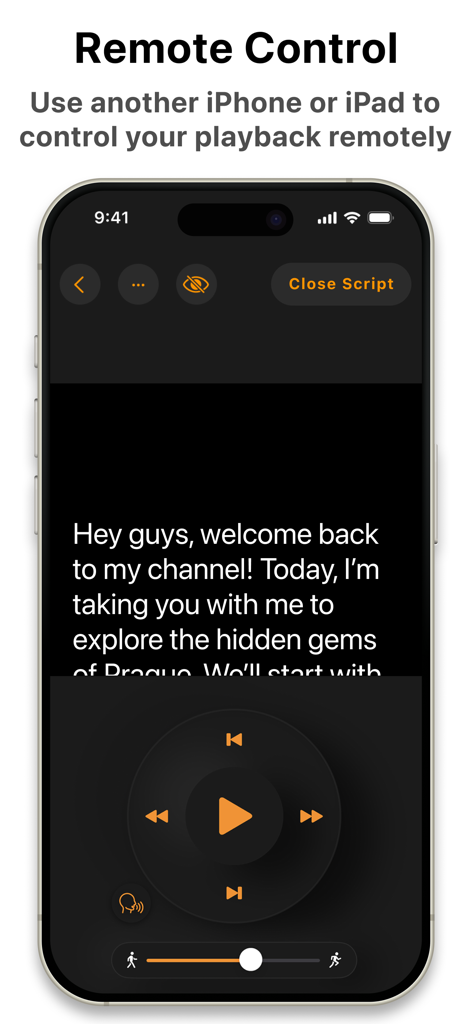
スクリプト再生ボタン付きのTeleprompterアプリのリモートコントロールインターフェースを示すスマートフォン画面

スクリプト再生ボタン付きのTeleprompterアプリのリモートコントロールインターフェースを示すスマートフォン画面

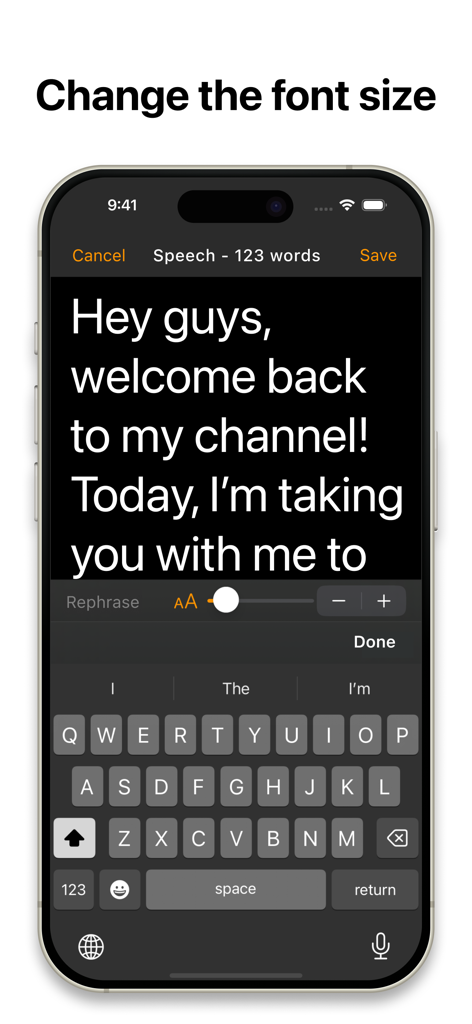
iPhone上のスクリプトエディタとフォントサイズスライダーコントロールを示すTeleprompterアプリのインターフェース

iPhone上のスクリプトエディタとフォントサイズスライダーコントロールを示すTeleprompterアプリのインターフェース

自信を持ってカメラをコマンドする

このアプリを際立たせるツール、 2M+ 人のユーザーが選択.

🎙️

AI搭載音声追従

手動のペース設定のストレスを解消しましょう。インテリジェントなスクロールはあなたの自然な話し方に追従し、ビートを逃したり、アイコンタクトを失ったりすることはありません。

マルチデバイスリモートコントロール

Apple Watch、Bluetoothリモコン、または他のデバイスからスクリプトをシームレスに管理しましょう。カメラリグに触れることなく、レンズに集中しましょう。

プロレベルのスタジオエフェクト

背景を瞬時に置き換え、音声を強化し、高解像度で録画しましょう。録画ボタンを押すたびに、ワンテイクの完璧さとプロフェッショナルなブランディングを実現しましょう。

世界中のユーザーに愛されています

Trusted by 2M+ 人がこのアプリを愛用しています.

"

"マーケティングディレクターとして、私のスケジュールは非常に忙しく、社内アップデートの録画に何時間も費やす余裕はありません。Teleprompter.comは、私のエグゼクティブプレゼンスにとって、まさにゲームチェンジャーとなりました。音声追従スクロールは純粋な魔法です。強調のために私が一時停止するのを待ち、スクリプト通りではなく完全に自然な配信に見えます。『ワンテイクの達人』となり、毎週何時間もの制作時間を節約しました。"

Sarah Jenkins, Corporate Communications Lead
"

"失読症のため、スクリプトを読むのにいつも苦労していましたが、このアプリのOpen Dyslexicフォントとカスタマイズ可能なマージンの採用がすべてを変えてくれました。レンズに目を向けながら、自分が何を言っているのか自信を持つことができます。MacとiPad間でスクリプトを同期し、Apple Watchで制御できることで、ホームオフィスにプロフェッショナルなスタジオセットアップが実現しました。"

Jordan Miller, E-Learning Content Creator

アプリについて

について知っておくべきこと Teleprompter.com.

説明

More than 5 million downloads and counting—Teleprompter.com is your go-to teleprompting app designed to make professional videos effortless for content creators, public speakers, educators, and businesses. Teleprompt Like a Pro Teleprompter.com helps you easily read and deliver scripts without missing a beat. Compatible with iPhone, iPad, and Mac, it offers smooth script scrolling, easy video recording, and flawless live streaming, all from one intuitive app. Key Features: Script Management Made Easy - Write and edit scripts directly within the app - Import TXT, Word, and PDF scripts from your favorite cloud services - Store unlimited scripts securely within the app - Automatically generate subtitles from your scripts Advanced Teleprompting Controls - Automatic scrolling that seamlessly follows your voice - Adjustable scrolling speed for manual control - Timed scrolling for precise delivery - Rephrase tricky lines instantly with AI-powered assistance - Customize fonts, including accessible fonts like Lexend and Open Dyslexic - Resize text to keep your eyes focused on the camera - Vertical and horizontal mirroring options - Countdown timer before scrolling starts - Remaining script time indicator to clearly track how much time is left - Progress bar to visually monitor script completion Record and Edit Your Videos - Record high-quality videos directly in the app - Seamlessly switch between front and rear cameras during recordings - Pause and resume recordings without hassle - Trim your footage easily - Add personalized intros and outros for professional finishing touches Boost Your Visual Appeal - Replace backgrounds with custom images or videos - Portrait mode to blur backgrounds elegantly, keeping the focus on you - Adjustable resizing options for perfect framing - Professional-grade audio quality is achievable with the clean audio feature, which eliminates background noise. Live Streaming Made Easy - Perfect for live broadcasts—stay on-point every time Remote Control - Use another device with the Teleprompter.com app to control playback and see the screen from the remote remotely - Works online and offline as well - Edit your scripts from the remote and do not touch the device in the teleprompter rig - Additional remote options: Apple Watch, Bluetooth keyboards, presentation remotes, game controllers, MIDI controllers, and foot pedals Enhanced Accessibility & Integration - Optimized support for right-to-left languages (Hebrew, Arabic, and more) - Connect to DockKit-supported gimbals for stable, professional-grade videos - External USB microphone support on compatible devices for exceptional audio quality - Customize margins to suit any teleprompter setup perfectly Easy Sign-In & Customization - Quick sign-in across devices (including Sign in with Apple and Google) - Customizable app icons and quick launch from your lock screen with iOS 18 - Enhanced macOS performance with an intuitive, user-friendly interface Stay Connected with Your Audience Consistently create engaging content like: - Short videos for social updates - Tutorials and explainer content - Testimonials and interviews - Internal company messages - Product pitches and announcements - E-learning content and coaching materials - Teasers and trailers linked to your website Teleprompter.com Pro Subscription Unlock all premium features with our monthly subscription for just $19.99/month after a 7-day free trial. Easily manage your subscription through your iTunes account. Note: Any unused portion of a free trial period will be forfeited when you purchase the subscription. Privacy Policy: https://www.teleprompter.com/privacy-policy Terms of Use: https://www.teleprompter.com/end-user-licence-agreement Got feedback? We'd love to hear from you: support@teleprompter.com Transform your video presentations effortlessly—download Teleprompter.com now and deliver every line perfectly!

最新バージョン

9.0.12

サイズ

77.9 MB

リリース日

2018年8月23日

ワンテイクの達人になる準備はできましたか?

数百万人のプロフェッショナルに加わり、数時間ではなく数分でインパクトのあるビデオを作成しましょう。今すぐTeleprompter.comをダウンロードして、7日間の無料トライアルを開始してください。

ダウンロード: App Storeダウンロード: Google Play
FAQ

よくある質問

について知っておくべきこと Teleprompter.com

Teleprompter.comアプリはどのデバイスに対応していますか?

Teleprompter.comアプリは、iPhone、iPad、Macデバイスに対応しています。これらのAppleプラットフォームでシームレスなテレプロンプター体験ができるように設計されています。

Teleprompter.com Proサブスクリプションの料金はいくらですか?

Teleprompter.com Proサブスクリプションは月額19.99ドルです。すべてのプレミアム機能をアンロックするための7日間の無料トライアルが含まれています。

Teleprompter.comアプリにスクリプトをインポートできますか?

はい、ユーザーはTXT、Word、PDFのスクリプトを、お気に入りのクラウドサービスから直接Teleprompter.comアプリにインポートして、簡単に管理できます。

Teleprompter.comはテレプロンプターリグ用の画面ミラーリングに対応していますか?

はい、Teleprompter.comは縦向きと横向きの両方のミラーリングオプションに対応しています。この機能により、ユーザーはアプリをテレプロンプターリグと統合できます。

Teleprompter.comはアプリ内で直接ビデオを録画できますか?

はい、Teleprompter.comでは、ユーザーはアプリ内で直接高品質のビデオを録画できます。また、録画中に前面カメラと背面カメラを切り替えることもサポートしています。

Teleprompter.comアプリのリモートコントロールはどのように機能しますか?

ユーザーは、アプリを搭載した別のデバイス、Apple Watch、Bluetoothキーボード、プレゼンテーションリモコン、ゲームコントローラー、またはフットペダルを使用して、Teleprompter.comの再生をリモートで制御できます。

Teleprompter.comは音声操作によるスクロール機能を提供していますか?

はい、Teleprompter.comは、ユーザーの声に合わせてシームレスに自動スクロールする機能を備えています。これにより、手動での調整なしに自然なデリバリーが可能です。

Teleprompter.comはビデオの背景を変更したり、ぼかしたりできますか?

はい、Teleprompter.comは、カスタム画像やビデオで背景を置き換えることができます。また、ポートレートモードで背景をぼかし、プレゼンターに焦点を当てることも可能です。

Teleprompter.comはスクリプトにAIアシスタントを提供していますか?

はい、Teleprompter.comは、スクリプト内の難しいセリフを瞬時に言い換えるためのAI搭載アシスタントを提供しています。これにより、ユーザーはコンテンツをスムーズにデリバリーできます。

Teleprompter.comはPro機能の無料トライアルを提供していますか?

はい、Teleprompter.comはProサブスクリプションの7日間の無料トライアルを提供しています。これにより、ユーザーは契約前にすべてのプレミアム機能をアンロックして体験できます。