ZHouse

ZHouse

ダウンロード: App Store
Spark by MWM logo
ロゴ: ZHouse

ZHouse: 数分でプロのインテリアデザインと3Dマッピングを

間取り図を素晴らしいHDレンダリングに変換し、外出先で完全なCADセットをエクスポート。デザイナー、不動産業者、住宅リノベーション業者向けの究極のモバイルツールキットで、視覚化と契約締結を迅速化します。

開発元

Xiamen Zhibenjia Technology Co.,LTD.

カテゴリ

Productivity

ダウンロード

3M+

ユーザー評価

4.2/5

評価数

6K+

対応言語

5

デザインをアクションで

このインターフェースを利用する 3M+ 人のユーザー.

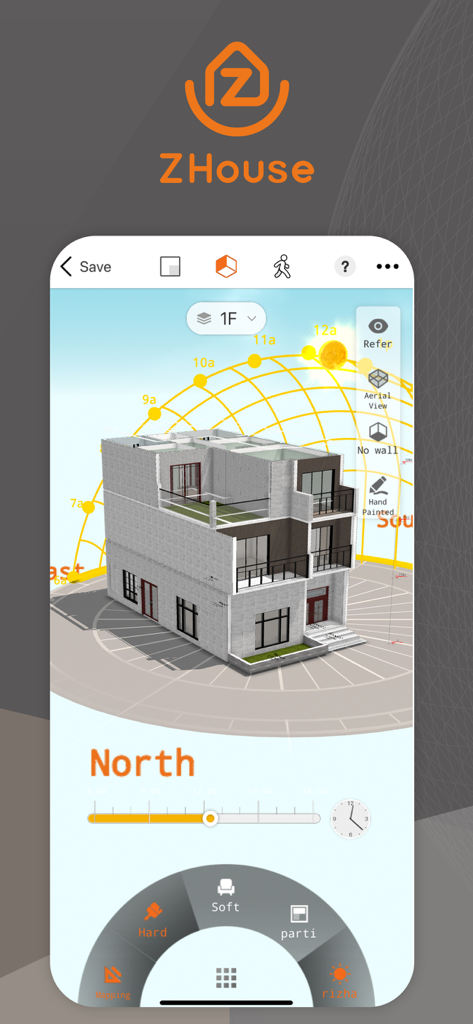
太陽光解析のための日照経路可視化機能を備えた3D建築モデルを表示するZHouseアプリのインターフェース

太陽光解析のための日照経路可視化機能を備えた3D建築モデルを表示するZHouseアプリのインターフェース

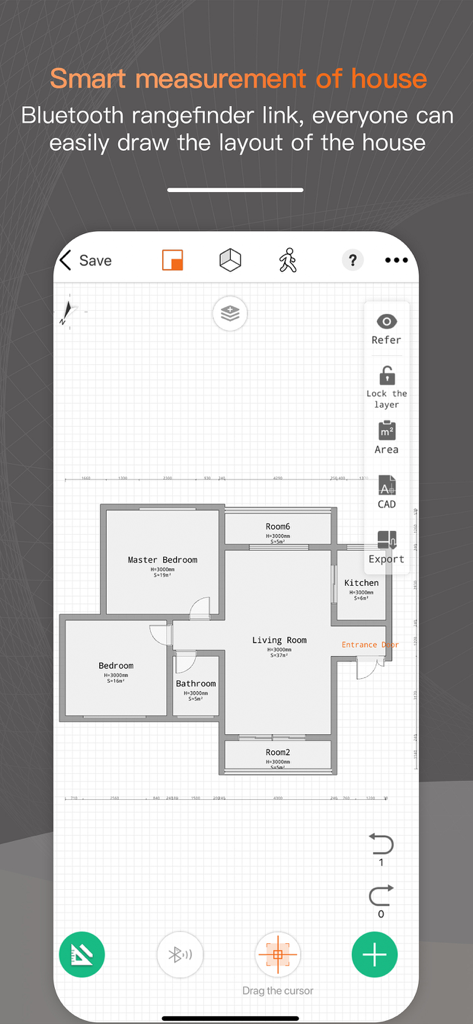
部屋のラベルとデザインツールを備えた2D住宅間取り図レイアウトを表示するZHouseモバイルアプリのインターフェース

部屋のラベルとデザインツールを備えた2D住宅間取り図レイアウトを表示するZHouseモバイルアプリのインターフェース

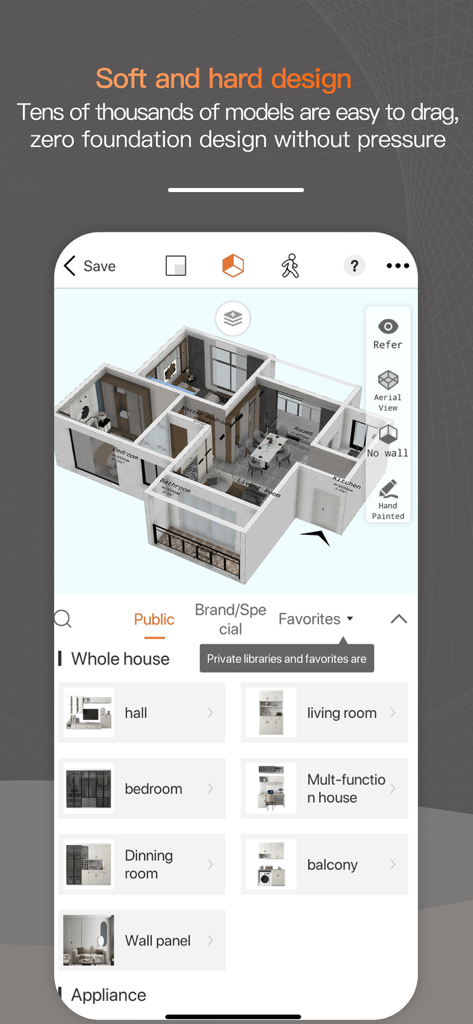
ZHouseアプリのインターフェース。インテリアデザイン用の様々な部屋の家具カテゴリを持つ3D間取り図を表示しています。

ZHouseアプリのインターフェース。インテリアデザイン用の様々な部屋の家具カテゴリを持つ3D間取り図を表示しています。

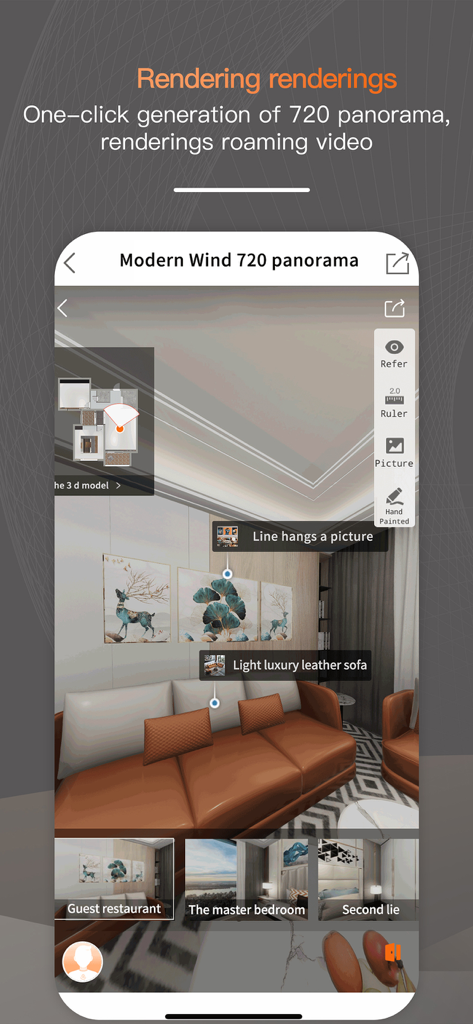
リビングルームの720度パノラマ3Dインテリアデザインレンダリングを表示するZHouseモバイルアプリのインターフェース

リビングルームの720度パノラマ3Dインテリアデザインレンダリングを表示するZHouseモバイルアプリのインターフェース

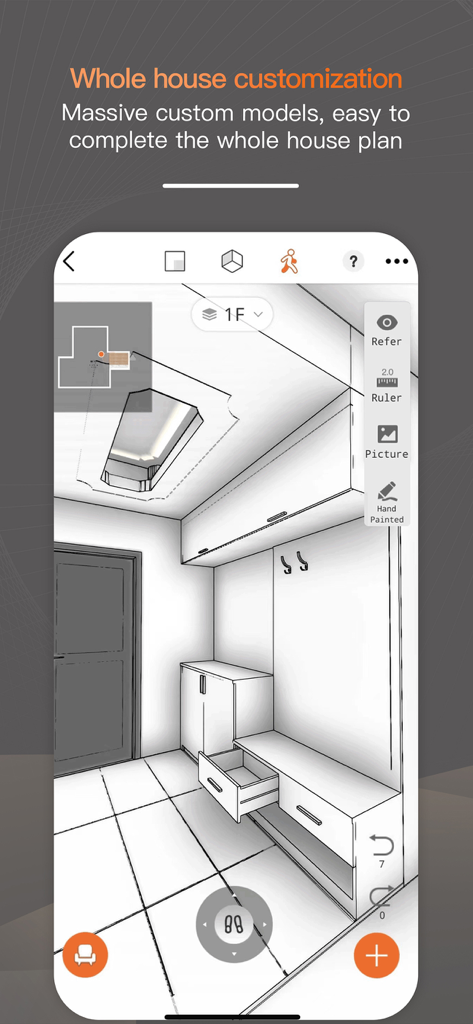
ZHouseインテリアデザインアプリにおけるカスタム家具を備えたエントランスホールの3D建築スケッチ

ZHouseインテリアデザインアプリにおけるカスタム家具を備えたエントランスホールの3D建築スケッチ

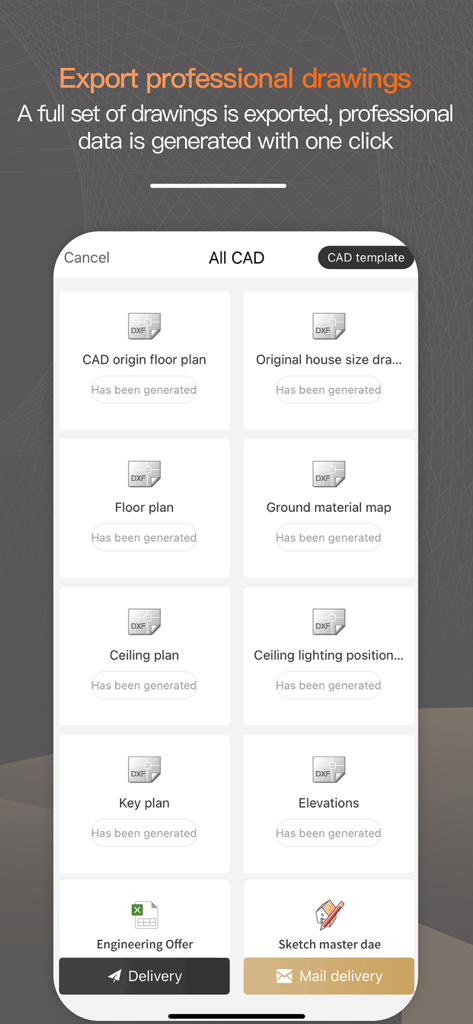
ZHouseアプリのインターフェース。間取り図や立面図を含むプロフェッショナルなCAD図面をエクスポートするオプションが表示されています。

ZHouseアプリのインターフェース。間取り図や立面図を含むプロフェッショナルなCAD図面をエクスポートするオプションが表示されています。

スマホからプロのようにデザイン

このアプリを際立たせるツール、 3M+ 人のユーザーが選択.

瞬時に3D間取り図を作成

手作業の測定から10分以内に完全な3Dレイアウトへ。ゲームをプレイするのと同じくらい簡単でありながら、プロレベルの精度を実現します。

📸

720°のフォトリアルなビュー

リノベーションが始まる前にデザインをウォークスルーできる没入型HDパノラマで、より多くの契約を締結したり、住宅のレイアウトを最終決定したりできます。

📐

ワンクリックCADエクスポート

モバイルコンセプトから建設へのシームレスな移行。請負業者、建築家、家具サプライヤーと共有するために、完全なCADセットを瞬時にエクスポートします。

世界中のユーザーに愛されています

Trusted by 3M+ 人がこのアプリを愛用しています.

"

"ZHouseは私のワークフローを完全に変えました。クライアントの家を訪問し、初回コンサルティングが終わる前に完全な3D間取り図を用意できます。iPadから直接プロのCADファイルをエクスポートできる機能は、私のデザイン事務所にとってまさに画期的なことです。"

サラ・ジェンキンス、フリーランスインテリアデザイナー
"

"空き家の販売は以前は困難でしたが、ZHouseを使えばバーチャルステージングが信じられないほど簡単になります。720°パノラマ機能を使って、購入者がスマホで空間の可能性を視覚化できるようにしています。ゲームをプレイするのと同じくらい直感的ですが、実際に契約を結ぶハイエンドな結果をもたらします。"

マイケル・リベラ、不動産スペシャリスト

レビュー分析

ユーザーレビューの分析.

感情スコア

15%
ネガティブ

概要

This app receives overwhelmingly negative feedback, primarily due to severe concerns about user privacy and aggressive monetization. Numerous users report receiving an influx of spam calls from renovation companies shortly after registering, indicating personal data leakage. Many also express frustration with the app's pricing model, which charges for basic features, hides functionalities behind paywalls, and even applies fees to previously free content. While some users praise the app for its easy learning curve and detailed 2D/3D drawing capabilities, these positive aspects are overshadowed by widespread complaints about technical issues like crashes, bugs, and inaccurate AI recognition, alongside difficulties with registration and account deletion.

主なテーマ

Privacy / Data Leakage(27)
Pricing / Hidden Fees(11)
Technical Stability / Bugs(8)
Account Management(5)
Drawing Accuracy / Features(4)
Usability Issues(3)
Learning Curve(2)
AI Recognition Accuracy(1)

アプリについて

について知っておくべきこと ZHouse.

説明

ZHouse App makes interior design interesting, fast and easy - 1 minute mapping and 10 minutes effect pictures onsite; make floor plans in 2D, 3D and Roaming plans; one-click to export full set CAD; rendering directly via mobile phone; whole house furniture customization etc. Design your sweet home. Whether you are interior designer, or you are a real estate company, or you are doing whole house customized business, or you are house decoration material supplier, or even you are house owner to renovating your sweet home, Joyplay has all you want. 7 years development in China, with over 1 billion downloads and more than 2 million professional users in China, Joyplay makes interior design easier and faster, make your own house design while playing an interesting game! Features: 1. 10 Minutes finish house measuring and sketchup design, plain design transfer to 3D design one second. 2. Interior design easily via mobile phone. Hardware and software design with massive models. 3. Whole house furniture customization, massive models can be selected; material, color and models can be changed easily. 4. Support multi storey villa residence design easily. 5. Special-shaped scheme arbitrarily; Floor, double hollow, ceiling, all in one net. 6. HD real-time rendering 720 panorama, the real effect helps you better show the scheme. Promote rapid transaction of users. 7. One click to export full set CAD plans. 8. Make designs in 2D, 3D and Roaming modes. 9. Easy operation just like playing a game. 【Explanation of automatic renewal】 Benefits: full set of functions (export CAD, fast calculation, rendering of renderings, 720 panorama, roaming video...) 1. Subscription service: Know the commercial version of the apartment type (continuous) (1 month). 2. Subscription price: subject to IAP application information, for example, continuous monthly subscription is 168 yuan per month. 3. Payment: The subscription can be managed by the user, and the user confirms the purchase and pays for it and is credited to the iTunes account. 4. Renewal: Apple iTunes account will be deducted within 24 hours before expiration, and the subscription cycle will be extended by one subscription cycle after the deduction is successful. 5. Cancellation of renewal: To cancel the subscription, please open the iPhone "Settings" --> enter "iTunes Store and App Store" --> click "Apple ID", select "View Apple ID", and enter "Account Settings" page, click "Subscribe", and select "Bunko University Student Edition" to cancel the subscription. This subscription will automatically renew if the subscription is not closed at least 24 hours before the end of the subscription period. 6. Automatic renewal service rules: https://zhx.zbjsaas.com/userProtocol/userAutoRenewRule 7. Privacy Agreement: https://zhx.zbjsaas.com/userProtocol/concealProtocol 8. Member Service Association: https://zhx.zbjsaas.com/userProtocol/memberServiceProtocol If you have any questions, feel free to contact us at: service@joyplanchina.com Mobile phone: + 86 18150100690 Follow us! Youtube:https://www.youtube.com/channel/UCKCCbZqXuGiQzv8-npFT4pQ Facebook: https://www.facebook.com/joyplanheadquarterchina Instgram: https://www.instagram.com/joyplanofficial/

最新バージョン

25.12.17

サイズ

693.9 MB

リリース日

2017年12月5日

外出先でプロのようにデザインを始めましょう

間取り図を10分以内にHDレンダリングに変換。今すぐZHouseをダウンロードして、どこからでもインテリアデザインプロジェクトを実現しましょう。

ダウンロード: App Store
FAQ

よくある質問

について知っておくべきこと ZHouse

ZHouseアプリは間取り図の2Dおよび3Dデザインに対応していますか?

はい、ZHouseアプリは2D、3D、およびローミングモードで間取り図を作成できます。プレーンなデザインを瞬時に3Dデザインに変換します。

ZHouseアプリからCADプランをエクスポートできますか?

はい、ZHouseアプリは、プロフェッショナルなCADプラン一式をワンクリックでエクスポートできます。これには、CAD元間取り図、間取り図、天井伏図が含まれます。

ZHouseアプリはどのようなユーザーを対象としていますか?

ZHouseアプリは、インテリアデザイナー、不動産会社、住宅カスタマイズビジネス、建材サプライヤー、そして自宅のリフォームを検討している住宅所有者を対象としています。

ZHouseアプリには、家全体の家具カスタマイズ機能が含まれていますか?

はい、ZHouseは包括的な家全体の家具カスタマイズを提供しています。ユーザーは、アプリ内の膨大なオプションから素材、色、モデルを簡単に変更できます。

ZHouseアプリでデザインをHDでレンダリングできますか?

はい、ZHouseアプリはHDリアルタイムレンダリングをサポートしており、720パノラマやローミングビデオも含まれます。ユーザーは携帯電話から直接レンダリングして、リアルな効果を得ることができます。

ZHouseアプリのサブスクリプションをキャンセルするにはどうすればよいですか?

ZHouseのサブスクリプションをキャンセルするには、iPhoneの「設定」>「iTunes StoreとApp Store」>「Apple ID」>「アカウント設定」>「登録」に移動し、更新の少なくとも24時間前にキャンセルしたい該当のサブスクリプションを選択してください。

ZHouseアプリのサブスクリプションにはどのような機能が含まれていますか?

ZHouseの商用版サブスクリプションでは、全機能にアクセスできます。これには、CADエクスポート、高速計算、レンダリング、720パノラマ、ローミングビデオ機能が含まれます。

ZHouseアプリで複数階建ての住宅デザインは可能ですか?

はい、ZHouseアプリは複数階建てのヴィラ住宅のデザインを容易にサポートします。また、任意の特殊形状のフロア、二重吹き抜け、天井にも対応しています。

ZHouseアプリを使用して、どのくらいの速さで住宅プランの測定とデザインができますか?

ZHouseアプリを使用すると、ユーザーは10分で住宅の測定とSketchUpデザインを完了できます。また、同じ時間枠内で現場で効果図を生成します。